phone JEEP GRAND CHEROKEE 2014 WK2 / 4.G Owner's Manual
[x] Cancel search | Manufacturer: JEEP, Model Year: 2014, Model line: GRAND CHEROKEE, Model: JEEP GRAND CHEROKEE 2014 WK2 / 4.GPages: 220, PDF Size: 6.12 MB
Page 62 of 220
Remote Horn And Lights— It’s easy to locate a vehicle in a dark, crowded or noisy
parking area by activating the horn and lights. It may also help if you need to draw
attention to your vehicle for any reason. You can send a request to your vehicle in one
of three ways:
1. Using the Uconnect
®Access App from a compatible smartphone.
2. From the Mopar Owner Connect website.
3. By contacting the Uconnect
®Care on the phone.
To use this feature after the Uconnect
®Access App is downloaded, login using your
user name and Uconnect®Security PIN. You can set-up notifications for your
account to receive an email or text (SMS) message every time a command is sent.
Login to Mopar Owner Connect (moparownerconnect.com) and click on Edit Profile
to manage Uconnect
®Notifications.
Voice Texting (U.S. Residents Only)— Want to dictate a personal message? Register
with Uconnect
®Access to take advantage of a new, cloudbased Voice Texting service,
an enhancement to Voice Text Reply.
Voice Texting allows you to compose a new text or reply to an incoming text message.
Before you attempt to use the Voice Texting feature, check to ensure you have the
following:
1. A paired, Bluetooth
®enabled phone with the Message Access Profile (MAP). Not
all Bluetooth®enabled phones support MAP, including all iPhones®(Apple iOS).
Visit UconnectPhone.com for system and device compatibility information.
2. An active Uconnect
®Access trial or paid subscription. Press the “U” button on
the lower right hand corner of the touchscreen to begin the registration process.
3. Accept the Allow MAP profile request on your smart phone. (Please refer to device
manufacturer instructions for details).
To Send A Text Message:
1. Press the “Uconnect
®Phone” button.
2. Wait for the beep.
3. Say “Text.”
4. Uconnect
®will prompt you “Say the phone number, or full name and phone type
of the contact you want to send a message to.”
5. Wait for the beep and say a contact that is in your phonebook, or a mobile phone
number that you would like to send the message to.
6. Uconnect
®will prompt you “Please say the message that you would like to send.”
(If you do not hear this prompt, you may not have an active subscription with
Uconnect
®Access).
ELECTRONICS
60
Page 63 of 220
7. Wait for the beep, and then dictate any message up to 140 characters. If you
exceed 140 characters, you will hear the following prompt: “Message was too
long; your message will be truncated.”
8. Uconnect
®will then repeat the message back to you.
9. Uconnect
®will prompt you: “To add to your message, say “Continue”; To delete
the current message and start over, say “Start Over”; to send the current message,
say “Send”; to hear the message again, say “Repeat”.
10. If you are happy with your message and would like to send it, wait for the beep
and say “Send”.
11. Uconnect
®will then say “Sending your message.”
Sample Commands For Voice Text Reply And Voice Texting
Example Command Action
“Text John Smith”Send a message to specific contact in
address book
“Text 123 - 456 - 7890”Send 123 - 456 - 7890 a message
from your phonebook
“Show messages”See recent text messages listed by
number on Uconnect
®screen
“Listen to/view (message number four,
for example)”Hear messages or read it on
Uconnect
®screen
“Reply”Send a voice text reply to a
current message
“Forward text/message to “John Smith”Forward current text to specific
contact in address book
“Forward text/message to
“123 - 456 - 7890”Forward current text to specific
phone number
Uconnect® Access Via Mobile (If Equipped — Available On Uconnect® 8.4A And
Uconnect® 8.4AN)
Uconnect®Access via Mobile offers additional apps such as Aha™, iHeartRadio,
Pandora®and Slacker Radio. It uses your smartphone’s existing data plan to access
Uconnect®System-enabled apps, which you can control using both your touchscreen
and steering wheel controls. Customer’s data plan charges will apply.
To get started using Via Mobile apps, first register your Uconnect
®Access system
where you'll be guided through the setup of your Via Mobile (requires a compatible
Android or iPhone
®smartphone). Please refer to “Uconnect®Access Registration”
for more information.
ELECTRONICS
61
Page 64 of 220
The Uconnect®Access app is compatible with select iPhone®and Android smart-
phones. Visit UconnectPhone.com to confirm that your smartphone is compatible
with Uconnect
®. Once you’ve confirmed your smartphone is compatible, pair it to the
vehicle touchscreen via Bluetooth®to use Via Mobile apps. If using an iPhone®,a
USB cable may also be supported for the data connection.
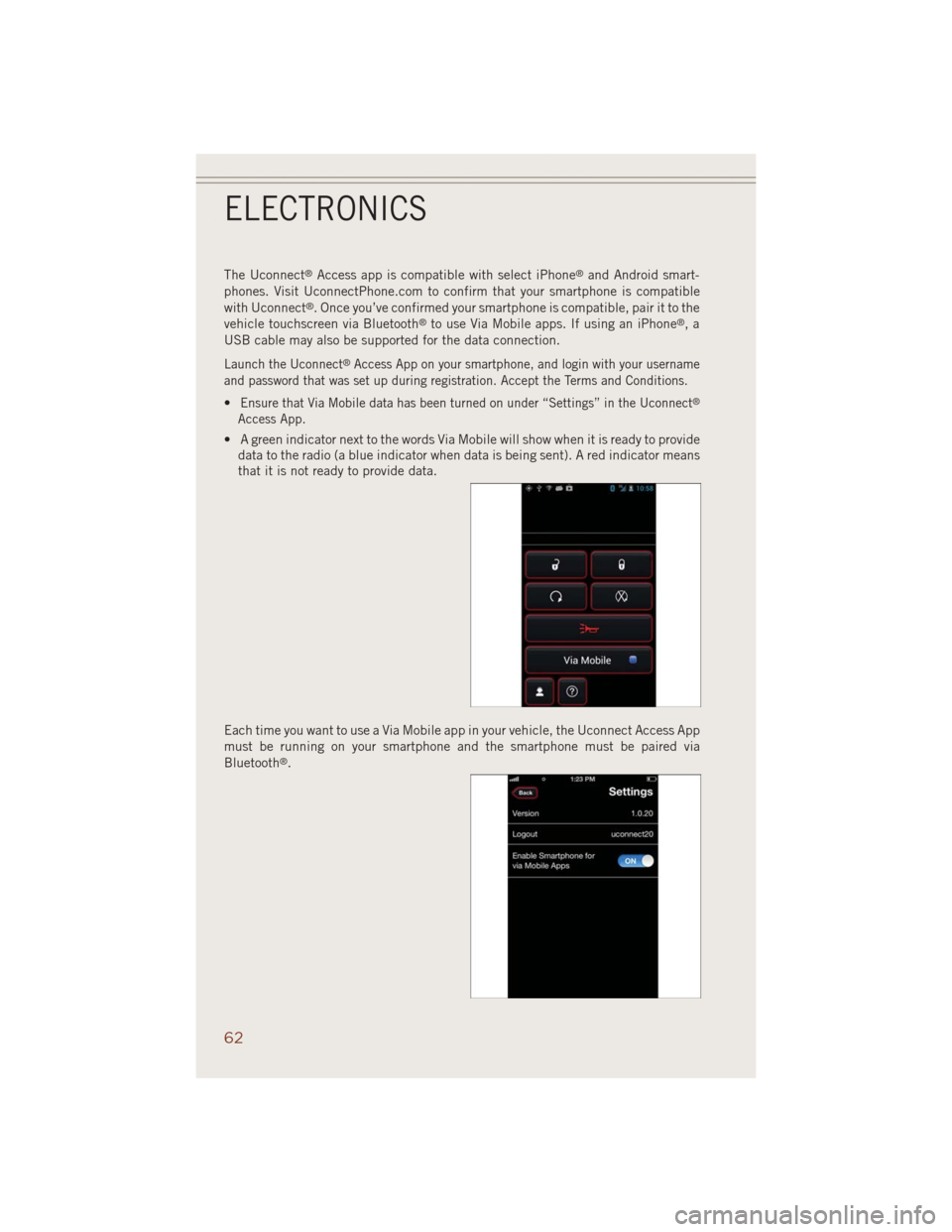
Launch the Uconnect®Access App on your smartphone, and login with your username
and password that was set up during registration. Accept the Terms and Conditions.
•Ensure that Via Mobile data has been turned on under “Settings” in the Uconnect®
Access App.
• A green indicator next to the words Via Mobile will show when it is ready to provide
data to the radio (a blue indicator when data is being sent). A red indicator means
that it is not ready to provide data.
Each time you want to use a Via Mobile app in your vehicle, the Uconnect Access App
must be running on your smartphone and the smartphone must be paired via
Bluetooth
®.
ELECTRONICS
62
Page 65 of 220
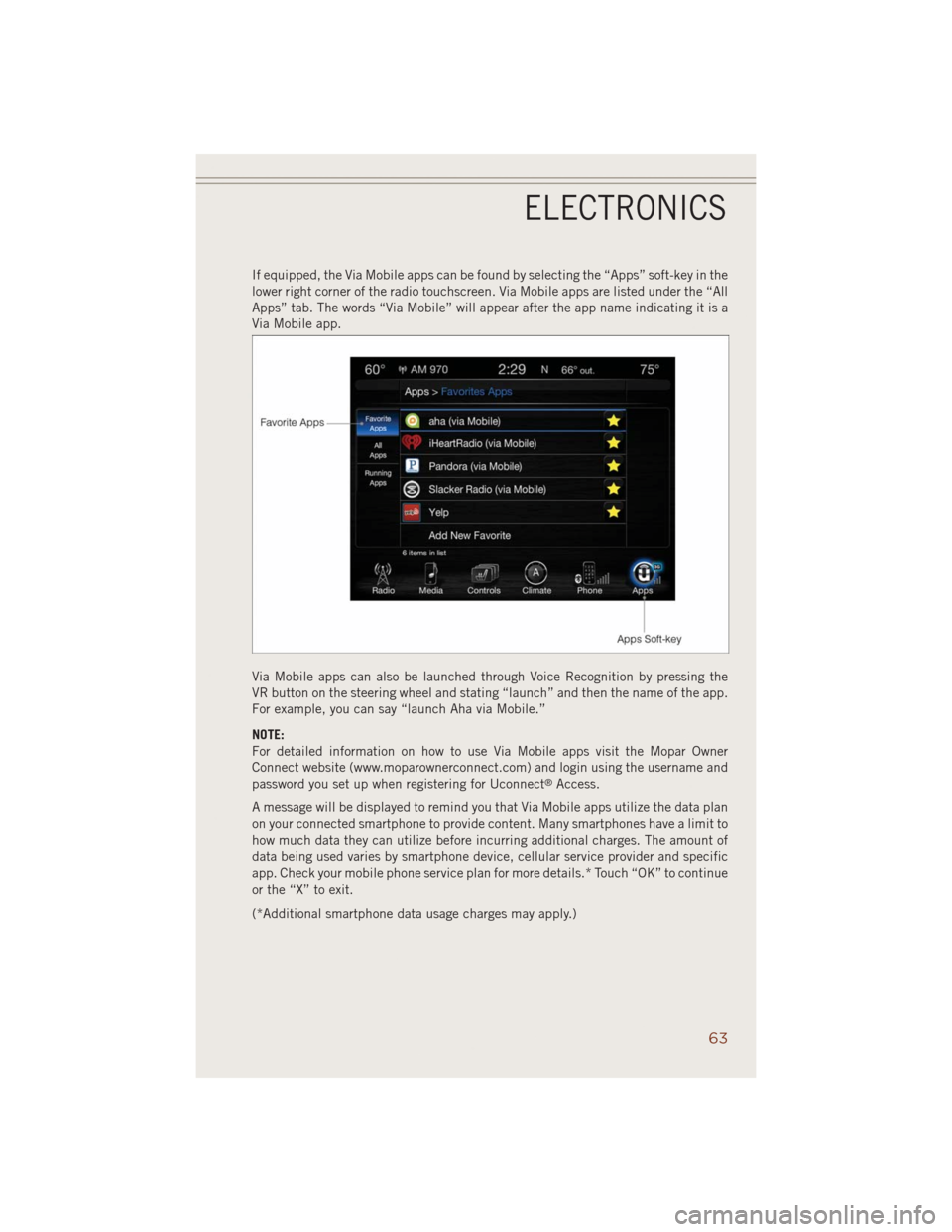
If equipped, the Via Mobile apps can be found by selecting the “Apps” soft-key in the
lower right corner of the radio touchscreen. Via Mobile apps are listed under the “All
Apps” tab. The words “Via Mobile” will appear after the app name indicating it is a
Via Mobile app.
Via Mobile apps can also be launched through Voice Recognition by pressing the
VR button on the steering wheel and stating “launch” and then the name of the app.
For example, you can say “launch Aha via Mobile.”
NOTE:
For detailed information on how to use Via Mobile apps visit the Mopar Owner
Connect website (www.moparownerconnect.com) and login using the username and
password you set up when registering for Uconnect
®Access.
A message will be displayed to remind you that Via Mobile apps utilize the data plan
on your connected smartphone to provide content. Many smartphones have a limit to
how much data they can utilize before incurring additional charges. The amount of
data being used varies by smartphone device, cellular service provider and specific
app. Check your mobile phone service plan for more details.* Touch “OK” to continue
or the “X” to exit.
(*Additional smartphone data usage charges may apply.)
ELECTRONICS
63
Page 70 of 220
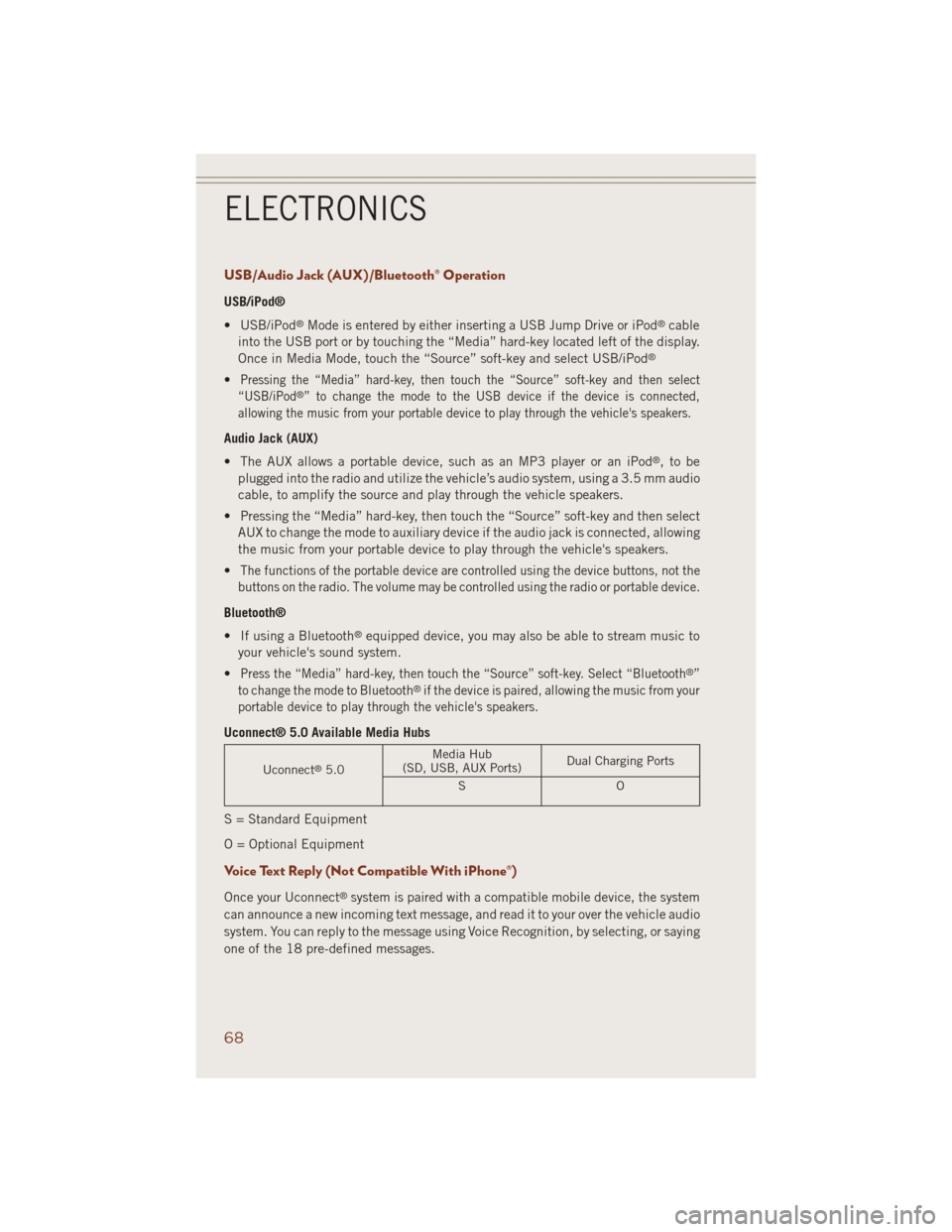
USB/Audio Jack (AUX)/Bluetooth® Operation
USB/iPod®
• USB/iPod
®Mode is entered by either inserting a USB Jump Drive or iPod®cable
into the USB port or by touching the “Media” hard-key located left of the display.
Once in Media Mode, touch the “Source” soft-key and select USB/iPod
®
•Pressing the “Media” hard-key, then touch the “Source” soft-key and then select
“USB/iPod®” to change the mode to the USB device if the device is connected,
allowing the music from your portable device to play through the vehicle's speakers.
Audio Jack (AUX)
• The AUX allows a portable device, such as an MP3 player or an iPod
®,tobe
plugged into the radio and utilize the vehicle’s audio system, using a 3.5 mm audio
cable, to amplify the source and play through the vehicle speakers.
• Pressing the “Media” hard-key, then touch the “Source” soft-key and then select
AUX to change the mode to auxiliary device if the audio jack is connected, allowing
the music from your portable device to play through the vehicle's speakers.
•
The functions of the portable device are controlled using the device buttons, not the
buttons on the radio. The volume may be controlled using the radio or portable device.
Bluetooth®
• If using a Bluetooth
®equipped device, you may also be able to stream music to
your vehicle's sound system.
•
Press the “Media” hard-key, then touch the “Source” soft-key. Select “Bluetooth®”
to change the mode to Bluetooth®if the device is paired, allowing the music from your
portable device to play through the vehicle's speakers.
Uconnect® 5.0 Available Media Hubs
Uconnect®5.0Media Hub
(SD, USB, AUX Ports)Dual Charging Ports
SO
S = Standard Equipment
O = Optional Equipment
Voice Text Reply (Not Compatible With iPhone®)
Once your Uconnect®system is paired with a compatible mobile device, the system
can announce a new incoming text message, and read it to your over the vehicle audio
system. You can reply to the message using Voice Recognition, by selecting, or saying
one of the 18 pre-defined messages.
ELECTRONICS
68
Page 71 of 220
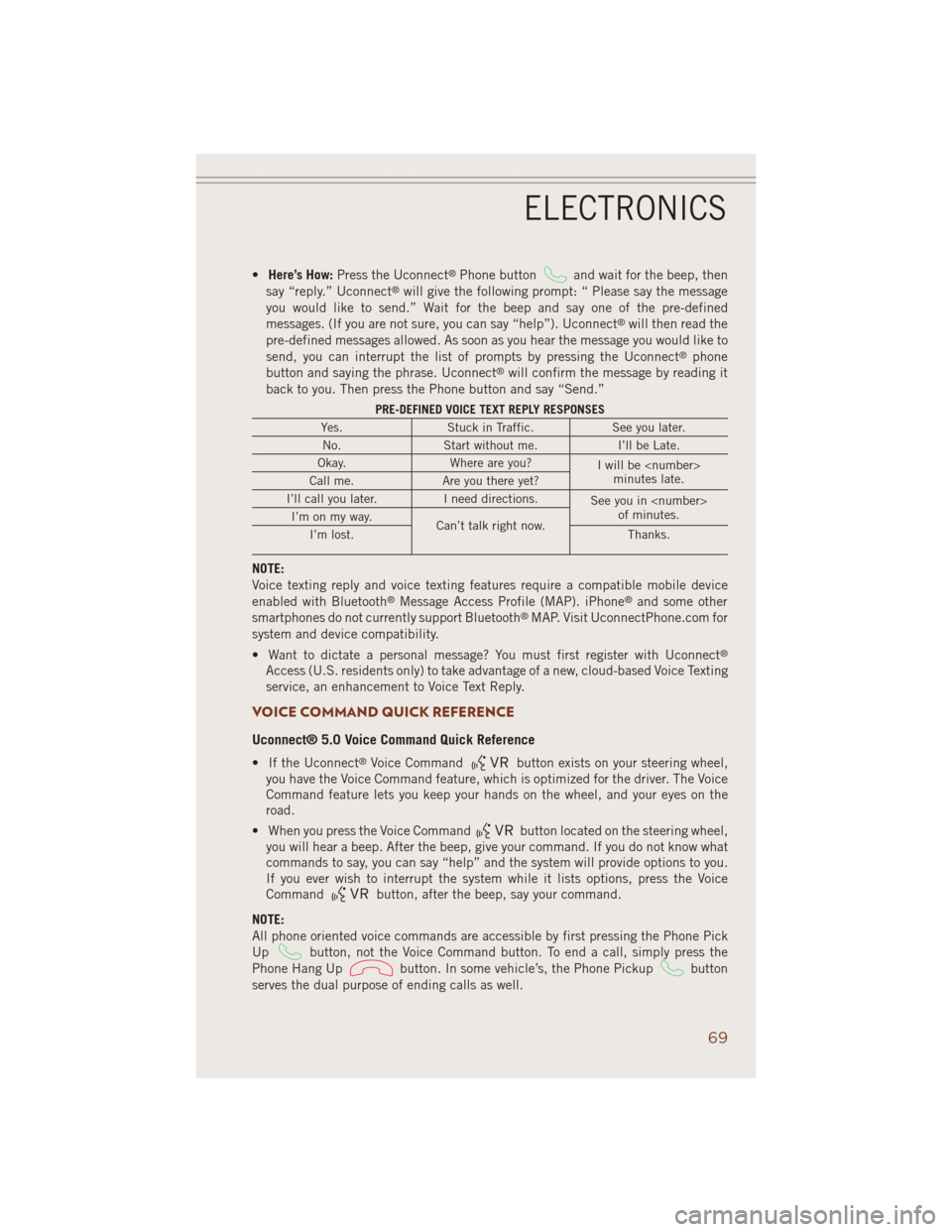
•Here’s How:Press the Uconnect®Phone buttonand wait for the beep, then
say “reply.” Uconnect®will give the following prompt: “ Please say the message
you would like to send.” Wait for the beep and say one of the pre-defined
messages. (If you are not sure, you can say “help”). Uconnect
®will then read the
pre-defined messages allowed. As soon as you hear the message you would like to
send, you can interrupt the list of prompts by pressing the Uconnect
®phone
button and saying the phrase. Uconnect®will confirm the message by reading it
back to you. Then press the Phone button and say “Send.”
PRE-DEFINED VOICE TEXT REPLY RESPONSES
Yes. Stuck in Traffic. See you later.
No. Start without me. I’ll be Late.
Okay. Where are you?
I will be
minutes late.
Call me. Are you there yet?
I’ll call you later. I need directions.
See you in
of minutes.
I’m on my way.
Can’t talk right now.
I’m lost. Thanks.
NOTE:
Voice texting reply and voice texting features require a compatible mobile device
enabled with Bluetooth
®Message Access Profile (MAP). iPhone®and some other
smartphones do not currently support Bluetooth®MAP. Visit UconnectPhone.com for
system and device compatibility.
• Want to dictate a personal message? You must first register with Uconnect
®
Access (U.S. residents only) to take advantage of a new, cloud-based Voice Texting
service, an enhancement to Voice Text Reply.
VOICE COMMAND QUICK REFERENCE
Uconnect® 5.0 Voice Command Quick Reference
• If the Uconnect®Voice Commandbutton exists on your steering wheel,
you have the Voice Command feature, which is optimized for the driver. The Voice
Command feature lets you keep your hands on the wheel, and your eyes on the
road.
• When you press the Voice Command
button located on the steering wheel,
you will hear a beep. After the beep, give your command. If you do not know what
commands to say, you can say “help” and the system will provide options to you.
If you ever wish to interrupt the system while it lists options, press the Voice
Command
button, after the beep, say your command.
NOTE:
All phone oriented voice commands are accessible by first pressing the Phone Pick
Up
button, not the Voice Command button. To end a call, simply press the
Phone Hang Up
button. In some vehicle’s, the Phone Pickupbutton
serves the dual purpose of ending calls as well.
ELECTRONICS
69
Page 72 of 220
Voice Command (VR) User TIPs
• To hear available commands, press the Uconnect
®Voice Command button and
say “Help.” You will hear available commands for the menu displayed.
• At any time, you can say the words “Cancel” or “Help.” These commands are
universal and can be used from virtually any menu. All other specific commands
can be used depending upon the active application.
• You can interrupt the system prompts at any time by pressing the Uconnect
®Voice
Command button while the system is speaking. After the beep, you can say a
command.
• You can chain commands together for faster results. Say “Call Joe Doe mobile”,
for example.
• For best performance, adjust the rearview mirror to provide at least ½ in (1 cm)
gap between the overhead console (if equipped) and the mirror.
• Always wait for the beep before speaking.
• Speak normally, without pausing, just as you would speak to a person sitting a few
feet/meters away from you.
• Make sure that no one other than you is speaking during a Voice Command period.
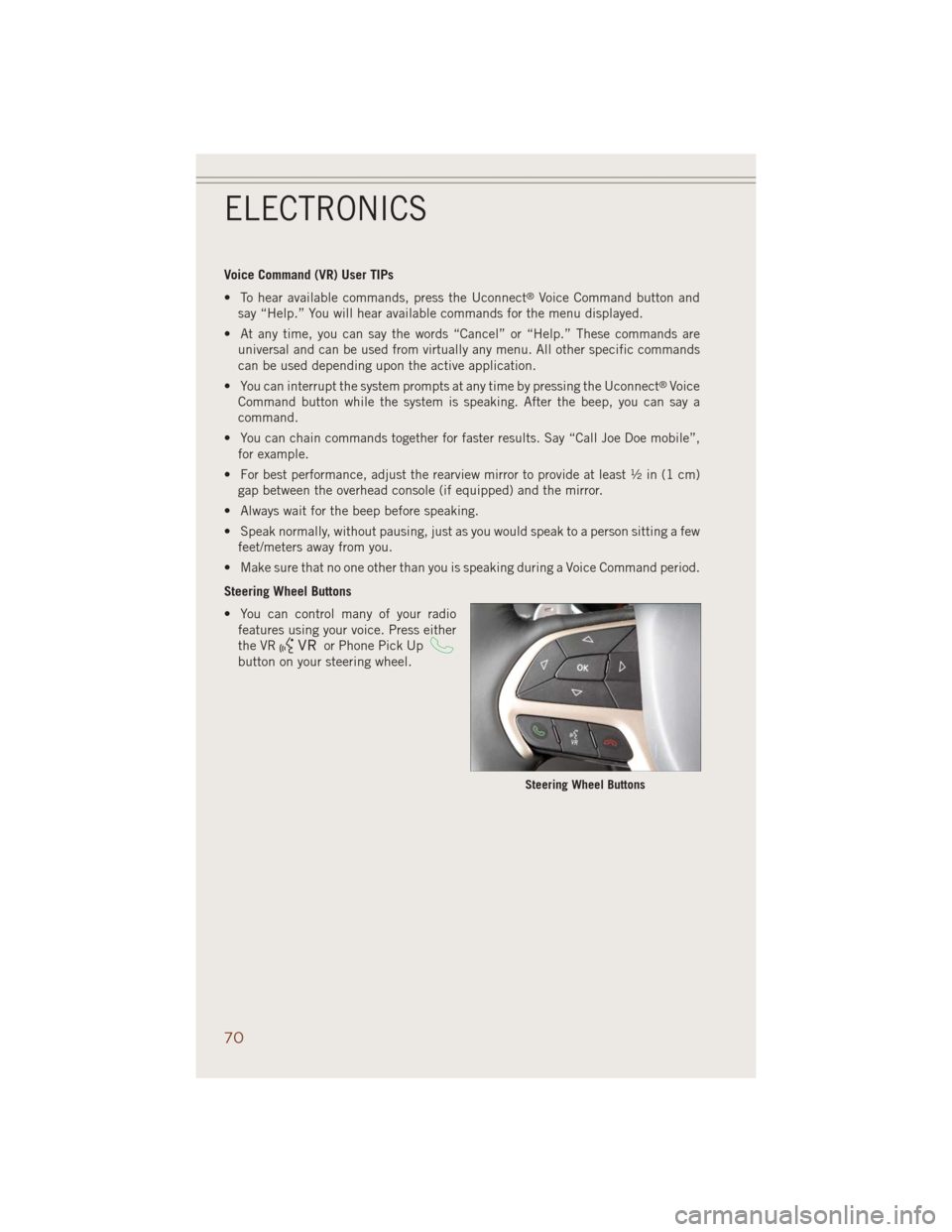
Steering Wheel Buttons
• You can control many of your radio
features using your voice. Press either
the VR
or Phone Pick Up
button on your steering wheel.
Steering Wheel Buttons
ELECTRONICS
70
Page 73 of 220
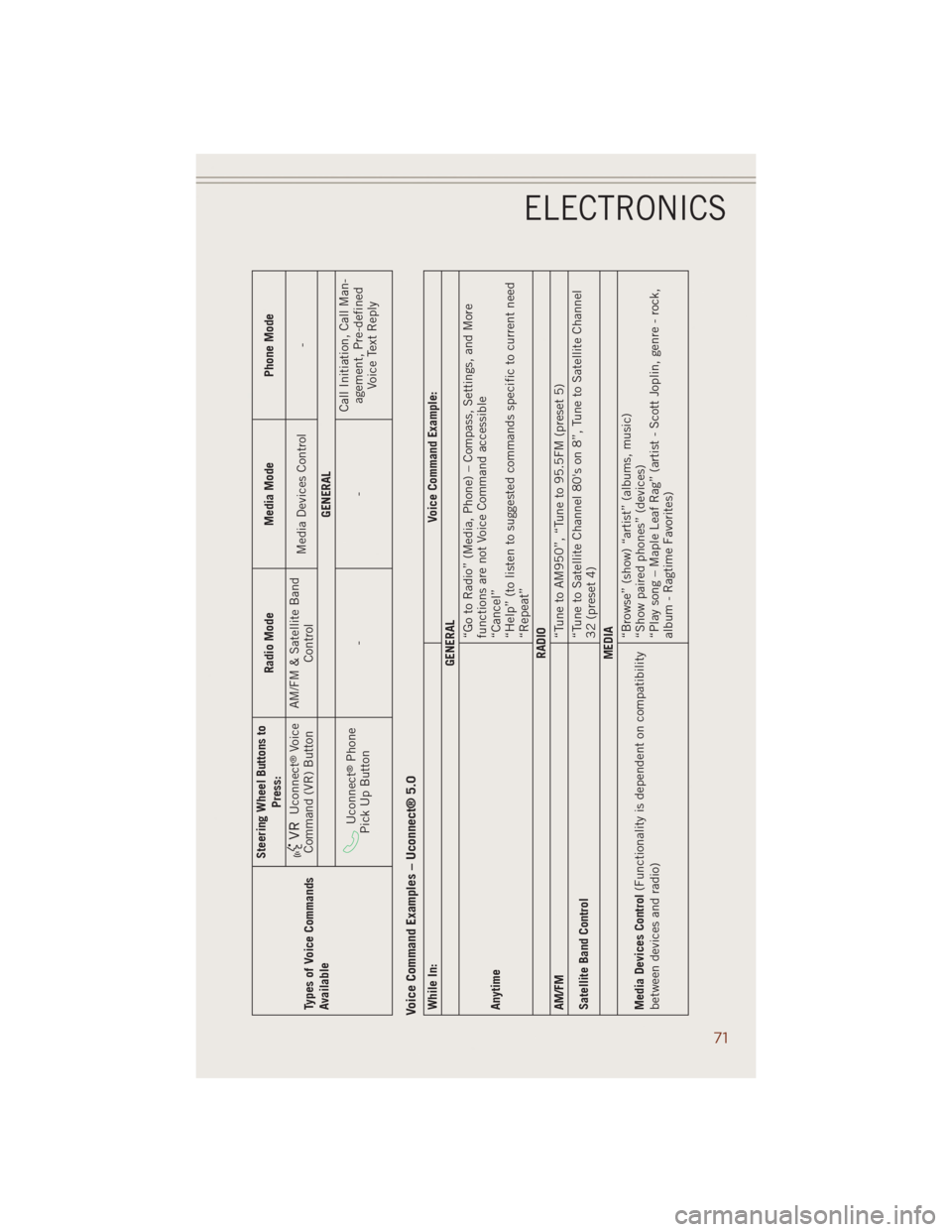
Types of Voice Commands
AvailableSteering Wheel Buttons to
Press:Radio Mode Media Mode Phone Mode
Uconnect
®Voice
Command (VR) ButtonAM/FM & Satellite Band
ControlMedia Devices Control -
GENERAL
Uconnect
®Phone
Pick Up Button--Call Initiation, Call Man-
agement, Pre-defined
Voice Text Reply
Voice Command Examples – Uconnect® 5.0While In:Voice Command Example:
GENERAL
Anytime“Go to Radio” (Media, Phone) – Compass, Settings, and More
functions are not Voice Command accessible
“Cancel”
“Help” (to listen to suggested commands specific to current need
“Repeat”
RADIO
AM/FM
“Tune to AM950”, “Tune to 95.5FM (preset 5)
Satellite Band Control“Tune to Satellite Channel 80's on 8”, Tune to Satellite Channel
32 (preset 4)
MEDIA
Media Devices Control(Functionality is dependent on compatibility
between devices and radio)“Browse” (show) “artist” (albums, music)
“Show paired phones” (devices)
“Play song – Maple Leaf Rag” (artist - Scott Joplin, genre - rock,
album - Ragtime Favorites)
ELECTRONICS
71
Page 74 of 220
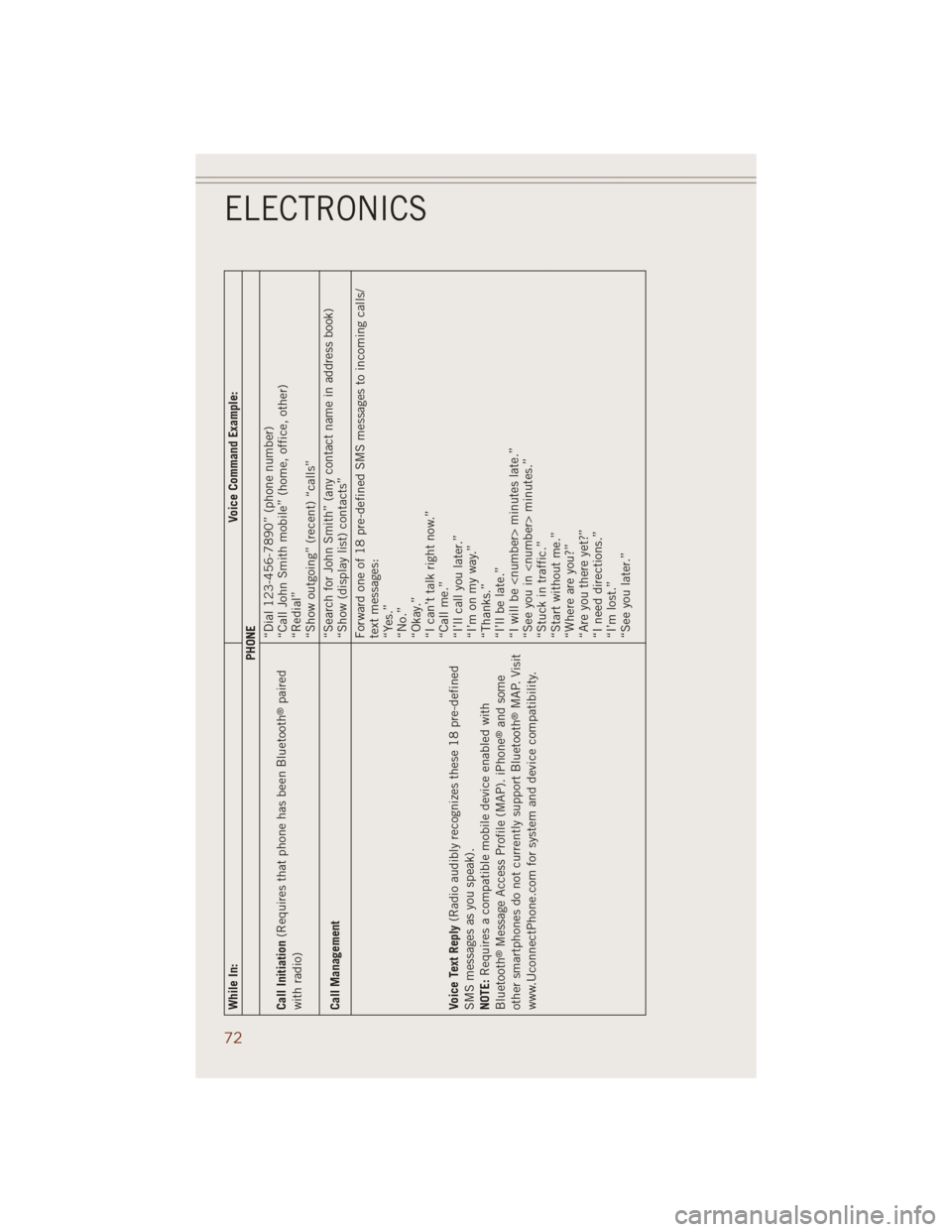
While In:Voice Command Example:
PHONE
Call Initiation(Requires that phone has been Bluetooth
®paired
with radio)“Dial 123-456-7890” (phone number)
“Call John Smith mobile” (home, office, other)
“Redial”
“Show outgoing” (recent) “calls”
Call Management“Search for John Smith” (any contact name in address book)
“Show (display list) contacts”
Voice Text Reply(Radio audibly recognizes these 18 pre-defined
SMS messages as you speak).
NOTE:Requires a compatible mobile device enabled with
Bluetooth
®Message Access Profile (MAP). iPhone
®and some
other smartphones do not currently support Bluetooth®MAP. Visit
www.UconnectPhone.com for system and device compatibility.Forward one of 18 pre-defined SMS messages to incoming calls/
text messages:
“Yes.”
“No.”
“Okay.”
“I can’t talk right now.”
“Call me.”
“I’ll call you later.”
“I’m on my way.”
“Thanks.”
“I’ll be late.”
“I will be
“See you in
“Stuck in traffic.”
“Start without me.”
“Where are you?”
“Are you there yet?”
“I need directions.”
“I’m lost.”
“See you later.”
ELECTRONICS
72
Page 81 of 220
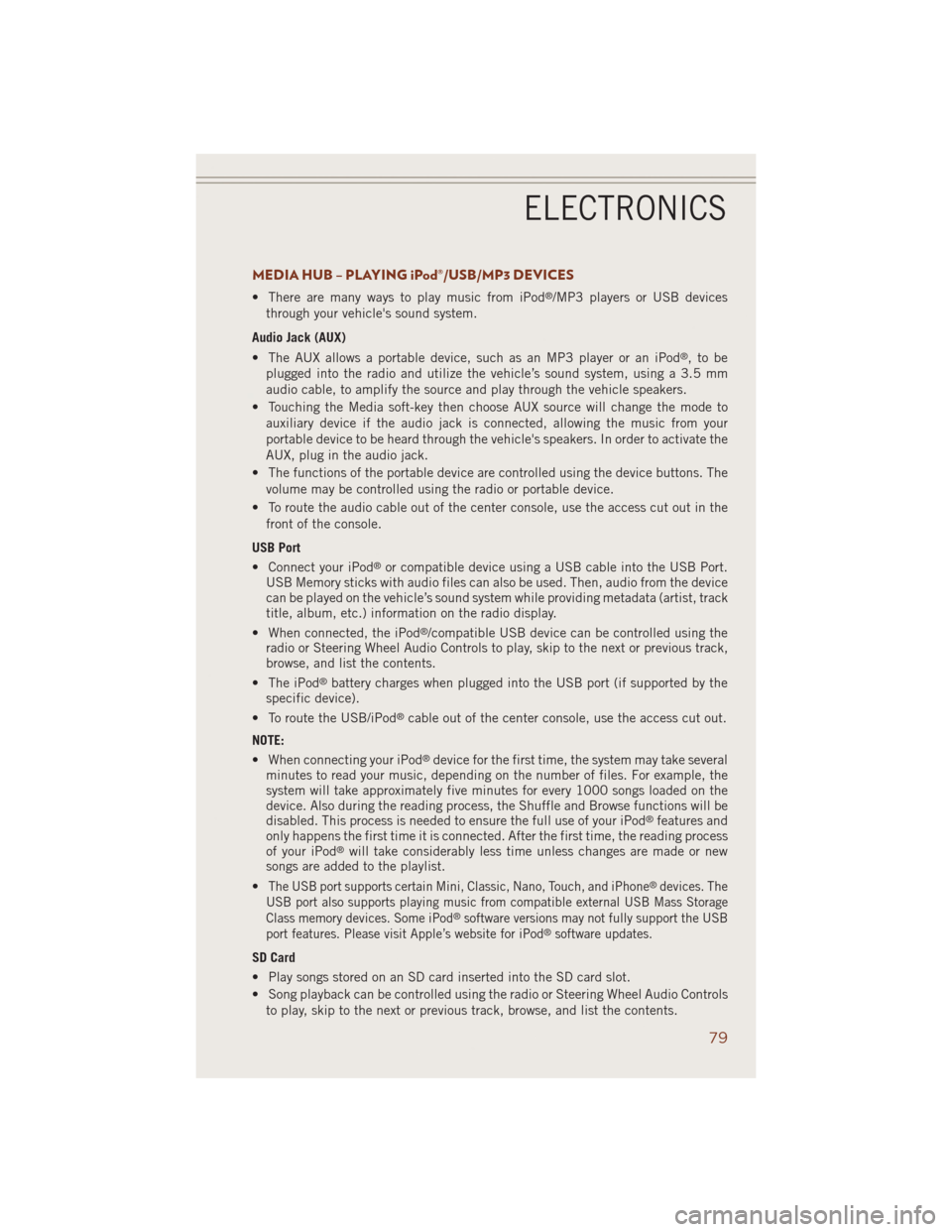
MEDIA HUB – PLAYING iPod®/USB/MP3 DEVICES
• There are many ways to play music from iPod®/MP3 players or USB devices
through your vehicle's sound system.
Audio Jack (AUX)
• The AUX allows a portable device, such as an MP3 player or an iPod
®,tobe
plugged into the radio and utilize the vehicle’s sound system, using a 3.5 mm
audio cable, to amplify the source and play through the vehicle speakers.
• Touching the Media soft-key then choose AUX source will change the mode to
auxiliary device if the audio jack is connected, allowing the music from your
portable device to be heard through the vehicle's speakers. In order to activate the
AUX, plug in the audio jack.
• The functions of the portable device are controlled using the device buttons. The
volume may be controlled using the radio or portable device.
• To route the audio cable out of the center console, use the access cut out in the
front of the console.
USB Port
• Connect your iPod
®or compatible device using a USB cable into the USB Port.
USB Memory sticks with audio files can also be used. Then, audio from the device
can be played on the vehicle’s sound system while providing metadata (artist, track
title, album, etc.) information on the radio display.
• When connected, the iPod
®/compatible USB device can be controlled using the
radio or Steering Wheel Audio Controls to play, skip to the next or previous track,
browse, and list the contents.
• The iPod
®battery charges when plugged into the USB port (if supported by the
specific device).
• To route the USB/iPod
®cable out of the center console, use the access cut out.
NOTE:
• When connecting your iPod
®device for the first time, the system may take several
minutes to read your music, depending on the number of files. For example, the
system will take approximately five minutes for every 1000 songs loaded on the
device. Also during the reading process, the Shuffle and Browse functions will be
disabled. This process is needed to ensure the full use of your iPod
®features and
only happens the first time it is connected. After the first time, the reading process
of your iPod
®will take considerably less time unless changes are made or new
songs are added to the playlist.
•
The USB port supports certain Mini, Classic, Nano, Touch, and iPhone®devices. The
USB port also supports playing music from compatible external USB Mass Storage
Class memory devices. Some iPod
®software versions may not fully support the USB
port features. Please visit Apple’s website for iPod®software updates.
SD Card
• Play songs stored on an SD card inserted into the SD card slot.
• Song playback can be controlled using the radio or Steering Wheel Audio Controls
to play, skip to the next or previous track, browse, and list the contents.
ELECTRONICS
79