CD player JEEP GRAND CHEROKEE 2015 WK2 / 4.G User Guide
[x] Cancel search | Manufacturer: JEEP, Model Year: 2015, Model line: GRAND CHEROKEE, Model: JEEP GRAND CHEROKEE 2015 WK2 / 4.GPages: 717, PDF Size: 18.54 MB
Page 371 of 717
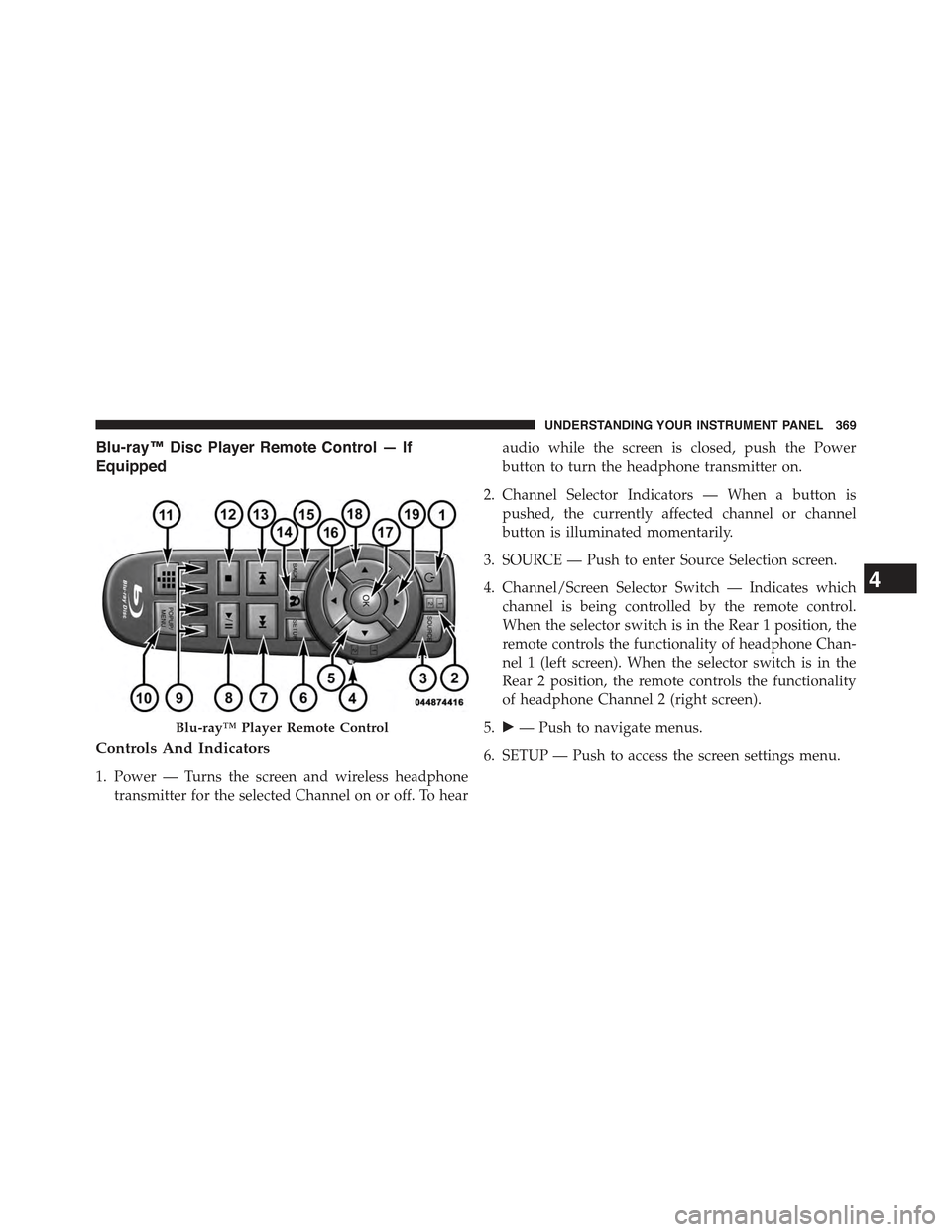
Blu-ray™ Disc Player Remote Control — If
Equipped
Controls And Indicators
1. Power — Turns the screen and wireless headphone
transmitter for the selected Channel on or off. To hear
audio while the screen is closed, push the Power
button to turn the headphone transmitter on.
2. Channel Selector Indicators — When a button is
pushed, the currently affected channel or channel
button is illuminated momentarily.
3. SOURCE — Push to enter Source Selection screen.
4. Channel/Screen Selector Switch — Indicates which
channel is being controlled by the remote control.
When the selector switch is in the Rear 1 position, the
remote controls the functionality of headphone Chan-
nel 1 (left screen). When the selector switch is in the
Rear 2 position, the remote controls the functionality
of headphone Channel 2 (right screen).
5.!— Push to navigate menus.
6. SETUP — Push to access the screen settings menu.
Blu-ray™ Player Remote Control
4
UNDERSTANDING YOUR INSTRUMENT PANEL 369
Page 377 of 717
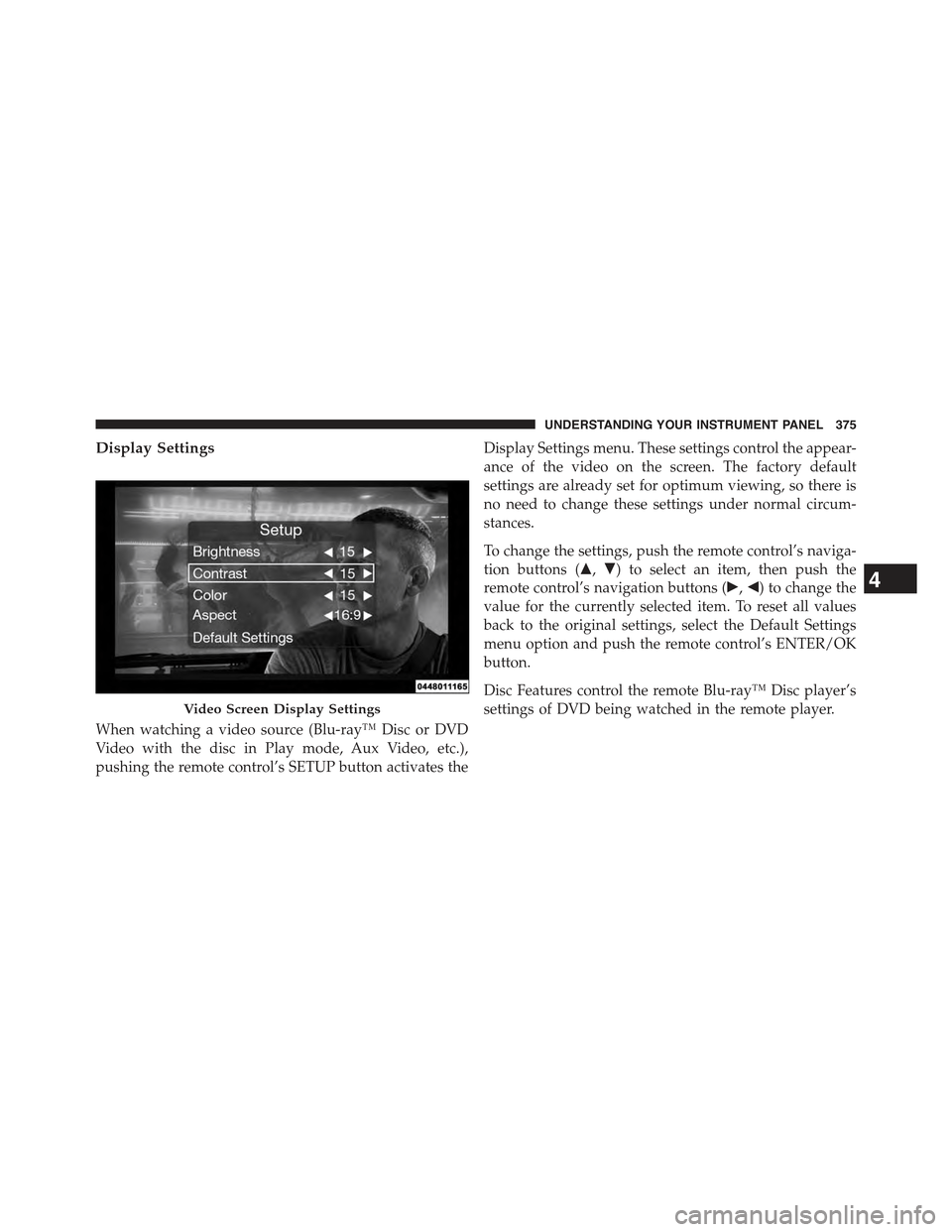
Display Settings
When watching a video source (Blu-ray™ Disc or DVD
Video with the disc in Play mode, Aux Video, etc.),
pushing the remote control’s SETUP button activates the
Display Settings menu. These settings control the appear-
ance of the video on the screen. The factory default
settings are already set for optimum viewing, so there is
no need to change these settings under normal circum-
stances.
To change the settings, push the remote control’s naviga-
tion buttons ($,#) to select an item, then push the
remote control’s navigation buttons (!,") to change the
value for the currently selected item. To reset all values
back to the original settings, select the Default Settings
menu option and push the remote control’s ENTER/OK
button.
Disc Features control the remote Blu-ray™ Disc player’s
settings of DVD being watched in the remote player.Video Screen Display Settings
4
UNDERSTANDING YOUR INSTRUMENT PANEL 375
Page 378 of 717
Listening To Audio With The Screen Closed
To listen to only audio portion of the channel with the
screen closed:
•Set the audio to the desired source and channel.
•Close the video screen.
•To change the current audio mode, push the remote
control’s SOURCE button. This will automatically se-
lect the next available audio mode without using the
Mode/Source Select menu.
•When the screen is reopened, the video screen will
automatically turn back on and show the appropriate
display menu or media.
If the screen is closed and there is no audio heard, verify
that the headphones are turned on (the ON indicator is
illuminated) and the headphone selector switch is on the
desired channel. If the headphones are turned on, push
the remote control’s power button to turn audio on. If
audio is still not heard, check that fully charged batteries
are installed in the headphones.
Disc Formats
The Blu-ray™ Disc player is capable of the playing the
following types of discs (12 mm or 8 mm diameter):
•BD: BDMV (Profile 1.1), BDAV (Profile 1.1),
•DVD: DVD-Video, DVD-Audio, AVCREC, AVCHD,
DVD-VR
•CD: CD-DA, VCD, CD-TEXT
•DVD/CD: MP3, WMA, AAC, DivX (versions3–6)
profile 3.0
DVD Region Codes
The Blu-ray™ Disc player and many DVD discs are
coded by geographic region. These region codes must
376 UNDERSTANDING YOUR INSTRUMENT PANEL
Page 379 of 717
match in order for the disc to play. If the region code for
the DVD disc does not match the region code for the
player, the disc will not play.
DVD Audio Support
When a DVD-Audio disc is inserted in the Blu-ray™ Disc
player, the DVD-Audio title on the disc is played by
default (most DVD-Audio discs also have a Video title,
but the Video title is ignored). All multi-channel program
material is automatically mixed down to two channels,
which may result in a lowered apparent volume level. If
you increase the volume level to account for this change
in level, remember to lower the volume before changing
the disc or to another mode.
Recorded Discs
The Blu-ray™ Disc player will play CD-R and CD-RW
discs recorded in CD-Audio or Video-CD format, or as a
CD-ROM containing MP3 or WMA files. The player will
also play DVD-Video content recorded to a DVD-R or
DVD-RW disc. DVD-ROM discs (either pressed or re-
corded) are not supported.
If you record a disc using a personal computer, there may
be cases where the Blu-ray™ Disc player may not be able
to play some or the entire disc, even if it is recorded in a
compatible format and is playable on other players. To
help avoid playback problems, use the following guide-
lines when recording discs.
•Open sessions are ignored. Only sessions that are
closed are playable.
•For multi-session CDs that contain only multiple CD-
Audio sessions, the player will renumber the tracks so
each track number is unique.
4
UNDERSTANDING YOUR INSTRUMENT PANEL 377
Page 380 of 717
•For CD Data (or CD-ROM) discs, always use the
ISO-9660 (Level 1 or Level 2), Joliet, or Romeo format.
Other formats (such as UDF, HFS, or others) are not
supported.
•The player recognizes a maximum of 512 files and 99
folders per CD-R and CD-RW disc.
•Mixed media recordable DVD formats will only play
the Video_TS portion of the disc.
If you are still having trouble writing a disc that is
playable in the Blu-ray™ Disc player, check with the disc
recording software publisher for more information about
burning playable discs.
The recommended method for labeling recordable discs
(CD-R, CD-RW, and DVD-R) is with a permanent marker.
Do not use adhesive labels as they may separate from the
disc, become stuck, and cause permanent damage to the
DVD player.
Compressed Audio Files (MP3 and WMA)
The Blu-ray™ Disc player is capable of playing MP3
(MPEG-1 Audio Layer 3) and WMA (Windows Media
Audio) files from a CD Data disc (usually a CD-R or
CD-RW).
•The Blu-ray™ Disc player always uses the file exten-
sion to determine the audio format, so MP3 files must
always end with the extension#.mp3#or#.MP3#and
WMA files must always end with the extension#.wma#
or#.WMA#. To prevent incorrect playback, do not use
these extensions for any other types of files.
•For MP3 files, only version 1 ID3 tag data (such as
artist name, track title, album, etc.) are supported.
•Any file that is copy protected (such as those down-
loaded from many online music stores) will not play.
The Blu-ray™ player will automatically skip the file
and begin playing the next available file.
378 UNDERSTANDING YOUR INSTRUMENT PANEL
Page 381 of 717
•Other compression formats such as AAC, MP3 Pro,
Ogg Vorbis, and ATRAC3 will not play. The Blu-ray™
player will automatically skip the file and begin play-
ing the next available file.
•If you are creating your own files, the recommended
fixed bit rate for MP3 files is between 96 and 192Kbps
and the recommended fixed bit rate for WMA files is
between 64 and 192Kbps. Variable bit rates are also
supported. For both formats, the recommended
sample rate is either 44.1kHz or 48kHz.
•To change the current file, use the remote control’s or
Blu-ray™ Disc player ’s$button to advance to the
next file, or the#button to return to the start of the
current or previous file.
Disc Errors
If the Blu-ray™ Disc player is unable to read the disc, a
#Disc Error#message is displayed on the rear screen and
Radio displays. A dirty, damaged, or incompatible disc
format are all potential causes for a#Disc Error#message.
If a disc has a damaged track which results in audible or
visible errors that persists for two seconds, the Blu-ray™
Disc player will attempt to continue playing the disc by
skipping forward one to three seconds at a time. If the
end of the disc is reached, the Blu-ray™ Disc player will
return to the beginning of the disc and attempt to play
the start of the first track.
The Blu-ray™ Disc player may shut down during ex-
tremely hot conditions, such as when the vehicle’s inte-
rior temperature is above 120° F (48.9° C). When this
occurs, the player will display#High Temp#and will shut
off the Rear Seat displays until a safe temperature is
reached. This shutdown is necessary to protect the optics
of the Blu-ray™ Disc player.
4
UNDERSTANDING YOUR INSTRUMENT PANEL 379
Page 384 of 717
The button located in the center of the left-hand control
will tune to the next preset station that you have pro-
grammed in the radio preset button.
CD Player
Pushing the top of the switch once will go to the next
track on the CD. Pushing the bottom of the switch once
will go to the beginning of the current track, or to the
beginning of the previous track if it is within one second
after the current track begins to play.
If you push the switch up or down twice, it plays the
second track; three times, it will play the third, etc.
CD/DVD/Blu-ray™ Disc MAINTENANCE
To keep a CD/DVD/Blu-ray™ Disc in good condition,
take the following precautions:
1. Handle the disc by its edge; avoid touching the
surface.
2. If the disc is stained, clean the surface with a soft cloth,
wiping from center to edge.
3. Do not apply paper or tape to the disc; avoid scratch-
ing the disc.
4. Do not use solvents such as benzene, thinner, cleaners,
or anti-static sprays.
5. Store the disc in its case after playing.
6. Do not expose the disc to direct sunlight.
7. Do not store the disc where temperatures may become
too high.
NOTE:If you experience difficulty in playing a particular
disc, it may be damaged (i.e., scratched, reflective coating
removed, a hair, moisture or dew on the disc) oversized,
or have protection encoding. Try a known good disc
before considering disc player service.
382 UNDERSTANDING YOUR INSTRUMENT PANEL
Page 387 of 717
•Consult the dealer or an experienced radio technician
for help.
CLIMATE CONTROLS
The air conditioning and heating system is designed to
make you comfortable in all types of weather. This
system can be operated through either the controls on the
instrument panel or through the Uconnect® system dis-
play.
When the Uconnect® system is in different modes (Ra-
dio, Player, Settings, More, etc.) the driver and passenger
temperature settings will be indicated at the top of the
display.
General Overview
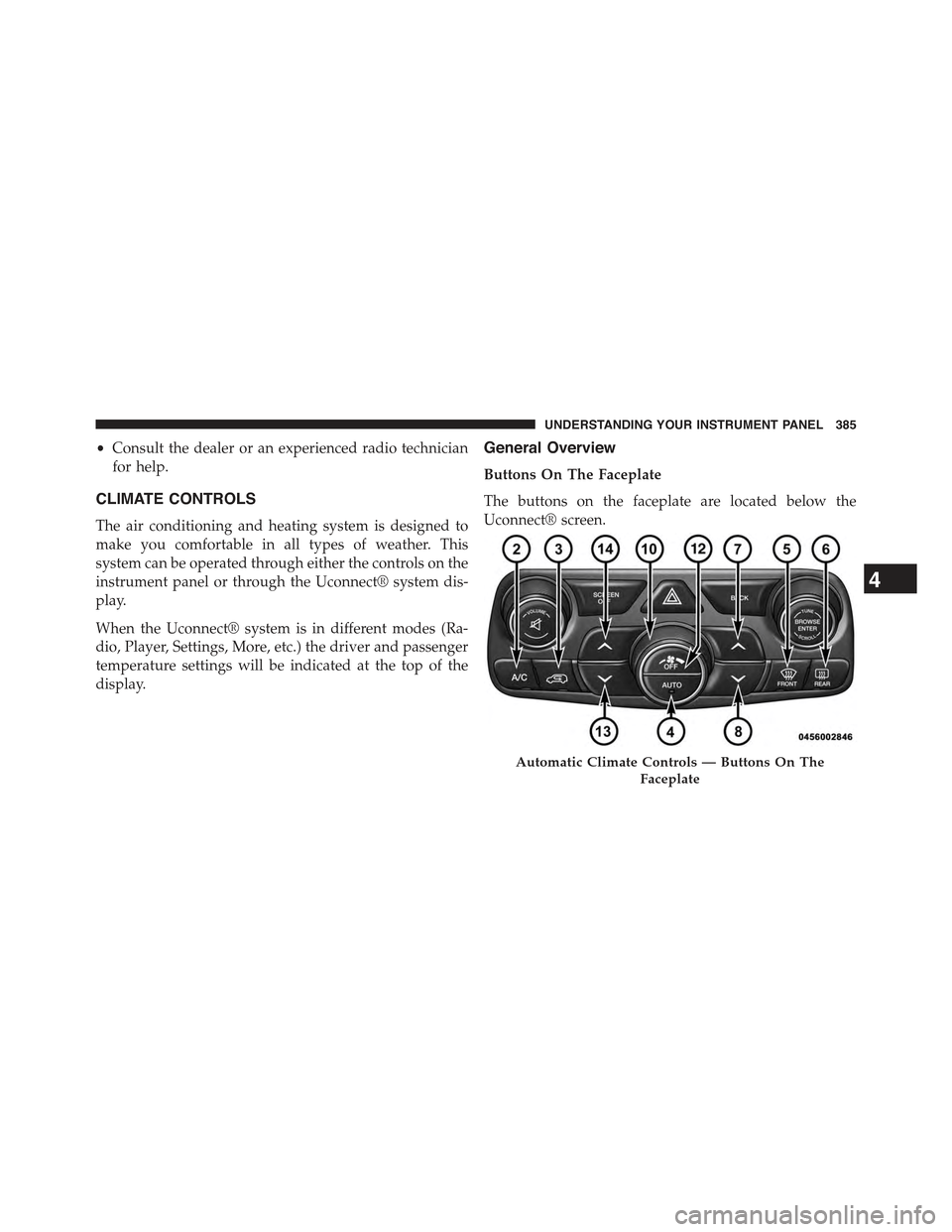
Buttons On The Faceplate
The buttons on the faceplate are located below the
Uconnect® screen.
Automatic Climate Controls — Buttons On The
Faceplate
4
UNDERSTANDING YOUR INSTRUMENT PANEL 385
Page 404 of 717
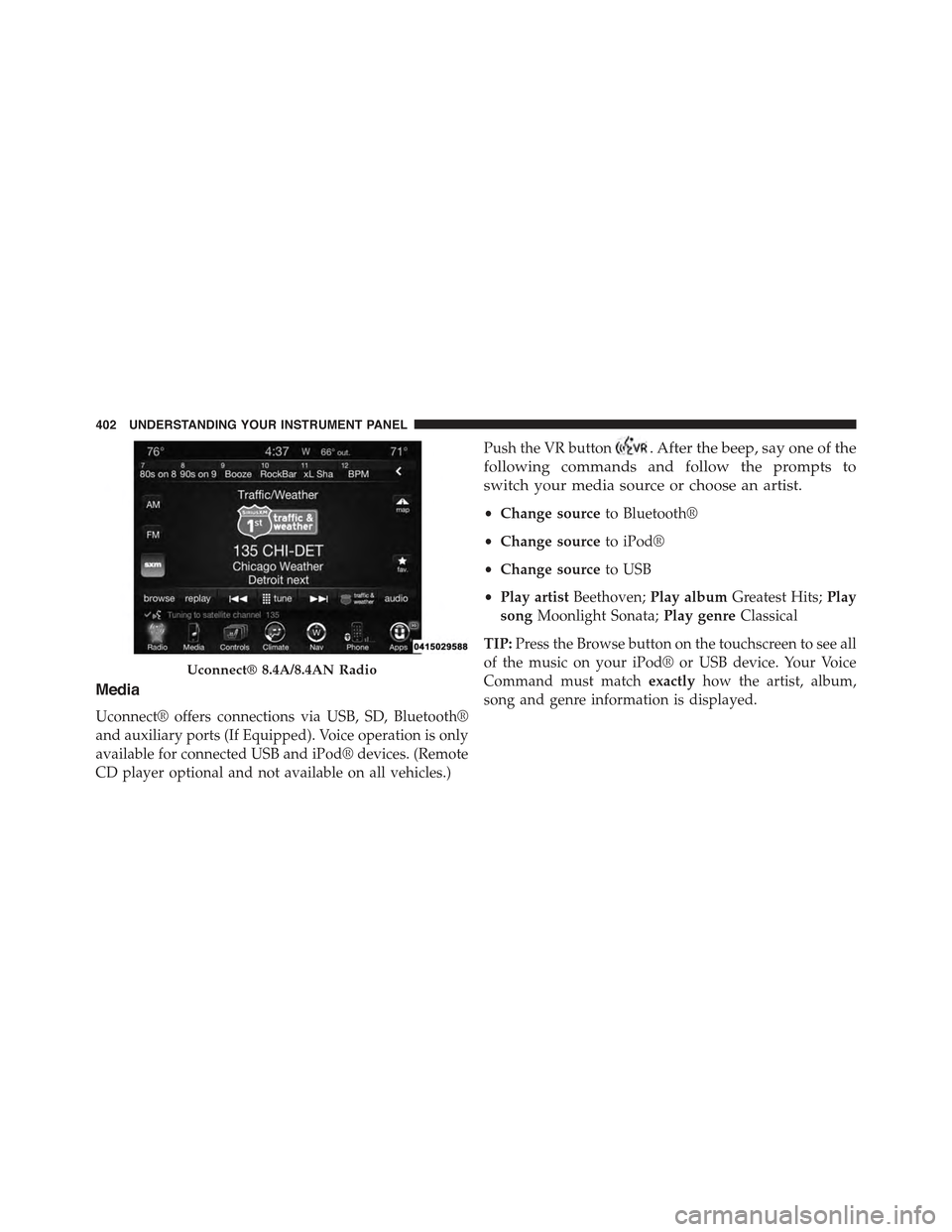
Media
Uconnect® offers connections via USB, SD, Bluetooth®
and auxiliary ports (If Equipped). Voice operation is only
available for connected USB and iPod® devices. (Remote
CD player optional and not available on all vehicles.)
Push the VR button. After the beep, say one of the
following commands and follow the prompts to
switch your media source or choose an artist.
•Change sourceto Bluetooth®
•Change sourceto iPod®
•Change sourceto USB
•Play artistBeethoven;Play albumGreatest Hits;Play
songMoonlight Sonata;Play genreClassical
TIP:Press the Browse button on the touchscreen to see all
of the music on your iPod® or USB device. Your Voice
Command must matchexactlyhow the artist, album,
song and genre information is displayed.
Uconnect® 8.4A/8.4AN Radio
402 UNDERSTANDING YOUR INSTRUMENT PANEL