navigation JEEP GRAND CHEROKEE 2015 WK2 / 4.G Owners Manual
[x] Cancel search | Manufacturer: JEEP, Model Year: 2015, Model line: GRAND CHEROKEE, Model: JEEP GRAND CHEROKEE 2015 WK2 / 4.GPages: 717, PDF Size: 18.54 MB
Page 245 of 717
PARKVIEW® REAR BACK UP CAMERA — IF
EQUIPPED
Your vehicle may be equipped with the ParkView® Rear
Back Up Camera that allows you to see an on-screen
image of the rear surroundings of your vehicle whenever
the shift lever/gear selector is put into REVERSE. The
image will be displayed on the Navigation/Multimedia
radio display screen along with a caution note to “check
entire surroundings” across the top of the screen. After
five seconds this note will disappear. The ParkView®
camera is located on the rear of the vehicle above the rear
License plate.
When the vehicle is shifted out of REVERSE (with camera
delay turned OFF), the rear camera mode is exited and
the navigation or audio screen appears again.
When the vehicle is shifted out of REVERSE (with camera
delay turned ON), the rear view image with dynamic
grid lines will be displayed for up to 10 seconds after
shifting out of#REVERSE#unless the forward vehicle
speed exceeds 8 mph (13 km/h), the transmission is
shifted into#PARK#or the ignition is switched to the OFF
position.
NOTE:The ParkView® Rear Back Up Camera has pro-
grammable modes of operation that may be selected
through the Uconnect® System. Refer to “Uconnect®
Settings” in “Understanding Your Instrument Panel” for
further information.
When enabled, active guide lines are overlaid on the
image to illustrate the width of the vehicle and its
projected backup path based on the steering wheel
position. The active guide lines will show separate zones
that will help indicate the distance to the rear of the
vehicle while a dashed center-line will indicate the center
3
UNDERSTANDING THE FEATURES OF YOUR VEHICLE 243
Page 291 of 717
!CLIMATE CONTROLS...................385
▫General Overview.....................385
▫Climate Control Functions...............391
▫Automatic Temperature Control (ATC)......392
▫Operating Tips.......................394
!Uconnect® VOICE RECOGNITION QUICK
TIPS................................397
▫Introducing Uconnect®.................397
▫Get Started..........................398
▫Basic Voice Commands..................399
▫Radio..............................401
▫Media..............................402
▫Phone..............................404
▫Voice Text Reply......................405
▫Climate (8.4A/8.4AN)..................406
▫Navigation (8.4A/8.4AN)................407
▫Uconnect® Access* (8.4A/8.4AN)..........407
▫Register (8.4A/8.4AN)..................408
▫Mobile App (8.4A/8.4AN)...............409
▫Voice Texting (8.4A/8.4AN)..............410
▫Yelp® (8.4A/8.4AN)....................411
▫SiriusXM Travel Link™ (8.4A/8.4AN).......412
▫Additional Information.................413
4
UNDERSTANDING YOUR INSTRUMENT PANEL 289
Page 326 of 717
•Set Language
When in this display, you may select one of multiple
languages (English/Français/Español) for all display no-
menclature, including the trip functions and the naviga-
tion system (if equipped). Press the “Set Language”
button on the touchscreen, then press the desired lan-
guage button on the touchscreen. Press the back arrow
button on the touchscreen to return to the previous
menu.
•Units
When in this display, you may select to have the DID,
odometer, and navigation system (if equipped) changed
between US and Metric units of measure. Press “US” or
“Metric” to make your selection. Press the back arrow
button on the touchscreen to return to the previous
menu.
•Touchscreen Beep
When in this display, you may turn on or shut off the
sound heard when a button on the touchscreen is
pressed. Press the “Touchscreen Beep” button on the
touchscreen then select from “on” or “off.” Press the back
arrow button on the touchscreen to return to the previous
menu.
Voice
•Voice Response Length
When in this display, you may change the Voice Re-
sponse Length settings. To change the Voice Response
Length, press the “Voice Response Length” button on the
touchscreen and select from “Brief” or “Detailed.” Press
the back arrow button on the touchscreen to return to the
previous menu.
324 UNDERSTANDING YOUR INSTRUMENT PANEL
Page 328 of 717
“Sound Only” or “Sounds and Display” button. Then
press the back arrow button on the touchscreen. Refer to
“ParkSense®” in “Understanding The Features Of Your
Vehicle” for system function and operating information.
•Tilt Mirrors In Reverse
When this feature is selected, the exterior sideview
mirrors will tilt downward when the ignition is in the
RUN position and the transmission shift lever/gear
selector is in the REVERSE position. The mirrors will
move back to their previous position when the transmis-
sion is shifted out of REVERSE. To make your selection,
press the “Tilt Mirrors In Reverse” button on the touch-
screen and make your selection. Press the back arrow
button on the touchscreen to return to the previous
menu.
•ParkView® Backup Camera Active Guidelines
Your vehicle may be equipped with the ParkView® Rear
Back Up Camera Active Guidelines that allows you to see
active guidelines over the ParkView Back up camera
display whenever the shift lever/gear selector is put into
REVERSE. The image will be displayed on the radio
touchscreen display along with a caution note to “check
entire surroundings” across the top of the screen. After
five seconds, this note will disappear. To make your
selection, press the “ParkView® Backup Camera Active
Guidelines” button on the touchscreen and make your
selection. Press arrow button on the touchscreen to return
to the previous menu.
•ParkView® Backup Camera Delay
When the vehicle is shifted out of REVERSE (with camera
delay turned OFF), the rear camera mode is exited and
the navigation or audio screen appears again. When the
vehicle is shifted out of REVERSE (with camera delay
turned ON), the rear view image with dynamic grid lines
will be displayed for up to 10 seconds after shifting out of
“REVERSE” unless the forward vehicle speed exceeds
326 UNDERSTANDING YOUR INSTRUMENT PANEL
Page 343 of 717
•Set Language
When in this display, you may select one of multiple
languages (English/Français/Español) for all display no-
menclature, including the trip functions and the naviga-
tion system (if equipped.) Press the “Set Language”
button on the touchscreen and then press the desired
language button until a check-mark appears next to the
language, showing that setting has been selected. Press
the back arrow button on the touchscreen to return to the
previous menu.
•Units
When in this display, you may select to have the DID,
odometer, and navigation system (if equipped) changed
between US and Metric units of measure. Press “US” or
“Metric” until a check-mark appears next to the setting,
showing that setting has been selected. Press the back
arrow button on the touchscreen to return to the previous
menu.
•Touchscreen Beep
When in this display, you may turn on or shut off the
sound heard when button on the touchscreen is pressed.
Press the “Touchscreen Beep” button on the touchscreen
until a check-mark appears next to the setting, showing
that setting has been selected. Press the back arrow
button on the touchscreen to return to the previous
menu.
•Controls Screen Time-Out
When in this display, you may turn on or shut off the
ability for the controls screen to time out. Press the
“Controls Screen Time-Out” button on the touchscreen
until a check-mark appears next to the setting, showing
that setting has been selected. Press the back arrow
button on the touchscreen to return to the previous
menu.
4
UNDERSTANDING YOUR INSTRUMENT PANEL 341
Page 344 of 717
•Navigation Turn-By-Turn Displayed In Cluster — If
Equipped
When this feature is selected, To make your selection,
press the “Navigation Turn-By-Turn Displayed In Clus-
ter” button on the touchscreen, until a check-mark ap-
pears next to the setting, showing that setting has been
selected. Press the back arrow button on the touchscreen
to return to the previous menu.
Voice
•Voice Response Length
When in this display, you may change the Voice Re-
sponse Length settings. To change the Voice Response
Length, press the “Brief” or “Detailed” button on the
touchscreen until a check-mark appears next to the
setting, showing that setting has been selected. Press the
back arrow button on the touchscreen to return to the
previous menu.
•Show Command List
When in this display, you may choose to Always, With
Help, or Never display the Teleprompter with possible
options while in a voice session. To change the Show
Command List settings, press the “Always,” “With
Help,” or “Never” button on the touchscreen until a
check-mark appears next to the setting, showing that
setting has been selected. Press the back arrow button on
the touchscreen to return to the previous menu.
Clock
After pressing the “Clock” button on the touchscreen the
following settings will be available:
•Sync Time With GPS
This feature will allow the radio to sync time with a GPS
signal. To change the Sync Time setting, press the “Sync
342 UNDERSTANDING YOUR INSTRUMENT PANEL
Page 349 of 717
•ParkView® Backup Camera Active Guidelines
Your vehicle may be equipped with the ParkView® Rear
Back Up Camera Active Guidelines that allows you to see
active guidelines over the ParkView Back up camera
display whenever the shift lever is put into REVERSE.
The image will be displayed on the radio touchscreen
display along with a caution note to “check entire sur-
roundings” across the top of the screen. After five sec-
onds, this note will disappear. To change the mode status,
press the “ParkView Backup Camera Active Guidelines”
button on the touchscreen, until a check-mark appears
next to setting, indicating that the setting had been
selected. Press the back arrow button on the touchscreen
to return to the previous menu.
•ParkView® Backup Camera Delay
When the vehicle is shifted out of REVERSE (with camera
delay turned OFF), the rear camera mode is exited and
the navigation or audio screen appears again. When the
vehicle is shifted out of REVERSE (with camera delay
turned ON), the rear view image with dynamic grid lines
will be displayed for up to 10 seconds after shifting out of
“REVERSE” unless the forward vehicle speed exceeds
8 mph (12 km/h), the transmission is shifted into
“PARK” or the ignition is switched to the OFF position.
To set the ParkView® Backup Camera Delay press the
“Controls” button on the touchscreen, the “settings”
button on the touchscreen, then the “Safety & Driving
Assistance” button on the touchscreen. Press the
“Parkview Backup camera Delay” button on the touch-
screen to turn the ParkView® Delay ON or OFF.
•Rain Sensing Auto Wipers
When this feature is selected, the system will automati-
cally activate the windshield wipers if it senses moisture
on the windshield. To make your selection, press the
“Rain Sensing” button on the touchscreen, until a check-
mark appears next to setting, indicating that the setting
4
UNDERSTANDING YOUR INSTRUMENT PANEL 347
Page 377 of 717
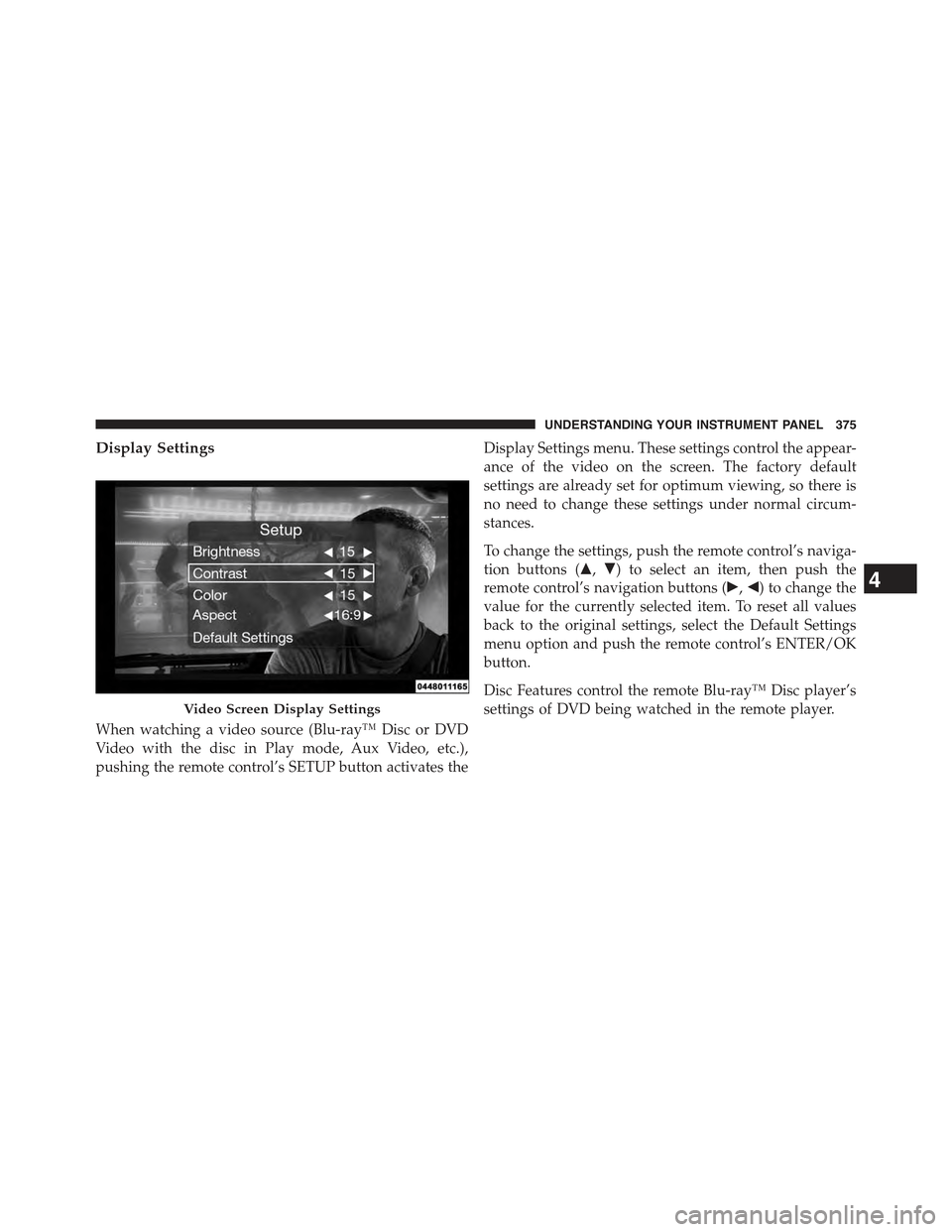
Display Settings
When watching a video source (Blu-ray™ Disc or DVD
Video with the disc in Play mode, Aux Video, etc.),
pushing the remote control’s SETUP button activates the
Display Settings menu. These settings control the appear-
ance of the video on the screen. The factory default
settings are already set for optimum viewing, so there is
no need to change these settings under normal circum-
stances.
To change the settings, push the remote control’s naviga-
tion buttons ($,#) to select an item, then push the
remote control’s navigation buttons (!,") to change the
value for the currently selected item. To reset all values
back to the original settings, select the Default Settings
menu option and push the remote control’s ENTER/OK
button.
Disc Features control the remote Blu-ray™ Disc player’s
settings of DVD being watched in the remote player.Video Screen Display Settings
4
UNDERSTANDING YOUR INSTRUMENT PANEL 375
Page 401 of 717
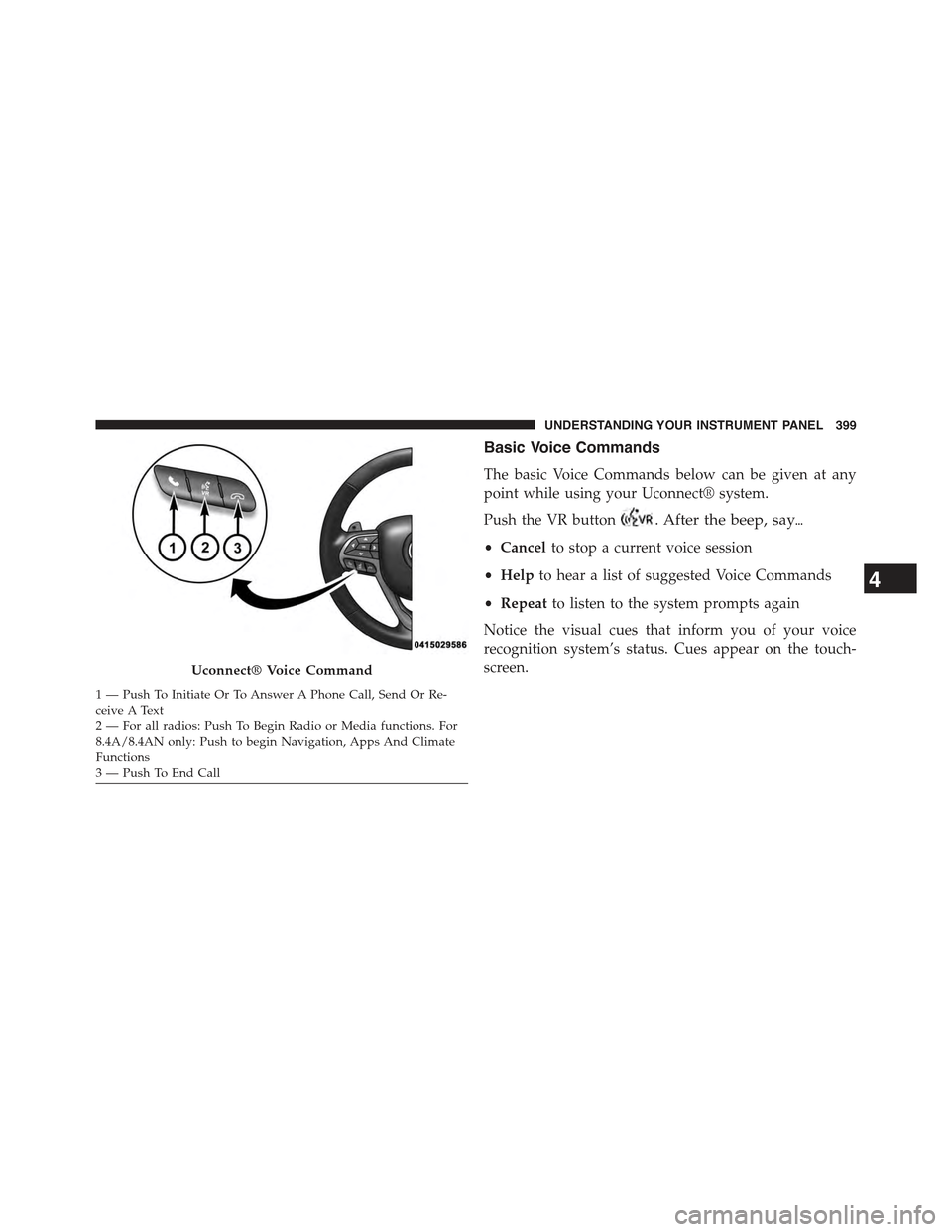
Basic Voice Commands
The basic Voice Commands below can be given at any
point while using your Uconnect® system.
Push the VR button. After the beep, say&
•Cancelto stop a current voice session
•Helpto hear a list of suggested Voice Commands
•Repeatto listen to the system prompts again
Notice the visual cues that inform you of your voice
recognition system’s status. Cues appear on the touch-
screen.Uconnect® Voice Command
1—PushToInitiateOrToAnswerAPhoneCall,SendOrRe-ceive A Text2 — For all radios: Push To Begin Radio or Media functions. For8.4A/8.4AN only: Push to begin Navigation, Apps And ClimateFunctions3—PushToEndCall
4
UNDERSTANDING YOUR INSTRUMENT PANEL 399
Page 409 of 717
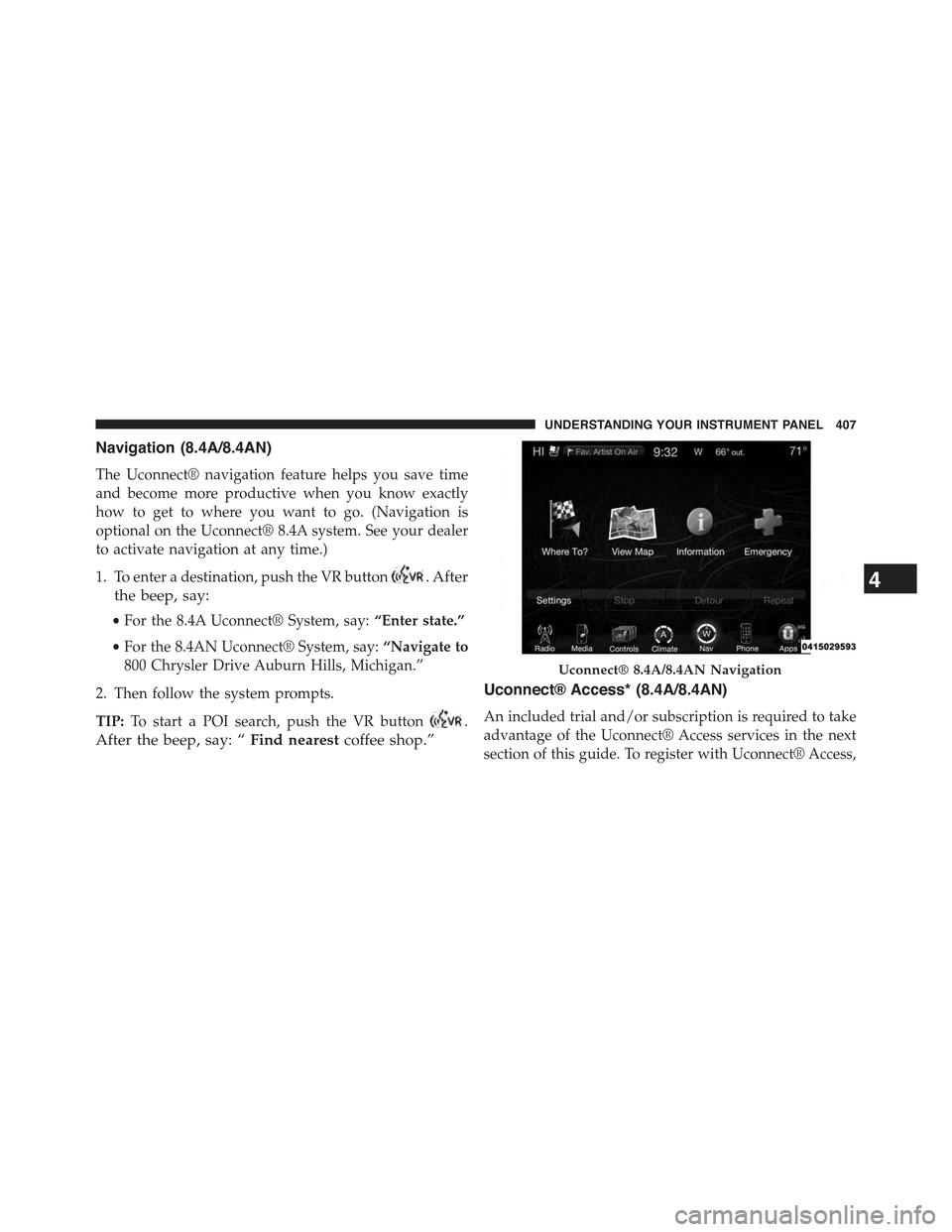
Navigation (8.4A/8.4AN)
The Uconnect® navigation feature helps you save time
and become more productive when you know exactly
how to get to where you want to go. (Navigation is
optional on the Uconnect® 8.4A system. See your dealer
to activate navigation at any time.)
1. To enter a destination, push the VR button. After
the beep, say:
•For the 8.4A Uconnect® System, say:“Enter state.”
•For the 8.4AN Uconnect® System, say:“Navigate to
800 Chrysler Drive Auburn Hills, Michigan.”
2. Then follow the system prompts.
TIP:To start a POI search, push the VR button.
After the beep, say: “Find nearestcoffee shop.”
Uconnect® Access* (8.4A/8.4AN)
An included trial and/or subscription is required to take
advantage of the Uconnect® Access services in the next
section of this guide. To register with Uconnect® Access,
Uconnect® 8.4A/8.4AN Navigation
4
UNDERSTANDING YOUR INSTRUMENT PANEL 407