4WD JEEP GRAND CHEROKEE 2023 User Guide
[x] Cancel search | Manufacturer: JEEP, Model Year: 2023, Model line: GRAND CHEROKEE, Model: JEEP GRAND CHEROKEE 2023Pages: 424, PDF Size: 15.48 MB
Page 133 of 424
STARTING AND OPERATING131
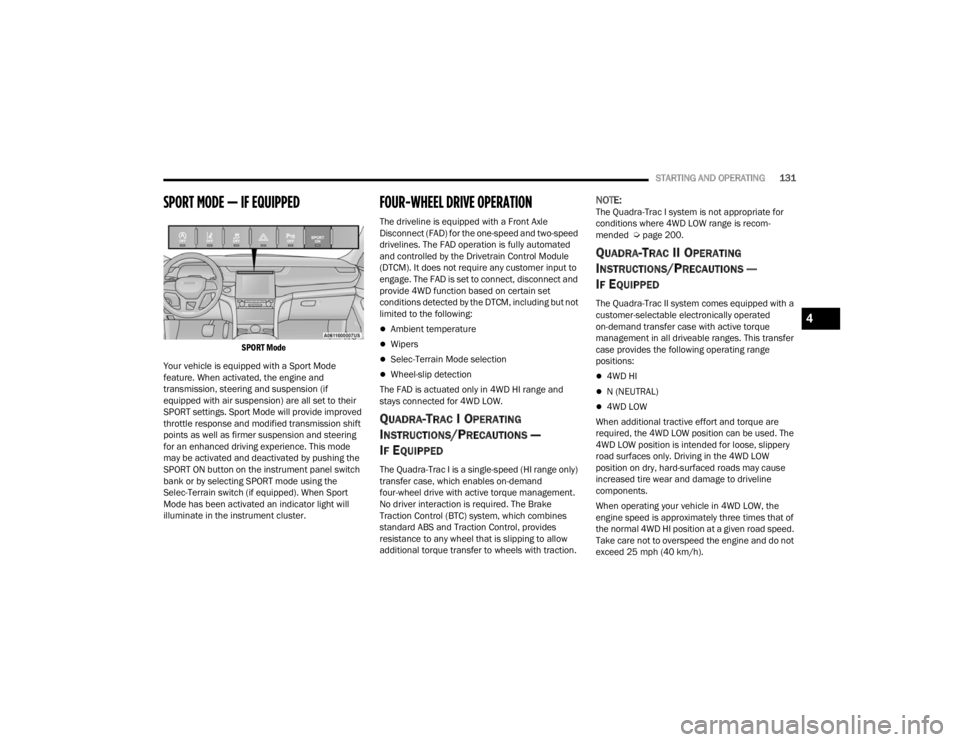
SPORT MODE — IF EQUIPPED
SPORT Mode
Your vehicle is equipped with a Sport Mode
feature. When activated, the engine and
transmission, steering and suspension (if
equipped with air suspension) are all set to their
SPORT settings. Sport Mode will provide improved
throttle response and modified transmission shift
points as well as firmer suspension and steering
for an enhanced driving experience. This mode
may be activated and deactivated by pushing the
SPORT ON button on the instrument panel switch
bank or by selecting SPORT mode using the
Selec-Terrain switch (if equipped). When Sport
Mode has been activated an indicator light will
illuminate in the instrument cluster.
FOUR-WHEEL DRIVE OPERATION
The driveline is equipped with a Front Axle
Disconnect (FAD) for the one-speed and two-speed
drivelines. The FAD operation is fully automated
and controlled by the Drivetrain Control Module
(DTCM). It does not require any customer input to
engage. The FAD is set to connect, disconnect and
provide 4WD function based on certain set
conditions detected by the DTCM, including but not
limited to the following:
Ambient temperature
Wipers
Selec-Terrain Mode selection
Wheel-slip detection
The FAD is actuated only in 4WD HI range and
stays connected for 4WD LOW.
QUADRA-TRAC I OPERATING
I
NSTRUCTIONS/PRECAUTIONS —
I
F EQUIPPED
The Quadra-Trac I is a single-speed (HI range only)
transfer case, which enables on-demand
four-wheel drive with active torque management.
No driver interaction is required. The Brake
Traction Control (BTC) system, which combines
standard ABS and Traction Control, provides
resistance to any wheel that is slipping to allow
additional torque transfer to wheels with traction.
NOTE:The Quadra-Trac I system is not appropriate for
conditions where 4WD LOW range is recom -
mended Ú page 200.
QUADRA-TRAC II OPERATING
I
NSTRUCTIONS/PRECAUTIONS —
I
F EQUIPPED
The Quadra-Trac II system comes equipped with a
customer-selectable electronically operated
on-demand transfer case with active torque
management in all driveable ranges. This transfer
case provides the following operating range
positions:
4WD HI
N (NEUTRAL)
4WD LOW
When additional tractive effort and torque are
required, the 4WD LOW position can be used. The
4WD LOW position is intended for loose, slippery
road surfaces only. Driving in the 4WD LOW
position on dry, hard-surfaced roads may cause
increased tire wear and damage to driveline
components.
When operating your vehicle in 4WD LOW, the
engine speed is approximately three times that of
the normal 4WD HI position at a given road speed.
Take care not to overspeed the engine and do not
exceed 25 mph (40 km/h).
4
23_WL_OM_EN_USC_t.book Page 131
Page 134 of 424
132STARTING AND OPERATING
Proper operation of four-wheel drive vehicles
depends on tires of equal size, type, and
circumference on each wheel. Any difference will
adversely affect performance and function of the
transfer case.
Because four-wheel drive provides improved
traction, there is a tendency to exceed safe turning
and stopping speeds. Do not go faster than road
conditions permit.
SHIFT POSITIONS
For additional information on the appropriate use
of each four-wheel drive system mode position,
see the following:
4WD HI
This is the default operating range for daily use.
N (NEUTRAL)
This range disengages the driveline from the
powertrain. It is used for towing your vehicle
behind another vehicle Ú page 195.
4WD LOW
This range is for low speed four-wheel drive. It
provides an additional gear reduction which allows
for increased torque to be delivered to both the
front and rear wheels while providing maximum
pulling power for loose, slippery road surfaces only.
Do not exceed 25 mph (40 km/h).
SHIFTING PROCEDURES
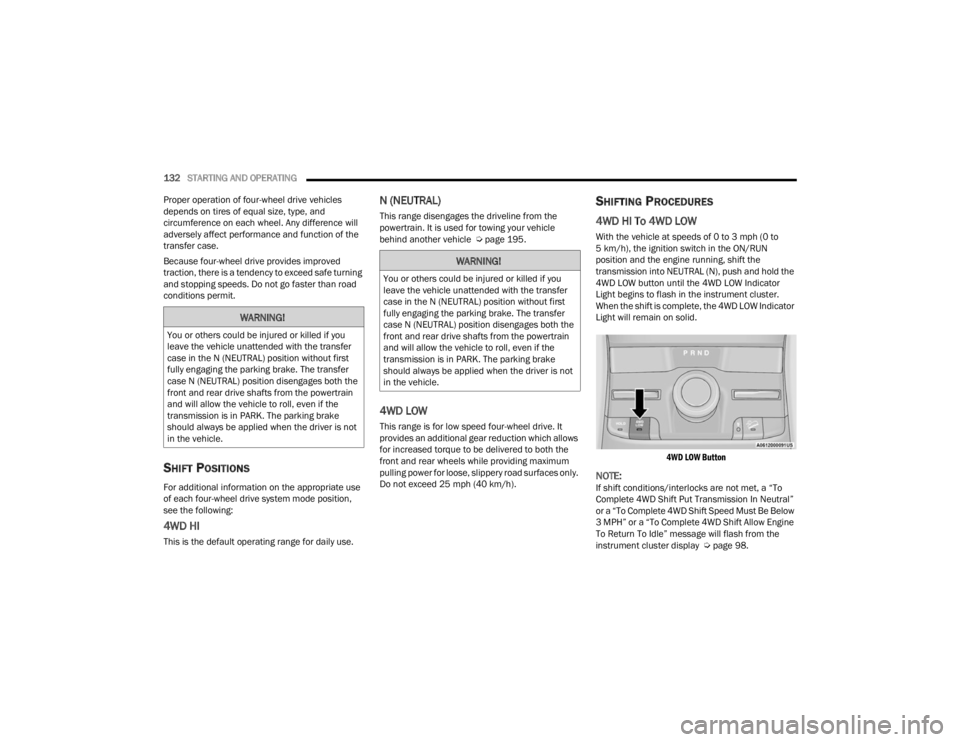
4WD HI To 4WD LOW
With the vehicle at speeds of 0 to 3 mph (0 to
5 km/h), the ignition switch in the ON/RUN
position and the engine running, shift the
transmission into NEUTRAL (N), push and hold the
4WD LOW button until the 4WD LOW Indicator
Light begins to flash in the instrument cluster.
When the shift is complete, the 4WD LOW Indicator
Light will remain on solid.
4WD LOW Button
NOTE:If shift conditions/interlocks are not met, a “To
Complete 4WD Shift Put Transmission In Neutral”
or a “To Complete 4WD Shift Speed Must Be Below
3 MPH” or a “To Complete 4WD Shift Allow Engine
To Return To Idle” message will flash from the
instrument cluster display Ú page 98.
WARNING!
You or others could be injured or killed if you
leave the vehicle unattended with the transfer
case in the N (NEUTRAL) position without first
fully engaging the parking brake. The transfer
case N (NEUTRAL) position disengages both the
front and rear drive shafts from the powertrain
and will allow the vehicle to roll, even if the
transmission is in PARK. The parking brake
should always be applied when the driver is not
in the vehicle.
WARNING!
You or others could be injured or killed if you
leave the vehicle unattended with the transfer
case in the N (NEUTRAL) position without first
fully engaging the parking brake. The transfer
case N (NEUTRAL) position disengages both the
front and rear drive shafts from the powertrain
and will allow the vehicle to roll, even if the
transmission is in PARK. The parking brake
should always be applied when the driver is not
in the vehicle.
23_WL_OM_EN_USC_t.book Page 132
Page 135 of 424
STARTING AND OPERATING133
4WD LOW To 4WD HI
With the vehicle at speeds of 0 to 3 mph (0 to
5 km/h), the ignition switch in the ON position or
the engine running, shift the transmission into
NEUTRAL (N), push and hold the 4WD LOW button
until the 4WD LOW Indicator Light begins to flash
in the instrument cluster. When the shift is
complete, the 4WD LOW Indicator Light will
remain off.
NOTE:
If shift conditions/interlocks are not met —
“4WD Shift Cancelled” or “4WD Shift Aborted/
Retry Shift” message will be displayed on the
instrument cluster. To reattempt shift, put the
transmission in NEUTRAL (N) and push and hold
the 4WD LOW button.
If shift conditions/interlocks are not met, a “To
Complete 4WD Shift Put Transmission In
Neutral” or a “To Complete 4WD Shift Speed
Must Be Below 3 MPH” or a “To Complete 4WD
Shift Allow Engine To Return To Idle” message
will flash from the instrument cluster display
Úpage 98.
Shifting into or out of 4WD LOW is possible with
the vehicle completely stopped; however, diffi -
culty may occur due to the mating clutch teeth
not being properly aligned. Several attempts
may be required for clutch teeth alignment and shift completion to occur. The preferred
method is with the vehicle rolling 0 to 3 mph
(0 to 5 km/h). If the vehicle is moving faster
than 3 mph (5 km/h), the transfer case will not
allow the shift.
QUADRA-TRAC II SYSTEM —
I
F EQUIPPED
The Quadra-Trac II System features two torque
transfer couplings. The couplings include an
Electronic Limited-Slip Differential (ELSD) rear axle
and the Quadra-Trac II transfer case. The ELSD
axle is fully automatic and requires no driver input
to operate. Under normal driving conditions, the
unit functions as a standard axle, balancing torque
evenly between left and right wheels. With a
traction difference between left and right wheels,
the coupling will sense a speed difference. As one
wheel begins to spin faster than the other, torque
will automatically transfer from the wheel that has
less traction, to the wheel that has traction. While
the transfer case and axle coupling differ in design,
their operation is similar. Follow the Quadra-Trac II
transfer case shifting information, preceding this
section, for shifting this system.
ELECTRONIC SWAY BAR DISCONNECT —
I
F EQUIPPED
Your vehicle may be equipped with an electronic
disconnecting stabilizer/sway bar. This system
allows greater front suspension travel in off-road
situations.
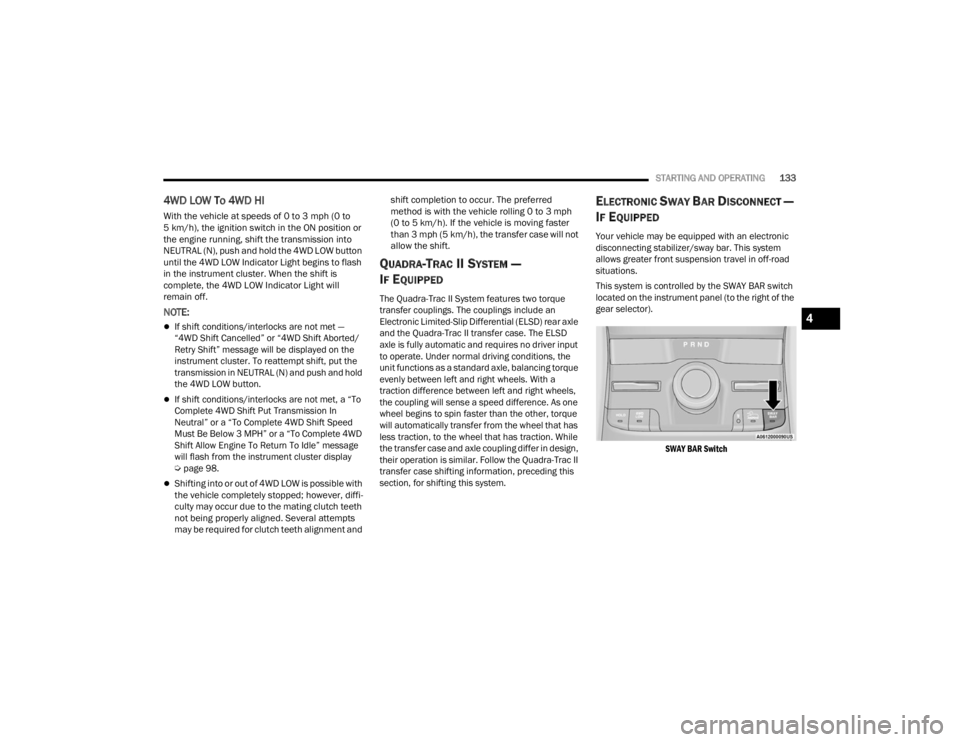
This system is controlled by the SWAY BAR switch
located on the instrument panel (to the right of the
gear selector).
SWAY BAR Switch
4
23_WL_OM_EN_USC_t.book Page 133
Page 136 of 424

134STARTING AND OPERATING
Push the SWAY BAR switch to activate the system.
Push the switch again to deactivate the system.
The Sway Bar Indicator Light (located in the
instrument cluster) will illuminate when the bar is
disconnected. The Sway Bar Indicator Light will
flash during activation transition, or when
activation conditions are not met. The stabilizer/
sway bar should remain in on-road mode during
normal driving conditions.
NOTE:If the electronic disconnecting stabilizer/sway bar
is disconnected and then driven at speeds above
18 mph (29 km/h), the system will reconnect for
driver safety. The Sway Bar Indicator Light will
continue to flash as the system waits for the driver
to slow the vehicle and will automatically
disconnect again unless the driver cancels the
request with the SWAY BAR switch. The system can
cancel the pending disconnect request if drivetrain
changes are made (e.g. 4WD HI to 4WD LOW)
based on road conditions. To disconnect the stabilizer/sway bar, shift to 4WD
LOW and push the SWAY BAR switch to obtain the
off-road position Ú
page 131. The Sway Bar
Indicator Light will flash until the stabilizer/sway
bar has been fully disconnected.
NOTE:The stabilizer/sway bar may be torque locked due
to left and right suspension height differences.
This condition is due to driving surface differences
or vehicle loading. In order for the stabilizer/sway bar to disconnect/reconnect, the right and left
halves of the bar must be aligned. This alignment
may require that the vehicle be driven onto level
ground or rocked from side to side.
To return to on-road mode, push the SWAY BAR
switch again.
SELEC-TERRAIN — IF EQUIPPED
SELEC-TERRAIN MODE SELECTION
Selec-Terrain combines the capabilities of the
vehicle control systems, along with driver input, to
provide the best performance for all terrains. Tap
the toggle up or down to cycle through the
positions.
WARNING!
Ensure the stabilizer/sway bar is reconnected
before driving on hard surfaced roads or at
speeds above 18 mph (29 km/h); a
disconnected stabilizer/sway bar may contribute
to the loss of vehicle control, which could result
in serious injury. Under certain circumstances,
the front stabilizer/sway bar enhances vehicle
stability and assists with vehicle control. The
system monitors vehicle speed and will attempt
to reconnect the stabilizer/sway bar at speeds
over 18 mph (29 km/h). This is indicated by a
flashing or solid Sway Bar Indicator Light. Once
vehicle speed is reduced below 14 mph
(22 km/h), the system will once again attempt to
return to off-road mode.
WARNING!
If the stabilizer/sway bar will not return to
on-road mode, the Sway Bar Indicator Light will
flash in the instrument cluster and vehicle
stability may be reduced. Do not attempt to drive
the vehicle over 18 mph (29 km/h). Driving
faster than 18 mph (29 km/h) with a
disconnected stabilizer/sway bar may contribute
to the loss of vehicle control, which could result
in serious injury.
23_WL_OM_EN_USC_t.book Page 134
Page 137 of 424
STARTING AND OPERATING135
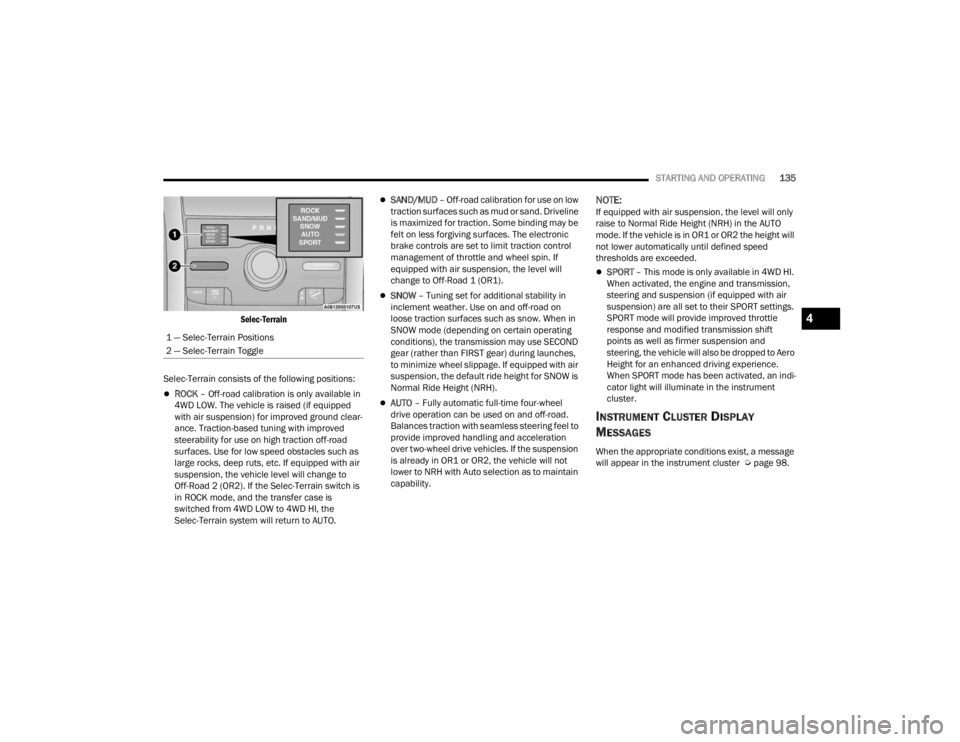
Selec-Terrain
Selec-Terrain consists of the following positions:
ROCK – Off-road calibration is only available in
4WD LOW. The vehicle is raised (if equipped
with air suspension) for improved ground clear -
ance. Traction-based tuning with improved
steerability for use on high traction off-road
surfaces. Use for low speed obstacles such as
large rocks, deep ruts, etc. If equipped with air
suspension, the vehicle level will change to
Off-Road 2 (OR2). If the Selec-Terrain switch is
in ROCK mode, and the transfer case is
switched from 4WD LOW to 4WD HI, the
Selec-Terrain system will return to AUTO.
SAND/MUD – Off-road calibration for use on low
traction surfaces such as mud or sand. Driveline
is maximized for traction. Some binding may be
felt on less forgiving surfaces. The electronic
brake controls are set to limit traction control
management of throttle and wheel spin. If
equipped with air suspension, the level will
change to Off-Road 1 (OR1).
SNOW – Tuning set for additional stability in
inclement weather. Use on and off-road on
loose traction surfaces such as snow. When in
SNOW mode (depending on certain operating
conditions), the transmission may use SECOND
gear (rather than FIRST gear) during launches,
to minimize wheel slippage. If equipped with air
suspension, the default ride height for SNOW is
Normal Ride Height (NRH).
AUTO – Fully automatic full-time four-wheel
drive operation can be used on and off-road.
Balances traction with seamless steering feel to
provide improved handling and acceleration
over two-wheel drive vehicles. If the suspension
is already in OR1 or OR2, the vehicle will not
lower to NRH with Auto selection as to maintain
capability.
NOTE:If equipped with air suspension, the level will only
raise to Normal Ride Height (NRH) in the AUTO
mode. If the vehicle is in OR1 or OR2 the height will
not lower automatically until defined speed
thresholds are exceeded.
SPORT – This mode is only available in 4WD HI.
When activated, the engine and transmission,
steering and suspension (if equipped with air
suspension) are all set to their SPORT settings.
SPORT mode will provide improved throttle
response and modified transmission shift
points as well as firmer suspension and
steering, the vehicle will also be dropped to Aero
Height for an enhanced driving experience.
When SPORT mode has been activated, an indi -
cator light will illuminate in the instrument
cluster.
INSTRUMENT CLUSTER DISPLAY
M
ESSAGES
When the appropriate conditions exist, a message
will appear in the instrument cluster Ú page 98.
1 — Selec-Terrain Positions
2 — Selec-Terrain Toggle
4
23_WL_OM_EN_USC_t.book Page 135
Page 146 of 424

144STARTING AND OPERATING
Adaptive Cruise Control Off
When ACC is deactivated, the display will read
“Adaptive Cruise Control Off”.
The instrument cluster display will return to the last
display selected after five seconds of no ACC
display activity.
Activating Adaptive Cruise Control (ACC)
The minimum set speed for the ACC system is
20 mph (32 km/h).
When the system is turned on and in the ready
state, the instrument cluster display will read “ACC
Ready.”
When the system is off, the instrument cluster
display will read “Adaptive Cruise Control (ACC)
Off.”
NOTE:You cannot engage ACC under the following condi -
tions:
When in 4WD Low
When the brakes are applied
When the parking brake is applied
When the transmission is in PARK, REVERSE or
NEUTRAL
When the brakes are overheated
When the driver’s door is open at low speeds
When the driver’s seat belt is unbuckled at low
speeds
When there is a stationary vehicle in front of
your vehicle in close proximity
When Electronic Stability Control (ESC) Full Off
mode is active
To Activate/Deactivate
Push and release the Adaptive Cruise Control
(ACC) on/off button. The ACC menu in the
instrument cluster displays “ACC Ready.”
To turn the system off, push and release the
Adaptive Cruise Control (ACC) on/off button again.
At this time, the system will turn off and the
instrument cluster displays “Adaptive Cruise
Control (ACC) Off.”
To Set A Desired Speed
When the vehicle reaches the speed desired, push
the SET (+) button or the SET (-) button and
release. The instrument cluster display will show
the set speed.
NOTE:Fixed Speed Cruise Control (if equipped) is used
without ACC enabled. To change between Adaptive
Cruise Control (ACC) and Fixed Speed Cruise
Control features, first turn off ACC by pushing the
ACC on/off button. Then, turn on Fixed Speed
Cruise Control by pushing the Fixed Speed Cruise
Control on/off button.
If ACC is set when the vehicle speed is below
20 mph (32 km/h), the set speed will default to
20 mph (32 km/h).
NOTE:Fixed Speed Cruise Control cannot be set below
20 mph (32 km/h).
If either system is set when the vehicle speed is
above 20 mph (32 km/h), the set speed shall be
the current speed of the vehicle.
WARNING!
Leaving the Adaptive Cruise Control (ACC)
system on when not in use is dangerous. You
could accidentally set the system or cause it to
go faster than you want. You could lose control
and have a collision. Always leave the system off
when you are not using it.
WARNING!
In Fixed Speed Cruise Control mode, the system
will not react to vehicles ahead. In addition, the
proximity warning does not activate and no
alarm will sound even if you are too close to the
vehicle ahead since neither the presence of the
vehicle ahead nor the vehicle-to-vehicle distance
is detected. Be sure to maintain a safe distance
between your vehicle and the vehicle ahead.
Always be aware which mode is selected.
23_WL_OM_EN_USC_t.book Page 144
Page 147 of 424

STARTING AND OPERATING145
NOTE:
Keeping your foot on the accelerator pedal can
cause the vehicle to continue to accelerate
beyond the set speed. If this occurs, the
message “DRIVER OVERRIDE” will display in the
instrument cluster display.
If you continue to accelerate beyond the set
speed while ACC is enabled, the system will not
be controlling the distance between your vehicle
and the vehicle ahead. The vehicle speed will
only be determined by the position of the accel-
erator pedal.
To Cancel
The following conditions cancel the ACC or Fixed
Speed Cruise Control systems:
The brake pedal is applied
The CANC (cancel) button is pushed
The gear selector is removed from the DRIVE
position
The Electronic Stability Control/Traction Control
System (ESC/TCS) activates
The vehicle parking brake is applied
The Trailer Sway Control (TSC) activates
The braking temperature exceeds normal range
(overheated) The following conditions will only cancel the ACC
system:
Driver seat belt is unbuckled at low speeds
Driver door is opened at low speeds
To Turn Off
The system will turn off and erase the set speed in
memory if:
The Adaptive Cruise Control (ACC) on/off button
is pushed
Fixed Speed Cruise Control on/off button is
pushed
The ignition is placed in the OFF position
4WD Low is engaged
The Active Driving Assist (ADA) system (if
equipped) is enabled/engaged and the ADA
button is pressed
NOTE:If ADA is not enabled/engaged and the ADA button
is pressed, the ACC system will remain on or turn
on, depending on the state of ACC at the time of
the ADA button press.
To Resume
If there is a set speed in memory, push the RES
(resume) button and remove your foot from the
accelerator pedal. The instrument cluster display
will show the last set speed. Resume can be used at any speed above 20 mph
(32 km/h) when only Fixed Speed Cruise Control is
being used.
Resume can be used at any speed above 0 mph
(0 km/h) when ACC is active.
NOTE:
While in ACC mode, when the vehicle comes to
a complete stop longer than two seconds, the
driver will either have to push the RES (resume)
button or press the accelerator pedal to reen
-
gage the ACC system.
ACC cannot be resumed if there is a stationary
vehicle in front of your vehicle in close proximity.
WARNING!
The Resume function should only be used if
traffic and road conditions permit. Resuming a
set speed that is too high or too low for
prevailing traffic and road conditions could
cause the vehicle to accelerate or decelerate too
sharply for safe operation. Failure to follow these
warnings can result in a collision and death or
serious personal injury.
4
23_WL_OM_EN_USC_t.book Page 145
Page 161 of 424

STARTING AND OPERATING159
If the suspension alignment is not correct, if the
vehicle is modified (e.g. lifting or lowering the
suspension, installing different sized wheels or
tires) or if there has been damage due to road
hazards
Driving near highway toll booths
NOTE:If damage to the windshield occurs, have the wind -
shield replaced by an authorized dealer as soon as
possible.
PARKSENSE FRONT/REAR PARK ASSIST
SYSTEM — IF EQUIPPED
The ParkSense Park Assist system provides visual
and audible indications of the distance between
the rear, and if equipped, the front fascia/bumper
and a detected obstacle when backing up or
moving forward (e.g. during a parking maneuver).
The vehicle brakes may be automatically applied
and released when performing a reverse parking
maneuver if the system detects a possible collision
with an obstacle.
NOTE:
The driver can disable the automatic braking
function by turning ParkSense off via the
ParkSense switch. The driver can also override
automatic braking by changing the gear or by
pressing the gas pedal over 90% of its capacity
during the braking event.
Automatic brakes are not available if the vehicle
is in 4WD Low.
Automatic brakes will not be available if there is
a faulted condition detected with the ParkSense
Park Assist system or the Braking System
Module.
The automatic braking function may only be
applied if the vehicle deceleration is not enough
to avoid colliding with a detected obstacle.
The automatic braking function may not be
applied fast enough for obstacles that move
toward the rear of the vehicle from the left and/
or right sides.
The automatic braking function can be
enabled/disabled from the Customer Program -
mable Features section of the Uconnect system.
ParkSense will retain its last known configura -
tion state for the automatic braking function
through ignition cycles.
The automatic braking function is intended to
assist the driver in avoiding possible collisions with
detected obstacles when backing up in REVERSE
gear.
NOTE:
The system is designed to assist the driver and
not to substitute the driver.
The driver must stay in full control of the
vehicle's acceleration and braking and is
responsible for the vehicle's movements.
4
23_WL_OM_EN_USC_t.book Page 159
Page 178 of 424
176STARTING AND OPERATING
NOTE:
If the vehicle is in DRIVE, NEUTRAL, or REVERSE,
and speed is greater than or equal to 8 mph
(13 km/h), Zoom View is unavailable and the
icon will appear gray.
While in Zoom View, the guidelines will not be
visible.
VIEWING AT SPEED
When the vehicle is in PARK, NEUTRAL or
DRIVE, the Rear View Camera can be
activated with the Back Up Camera
button in the Controls menu. This feature
allows the customer to monitor the area directly
behind the vehicle (or trailer, if equipped) for up to
10 seconds while driving. If the vehicle speed
remains below 8 mph (13 km/h), the Rear View
Camera image will be displayed continuously until
deactivated via the X button on the touchscreen.
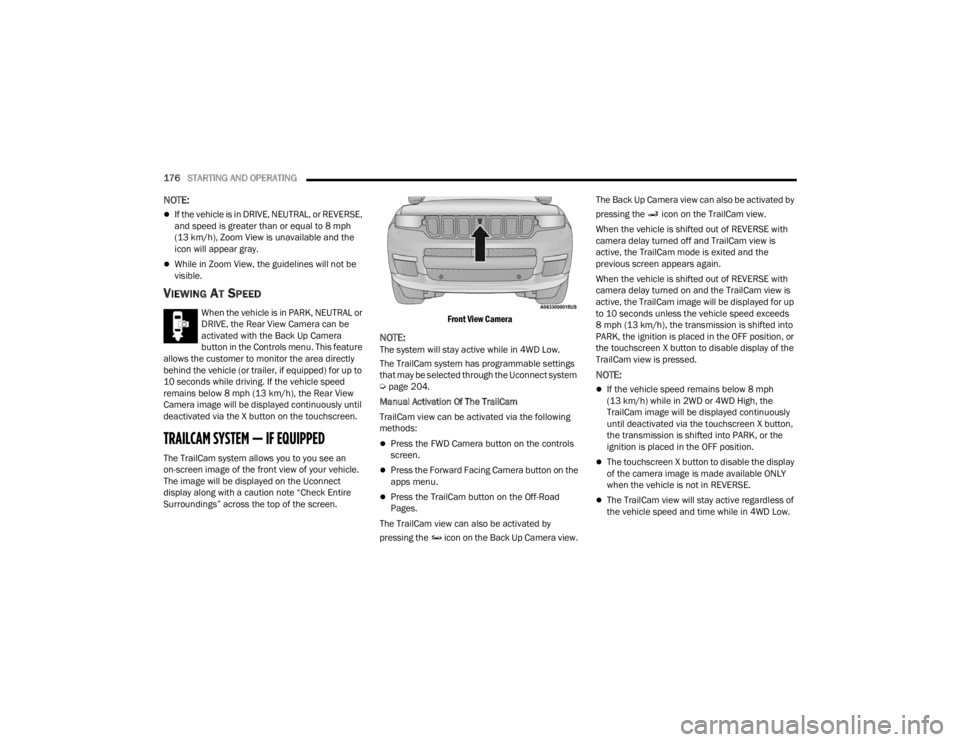
TRAILCAM SYSTEM — IF EQUIPPED
The TrailCam system allows you to you see an
on-screen image of the front view of your vehicle.
The image will be displayed on the Uconnect
display along with a caution note “Check Entire
Surroundings” across the top of the screen.
Front View Camera
NOTE:The system will stay active while in 4WD Low.
The TrailCam system has programmable settings
that may be selected through the Uconnect system
Ú
page 204.
Manual Activation Of The TrailCam
TrailCam view can be activated via the following
methods:
Press the FWD Camera button on the controls
screen.
Press the Forward Facing Camera button on the
apps menu.
Press the TrailCam button on the Off-Road
Pages.
The TrailCam view can also be activated by
pressing the icon on the Back Up Camera view. The Back Up Camera view can also be activated by
pressing the icon on the TrailCam view.
When the vehicle is shifted out of REVERSE with
camera delay turned off and TrailCam view is
active, the TrailCam mode is exited and the
previous screen appears again.
When the vehicle is shifted out of REVERSE with
camera delay turned on and the TrailCam view is
active, the TrailCam image will be displayed for up
to 10 seconds unless the vehicle speed exceeds
8 mph (13 km/h), the transmission is shifted into
PARK, the ignition is placed in the OFF position, or
the touchscreen X button to disable display of the
TrailCam view is pressed.
NOTE:
If the vehicle speed remains below 8 mph
(13 km/h) while in 2WD or 4WD High, the
TrailCam image will be displayed continuously
until deactivated via the touchscreen X button,
the transmission is shifted into PARK, or the
ignition is placed in the OFF position.
The touchscreen X button to disable the display
of the camera image is made available ONLY
when the vehicle is not in REVERSE.
The TrailCam view will stay active regardless of
the vehicle speed and time while in 4WD Low.
23_WL_OM_EN_USC_t.book Page 176
Page 197 of 424

STARTING AND OPERATING195
RECREATIONAL TOWING (BEHIND MOTORHOME)
TOWING THIS VEHICLE BEHIND ANOTHER VEHICLE
NOTE:
When towing your vehicle, always follow applicable state and provincial laws. Contact state and provincial Highway Safety offices for additional details.
Vehicles equipped with Quadra-Lift must be placed in Transport Mode before tying them down (from the body) on a trailer or flatbed truck Úpage 136. If the
vehicle cannot be placed in Transport Mode (for example, engine will not run), tie-downs should be fastened over the tires using specific straps (not to the
body). Failure to follow these instructions may cause fault codes to be set and/or cause loss of proper tie-down tension.
Towing Condition Wheels OFF The Ground Two-Wheel Drive Models Four-Wheel Drive Models
Without 4WD LOW Four-Wheel Drive Models
With 4WD LOW
Flat Tow NONENOT ALLOWEDNOT ALLOWEDSee Instructions
Transmission in PARK
Ensure vehicle is set to
Normal Ride Height — if
equipped
Transfer case in N
(NEUTRAL)
Tow in forward direction
Dolly Tow Front
NOT ALLOWEDNOT ALLOWEDNOT ALLOWED
Rear OKNOT ALLOWEDNOT ALLOWED
On Trailer ALLOKOKOK
4
23_WL_OM_EN_USC_t.book Page 195