Oil JEEP GRAND CHEROKEE 2023 User Guide
[x] Cancel search | Manufacturer: JEEP, Model Year: 2023, Model line: GRAND CHEROKEE, Model: JEEP GRAND CHEROKEE 2023Pages: 424, PDF Size: 15.48 MB
Page 105 of 424
GETTING TO KNOW YOUR INSTRUMENT PANEL103
INSTRUMENT CLUSTER DISPLAY MENU
I
TEMS
The instrument cluster display can be used to view
the main menu items for several features. Use the
up and down arrow buttons to scroll through
the driver interactive display menu options until
the desired menu is reached.
NOTE:Depending on the vehicle’s options, feature
settings may vary.
Main Menu
DRIVER INFO
Push and release the up or down arrow
button until the Drive menu title is displayed in the
instrument cluster display.
Speedometer
Push and release the up or down arrow
button until the Speedometer menu title is
displayed in the instrument cluster display. Push
and release the OK button to toggle units (mph or
km/h) of the speedometer. Hold the OK button to
toggle between Analog and Digital speedometer. Night Vision — If Equipped
While viewing the Speedometer menu
title, push and release the left or
right arrow button until the Night
Vision menu title is displayed in the instrument
cluster display. Pedestrian/Animal icons will be
displayed in the top left location Ú page 177.
Driver Assist — If Equipped
While viewing the Speedometer menu title, push
and release the left or right arrow button
until the Driver Assist menu title is displayed in the
instrument cluster display. The Driver Assist
screen indicates the current status of ACC, Active
Lane Management and Active Driving Assist/
Assist+/Pilot. Push and release the OK button
again to change between Zoomed In and Zoomed
Out view (“Press OK to Zoom In” will display when
in Zoomed Out view/“Press OK to Zoom Out” will
display when in Zoomed In view).
VEHICLE INFO
Push and release the up or down arrow
button until the Vehicle Info title is highlighted in
the instrument cluster display. Push the left or
right arrow button to scroll through the
information submenus. Fuel Economy
Average Fuel Economy
Current Fuel Economy
Range To Empty
Press the OK button to reset the average fuel
economy
NOTE:The Range feature is not able to be reset through
the instrument cluster display controls.
Gauge Summary
Coolant Temperature — If Equipped
Displays the current temperature of the coolant.
Transmission Temperature
Displays the actual transmission temperature.
Oil Temperature
Displays the actual oil temperature.
Oil Pressure
Displays the actual oil pressure.
Battery Voltage
Displays the current voltage level of the battery.
Oil Life
Displays the current oil life of the vehicle.
3
23_WL_OM_EN_USC_t.book Page 103
Page 112 of 424
110GETTING TO KNOW YOUR INSTRUMENT PANEL
Hood Open Warning Light
This warning light will illuminate when the
hood is left open and not fully closed.
NOTE:If the vehicle is moving, there will also be a single
chime.
Liftgate Open Warning Light
This warning light will illuminate when the
liftgate is open.
NOTE:If the vehicle is moving, there will also be a single
chime.
Night Vision Animal Warning Light
The Night Vision Animal Warning Light
will illuminate in red when an animal is
detected directly in the vehicle’s path,
near the headlights, and a collision is
possible Ú page 177.
If enabled, a chime will sound and a video pop-up
may display when a detection occurs.
Night Vision Pedestrian Warning Light
The Night Vision Pedestrian Warning
Light will illuminate in red when a
pedestrian is detected directly in the
vehicle’s path, near the headlights, and a
collision is possible Ú page 177. If enabled, a chime will sound and a video pop-up
may display when a detection occurs.
Oil Pressure Warning Light
This warning light will illuminate to
indicate low engine oil pressure. If the
light turns on while driving, stop the
vehicle, shut off the engine as soon as
possible, and contact an authorized dealer. A
chime will sound when this light turns on.
Do not operate the vehicle until the cause is
corrected. This light does not indicate how much oil
is in the engine. The engine oil level must be
checked under the hood.
Oil Temperature Warning Light
This warning light will illuminate to
indicate the engine oil temperature is
high. If the light turns on while driving,
stop the vehicle and shut off the engine
as soon as possible. Wait for oil temperature to
return to normal levels.
Rear Seat Belt Reminder Warning Light —
If Equipped
This light indicates when a rear seat belt
is unbuckled in the second row. When
the ignition is first placed in the ON/RUN
position, and if a seat belt in the second
row is unbuckled, a light corresponding to the
specific seat will turn on in the upper right portion of the instrument cluster display, momentarily
replacing the configurable corner information. If a
second row seat belt that was buckled at the start
of the trip is unbuckled, the Rear Seat Belt
Reminder Light will change from the buckled to the
unbuckled symbol, and a chime will sound
Ú
page 269.
Seat Belt Reminder Warning Light
This warning light indicates when the
driver or passenger seat belt is
unbuckled. When the ignition is first
placed in the ON/RUN position and if the
driver’s seat belt is unbuckled, a chime will sound
and the light will turn on. When driving, if the driver
or front passenger seat belt remains unbuckled,
the Seat Belt Reminder Light will flash or remain on
continuously and a chime will sound Ú page 269.
Transmission Temperature Warning Light —
If Equipped
This warning light will illuminate to warn
of a high transmission fluid temperature.
This may occur with strenuous usage
such as trailer towing. If this light turns
on, stop the vehicle and run the engine at idle or
slightly faster, with the transmission in PARK (P) or
NEUTRAL (N), until the light turns off. Once the light
turns off, you may continue to drive normally.
23_WL_OM_EN_USC_t.book Page 110
Page 113 of 424
GETTING TO KNOW YOUR INSTRUMENT PANEL111
Vehicle Security Warning Light —
If Equipped
This light will flash at a fast rate for
approximately 15 seconds when the vehicle
security system is arming, and then will flash
slowly until the vehicle is disarmed.
YELLOW WARNING LIGHTS
Active Driving Assist - Driver
Inattentiveness Warning Light
This light illuminates when driver
inattentiveness has been detected,
warning the driver to place their hands on
the steering wheel.
Active Driving Assist Fault Warning Light
This light will turn on when the Active
Driving Assist system has detected a
fault.
Air Suspension Fault Warning Light
This light will illuminate when there is a
fault detected in the air suspension
system.
Anti-Lock Brake System (ABS) Warning Light
This warning light monitors the ABS. The
light will turn on when the ignition is
placed in the ON/RUN or position and
may stay on for as long as four seconds.
If the ABS light remains on or turns on while
driving, then the Anti-Lock portion of the brake
system is not functioning and service is required as
soon as possible. However, the conventional brake
system will continue to operate normally,
assuming the Brake Warning Light is not also on.
If the ABS light does not turn on when the ignition
is placed in the ON/RUN position, have the brake
system inspected by an authorized dealer.
Electric Park Brake Fault Warning Light
This warning light will illuminate to
indicate the Electric Park Brake is not
functioning properly and service is
required. Contact an authorized dealer.
Electronic Stability Control (ESC) Active
Warning Light — If Equipped
This warning light will indicate when the
ESC system is Active. The ESC Indicator
Light in the instrument cluster will come
on when the ignition is placed in the ON/
RUN position, and when ESC is activated. It should
go out with the engine running. If the ESC Indicator
Light comes on continuously with the engine
running, a malfunction has been detected in the
ESC system. If this warning light remains on after
several ignition cycles, and the vehicle has been
driven several miles (kilometers) at speeds greater
than 30 mph (48 km/h), see an authorized dealer
as soon as possible to have the problem
diagnosed and corrected.
The ESC OFF Indicator Light and the ESC Indi -
cator Light come on momentarily each time the
ignition is placed in the ON/RUN position.
The ESC system will make buzzing or clicking
sounds when it is active. This is normal; the
sounds will stop when ESC becomes inactive.
This light will come on when the vehicle is in an
ESC event.
WARNING!
If you continue operating the vehicle when the
Transmission Temperature Warning Light is
illuminated you could cause the fluid to boil over,
come in contact with hot engine or exhaust
components and cause a fire.
CAUTION!
Continuous driving with the Transmission
Temperature Warning Light illuminated will
eventually cause severe transmission damage
or transmission failure.
3
23_WL_OM_EN_USC_t.book Page 111
Page 124 of 424

122STARTING AND OPERATING
4. If the engine fails to start after eight attempts, allow the starter to cool for at least
10 minutes, then repeat the Extended Park
Starting procedure.
IF ENGINE FAILS TO START
If the engine fails to start after you have followed
the “Normal Starting” procedure and has not
experienced an Extended Park condition as
defined previously, it may be flooded. Push the
accelerator pedal all the way to the floor and hold
it there while the engine is cranking. This should
clear any excess fuel in case the engine is flooded.
The starter motor will engage automatically, run for
10 seconds, and then disengage. Once this occurs,
release the accelerator pedal and brake pedal,
wait 10 to 15 seconds, then repeat the “Normal
Starting” procedure.
COLD WEATHER OPERATION
(B
ELOW –22°F OR −30°C)
To ensure reliable starting at these temperatures,
use of an externally powered electric engine block
heater (available from an authorized dealer) is
recommended.
AFTER STARTING
The idle speed is controlled automatically, and it
will decrease as the engine warms up.
ENGINE BREAK-IN RECOMMENDATIONS
A long break-in period is not required for the engine
and drivetrain (transmission and axle) in your
vehicle.
Drive moderately during the first 300 miles
(500 km). After the initial 60 miles (100 km),
speeds up to 50 or 55 mph (80 or 90 km/h) are
desirable.
Brief full-throttle acceleration within the limits of
local traffic laws contributes to a good break-in.
Wide-open throttle acceleration in low gear can be
detrimental and should be avoided.
The engine oil installed in the engine at the factory
is a high-quality energy conserving type lubricant.
Oil changes should be consistent with anticipated
climate conditions under which vehicle operations
will occur Ú page 338.
CAUTION!
To prevent damage to the starter, do not crank
continuously for more than 10 seconds at a
time. Wait 10 to 15 seconds before trying again.
WARNING!
Never pour fuel or other flammable liquid into
the throttle body air inlet opening in an
attempt to start the vehicle. This could result
in flash fire causing serious personal injury.
Do not attempt to push or tow your vehicle to
get it started. Vehicles equipped with an auto -
matic transmission cannot be started this
way. Unburned fuel could enter the catalytic
converter and once the engine has started,
ignite and damage the converter and vehicle.
If the vehicle has a discharged battery,
booster cables may be used to obtain a start
from a booster battery or the battery in
another vehicle. This type of start can be
dangerous if done improperly Ú page 320.
CAUTION!
To prevent damage to the starter, do not
continuously crank the engine for more than 10
seconds at a time. Wait 10 to 15 seconds before
trying again.
23_WL_OM_EN_USC_t.book Page 122
Page 125 of 424
STARTING AND OPERATING123
NOTE:A new engine may consume some oil during its first
few thousand miles (kilometers) of operation. This
should be considered a normal part of the break-in
and not interpreted as a problem. Please check
your oil level with the engine oil indicator often
during the break-in period. Add oil as required.
PARKING BRAKE
ELECTRIC PARK BRAKE (EPB)
Your vehicle is equipped with an EPB that offers
simple operation, and some additional features that
make the parking brake more convenient and useful.
The parking brake is primarily intended to prevent
the vehicle from rolling while parked. Before
leaving the vehicle, make sure the parking brake is
applied. Also, be certain to leave the transmission
in PARK.
You can engage the parking brake in two ways:
Manually, by applying the parking brake switch.
Automatically, by enabling the Auto Park Brake
feature in the Customer Programmable
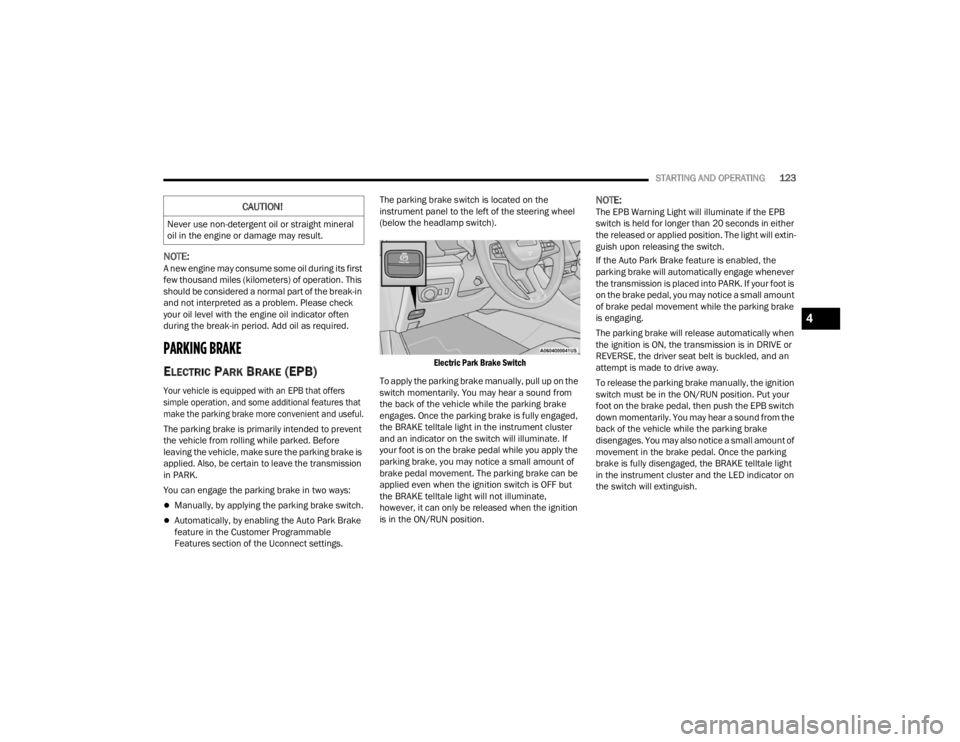
Features section of the Uconnect settings. The parking brake switch is located on the
instrument panel to the left of the steering wheel
(below the headlamp switch).
Electric Park Brake Switch
To apply the parking brake manually, pull up on the
switch momentarily. You may hear a sound from
the back of the vehicle while the parking brake
engages. Once the parking brake is fully engaged,
the BRAKE telltale light in the instrument cluster
and an indicator on the switch will illuminate. If
your foot is on the brake pedal while you apply the
parking brake, you may notice a small amount of
brake pedal movement. The parking brake can be
applied even when the ignition switch is OFF but
the BRAKE telltale light will not illuminate,
however, it can only be released when the ignition
is in the ON/RUN position.
NOTE:The EPB Warning Light will illuminate if the EPB
switch is held for longer than 20 seconds in either
the released or applied position. The light will extin -
guish upon releasing the switch.
If the Auto Park Brake feature is enabled, the
parking brake will automatically engage whenever
the transmission is placed into PARK. If your foot is
on the brake pedal, you may notice a small amount
of brake pedal movement while the parking brake
is engaging.
The parking brake will release automatically when
the ignition is ON, the transmission is in DRIVE or
REVERSE, the driver seat belt is buckled, and an
attempt is made to drive away.
To release the parking brake manually, the ignition
switch must be in the ON/RUN position. Put your
foot on the brake pedal, then push the EPB switch
down momentarily. You may hear a sound from the
back of the vehicle while the parking brake
disengages. You may also notice a small amount of
movement in the brake pedal. Once the parking
brake is fully disengaged, the BRAKE telltale light
in the instrument cluster and the LED indicator on
the switch will extinguish.CAUTION!
Never use non-detergent oil or straight mineral
oil in the engine or damage may result.
4
23_WL_OM_EN_USC_t.book Page 123
Page 203 of 424
STARTING AND OPERATING201
Standing Water
Avoid driving in standing water deeper than
24 inches (61 cm) with air suspension or
21 inches (53 cm) without air suspension, and
reduce speed appropriately to minimize wave
effects. Maximum speed is 5 mph (8 km/h).
Maintenance
After driving through deep water, inspect your
vehicle fluids and lubricants (engine oil,
transmission oil, axle, transfer case) to ensure the
fluids have not been contaminated. Contaminated
fluid (milky, foamy in appearance) should be
flushed/changed as soon as possible to prevent
component damage.
Driving In Snow, Mud And Sand
In heavy snow, when pulling a load, or for
additional control at slower speeds, shift the
transmission to a low gear and shift the transfer
case to 4WD LOW if necessary Ú page 131. Only
shift into a lower gear to maintain forward motion.
Over-revving the engine can spin the wheels and
traction will be lost.
Avoid abrupt downshifts on icy or slippery roads,
because engine braking may cause skidding and
loss of control.
Hill Climbing
NOTE:Before attempting to climb a hill, determine the
conditions at the crest and/or on the other side.
Before climbing a steep hill, shift the transmission
to a lower gear and shift the transfer case to 4WD
LOW. Use FIRST gear and 4WD LOW for very steep
hills.
If you stall or begin to lose forward motion while
climbing a steep hill, allow your vehicle to come to
a stop and immediately apply the brakes. Restart
the engine, and shift into REVERSE (R). Back slowly
down the hill, allowing the compression braking of
the engine to help regulate your speed. If the
brakes are required to control vehicle speed, apply
them lightly and avoid locking or skidding the tires. Remember, never drive diagonally across a hill.
Always drive straight up or down.
If the wheels start to slip as you approach the crest
of a hill, ease off the accelerator and maintain
forward motion by turning the front wheels slowly.
This may provide a fresh “bite” into the surface and
will usually provide traction to complete the climb.
Traction Downhill
When descending mountains or hills, use Hill
Descent Control or Selec-Speed Control to avoid
repeated heavy braking.
If not equipped with Hill Descent Control or
Selec-Speed Control use the following procedure:
Shift the transmission into a low gear, and the
transfer case into 4WD LOW range. Let the vehicle
go slowly down the hill with all four wheels turning
against engine compression drag. This will permit
you to control the vehicle speed and direction.
When descending mountains or hills, repeated
braking can cause brake fade with loss of braking
control. Avoid repeated heavy braking by
downshifting the transmission whenever possible.
WARNING!
If the engine stalls, you lose forward motion, or
cannot make it to the top of a steep hill or grade,
never attempt to turn around. To do so may
result in tipping and rolling the vehicle. Always
back carefully straight down a hill in REVERSE
gear. Never back down a hill in NEUTRAL using
only the brake.
4
23_WL_OM_EN_USC_t.book Page 201
Page 248 of 424
246MULTIMEDIA
VEHICLE DYNAMICS
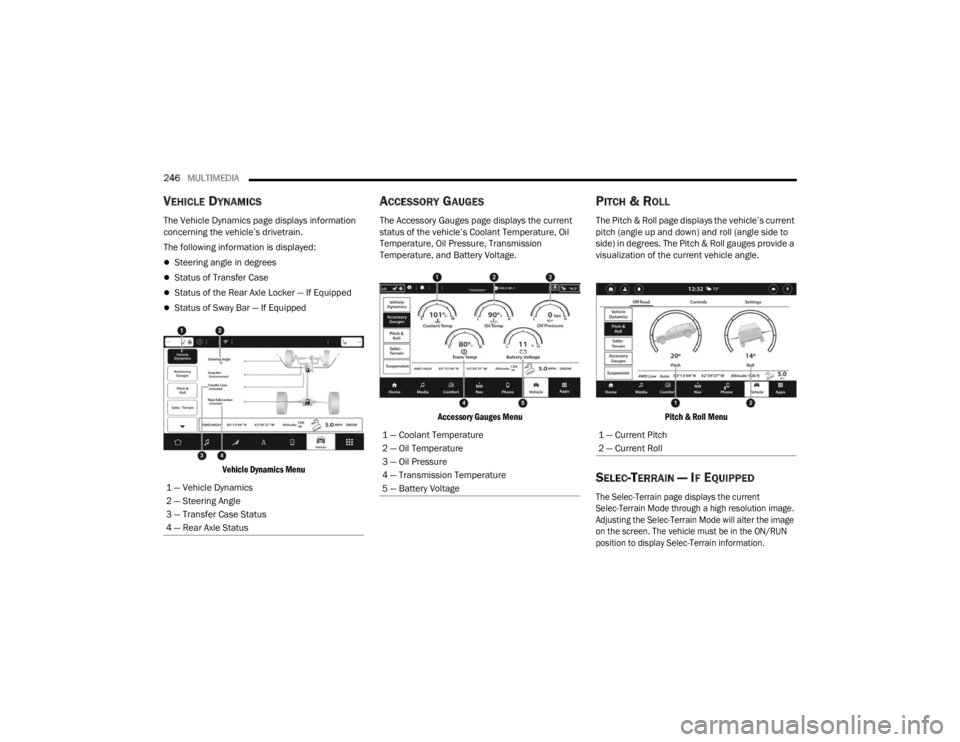
The Vehicle Dynamics page displays information
concerning the vehicle’s drivetrain.
The following information is displayed:
Steering angle in degrees
Status of Transfer Case
Status of the Rear Axle Locker — If Equipped
Status of Sway Bar — If Equipped
Vehicle Dynamics Menu
ACCESSORY GAUGES
The Accessory Gauges page displays the current
status of the vehicle’s Coolant Temperature, Oil
Temperature, Oil Pressure, Transmission
Temperature, and Battery Voltage.
Accessory Gauges Menu
PITCH & ROLL
The Pitch & Roll page displays the vehicle’s current
pitch (angle up and down) and roll (angle side to
side) in degrees. The Pitch & Roll gauges provide a
visualization of the current vehicle angle.
Pitch & Roll Menu
SELEC-TERRAIN — IF EQUIPPED
The Selec-Terrain page displays the current
Selec-Terrain Mode through a high resolution image.
Adjusting the Selec-Terrain Mode will alter the image
on the screen. The vehicle must be in the ON/RUN
position to display Selec-Terrain information.
1 — Vehicle Dynamics
2 — Steering Angle
3 — Transfer Case Status
4 — Rear Axle Status
1 — Coolant Temperature
2 — Oil Temperature
3 — Oil Pressure
4 — Transmission Temperature
5 — Battery Voltage1 — Current Pitch
2 — Current Roll
23_WL_OM_EN_USC_t.book Page 246
Page 307 of 424

SAFETY305
PERIODIC SAFETY CHECKS YOU SHOULD
M
AKE OUTSIDE THE VEHICLE
Tires
Examine tires for excessive tread wear and uneven
wear patterns. Check for stones, nails, glass, or
other objects lodged in the tread or sidewall.
Inspect the tread for cuts and cracks. Inspect
sidewalls for cuts, cracks, and bulges. Check the
lug nut/bolt torque for tightness. Check the tires
(including spare) for proper cold inflation pressure.
Lights
Have someone observe the operation of brake
lights and exterior lights while you work the
controls. Check turn signal and high beam
indicator lights on the instrument panel.
Door Latches
Check for proper closing, latching, and locking.
Fluid Leaks
Check area under the vehicle after overnight
parking for fuel, coolant, oil, or other fluid leaks.
Also, if gasoline fumes are detected or if fuel or
brake fluid leaks are suspected, the cause should
be located and corrected immediately.
EXHAUST GAS
NEVER place any objects under the floor mat
(e.g., towels, keys, etc.). These objects could
change the position of the floor mat and may
cause interference with the accelerator,
brake, or clutch pedals.
If the vehicle carpet has been removed and
re-installed, always properly attach carpet to
the floor and check the floor mat fasteners are
secure to the vehicle carpet. Fully depress
each pedal to check for interference with the
accelerator, brake, or clutch pedals then
re-install the floor mats.
It is recommended to only use mild soap and
water to clean your floor mats. After cleaning,
always check your floor mat has been properly
installed and is secured to your vehicle using
the floor mat fasteners by lightly pulling mat.
WARNING!
WARNING!
Exhaust gases can injure or kill. They contain
carbon monoxide (CO), which is colorless and
odorless. Breathing it can make you
unconscious and can eventually poison you. To
avoid breathing (CO), follow these safety tips:
Do not run the engine in a closed garage or in
confined areas any longer than needed to
move your vehicle in or out of the area.
If you are required to drive with the trunk/lift -
gate/rear doors open, make sure that all
windows are closed and the climate control
BLOWER switch is set at high speed. DO NOT
use the recirculation mode.
If it is necessary to sit in a parked vehicle with
the engine running, adjust your heating or
cooling controls to force outside air into the
vehicle. Set the blower at high speed.
6
23_WL_OM_EN_USC_t.book Page 305
Page 308 of 424

306SAFETY
(Continued)
The best protection against carbon monoxide entry
into the vehicle body is a properly maintained
engine exhaust system.
Whenever a change is noticed in the sound of the
exhaust system, when exhaust fumes can be
detected inside the vehicle, or when the underside
or rear of the vehicle is damaged, have an
authorized dealer inspect the complete exhaust
system and adjacent body areas for broken,
damaged, deteriorated, or mispositioned parts.
Open seams or loose connections could permit
exhaust fumes to seep into the passenger
compartment. In addition, inspect the exhaust
system each time the vehicle is raised for
lubrication or oil change. Replace as required.
CARBON MONOXIDE WARNINGS
WARNING!
Carbon monoxide (CO) in exhaust gases is
deadly. Follow the precautions below to prevent
carbon monoxide poisoning:
Do not inhale exhaust gases. They contain
carbon monoxide, a colorless and odorless
gas, which can kill. Never run the engine in a
closed area, such as a garage, and never sit in
a parked vehicle with the engine running for
an extended period. If the vehicle is stopped in
an open area with the engine running for more
than a short period, adjust the ventilation
system to force fresh, outside air into the
vehicle.
Guard against carbon monoxide with proper
maintenance. Have the exhaust system
inspected every time the vehicle is raised.
Have any abnormal conditions repaired
promptly. Until repaired, drive with all side
windows fully open.
When exiting the vehicle, always make sure
the ignition is in the OFF position, remove the
key fob from the vehicle and lock your vehicle.
WARNING!
23_WL_OM_EN_USC_t.book Page 306
Page 332 of 424
330
SERVICING AND MAINTENANCE
SCHEDULED SERVICING
Your vehicle is equipped with an automatic oil
change indicator system. The oil change indicator
system will remind you that it is time to take your
vehicle in for scheduled maintenance.
Based on engine operation conditions, the oil
change indicator message will illuminate. This
means that service is required for your vehicle.
Operating conditions such as frequent short-trips,
trailer tow, extremely hot or cold ambient
temperatures, and E85 fuel usage will influence
when the “Oil Change Required” message is
displayed. Have your vehicle serviced as soon as
possible, within the next 500 miles (805 km).An authorized dealer will reset the oil change
indicator message after completing the scheduled
oil change.
NOTE:Under no circumstances should oil change
intervals exceed 10,000 miles (16,000 km),
12 months or 350 hours of engine run time,
whichever comes first. The 350 hours of engine
run or idle time is generally only a concern for fleet
customers.
Once A Month Or Before A Long Trip:
Check engine oil level.
Check windshield washer fluid level.
Check the tire inflation pressures and look for
unusual wear or damage.
Check the fluid levels of the coolant reservoir,
brake master cylinder and fill as needed.
Check function of all interior and exterior lights.
23_WL_OM_EN_USC_t.book Page 330