Track JEEP GRAND CHEROKEE 2023 User Guide
[x] Cancel search | Manufacturer: JEEP, Model Year: 2023, Model line: GRAND CHEROKEE, Model: JEEP GRAND CHEROKEE 2023Pages: 424, PDF Size: 15.48 MB
Page 233 of 424
MULTIMEDIA231
To change the media source, press the Source
button and then press on the desired source. The
available sources are:
Live Radio (FM, AM, SXM)
Bluetooth®
USB 1
USB 2
AUX
AV 1 — If Equipped
AV 2 — If Equipped
Rear Screen 1 Listen In — If Equipped
Rear Screen 2 Listen In — If Equipped
NOTE:
Audio devices connected via Bluetooth® must
be done through the Device Manager in the
radio. For more information on pairing a device,
refer to your Uconnect Radio Instruction
Manual.
If the driver is listening to “Live Radio”, the
option will not be available in the Passenger
Screen. Select “Now Playing On Radio” to listen
to the currently playing station. If the driver
selects a radio station while the Passenger
Screen is playing live radio content, the feed will
end on the Passenger Screen and control will be
given to the Uconnect system. On the Preset menu, you will be able to listen to
saved radio presets. Press the desired preset to
begin listening.
The Browse tab will let you browse through
different radio stations or audio saved onto a USB
or audio device. Press “Browse” and select from
the different folders. You can scroll up and down to
view the options within those folders. Press on the
desired radio station or audio track to begin
playing it.
When the USB source is selected, you can chose a
video file to play if saved to a USB device. Press
“Browse” and locate the folder with the video file.
Press the video file name, and it will begin to play
on the Passenger Screen.
NOTE:Not all video files will be supported from a USB.
Certain video files may require digital rights to view
or play. These may be unavailable for playback on
the Passenger Screen.
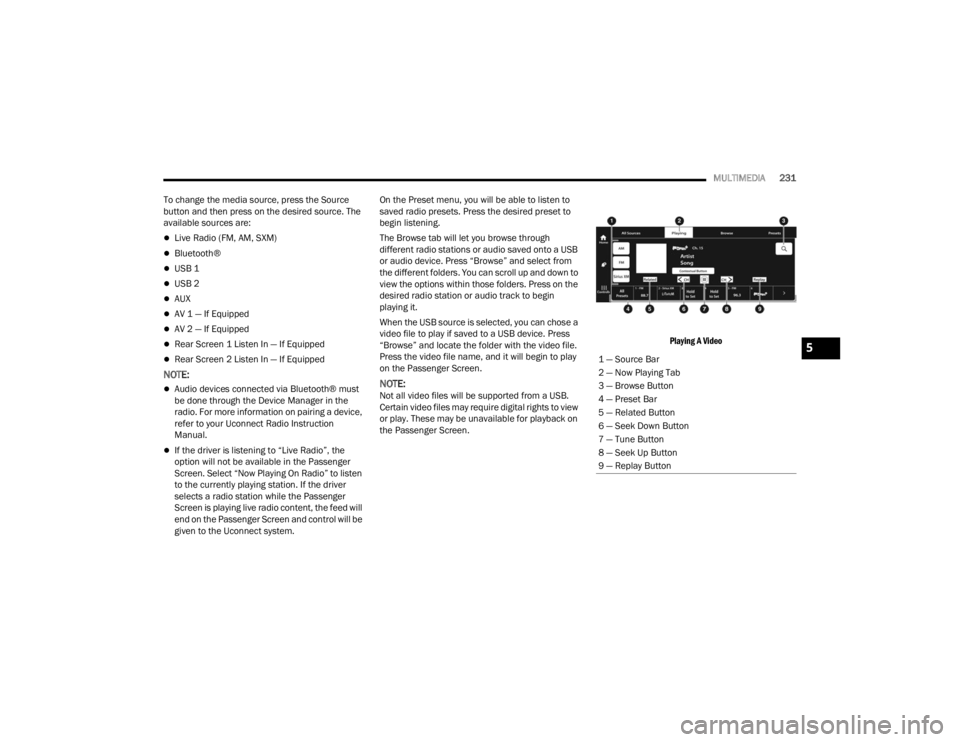
Playing A Video
1 — Source Bar
2 — Now Playing Tab
3 — Browse Button
4 — Preset Bar
5 — Related Button
6 — Seek Down Button
7 — Tune Button
8 — Seek Up Button
9 — Replay Button
5
23_WL_OM_EN_USC_t.book Page 231
Page 236 of 424

234MULTIMEDIA
NOTE:To change the source within the app, press the
source name. Pressing this will open a menu with
all available sources. To change the audio source
outside of the app, press the Media button, and
then press the Sources button.
To exit the app, press any of the buttons on the
Bottom Menu Bar. Day/Night Mode
Press the Menu button in the upper left-hand
corner to access McIntosh settings. Tap on a Mode
to set it as the default, or tap “Auto Mode” to
enable your screen to automatically switch
between Day and Night Modes.
Theater Mode
Press the Menu button in the upper left-hand
corner to access McIntosh settings. Under the
Theater Mode section, select “On” to bring forward
the McIntosh meters. This will enlarge the meters
for a more prominent view.
NOTE:Theater Mode will engage after 10 seconds
without input from the user.
For more information on McIntosh, the McIntosh
app and its functionality, please visit
https://
www.mcintoshlabs.com.
REAR SEAT ENTERTAINMENT (RSE) WITH
AMAZON FIRE TV BUILT-IN — IF EQUIPPED
OVERVIEW
Rear Seat Entertainment with Fire TV built-in is
designed to give your family years of enjoyment.
Fire TV lets passengers enjoy a wide variety of
content from popular apps (subscriptions may be
required). Stream videos, play games, listen to
Skip Backward
Press to skip
backward. Press and
hold to fast rewind.
Play/Pause Press to play/pause
the track.
Skip Forward Press to skip forward.
Press and hold to fast
forward.
Repeat Press to repeat track.
Press again to repeat
playlist. Press again to
turn off (works only
with a USB device).
Change Channel Down Press to change
channel down. Press
and hold to seek
channel down. While
using AM/FM, pressing
the channel down will
change the frequency
by 0.1. Pressing and
holding in AM/FM will
seek channels.
Change Channel UpPress to change
channel up. Press and
hold to seek channel
up. While using AM/
FM, pressing the
channel up will change
the frequency by 0.1.
Pressing and holding in
AM/FM will seek
channels.
Menu Press to access
McIntosh settings.
About Press to learn more
about McIntosh.
Audio Press to open the
audio settings page of
the Uconnect media
player.
23_WL_OM_EN_USC_t.book Page 234
Page 241 of 424
MULTIMEDIA239
VOICE REMOTE WITH ALEXA
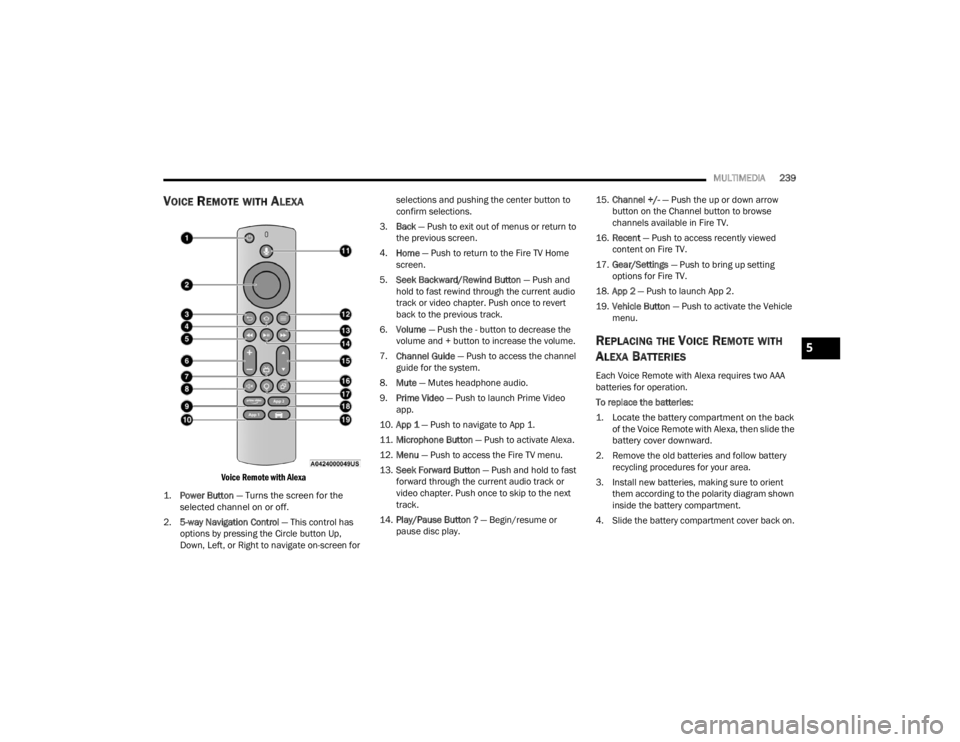
Voice Remote with Alexa
1.
Power Button
— Turns the screen for the
selected channel on or off.
2. 5-way Navigation Control — This control has
options by pressing the Circle button Up,
Down, Left, or Right to navigate on-screen for selections and pushing the center button to
confirm selections.
3. Back — Push to exit out of menus or return to
the previous screen.
4. Home — Push to return to the Fire TV Home
screen.
5. Seek Backward/Rewind Button — Push and
hold to fast rewind through the current audio
track or video chapter. Push once to revert
back to the previous track.
6. Volume — Push the - button to decrease the
volume and + button to increase the volume.
7. Channel Guide — Push to access the channel
guide for the system.
8. Mute — Mutes headphone audio.
9. Prime Video — Push to launch Prime Video
app.
10. App 1 — Push to navigate to App 1.
11. Microphone Button — Push to activate Alexa.
12. Menu — Push to access the Fire TV menu.
13. Seek Forward Button — Push and hold to fast
forward through the current audio track or
video chapter. Push once to skip to the next
track.
14. Play/Pause Button ? — Begin/resume or
pause disc play. 15.
Channel +/- — Push the up or down arrow
button on the Channel button to browse
channels available in Fire TV.
16. Recent — Push to access recently viewed
content on Fire TV.
17. Gear/Settings — Push to bring up setting
options for Fire TV.
18. App 2 — Push to launch App 2.
19. Vehicle Button — Push to activate the Vehicle
menu.
REPLACING THE VOICE REMOTE WITH
A
LEXA BATTERIES
Each Voice Remote with Alexa requires two AAA
batteries for operation.
To replace the batteries:
1. Locate the battery compartment on the back
of the Voice Remote with Alexa, then slide the
battery cover downward.
2. Remove the old batteries and follow battery recycling procedures for your area.
3. Install new batteries, making sure to orient them according to the polarity diagram shown
inside the battery compartment.
4. Slide the battery compartment cover back on.
5
23_WL_OM_EN_USC_t.book Page 239
Page 250 of 424
248 (Continued)
SAFETY
SAFETY FEATURES
ANTI-LOCK BRAKE SYSTEM (ABS)
The ABS provides increased vehicle stability and
brake performance under most braking conditions.
The system automatically prevents wheel lock and
enhances vehicle control during braking.
The ABS performs a self-check cycle to ensure that
the ABS is working properly each time the vehicle
is started and driven. During this self-check, you
may hear a slight clicking sound as well as some
related motor noises.
The ABS is activated during braking when the
system detects one or more wheels are beginning
to lock. Road conditions such as ice, snow, gravel,
bumps, railroad tracks, loose debris, or panic stops
may increase the likelihood of ABS activation(s).
You also may experience the following normal
characteristics when the ABS activates:
ABS motor noise or clicking sounds (you may
continue to hear for a short time after the stop)
Brake pedal pulsations
A slight drop of the brake pedal at the end of the
stopThe ABS is designed to function with the Original
Equipment Manufacturer (OEM) tires. Modification
may result in degraded ABS performance.
Anti-Lock Brake System (ABS) Warning
Light
The yellow ABS Warning Light will turn on when the
ignition is placed in the ON/RUN mode and may
stay on for as long as four seconds.
If the ABS Warning Light remains on or comes on
while driving, it indicates that the anti-lock portion
of the brake system is not functioning and that
service is required. However, the conventional
brake system will continue to operate normally if
the ABS Warning Light is on.
WARNING!
The ABS contains sophisticated electronic
equipment that may be susceptible to interfer
-
ence caused by improperly installed or high
output radio transmitting equipment. This
interference can cause possible loss of
anti-lock braking capability. Installation of
such equipment should be performed by qual -
ified professionals.
Pumping of the Anti-Lock Brakes will diminish
their effectiveness and may lead to a collision.
Pumping makes the stopping distance longer.
Just press firmly on your brake pedal when you
need to slow down or stop.
The ABS cannot prevent the natural laws of
physics from acting on the vehicle, nor can it
increase braking or steering efficiency beyond
that afforded by the condition of the vehicle
brakes and tires or the traction afforded.
The ABS cannot prevent collisions, including
those resulting from excessive speed in turns,
following another vehicle too closely, or hydro -
planing.
The capabilities of an ABS equipped vehicle
must never be exploited in a reckless or
dangerous manner that could jeopardize the
user’s safety or the safety of others.
WARNING!
23_WL_OM_EN_USC_t.book Page 248
Page 279 of 424
SAFETY277
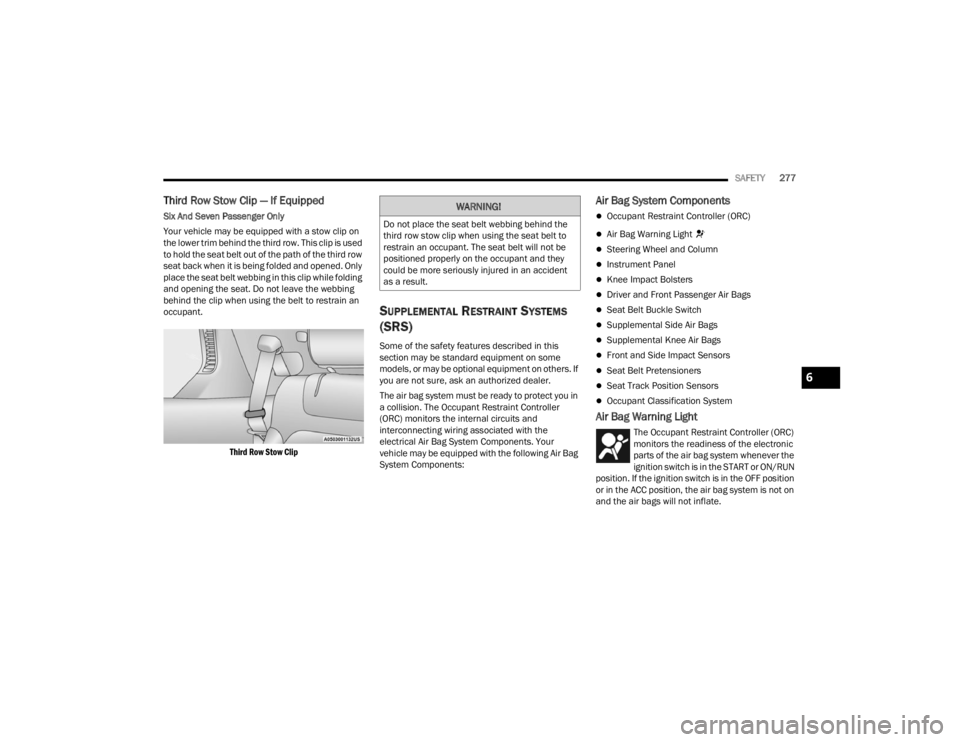
Third Row Stow Clip — If Equipped
Six And Seven Passenger Only
Your vehicle may be equipped with a stow clip on
the lower trim behind the third row. This clip is used
to hold the seat belt out of the path of the third row
seat back when it is being folded and opened. Only
place the seat belt webbing in this clip while folding
and opening the seat. Do not leave the webbing
behind the clip when using the belt to restrain an
occupant.
Third Row Stow Clip
SUPPLEMENTAL RESTRAINT SYSTEMS
(SRS)
Some of the safety features described in this
section may be standard equipment on some
models, or may be optional equipment on others. If
you are not sure, ask an authorized dealer.
The air bag system must be ready to protect you in
a collision. The Occupant Restraint Controller
(ORC) monitors the internal circuits and
interconnecting wiring associated with the
electrical Air Bag System Components. Your
vehicle may be equipped with the following Air Bag
System Components:
Air Bag System Components
Occupant Restraint Controller (ORC)
Air Bag Warning Light
Steering Wheel and Column
Instrument Panel
Knee Impact Bolsters
Driver and Front Passenger Air Bags
Seat Belt Buckle Switch
Supplemental Side Air Bags
Supplemental Knee Air Bags
Front and Side Impact Sensors
Seat Belt Pretensioners
Seat Track Position Sensors
Occupant Classification System
Air Bag Warning Light
The Occupant Restraint Controller (ORC)
monitors the readiness of the electronic
parts of the air bag system whenever the
ignition switch is in the START or ON/RUN
position. If the ignition switch is in the OFF position
or in the ACC position, the air bag system is not on
and the air bags will not inflate.
WARNING!
Do not place the seat belt webbing behind the
third row stow clip when using the seat belt to
restrain an occupant. The seat belt will not be
positioned properly on the occupant and they
could be more seriously injured in an accident
as a result.
6
23_WL_OM_EN_USC_t.book Page 277
Page 281 of 424

SAFETY279
(Continued)
Driver And Passenger Front Air Bag
Features
The Advanced Front Air Bag system has multistage
driver and front passenger air bags. This system
provides output appropriate to the severity and
type of collision as determined by the Occupant
Restraint Controller (ORC), which may receive
information from the front impact sensors (if
equipped) or other system components. The first stage inflator is triggered immediately
during an impact that requires air bag deployment.
A low energy output is used in less severe
collisions. A higher energy output is used for more
severe collisions.
This vehicle may be equipped with a driver and/or
front passenger seat belt buckle switch that
detects whether the driver or front passenger seat
belt is buckled. The seat belt buckle switch may
adjust the inflation rate of the Advanced Front Air
Bags.
This vehicle may be equipped with driver and/or
front passenger seat track position sensors that
may adjust the inflation rate of the Advanced Front
Air Bags based upon seat position.
This vehicle is equipped with a right front
passenger Occupant Classification System (“OCS”)
that is designed to provide Passenger Advanced
Front Air Bag output appropriate to the occupant’s
seated weight input, as determined by the OCS.
Front Air Bag Operation
Front Air Bags are designed to provide additional
protection by supplementing the seat belts. Front
air bags are not expected to reduce the risk of
injury in rear, side, or rollover collisions. The front
air bags will not deploy in all frontal collisions,
including some that may produce substantial
vehicle damage — for example, some pole
collisions, truck underrides, and angle offset
collisions.
WARNING!
Being too close to the steering wheel or instru
-
ment panel during front air bag deployment
could cause serious injury, including death. Air
bags need room to inflate. Sit back, comfort -
ably extending your arms to reach the steering
wheel or instrument panel.
Never place a rear-facing child restraint in
front of an air bag. A deploying passenger
front air bag can cause death or serious injury
to a child 12 years or younger, including a
child in a rear-facing child restraint.
Never install a rear-facing child restraint in the
front seat of a vehicle. Only use a rear-facing
child restraint in the rear seat. If the vehicle
does not have a rear seat, do not transport a
rear-facing child restraint in that vehicle.
WARNING!
No objects should be placed over or near the
air bag on the instrument panel or steering
wheel because any such objects could cause
harm if the vehicle is in a collision severe
enough to cause the air bag to inflate.
Do not put anything on or around the air bag
covers or attempt to open them manually. You
may damage the air bags and you could be
injured because the air bags may no longer be
functional. The protective covers for the air
bag cushions are designed to open only when
the air bags are inflating.
Relying on the air bags alone could lead to
more severe injuries in a collision. The air
bags work with your seat belt to restrain you
properly. In some collisions, air bags won’t
deploy at all. Always wear your seat belts even
though you have air bags.
WARNING!
6
23_WL_OM_EN_USC_t.book Page 279
Page 288 of 424
286SAFETY
NOTE:Air bag covers may not be obvious in the interior
trim, but they will open during air bag deployment.
Rollover Events
Side Air Bags and seat belt pretensioners are
designed to activate in certain rollover events. The
Occupant Restraint Controller (ORC) determines
whether deployment in a particular rollover event
is appropriate, based on the severity and type of
collision. Vehicle damage by itself is not a good
indicator of whether or not Side Air Bags and seat
belt pretensioners should have deployed. The Side Air Bags and seat belt pretensioners will
not deploy in all rollover events. The rollover
sensing system determines if a rollover event may
be in progress and whether deployment is
appropriate. In the event the vehicle experiences a
rollover or near rollover event, and deployment is
appropriate, the rollover sensing system will deploy
the side air bags and seat belt pretensioners on
both sides of the vehicle.
The SABICs may help reduce the risk of partial or
complete ejection of vehicle occupants through
side windows in certain rollover or side impact
events.
Air Bag System Components
NOTE:The Occupant Restraint Controller (ORC) monitors
the internal circuits and interconnecting wiring
associated with electrical Air Bag System Compo
-
nents listed below:
Occupant Restraint Controller (ORC)
Air Bag Warning Light
Steering Wheel and Column
Instrument Panel
Knee Impact Bolsters
Driver and Front Passenger Air Bags
Seat Belt Buckle Switch
Supplemental Side Air Bags
Supplemental Knee Air Bags
Front and Side Impact Sensors
Seat Belt Pretensioners
Seat Track Position Sensors
Occupant Classification System
If A Deployment Occurs
The front air bags are designed to deflate
immediately after deployment.
NOTE:Front and/or side air bags will not deploy in all colli -
sions. This does not mean something is wrong with
the air bag system.
If you do have a collision which deploys the air
bags, any or all of the following may occur:
The air bag material may sometimes cause
abrasions and/or skin reddening to the occu -
pants as the air bags deploy and unfold. The
abrasions are similar to friction rope burns or
those you might get sliding along a carpet or
gymnasium floor. They are not caused by
contact with chemicals. They are not permanent
and normally heal quickly. However, if you
haven’t healed significantly within a few days, or
if you have any blistering, see your doctor imme -
diately.
WARNING!
Side Air Bags need room to inflate. Do not lean
against the door or window. Sit upright in the
center of the seat.
Being too close to the Side Air Bags during
deployment could cause you to be severely
injured or killed.
Relying on the Side Air Bags alone could lead
to more severe injuries in a collision. The Side
Air Bags work with your seat belt to restrain
you properly. In some collisions, Side Air Bags
won’t deploy at all. Always wear your seat belt
even though you have Side Air Bags.
23_WL_OM_EN_USC_t.book Page 286
Page 345 of 424

SERVICING AND MAINTENANCE343
Belt broken (identify and correct problem before
new belt is installed)
Noise (objectionable squeal, squeak, or rumble
is heard or felt while drive belt is in operation)
Some conditions can be caused by a faulty
component such as a belt pulley. Belt pulleys
should be carefully inspected for damage and
proper alignment.
Belt replacement on some models requires the
use of special tools, we recommend having your
vehicle serviced at an authorized dealer.
BODY LUBRICATION
Locks and all body pivot points, including such
items as seat tracks, door hinge pivot points and
rollers, liftgate, tailgate, decklid, sliding doors and
hood hinges, should be lubricated periodically with
a lithium-based grease, such as Mopar® Spray
White Lube to ensure quiet, easy operation and to
protect against rust and wear. Prior to the
application of any lubricant, the parts concerned
should be wiped clean to remove dust and grit;
after lubricating excess oil and grease should be
removed. Particular attention should also be given
to hood latching components to ensure proper
function. When performing other underhood
services, the hood latch, release mechanism and
safety catch should be cleaned and lubricated. The external lock cylinders should be lubricated
twice a year, preferably in the Autumn and Spring.
Apply a small amount of a high quality lubricant,
such as Mopar® Lock Cylinder Lubricant directly
into the lock cylinder.
WINDSHIELD WIPER BLADES
Clean the rubber edges of the wiper blades and the
windshield periodically with a sponge or soft cloth
and a mild nonabrasive cleaner. This will remove
accumulations of salt or road film.
Operation of the wipers on dry glass for long
periods may cause deterioration of the wiper
blades. Always use washer fluid when using the
wipers to remove salt or dirt from a dry windshield.
Avoid using the wiper blades to remove frost or ice
from the windshield. Keep the blade rubber out of
contact with petroleum products such as engine
oil, gasoline, etc.
NOTE:Life expectancy of wiper blades varies depending
on geographical area and frequency of use. Poor
performance of blades may be present with chat
-
tering, marks, water lines or wet spots. If any of
these conditions are present, clean the wiper
blades or replace as necessary. The wiper blades and wiper arms should be
inspected periodically, not just when wiper
performance problems are experienced. This
inspection should include the following points:
Wear or uneven edges
Foreign material
Hardening or cracking
Deformation or fatigue
If a wiper blade or wiper arm is damaged, replace
the affected wiper arm or blade with a new unit. Do
not attempt to repair a wiper arm or blade that is
damaged.
Front Wiper Blade Removal/Installation
CAUTION!
Do not allow the wiper arm to spring back
against the glass without the wiper blade in
place or the glass may be damaged.
8
23_WL_OM_EN_USC_t.book Page 343