alert JEEP GRAND CHEROKEE 2023 User Guide
[x] Cancel search | Manufacturer: JEEP, Model Year: 2023, Model line: GRAND CHEROKEE, Model: JEEP GRAND CHEROKEE 2023Pages: 424, PDF Size: 15.48 MB
Page 119 of 424
GETTING TO KNOW YOUR INSTRUMENT PANEL117
Selec-Speed Control Indicator Light —
If Equipped
This light will turn on when Selec-Speed
Control is activated.
To activate Selec-Speed Control, assure
the vehicle is 4WD Low and push the button on the
Instrument Panel Ú page 134.
NOTE:If the vehicle is not in 4WD Low, “To Enter
Selec-Speed Shift to 4WD Low” will appear in the
instrument cluster display.
BLUE INDICATOR LIGHTS
High Beam Indicator Light
This indicator light will illuminate to
indicate that the high beam headlights
are on. With the low beams activated,
push the multifunction lever forward
(toward the front of the vehicle) to turn on the high
beams. Pull the multifunction lever rearward
(toward the rear of the vehicle) to turn off the high
beams. If the high beams are off, pull the lever
toward you for a temporary high beam on, “flash to
pass” scenario.
GRAY INDICATOR LIGHTS
Night Vision Suppressed Indicator Light —
If Equipped
This light alerts the driver that the Night
Vision Warning System status is
Suppressed Ú page 177.
ONBOARD DIAGNOSTIC SYSTEM — OBD II
Your vehicle is equipped with a sophisticated
Onboard Diagnostic system called OBD II. This
system monitors the performance of the
emissions, engine, and transmission control
systems. When these systems are operating
properly, your vehicle will provide excellent
performance and fuel economy, as well as engine
emissions well within current government
regulations.
If any of these systems require service, the OBD II
system will turn on the Malfunction Indicator Light
(MIL). It will also store diagnostic codes and other
information to assist your service technician in
making repairs. Although your vehicle will usually
be driveable and not need towing, see an
authorized dealer for service as soon as possible.
ONBOARD DIAGNOSTIC SYSTEM
(OBD II) C
YBERSECURITY
Your vehicle is required to have OBD II and a
connection port to allow access to information
related to the performance of your emissions
controls. Authorized service technicians may need
to access this information to assist with the
diagnosis and service of your vehicle and
emissions system Ú page 203.
CAUTION!
Prolonged driving with the MIL on could cause
further damage to the emission control
system. It could also affect fuel economy and
driveability. The vehicle must be serviced
before any emissions tests can be performed.
If the MIL is flashing while the vehicle is
running, severe catalytic converter damage
and power loss will soon occur. Immediate
service is required.3
23_WL_OM_EN_USC_t.book Page 117
Page 149 of 424

STARTING AND OPERATING147
To decrease the distance setting, push the
Distance Decrease button and release. Each time
the button is pushed, the distance setting
decreases by one bar (shorter).
If there is no vehicle ahead, the vehicle will
maintain the set speed. If a slower moving vehicle
is detected in the same lane, the instrument
cluster display will show the ACC Set With Target
Detected Indicator Light, and the system will adjust
the vehicle speed automatically to maintain the
distance setting, regardless of the set speed.
The vehicle will then maintain the set distance
until:
The vehicle ahead accelerates to a speed above
the set speed.
The vehicle ahead moves out of your lane or
view of the sensor.
The distance setting is changed.
The system disengages Ú page 144.
The maximum braking applied by ACC is limited;
however, the driver can always apply the brakes
manually, if necessary.
NOTE:The brake lights will illuminate whenever the ACC
system applies the brakes. A Proximity Warning will alert the driver if ACC
predicts that its maximum braking level is not
sufficient to maintain the set distance. If this
occurs, a visual alert “BRAKE!” will flash in the
instrument cluster display and a chime will sound
while ACC continues to apply its maximum braking
capacity.
NOTE:The “BRAKE!” screen in the instrument cluster
display is a warning for the driver to take action
and does not necessarily mean that the Forward
Collision Warning system is applying the brakes
autonomously.
Overtake Aid
When driving with Adaptive Cruise Control (ACC)
engaged and following a vehicle, the system will
provide an additional acceleration up to the ACC
set speed to assist in passing the vehicle. This
additional acceleration is triggered when the driver
utilizes the left turn signal and will only be active
when passing on the left hand side.
ACC Operation At Stop
If the ACC system brings your vehicle to a standstill
while following a vehicle ahead, your vehicle will
resume motion, without any driver interaction, if
the vehicle ahead starts moving within two
seconds of your vehicle coming to a standstill.If the vehicle in front does not start moving within
two seconds of your vehicle coming to a standstill,
the driver will either have to push the RES (resume)
button, or apply the accelerator pedal to reengage
the ACC to the existing set speed.
NOTE:
If your vehicle is at a standstill for longer than
two seconds, the system will hold brake pres
-
sure for up to 10 minutes. If no driver action is
taken after the 10 minutes, the Electric Park
Brake will be applied and the ACC system will
cancel.
While ACC is holding your vehicle at a standstill
(or the vehicle is traveling below 3 mph
(5 km/h), and the driver seat belt is unbuckled
or the driver door is opened, the Electric Park
Brake will be applied and the ACC system will
cancel.
WARNING!
When the ACC system is resumed, the driver
must ensure that there are no pedestrians,
vehicles or objects in the path of the vehicle.
Failure to follow these warnings can result in a
collision and death or serious personal injury.
4
23_WL_OM_EN_USC_t.book Page 147
Page 151 of 424

STARTING AND OPERATING149
When the condition that created limited
functionality is no longer present, the system will
return to full functionality.
NOTE:If the “ACC Limited Functionality Clean Front Wind -
shield” message occurs frequently (e.g. more than
once on every trip) without any snow, rain, mud, or
other obstruction, have the windshield and forward
facing camera inspected at an authorized dealer.
SERVICE ACC WARNING
If the system turns off, and the instrument cluster
display reads “ACC Unavailable Service Required”
or “Cruise Unavailable Service Required”, there
may be an internal system fault or a temporary
malfunction that limits ACC functionality. Although
the vehicle is still drivable under normal
conditions, ACC will be temporarily unavailable. If
this occurs, try activating ACC again later, following
an ignition cycle. If the problem persists, see an
authorized dealer.
Precautions While Driving With ACC
In certain driving situations, ACC may have
detection issues. In these cases, ACC may brake
late or unexpectedly. The driver needs to stay alert
and may need to intervene. The following are
examples of these types of situations:
TOWING A TRAILER
Towing a trailer is not recommended when using
ACC.
OFFSET DRIVING
ACC may not detect a vehicle in the same lane that
is offset from your direct line of travel, or a vehicle
merging in from a side lane. There may not be
sufficient distance to the vehicle ahead. The offset
vehicle may move in and out of the line of travel,
which can cause your vehicle to brake or
accelerate unexpectedly.
Offset Driving Condition Example
TURNS AND BENDS
When driving on a curve with ACC engaged, the
system may increase or decrease the vehicle
speed for stability, with no vehicle ahead detected.
Once the vehicle is out of the curve, the system will
resume your original set speed. This is a part of
normal ACC system functionality.
NOTE:On tight turns ACC performance may be limited.
4
23_WL_OM_EN_USC_t.book Page 149
Page 153 of 424

STARTING AND OPERATING151
TRAFFIC SIGN ASSIST SYSTEM —
IF EQUIPPED
The Traffic Sign Assist (TSA) system uses a camera
mounted on the windshield, as well as map data
when the vehicle is equipped with Navigation, to
detect recognizable road signs such as:
Speed limits
School zones
No passing zones
NOTE:
The TSA system will automatically display the
detected road sign using the unit of measure-
ment (mph or km/h) selected within the instru -
ment cluster display.
If no speed limit signs are detected, the system
will revert to the speed limit signs that are
stored in the Navigation system.
The system always checks the traffic signs indi -
cating the current speed limit. The system is
able to recognize and display up to two different
road signs in the instrument cluster display.
These road signs can be found on the Driver
Assist page.
ACTIVATION/DEACTIVATION
The TSA System can be enabled/disabled within
the Uconnect system through the Safety/Driver
Assistance menu. System ON is signaled by road
signs shown on the instrument cluster display.
NOTE:Even if the system is OFF, the speed limit sign will
be displayed when the driver selects it on the
HOME screen.
TRAFFIC SIGN ASSIST MODES
TSA has three selectable modes of operation that
are available through the Uconnect system
Ú page 204.
Visual
When Visual is selected, the system will alert the
driver when the current speed of the vehicle
exceeds the detected speed limit by showing a
graphic in the instrument cluster display. Visual + Chime
When Visual + Chime is selected, the system will
alert the driver when the current speed of the
vehicle exceeds the detected speed limit by
showing a graphic in the instrument cluster
display, and by sounding an audible alert. The
audible alert will last for 10 seconds, and the
visual alert will remain on as long as the vehicle is
exceeding the speed limit.
TSA Off
When the TSA system is turned off, the system will
not show any traffic signs (unless selected in the
HOME screen, which will show detected speed
limit signs), and no alerts will be issued to the
driver.
INDICATIONS ON THE DISPLAY
Detected traffic signs are shown in the instrument
cluster display, and can display any combination of
signs at one time (e.g. speed limit, speed limit and
supplemental info, and “Do Not Pass” signs)
depending on what information is available.
When a newly detected speed limit is higher than
the current speed limit, the display will update
along with an up arrow.
4
23_WL_OM_EN_USC_t.book Page 151
Page 154 of 424
152STARTING AND OPERATING
(Continued)
When a newly detected speed limit is lower than
the current speed limit, the display will update
along with a down arrow.
NOTE:Up or down arrows will be displayed for up to five
seconds.
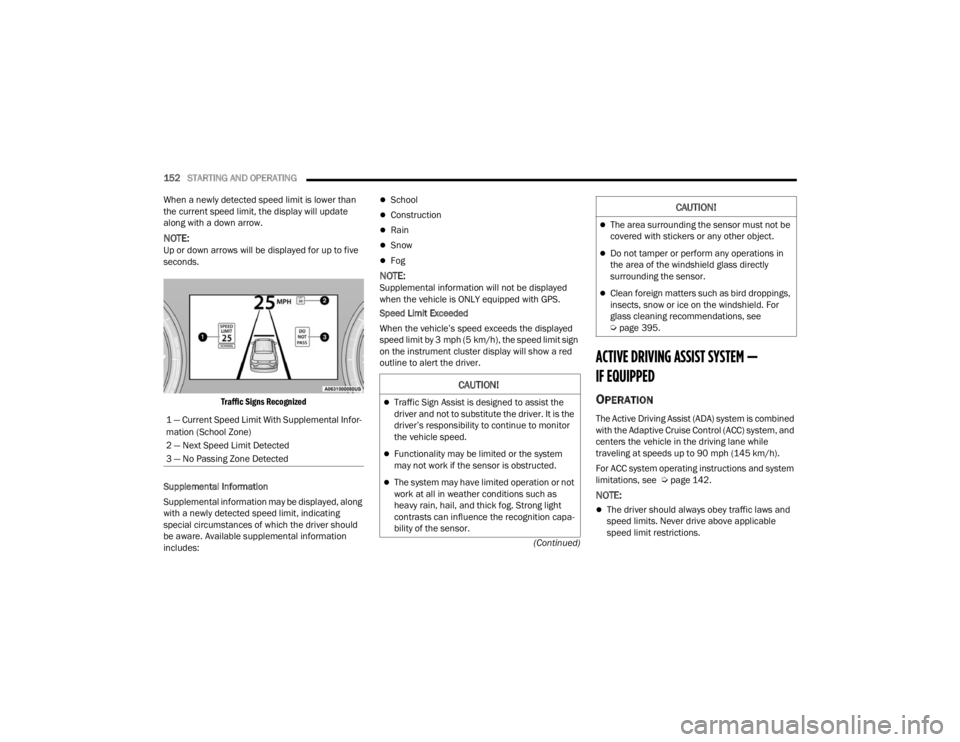
Traffic Signs Recognized
Supplemental Information
Supplemental information may be displayed, along
with a newly detected speed limit, indicating
special circumstances of which the driver should
be aware. Available supplemental information
includes:
School
Construction
Rain
Snow
Fog
NOTE:Supplemental information will not be displayed
when the vehicle is ONLY equipped with GPS.
Speed Limit Exceeded
When the vehicle’s speed exceeds the displayed
speed limit by 3 mph (5 km/h), the speed limit sign
on the instrument cluster display will show a red
outline to alert the driver.
ACTIVE DRIVING ASSIST SYSTEM —
IF EQUIPPED
OPERATION
The Active Driving Assist (ADA) system is combined
with the Adaptive Cruise Control (ACC) system, and
centers the vehicle in the driving lane while
traveling at speeds up to 90 mph (145 km/h).
For ACC system operating instructions and system
limitations, see Ú page 142.
NOTE:
The driver should always obey traffic laws and
speed limits. Never drive above applicable
speed limit restrictions.
1 — Current Speed Limit With Supplemental Infor
-
mation (School Zone)
2 — Next Speed Limit Detected
3 — No Passing Zone Detected
CAUTION!
Traffic Sign Assist is designed to assist the
driver and not to substitute the driver. It is the
driver’s responsibility to continue to monitor
the vehicle speed.
Functionality may be limited or the system
may not work if the sensor is obstructed.
The system may have limited operation or not
work at all in weather conditions such as
heavy rain, hail, and thick fog. Strong light
contrasts can influence the recognition capa -
bility of the sensor.
The area surrounding the sensor must not be
covered with stickers or any other object.
Do not tamper or perform any operations in
the area of the windshield glass directly
surrounding the sensor.
Clean foreign matters such as bird droppings,
insects, snow or ice on the windshield. For
glass cleaning recommendations, see
Ú page 395.
CAUTION!
23_WL_OM_EN_USC_t.book Page 152
Page 160 of 424

158STARTING AND OPERATING
(Continued)
Hands-Free Active Driving Assist System
Two haptic brake jerk warnings will be issued
(red warning light is being issued).
A seat vibration warning will occur (red warning
light is being issued).
The driver can take control of the vehicle at
anytime to override the warnings by pressing the
gas or brake pedal, moving the steering wheel, and
being attentive to the road.
SYSTEM OPERATION/LIMITATIONS
The Base Active Driving Assist and Hands-Free
Active Driving Assist systems DO NOT:
Warn or prevent collisions with other vehicles
Steer your vehicle around stopped vehicles,
slower vehicles, construction zones or equip -
ment, pedestrians, or animals
Respond to traffic lights or stop signs
Merge onto highways or exit off ramps
Change lanes (exception: Hands-Free, only
when initiated by the driver)
React to cross traffic
NOTE:Adaptive Cruise Control (ACC) is a core component
of ADA. For ACC system limitations Ú page 142.
The Active Driving Assist system may have limited
or reduced functionality when one of the following
conditions occur:
The vehicle’s radar sensors and/or forward
facing camera is damaged, covered,
misaligned, or obstructed (e.g. by mud, ice,
snow, etc.)
WARNING!
Active Driving Assist is an SAE Level 2 Driver
Assist feature, requiring driver attention at all
times. To prevent serious injury or death:
Always remember that the Active Driving
Assist system is a convenience system that
cannot accurately detect all situations.
Complete attention is always required while
driving, even when using the Active Driving
Assist system.
Always remain alert and be ready to take
control of the vehicle in the event that the
Active Driving Assist system deactivates, or
otherwise lacks full functionality as described
further before and after this statement.
Always keep your hands on the steering wheel
when the Base Active Driving Assist system is
activated.
Always keep your eyes on the road when the
Hands-Free Active Driving Assist system is
activated.
Maintain a safe distance from other vehicles
and pay attention to traffic conditions.
Do not use a hand held device when either
Base, or Hands-Free Active Driving Assist
system is engaged.
Always pay attention to the road when the
Hands-Free Active Driving Assist system is
engaged. The Active Driving Assist system will
not steer to avoid safety hazards, construction
zones, objects, or road impediments. You
need to take control to steer and brake the
vehicle in such situations, and when merging
into traffic, exiting the highway, making a turn
for crossing traffic, or stopping for traffic
control devices.
Do not place any objects on the steering wheel
(e.g. steering wheel covers) which could inter -
fere with the hand detection sensors.
WARNING!
23_WL_OM_EN_USC_t.book Page 158
Page 164 of 424

162STARTING AND OPERATING
The vehicle is close to the obstacle when the instrument cluster display shows one flashing arc and sounds a continuous tone. The following chart shows the
warning alert operation when the system is detecting an obstacle:
NOTE:ParkSense will reduce the volume of the radio, if on, when the system is sounding an audio tone.
WARNING ALERTS FOR REAR
Rear Distance (inches/cm) Greater than
79 inches(200 cm) 79-59 inches
(200-150 cm) 59-47 inches
(150-120 cm) 47-39 inches
(120-100 cm) 39-25 inches
(100-65 cm) 25-12 inches
(65-30 cm) Less than
12 inches (30 cm)
Audible Alert Chime NoneSingle 1/2
Second Tone Slow
Slow FastFastContinuous
Arcs-Left NoneNoneNoneNoneNone 6th Flashing 5th Flashing
Arcs-Center None 10th Solid 9th Solid 8th Solid 7th Flashing 6th Flashing 5th Flashing
Arcs-Right NoneNoneNoneNoneNone 6th Flashing 5th Flashing
Radio Volume Reduced No
Yes YesYesYesYesYes
WARNING ALERTS FOR FRONT
Front Distance
(inches/cm) Greater than 47 inches
(120 cm) 47-39 inches
(120-100 cm) 39-25 inches
(100-65 cm) 25-12 inches (65-30 cm) Less than 12 inches
(30 cm)
Audible Alert Chime NoneNoneNone FastContinuous
Arcs-Left NoneNoneNone3rd Flashing 4th Flashing
Arcs-Center None1st Solid2nd Flashing 3rd Flashing4th Flashing
Arcs-Right NoneNoneNone3rd Flashing 4th Flashing
Radio Volume Reduced NoNoNo Yes Yes
23_WL_OM_EN_USC_t.book Page 162
Page 165 of 424

STARTING AND OPERATING163
Front Park Assist Audible Alerts
ParkSense will turn off the Front Park Assist
audible alert (chime) after approximately three
seconds when an obstacle has been detected, and
the vehicle is stationary.
Adjustable Chime Volume Settings
Front and rear chime volume settings can be
selected from the Uconnect system Ú page 204.
The chime volume settings include low, medium,
and high.
ParkSense will retain its last known configuration
state through ignition cycles.
PARKSENSE WARNING DISPLAY
The ParkSense Warning screen is located within
the instrument cluster display Ú page 98. It
provides visual warnings to indicate the distance
between the rear fascia/bumper and/or front
fascia/bumper and the detected obstacle.
ENABLING AND DISABLING PARKSENSE
ParkSense can be enabled and disabled
with the ParkSense switch located on the
switch panel above the Uconnect display.
When the ParkSense switch is pushed to enable
the system, the instrument cluster will display the
system state. When the ParkSense switch is pushed to disable
the system, the instrument cluster will display the
“PARKSENSE OFF” message for approximately two
seconds. When the gear selector is moved to
REVERSE and the system is disabled, the
instrument cluster display will display the
“PARKSENSE OFF” message for as long as the
vehicle is in REVERSE.
NOTE:When ParkSense is disabled and the gear selector
is moved to the DRIVE position, no warning
message will be displayed.
The ParkSense switch LED will be on when
ParkSense is disabled or requires service. The
ParkSense switch LED will be off when the system
is enabled. If the ParkSense switch is pushed, and
the system requires service, the ParkSense switch
LED will blink momentarily, and then the LED will
be on.
SERVICE THE PARKSENSE PARK ASSIST
S
YSTEM
During vehicle start-up, when the ParkSense
System has detected a faulted condition, the
instrument cluster will actuate a single chime,
once per ignition cycle, and it will display a pop-up.
The pop-up will include up to two faults. Possible
fault messages are "PARKSENSE UNAVAILABLE
WIPE REAR SENSORS", "PARKSENSE
UNAVAILABLE WIPE FRONT SENSORS", or "PARKSENSE UNAVAILABLE SERVICE REQUIRED.”
The pop-up message will display for five seconds.
When the gear selector is moved to REVERSE and
the system has detected a faulted condition, the
instrument cluster display will display a
"PARKSENSE UNAVAILABLE WIPE REAR SENSORS",
"PARKSENSE UNAVAILABLE WIPE FRONT SENSORS"
or "PARKSENSE UNAVAILABLE SERVICE REQUIRED"
pop-up message for five seconds. After five seconds,
a vehicle graphic will be displayed with
"UNAVAILABLE" at either the front or rear sensor
location depending on where the fault is detected.
The system will continue to provide arc alerts for the
side that is functioning properly. These arc alerts will
interrupt the "PARKSENSE UNAVAILABLE WIPE REAR
SENSORS", "PARKSENSE UNAVAILABLE WIPE
FRONT SENSORS", or "PARKSENSE UNAVAILABLE
SERVICE REQUIRED" messages if an object is
detected within the five second pop-up duration. The
vehicle graphic will remain displayed for as long as
the vehicle is in REVERSE.
If "PARKSENSE UNAVAILABLE WIPE REAR
SENSORS" or "PARKSENSE UNAVAILABLE WIPE
FRONT SENSORS" appears in the instrument
cluster display make sure the outer surface and
the underside of the rear fascia/bumper and/or
front fascia/bumper is clean and clear of snow,
ice, mud, dirt or other obstruction and then cycle
the ignition. If the message continues to appear
see an authorized dealer.
4
23_WL_OM_EN_USC_t.book Page 163
Page 167 of 424

STARTING AND OPERATING165
SIDE DISTANCE WARNING SYSTEM
The Side Distance Warning system detects the
presence of side obstacles near the vehicle using
the parking sensors located in the front and rear
fascia/bumpers.
Side Distance Warning Display
The Side Distance Warning screen will only be
displayed if this feature is enabled within Uconnect
Settings Úpage 204.
The system warns the driver with an acoustic
signal and, when enabled, with visual indications
on the instrument cluster display. When the vehicle is in DRIVE, the Side Distance
Warning volume/chime will match the Front
ParkSense volume and chime type.
When the vehicle is in REVERSE, the Side Distance
Warning volume/chime will match the Rear
ParkSense volume and chime type.NOTE:ParkSense will reduce the volume of the radio if on
when the system is sounding an audible tone. An
audible tone will only sound if a collision is
possible.
Activation/Deactivation
The system can operate only after driving a short
distance and if the vehicle speed is between 0 and
7 mph (0 and 11 km/h). The system can be
activated/deactivated via the Settings menu of the
Uconnect system. If the ParkSense System is
deactivated via the ParkSense hard switch, then
the Side Distance Warning system will
automatically be deactivated.
Message on the display for Side Distance Warning
feature:
“Wipe Sensors” — This message is displayed in the
case of a failure of the Side Distance Warning
system sensors. Free the bumpers of any
obstacles, ensure that the front and rear fascia/
bumper are free of snow, ice, mud, dirt and debris
to keep the ParkSense system operating properly.
“System Not Available” — This message is
displayed if the Side Distance Warning system is
not available. The failed operation of the system
might be due to the insufficient voltage from the
battery or other failures on the electrical system.
Contact an authorized dealer as soon as possible
to have the electrical system checked.CAUTION!
ParkSense is only a parking aid and it is
unable to recognize every obstacle, including
small obstacles. Parking curbs might be
temporarily detected or not detected at all.
Obstacles located above or below the sensors
will not be detected when they are in close
proximity.
The vehicle must be driven slowly when using
ParkSense in order to be able to stop in time
when an obstacle is detected. It is recom
-
mended that the driver looks over his/her
shoulder when using ParkSense.
WARNING ALERTS
Distance
(inches/cm) Less than
12 inches
(30 cm)12 –
24 inches
(30–60 cm)
Arcs-Left Flashing Flashing
Arcs-Right Flashing Flashing
Audible Alert
Chime ContinuousFast audible
chime as the
objects get
close to the
vehicle
Radio Volume
Reduced Yes
Yes
4
23_WL_OM_EN_USC_t.book Page 165
Page 181 of 424
STARTING AND OPERATING179
(Continued)
The Night Vision alert status telltale will
be gray when the warnings are
suppressed. The telltale will also turn
gray to indicate that the alerts are
suppressed due to environmental factors (e.g.
daylight hours, external temperature is greater
than 86°F (30°C)) or if the gear selector is in
REVERSE. When the Night Vision alerts are active,
the telltale will be green Ú page 108.
Camera Washers
When the front window washer is activated, the
Night Vision camera will also be washed
Ú page 64.
DETECTION RANGE
The system can detect people 4 ft (1.25 m) tall or
greater in the upright position. The system can also
detect animals that are four-legged and 3 ft (1 m)
tall or greater in the upright position.
The detection distance for the system is between
26 ft (8 m) and 328 ft (100 m) from the front of the
vehicle.
The system may not be able to detect pedestrians
or animals in the following situations:
Pedestrian/animal is outside of the detection
range
Pedestrian/animal is fully or partially covered
Pedestrian/animal does not reach the minimum
detection height
NOTE:Other objects on the road that meet the height/
shape/temperature (e.g. sun exposure) of pedes -
trians/animals may be detected and classified as
targets.
WARNING!
Do not jerk the steering wheel in response to
a warning.
Never attempt to swerve around animals if
doing so would endanger you or others.
Do not stare at the image while driving. You
could crash and you or others could be
injured.
The Night Vision system only provides alerts to
objects of interest and cannot serve as a
substitute for the driver’s personal judgment.
The warnings are meant to direct your atten-
tion to the detected objects, but the Night
Vision system does not automatically brake
the vehicle and may not provide a warning
with enough time to help avoid a crash.
Warnings are only provided if a pedestrian or
large animal is detected by the system.
It is always the driver’s responsibility to be
attentive of road, traffic, and weather condi -
tions, vehicle speed, distance to the vehicle
ahead, and most importantly, brake opera -
tion, to ensure safe operation of the vehicle
under all road conditions. Your complete
attention is always required while driving to
maintain safe control of your vehicle.
WARNING!
4
23_WL_OM_EN_USC_t.book Page 179