heater JEEP GRAND CHEROKEE 2023 Owners Manual
[x] Cancel search | Manufacturer: JEEP, Model Year: 2023, Model line: GRAND CHEROKEE, Model: JEEP GRAND CHEROKEE 2023Pages: 424, PDF Size: 15.48 MB
Page 35 of 424
GETTING TO KNOW YOUR VEHICLE33
Use the four-way control to adjust the steering
column.
NOTE:For vehicles equipped with Driver Memory
Settings, use the key fob or the memory switch on
the driver's door trim panel to return the tilt/tele -
scopic steering column to saved positions
Ú page 34.
HEATED STEERING WHEEL —
I
F EQUIPPED
The steering wheel contains a heating
element that helps warm your hands in
cold weather. The heated steering wheel
has only one temperature setting. Once
the heated steering wheel has been turned on, it
will stay on until the operator turns it off. The
heated steering wheel may not turn on when it is
already warm. The heated steering wheel button is located on the
center of the instrument panel below the radio
screen, and within the Comfort screen of the
touchscreen.
Press the heated steering wheel button once to
turn the heating element on.
Press the heated steering wheel button a
second time to turn the heating element off.
NOTE:The engine must be running for the heated
steering wheel to operate.
For information on use with the Remote Start
system, see Ú
page 25.
UCONNECT VOICE RECOGNITION QUICK
TIPS — IF EQUIPPED
INTRODUCING VOICE RECOGNITION
Start using Uconnect Voice Recognition with these
helpful quick tips. It provides the key Voice
Commands and tips you need to know to control
your vehicle’s Voice Recognition (VR) system.
BASIC VOICE COMMANDS
The following basic Voice Commands can be given
at any point while using your Uconnect system.
Push the VR button on the steering wheel or say
the vehicle’s Wake Up word, “Hey Uconnect” or
“Hey Jeep®”. The factory default Wake Up word is
set to “Hey Uconnect” and can be reprogrammed
through the Uconnect Settings. After the beep, say:
“Cancel ” to stop a current voice session.
“Help ” to hear a list of suggested Voice
Commands.
“ Repeat ” to listen to the system prompts again.
Notice the visual cues that inform you of your Voice
Recognition system’s status.
WARNING!
Do not adjust the steering column while driving.
Adjusting the steering column while driving or
driving with the steering column unlocked, could
cause the driver to lose control of the vehicle.
Failure to follow this warning may result in
serious injury or death.
WARNING!
Persons who are unable to feel pain to the
skin because of advanced age, chronic illness,
diabetes, spinal cord injury, medication,
alcohol use, exhaustion, or other physical
conditions must exercise care when using the
steering wheel heater. It may cause burns
even at low temperatures, especially if used
for long periods.
Do not place anything on the steering wheel
that insulates against heat, such as a blanket
or steering wheel covers of any type and mate -
rial. This may cause the steering wheel heater
to overheat.
2
23_WL_OM_EN_USC_t.book Page 33
Page 47 of 424

GETTING TO KNOW YOUR VEHICLE45
(Continued)
Door Panel Massage Button
Once activated by either method, the massage
controls will display on the radio screen, and
“Massage Type” and “Intensity Level” can be
selected for the activated seat.
There are four intensity levels and five massage
types that can be selected.
Intensity Levels:
High
Med
Low
Off
Massage Types:
Waterfall
Lower Back
Extend
Low Extend
Rock Climb
The selected settings will save in the system’s
memory when turned off, and will resume the next
time the system is turned on.
NOTE:
The engine must be running for the power seat -
back massage to operate.
The massage feature will turn off after
20 minutes of use. However, if the massage
type or intensity level is changed, the timer then
resets.
HEATED SEATS — IF EQUIPPED
Front Heated Seats
The front heated seats control buttons
are located on the center stack below the
radio screen or within the Uconnect
system. You can gain access to the
control buttons through the Comfort screen.
Press the heated seat switch once to turn the HI
setting on.
Press the heated seat switch a second time to
turn the MED setting on.
Press the heated seat switch a third time to turn
the LO setting on.
Press the heated seat switch a fourth time to
turn the heating elements off.
WARNING!
Persons who are unable to feel pain to the
skin because of advanced age, chronic illness,
diabetes, spinal cord injury, medication,
alcohol use, exhaustion or other physical
condition must exercise care when using the
seat heater. It may cause burns even at low
temperatures, especially if used for long
periods of time.
Do not place anything on the seat or seatback
that insulates against heat, such as a blanket
or cushion. This may cause the seat heater to
overheat. Sitting in a seat that has been over -
heated could cause serious burns due to the
increased surface temperature of the seat.
WARNING!
2
23_WL_OM_EN_USC_t.book Page 45
Page 48 of 424
46GETTING TO KNOW YOUR VEHICLE
NOTE:
Once a heat setting is selected, heat will be felt
within two to five minutes.
The engine must be running for the heated
seats to operate.
The level of heat selected will stay on until the
operator changes it.
For information on use with the Remote Start
system, see Ú page 25.
Rear Heated Seats — If Equipped
The two second row outboard seats may
be equipped with heated seats. There
are two heated seat switches that allow
the rear passengers to operate the seats
independently. The heated seat switches for each
heater are located on the rear of the center
console.
You can choose from HI, MED, LO, or OFF heat
settings. Indicator lights in each switch illuminate
indicating the level of heat in use.
Push the heated seat switch once to turn the HI
setting on.
Push the heated seat switch a second time to
turn the MED setting on.
Push the heated seat switch a third time to turn
the LO setting on.
Push the heated seat switch a fourth time to
turn the heating elements off. The level of heat selected will stay on until the
operator changes it.
NOTE:The engine must be running for the heated seats to
operate.
VENTILATED SEATS — IF EQUIPPED
Located in the seat cushion and seatback are fans
that draw the air from the passenger compartment
and move air through fine perforations in the seat
cover to help keep the occupant cooler in higher
ambient temperatures.
Front Ventilated Seats
The ventilated seats control buttons are
located on the center stack below the
radio screen or within the Uconnect
system. The fans operate at three
speeds: HI, MED and LO.
Press the ventilated seat switch once to choose
HI.
Press the ventilated seat switch a second time
to choose MED.
Press the ventilated seat switch a third time to
choose LO.
Press the ventilated seat switch a fourth time to
turn the ventilation off.
NOTE:The engine must be running for the ventilated
seats to operate.
For information on use with the Remote Start
system, see Ú page 25.
Rear Ventilated Seats — If Equipped
The two second row outboard seats may
be equipped with ventilated seats. The
rear ventilated seat control switches are
located on the rear of the center console
and allow the rear passengers to operate the seats
independently. The fans operate at three speeds:
HI, MED, and LO. Push the ventilated seat switches
to toggle through the speeds, or to turn the feature
off.
There are two ventilated seat switches
Push the ventilated seat switch once to choose
HI.
Push the ventilated seat switch a second time to
choose MED.
Push the ventilated seat switch a third time to
choose LO.
Push the ventilated seat switch a fourth time to
turn the ventilation off.
NOTE:The engine must be running for the ventilated
seats to operate.
23_WL_OM_EN_USC_t.book Page 46
Page 75 of 424

GETTING TO KNOW YOUR VEHICLE73
Push the VR button. After the beep, say one of the
following commands:
“ Set the driver temperature to 70 degrees ”
“Set the passenger temperature to 70 degrees ”
Did You Know: Voice Command for Climate may
only be used to adjust the interior temperature of
your vehicle. Voice Command will not work to
adjust the heated seats or steering wheel if
equipped.
OPERATING TIPS
NOTE:Refer to the chart at the end of this section for
suggested control settings for various weather
conditions.
Summer Operation
The engine cooling system must be protected with
a high-quality antifreeze coolant to provide proper
corrosion protection and to protect against engine
overheating. OAT coolant (conforming to
MS.90032) is recommended. For more
information, see Ú page 401.
Winter Operation
To ensure the best possible heater and defroster
performance, make sure the engine cooling
system is functioning properly and the proper
amount, type, and concentration of coolant is
used. Use of the Air Recirculation mode during
Winter months is not recommended, because it
may cause window fogging.
Vacation/Storage
For information on maintaining the Climate Control
system when the vehicle is being stored for an
extended period of time, see Ú page 392.
Window Fogging
Vehicle windows tend to fog on the inside in mild,
rainy, and/or humid weather. To clear the
windows, select Defrost or Mix mode and increase
the front blower speed. Do not use the
Recirculation mode without A/C for long periods,
as fogging may occur.
Outside Air Intake
Make sure the air intake, located directly in front of
the windshield, is free of obstructions, such as
leaves. Leaves collected in the air intake may
reduce airflow, and if they enter the air distribution
box, they could plug the water drains. In Winter
months, make sure the air intake is clear of ice,
slush, and snow.
Cabin Air Filter
The Climate Control system filters out dust and
pollen from the air. Contact an authorized dealer to
service your cabin air filter, and to have it replaced
when needed.
Stop/Start System — If Equipped
While in an Autostop, the Climate Control system
may automatically adjust airflow to maintain cabin
comfort. Customer settings will be maintained
upon return to an engine running condition.
Windshield Wiper De-Icer — If Equipped
The Windshield Wiper De-Icer is a heating element
located at the base of the windshield.
It operates automatically once the following
conditions are met:
Activation By Front Defrost
The Windshield Wiper De-Icer activates auto -
matically during a cold weather manual start
with full defrost, and when the ambient
temperature is below 33°F (0.6°C) .
CAUTION!
Interior air enters the Rear Automatic
Temperature Control system through an intake
grille, located in the right side trim panel behind
the third row seats. The heater outlets are
located in the right side trim panel, just behind
the rear doors. Do not block or place objects
directly in front of the inlet grille or heater
outlets. The electrical system could overload
causing damage to the blower motor.
2
23_WL_OM_EN_USC_t.book Page 73
Page 124 of 424
122STARTING AND OPERATING
4. If the engine fails to start after eight attempts, allow the starter to cool for at least
10 minutes, then repeat the Extended Park
Starting procedure.
IF ENGINE FAILS TO START
If the engine fails to start after you have followed
the “Normal Starting” procedure and has not
experienced an Extended Park condition as
defined previously, it may be flooded. Push the
accelerator pedal all the way to the floor and hold
it there while the engine is cranking. This should
clear any excess fuel in case the engine is flooded.
The starter motor will engage automatically, run for
10 seconds, and then disengage. Once this occurs,
release the accelerator pedal and brake pedal,
wait 10 to 15 seconds, then repeat the “Normal
Starting” procedure.
COLD WEATHER OPERATION
(B
ELOW –22°F OR −30°C)
To ensure reliable starting at these temperatures,
use of an externally powered electric engine block
heater (available from an authorized dealer) is
recommended.
AFTER STARTING
The idle speed is controlled automatically, and it
will decrease as the engine warms up.
ENGINE BREAK-IN RECOMMENDATIONS
A long break-in period is not required for the engine
and drivetrain (transmission and axle) in your
vehicle.
Drive moderately during the first 300 miles
(500 km). After the initial 60 miles (100 km),
speeds up to 50 or 55 mph (80 or 90 km/h) are
desirable.
Brief full-throttle acceleration within the limits of
local traffic laws contributes to a good break-in.
Wide-open throttle acceleration in low gear can be
detrimental and should be avoided.
The engine oil installed in the engine at the factory
is a high-quality energy conserving type lubricant.
Oil changes should be consistent with anticipated
climate conditions under which vehicle operations
will occur Ú page 338.
CAUTION!
To prevent damage to the starter, do not crank
continuously for more than 10 seconds at a
time. Wait 10 to 15 seconds before trying again.
WARNING!
Never pour fuel or other flammable liquid into
the throttle body air inlet opening in an
attempt to start the vehicle. This could result
in flash fire causing serious personal injury.
Do not attempt to push or tow your vehicle to
get it started. Vehicles equipped with an auto -
matic transmission cannot be started this
way. Unburned fuel could enter the catalytic
converter and once the engine has started,
ignite and damage the converter and vehicle.
If the vehicle has a discharged battery,
booster cables may be used to obtain a start
from a booster battery or the battery in
another vehicle. This type of start can be
dangerous if done improperly Ú page 320.
CAUTION!
To prevent damage to the starter, do not
continuously crank the engine for more than 10
seconds at a time. Wait 10 to 15 seconds before
trying again.
23_WL_OM_EN_USC_t.book Page 122
Page 208 of 424
206MULTIMEDIA
Entertainment Screens
Theme Mode This setting will allow you to adjust the brightness of your theme. Setting
options are “Light”, “Dark” and “Auto”. Select to show themes in Light or Dark
mode. “Auto” changes the theme with the headlights.
Touchscreen Beep This setting will allow you to turn the touchscreen beep on or off.
Show Main Category Bar Labels
This setting will allow you to turn the bottom main category bar labels on or off.
Navigation Turn-by-Turn Displayed In Cluster This setting will display Navigation prompts in the Instrument Cluster Display.
Phone Pop-ups Displayed In Cluster This setting will display smartphone notifications and messages in the
Instrument Cluster Display.
Ready To Drive Pop-ups This setting will enable the Ready To Drive pop-ups in the Instrument Cluster
Display.
Massage Pop-Up Displayed With Button Press This setting will activate or deactivate the massage feature pop-ups.
Setting NameDescription
When the Entertainment Screens button is pressed on the touchscreen, the system displays the different options related to the vehicle’s Entertainment.
NOTE:Depending on the vehicle’s options, feature settings may vary.
Setting NameDescription
Passenger Screen Permissions This setting will enable or disable Passenger Screen Permissions. Options
within this setting are “Navigation”, “Device Manager”, and “Uconnect
Theater”, and each have “On” and “Off” options.
Rear Seat Screen Permissions This setting will enable or disable your Rear Seat Screen Permissions. “On”
and “Off” options are found within “Navigation”.
23_WL_OM_EN_USC_t.book Page 206
Page 236 of 424
234MULTIMEDIA
NOTE:To change the source within the app, press the
source name. Pressing this will open a menu with
all available sources. To change the audio source
outside of the app, press the Media button, and
then press the Sources button.
To exit the app, press any of the buttons on the
Bottom Menu Bar. Day/Night Mode
Press the Menu button in the upper left-hand
corner to access McIntosh settings. Tap on a Mode
to set it as the default, or tap “Auto Mode” to
enable your screen to automatically switch
between Day and Night Modes.
Theater Mode
Press the Menu button in the upper left-hand
corner to access McIntosh settings. Under the
Theater Mode section, select “On” to bring forward
the McIntosh meters. This will enlarge the meters
for a more prominent view.
NOTE:Theater Mode will engage after 10 seconds
without input from the user.
For more information on McIntosh, the McIntosh
app and its functionality, please visit
https://
www.mcintoshlabs.com.
REAR SEAT ENTERTAINMENT (RSE) WITH
AMAZON FIRE TV BUILT-IN — IF EQUIPPED
OVERVIEW
Rear Seat Entertainment with Fire TV built-in is
designed to give your family years of enjoyment.
Fire TV lets passengers enjoy a wide variety of
content from popular apps (subscriptions may be
required). Stream videos, play games, listen to
Skip Backward
Press to skip
backward. Press and
hold to fast rewind.
Play/Pause Press to play/pause
the track.
Skip Forward Press to skip forward.
Press and hold to fast
forward.
Repeat Press to repeat track.
Press again to repeat
playlist. Press again to
turn off (works only
with a USB device).
Change Channel Down Press to change
channel down. Press
and hold to seek
channel down. While
using AM/FM, pressing
the channel down will
change the frequency
by 0.1. Pressing and
holding in AM/FM will
seek channels.
Change Channel UpPress to change
channel up. Press and
hold to seek channel
up. While using AM/
FM, pressing the
channel up will change
the frequency by 0.1.
Pressing and holding in
AM/FM will seek
channels.
Menu Press to access
McIntosh settings.
About Press to learn more
about McIntosh.
Audio Press to open the
audio settings page of
the Uconnect media
player.
23_WL_OM_EN_USC_t.book Page 234
Page 237 of 424
MULTIMEDIA235
music, get information, and watch downloaded
programs all while on the road. Two Voice Remotes
with Alexa are included with the system. Press the
Microphone button on the Voice Remote with Alexa
to easily find, launch, and control content. Check
sports scores, play music, control smart home
devices, or see your live camera feeds (compatible
smart home device required and sold separately).
In addition to streaming and downloaded content,
changing the input in Fire TV also enables you to:
Mirror what’s on your phone or tablet to Fire TV
via Miracast capable devices
Stream your favorite shows with Fire TV
Plug and play a variety of standard video games
or devices into the HDMI port
Listen to audio over wired or wireless head -
phones (not included, customer will have to
provide their own)
Plug and play a variety of devices into the front
seat Video USB port. USB ports located under
the rear screens are charge only
Watch content individually on each rear display
or mirror across both displays to watch together
NOTE:Vehicle must be in an active and usable cellular
range and properly equipped with a Uconnect
5 NAV system and Rear Seat Entertainment with
Fire TV package. Streaming requires a Wi-Fi
connection and registered Amazon account to run Fire TV in the vehicle. Streaming service subscrip
-
tions are not included. Services and features are
subject to change or withdrawal at any time, may
not be available in all areas and languages, and
may require separate subscriptions.
Please review this Owner's Manual to become
familiar with RSE features and operation.
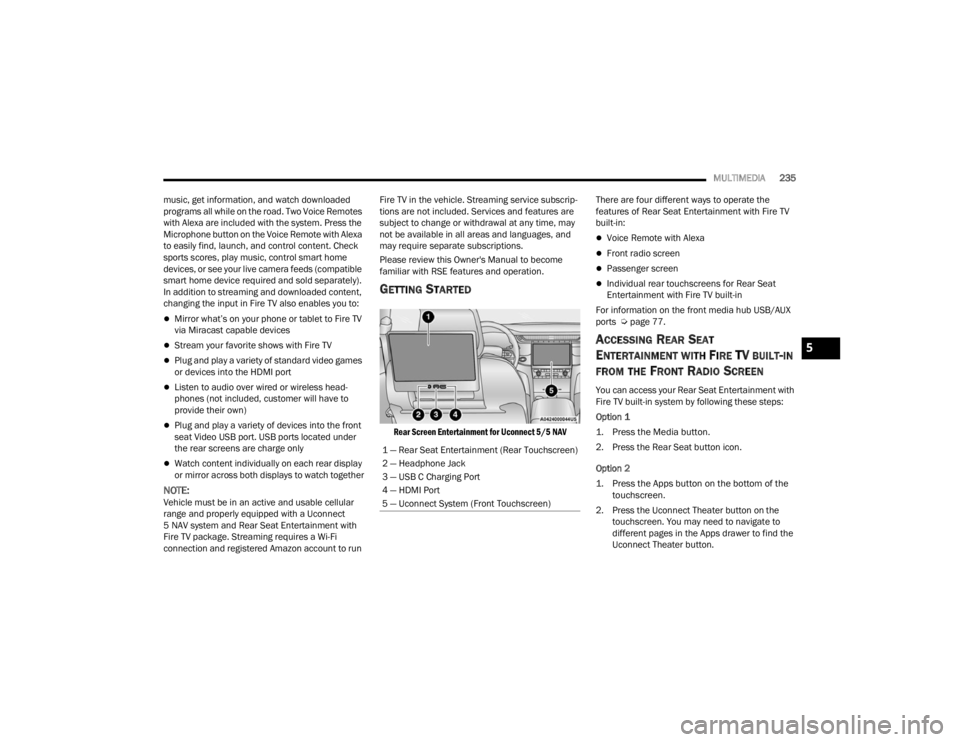
GETTING STARTED
Rear Screen Entertainment for Uconnect 5/5 NAV
There are four different ways to operate the
features of Rear Seat Entertainment with Fire TV
built-in:
Voice Remote with Alexa
Front radio screen
Passenger screen
Individual rear touchscreens for Rear Seat
Entertainment with Fire TV built-in
For information on the front media hub USB/AUX
ports Ú page 77.
ACCESSING REAR SEAT
E
NTERTAINMENT WITH FIRE TV BUILT-IN
FROM THE FRONT RADIO SCREEN
You can access your Rear Seat Entertainment with
Fire TV built-in system by following these steps:
Option 1
1. Press the Media button.
2. Press the Rear Seat button icon.
Option 2
1. Press the Apps button on the bottom of the
touchscreen.
2. Press the Uconnect Theater button on the touchscreen. You may need to navigate to
different pages in the Apps drawer to find the
Uconnect Theater button.
1 — Rear Seat Entertainment (Rear Touchscreen)
2 — Headphone Jack
3 — USB C Charging Port
4 — HDMI Port
5 — Uconnect System (Front Touchscreen)
5
23_WL_OM_EN_USC_t.book Page 235
Page 289 of 424
SAFETY287
As the air bags deflate, you may see some
smoke-like particles. The particles are a normal
by-product of the process that generates the
non-toxic gas used for air bag inflation. These
airborne particles may irritate the skin, eyes,
nose, or throat. If you have skin or eye irritation,
rinse the area with cool water. For nose or throat
irritation, move to fresh air. If the irritation
continues, see your doctor. If these particles
settle on your clothing, follow the garment
manufacturer’s instructions for cleaning.
Do not drive your vehicle after the air bags have
deployed. If you are involved in another collision,
the air bags will not be in place to protect you.
NOTE:
Air bag covers may not be obvious in the interior
trim, but they will open during air bag deploy -
ment.
After any collision, the vehicle should be taken
to an authorized dealer immediately.
Enhanced Accident Response System
In the event of an impact, if the communication
network remains intact, and the power remains
intact, depending on the nature of the event, the
Occupant Restraint Controller (ORC) will determine
whether to have the Enhanced Accident Response
System perform the following functions:
Cut off fuel to the engine (if equipped)
Cut off battery power to the electric motor (if
equipped)
Flash hazard lights as long as the battery has
power
Turn on the interior lights, which remain on as
long as the battery has power or for 15 minutes
from the intervention of the Enhanced Accident
Response System
Unlock the power door locks
Your vehicle may also be designed to perform any
of these other functions in response to the
Enhanced Accident Response System:
Turn off the Fuel Filter Heater, Turn off the HVAC
Blower Motor, Close the HVAC Circulation Door
Cut off battery power to the:
Engine
Electric Motor (if equipped)
Electric power steering
Brake booster
Electric park brake
Automatic transmission gear selector
Horn
Front wiper
NOTE:After an accident, remember to cycle the ignition to
the STOP (OFF/LOCK) position and remove the key
from the ignition switch to avoid draining the
battery. Carefully check the vehicle for fuel leaks in
the engine compartment and on the ground near
the engine compartment and fuel tank before
resetting the system and starting the engine. If
there are no fuel leaks or damage to the vehicle
electrical devices (e.g. headlights) after an
accident, reset the system by following the
procedure described here. If you have any doubt,
contact an authorized dealer.
Enhanced Accident Response System
Reset Procedure
If Applicable, refer to the “Hybrid Supplement” for
additional information.
In order to reset the Enhanced Accident Response
System functions after an event, the ignition switch
must be changed from ignition START or ON/RUN
to ignition OFF. Carefully check the vehicle for fuel
leaks in the engine compartment and on the
ground near the engine compartment and fuel
tank before resetting the system and starting the
engine.
WARNING!
Deployed air bags and seat belt pretensioners
cannot protect you in another collision. Have the air
bags, seat belt pretensioners, and the seat belt
retractor assemblies replaced by an authorized
dealer immediately. Also, have the Occupant
Restraint Controller System serviced as well.
6
23_WL_OM_EN_USC_t.book Page 287
Page 322 of 424
320IN CASE OF EMERGENCY
(Continued)
PREPARATIONS FOR JUMP START
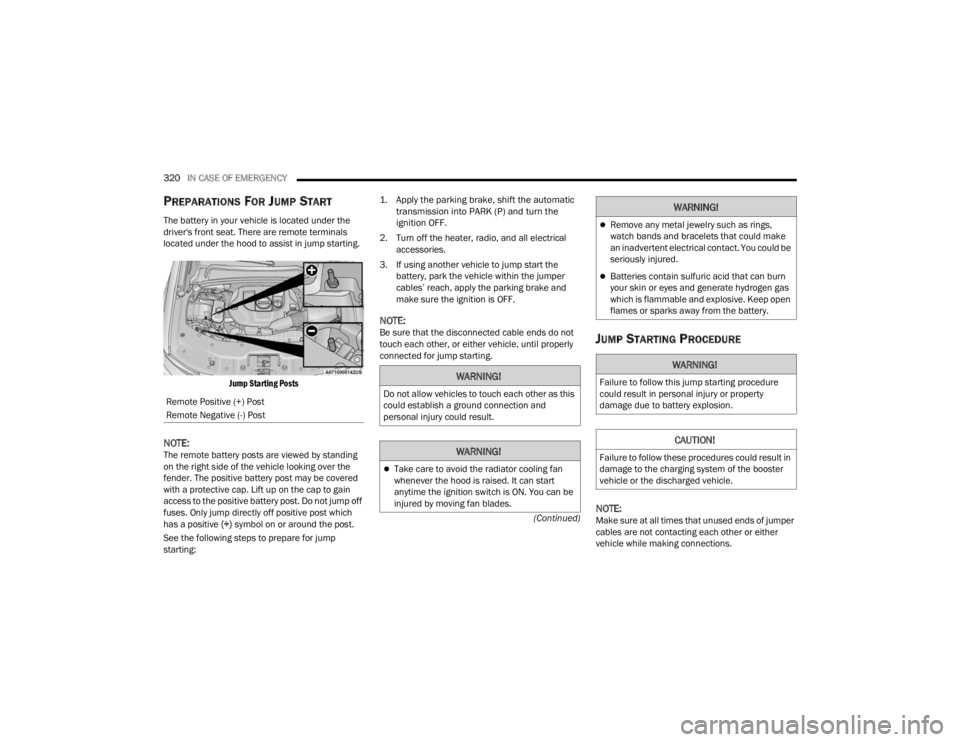
The battery in your vehicle is located under the
driver's front seat. There are remote terminals
located under the hood to assist in jump starting.
Jump Starting Posts
NOTE:The remote battery posts are viewed by standing
on the right side of the vehicle looking over the
fender. The positive battery post may be covered
with a protective cap. Lift up on the cap to gain
access to the positive battery post. Do not jump off
fuses. Only jump directly off positive post which
has a positive (+) symbol on or around the post.
See the following steps to prepare for jump
starting:
1. Apply the parking brake, shift the automatic
transmission into PARK (P) and turn the
ignition OFF.
2. Turn off the heater, radio, and all electrical accessories.
3. If using another vehicle to jump start the battery, park the vehicle within the jumper
cables’ reach, apply the parking brake and
make sure the ignition is OFF.
NOTE:Be sure that the disconnected cable ends do not
touch each other, or either vehicle, until properly
connected for jump starting.JUMP STARTING PROCEDURE
NOTE:Make sure at all times that unused ends of jumper
cables are not contacting each other or either
vehicle while making connections.
Remote Positive (+) Post
Remote Negative (-) Post
WARNING!
Do not allow vehicles to touch each other as this
could establish a ground connection and
personal injury could result.
WARNING!
Take care to avoid the radiator cooling fan
whenever the hood is raised. It can start
anytime the ignition switch is ON. You can be
injured by moving fan blades.
Remove any metal jewelry such as rings,
watch bands and bracelets that could make
an inadvertent electrical contact. You could be
seriously injured.
Batteries contain sulfuric acid that can burn
your skin or eyes and generate hydrogen gas
which is flammable and explosive. Keep open
flames or sparks away from the battery.
WARNING!
Failure to follow this jump starting procedure
could result in personal injury or property
damage due to battery explosion.
CAUTION!
Failure to follow these procedures could result in
damage to the charging system of the booster
vehicle or the discharged vehicle.
WARNING!
23_WL_OM_EN_USC_t.book Page 320