belt JEEP GRAND CHEROKEE 2023 User Guide
[x] Cancel search | Manufacturer: JEEP, Model Year: 2023, Model line: GRAND CHEROKEE, Model: JEEP GRAND CHEROKEE 2023Pages: 424, PDF Size: 15.48 MB
Page 45 of 424

GETTING TO KNOW YOUR VEHICLE43
Cushion Extender
The cushion can be extended forward a few inches
(centimeters) to increase thigh support. Push the
cushion extender switch forward or rearward to
extend or retract the cushion. Release the switch
when the desired position has been reached.
Power Lumbar — If Equipped
Vehicles equipped with power driver or passenger
seats may also be equipped with power lumbar.
The power lumbar switch is located on the
outboard side of the power seat. Push the switch
forward to increase the lumbar support. Push the
switch rearward to decrease the lumbar support.
Pushing upward or downward on the switch will
raise and lower the position of the support.
Power Lumbar Switch
Easy Entry/Exit Seat — If Equipped
This feature provides automatic driver seat
positioning to enhance driver mobility when
entering and exiting the vehicle.
The distance the driver seat moves depends on
where you have the driver seat positioned when
you place the vehicle’s ignition in the OFF position.
When you place the vehicle’s ignition in the OFF
position, the driver seat will move about
2.4 inches (6 cm) rearward if the driver seat
position is greater than or equal to 2.7 inches
(6.8 cm) forward of the rear stop. The seat will
return to its previously set position when you
place the vehicle’s ignition in the ON/RUN posi -
tion.
The Easy Entry/Easy Exit feature is disabled
when the driver seat position is less than 0.9 of
an inch (2.3 cm) forward of the rear stop. At this
position, there is no benefit to the driver by
moving the seat for Easy Exit or Easy Entry.
When enabled in Uconnect Settings, Easy Entry
and Easy Exit positions are stored in each memory
setting profile Ú page 34.
NOTE:The Easy Entry/Exit feature is enabled or disabled
within the Uconnect system Ú page 204.
POWER ADJUSTMENT (REAR SEATS) —
I
F EQUIPPED
WARNING!
Adjusting a seat while driving may be
dangerous. Moving a seat while driving could
result in loss of control which could cause a
collision and serious injury or death.
Seats should be adjusted before fastening the
seat belts and while the vehicle is parked.
Serious injury or death could result from a
poorly adjusted seat belt.
Do not ride with the seatback reclined so that
the shoulder belt is no longer resting against
your chest. In a collision you could slide under
the seat belt, which could result in serious
injury or death.
Do not place the seat belt webbing behind the
third row stow clip when using the seat belt to
restrain an occupant. The seat belt will not be
positioned properly on the occupant and they
could be more seriously injured in an accident
as a result.
2
23_WL_OM_EN_USC_t.book Page 43
Page 46 of 424

44GETTING TO KNOW YOUR VEHICLE
Rear Seat Power Folding Seatbacks —
If Equipped
If the vehicle is equipped with third row seating, the
second and third rows may be equipped with
power folding seatbacks.
A one-touch power folding seat switch is located in
the right rear trim panel inside the cargo area, as
part of a switch bank.
NOTE:
You may need to move the front seats forward to
allow the second row seats to fold properly, as
they may bump into the Rear Seat Entertain -
ment touchscreens (if equipped).
The third row seat belts may interfere with the
power folding of the seat. Place the seat belt
webbing behind the stow clip before stowing or
opening the seat. When the seat is in the
desired position, remove the webbing from the
stow clip so that it is ready for use. Never leave
the seat belt in the stow clip when it is used to
restrain an occupant.
The head restraints will lower automatically as
necessary when the power seat begins to move
when the vehicle is in PARK, and a rear door or
the liftgate is open.
The rear switch bank allows multiple power folding
positions for the second and third row seats. The
second row seats can be folded using these
switches, while the third row can be folded or
unfolded.
Rear Panel Power Switch Bank
There are also power folding switches for the third
row seats located on the C-pillar (just behind the
rear doors on the trim panels).
C-Pillar Power Folding Switches (Left Side Shown)
POWER SEATBACK MASSAGE —
I
F EQUIPPED
The driver’s and front passenger’s seatbacks may
be equipped with power massage.
The massage feature can be turned on/off through
the massage button located on the door panel
near the handle, or through the Comfort screen on
the radio.
CAUTION!
Do not place any article under a power seat or
impede its ability to move as it may cause
damage to the seat controls. Seat travel may
become limited if movement is stopped by an
obstruction in the seat's path.
1 — Second Row Left Side Fold
2 — Second Row Right Side Fold
3 — Third Row Left Side Fold/Unfold
4 — Third Row Right Side Fold/Unfold
1 — Third Row Left Side Fold/Unfold
2 — Third Row Right Side Fold/Unfold
23_WL_OM_EN_USC_t.book Page 44
Page 85 of 424
GETTING TO KNOW YOUR VEHICLE83
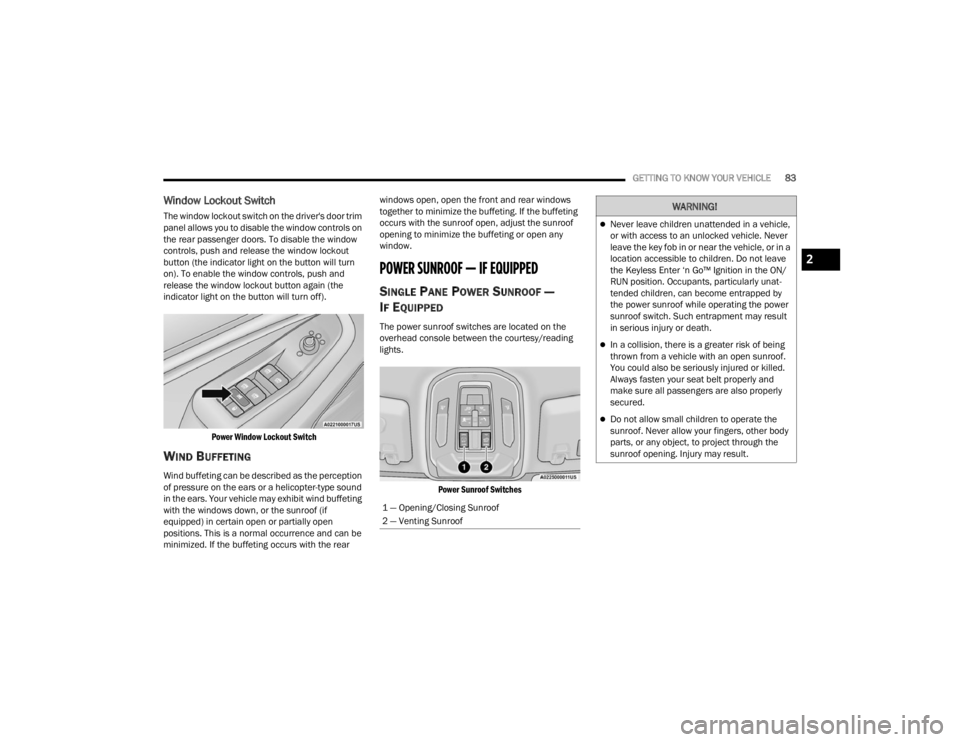
Window Lockout Switch
The window lockout switch on the driver's door trim
panel allows you to disable the window controls on
the rear passenger doors. To disable the window
controls, push and release the window lockout
button (the indicator light on the button will turn
on). To enable the window controls, push and
release the window lockout button again (the
indicator light on the button will turn off).
Power Window Lockout Switch
WIND BUFFETING
Wind buffeting can be described as the perception
of pressure on the ears or a helicopter-type sound
in the ears. Your vehicle may exhibit wind buffeting
with the windows down, or the sunroof (if
equipped) in certain open or partially open
positions. This is a normal occurrence and can be
minimized. If the buffeting occurs with the rear windows open, open the front and rear windows
together to minimize the buffeting. If the buffeting
occurs with the sunroof open, adjust the sunroof
opening to minimize the buffeting or open any
window.
POWER SUNROOF — IF EQUIPPED
SINGLE PANE POWER SUNROOF —
I
F EQUIPPED
The power sunroof switches are located on the
overhead console between the courtesy/reading
lights.
Power Sunroof Switches
1 — Opening/Closing Sunroof
2 — Venting Sunroof
WARNING!
Never leave children unattended in a vehicle,
or with access to an unlocked vehicle. Never
leave the key fob in or near the vehicle, or in a
location accessible to children. Do not leave
the Keyless Enter ‘n Go™ Ignition in the ON/
RUN position. Occupants, particularly unat -
tended children, can become entrapped by
the power sunroof while operating the power
sunroof switch. Such entrapment may result
in serious injury or death.
In a collision, there is a greater risk of being
thrown from a vehicle with an open sunroof.
You could also be seriously injured or killed.
Always fasten your seat belt properly and
make sure all passengers are also properly
secured.
Do not allow small children to operate the
sunroof. Never allow your fingers, other body
parts, or any object, to project through the
sunroof opening. Injury may result.
2
23_WL_OM_EN_USC_t.book Page 83
Page 87 of 424
GETTING TO KNOW YOUR VEHICLE85
DUAL PANE POWER SUNROOF —
I
F EQUIPPED
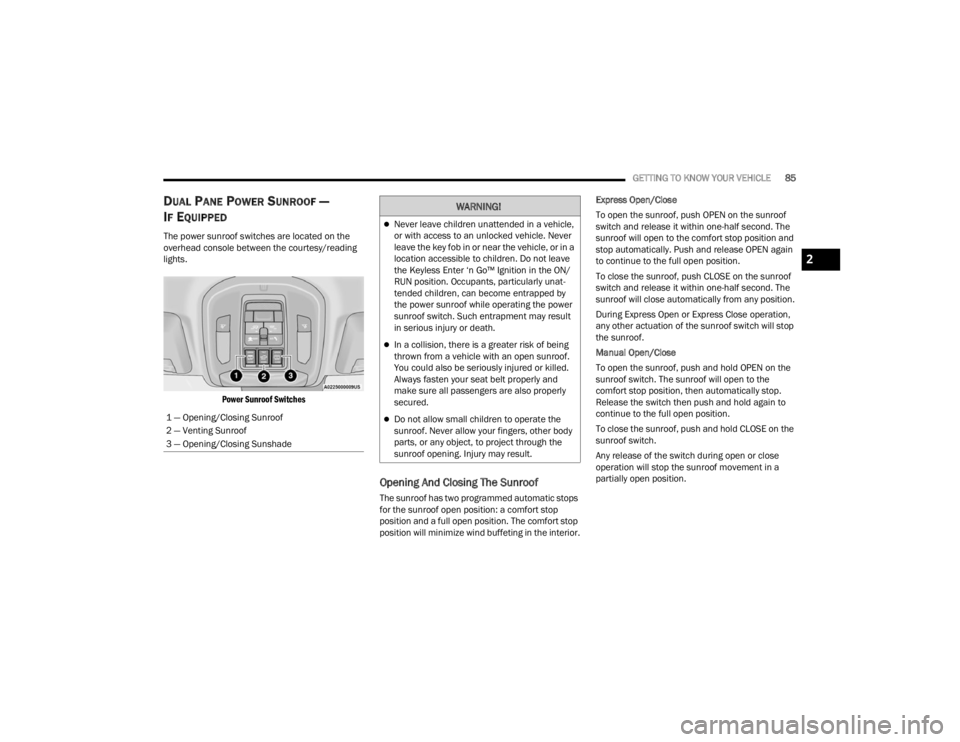
The power sunroof switches are located on the
overhead console between the courtesy/reading
lights.
Power Sunroof Switches
Opening And Closing The Sunroof
The sunroof has two programmed automatic stops
for the sunroof open position: a comfort stop
position and a full open position. The comfort stop
position will minimize wind buffeting in the interior. Express Open/Close
To open the sunroof, push OPEN on the sunroof
switch and release it within one-half second. The
sunroof will open to the comfort stop position and
stop automatically. Push and release OPEN again
to continue to the full open position.
To close the sunroof, push CLOSE on the sunroof
switch and release it within one-half second. The
sunroof will close automatically from any position.
During Express Open or Express Close operation,
any other actuation of the sunroof switch will stop
the sunroof.
Manual Open/Close
To open the sunroof, push and hold OPEN on the
sunroof switch. The sunroof will open to the
comfort stop position, then automatically stop.
Release the switch then push and hold again to
continue to the full open position.
To close the sunroof, push and hold CLOSE on the
sunroof switch.
Any release of the switch during open or close
operation will stop the sunroof movement in a
partially open position.
1 — Opening/Closing Sunroof
2 — Venting Sunroof
3 — Opening/Closing Sunshade
WARNING!
Never leave children unattended in a vehicle,
or with access to an unlocked vehicle. Never
leave the key fob in or near the vehicle, or in a
location accessible to children. Do not leave
the Keyless Enter ‘n Go™ Ignition in the ON/
RUN position. Occupants, particularly unat
-
tended children, can become entrapped by
the power sunroof while operating the power
sunroof switch. Such entrapment may result
in serious injury or death.
In a collision, there is a greater risk of being
thrown from a vehicle with an open sunroof.
You could also be seriously injured or killed.
Always fasten your seat belt properly and
make sure all passengers are also properly
secured.
Do not allow small children to operate the
sunroof. Never allow your fingers, other body
parts, or any object, to project through the
sunroof opening. Injury may result.
2
23_WL_OM_EN_USC_t.book Page 85
Page 93 of 424
GETTING TO KNOW YOUR VEHICLE91
(Continued)
Additional storage can be found under the storage
lid. To access the lower storage, lift the handle and
raise the storage lid.
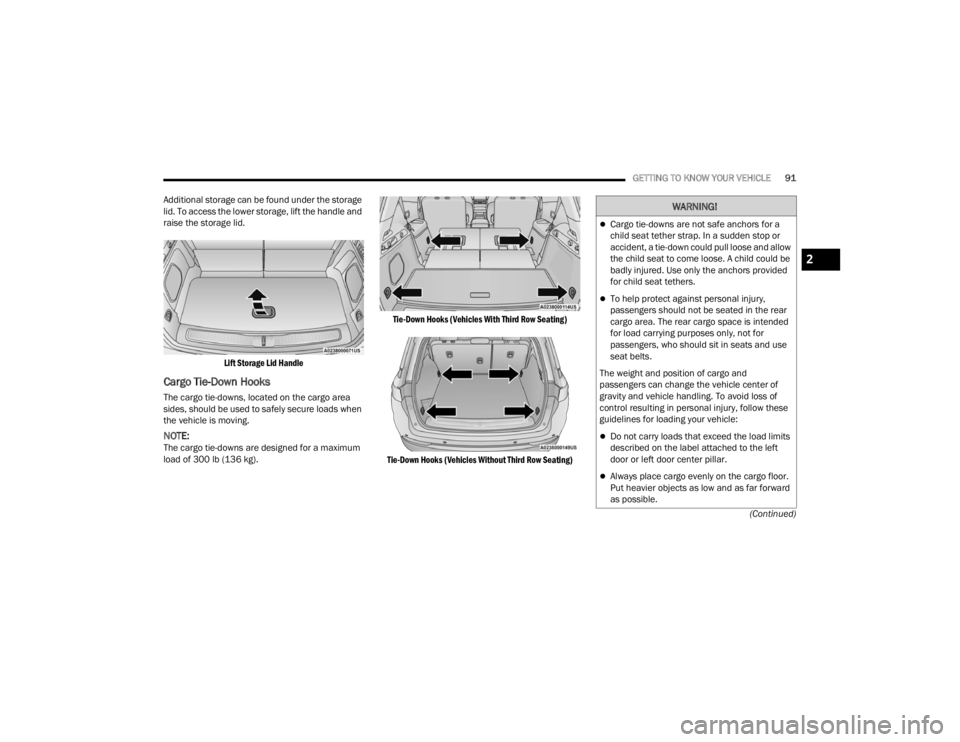
Lift Storage Lid Handle
Cargo Tie-Down Hooks
The cargo tie-downs, located on the cargo area
sides, should be used to safely secure loads when
the vehicle is moving.
NOTE:The cargo tie-downs are designed for a maximum
load of 300 lb (136 kg).
Tie-Down Hooks (Vehicles With Third Row Seating)
Tie-Down Hooks (Vehicles Without Third Row Seating)
WARNING!
Cargo tie-downs are not safe anchors for a
child seat tether strap. In a sudden stop or
accident, a tie-down could pull loose and allow
the child seat to come loose. A child could be
badly injured. Use only the anchors provided
for child seat tethers.
To help protect against personal injury,
passengers should not be seated in the rear
cargo area. The rear cargo space is intended
for load carrying purposes only, not for
passengers, who should sit in seats and use
seat belts.
The weight and position of cargo and
passengers can change the vehicle center of
gravity and vehicle handling. To avoid loss of
control resulting in personal injury, follow these
guidelines for loading your vehicle:
Do not carry loads that exceed the load limits
described on the label attached to the left
door or left door center pillar.
Always place cargo evenly on the cargo floor.
Put heavier objects as low and as far forward
as possible.
2
23_WL_OM_EN_USC_t.book Page 91
Page 104 of 424
102GETTING TO KNOW YOUR INSTRUMENT PANEL
Unstored Messages Until RUN
These messages deal primarily with the Remote
Start feature. This message type is displayed
until the ignition is in the RUN state. Examples of
this message type are “Remote Start Canceled - Door Ajar” and “Press Brake Pedal and Push
Button to Start”.
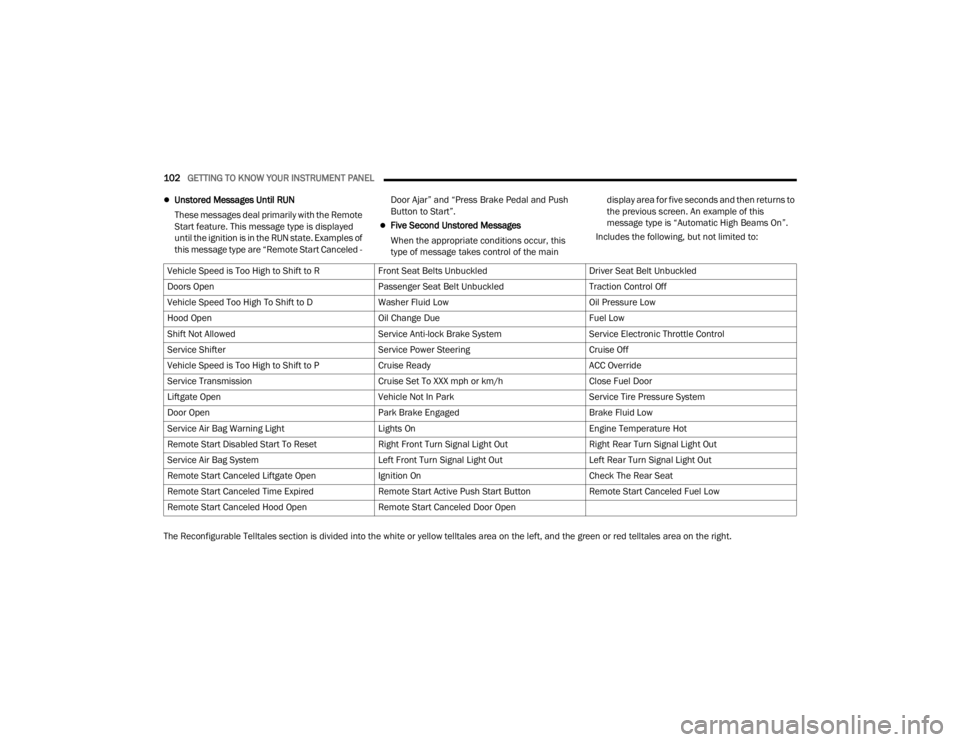
Five Second Unstored Messages
When the appropriate conditions occur, this
type of message takes control of the main display area for five seconds and then returns to
the previous screen. An example of this
message type is “Automatic High Beams On”.
Includes the following, but not limited to:
The Reconfigurable Telltales section is divided into the white or yellow telltales area on the left, and the green or red telltales area on the right. Vehicle Speed is Too High to Shift to R
Front Seat Belts UnbuckledDriver Seat Belt Unbuckled
Doors Open Passenger Seat Belt UnbuckledTraction Control Off
Vehicle Speed Too High To Shift to D Washer Fluid LowOil Pressure Low
Hood Open Oil Change DueFuel Low
Shift Not Allowed Service Anti-lock Brake SystemService Electronic Throttle Control
Service Shifter Service Power SteeringCruise Off
Vehicle Speed is Too High to Shift to P Cruise ReadyACC Override
Service Transmission Cruise Set To XXX mph or km/hClose Fuel Door
Liftgate Open Vehicle Not In ParkService Tire Pressure System
Door Open Park Brake EngagedBrake Fluid Low
Service Air Bag Warning Light Lights OnEngine Temperature Hot
Remote Start Disabled Start To Reset Right Front Turn Signal Light OutRight Rear Turn Signal Light Out
Service Air Bag System Left Front Turn Signal Light OutLeft Rear Turn Signal Light Out
Remote Start Canceled Liftgate Open Ignition OnCheck The Rear Seat
Remote Start Canceled Time Expired Remote Start Active Push Start ButtonRemote Start Canceled Fuel Low
Remote Start Canceled Hood Open Remote Start Canceled Door Open
23_WL_OM_EN_USC_t.book Page 102
Page 112 of 424
110GETTING TO KNOW YOUR INSTRUMENT PANEL
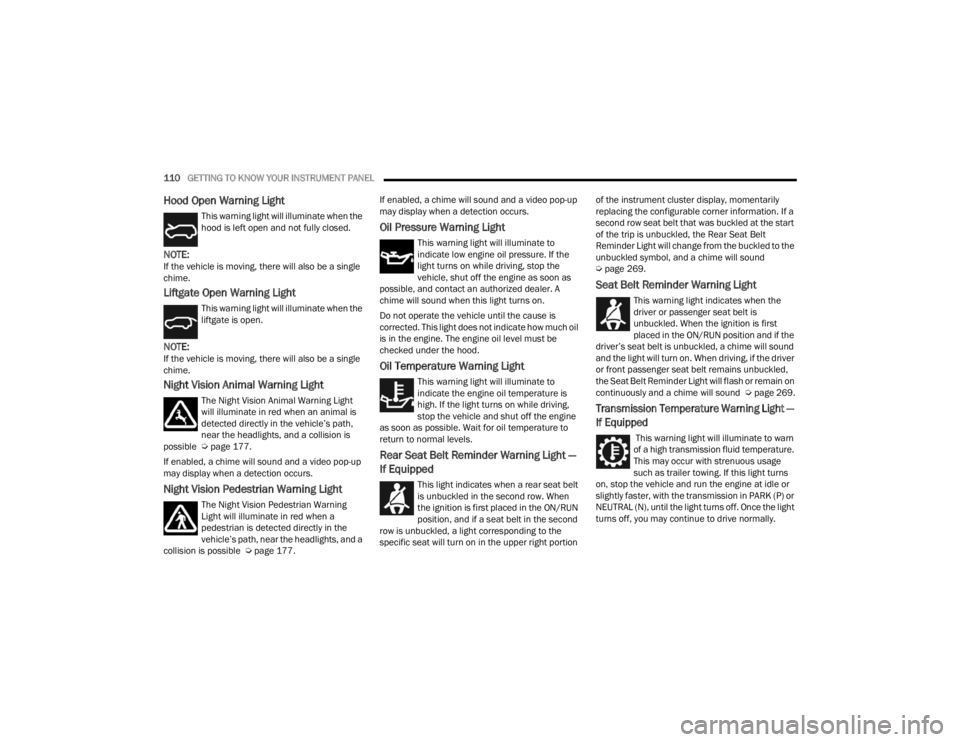
Hood Open Warning Light
This warning light will illuminate when the
hood is left open and not fully closed.
NOTE:If the vehicle is moving, there will also be a single
chime.
Liftgate Open Warning Light
This warning light will illuminate when the
liftgate is open.
NOTE:If the vehicle is moving, there will also be a single
chime.
Night Vision Animal Warning Light
The Night Vision Animal Warning Light
will illuminate in red when an animal is
detected directly in the vehicle’s path,
near the headlights, and a collision is
possible Ú page 177.
If enabled, a chime will sound and a video pop-up
may display when a detection occurs.
Night Vision Pedestrian Warning Light
The Night Vision Pedestrian Warning
Light will illuminate in red when a
pedestrian is detected directly in the
vehicle’s path, near the headlights, and a
collision is possible Ú page 177. If enabled, a chime will sound and a video pop-up
may display when a detection occurs.
Oil Pressure Warning Light
This warning light will illuminate to
indicate low engine oil pressure. If the
light turns on while driving, stop the
vehicle, shut off the engine as soon as
possible, and contact an authorized dealer. A
chime will sound when this light turns on.
Do not operate the vehicle until the cause is
corrected. This light does not indicate how much oil
is in the engine. The engine oil level must be
checked under the hood.
Oil Temperature Warning Light
This warning light will illuminate to
indicate the engine oil temperature is
high. If the light turns on while driving,
stop the vehicle and shut off the engine
as soon as possible. Wait for oil temperature to
return to normal levels.
Rear Seat Belt Reminder Warning Light —
If Equipped
This light indicates when a rear seat belt
is unbuckled in the second row. When
the ignition is first placed in the ON/RUN
position, and if a seat belt in the second
row is unbuckled, a light corresponding to the
specific seat will turn on in the upper right portion of the instrument cluster display, momentarily
replacing the configurable corner information. If a
second row seat belt that was buckled at the start
of the trip is unbuckled, the Rear Seat Belt
Reminder Light will change from the buckled to the
unbuckled symbol, and a chime will sound
Ú
page 269.
Seat Belt Reminder Warning Light
This warning light indicates when the
driver or passenger seat belt is
unbuckled. When the ignition is first
placed in the ON/RUN position and if the
driver’s seat belt is unbuckled, a chime will sound
and the light will turn on. When driving, if the driver
or front passenger seat belt remains unbuckled,
the Seat Belt Reminder Light will flash or remain on
continuously and a chime will sound Ú page 269.
Transmission Temperature Warning Light —
If Equipped
This warning light will illuminate to warn
of a high transmission fluid temperature.
This may occur with strenuous usage
such as trailer towing. If this light turns
on, stop the vehicle and run the engine at idle or
slightly faster, with the transmission in PARK (P) or
NEUTRAL (N), until the light turns off. Once the light
turns off, you may continue to drive normally.
23_WL_OM_EN_USC_t.book Page 110
Page 118 of 424
116GETTING TO KNOW YOUR INSTRUMENT PANEL
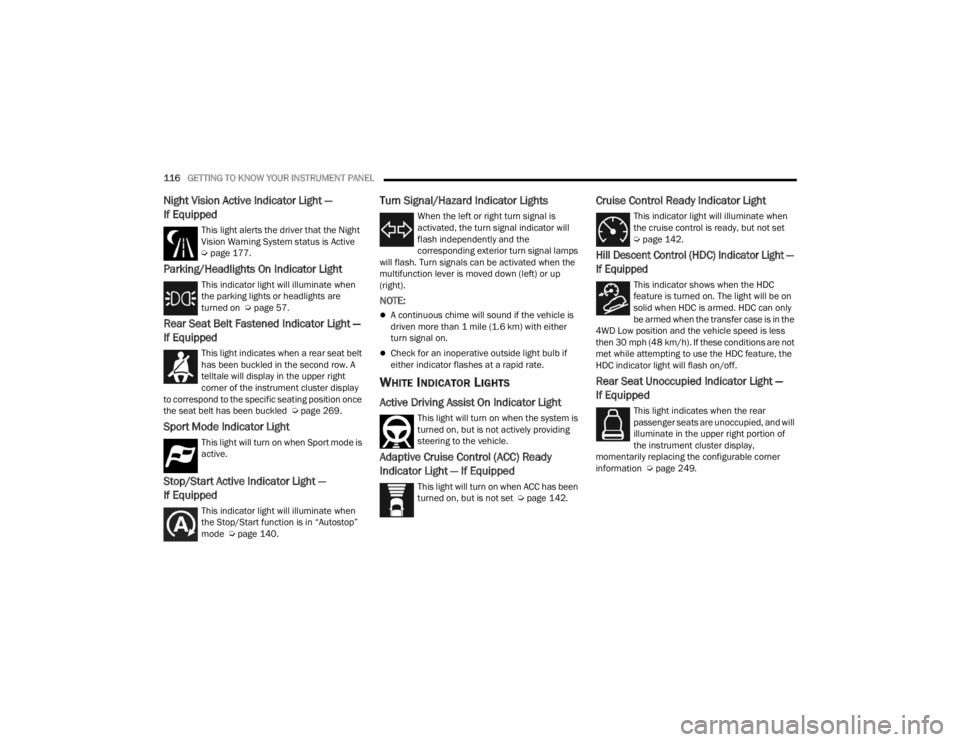
Night Vision Active Indicator Light —
If Equipped
This light alerts the driver that the Night
Vision Warning System status is Active
Úpage 177.
Parking/Headlights On Indicator Light
This indicator light will illuminate when
the parking lights or headlights are
turned on Ú page 57.
Rear Seat Belt Fastened Indicator Light —
If Equipped
This light indicates when a rear seat belt
has been buckled in the second row. A
telltale will display in the upper right
corner of the instrument cluster display
to correspond to the specific seating position once
the seat belt has been buckled Ú page 269.
Sport Mode Indicator Light
This light will turn on when Sport mode is
active.
Stop/Start Active Indicator Light —
If Equipped
This indicator light will illuminate when
the Stop/Start function is in “Autostop”
mode Úpage 140.
Turn Signal/Hazard Indicator Lights
When the left or right turn signal is
activated, the turn signal indicator will
flash independently and the
corresponding exterior turn signal lamps
will flash. Turn signals can be activated when the
multifunction lever is moved down (left) or up
(right).
NOTE:
A continuous chime will sound if the vehicle is
driven more than 1 mile (1.6 km) with either
turn signal on.
Check for an inoperative outside light bulb if
either indicator flashes at a rapid rate.
WHITE INDICATOR LIGHTS
Active Driving Assist On Indicator Light
This light will turn on when the system is
turned on, but is not actively providing
steering to the vehicle.
Adaptive Cruise Control (ACC) Ready
Indicator Light — If Equipped
This light will turn on when ACC has been
turned on, but is not set Ú page 142.
Cruise Control Ready Indicator Light
This indicator light will illuminate when
the cruise control is ready, but not set
Úpage 142.
Hill Descent Control (HDC) Indicator Light —
If Equipped
This indicator shows when the HDC
feature is turned on. The light will be on
solid when HDC is armed. HDC can only
be armed when the transfer case is in the
4WD Low position and the vehicle speed is less
then 30 mph (48 km/h). If these conditions are not
met while attempting to use the HDC feature, the
HDC indicator light will flash on/off.
Rear Seat Unoccupied Indicator Light —
If Equipped
This light indicates when the rear
passenger seats are unoccupied, and will
illuminate in the upper right portion of
the instrument cluster display,
momentarily replacing the configurable corner
information Ú page 249.
23_WL_OM_EN_USC_t.book Page 116
Page 121 of 424
119
(Continued)
(Continued)
STARTING AND OPERATING
STARTING THE ENGINE
Before starting your vehicle, adjust your seat,
adjust the inside and outside mirrors, fasten your
seat belt, and if present, instruct all other
occupants to buckle their seat belts.
AUTOMATIC TRANSMISSION
The gear selector must be in the NEUTRAL (N) or
PARK (P) position before you can start the engine.
Apply the brakes before shifting into any driving
gear.
KEYLESS ENTER ‘N GO™ — IGNITION
This feature allows the driver to operate the
ignition switch with the push of a button, as long as
the Remote Start/Keyless Enter ‘n Go™ key fob is
in the passenger compartment.
NORMAL STARTING
To Turn On The Engine Using The ENGINE START/
STOP Button
1. The transmission must be in PARK (P).
2. Press and hold the brake pedal while pushing
the ENGINE START/STOP button once.
WARNING!
Before exiting a vehicle, always come to a
complete stop, then shift the automatic trans -
mission into PARK and apply the parking
brake.
Always make sure the keyless ignition node is
in the OFF position, key fob is removed from
the vehicle and vehicle is locked.
Never leave children alone in a vehicle, or with
access to an unlocked vehicle. Leaving chil -
dren in a vehicle unattended is dangerous for
a number of reasons. A child or others could
be seriously or fatally injured. Children should
be warned not to touch the parking brake,
brake pedal or the gear selector.
Do not leave the key fob in or near the vehicle,
or in a location accessible to children, and do
not leave the ignition of a vehicle equipped
with Keyless Enter ‘n Go™ in the ON/RUN
position. A child could operate power
windows, other controls, or move the vehicle.
Do not leave children or animals inside parked
vehicles in hot weather. Interior heat buildup
may cause serious injury or death.
CAUTION!
Damage to the transmission may occur if the
following precautions are not observed:
Do not shift from REVERSE (R), PARK, or
NEUTRAL into any forward gear when the
engine is above idle speed.
WARNING!
Shift into PARK only after the vehicle has
come to a complete stop.
Shift into or out of REVERSE only after the
vehicle has come to a complete stop and the
engine is at idle speed.
Before shifting into any gear, make sure your
foot is firmly on the brake pedal.
CAUTION!
4
23_WL_OM_EN_USC_t.book Page 119
Page 123 of 424
STARTING AND OPERATING121
If the vehicle is not in PARK and the driver turns off
the engine, the vehicle may AutoPark.
AutoPark will engage when all of these conditions
are met:
Vehicle is equipped with an 8-speed transmis -
sion
Vehicle is not in PARK
Vehicle speed is 1.2 mph (1.9 km/h) or less
NOTE:For Keyless Enter ‘n Go™ equipped vehicles, the
engine will turn off and the ignition switch will
change to the ON/RUN position. After 30 minutes
the ignition switches to OFF automatically, unless
the driver turns the ignition switch OFF.
If the vehicle is not in PARK and the driver exits the
vehicle with the engine running, the vehicle may
AutoPark.
AutoPark will engage when all of these conditions
are met:
Vehicle is equipped with an 8-speed transmis -
sion
Vehicle is not in PARK
Vehicle speed is 1.2 mph (1.9 km/h) or less
Driver’s seat belt is unbuckled
Driver’s door is ajar
Brake pedal is not pressed The message “
AutoPark Engaged Shift To P Then
Shift To Gear ” will display in the instrument cluster.
NOTE:In some cases the ParkSense graphic will be
displayed in the instrument cluster. In these cases,
the gear selector must be returned to “P” to select
desired gear.
If the driver shifts into PARK while moving, the
vehicle may AutoPark.
AutoPark will engage ONLY when vehicle speed is
1.2 mph (1.9 km/h) or less.
The message “ Vehicle Speed Is Too High To Shift
To P ” will be displayed in the instrument cluster if
vehicle speed is above 1.2 mph (1.9 km/h).
4WD LOW — If Equipped
AutoPark will be disabled when operating the
vehicle in 4WD LOW.
The message “ AutoPark Disabled ” will be
displayed in the instrument cluster. Additional customer warnings will be given when
both of these conditions are met:Vehicle is not in PARK
Driver’s door is ajar
The message “ AutoPark Not Engaged” will be
displayed in the instrument cluster. A warning
chime will continue until you shift the vehicle into
PARK or the driver’s door is closed.
ALWAYS DO A VISUAL CHECK
that your vehicle is in
PARK by looking for the "P" in the instrument
cluster display and on the gear selector. As an
added precaution, always apply the parking brake
when exiting the vehicle.
EXTENDED PARK STARTING
NOTE:Extended Park condition occurs when the vehicle
has not been started or driven for at least 30 days.
1. Install a battery charger or jumper cables to the battery to ensure a full battery charge
during the crank cycle.
2. Press and hold the brake pedal while pushing the ENGINE START/STOP button once.
3. If the engine fails to start within 10 seconds, wait 10 to 15 seconds to allow the starter to
cool, then repeat the Extended Park Starting
procedure.
WARNING!
If vehicle speed is above 1.2 mph (1.9 km/h),
the transmission will default to NEUTRAL until
the vehicle speed drops below 1.2 mph
(1.9 km/h). A vehicle left in the NEUTRAL
position can roll. As an added precaution, always
apply the parking brake when exiting the vehicle.
4
23_WL_OM_EN_USC_t.book Page 121