light JEEP GRAND CHEROKEE 2023 Owners Manual
[x] Cancel search | Manufacturer: JEEP, Model Year: 2023, Model line: GRAND CHEROKEE, Model: JEEP GRAND CHEROKEE 2023Pages: 424, PDF Size: 15.48 MB
Page 5 of 424

3
MIRRORS ............................................................... 49 Inside Rearview Mirror .....................................49
Illuminated Vanity Mirrors ...............................50
Outside Mirrors ................................................51
Outside Automatic Dimming Mirror —
If Equipped........................................................52
Power Mirrors ...................................................52
Automatic Power Folding Mirrors — If Equipped ...53
Heated Mirrors — If Equipped..........................53
Tilt Side Mirrors In Reverse — If Equipped......53
UNIVERSAL GARAGE DOOR OPENER
(HOMELINK®) — IF EQUIPPED ............................ 53
Before You Begin Programming HomeLink® ... 54
Erasing All The HomeLink® Channels ............54
Identifying Whether You Have A Rolling Code
Or Non-Rolling Code Device.............................54
Programming HomeLink® To A Garage Door
Opener ..............................................................54
Programming HomeLink® To A Miscellaneous
Device ...............................................................55
Reprogramming A Single HomeLink® Button.... 56
Canadian/Gate Operator Programming .........56
Security .............................................................57
Troubleshooting Tips ........................................57 EXTERIOR LIGHTS ..................................................57
Headlight Switch .............................................57
Multifunction Lever ..........................................58
Daytime Running Lights (DRLs) —
If Equipped .......................................................58
High/Low Beam Switch....................................59
Automatic High Beams — If Equipped ............59
Flash-To-Pass ...................................................59
Automatic Headlights ......................................59
Parking Lights And Panel Lights ......................59
Headlights On Automatically With Wipers ......60
Headlight Illumination On Approach ...............60
Headlight Delay ................................................60
Lights-On Reminder .........................................61
Fog Lights — If Equipped .................................61
Turn Signals ......................................................61
Lane Change Assist — If Equipped ..................61
Automatic Headlight Leveling —
If Equipped........................................................61
Battery Saver ....................................................62
INTERIOR LIGHTS ..................................................62
Courtesy Lights .................................................62 WINDSHIELD WIPERS AND WASHERS ............. 64
Windshield Wiper Operation............................ 64
Rain Sensing Wipers — If Equipped ............... 65
Rear Wiper And Washer .................................. 66
Windshield Wiper De-Icer —If Equipped ........ 66
CLIMATE CONTROLS ............................................. 66
Automatic Climate Control Descriptions And
Functions .......................................................... 66
Automatic Temperature Control (ATC) ............ 72
Climate Voice Recognition............................... 72
Operating Tips .................................................73
INTERIOR STORAGE AND EQUIPMENT ............... 74
Storage ............................................................. 74
Lighted Cupholders — If Equipped .................. 76
Sun Screens — If Equipped .............................76
USB/AUX Control ............................................. 77
Electrical Power Outlets................................... 78
Power Inverter — If Equipped .......................... 80
Wireless Charging Pad — If Equipped ............ 80
WINDOWS ............................................................. 81
Power Window Controls ................................... 81
Wind Buffeting .................................................83
23_WL_OM_EN_USC_t.book Page 3
Page 6 of 424

4
POWER SUNROOF — IF EQUIPPED .................... 83 Single Pane Power Sunroof — If Equipped ....83
Dual Pane Power Sunroof —If Equipped ........85
HOOD ...................................................................... 87
Opening The Hood............................................87
Closing The Hood .............................................87
LIFTGATE ................................................................. 88
To Unlock/Open The Liftgate...........................88
To Lock/Close The Liftgate ..............................88
Adjustable Power Liftgate Height ....................89
Hands-Free Liftgate — If Equipped .................89
Cargo Area Features ........................................90
ROOF LUGGAGE RACK — IF EQUIPPED ............. 93
GETTING TO KNOW YOUR
INSTRUMENT PANEL
DIGITAL INSTRUMENT CLUSTER ......................... 95
Digital Instrument Cluster Descriptions ..........96
ANALOG INSTRUMENT CLUSTER ........................ 97
Analog Instrument Cluster Descriptions .........98 INSTRUMENT CLUSTER DISPLAY.........................98
Location And Controls ......................................98
Engine Oil Life Reset .................................... 100
Display And Messages .................................. 101
Instrument Cluster Display Menu Items ..... 103
Head Up Display (HUD) — If Equipped ......... 105Battery Saver On/Battery Saver Mode
Message — Electrical Load Reduction
Actions — If Equipped ................................... 106
WARNING LIGHTS AND MESSAGES ................ 108
Red Warning Lights ....................................... 108
Yellow Warning Lights ................................... 111Yellow Indicator Lights .................................. 114
Green Indicator Lights .................................. 115
White Indicator Lights ................................... 116Blue Indicator Lights ..................................... 117
Gray Indicator Lights ..................................... 117
ONBOARD DIAGNOSTIC SYSTEM — OBD II ..... 117
Onboard Diagnostic System
(OBD II) Cybersecurity ................................... 117
EMISSIONS INSPECTION AND MAINTENANCE
PROGRAMS ......................................................... 118
STARTING AND OPERATING
STARTING THE ENGINE ...................................... 119
Automatic Transmission ............................... 119
Keyless Enter ‘n Go™ — Ignition .................. 119
Normal Starting ............................................ 119
AutoPark ........................................................ 120
Extended Park Starting ................................. 121
If Engine Fails To Start .................................. 122Cold Weather Operation
(Below –22°F Or −30°C) ............................ 122
After Starting ................................................. 122
ENGINE BREAK-IN RECOMMENDATIONS ......... 122
PARKING BRAKE ................................................. 123
Electric Park Brake (EPB) ............................. 123Auto Park Brake ............................................ 125
SafeHold ........................................................ 125
Hold ‘N Go — If Equipped ............................. 125Brake Maintenance Mode ............................ 125
AUTOMATIC TRANSMISSION ............................. 126
Ignition Park Interlock................................... 127
Brake/Transmission Shift Interlock (BTSI)
System .......................................................... 1278-Speed Automatic Transmission ............... 127
SPORT MODE — IF EQUIPPED............................ 131
23_WL_OM_EN_USC_t.book Page 4
Page 14 of 424
12
VEHICLE MODIFICATIONS/ALTERATIONS
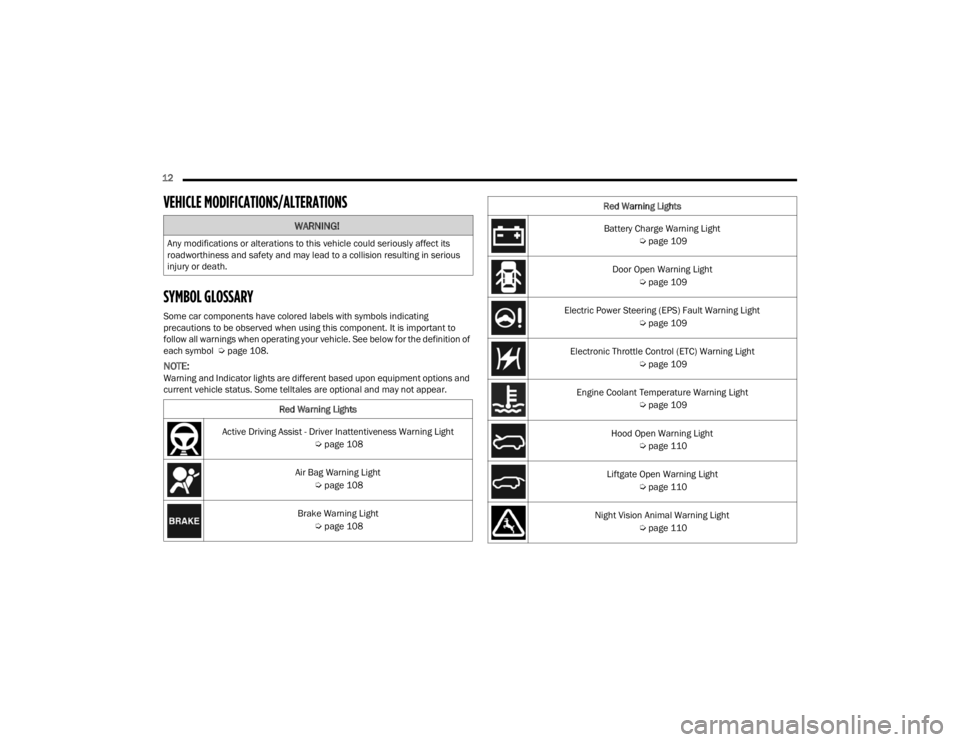
SYMBOL GLOSSARY
Some car components have colored labels with symbols indicating
precautions to be observed when using this component. It is important to
follow all warnings when operating your vehicle. See below for the definition of
each symbol Úpage 108.
NOTE:Warning and Indicator lights are different based upon equipment options and
current vehicle status. Some telltales are optional and may not appear.
WARNING!
Any modifications or alterations to this vehicle could seriously affect its
roadworthiness and safety and may lead to a collision resulting in serious
injury or death.
Red Warning Lights
Active Driving Assist - Driver Inattentiveness Warning Light Úpage 108
Air Bag Warning Light Úpage 108
Brake Warning Light Úpage 108
Battery Charge Warning Light
Úpage 109
Door Open Warning Light Úpage 109
Electric Power Steering (EPS) Fault Warning Light Úpage 109
Electronic Throttle Control (ETC) Warning Light Úpage 109
Engine Coolant Temperature Warning Light Úpage 109
Hood Open Warning Light Úpage 110
Liftgate Open Warning Light Úpage 110
Night Vision Animal Warning Light Úpage 110
Red Warning Lights
23_WL_OM_EN_USC_t.book Page 12
Page 15 of 424
13
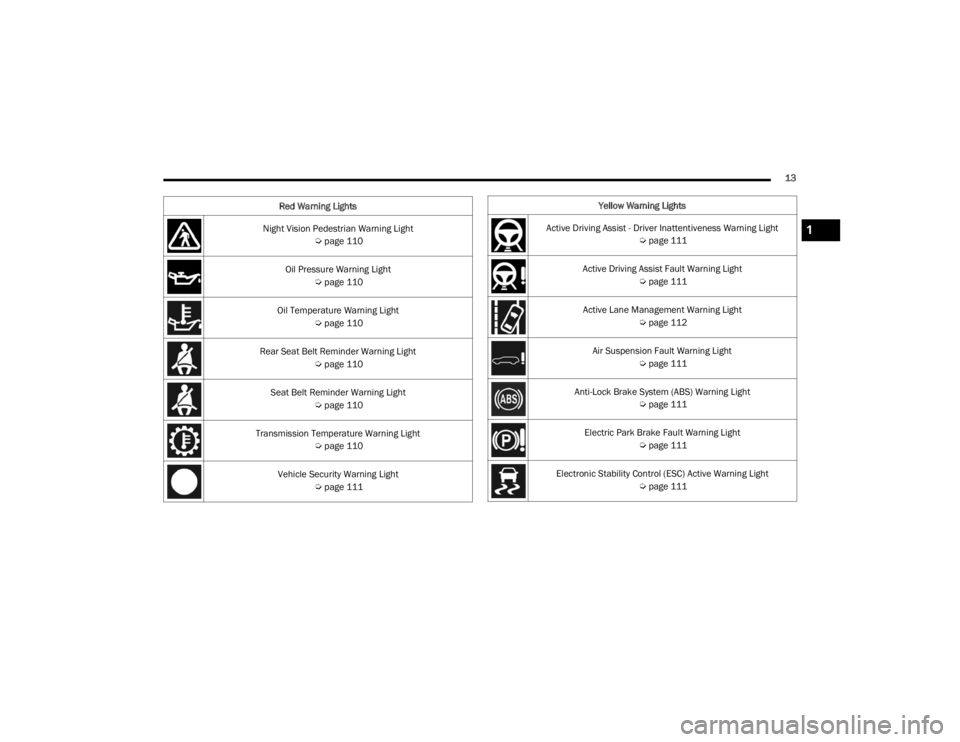
Night Vision Pedestrian Warning Light Úpage 110
Oil Pressure Warning Light Úpage 110
Oil Temperature Warning Light Úpage 110
Rear Seat Belt Reminder Warning Light Úpage 110
Seat Belt Reminder Warning Light Úpage 110
Transmission Temperature Warning Light Úpage 110
Vehicle Security Warning Light Úpage 111
Red Warning Lights
Yellow Warning Lights
Active Driving Assist - Driver Inattentiveness Warning Light Úpage 111
Active Driving Assist Fault Warning Light Úpage 111
Active Lane Management Warning Light Úpage 112
Air Suspension Fault Warning Light Úpage 111
Anti-Lock Brake System (ABS) Warning Light Úpage 111
Electric Park Brake Fault Warning Light Úpage 111
Electronic Stability Control (ESC) Active Warning Light Úpage 111
1
23_WL_OM_EN_USC_t.book Page 13
Page 16 of 424
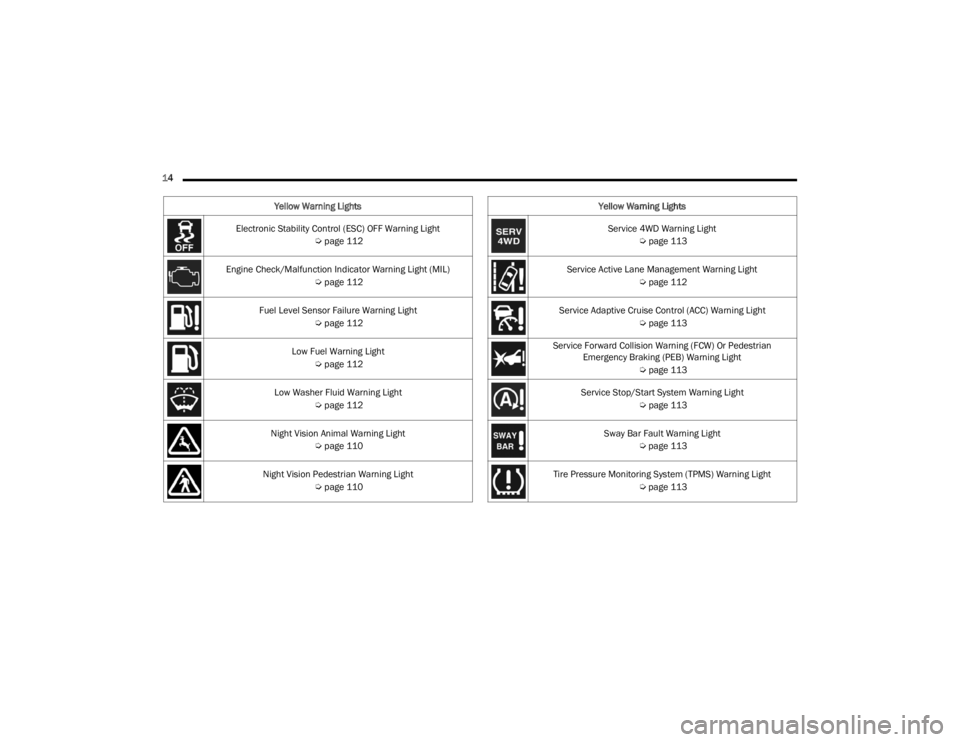
14 Electronic Stability Control (ESC) OFF Warning Light Úpage 112
Engine Check/Malfunction Indicator Warning Light (MIL) Úpage 112
Fuel Level Sensor Failure Warning Light Úpage 112
Low Fuel Warning Light Úpage 112
Low Washer Fluid Warning Light Úpage 112
Night Vision Animal Warning Light Úpage 110
Night Vision Pedestrian Warning Light Úpage 110
Yellow Warning Lights
Service 4WD Warning Light
Úpage 113
Service Active Lane Management Warning Light Úpage 112
Service Adaptive Cruise Control (ACC) Warning Light Úpage 113
Service Forward Collision Warning (FCW) Or Pedestrian Emergency Braking (PEB) Warning Light
Úpage 113
Service Stop/Start System Warning Light Úpage 113
Sway Bar Fault Warning Light Úpage 113
Tire Pressure Monitoring System (TPMS) Warning Light Úpage 113
Yellow Warning Lights
23_WL_OM_EN_USC_t.book Page 14
Page 17 of 424
15
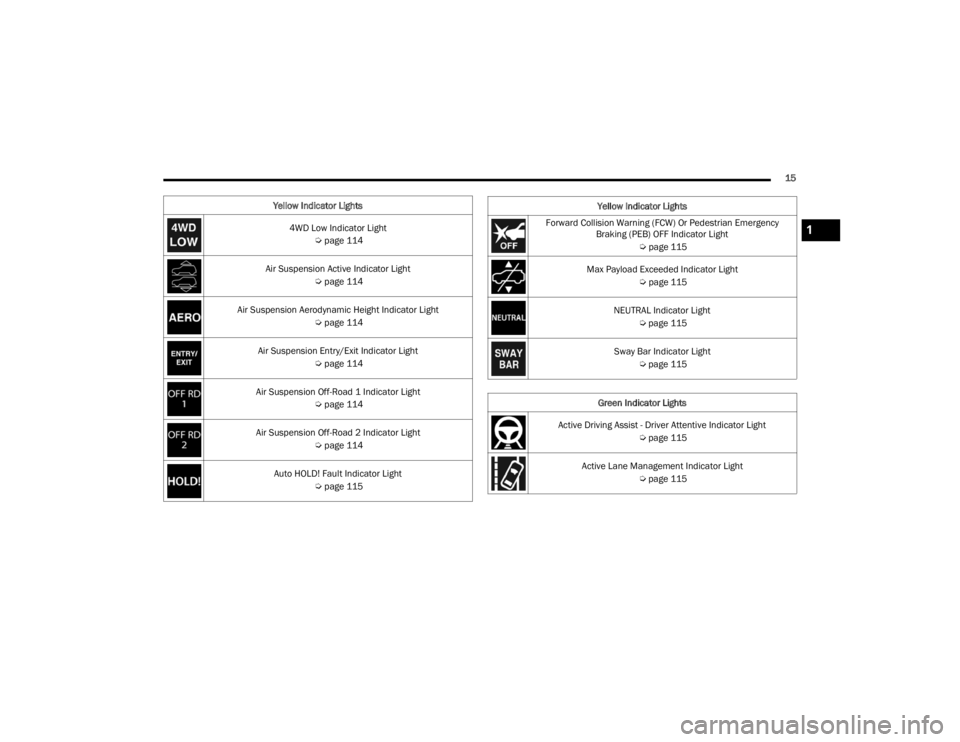
Yellow Indicator Lights 4WD Low Indicator Light Úpage 114
Air Suspension Active Indicator Light Úpage 114
Air Suspension Aerodynamic Height Indicator Light Úpage 114
Air Suspension Entry/Exit Indicator Light Úpage 114
Air Suspension Off-Road 1 Indicator Light Úpage 114
Air Suspension Off-Road 2 Indicator Light Úpage 114
Auto HOLD! Fault Indicator Light Úpage 115
Forward Collision Warning (FCW) Or Pedestrian Emergency
Braking (PEB) OFF Indicator Light
Úpage 115
Max Payload Exceeded Indicator Light Úpage 115
NEUTRAL Indicator Light Úpage 115
Sway Bar Indicator Light Úpage 115
Green Indicator Lights
Active Driving Assist - Driver Attentive Indicator Light Úpage 115
Active Lane Management Indicator Light Úpage 115
Yellow Indicator Lights1
23_WL_OM_EN_USC_t.book Page 15
Page 18 of 424
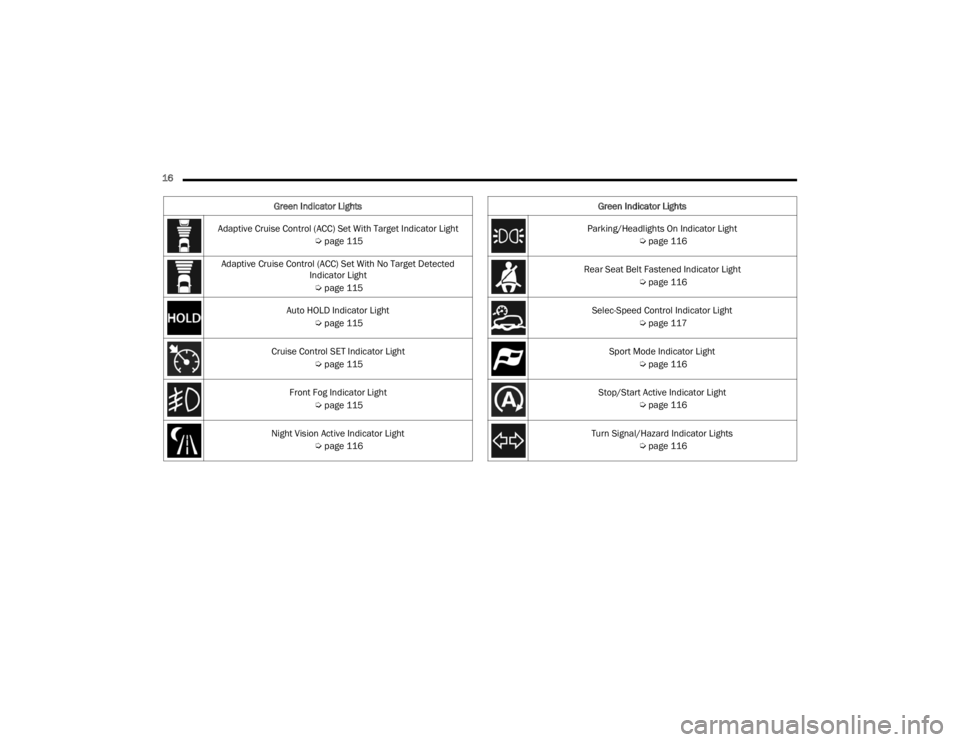
16 Adaptive Cruise Control (ACC) Set With Target Indicator Light Úpage 115
Adaptive Cruise Control (ACC) Set With No Target Detected Indicator Light
Ú page 115
Auto HOLD Indicator Light Úpage 115
Cruise Control SET Indicator Light Úpage 115
Front Fog Indicator Light Úpage 115
Night Vision Active Indicator Light Úpage 116
Green Indicator Lights
Parking/Headlights On Indicator Light
Úpage 116
Rear Seat Belt Fastened Indicator Light Úpage 116
Selec-Speed Control Indicator Light Úpage 117
Sport Mode Indicator Light Úpage 116
Stop/Start Active Indicator Light Úpage 116
Turn Signal/Hazard Indicator Lights Úpage 116
Green Indicator Lights
23_WL_OM_EN_USC_t.book Page 16
Page 19 of 424
17
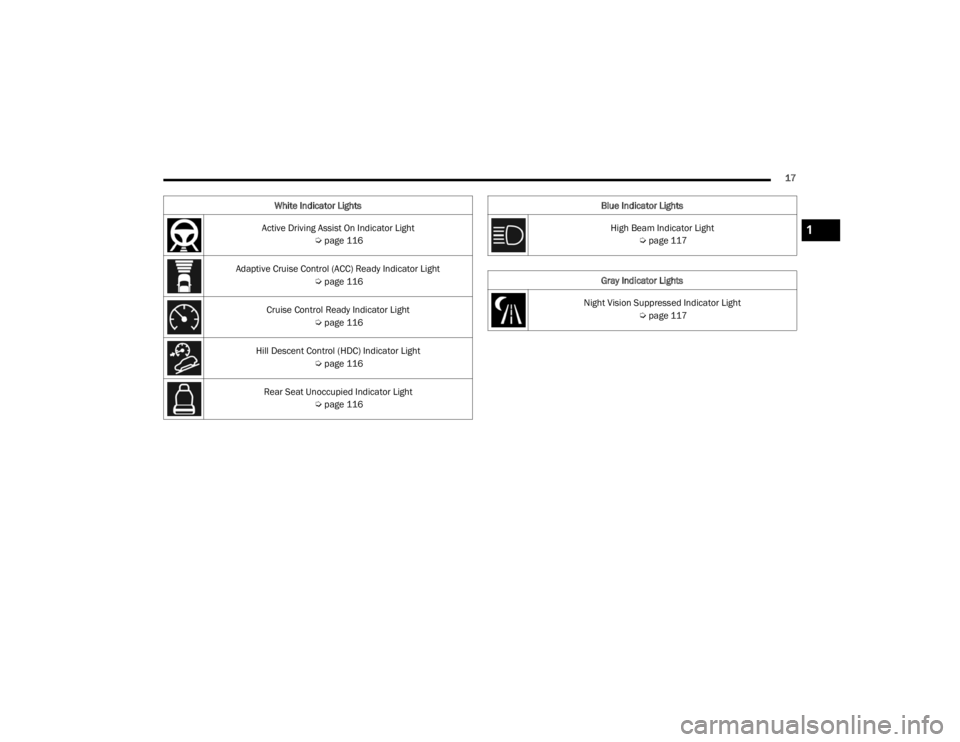
White Indicator Lights
Active Driving Assist On Indicator Light Úpage 116
Adaptive Cruise Control (ACC) Ready Indicator Light Úpage 116
Cruise Control Ready Indicator Light Úpage 116
Hill Descent Control (HDC) Indicator Light Úpage 116
Rear Seat Unoccupied Indicator Light Úpage 116
Blue Indicator Lights
High Beam Indicator Light Úpage 117
Gray Indicator Lights
Night Vision Suppressed Indicator Light Úpage 117
1
23_WL_OM_EN_USC_t.book Page 17
Page 20 of 424
18
GETTING TO KNOW YOUR VEHICLE
KEYS
KEY FOB
Your vehicle is equipped with a key fob which
supports Passive Entry, Remote Keyless Entry
(RKE), Keyless Enter ‘n Go™ (if equipped), Remote
Start (if equipped), and remote power liftgate (if
equipped) operation. The key fob allows you to lock
or unlock all doors and liftgate, as well as activate
the Panic Alarm from distances up to
approximately 66 ft (20 m). The key fob does not need to be pointed at the vehicle to activate the
system. The key fob also contains an emergency
key, which is stored in the rear of the key fob.
NOTE:In vehicles equipped with Remote Start, the key
fob will operate at distances up to 328 ft (100 m).
NOTE:
The key fob’s wireless signal may be blocked if
the key fob is located next to a mobile phone,
laptop, or other electronic device. This may
result in poor performance.
If your vehicle is equipped with a Wireless
Charging Pad, the key fob may not be detected
if it is placed within 6 inches (15 cm) of the pad
Ú page 80.
With the ignition in the ON position and the
vehicle moving at 2 mph (4 km/h), all RKE
commands are disabled.
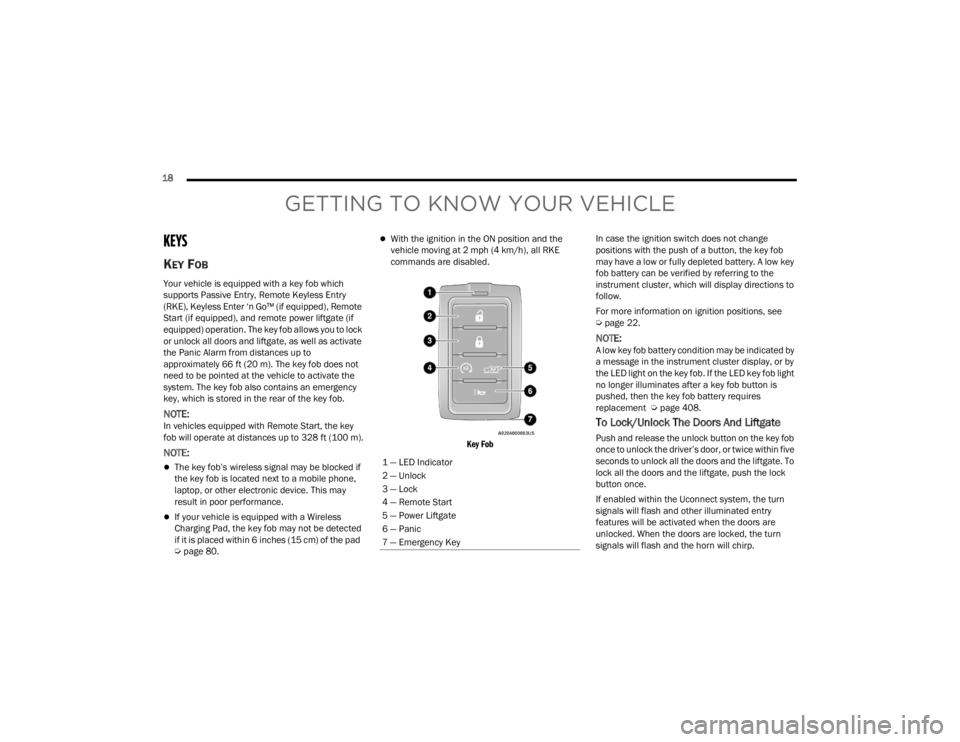
Key Fob
In case the ignition switch does not change
positions with the push of a button, the key fob
may have a low or fully depleted battery. A low key
fob battery can be verified by referring to the
instrument cluster, which will display directions to
follow.
For more information on ignition positions, see
Ú
page 22.
NOTE:A low key fob battery condition may be indicated by
a message in the instrument cluster display, or by
the LED light on the key fob. If the LED key fob light
no longer illuminates after a key fob button is
pushed, then the key fob battery requires
replacement Ú page 408.
To Lock/Unlock The Doors And Liftgate
Push and release the unlock button on the key fob
once to unlock the driver’s door, or twice within five
seconds to unlock all the doors and the liftgate. To
lock all the doors and the liftgate, push the lock
button once.
If enabled within the Uconnect system, the turn
signals will flash and other illuminated entry
features will be activated when the doors are
unlocked. When the doors are locked, the turn
signals will flash and the horn will chirp.
1 — LED Indicator
2 — Unlock
3 — Lock
4 — Remote Start
5 — Power Liftgate
6 — Panic
7 — Emergency Key
23_WL_OM_EN_USC_t.book Page 18
Page 21 of 424

GETTING TO KNOW YOUR VEHICLE19
NOTE:
If the vehicle is equipped with the Auto Relock
feature, and is unlocked with the key fob, and
no door is opened within 60 seconds, the
vehicle will relock and the Vehicle Security
system will arm (if equipped). This feature can
be enabled/disabled within Uconnect Settings.
If one or more doors are open, or the liftgate is
open, the doors will lock. The doors will unlock
again automatically if the key fob is left inside
the passenger compartment, otherwise the
doors will stay locked.
All doors can be programmed to unlock on the first
push of the unlock button through Uconnect
Settings Ú page 204.
Using The Panic Feature
To turn the Panic feature on or off, push the Panic
button on the key fob. When the Panic feature is
activated, the turn signals will flash, the horn may
pulse on and off (if equipped with horn alarm), and
the interior lights will turn on.
The Panic feature will stay on for three minutes
unless you turn it off by either pushing the Panic
button a second time or drive the vehicle at a
speed of 15 mph (24 km/h) or greater.
NOTE:
The interior lights will turn off if you place the
ignition in the ON/RUN position while the Panic
feature is activated. However, the exterior lights
and horn (if equipped with horn alarm) will
remain on.
You may need to be closer than 66 ft (20 m)
from the vehicle when using the key fob to turn
off the Panic feature due to the radio frequency
noises emitted by the system.
Key Left Vehicle Feature
If a valid key fob is no longer detected inside the
vehicle while the vehicle’s ignition system is in the
ON/RUN or START position, the message “Key Fob
Has Left The Vehicle” will be shown in the
instrument cluster display along with an interior
chime. An exterior audible and visual alert will also
be activated to warn the driver.
The vehicle’s horn will rapidly chirp three times
along with a single flash of the vehicle’s exterior
lights.
NOTE:
The doors have to be open and then closed in
order for the vehicle to check for the presence of
a key fob; the Key Left Vehicle feature will not
activate until all of the doors are closed.
These alerts will not be activated in situations
where the vehicle’s engine is left running with
the key fob inside.
Using The Key Fob To Open Vehicle
Windows — If Equipped
From outside of the vehicle, push and release the
unlock button on the key fob, and within five
seconds push and hold the unlock button for up to
seven seconds. All vehicle door windows will open.
NOTE:
This feature is enabled through Uconnect
Settings Ú page 204.
Vehicle must be equipped with front and rear
auto up/down windows.
Replacing The Battery In The Key Fob
The replacement battery model is one CR2450
battery.
NOTE:
Customers are recommended to use a battery
obtained from Mopar®. Aftermarket coin
battery specifications may not meet the original
OEM coin battery specifications.
Perchlorate Material — special handling may
apply. See www.dtsc.ca.gov/hazard -
ouswaste/perchlorate for further information.
Do not touch the battery terminals that are on
the back housing or the printed circuit board.
2
23_WL_OM_EN_USC_t.book Page 19