warning JEEP GRAND CHEROKEE LAREDO 2012 Owner's Manual
[x] Cancel search | Manufacturer: JEEP, Model Year: 2012, Model line: GRAND CHEROKEE LAREDO, Model: JEEP GRAND CHEROKEE LAREDO 2012Pages: 655, PDF Size: 4.26 MB
Page 179 of 655
WARNING!
Do not ride with the seatback reclined so that the
shoulder belt is no longer resting against your chest.
In a collision you could slide under the seat belt,
which could result in serious injury or death.
Heated Seats — If Equipped
On some models, the front and rear seats may be
equipped with heaters in both the seat cushions and
seatbacks.
Page 187 of 655
WARNING!
Sitting in a seat with the head restraint in its lowered
position could result in serious injury or death in a
(Continued)
Page 190 of 655
WARNING!
Do not ride with the seatback reclined so that the
shoulder belt is no longer resting against your chest.
In a collision you could slide under the seat belt,
which could result in serious injury or death.
DRIVER MEMORY SEAT — IF EQUIPPED
This feature allows the driver to store up to two different
memory profiles for easy recall through a memory
switch. Each memory profile contains desired position
settings for the driver seat, side mirrors, adjustable
pedals (if equipped), and power tilt and telescopic steer-
ing column (if equipped) and a set of desired radio
station presets. Your Remote Keyless Entry (RKE) trans-
mitter can also be programmed to recall the same posi-
tions when the UNLOCK button is pressed.NOTE:
Your vehicle is equipped with two RKE trans-
mitters. One RKE transmitter can be linked to memory
position 1 and the other transmitter can be linked to
memory position 2.
The memory seat switch is located on the driver ’s door
trim panel. The switch consists of three buttons:
• The (S) button, which is used to activate the memory
save function
188 UNDERSTANDING THE FEATURES OF YOUR VEHICLE
Page 217 of 655
WARNING!
•Persons who are unable to feel pain to the skin
because of advanced age, chronic illness, diabetes,
spinal cord injury, medication, alcohol use, exhaus-
tion, or other physical conditions must exercise
care when using the steering wheel heater. It may
cause burns even at low temperatures, especially if
used for long periods.
• Do not place anything on the steering wheel that
insulates against heat, such as a blanket or steering
wheel covers of any type and material. This may
cause the steering wheel heater to overheat.
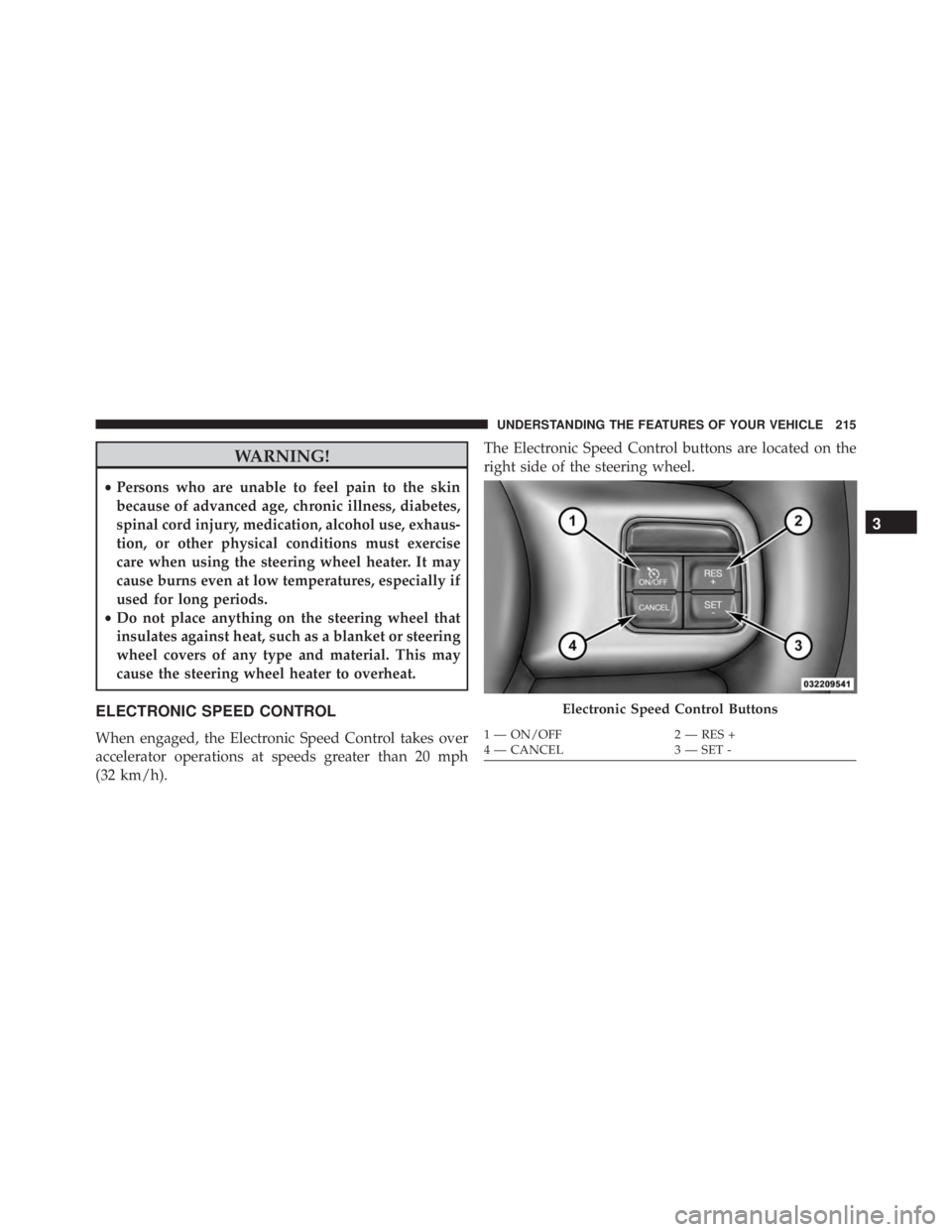
ELECTRONIC SPEED CONTROL
When engaged, the Electronic Speed Control takes over
accelerator operations at speeds greater than 20 mph
(32 km/h). The Electronic Speed Control buttons are located on the
right side of the steering wheel.
Page 221 of 655
WARNING!
•Adaptive Cruise Control (ACC) is a convenience
system. It is not a substitute for active driving
involvement. It is always the driver ’s responsibility
to be attentive of road, traffic, and weather condi-
tions, vehicle speed, distance to the vehicle ahead;
and, most importantly, brake operation to ensure
safe operation of the vehicle under all road condi-
tions. Your complete attention is always required
while driving to maintain safe control of your ve-
hicle. Failure to follow these warnings can result in a
collision and death or serious personal injury.
•The ACC system:
– Does not react to pedestrians, oncoming ve- hicles, and stationary objects (e.g., a stopped
vehicle in a traffic jam or a disabled vehicle).
(Continued)
Page 222 of 655

WARNING!
You should switch off the ACC system:
•When driving in fog, heavy rain, heavy snow, sleet,
heavy traffic, and complex driving situations (i.e.,
in highway construction zones).
• When entering a turn lane or highway off ramp;
when driving on roads that are winding, icy, snow-
covered, slippery, or have steep uphill or downhill
slopes.
• When towing a trailer up or down steep slopes.
• When circumstances do not allow safe driving at a
constant speed.
Failure to follow these warnings can result in a
collision and death or serious personal injury. The Cruise Control system has two control modes:
•
Adaptive Cruise Control mode for maintaining an
appropriate distance between vehicles.
• Normal (fixed speed) cruise control mode for cruising
at a constant preset speed. For additional information,
refer to “Normal (Fixed Speed) Cruise Control Mode”
in this section.
NOTE: The system will not react to preceding vehicles.
Always be aware of the mode selected.
You can change the mode by using the Cruise Control
buttons. The two control modes function differently.
Always confirm which mode is selected.
220 UNDERSTANDING THE FEATURES OF YOUR VEHICLE
Page 258 of 655
WARNING!(Continued)
could detect the ball mount and hitch ball assem-
bly, depending on its size and shape, giving a false
indication that an obstacle is behind the vehicle.
PARKVIEW® REAR BACK UP CAMERA — IF
EQUIPPED
Your vehicle may be equipped with the ParkView® Rear
Back Up Camera that allows you to see an on-screen
image of the rear surroundings of your vehicle whenever
the shift lever is put into REVERSE. The image will be
displayed on the Navigation/Multimedia radio display
screen along with a caution note to “check entire sur-
roundings” across the top of the screen. After five sec-
onds this note will disappear. The ParkView® camera is
located on the rear of the vehicle above the rear License
plate. When the vehicle is shifted out of REVERSE, the rear
camera mode is exited and the navigation or audio screen
appears again.
When displayed, static grid lines will illustrate the width
of the vehicle while a dashed center-line will indicate the
center of the vehicle to assist with aligning to a hitch/
receiver. The static grid lines will show separate zones
that will help indicate the distance to the rear of the
vehicle. The following table shows the approximate
distances for each zone:
256 UNDERSTANDING THE FEATURES OF YOUR VEHICLE
Page 271 of 655
WARNING!
•Your motorized door or gate will open and close
while you are programming the universal trans-
ceiver. Do not program the transceiver if people,
pets or other objects are in the path of the door or
gate. Only use this transceiver with a garage door
opener that has a “stop and reverse” feature as
required by Federal safety standards. This includes
most garage door opener models manufactured
after 1982. Do not use a garage door opener without
these safety features. Call toll-free 1–800–355–3515
or, on the Internet at www.HomeLink.com for
safety information or assistance.
• Vehicle exhaust contains carbon monoxide, a dan-
gerous gas. Do not run your vehicle in the garage
while programming the transceiver. Exhaust gas
can cause serious injury or death.
General Information
This device complies with FCC rules Part 15 and Industry
Canada RSS-210. Operation is subject to the following
two conditions:
1. This device may not cause harmful interference.
2. This device must accept any interference that may be
received including interference that may cause unde-
sired operation.
NOTE:
•
The transmitter has been tested and it complies with FCC
and IC rules. Changes or modifications not expressly
approved by the party responsible for compliance could
void the user ’s authority to operate the device.
• The term IC before the certification/registration num-
ber only signifies that Industry Canada technical speci-
fications were met.
3
UNDERSTANDING THE FEATURES OF YOUR VEHICLE 269
Page 276 of 655
WARNING!(Continued)
equipped with Keyless Enter-N-Go™). Occupants,
particularly unattended children, can become en-
trapped by the power sunroof while operating the
power sunroof switch. Such entrapment may result
in serious injury or death.
• In a collision, there is a greater risk of being thrown
from a vehicle with an open sunroof. You could
also be seriously injured or killed. Always fasten
your seat belt properly and make sure all passen-
gers are also properly secured.
• Do not allow small children to operate the sunroof.
Never allow your fingers, other body parts, or any
object, to project through the sunroof opening.
Injury may result.
Opening Sunroof — Express
Press the switch rearward and release it within one-half
second. The sunroof and sunshade will open automati-
cally from any position. The sunroof and sunshade will
open fully and stop automatically. This is called “Express
Open”. During Express Open operation, any movement
of the sunroof switch will stop the sunroof.
Opening Sunroof — Manual Mode
To open the sunroof, press and hold the switch rearward
to full open. Any release of the switch will stop the
movement. The sunroof and sunshade will remain in a
partially opened condition until the switch is pushed and
held rearward again.
Closing Sunroof — Express
Press the switch forward and release it within one-half
second and the sunroof will close automatically from any
274 UNDERSTANDING THE FEATURES OF YOUR VEHICLE
Page 283 of 655
WARNING!
To avoid serious injury or death:
•Only devices designed for use in this type of outlet
should be inserted into any 12 Volt outlet.
• Do not touch with wet hands.
• Close the lid when not in use and while driving the
vehicle.
• If this outlet is mishandled, it may cause an electric
shock and failure.