warning JEEP GRAND CHEROKEE LIMITED 2019 User Guide
[x] Cancel search | Manufacturer: JEEP, Model Year: 2019, Model line: GRAND CHEROKEE LIMITED, Model: JEEP GRAND CHEROKEE LIMITED 2019Pages: 626, PDF Size: 3.77 MB
Page 58 of 626
WARNING!(Continued)
•Do not place anything on the seat or seatback that
insulates against heat, such as a blanket or cushion.
This may cause the seat heater to overheat. Sitting in
a seat that has been overheated could cause serious
burns due to the increased surface temperature of the
seat.
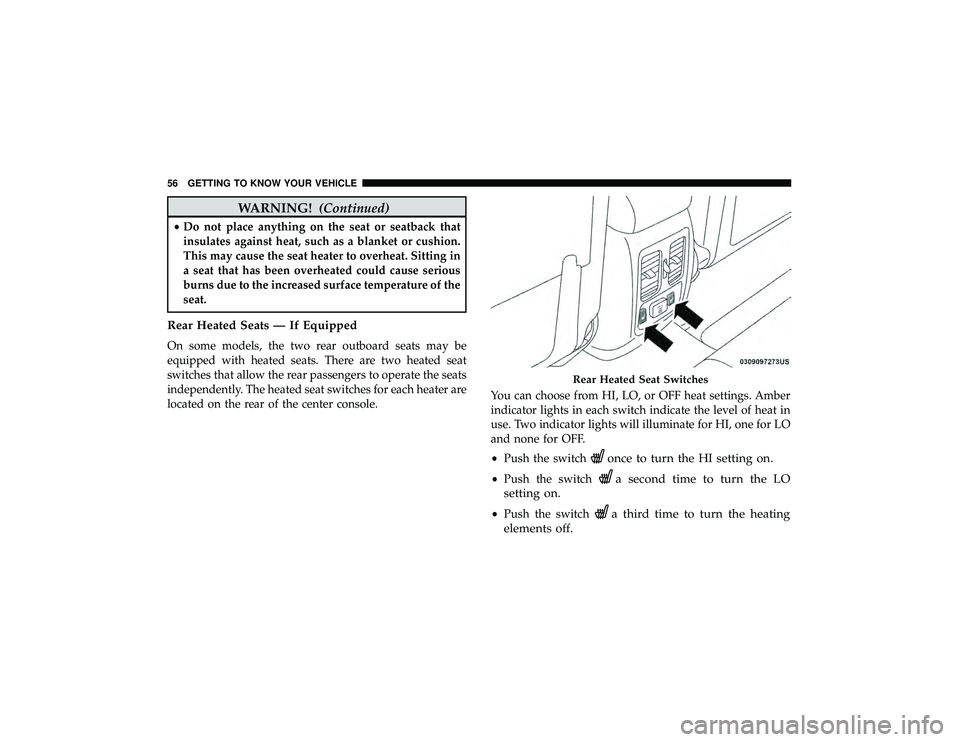
Rear Heated Seats — If Equipped
On some models, the two rear outboard seats may be
equipped with heated seats. There are two heated seat
switches that allow the rear passengers to operate the seats
independently. The heated seat switches for each heater are
located on the rear of the center console. You can choose from HI, LO, or OFF heat settings. Amber
indicator lights in each switch indicate the level of heat in
use. Two indicator lights will illuminate for HI, one for LO
and none for OFF.
•
Push the switch
once to turn the HI setting on.
•Push the switcha second time to turn the LO
setting on.
• Push the switcha third time to turn the heating
elements off.
Page 109 of 626
WARNING!
Be sure the hood is fully latched before driving your
vehicle. If the hood is not fully latched, it could open
when the vehicle is in motion and block your vision.
Failure to follow this warning could result in serious
injury or death.
CAUTION!
To prevent possible damage, do not slam the hood to
close it. Lower hood to approximately 12 inches (30 cm)
and drop the hood to close. Make sure hood is fully
closed for both latches. Never drive vehicle unless
hood is fully closed, with both latches engaged.
LIFTGATE
Opening
The liftgate can be opened from inside the vehicle using the
power liftgate button on the overhead console, using the
key fob outside of the vehicle or the electronic liftgate
release.
To Unlock/Enter The Liftgate
The liftgate may be released in several ways:
•Key fob
• Outside handle
• Button on overhead console
The liftgate passive entry unlock feature is built into the
electronic liftgate release. With a valid Passive Entry key
fob within 5 ft (1.5 m) of the liftgate, push the electronic
liftgate release to open with one fluid motion. Push the
button on the key fob twice within five seconds to release
the liftgate.
3
GETTING TO KNOW YOUR VEHICLE 107
Page 116 of 626
WARNING!(Continued)
•Place as much cargo as possible in front of the rear
axle. Too much weight or improperly placed weight
over or behind the rear axle can cause the rear of the
vehicle to sway.
• Do not pile luggage or cargo higher than the top of
the seatback. This could impair visibility or become
a dangerous projectile in a sudden stop or accident.
GARAGE DOOR OPENER — IF EQUIPPED
HomeLink replaces up to three hand-held transmitters that
operate devices such as garage door openers, motorized
gates, lighting or home security systems. The HomeLink
unit is powered by your vehicle’s 12 Volt battery.
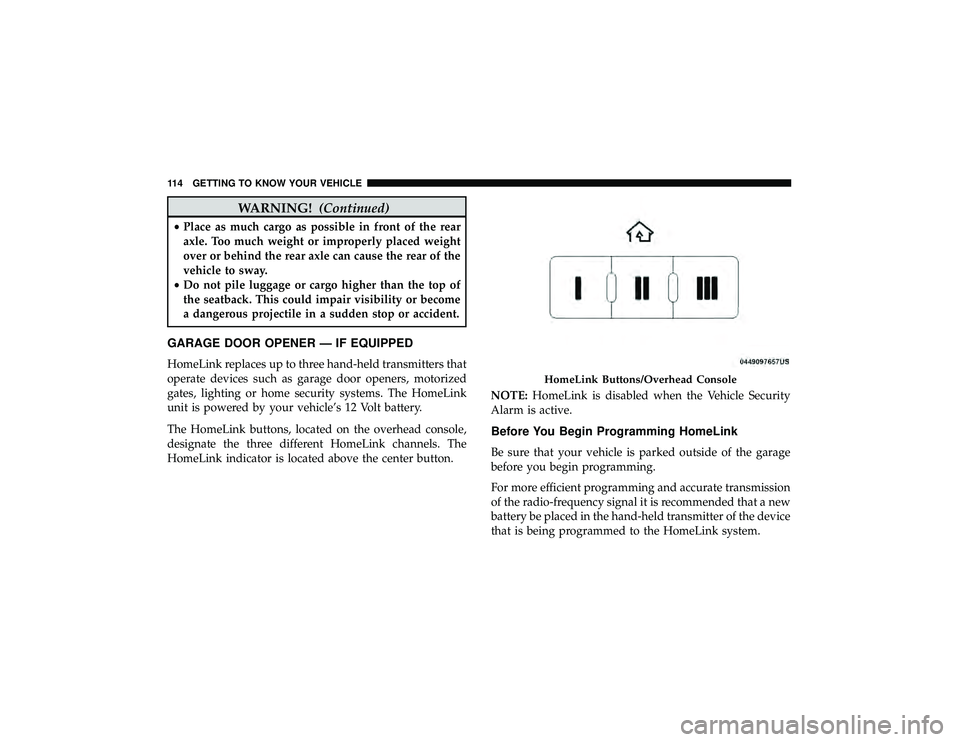
The HomeLink buttons, located on the overhead console,
designate the three different HomeLink channels. The
HomeLink indicator is located above the center button. NOTE:
HomeLink is disabled when the Vehicle Security
Alarm is active.
Before You Begin Programming HomeLink
Be sure that your vehicle is parked outside of the garage
before you begin programming.
For more efficient programming and accurate transmission
of the radio-frequency signal it is recommended that a new
battery be placed in the hand-held transmitter of the device
that is being programmed to the HomeLink system.
Page 131 of 626
WARNING!(Continued)
•Close the lid when not in use and while driving the
vehicle.
• If this outlet is mishandled, it may cause an electric
shock and failure.
CAUTION!
•Many accessories that can be plugged in draw power
from the vehicle’s battery, even when not in use (i.e.,
cellular phones, etc.). Eventually, if plugged in long
enough, the vehicle’s battery will discharge suffi-
ciently to degrade battery life and/or prevent the
engine from starting.
• Accessories that draw higher power (i.e., coolers,
vacuum cleaners, lights, etc.) will degrade the battery
even more quickly. Only use these intermittently and
with greater caution.
• After the use of high power draw accessories, or long
periods of the vehicle not being started (with acces-
sories still plugged in), the vehicle must be driven a
sufficient length of time to allow the generator to
recharge the vehicle’s battery.
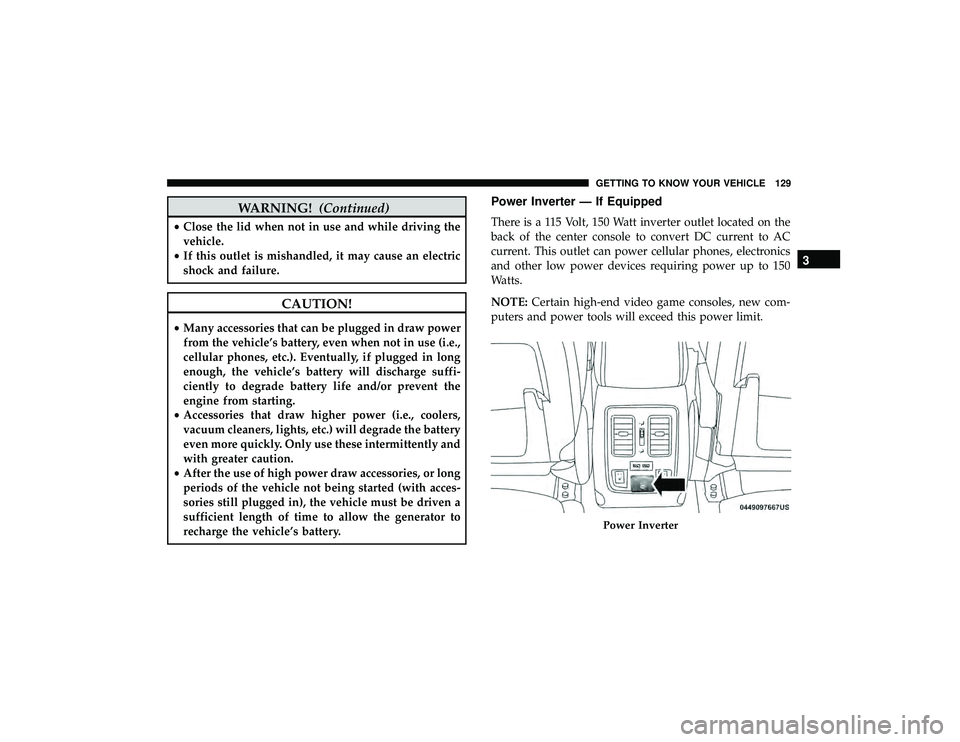
Power Inverter — If Equipped
There is a 115 Volt, 150 Watt inverter outlet located on the
back of the center console to convert DC current to AC
current. This outlet can power cellular phones, electronics
and other low power devices requiring power up to 150
Watts.
NOTE: Certain high-end video game consoles, new com-
puters and power tools will exceed this power limit.
Page 138 of 626
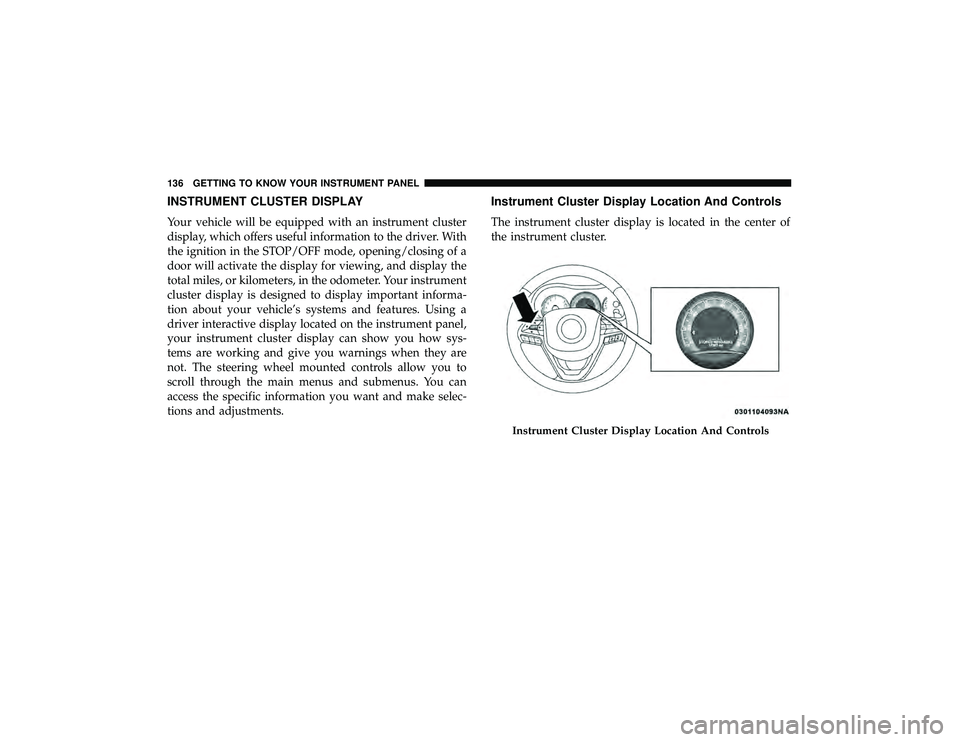
INSTRUMENT CLUSTER DISPLAY
Your vehicle will be equipped with an instrument cluster
display, which offers useful information to the driver. With
the ignition in the STOP/OFF mode, opening/closing of a
door will activate the display for viewing, and display the
total miles, or kilometers, in the odometer. Your instrument
cluster display is designed to display important informa-
tion about your vehicle’s systems and features. Using a
driver interactive display located on the instrument panel,
your instrument cluster display can show you how sys-
tems are working and give you warnings when they are
not. The steering wheel mounted controls allow you to
scroll through the main menus and submenus. You can
access the specific information you want and make selec-
tions and adjustments.
Instrument Cluster Display Location And Controls
The instrument cluster display is located in the center of
the instrument cluster.
Page 141 of 626
Secondary Method For Oil Change Reset Procedure
1. Without pushing the brake pedal, place the ignition inthe ON/RUN position (do not start the engine).
2. Fully press the accelerator pedal, slowly, three times within ten seconds.
3. Without pushing the brake pedal, place the ignition in the OFF/LOCK position.
NOTE: If the indicator message illuminates when you
start the vehicle, the oil change indicator system did not
reset. If necessary, repeat this procedure.
Instrument Cluster Display Messages
Includes the following, but not limited to:
• Front Seatbelts Unbuckled
• Driver Seat Belt Unbuckled
• Passenger Seat Belt Unbuckled
• Traction Control Off
• Washer Fluid Low
• Oil Pressure Low
• Oil Change Due •
Fuel Low
• Service Anti-lock Brake System
• Service Electronic Throttle Control
• Service Power Steering
• Cruise Control Off
• Cruise Control Ready
• ACC Driver Override
• Cruise Control Set To XXX MPH
• Tire Pressure Screen With Low Tire(s) “Inflate Tire to
XX”
• Service Tire Pressure System
• Speed Warning Set To XXX MPH
• Speed Warning Exceeded
• Parking Brake Engaged
• Brake Fluid Low
• Service Electronic Braking System
• Engine Temperature Hot
• Lights On
4
GETTING TO KNOW YOUR INSTRUMENT PANEL 139
Page 142 of 626
•Right Front Turn Signal Light Out
• Right Rear Turn Signal Light Out
• Left Front Turn Signal Light Out
• Left Rear Turn Signal Light Out
• Ignition Or Accessory On
• Vehicle Not In Park
• Remote Start Active Push Start Button — If Equipped
• Remote Start Canceled Fuel Low — If Equipped
• Remote Start Canceled Too Cold — If Equipped
• Remote Start Canceled Door Open — If Equipped
• Remote Start Canceled Hood Open — If Equipped
• Remote Start Canceled Liftgate Open — If Equipped
• Remote Start Canceled Time Expired — If Equipped
• Remote Start Disabled Start To Reset — If Equipped
• Service Air Bag System
• Service Air Bag Warning Light
• Door Open
• Doors Open •
Liftgate Open
• Hood Open
• Shift Not Allowed
• Vehicle Speed Is Too High To Shift To D
• Vehicle Speed Is Too High To Shift To R
• Vehicle Speed Is Too High To Shift To P
• Service Transmission
• Service Shifter
• Service Air Suspension System
• Normal Ride Height Achieved
• Aerodynamic Ride Height Achieved
• Off Road 1 Ride Height Achieved
• Off Road 2 Ride Height Achieved
• Entry/Exit Ride Height Achieved
• Selected Ride Height Not Permitted
• Service Air Suspension System Immediately
• Reduce Speed To Maintain Selected Ride Height
• Air Suspension System Cooling Down Please Wait
140 GETTING TO KNOW YOUR INSTRUMENT PANEL
Page 143 of 626
•Vehicle Cannot Be Lowered Door Open
• Air Suspension Temporarily Disabled
• Battery Low Start Engine To Change Ride Height
For further information on the color warning and indicator
lights in the instrument cluster, refer to “Warning Lights
And Messages” in “Getting To Know Your Instrument
Panel”.
Instrument Cluster Display Menu Items
The instrument cluster display can be used to view the
main menu items for several features. Use the upand
down arrow buttons to scroll through the driver interactive
display menu options until the desired menu is reached.
NOTE: Depending on the vehicle’s options, feature set-
tings may vary.
Speedometer
Push and release the upordown arrow button until the
main gauge menu icon is displayed in the instrument
cluster display. Push and release the leftorright arrow
button to select the analog or digital type speedometer
display. Push and release the OKbutton to toggle units
(mph or km/h) of the speedometer.
Accessibility — If Equipped
Accessibility is a feature of the DVD/Blu-ray system that
announces a function prior to performing the action. For
further information refer to “Uconnect Settings” in “Mul-
timedia.”
Vehicle Info
Push and release the upordown arrow button until the
Vehicle Info menu icon is displayed in the instrument
cluster display. Push and release the leftorright arrow
button to scroll through the information submenus and
push and release the OKbutton to select or reset the
resettable submenus.
Page 145 of 626
•System Off
• ACC Proximity Warning
• ACC Unavailable Warning
NOTE: The instrument cluster display will return to the
last display selected after five seconds of no ACC display
activity.
Refer to “Adaptive Cruise Control (ACC) — If Equipped”
in “Starting And Operating” for further information.
LaneSense — If Equipped
The instrument cluster display displays the current Lane-
Sense system settings. The information displayed depends
on LaneSense system status and the conditions that need to
be met. Refer to “LaneSense — If Equipped” in “Starting
And Operating” for further information.
Fuel Economy
Push and release the upordown arrow button until the
Fuel Economy Icon is highlighted in the instrument cluster
display. Push and hold the OKbutton to reset average fuel
economy feature. Toggle left or right to select a display with or without
Current Fuel Economy Information.
•
Range – The display shows the estimated distance (mi
or km) that can be traveled with the fuel remaining in
the tank. When the Range value is less than 30 miles
(48 km) estimated driving distance, the Range display
will change to a “RANGE LOW” message. Adding a
significant amount of fuel to the vehicle will turn off the
“RANGE LOW” message and a new Range value will
display. Range cannot be reset through the OKbutton.
NOTE: Significant changes in driving style or vehicle
loading will greatly affect the actual drivable distance of
the vehicle, regardless of the Range displayed value.
• Average – The display shows the average fuel economy
(MPG, L/100 km, or km/L) since the last reset.
• Current – This display shows the current fuel economy
(MPG, L/100 km, km/L) while driving.
4
GETTING TO KNOW YOUR INSTRUMENT PANEL 143
Page 146 of 626
Trip Info
Push and release theupordown arrow button until the
Trip menu title is displayed in the instrument cluster
display. Toggle the leftorright arrow button to select Trip
A or Trip B. The Trip information will display the follow-
ing:
• Distance – Shows the total distance (mi or km) traveled
for Trip A or Trip B since the last reset.
• Average Fuel Economy – Shows the average fuel
economy (MPG or L/100 km or km/L) of Trip A or Trip
B since the last reset.
• Elapsed Time – Shows the total elapsed time of travel
since Trip A or Trip B has been reset.
Hold the OKbutton to reset feature information.
Stop/Start – If Equipped
Push and release the upordown arrow button on
the steering wheel to scroll to the Stop/Start menu
in the driver interactive display. This menu will give access
to Stop/Start settings using the leftand right arrow
buttons on the steering wheel. For further information on the use and different modes of
the Stop/Start System accessible through these settings,
refer to “Stop/Start System – If Equipped” in “Starting
And Operating”.
Audio
Push and release the
upordown arrow button until the
Audio menu title is displayed in the instrument cluster
display.
Stored Messages
Push and release the upordown arrow button until the
Messages Menu Icon is highlighted in the instrument
cluster display. This feature shows the number of stored
warning messages. Pushing the leftorright arrow button
will allow you to scroll through the stored messages.
Screen Setup
Push and release the upordown arrow button until the
Screen Setup Menu Icon/Title is highlighted in the instru-
ment cluster display. Push and release the OKbutton to
enter the sub-menus and follow the prompts on the screen
as needed. The Screen Setup feature allows you to change
what information is displayed in the instrument cluster as
well as the location that information is displayed.