ABS JEEP GRAND CHEROKEE LIMITED 2019 Owners Manual
[x] Cancel search | Manufacturer: JEEP, Model Year: 2019, Model line: GRAND CHEROKEE LIMITED, Model: JEEP GRAND CHEROKEE LIMITED 2019Pages: 626, PDF Size: 3.77 MB
Page 37 of 626
the vehicle or not. If you remain in the vehicle and open a
door, the alarm will sound. If this occurs, disarm the
vehicle security alarm.
If the vehicle security alarm is armed and the battery
becomes disconnected, the vehicle security alarm will
remain armed when the battery is reconnected; the exterior
lights will flash, and the horn will sound. If this occurs,
disarm the vehicle security alarm.
Rearming Of The System
If something triggers the alarm, and no action is taken to
disarm it, the vehicle security alarm will turn the horn off
after 29 seconds, five seconds between cycles, up to eight
cycles if the trigger remains active and the vehicle security
alarm will rearm itself.
Security System Manual Override
The vehicle security alarm will not arm if you lock the
doors using the manual door lock plunger.
Tamper Alert
If something has triggered the vehicle security alarm in
your absence, the horn will sound three times and the
exterior lights will blink three times when you disarm the
vehicle security alarm. Check the vehicle for tampering.
DOORS
Manual Door Locks
The power door locks can be manually locked from inside
the vehicle by using the door lock knob. To lock each door,
push the door lock knob on each door trim panel down-
ward. To unlock the front doors, pull the inside door
handle to the first detent. To unlock the rear doors, pull the
door lock knob on the door trim panel upward. If the lock
knob is down when the door is closed, the door will lock.
Therefore, make sure the key fob is not inside the vehicle
before closing the door.
NOTE:Manually locking the vehicle will not arm the
vehicle security alarm.
Page 156 of 626
If the ABS light does not turn on when the ignition is
placed in the ON/RUN or ACC/ON/RUN position, have
the brake system inspected by an authorized dealer.
Page 168 of 626
SAFETY FEATURES
Anti-Lock Brake System (ABS)
The Anti-Lock Brake System (ABS) provides increased
vehicle stability and brake performance under most brak-
ing conditions. The system automatically prevents wheel
lock, and enhances vehicle control during braking.
The ABS performs a self-check cycle to ensure that the ABS
is working properly each time the vehicle is started and
driven. During this self-check, you may hear a slight
clicking sound as well as some related motor noises.
ABS is activated during braking when the system detects
one or more wheels begin to lock. Road conditions such as
ice, snow, gravel, bumps, railroad tracks, loose debris, or
panic stops may increase the likelihood of ABS activa-
tion(s).
You also may experience the following when ABS activates:
•The ABS motor noise (it may continue to run for a short
time after the stop).
• The clicking sound of solenoid valves.
• Brake pedal pulsations.
• A slight drop of the brake pedal at the end of the stop. These are all normal characteristics of ABS.
Page 169 of 626
WARNING!(Continued)
•The capabilities of an ABS equipped vehicle must
never be exploited in a reckless or dangerous manner
that could jeopardize the user ’s safety or the safety of
others.
ABS is designed to function with the OEM tires. Modifica-
tion may result in degraded ABS performance.
Anti-Lock Brake Warning Light
The yellow “Anti-Lock Brake Warning Light” will turn on
when the ignition is turned to the ON/RUN mode and
may stay on for as long as four seconds.
If the “Anti-Lock Brake Warning Light” remains on or
comes on while driving, it indicates that the anti-lock
portion of the brake system is not functioning and that
service is required. However, the conventional brake sys-
tem will continue to operate normally if the “Anti-Lock
Brake Warning Light” is on.
If the “Anti-Lock Brake Warning Light” is on, the brake
system should be serviced as soon as possible to restore the
benefits of anti-lock brakes. If the “Anti-Lock Brake Warn-
ing Light” does not come on when the ignition is turned to
the ON/RUN mode, have the light repaired as soon as
possible.
Electronic Brake Control System
Your vehicle is equipped with an advanced Electronic
Brake Control system (EBC). This system includes Elec-
tronic Brake Force Distribution (EBD), Anti-Lock Brake
System (ABS), Brake Assist System (BAS), Hill Start Assist
(HSA), Traction Control System (TCS), Electronic Stability
Control (ESC), and Electronic Roll Mitigation (ERM). These
systems work together to enhance both vehicle stability
and control in various driving conditions.
Your vehicle may also be equipped with Trailer Sway
Control (TSC), Ready Alert Braking (RAB), Rain Brake
Support (RBS), Dynamic Steering Torque (DST), Hill De-
scent Control (HDC), and Selec-Speed Control (SSC).
Electronic Brake Force Distribution (EBD)
This function manages the distribution of the braking
torque between the front and rear axles by limiting braking
pressure to the rear axle. This is done to prevent overslip of
the rear wheels to avoid vehicle instability, and to prevent
the rear axle from entering ABS before the front axle.
Brake System Warning Light
The red “Brake System Warning Light” will turn on when
the ignition is turned to the ON/RUN mode and may stay
on for as long as four seconds.
5
SAFETY 167
Page 170 of 626
If the “Brake System Warning Light” remains on or comes
on while driving, it indicates that the brake system is not
functioning properly and that immediate service is re-
quired. If the “Brake System Warning Light” does not come
on when the ignition is turned to the ON/RUN mode, have
the light repaired as soon as possible.
Brake Assist System (BAS)
The BAS is designed to optimize the vehicle’s braking
capability during emergency braking maneuvers. The sys-
tem detects an emergency braking situation by sensing the
rate and amount of brake application and then applies
optimum pressure to the brakes. This can help reduce
braking distances. The BAS complements the anti-lock
brake system (ABS). Applying the brakes very quickly
results in the best BAS assistance. To receive the benefit of
the system, you must apply continuous braking pressure
during the stopping sequence, (do not “pump” the brakes).
Do not reduce brake pedal pressure unless braking is no
longer desired. Once the brake pedal is released, the BAS is
deactivated.
Page 219 of 626
Supplemental Driver Knee Air Bag
This vehicle is equipped with a Supplemental Driver Knee
Air Bag mounted in the instrument panel below the
steering column. The Supplemental Driver Knee Air Bag
provides enhanced protection during a frontal impact by
working together with the seat belts, pretensioners, and
front air bags.
Supplemental Side Air Bags
Supplemental Seat-Mounted Side Air Bags (SABs)
This vehicle is equipped with Supplemental Seat-Mounted
Side Air Bags (SABs).
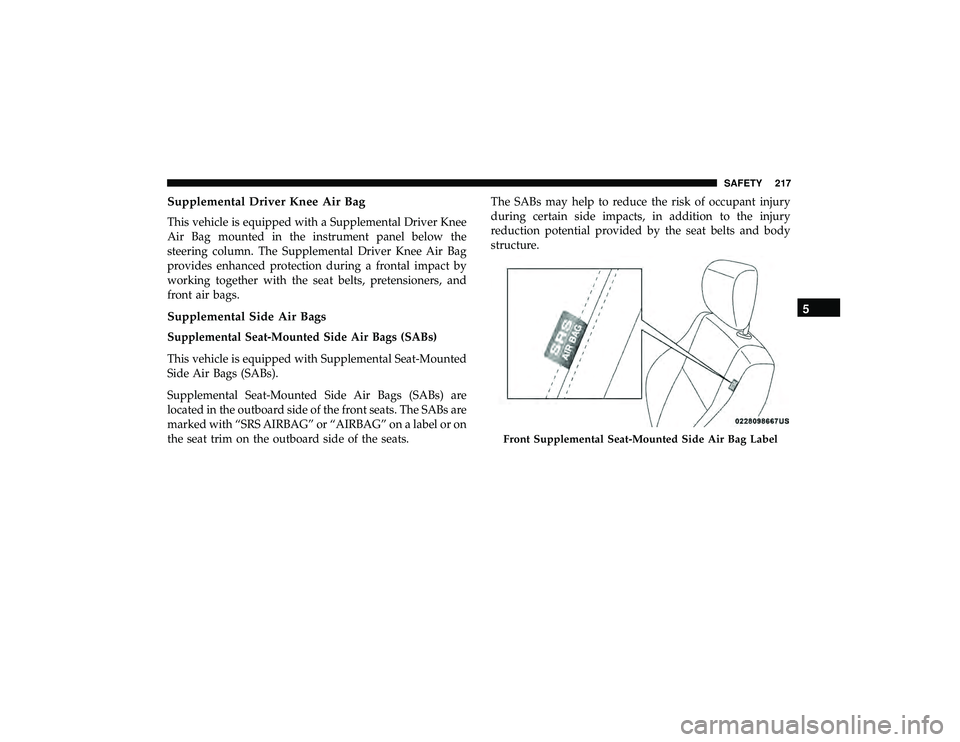
Supplemental Seat-Mounted Side Air Bags (SABs) are
located in the outboard side of the front seats. The SABs are
marked with “SRS AIRBAG” or “AIRBAG” on a label or on
the seat trim on the outboard side of the seats.The SABs may help to reduce the risk of occupant injury
during certain side impacts, in addition to the injury
reduction potential provided by the seat belts and body
structure.
Page 275 of 626
FOUR WHEEL DRIVE OPERATION
Quadra-Trac I Operating Instructions/Precautions
— If Equipped
The Quadra-Trac I is a single-speed (HI range only) trans-
fer case, which provides convenient full-time four-wheel
drive. No driver interaction is required. The Brake Traction
Control (BTC) System, which combines standard ABS and
Traction Control, provides resistance to any wheel that is
slipping to allow additional torque transfer to wheels with
traction.
NOTE:The Quadra-Trac I system is not appropriate for
conditions where 4WD LOW range is recommended. Refer
to “Off-Road Driving Tips” in “Starting And Operating”
Quadra-Trac II Operating Instructions/Precautions
— If Equipped
The Quadra-Trac II transfer case is fully automatic in the
normal driving 4WD AUTO mode. The Quadra-Trac II
transfer case provides three mode positions:
• 4WD HI
• NEUTRAL
• 4WD LOW This transfer case is fully automatic in the 4WD HI mode.
When additional traction is required, the 4WD LOW
position can be used to lock the front and rear driveshafts
together and force the front and rear wheels to rotate at the
same speed. The 4WD LOW position is intended for loose,
slippery road surfaces only. Driving in the 4WD LOW
position on dry, hard-surfaced roads may cause increased
tire wear and damage to driveline components.
When operating your vehicle in 4WD LOW, the engine
speed is approximately three times that of the 4WD HI
position at a given road speed. Take care not to overspeed
the engine and do not exceed 25 mph (40 km/h).
Proper operation of four-wheel drive vehicles depends on
tires of equal size, type, and circumference on each wheel.
Any difference will adversely affect shifting and cause
damage to the transfer case.
Because four-wheel drive provides improved traction,
there is a tendency to exceed safe turning and stopping
speeds. Do not go faster than road conditions permit.
6
STARTING AND OPERATING 273
Page 299 of 626
WARNING!
Leaving the Adaptive Cruise Control (ACC) system on
when not in use is dangerous. You could accidentally
set the system or cause it to go faster than you want.
You could lose control and have a collision. Always
leave the system off when you are not using it.
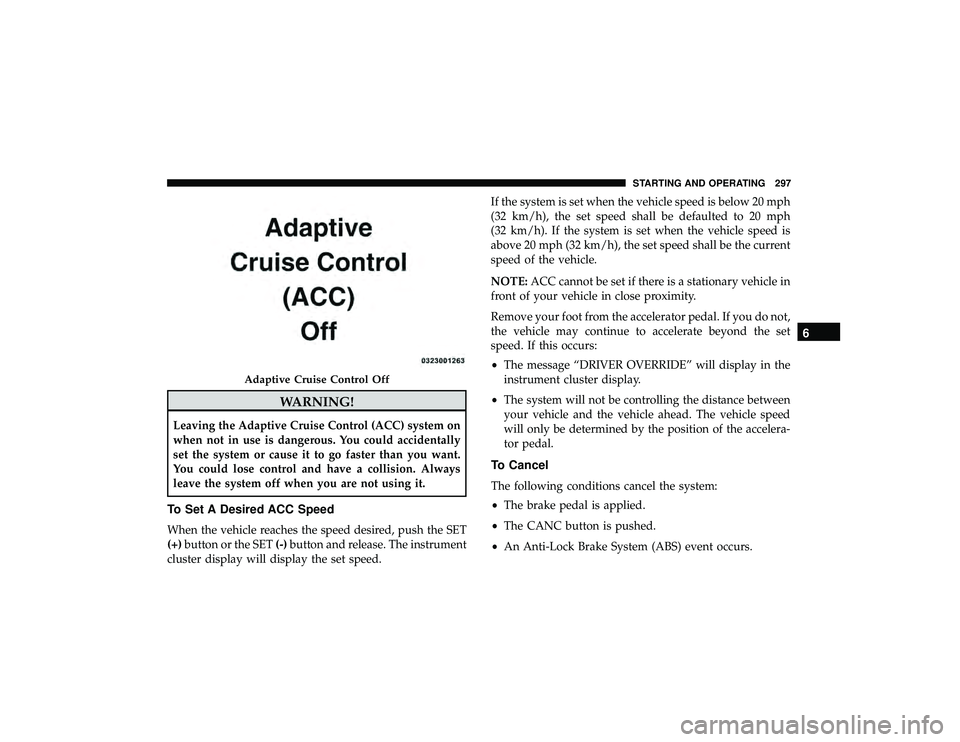
To Set A Desired ACC Speed
When the vehicle reaches the speed desired, push the SET
(+)button or the SET (-)button and release. The instrument
cluster display will display the set speed. If the system is set when the vehicle speed is below 20 mph
(32 km/h), the set speed shall be defaulted to 20 mph
(32 km/h). If the system is set when the vehicle speed is
above 20 mph (32 km/h), the set speed shall be the current
speed of the vehicle.
NOTE:
ACC cannot be set if there is a stationary vehicle in
front of your vehicle in close proximity.
Remove your foot from the accelerator pedal. If you do not,
the vehicle may continue to accelerate beyond the set
speed. If this occurs:
• The message “DRIVER OVERRIDE” will display in the
instrument cluster display.
• The system will not be controlling the distance between
your vehicle and the vehicle ahead. The vehicle speed
will only be determined by the position of the accelera-
tor pedal.
To Cancel
The following conditions cancel the system:
•The brake pedal is applied.
• The CANC button is pushed.
• An Anti-Lock Brake System (ABS) event occurs.
Page 334 of 626
CAUTION!
•ParkSense is only a parking aid and it is unable to
recognize every obstacle, including small obstacles.
Parking curbs might be temporarily detected or not
detected at all. Obstacles located above or below the
sensors will not be detected when they are in close
proximity.
• The vehicle must be driven slowly when using
ParkSense in order to be able to stop in time when an
obstacle is detected. It is recommended that the
driver looks over his/her shoulder when using
ParkSense.
PARKSENSE ACTIVE PARK ASSIST SYSTEM — IF
EQUIPPED
The ParkSense Active Park Assist system is intended to
assist the driver during parallel and perpendicular parking
maneuvers by identifying a proper parking space, provid-
ing audible/visual instructions, and controlling the steer-
ing wheel. The ParkSense Active Park Assist system is
defined as “semi-automatic” since the driver maintains control of the accelerator, gear selector and brakes. De-
pending on the driver’s parking maneuver selection, the
ParkSense Active Park Assist system is capable of maneu-
vering a vehicle into a parallel or a perpendicular parking
space on either side (i.e., driver side or passenger side).
NOTE:
•
The driver is always responsible for controlling the
vehicle, responsible for any surrounding objects, and
must intervene as required.
• The system is provided to assist the driver and not to
substitute the driver.
• During a semi-automatic maneuver, if the driver touches
the steering wheel after being instructed to remove their
hands from the steering wheel, the system will cancel,
and the driver will be required to manually complete the
parking maneuver.
• The system may not work in all conditions (e.g. envi-
ronmental conditions such as heavy rain, snow, etc., or if
searching for a parking space that has surfaces that will
absorb the ultrasonic sensor waves).
332 STARTING AND OPERATING
Page 370 of 626
NOTE:The trailer tongue weight must be considered as
part of the combined weight of occupants and cargo, and
should never exceed the weight referenced on the Tire and
Loading Information placard. Refer to “Tires” in “Servicing
And Maintenance” for further information. The addition of
passengers and cargo may require reducing trailer tongue
load and Gross Trailer Weight (GTW). Redistributing cargo
(to the trailer) may be necessary to avoid exceeding Rear
Gross Axle Weight Rating (GAWR) of 3,700 lbs (1,678 kg).
Trailer Hitch Receiver Cover Removal (Summit
Models) — If Equipped
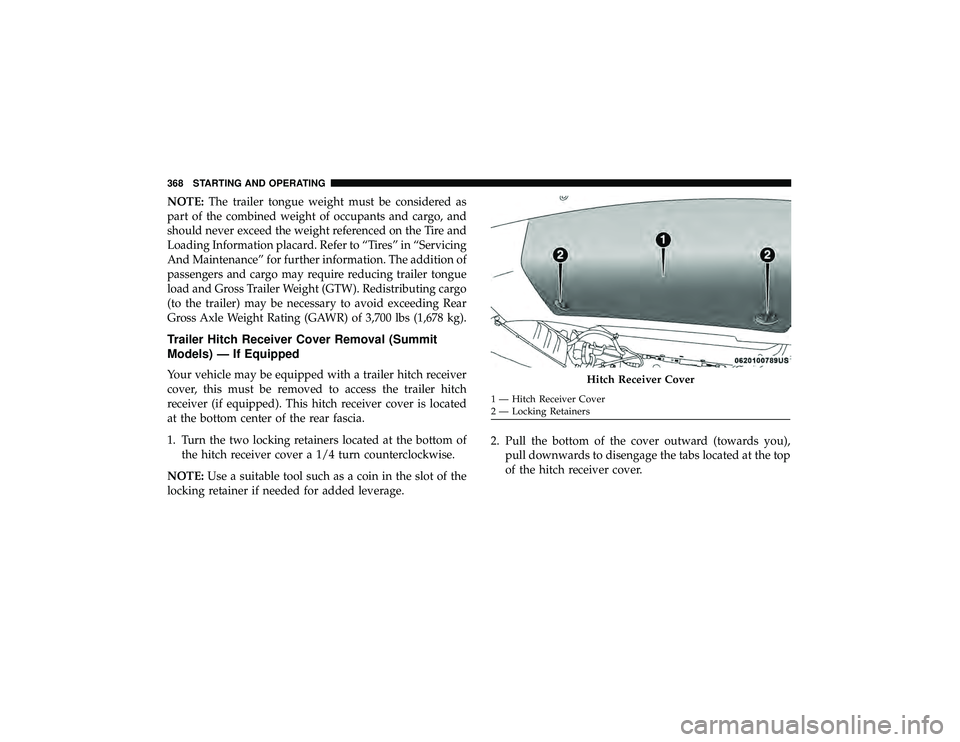
Your vehicle may be equipped with a trailer hitch receiver
cover, this must be removed to access the trailer hitch
receiver (if equipped). This hitch receiver cover is located
at the bottom center of the rear fascia.
1. Turn the two locking retainers located at the bottom of the hitch receiver cover a 1/4 turn counterclockwise.
NOTE: Use a suitable tool such as a coin in the slot of the
locking retainer if needed for added leverage. 2. Pull the bottom of the cover outward (towards you),
pull downwards to disengage the tabs located at the top
of the hitch receiver cover.