start stop button JEEP GRAND CHEROKEE LIMITED 2019 Owners Manual
[x] Cancel search | Manufacturer: JEEP, Model Year: 2019, Model line: GRAND CHEROKEE LIMITED, Model: JEEP GRAND CHEROKEE LIMITED 2019Pages: 626, PDF Size: 3.77 MB
Page 22 of 626
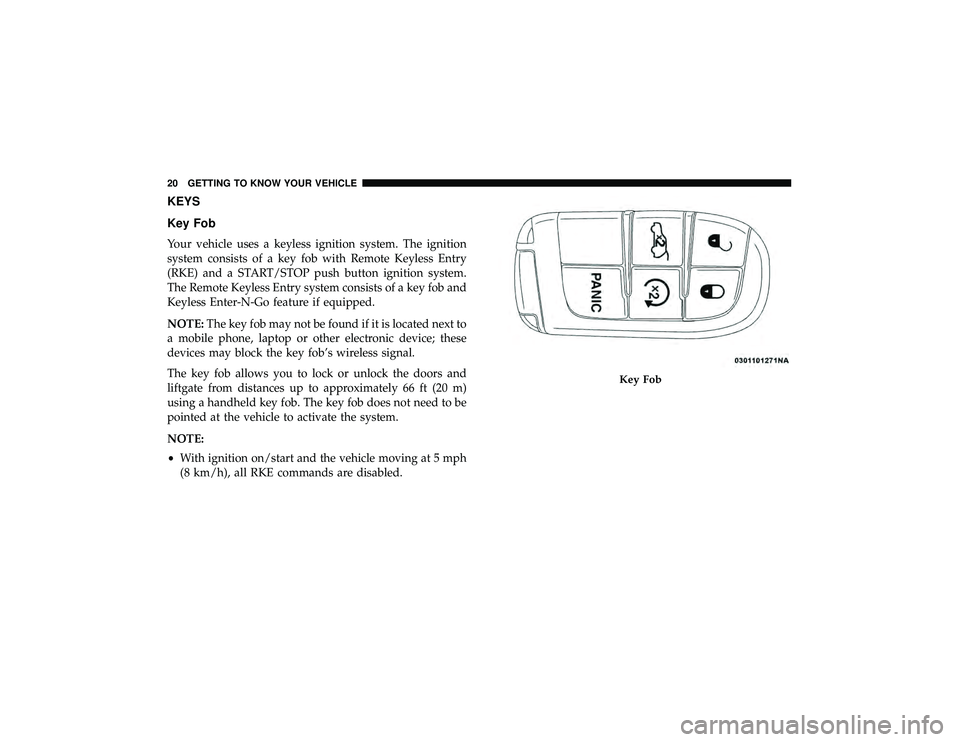
KEYS
Key Fob
Your vehicle uses a keyless ignition system. The ignition
system consists of a key fob with Remote Keyless Entry
(RKE) and a START/STOP push button ignition system.
The Remote Keyless Entry system consists of a key fob and
Keyless Enter-N-Go feature if equipped.
NOTE:The key fob may not be found if it is located next to
a mobile phone, laptop or other electronic device; these
devices may block the key fob’s wireless signal.
The key fob allows you to lock or unlock the doors and
liftgate from distances up to approximately 66 ft (20 m)
using a handheld key fob. The key fob does not need to be
pointed at the vehicle to activate the system.
NOTE:
• With ignition on/start and the vehicle moving at 5 mph
(8 km/h), all RKE commands are disabled.
Page 27 of 626
NOTE:
•When having the Sentry Key Immobilizer System ser-
viced, bring all vehicle keys with you to an authorized
dealer.
• Keys must be ordered to the correct key cut to match the
vehicle locks.
General Information
The following regulatory statement applies to all radio
frequency (RF) devices equipped in this vehicle:
This device complies with Part 15 of the FCC Rules and
with Industry Canada license-exempt RSS standard(s).
Operation is subject to the following two conditions:
1. This device may not cause harmful interference, and
2. This device must accept any interference received, in-
cluding interference that may cause undesired opera-
tion.
NOTE: Changes or modifications not expressly approved
by the party responsible for compliance could void the
user ’s authority to operate the equipment.
IGNITION SWITCH
Keyless Enter-N-Go — Ignition
This feature allows the driver to operate the ignition switch
with the push of a button as long as the key fob is in the
passenger compartment.
The Keyless Push Button Ignition has several operating
modes that are labeled and will illuminate when in posi-
tion. These modes are OFF, ACC, RUN, and START.
NOTE: If the ignition switch does not change with the
push of a button, the key fob may have a low or dead
battery. In this situation, a back up method can be used to
operate the ignition switch. Put the nose side (side opposite
of the emergency key) of the key fob against the ENGINE
START/STOP button and push to operate the ignition
switch.
3
GETTING TO KNOW YOUR VEHICLE 25
Page 28 of 626
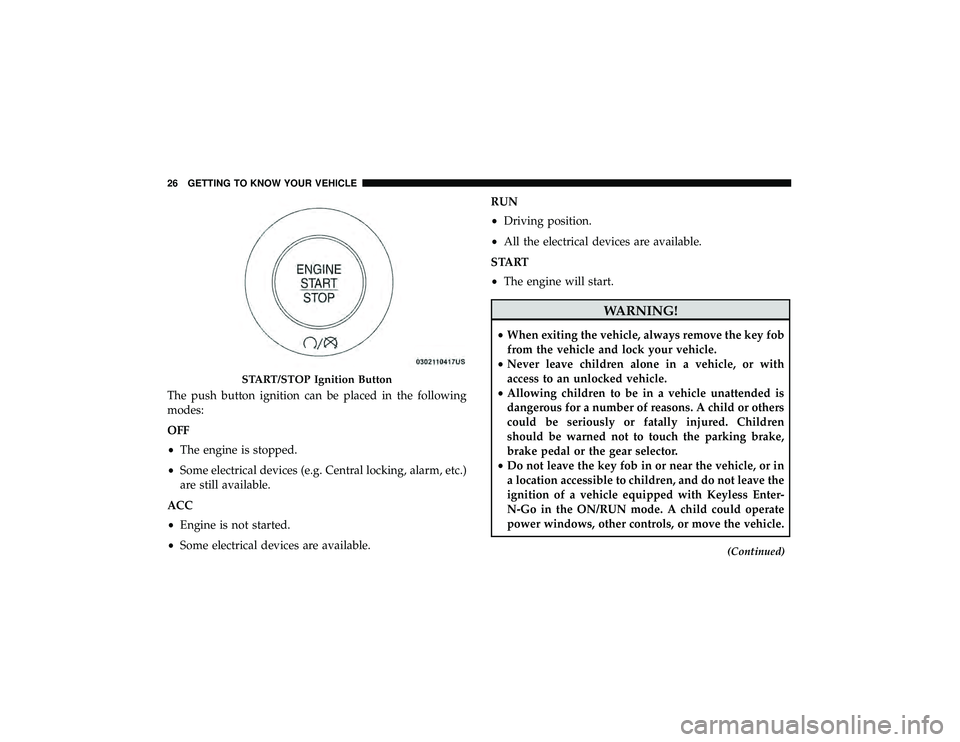
The push button ignition can be placed in the following
modes:
OFF
•The engine is stopped.
• Some electrical devices (e.g. Central locking, alarm, etc.)
are still available.
ACC
• Engine is not started.
• Some electrical devices are available. RUN
•
Driving position.
• All the electrical devices are available.
START
• The engine will start.
Page 31 of 626
How To Use Remote Start
•Push Remote Start button on the key fob twice within
five seconds. Pushing the Remote Start button a third
time shuts the engine off.
• With remote start, the engine will only run for 15
minutes (time out) unless the ignition is placed in the
ON/RUN position.
• The vehicle must be manually started with a push of the
ignition START/STOP button after two consecutive time
outs.
All of the following conditions must be met before the
engine will remote start:
• Gear Selector in PARK
• Doors closed
• Hood closed
• Liftgate closed
• Hazard switch off
• Brake switch inactive (brake pedal not pushed)
• Battery at an acceptable charge level
• PANIC button not pushed •
System not disabled from previous remote start event
• Vehicle alarm system indicator flashing
• Ignition in STOP/OFF position
• Fuel level meets minimum requirement
Page 32 of 626
•Remote Start Aborted Timer Expired
• Remote Start Aborted Liftgate Open
• Remote Start Disabled — Start Vehicle To Reset
The instrument cluster display message stays active until
the ignition is turned to the ON/RUN position.
To Enter Remote Start Mode
Push and release the Remote Start button on the key fob
twice within five seconds. The vehicle doors will lock, the
turn signals will flash twice, and the horn will chirp twice.
Then the engine will start, and the vehicle will remain in
the Remote Start mode for a 15-minute cycle.
NOTE:
• If an engine fault is present or fuel level is low, the
vehicle will start and then shut down in 10 seconds.
• The park lamps will turn on and remain on during
Remote Start mode.
• For security, power window operation is disabled when
the vehicle is in the Remote Start mode.
• The engine can be started two consecutive times (two
15-minute cycles) with the key fob. However, the igni-
tion must be placed in the ON/RUN position before you
can repeat the start sequence for a third cycle.
To Exit Remote Start Mode Without Driving The
Vehicle
Push and release the Remote Start button one time or allow
the remote start cycle to complete the entire 15-minute
cycle.
NOTE: To avoid unintentional shutdowns, the system will
disable the one time push of the Remote Start button for
two seconds after receiving a valid Remote Start request.
To Exit Remote Start Mode And Drive The Vehicle
Before the end of 15-minute cycle, push and release the
unlock button on the key fob to unlock the doors, or unlock
the vehicle using Keyless Enter-N-Go — Passive Entry via
the door handles, and disarm the vehicle security alarm (if
equipped). Then, prior to the end of the 15-minute cycle,
push and release the START/STOP button.
NOTE: For vehicles equipped with the Keyless Enter-
N-Go — Passive Entry feature, the message “Remote Start
Active — Push Start Button” will display in the instrument
cluster display until you push the ignition START button.
30 GETTING TO KNOW YOUR VEHICLE
Page 103 of 626
Pinch Protect Feature
This feature will detect an obstruction in the closing of the
sunroof during the Express Close operation. If an obstruc-
tion in the path of the sunroof is detected, the sunroof will
automatically retract. Remove the obstruction if this oc-
curs.
NOTE:If three consecutive sunroof close attempts result in
Pinch Protect reversals, Pinch Protect will disable and the
sunroof must be closed in Manual Mode.
Venting Sunroof — Express
Push and release the Vent button within one half second
and the sunroof will open to the vent position. This is
called “Express Vent” and it will occur regardless of
sunroof position. During Express Vent operation, any
movement of the switch will stop the sunroof.
Sunroof Maintenance
Use only a non-abrasive cleaner and a soft cloth to clean the
glass panel.
Relearn Procedure
For vehicles equipped with a single-pane sunroof, there is
a relearn procedure that allows you to reset the sunroof
when the “Express Open” feature stops working. To reset
the sunroof, follow these steps:
1. Set the ignition to the ACC or ON/RUN position.
2. Make sure that the sunroof is fully closed.
3. Push sunroof switch forward and hold. The sunroof will close fully then move to the Vent position after 10
seconds.
4. Release the sunroof switch, then push forward and hold the switch again within 5 seconds to begin the relearn
process. The sunroof will complete one full cycle and
return to the Fully Closed position.
NOTE: If the sunroof switch is released anytime during the
relearn cycle, the procedure will need to be repeated
starting from the first step.
5. Once the sunroof has stopped in the Fully Closed position, release the sunroof switch. The sunroof is now
reset and ready to use.
3
GETTING TO KNOW YOUR VEHICLE 101
Page 139 of 626
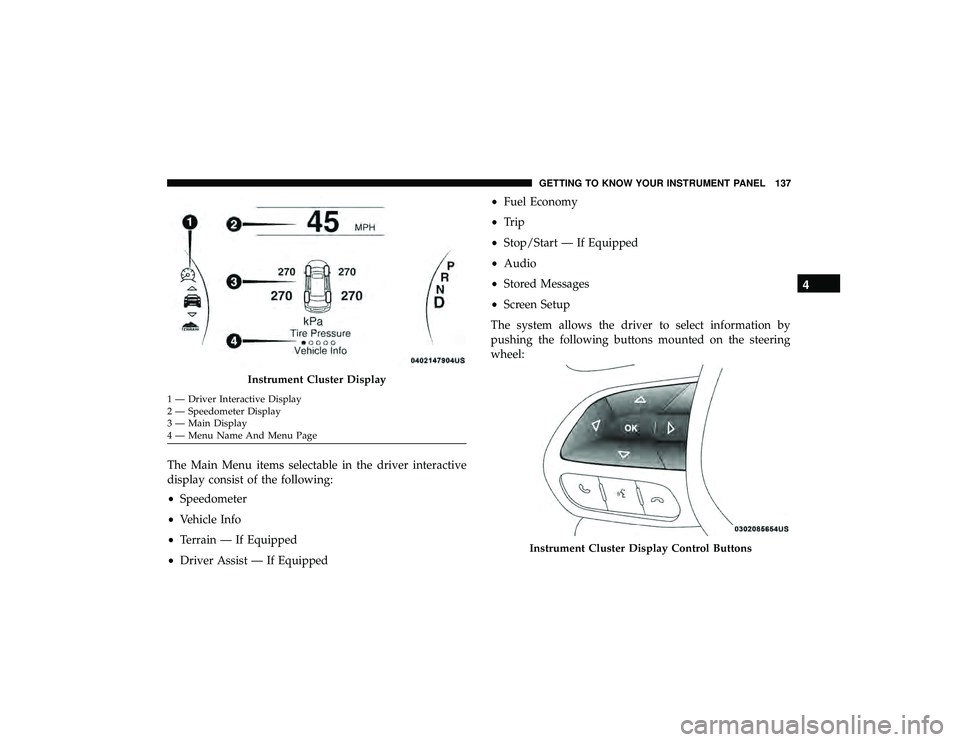
The Main Menu items selectable in the driver interactive
display consist of the following:
•Speedometer
• Vehicle Info
• Terrain — If Equipped
• Driver Assist — If Equipped •
Fuel Economy
• Trip
• Stop/Start — If Equipped
• Audio
• Stored Messages
• Screen Setup
The system allows the driver to select information by
pushing the following buttons mounted on the steering
wheel:
Page 146 of 626
Trip Info
Push and release theupordown arrow button until the
Trip menu title is displayed in the instrument cluster
display. Toggle the leftorright arrow button to select Trip
A or Trip B. The Trip information will display the follow-
ing:
• Distance – Shows the total distance (mi or km) traveled
for Trip A or Trip B since the last reset.
• Average Fuel Economy – Shows the average fuel
economy (MPG or L/100 km or km/L) of Trip A or Trip
B since the last reset.
• Elapsed Time – Shows the total elapsed time of travel
since Trip A or Trip B has been reset.
Hold the OKbutton to reset feature information.
Stop/Start – If Equipped
Push and release the upordown arrow button on
the steering wheel to scroll to the Stop/Start menu
in the driver interactive display. This menu will give access
to Stop/Start settings using the leftand right arrow
buttons on the steering wheel. For further information on the use and different modes of
the Stop/Start System accessible through these settings,
refer to “Stop/Start System – If Equipped” in “Starting
And Operating”.
Audio
Push and release the
upordown arrow button until the
Audio menu title is displayed in the instrument cluster
display.
Stored Messages
Push and release the upordown arrow button until the
Messages Menu Icon is highlighted in the instrument
cluster display. This feature shows the number of stored
warning messages. Pushing the leftorright arrow button
will allow you to scroll through the stored messages.
Screen Setup
Push and release the upordown arrow button until the
Screen Setup Menu Icon/Title is highlighted in the instru-
ment cluster display. Push and release the OKbutton to
enter the sub-menus and follow the prompts on the screen
as needed. The Screen Setup feature allows you to change
what information is displayed in the instrument cluster as
well as the location that information is displayed.
Page 148 of 626
•Trip Info (show/hide)
• Stop/Start
• Audio (show/hide)
• Messages
• Screen Setup
The menu with (show/hide) means user can press OK
button to choose show or hide this menu on the instrument
cluster display.
Battery Saver On/Battery Saver Mode Message —
Electrical Load Reduction Actions (If Equipped)
This vehicle is equipped with an Intelligent Battery Sensor
(IBS) to perform additional monitoring of the electrical
system and status of the vehicle battery.
In cases when the IBS detects charging system failure, or
the vehicle battery conditions are deteriorating, electrical
load reduction actions will take place to extend the driving
time and distance of the vehicle. This is done by reducing
power to or turning off non-essential electrical loads. Load reduction is only active when the engine is running.
It will display a message if there is a risk of battery
depletion to the point where the vehicle may stall due to
lack of electrical supply, or will not restart after the current
drive cycle.
When load reduction is activated, the message “Battery
Saver On” or “Battery Saver Mode” will appear in the
instrument cluster display.
These messages indicate the vehicle battery has a low state
of charge and continues to lose electrical charge at a rate
that the charging system cannot sustain.
NOTE:
•
The charging system is independent from load reduc-
tion. The charging system performs a diagnostic on the
charging system continuously.
• If the Battery Charge Warning Light is on it may indicate
a problem with the charging system. Refer to “Battery
Charge Warning Light” in “Warning Lights And Mes-
sages” located in ”Getting To Know Your Instrument
Panel” for further information.
146 GETTING TO KNOW YOUR INSTRUMENT PANEL
Page 256 of 626
CAUTION!(Continued)
•Shift into PARK only after the vehicle has come to a
complete stop.
• Shift into or out of REVERSE only after the vehicle
has come to a complete stop and the engine is at idle
speed.
• Before shifting into any gear, make sure your foot is
firmly on the brake pedal.
Normal Starting
To Turn On The Engine Using The ENGINE START/
STOP Button
1. The transmission must be in PARK or NEUTRAL.
2. Press and hold the brake pedal while pushing the
ENGINE START/STOP button once.
3. The system takes over and attempts to start the vehicle. If the vehicle fails to start, the starter will disengage
automatically after 10 seconds.
4. If you wish to stop the cranking of the engine prior to the engine starting, push the button again. NOTE:
Normal starting of either a cold or a warm engine
is obtained without pumping or pressing the accelerator
pedal.
To Turn Off The Engine Using ENGINE START/STOP
Button
1. Place the gear selector in PARK, then push and release the ENGINE START/STOP button.
2. The ignition will return to the OFF mode.
3. If the gear selector is not in PARK (with vehicle stopped) and the ENGINE START/STOP button is pushed once,
the transmission will automatically select PARK and the
engine will turn off, however the ignition will remain in
the ACC mode (NOT the OFF mode). Never leave a
vehicle out of the PARK position, or it could roll.
4. If the gear selector is in NEUTRAL, and the vehicle speed is below 5 mph (8 km/h), pushing the START/
STOP button once will turn the engine off. The ignition
will remain in the ACC mode.
254 STARTING AND OPERATING