cruise JEEP LIBERTY 2002 KJ / 1.G User Guide
[x] Cancel search | Manufacturer: JEEP, Model Year: 2002, Model line: LIBERTY, Model: JEEP LIBERTY 2002 KJ / 1.GPages: 1803, PDF Size: 62.3 MB
Page 311 of 1803

²The fuel pump is energized through the fuel
pump relay by the PCM. The fuel pump will operate
for approximately three seconds unless the engine is
operating or the starter motor is engaged.
²The O2S sensor heater element is energized via
the ASD or O2S heater relay. The O2S sensor input
is not used by the PCM to calibrate air-fuel ratio dur-
ing this mode of operation.
ENGINE START-UP MODE
This is an Open Loop mode. The following actions
occur when the starter motor is engaged.
The PCM receives inputs from:
²Battery voltage
²Engine coolant temperature sensor
²Crankshaft position sensor
²Intake manifold air temperature sensor
²Manifold absolute pressure (MAP) sensor
²Throttle position sensor (TPS)
²Camshaft position sensor signal
The PCM monitors the crankshaft position sensor.
If the PCM does not receive a crankshaft position
sensor signal within 3 seconds of cranking the
engine, it will shut down the fuel injection system.
The fuel pump is activated by the PCM through
the fuel pump relay.
Voltage is applied to the fuel injectors with the
ASD relay via the PCM. The PCM will then control
the injection sequence and injector pulse width by
turning the ground circuit to each individual injector
on and off.
The PCM determines the proper ignition timing
according to input received from the crankshaft posi-
tion sensor.
ENGINE WARM-UP MODE
This is an Open Loop mode. During engine warm-
up, the PCM receives inputs from:
²Battery voltage
²Crankshaft position sensor
²Engine coolant temperature sensor
²Intake manifold air temperature sensor
²Manifold absolute pressure (MAP) sensor
²Throttle position sensor (TPS)
²Camshaft position sensor signal
²Park/neutral switch (gear indicator signalÐauto.
trans. only)
²Air conditioning select signal (if equipped)
²Air conditioning request signal (if equipped)
Based on these inputs the following occurs:
²Voltage is applied to the fuel injectors with the
ASD relay via the PCM. The PCM will then control
the injection sequence and injector pulse width by
turning the ground circuit to each individual injector
on and off.²The PCM adjusts engine idle speed through the
idle air control (IAC) motor and adjusts ignition tim-
ing.
²The PCM operates the A/C compressor clutch
through the A/C compressor clutch relay. This is done
if A/C has been selected by the vehicle operator and
specified pressures are met at the high and low±pres-
sure A/C switches. Refer to Heating and Air Condi-
tioning for additional information.
²When engine has reached operating tempera-
ture, the PCM will begin monitoring O2S sensor
input. The system will then leave the warm-up mode
and go into closed loop operation.
IDLE MODE
When the engine is at operating temperature, this
is a Closed Loop mode. At idle speed, the PCM
receives inputs from:
²Air conditioning select signal (if equipped)
²Air conditioning request signal (if equipped)
²Battery voltage
²Crankshaft position sensor
²Engine coolant temperature sensor
²Intake manifold air temperature sensor
²Manifold absolute pressure (MAP) sensor
²Throttle position sensor (TPS)
²Camshaft position sensor signal
²Battery voltage
²Park/neutral switch (gear indicator signalÐauto.
trans. only)
²Oxygen sensors
Based on these inputs, the following occurs:
²Voltage is applied to the fuel injectors with the
ASD relay via the PCM. The PCM will then control
injection sequence and injector pulse width by turn-
ing the ground circuit to each individual injector on
and off.
²The PCM monitors the O2S sensor input and
adjusts air-fuel ratio by varying injector pulse width.
It also adjusts engine idle speed through the idle air
control (IAC) motor.
²The PCM adjusts ignition timing by increasing
and decreasing spark advance.
²The PCM operates the A/C compressor clutch
through the A/C compressor clutch relay. This is done
if A/C has been selected by the vehicle operator and
specified pressures are met at the high and low±pres-
sure A/C switches. Refer to Heating and Air Condi-
tioning for additional information.
CRUISE MODE
When the engine is at operating temperature, this
is a Closed Loop mode. At cruising speed, the PCM
receives inputs from:
²Air conditioning select signal (if equipped)
²Air conditioning request signal (if equipped)
8E - 12 ELECTRONIC CONTROL MODULESKJ
POWERTRAIN CONTROL MODULE (Continued)
Page 339 of 1803
negative jumper posts. Select TESTING AT JUMPER
POST when connecting to that location.
(3) Connect the tester to the battery or jumper
posts, the red clamp to positive (+) and the black
clamp to negative (±).
NOTE: Multiple batteries connected in parallel must
have the ground cable disconnected to perform a
battery test. Failure to disconnect may result in
false battery test readings.
NOTE: When testing the battery in a PT Cruiser,
always test at the battery terminals
(4) Using the ARROW key selectinoroutof vehi-
cle testing and press ENTER to make a selection.
(5) If not selected, choose the Cold Cranking Amp
(CCA) battery rating. Or select the appropriate bat-
tery rating for your area (see menu). The tester will
then run its self programmed test of the battery and
display the results. Refer to the test result table
noted below.
CAUTION: If REPLACE BATTERY is the result of the
test, this may mean a poor connection between the
vehicle's cables and battery exists. After discon-
necting the vehicle's battery cables from the bat-
tery, retest the battery using the OUT-OF-VEHICLE
test before replacing.
(6) While viewing the battery test result, press the
CODE button and the tester will prompt you for the
last 4 digits of the VIN. Use the UP/DOWN arrow
buttons to scroll to the correct character; then press
ENTER to select and move to the next digit. Then
press the ENTER button to view the SERVICE
CODE. Pressing the CODE button a second time will
return you to the test results.
BATTERY TEST RESULTS
GOOD BATTERY Return to service
GOOD - RECHARGE Fully charge battery and
return to service
CHARGE & RETEST Fully charge battery and
retest battery
REPLACE BATTERY Replace the battery and
retest complete system
BAD-CELL REPLACE Replace the battery and
retest complete system
NOTE: The SERVICE CODE is required on every
warranty claim submitted for battery replacement.
REMOVAL
(1) Turn the ignition switch to the Off position. Be
certain that all electrical accessories are turned off.
(2) Loosen the battery negative cable terminal
clamp pinch-bolt hex nut.
(3) Disconnect the battery negative cable terminal
clamp from the battery negative terminal post. If
necessary, use a battery terminal puller to remove
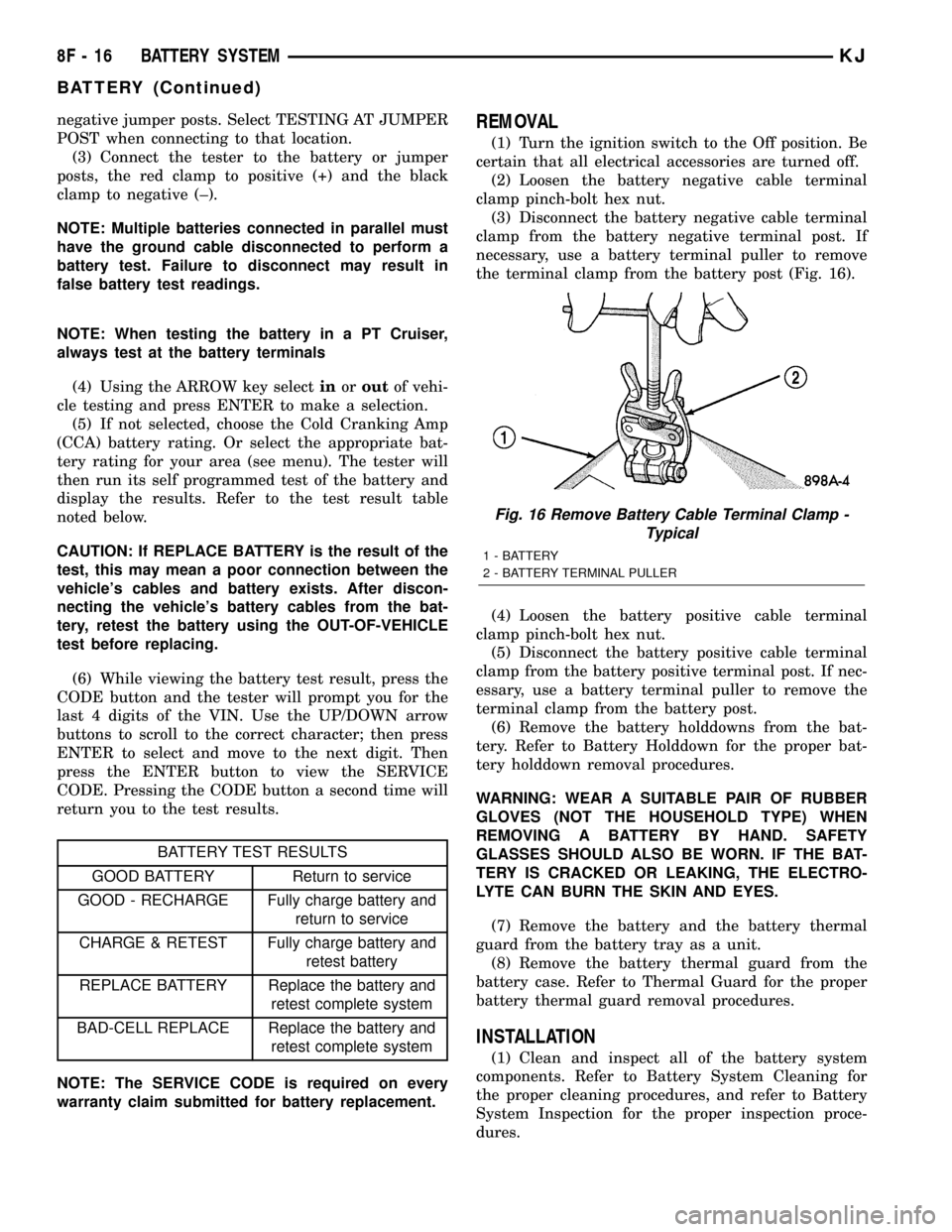
the terminal clamp from the battery post (Fig. 16).
(4) Loosen the battery positive cable terminal
clamp pinch-bolt hex nut.
(5) Disconnect the battery positive cable terminal
clamp from the battery positive terminal post. If nec-
essary, use a battery terminal puller to remove the
terminal clamp from the battery post.
(6) Remove the battery holddowns from the bat-
tery. Refer to Battery Holddown for the proper bat-
tery holddown removal procedures.
WARNING: WEAR A SUITABLE PAIR OF RUBBER
GLOVES (NOT THE HOUSEHOLD TYPE) WHEN
REMOVING A BATTERY BY HAND. SAFETY
GLASSES SHOULD ALSO BE WORN. IF THE BAT-
TERY IS CRACKED OR LEAKING, THE ELECTRO-
LYTE CAN BURN THE SKIN AND EYES.
(7) Remove the battery and the battery thermal
guard from the battery tray as a unit.
(8) Remove the battery thermal guard from the
battery case. Refer to Thermal Guard for the proper
battery thermal guard removal procedures.
INSTALLATION
(1) Clean and inspect all of the battery system
components. Refer to Battery System Cleaning for
the proper cleaning procedures, and refer to Battery
System Inspection for the proper inspection proce-
dures.
Fig. 16 Remove Battery Cable Terminal Clamp -
Typical
1 - BATTERY
2 - BATTERY TERMINAL PULLER
8F - 16 BATTERY SYSTEMKJ
BATTERY (Continued)
Page 404 of 1803

INSTRUMENT CLUSTER
TABLE OF CONTENTS
page page
INSTRUMENT CLUSTER
DESCRIPTION..........................2
OPERATION............................4
DIAGNOSIS AND TESTING - INSTRUMENT
CLUSTER............................7
REMOVAL.............................9
DISASSEMBLY..........................9
ASSEMBLY............................10
INSTALLATION.........................11
ABS INDICATOR
DESCRIPTION.........................11
OPERATION...........................11
AIRBAG INDICATOR
DESCRIPTION.........................12
OPERATION...........................12
BRAKE/PARK BRAKE INDICATOR
DESCRIPTION.........................13
OPERATION...........................13
DIAGNOSIS AND TESTING - BRAKE
INDICATOR..........................14
CHARGING INDICATOR
DESCRIPTION.........................15
OPERATION...........................15
COOLANT LOW INDICATOR
DESCRIPTION.........................15
OPERATION...........................16
CRUISE INDICATOR
DESCRIPTION.........................16
OPERATION...........................17
DOOR AJAR INDICATOR
DESCRIPTION.........................17
OPERATION...........................17
ENGINE TEMPERATURE GAUGE
DESCRIPTION.........................18
OPERATION...........................18
FRONT FOG LAMP INDICATOR
DESCRIPTION.........................19
OPERATION...........................19
FUEL GAUGE
DESCRIPTION.........................19
OPERATION...........................20
GATE AJAR INDICATOR
DESCRIPTION.........................20
OPERATION...........................20
GLASS AJAR INDICATOR
DESCRIPTION.........................21
OPERATION...........................21
HIGH BEAM INDICATOR
DESCRIPTION.........................22OPERATION...........................22
LOW FUEL INDICATOR
DESCRIPTION.........................22
OPERATION...........................22
LOW OIL PRESSURE INDICATOR
DESCRIPTION.........................23
OPERATION...........................23
MALFUNCTION INDICATOR LAMP (MIL)
DESCRIPTION.........................24
OPERATION...........................24
ODOMETER
DESCRIPTION.........................25
OPERATION...........................25
OVERDRIVE OFF INDICATOR
DESCRIPTION.........................26
OPERATION...........................26
REAR FOG LAMP INDICATOR
DESCRIPTION.........................27
OPERATION...........................27
SEATBELT INDICATOR
DESCRIPTION.........................27
OPERATION...........................28
SECURITY INDICATOR
DESCRIPTION.........................28
OPERATION...........................28
SHIFT INDICATOR (TRANSFER CASE)
DESCRIPTION
DESCRIPTION - PART TIME INDICATOR....29
DESCRIPTION - FULL TIME INDICATOR....29
DESCRIPTION - FOUR LOW MODE
INDICATOR..........................29
OPERATION
OPERATION - PART TIME INDICATOR.....29
OPERATION - FULL TIME INDICATOR.....30
OPERATION - FOUR LOW MODE
INDICATOR..........................30
SKIS INDICATOR
DESCRIPTION.........................31
OPERATION...........................31
SPEEDOMETER
DESCRIPTION.........................32
OPERATION...........................32
TACHOMETER
DESCRIPTION.........................33
OPERATION...........................33
TRANS TEMP INDICATOR
DESCRIPTION.........................33
OPERATION...........................34
KJINSTRUMENT CLUSTER 8J - 1
Page 406 of 1803

perform its many functions. The EMIC module incor-
porates a blue-green digital Vacuum Fluorescent Dis-
play (VFD) for displaying odometer and trip
odometer information, as well as several warning
messages and certain diagnostic information. In addi-
tion to instrumentation and indicators, the EMIC has
the hardware and software needed to provide the fol-
lowing features:
²Chime Warning Service- A chime tone gener-
ator on the EMIC electronic circuit board provides
audible alerts to the vehicle operator and eliminates
the need for a separate chime module. (Refer to 8 -
ELECTRICAL/CHIME WARNING SYSTEM -
DESCRIPTION).
²Panel Lamps Dimming Service- The EMIC
provides a hard wired 12-volt Pulse-Width Modulated
(PWM) output that synchronizes the dimming level
of the radio display, gear selector indicator, heater-air
conditioner control, and all other dimmable lighting
on the panel lamps dimmer circuit with that of the
cluster illumination lamps and VFD.
The EMIC houses four analog gauges and has pro-
visions for up to twenty-four indicators (Fig. 2). The
EMIC includes the following analog gauges:
²Coolant Temperature Gauge
²Fuel Gauge
²Speedometer
²Tachometer
Some of the EMIC indicators are automatically
configured when the EMIC is connected to the vehi-
cle electrical system for compatibility with certain
optional equipment or equipment required for regula-
tory purposes in certain markets. While each EMIC
may have provisions for indicators to support every
available option, the configurable indicators will not
be functional in a vehicle that does not have the
equipment that an indicator supports. The EMIC
includes provisions for the following indicators (Fig.
2):
²Airbag Indicator (with Airbag System only)
²Antilock Brake System (ABS) Indicator
(with ABS only)
²Brake Indicator
²Charging Indicator
²Coolant Low Indicator (with Diesel Engine
only)
²Cruise Indicator (with Speed Control Sys-
tem only)
²Four-Wheel Drive Full Time Indicator (with
Selec-Trac Transfer Case only)
²Four-Wheel Drive Low Mode Indicator
²Four-Wheel Drive Part Time Indicator
²Front Fog Lamp Indicator (with Front Fog
Lamps only)
²High Beam Indicator
²Low Fuel Indicator²Low Oil Pressure Indicator
²Malfunction Indicator Lamp (MIL)
²Overdrive-Off Indicator (with Automatic
Transmission only)
²Rear Fog Lamp Indicator (with Rear Fog
Lamps only)
²Seatbelt Indicator
²Security Indicator (with Vehicle Theft
Security System only)
²Sentry Key Immobilizer System (SKIS)
Indicator (with SKIS only)
²Transmission Overtemp Indicator (with
Automatic Transmission only)
²Turn Signal (Right and Left) Indicators
²Wait-To-Start Indicator (with Diesel Engine
only)
²Water-In-Fuel Indicator (with Diesel Engine
only)
Each indicator in the EMIC is illuminated by a
dedicated Light Emitting Diode (LED) that is sol-
dered onto the EMIC electronic circuit board. The
LEDs are not available for service replacement and,
if damaged or faulty, the entire EMIC must be
replaced. Cluster illumination is accomplished by
dimmable incandescent back lighting, which illumi-
nates the gauges for visibility when the exterior
lighting is turned on. Each of the incandescent bulbs
is secured by an integral bulb holder to the electronic
circuit board from the back of the cluster housing.
The incandescent bulb/bulb holder units are available
for service replacement.
Hard wired circuitry connects the EMIC to the
electrical system of the vehicle. These hard wired cir-
cuits are integral to several wire harnesses, which
are routed throughout the vehicle and retained by
many different methods. These circuits may be con-
nected to each other, to the vehicle electrical system
and to the EMIC through the use of a combination of
soldered splices, splice block connectors, and many
different types of wire harness terminal connectors
and insulators. Refer to the appropriate wiring infor-
mation. The wiring information includes wiring dia-
grams, proper wire and connector repair procedures,
further details on wire harness routing and reten-
tion, as well as pin-out and location views for the
various wire harness connectors, splices and grounds.
The EMIC modules for this model are serviced only
as complete units. The EMIC module cannot be
adjusted or repaired. If a gauge, an LED indicator,
the VFD, the electronic circuit board, the circuit
board hardware, the cluster overlay, or the EMIC
housing are damaged or faulty, the entire EMIC mod-
ule must be replaced. The cluster lens, hood and
mask unit and the individual incandescent lamp
bulbs with holders are available for service replace-
ment.
KJINSTRUMENT CLUSTER 8J - 3
INSTRUMENT CLUSTER (Continued)
Page 407 of 1803

OPERATION
The ElectroMechanical Instrument Cluster (EMIC)
is designed to allow the vehicle operator to monitor
the conditions of many of the vehicle components and
operating systems. The gauges and indicators in the
EMIC provide valuable information about the various
standard and optional powertrains, fuel and emis-
sions systems, cooling systems, lighting systems,
safety systems and many other convenience items.
The EMIC is installed in the instrument panel so
that all of these monitors can be easily viewed by the
vehicle operator when driving, while still allowing
relative ease of access for service. The microproces-sor-based EMIC hardware and software uses various
inputs to control the gauges and indicators visible on
the face of the cluster. Some of these inputs are hard
wired, but most are in the form of electronic mes-
sages that are transmitted by other electronic mod-
ules over the Programmable Communications
Interface (PCI) data bus network. (Refer to 8 -
ELECTRICAL/ELECTRONIC CONTROL MOD-
ULES/COMMUNICATION - OPERATION).
The EMIC microprocessor smooths the input data
using algorithms to provide gauge readings that are
accurate, stable and responsive to operating condi-
tions. These algorithms are designed to provide
Fig. 2 EMIC Gauges & Indicators
1 - SKIS INDICATOR 16 - REAR FOG LAMP INDICATOR
2 - AIRBAG INDICATOR 17 - ABS INDICATOR
3 - LOW FUEL INDICATOR 18 - CHARGING INDICATOR
4 - WAIT-TO-START INDICATOR 19 - WATER-IN-FUEL INDICATOR
5 - OVERDRIVE-OFF INDICATOR 20 - ENGINE TEMPERATURE GAUGE
6 - COOLANT LOW INDICATOR 21 - ODOMETER/TRIP ODOMETER SWITCH BUTTON
7 - SEATBELT INDICATOR 22 - ODOMETER/TRIP ODOMETER DISPLAY
8 - TACHOMETER 23 - CRUISE INDICATOR
9 - LEFT TURN INDICATOR 24 - LOW OIL PRESSURE INDICATOR
10 - HIGH BEAM INDICATOR 25 - TRANSMISSION OVERTEMP INDICATOR
11 - RIGHT TURN INDICATOR 26 - PART TIME 4WD INDICATOR
12 - SPEEDOMETER 27 - BRAKE INDICATOR
13 - FRONT FOG LAMP INDICATOR 28 - FULL TIME 4WD INDICATOR
14 - 4WD LOW MODE INDICATOR 29 - SECURITY INDICATOR
15 - MALFUNCTION INDICATOR LAMP (MIL) 30 - FUEL GAUGE
8J - 4 INSTRUMENT CLUSTERKJ
INSTRUMENT CLUSTER (Continued)
Page 419 of 1803

above the fuel gauge and to the left of the tachometer
in the instrument cluster. The coolant low indicator
consists of a stencil-like cutout of the International
Control and Display Symbol icon for ªLow Engine
Coolantº in the opaque layer of the instrument clus-
ter overlay. The dark outer layer of the overlay pre-
vents the indicator from being clearly visible when it
is not illuminated. An amber Light Emitting Diode
(LED) behind the cutout in the opaque layer of the
overlay causes the icon to appear in amber through
the translucent outer layer of the overlay when the
indicator is illuminated from behind by the LED,
which is soldered onto the instrument cluster elec-
tronic circuit board. The coolant low indicator is ser-
viced as a unit with the instrument cluster.
OPERATION
The coolant low indicator gives an indication to the
vehicle operator when the diesel engine coolant level
is low. This indicator is controlled by a transistor on
the instrument cluster circuit board based upon clus-
ter programming and a hard wired input received by
the cluster from the engine coolant level switch. The
coolant low indicator Light Emitting Diode (LED) is
completely controlled by the instrument cluster logic
circuit, and that logic will only allow this indicator to
operate when the instrument cluster receives a bat-
tery current input on the fused ignition switch out-
put (run-start) circuit. Therefore, the LED will
always be off when the ignition switch is in any posi-
tion except On or Start. The LED only illuminates
when it is provided a path to ground by the instru-
ment cluster transistor. The instrument cluster will
turn on the coolant low indicator for the following
reasons:
²Bulb Test- Each time the ignition switch is
turned to the On position the coolant low indicator is
illuminated for about three seconds as a bulb test.
²Engine Coolant Level Switch Input- Each
time the cluster detects ground on the low coolant
fluid level sense circuit (engine coolant level switch
closed = engine coolant level low) the cluster applies
an algorithm to confirm that the input is correct and
not the result of coolant sloshing in the coolant bot-
tle. The cluster tests the status of the circuit about
seven milliseconds after ignition On, and about once
every second thereafter, then uses an internal
counter to count up or down. When the counter accu-
mulates thirty ground inputs on the circuit, the cool-
ant low indicator will be illuminated. The indicator
remains illuminated until the low coolant fluid level
sense input to the cluster is an open circuit (engine
coolant level switch open = engine coolant level full),
or until the ignition switch is turned to the Off posi-
tion, whichever occurs first.²Engine Coolant Level Switch Input Fault-
The engine coolant level switch also features a 3.3
kilohm diagnostic resistor connected in parallel
between the switch input and output to provide the
cluster with verification that the low coolant fluid
level sense circuit is not open or shorted. If the clus-
ter does not see a proper input on the low coolant
fluid level sense circuit, it will suspend coolant low
indicator operation. The indicator operation remains
suspended until the low coolant fluid level sense cir-
cuit fault is resolved.
²Actuator Test- Each time the cluster is put
through the actuator test, the coolant low indicator
will be turned on, then off again during the bulb
check portion of the test to confirm the functionality
of the LED and the cluster control circuitry.
The engine coolant level switch on the coolant bot-
tle provides a hard wired ground input to the instru-
ment cluster circuitry through the low coolant fluid
level sense circuit whenever the level of the coolant
in the bottle is low. For further diagnosis of the cool-
ant low indicator or the instrument cluster circuitry
that controls the LED, (Refer to 8 - ELECTRICAL/
INSTRUMENT CLUSTER - DIAGNOSIS AND
TESTING). For proper diagnosis of the engine cool-
ant level switch input to the instrument cluster that
control the coolant low indicator, a DRBIIItscan tool
is required. Refer to the appropriate diagnostic infor-
mation.
CRUISE INDICATOR
DESCRIPTION
A cruise indicator is standard equipment on all
instrument clusters, but is only functional on vehi-
cles equipped with the optional speed control system.
The cruise indicator is located near the lower edge of
the instrument cluster, between the tachometer and
the speedometer. The cruise indicator consists of a
stencil-like cutout of the word ªCRUISEº in the
opaque layer of the instrument cluster overlay. The
dark outer layer of the overlay prevents the indicator
from being clearly visible when it is not illuminated.
A green Light Emitting Diode (LED) behind the cut-
out in the opaque layer of the overlay causes the
ªCRUISEº text to appear in green through the trans-
lucent outer layer of the overlay when it is illumi-
nated from behind by the LED, which is soldered
onto the instrument cluster electronic circuit board.
When the exterior lighting is turned On, the illumi-
nation intensity of the cruise indicator is dimmable,
which is adjusted using the panel lamps dimmer con-
trol ring on the left control stalk of the multi-func-
tion switch. The cruise indicator is serviced as a unit
with the instrument cluster.
8J - 16 INSTRUMENT CLUSTERKJ
COOLANT LOW INDICATOR (Continued)
Page 420 of 1803

OPERATION
The cruise indicator gives an indication to the vehi-
cle operator when the speed control system is turned
On, regardless of whether the speed control is
engaged. This indicator is controlled by a transistor
on the instrument cluster electronic circuit board
based upon the cluster programming and electronic
messages received by the cluster from the Powertrain
Control Module (PCM) over the Programmable Com-
munications Interface (PCI) data bus. The cruise
indicator Light Emitting Diode (LED) is completely
controlled by the instrument cluster logic circuit, and
that logic will only allow this indicator to operate
when the instrument cluster receives a battery cur-
rent input on the fused ignition switch output (run-
start) circuit. Therefore, the LED will always be off
when the ignition switch is in any position except On
or Start. The LED only illuminates when it is pro-
vided a path to ground by the instrument cluster
transistor. The instrument cluster will turn on the
cruise indicator for the following reasons:
²Cruise Lamp-On Message- Each time the
cluster receives a cruise lamp-on message from the
PCM indicating the speed control system has been
turned On, the cruise indicator is illuminated. The
indicator remains illuminated until the cluster
receives a cruise lamp-off message from the PCM or
until the ignition switch is turned to the Off position,
whichever occurs first.
²Actuator Test- Each time the cluster is put
through the actuator test, the cruise indicator will be
turned on, then off again during the bulb check por-
tion of the test in order to confirm the functionality
of the LED and the cluster control circuitry.
The PCM continually monitors the speed control
switches to determine the proper outputs to the
speed control servo. The PCM then sends the proper
cruise indicator lamp-on and lamp-off messages to
the instrument cluster. For further diagnosis of the
cruise indicator or the instrument cluster circuitry
that controls the indicator, (Refer to 8 - ELECTRI-
CAL/INSTRUMENT CLUSTER - DIAGNOSIS AND
TESTING). For proper diagnosis of the speed control
system, the PCM, the PCI data bus, or the electronic
message inputs to the instrument cluster that control
the cruise indicator, a DRBIIItscan tool is required.
Refer to the appropriate diagnostic information.
DOOR AJAR INDICATOR
DESCRIPTION
A door ajar indicator is standard equipment on all
instrument clusters. The door ajar indicator consists
of the word ªdoorº, which appears in place of the
odometer/trip odometer information in the Vacuum-Fluorescent Display (VFD) of the instrument cluster.
The VFD is part of the cluster electronic circuit
board, and is visible through a cutout located near
the lower edge of the speedometer dial face in the
instrument cluster. The dark outer layer of the over-
lay prevents the VFD from being clearly visible when
it is not illuminated. The word ªdoorº appears in the
same blue-green color and at the same lighting level
as the odometer/trip odometer information through
the translucent outer layer of the overlay when it is
illuminated by the instrument cluster electronic cir-
cuit board. The door ajar indicator is serviced as a
unit with the instrument cluster.
OPERATION
The door ajar indicator gives an indication to the
vehicle operator that one or more of the passenger
compartment doors may be open or not completely
latched. This indicator is controlled by the instru-
ment cluster electronic circuit board based upon clus-
ter programming and electronic messages received by
the cluster from the Body Control Module (BCM)
over the Programmable Communications Interface
(PCI) data bus. The door ajar indicator function of
the Vacuum Fluorescent Display (VFD) is completely
controlled by the instrument cluster logic circuit, and
that logic will only allow this indicator to operate
when the instrument cluster receives a battery cur-
rent input on the fused ignition switch output (run-
start) circuit. Therefore, the VFD door ajar indication
will always be off when the ignition switch is in any
position except On or Start. The instrument cluster
will turn on the door ajar indicator for the following
reasons:
²Door Ajar Lamp-On Message- Each time the
cluster receives a door ajar lamp-on message from
the BCM indicating that a door is open or not com-
pletely latched, the door ajar indicator will be illumi-
nated. If the vehicle is not moving when the door
ajar lamp-on message is received, the VFD will
repeatedly and sequentially cycle its indication in
two second intervals with the odometer/trip odometer
information, the door ajar warning, and any other
active warnings including: gate ajar, glass ajar, and
low washer fluid. If the vehicle is moving, or once the
cluster of a non-moving vehicle receives an electronic
vehicle speed message from the Powertrain Control
Module (PCM) indicating a speed greater than zero,
the warning sequence will consist of three complete
display cycles, then revert to only the odometer/trip
odometer display until the door ajar switch is cycled.
The door ajar indicator will also be extinguished
when the cluster receives a door ajar lamp-off mes-
sage from the BCM, or if the ignition switch is
turned to the Off position, whichever occurs first.
KJINSTRUMENT CLUSTER 8J - 17
CRUISE INDICATOR (Continued)
Page 675 of 1803
A ªtap downº feature is used to decelerate without
disengaging the speed control system. To decelerate
from an existing recorded target speed, momentarily
depress the COAST switch. For each switch activa-
tion, speed will be lowered approximately 1 mph.
OVERSHOOT/UNDERSHOOT
If the vehicle operator repeatedly presses and
releases the SET button with their foot off of the
accelerator (referred to as a ªlift foot setº), the vehicle
may accelerate and exceed the desired set speed by
up to 5 mph (8 km/h). It may also decelerate to less
than the desired set speed, before finally achieving
the desired set speed.
The Speed Control System has an adaptive strat-
egy that compensates for vehicle-to-vehicle variations
in speed control cable lengths. When the speed con-
trol is set with the vehicle operators foot off of the
accelerator pedal, the speed control thinks there is
excessive speed control cable slack and adapts
accordingly. If the ªlift foot setsº are continually used,
a speed control overshoot/undershoot condition will
develop.
To ªunlearnº the overshoot/undershoot condition,
the vehicle operator has to press and release the set
button while maintaining the desired set speed using
the accelerator pedal (not decelerating or accelerat-
ing), and then turning the cruise control switch to
the OFF position (or press the CANCEL button if
equipped) after waiting 10 seconds. This procedure
must be performed approximately 10±15 times to
completely unlearn the overshoot/undershoot condi-
tion.
DIAGNOSIS AND TESTING - ROAD TEST
Perform a vehicle road test to verify reports of
speed control system malfunction. The road testshould include attention to the speedometer. Speed-
ometer operation should be smooth and without flut-
ter at all speeds.
Flutter in the speedometer indicates a problem
which might cause surging in the speed control sys-
tem. The cause of any speedometer problems should
be corrected before proceeding. Refer to Group 8J,
Instrument Cluster for speedometer diagnosis.
If a road test verifies a system problem and the
speedometer operates properly, check for:
²A Diagnostic Trouble Code (DTC). If a DTC
exists, conduct tests per the Powertrain Diagnostic
Procedures service manual.
²A misadjusted brake (stop) lamp switch. This
could also cause an intermittent problem.
²Loose, damaged or corroded electrical connec-
tions at the servo. Corrosion should be removed from
electrical terminals and a light coating of Mopar
MultiPurpose Grease, or equivalent, applied.
²Leaking vacuum reservoir.
²Loose or leaking vacuum hoses or connections.
²Defective one-way vacuum check valve.
²Secure attachment of both ends of the speed con-
trol servo cable.
²Smooth operation of throttle linkage and throttle
body air valve.
²Failed speed control servo. Do the servo vacuum
test.
CAUTION: When test probing for voltage or conti-
nuity at electrical connectors, care must be taken
not to damage connector, terminals or seals. If
these components are damaged, intermittent or
complete system failure may occur.
SPECIFICATIONS
TORQUE - SPEED CONTROL
DESCRIPTION N-m Ft. Lbs. In. Lbs.
Servo Mounting Bracket-to-Servo Nuts 9 - 75
Servo Mounting Bracket-to-Body Bolts 12 - 105
Speed Control Switch Mounting Screws 1.5 - 14
Vacuum Reservoir Mounting Screws 3 - 20
8P - 2 SPEED CONTROLKJ
SPEED CONTROL (Continued)
Page 1435 of 1803

COLUMN
TABLE OF CONTENTS
page page
COLUMN
DESCRIPTION..........................5
OPERATION - SERVICE PRECAUTIONS......5
REMOVAL.............................5
INSTALLATION..........................7
SPECIFICATIONS
TORQUE CHART......................8
SPECIAL TOOLS
STEERING COLUMN....................8
IGNITION SWITCH
DESCRIPTION..........................8
DIAGNOSIS AND TESTING - IGNITION
SWITCH.............................8
REMOVAL
IGNITION SWITCH REMOVAL.............9INSTALLATION
IGNITION SWITCH INSTALLATION.........9
KEY-IN IGNITION SWITCH
DESCRIPTION.........................10
DIAGNOSIS AND TESTING - KEY-IN IGNITION
SWITCH............................10
LOCK CYLINDER
REMOVAL.............................10
INSTALLATION.........................11
INTERMEDIATE SHAFT
REMOVAL.............................11
INSTALLATION.........................11
STEERING WHEEL
REMOVAL.............................12
INSTALLATION.........................12
COLUMN
DESCRIPTION
The standard non-tilt and tilt steering column has
been designed to be serviced as an assembly. The col-
umn is connected to the steering gear with a one
piece shaft. The upper half has a support bearing
mounted to a bracket. The bracket mounts to the
frame rail with two nuts. The shaft is serviceable.
The key cylinder, switches, clock spring, trim shrouds
and steering wheel are serviced separately.
OPERATION - SERVICE PRECAUTIONS
Safety goggles should be worn at all times when
working on steering columns.
To service the steering wheel, switches or airbag,
refer to Electrical - Restraints and follow all WARN-
INGS and CAUTIONS.
WARNING: THE AIRBAG SYSTEM IS A SENSITIVE,
COMPLEX ELECTRO-MECHANICAL UNIT. BEFORE
ATTEMPTING TO DIAGNOSE, REMOVE OR INSTALL
THE AIRBAG SYSTEM COMPONENTS YOU MUST
FIRST DISCONNECT AND ISOLATE THE BATTERY
NEGATIVE (GROUND) CABLE. THEN WAIT TWOMINUTES FOR THE SYSTEM CAPACITOR TO DIS-
CHARGE. FAILURE TO DO SO COULD RESULT IN
ACCIDENTAL DEPLOYMENT OF THE AIRBAG AND
POSSIBLE PERSONAL INJURY. THE FASTENERS,
SCREWS, AND BOLTS, ORIGINALLY USED FOR
THE AIRBAG COMPONENTS, HAVE SPECIAL COAT-
INGS AND ARE SPECIFICALLY DESIGNED FOR THE
AIRBAG SYSTEM. THEY MUST NEVER BE
REPLACED WITH ANY SUBSTITUTES. ANYTIME A
NEW FASTENER IS NEEDED, REPLACE WITH THE
CORRECT FASTENERS PROVIDED IN THE SERVICE
PACKAGE OR FASTENERS LISTED IN THE PARTS
BOOKS.REMOVAL
(1) Position front wheelsstraight ahead.
(2) Remove and isolate the negative ground cable
from the battery.
(3) Remove the airbag, (Refer to 8 - ELECTRICAL/
RESTRAINTS/DRIVER AIRBAG - REMOVAL).
NOTE: If equipped with cruise control, disconnect
clock spring harness from the cruise switch har-
ness on the steering wheel.
KJCOLUMN 19 - 5
Page 1437 of 1803

INSTALLATION
(1) Align and install column into the steering cou-
pler.(2) Install column harness and connect harness to
switches.
(3) Reroute the shifter interlock cable through the
tie straps.
(4) Install the column onto the mounting studs.
(5) Install the two mounting nuts and the two
mounting bolts all finger tight.
CAUTION: Lower nuts must be installed and tight-
ened first then the upper nuts in order to prevent
damage to the capsules.
(6) Tighten the lower mounting nuts to 17 N´m
(150 in. lbs.).
(7) Tighten the upper mounting nuts to 17 N´m
(150 in. lbs.).
(8) Install the steering column coupler bolt and
tighten to 49 N´m (36 ft. lbs.).
(9) Reconnect the shifter interlock cable.
(10) Center the clock spring (if necessary) and
install it on the column, (Refer to 8 - ELECTRICAL/
RESTRAINTS/CLOCKSPRING - INSTALLATION).
(11) Snap together the column shrouds and install
the mounting screws.
(12) Install the knee blocker and the knee blocker
cover, (Refer to 23 - BODY/INSTRUMENT PANEL/
KNEE BLOCKER - INSTALLATION).
(13)
NOTE: Do not reuse the old steering wheel bolt (a
new bolt must be used)
NOTE: Be certain that the steering wheel mounting
bolt is tightened to the proper torque specification
to ensure proper clockspring operation.Install the
steering wheel and tighten bolt to 54 N´m (40 ft.
lbs.) (Refer to 19 - STEERING/COLUMN/STEERING
WHEEL - INSTALLATION).
NOTE: If equipped with cruise control, connect
clock spring harness to cruise switch harness on
the steering wheel.
(14) Install the airbag, (Refer to 8 - ELECTRICAL/
RESTRAINTS/DRIVER AIRBAG - INSTALLATION).
(15) Install the negative battery terminal.
Fig. 5 WIRING HARNESS COLUMN
1 - Column Wiring Harness
2 - Multi-function Switch
3 - Ignition Switch
4 - Steering Column
Fig. 6 CLOCK SPRING
1 - Tilt Lever
2 - Ignition Switch
3 - Clockspring
4 - Steering Column
5 - SKIM
KJCOLUMN 19 - 7
COLUMN (Continued)