part time JEEP LIBERTY 2002 KJ / 1.G User Guide
[x] Cancel search | Manufacturer: JEEP, Model Year: 2002, Model line: LIBERTY, Model: JEEP LIBERTY 2002 KJ / 1.GPages: 1803, PDF Size: 62.3 MB
Page 235 of 1803

The ECT sensor is a two-wire Negative Thermal
Coefficient (NTC) sensor. Meaning, as engine coolant
temperature increases, resistance (voltage) in the
sensor decreases. As temperature decreases, resis-
tance (voltage) in the sensor increases.
OPERATION
At key-on, the Powertrain Control Module (PCM)
sends out a regulated 5 volt signal to the ECT sensor.
The PCM then monitors the signal as it passes
through the ECT sensor to the sensor ground (sensor
return).
When the engine is cold, the PCM will operate in
Open Loop cycle. It will demand slightly richer air-
fuel mixtures and higher idle speeds. This is done
until normal operating temperatures are reached.
The PCM uses inputs from the ECT sensor for the
following calculations:
²for engine coolant temperature gauge operation
through CCD or PCI (J1850) communications
²Injector pulse-width
²Spark-advance curves
²ASD relay shut-down times
²Idle Air Control (IAC) motor key-on steps
²Pulse-width prime-shot during cranking
²O2 sensor closed loop times
²Purge solenoid on/off times
²EGR solenoid on/off times (if equipped)
²Leak Detection Pump operation (if equipped)
²Radiator fan relay on/off times (if equipped)
²Target idle speed
REMOVAL
2.4L
The Engine Coolant Temperature (ECT) sensor is
installed into a water jacket at left front of cylinder
head (Fig. 1).
WARNING: HOT, PRESSURIZED COOLANT CAN
CAUSE INJURY BY SCALDING. COOLING SYSTEM
MUST BE PARTIALLY DRAINED BEFORE REMOV-
ING THE COOLANT TEMPERATURE SENSOR.
(1) Partially drain cooling system.
(2) Disconnect electrical connector from sensor.
(3) Remove sensor from cylinder head.
3.7L
The Engine Coolant Temperature (ECT) sensor is
installed into a water jacket at front of intake mani-
fold near rear of generator (Fig. 2).
WARNING: HOT, PRESSURIZED COOLANT CAN
CAUSE INJURY BY SCALDING. COOLING SYSTEM
MUST BE PARTIALLY DRAINED BEFORE REMOV-
ING THE COOLANT TEMPERATURE SENSOR.(1) Partially drain cooling system.
(2) Disconnect electrical connector from sensor.
(3) Remove sensor from intake manifold.
Fig. 1 ECT AND UPPER TIMING BELT COVER/
BOLTS-2.4L
1 - UPPER TIMING BELT COVER
2 - ELECTRICAL CONNECTOR (ECT)
3 - MOUNTING BOLTS (3)
Fig. 2 MAP SENSOR / ECT SENSOR - 3.7L
1 - MOUNTING SCREWS
2 - MAP SENSOR
3 - ECT SENSOR
7 - 20 ENGINEKJ
ENGINE COOLANT TEMPERATURE SENSOR (Continued)
Page 263 of 1803

CONDITION POSSIBLE CAUSES CORRECTION
BELT SLIPS 1. Belt slipping because of
insufficient tension.1. Replace automatic belt tensioner.
2. Belt routed 2. Verify belt routing.
incorrectly
3. Incorrect belt. 3. Replace belt.
4. Belt or pulley subjected to
substance (belt dressing, oil
ethylene glycol) that has reduced
friction.4. Replace belt and clean pulleys.
5. Driven component bearing failure. 5. Replace faulty component
bearing.
6. Belt glazed and hardened from
heat and excessive slippage.6. Replace belt.
ªGROOVE JUMPING9(BELT
DOES NOT MAINTAIN CORRECT
POSITION ON PULLEY)1. Belt tension either too high or too
low.1. Replace automatic belt tensioner.
2. Belt routed 2. Verify belt routing.
incorrectly.
3. Incorrect belt. 3. Replace belt.
4. Pulley(s) not within design
tolerance.4. Replace pulley(s).
5. Foreign object(s) in grooves. 5. Remove foreign objects from
grooves.
6. Pulley misalignment. 6. Check and replace.
7. Belt cord line is broken. 7. Replace belt.
BELT BROKEN (NOTE: IDENTIFY
AND CORRECT PROBLEM
BEFORE NEW BELT IS
INSTALLED)1. Excessive tension. 1. Replace belt and automatic belt
tensioner.
2. Incorrect belt. 2. Replace belt.
3. Tensile member damaged during
belt installation.3. Replace belt.
4. Severe misalignment. 4. Check and replace.
5. Bracket, pulley, or bearing failure. 5. Replace defective component and
belt.
NOISE (OBJECTIONABLE
SQUEAL, SQUEAK, OR RUMBLE
IS HEARD OR FELT WHILE
DRIVE BELT IS IN OPERATION)1. Belt slippage. 1. Replace belt or automatic belt
tensioner.
2. Bearing noise. 2. Locate and repair.
3. Belt misalignment. 3. Replace belt.
4. Belt-to-pulley mismatch. 4. Install correct belt.
REMOVAL - 2.4L ENGINE
NOTE: The belt routing schematics are published
from the latest information available at the time of
publication. If anything differs between these sche-
matics and the Belt Routing Label, use the sche-
matics on Belt Routing Label. This label is located
in the engine compartment.CAUTION: DO NOT LET TENSIONER ARM SNAP
BACK TO THE FREEARM POSITION, SEVERE DAM-
AGE MAY OCCUR TO THE TENSIONER.
Belt tension is not adjustable. Belt adjustment is
maintained by an automatic ( spring load ) belt ten-
sioner.
(1) Disconnect negative battery cable from battery.
(2) Rotate belt tensioner until it contacts its stop.
Remove belt, then slowly rotate the tensioner into
the freearm position.
7s - 16 ACCESSORY DRIVEKJ
DRIVE BELTS -2.4L (Continued)
Page 264 of 1803

INSTALLATION - 2.4L ENGINE
NOTE: The belt routing schematics are published
from the latest information available at the time of
publication. If anything differs between these sche-
matics and the Belt Routing Label, use the sche-
matics on Belt Routing Label. This label is located
in the engine compartment.
Belt tension is not adjustable. Belt adjustment is
maintained by an automatic ( spring load ) belt ten-
sioner.
(1) Check condition of all pulleys.
CAUTION: When installing the serpentine accessory
drive belt, the belt MUST be routed correctly. If not,
the engine may overheat due to the water pump
rotating in the wrong direction.
(2) Install new belt (Fig. 3) or (Fig. 4). Route the
belt around all pulleys except the idler pulley. Rotate
the tensioner arm until it contacts its stop position.
Route the belt around the idler and slowly let the
tensioner rotate into the belt. Make sure the belt is
seated onto all pulleys.
(3) With the drive belt installed, inspect the belt
wear indicator. On 2.4L Engines the gap between the
tang and the housing stop ( measurement A ) must
not exceed 24 mm (.94 inches).
Fig. 3 BELT ROUTING 2.4L WITH A/C
1 - IDLER PULLEY
2 - GENERATOR PULLEY
3 - IDLER PULLEY
4 - POWER STEERING PUMP PULLEY
5 -CRANKSHAFT PULLEY
6 - TENSIONER
7 - A/C COMPRESSOR PULLEY
8 - ACCESSORY DRIVE BELT
Fig. 4 BELT ROUTING 2.4L WITHOUT A/C
1 - IDLER PULLEY
2 - GENERATOR PULLEY
3 - IDLER PULLEY
4 - POWER STEERING PUMP PULLEY
5 -CRANKSHAFT PULLEY
6 - TENSIONER
7 - NON A/C IDLER PULLEY
8 - ACCESSORY DRIVE BELT
KJACCESSORY DRIVE7s-17
DRIVE BELTS -2.4L (Continued)
Page 268 of 1803

ENGINE COOLANT
TEMPERATURE SENSOR
DESCRIPTION
The Engine Coolant Temperature (ECT) sensor is
used to sense engine coolant temperature. The sensor
protrudes into an engine water jacket.
The ECT sensor is a two-wire Negative Thermal
Coefficient (NTC) sensor. Meaning, as engine coolant
temperature increases, resistance (voltage) in the
sensor decreases. As temperature decreases, resis-
tance (voltage) in the sensor increases.
OPERATION
At key-on, the Powertrain Control Module (PCM)
sends out a regulated 5 volt signal to the ECT sensor.
The PCM then monitors the signal as it passes
through the ECT sensor to the sensor ground (sensor
return).
When the engine is cold, the PCM will operate in
Open Loop cycle. It will demand slightly richer air-
fuel mixtures and higher idle speeds. This is done
until normal operating temperatures are reached.
The PCM uses inputs from the ECT sensor for the
following calculations:
²for engine coolant temperature gauge operation
through CCD or PCI (J1850) communications
²Injector pulse-width²Spark-advance curves
²ASD relay shut-down times
²Idle Air Control (IAC) motor key-on steps
²Pulse-width prime-shot during cranking
²O2 sensor closed loop times
²Purge solenoid on/off times
²EGR solenoid on/off times (if equipped)
²Leak Detection Pump operation (if equipped)
²Radiator fan relay on/off times (if equipped)
²Target idle speed
REMOVAL
2.4L
The Engine Coolant Temperature (ECT) sensor is
installed into a water jacket at left front of cylinder
head (Fig. 2).
WARNING: HOT, PRESSURIZED COOLANT CAN
CAUSE INJURY BY SCALDING. COOLING SYSTEM
MUST BE PARTIALLY DRAINED BEFORE REMOV-
ING THE COOLANT TEMPERATURE SENSOR.
(1) Partially drain cooling system.
(2) Disconnect electrical connector from sensor.
(3) Remove sensor from cylinder head.
3.7L
The Engine Coolant Temperature (ECT) sensor is
installed into a water jacket at front of intake mani-
fold near rear of generator (Fig. 3).
Fig. 1 ENGINE BLOCK HEATER 2.4L
1 - CORE HOLE
2 - BLOCK HEATER
3 - POWER CORD
Fig. 2 ECT AND UPPER TIMING BELT COVER/
BOLTS-2.4L
1 - UPPER TIMING BELT COVER
2 - ELECTRICAL CONNECTOR (ECT)
3 - MOUNTING BOLTS (3)
KJENGINE7s-21
ENGINE BLOCK HEATER - 2.4L (Continued)
Page 301 of 1803

NOTE: If three attempts are made to enter secured
access mode using an incorrect PIN, secured
access mode will be locked out for one hour. To
exit this lockout mode, turn the ignition switch to
the ON position for one hour, then enter the correct
PIN. (Ensure all accessories are turned off. Also
monitor the battery state and connect a battery
charger if necessary).
(6) Press ENTER to transfer the secret key (the
SKIM will send the secret key to the PCM).
(7) Press PAGE BACK to get to the Select System
menu and select ENGINE, MISCELLANEOUS, and
SRI MEMORY CHECK.
(8) The DRBIIItwill ask, ªIs odometer reading
between XX and XX?º Select the YES or NO button
on the DRBIIIt. If NO is selected, the DRBIIItwill
read, ªEnter Odometer Reading (From I.P. odome-
ter)º. Enter the odometer reading from the instru-
ment cluster and press ENTER.
PROGRAMMING THE SKIM
(1) Turn the ignition switch to the On position
(transmission in Park/Neutral).
(2) Use the DRBIIItand select THEFT ALARM,
SKIM, then MISCELLANEOUS.
(3) Select PCM REPLACED (GAS ENGINE).
(4) Program the vehicle four-digit PIN into SKIM.
(5) Select COUNTRY CODE and enter the correct
country.
NOTE: Be sure to enter the correct country code. If
the incorrect country code is programmed into
SKIM, it cannot be changed and the SKIM must be
replaced.
(6) Select YES to update VIN (the SKIM will learn
the VIN from the PCM).
(7) Press ENTER to transfer the secret key (the
PCM will send the secret key to the SKIM).
(8) Program ignition keys to the SKIM.
NOTE: If the PCM and the SKIM are replaced at the
same time, all vehicle ignition keys will need to be
replaced and programmed to the new SKIM.
PROGRAMMING IGNITION KEYS TO THE SKIM
(1) Turn the ignition switch to the On position
(transmission in Park/Neutral).
(2) Use the DRBIIItand select THEFT ALARM,
SKIM, then MISCELLANEOUS.
(3) Select PROGRAM IGNITION KEY'S.
(4) Enter secured access mode by entering the
vehicle four-digit PIN.NOTE: A maximum of eight keys can be learned to
each SKIM. Once a key is learned to a SKIM it (the
key) cannot be transferred to another vehicle.
(5) Obtain ignition keys to be programmed from
the customer (8 keys maximum).
(6) Using the DRBIIIt, erase all ignition keys by
selecting MISCELLANEOUS, and ERASE ALL CUR-
RENT IGN. KEYS.
(7) Program all of the ignition keys.
If ignition key programming is unsuccessful, the
DRBIIItwill display one of the following messages:
²Programming Not Attempted- The DRBIIIt
attempts to read the programmed key status and
there are no keys programmed into SKIM memory.
²Programming Key Failed (Possible Used
Key From Wrong Vehicle)- SKIM is unable to pro-
gram an ignition key transponder due to one of the
following:
²The ignition key transponder is faulty.
²The ignition key transponder is or has been
already programmed to another vehicle.
²8 Keys Already Learned, Programming Not
Done- The SKIM transponder ID memory is full.
²Learned Key In Ignition- The ID for the igni-
tion key transponder currently in the ignition lock
cylinder is already programmed in SKIM memory.
BODY CONTROL MODULE
DESCRIPTION
A Body Control Module (BCM) is concealed behind
the driver side end of the instrument panel in the
passenger compartment, where it is secured to the
fuse panel side of the Junction Block (JB) with four
screws (Fig. 1). The JB is the interface between the
body, the instrument panel, and the headlamp and
dash wire harnesses. The JB also contains the fuses
and relays used for the interior electrical system of
the vehicle. The BCM is enclosed in a molded plastic
housing with two integral external connector recepta-
cles that connect it to the vehicle electrical system
through two take outs with connectors from the
instrument panel wire harness (Fig. 2). The BCM
also has an integral interface connector concealed on
the back side of the unit that joins it through a con-
nector receptacle that is integral to the JB housing to
the circuitry within the JB. This connector is referred
to as the JB-BCM connector. The combined BCM and
JB are sometimes referred to as the Junction Block
Module (JBM).
8E - 2 ELECTRONIC CONTROL MODULESKJ
ELECTRONIC CONTROL MODULES (Continued)
Page 316 of 1803

indicator on and off. If the SKIS indicator flashes
upon ignition On or stays on solid after the bulb test,
it signifies a SKIS fault. If the SKIM detects a sys-
tem malfunction and/or the SKIS has become inoper-
ative, the SKIS indicator will stay on solid. If the
SKIM detects an invalid key or if a key transponder-
related fault exists, the SKIS indicator will flash. If
the vehicle is equipped with the Customer Learn
transponder programming feature, the SKIM will
also send messages to the EMIC to flash the SKIS
indicator and to generate a single audible chime tone
whenever the Customer Learn programming mode is
being utilized. (Refer to 8 - ELECTRICAL/VEHICLE
THEFT SECURITY - STANDARD PROCEDURE -
SENTRY KEY TRANSPONDER PROGRAMMING).
The SKIS performs a self-test each time the igni-
tion switch is turned to the On position, and will
store fault information in the form of Diagnostic
Trouble Codes (DTC's) in SKIM memory if a system
malfunction is detected. The SKIM can be diagnosed,
and any stored DTC's can be retrieved using a
DRBIIItscan tool. Refer to the appropriate diagnos-
tic information.
REMOVAL
WARNING: ON VEHICLES EQUIPPED WITH AIR-
BAGS, DISABLE THE SUPPLEMENTAL RESTRAINT
SYSTEM BEFORE ATTEMPTING ANY STEERING
WHEEL, STEERING COLUMN, DRIVER AIRBAG,
PASSENGER AIRBAG, SEAT BELT TENSIONER,
FRONT IMPACT SENSORS, SIDE CURTAIN AIRBAG,
OR INSTRUMENT PANEL COMPONENT DIAGNOSIS
OR SERVICE. DISCONNECT AND ISOLATE THE
BATTERY NEGATIVE (GROUND) CABLE, THEN
WAIT TWO MINUTES FOR THE SYSTEM CAPACI-
TOR TO DISCHARGE BEFORE PERFORMING FUR-
THER DIAGNOSIS OR SERVICE. THIS IS THE ONLY
SURE WAY TO DISABLE THE SUPPLEMENTAL
RESTRAINT SYSTEM. FAILURE TO TAKE THE
PROPER PRECAUTIONS COULD RESULT IN ACCI-
DENTAL AIRBAG DEPLOYMENT AND POSSIBLE
PERSONAL INJURY.
(1) Disconnect and isolate the battery negative
cable.
(2) If the vehicle is equipped with the optional tilt
steering column, move the tilt steering column to the
fully lowered position and leave the tilt release lever
in the released (down) position.
(3) From below the steering column, remove the
two screws that secure the lower shroud to the upper
shroud (Fig. 11).
(4) Using hand pressure, push gently inward on
both sides of the upper shroud near the parting line
between the upper and lower shrouds to release thesnap features that secure the two halves to each
other.
(5) Remove both the upper and lower shrouds from
the steering column.
(6) Disconnect the instrument panel wire harness
connector for the SKIM from the module connector
receptacle.
(7) The SKIM mounting bracket features a clip for-
mation that secures the SKIM to the right lower
flange of the steering column jacket. Pull downward
on the connector end of the SKIM mounting bracket
to release this clip from the steering column jacket.
(8) Rotate the SKIM and its mounting bracket
downwards and then to the side away from the steer-
ing column to slide the SKIM antenna ring from
around the ignition switch lock cylinder housing. Lift
the multi-function switch upward off of the upper
steering column housing far enough to remove the
SKIM antenna ring formation from between the igni-
tion key release button and the multi-function switch
housing.
(9) Remove the SKIM from the steering column.
Fig. 11 Sentry Key Immobilizer Module Remove/
Install
1 - UPPER SHROUD
2 - STEERING COLUMN
3 - WIRE HARNESS CONNECTOR
4 - SENTRY KEY IMMOBILIZER MODULE
5 - LOWER SHROUD
6 - SCREW (2)
7 - IGNITION LOCK CYLINDER HOUSING
KJELECTRONIC CONTROL MODULES 8E - 17
SENTRY KEY IMMOBILIZER MODULE (Continued)
Page 325 of 1803

²Battery Thermal Guard- The battery thermal
guard insulates the battery to protect it from engine
compartment temperature extremes.
²Battery Tray- The battery tray provides a
secure mounting location in the vehicle for the bat-
tery and an anchor point for the battery holddown
hardware.
For battery system maintenance schedules and
jump starting procedures, see the owner's manual in
the vehicle glove box. Optionally, refer to Lubrication
and Maintenance for the proper battery jump start-
ing procedures. While battery charging can be consid-
ered a maintenance procedure, the battery charging
procedures and related information are located in the
service procedures section of this service manual.
This was done because the battery must be fully-
charged before any battery system diagnosis or test-
ing procedures can be performed. Refer to Standard
Procedures for the proper battery charging proce-
dures.
OPERATION
The battery system is designed to provide a safe,
efficient, reliable and mobile means of delivering and
storing electrical energy. This electrical energy is
required to operate the engine starting system, as
well as to operate many of the other vehicle acces-
sory systems for limited durations while the engine
and/or the charging system are not operating. The
battery system is also designed to provide a reserve
of electrical energy to supplement the charging sys-
tem for short durations while the engine is running
and the electrical current demands of the vehicle
exceed the output of the charging system. In addition
to delivering, and storing electrical energy for the
vehicle, the battery system serves as a capacitor and
voltage stabilizer for the vehicle electrical system. It
absorbs most abnormal or transient voltages caused
by the switching of any of the electrical components
or circuits in the vehicle.
DIAGNOSIS AND TESTING - BATTERY SYSTEM
The battery, starting, and charging systems in the
vehicle operate with one another and must be testedas a complete system. In order for the engine to start
and the battery to maintain its charge properly, all of
the components that are used in these systems must
perform within specifications. It is important that
the battery, starting, and charging systems be thor-
oughly tested and inspected any time a battery needs
to be charged or replaced. The cause of abnormal bat-
tery discharge, overcharging or early battery failure
must be diagnosed and corrected before a battery is
replaced and before a vehicle is returned to service.
The service information for these systems has been
separated within this service manual to make it eas-
ier to locate the specific information you are seeking.
However, when attempting to diagnose any of these
systems, it is important that you keep their interde-
pendency in mind.
The diagnostic procedures used for the battery,
starting, and charging systems include the most
basic conventional diagnostic methods, to the more
sophisticated On-Board Diagnostics (OBD) built into
the Powertrain Control Module (PCM). Use of an
induction-type milliampere ammeter, a volt/ohmme-
ter, a battery charger, a carbon pile rheostat (load
tester) and a 12-volt test lamp may be required. All
OBD-sensed systems are monitored by the PCM.
Each monitored circuit is assigned a Diagnostic Trou-
ble Code (DTC). The PCM will store a DTC in elec-
tronic memory for any failure it detects. Refer to
Charging System for the proper charging system on-
board diagnostic test procedures.
MIDTRONICS ELECTRICAL SYSTEM TESTER
The Midtronicstautomotive battery and charging
system tester is designed to help the dealership tech-
nicians diagnose the cause of a defective battery or
charging system. Follow the instruction manual sup-
plied with the tester to properly diagnose a vehicle. If
the instruction manual is not available refer to the
standard procedure in this section, which includes
the directions for using the midtronics electrical sys-
tem tester.
8F - 2 BATTERY SYSTEMKJ
BATTERY SYSTEM (Continued)
Page 328 of 1803

ABNORMAL BATTERY DISCHARGING
Any of the following conditions can result in abnor-
mal battery discharging:
²A faulty or incorrect charging system compo-
nent. Refer to Charging System for the proper charg-
ing system diagnosis and testing procedures.
²A faulty or incorrect battery. Refer to Standard
Procedures for the proper battery diagnosis and test-
ing procedures. Refer to Battery System Specifica-
tions for the proper specifications.
²A faulty circuit or component causing excessive
ignition-off draw.
²Electrical loads that exceed the output of the
charging system. This can be due to equipment
installed after manufacture, or repeated short trip
use.
²A faulty or incorrect starting system component.
Refer to Starting System for the proper starting sys-
tem diagnosis and testing procedures.
²Corroded or loose battery posts and terminal
clamps.
²A loose or worn generator drive belt.
²Slow driving speeds (heavy traffic conditions) or
prolonged idling, with high-amperage draw systems
in use.
CLEANING
The following information details the recommended
cleaning procedures for the battery and related com-
ponents. In addition to the maintenance schedules
found in this service manual and the owner's man-
ual, it is recommended that these procedures be per-
formed any time the battery or related components
must be removed for vehicle service.
(1) Clean the battery cable terminal clamps of all
corrosion. Remove any corrosion using a wire brush
or a post and terminal cleaning tool, and a sodium
bicarbonate (baking soda) and warm water cleaning
solution (Fig. 1).
(2) Clean the battery tray and battery holddown
hardware of all corrosion. Remove any corrosion
using a wire brush and a sodium bicarbonate (baking
soda) and warm water cleaning solution. Paint any
exposed bare metal.
(3) If the removed battery is to be reinstalled,
clean the outside of the battery case and the top
cover with a sodium bicarbonate (baking soda) and
warm water cleaning solution using a stiff bristle
parts cleaning brush to remove any acid film (Fig. 2).
Rinse the battery with clean water. Ensure that the
cleaning solution does not enter the battery cells
through the vent holes. If the battery is being
replaced, refer to Battery System Specifications for
the factory-installed battery specifications. Confirm
that the replacement battery is the correct size and
has the correct ratings for the vehicle.
Fig. 1 Clean Battery Cable Terminal Clamp - Typical
1 - TERMINAL BRUSH
2 - BATTERY CABLE
Fig. 2 Clean Battery - Typical
1 - CLEANING BRUSH
2 - WARM WATER AND BAKING SODA SOLUTION
3 - BATTERY
KJBATTERY SYSTEM 8F - 5
BATTERY SYSTEM (Continued)
Page 329 of 1803

(4) Clean the battery thermal guard with a sodium
bicarbonate (baking soda) and warm water cleaning
solution using a stiff bristle parts cleaning brush to
remove any acid film.
(5) Clean any corrosion from the battery terminal
posts with a wire brush or a post and terminal
cleaner, and a sodium bicarbonate (baking soda) and
warm water cleaning solution (Fig. 3).
INSPECTION
The following information details the recommended
inspection procedures for the battery and related
components. In addition to the maintenance sched-
ules found in this service manual and the owner's
manual, it is recommended that these procedures be
performed any time the battery or related compo-
nents must be removed for vehicle service.
(1) Inspect the battery cable terminal clamps for
damage. Replace any battery cable that has a dam-
aged or deformed terminal clamp.
(2) Inspect the battery tray and battery holddown
hardware for damage. Replace any damaged parts.
(3) Slide the thermal guard off of the battery case.
Inspect the battery case for cracks or other damagethat could result in electrolyte leaks. Also, check the
battery terminal posts for looseness. Batteries with
damaged cases or loose terminal posts must be
replaced.
(4) Inspect the battery thermal guard for tears,
cracks, deformation or other damage. Replace any
battery thermal guard that has been damaged.
(5) Inspect the battery built-in test indicator sight
glass for an indication of the battery condition. If the
battery is discharged, charge as required. Refer to
Standard Procedures for the proper battery built-in
indicator test procedures. Also refer to Standard Pro-
cedures for the proper battery charging procedures.
SPECIFICATIONS
The battery Group Size number, the Cold Cranking
Amperage (CCA) rating, and the Reserve Capacity
(RC) rating or Ampere-Hours (AH) rating can be
found on the original equipment battery label. Be
certain that a replacement battery has the correct
Group Size number, as well as CCA, and RC or AH
ratings that equal or exceed the original equipment
specification for the vehicle being serviced. Battery
sizes and ratings are discussed in more detail below.
²Group Size- The outside dimensions and ter-
minal placement of the battery conform to standards
established by the Battery Council International
(BCI). Each battery is assigned a BCI Group Size
number to help identify a correctly-sized replace-
ment.
²Cold Cranking Amperage- The Cold Crank-
ing Amperage (CCA) rating specifies how much cur-
rent (in amperes) the battery can deliver for thirty
seconds at -18É C (0É F). Terminal voltage must not
fall below 7.2 volts during or after the thirty second
discharge period. The CCA required is generally
higher as engine displacement increases, depending
also upon the starter current draw requirements.
²Reserve Capacity- The Reserve Capacity (RC)
rating specifies the time (in minutes) it takes for bat-
tery terminal voltage to fall below 10.5 volts, at a
discharge rate of 25 amperes. RC is determined with
the battery fully-charged at 26.7É C (80É F). This rat-
ing estimates how long the battery might last after a
charging system failure, under minimum electrical
load.
²Ampere-Hours- The Ampere-Hours (AH) rat-
ing specifies the current (in amperes) that a battery
can deliver steadily for twenty hours, with the volt-
age in the battery not falling below 10.5 volts. This
rating is also sometimes identified as the twenty-
hour discharge rating.
Fig. 3 Clean Battery Terminal Post - Typical
1 - TERMINAL BRUSH
2 - BATTERY CABLE
3 - BATTERY
8F - 6 BATTERY SYSTEMKJ
BATTERY SYSTEM (Continued)
Page 333 of 1803
turer of the battery charger for details on how to
bypass the polarity-sensing circuitry.
(3) Battery chargers vary in the amount of voltage
and current they provide. The amount of time
required for a battery to accept measurable charging
current at various voltages is shown in the Charge
Rate Table. If the charging current is still not mea-
surable at the end of the charging time, the battery
is faulty and must be replaced. If the charging cur-
rent is measurable during the charging time, the bat-
tery may be good and the charging should be
completed in the normal manner.
CHARGE RATE TABLE
Voltage Hours
16.0 volts maximum up to 4 hours
14.0 to 15.9 volts up to 8 hours
13.9 volts or less up to 16 hours
CHARGING TIME REQUIRED
The time required to charge a battery will vary,
depending upon the following factors:
²Battery Capacity- A completely discharged
heavy-duty battery requires twice the charging time
of a small capacity battery.
²Temperature- A longer time will be needed to
charge a battery at -18É C (0É F) than at 27É C (80É
F). When a fast battery charger is connected to a cold
battery, the current accepted by the battery will be
very low at first. As the battery warms, it will accept
a higher charging current rate (amperage).
²Charger Capacity- A battery charger that
supplies only five amperes will require a longer
charging time. A battery charger that supplies
twenty amperes or more will require a shorter charg-
ing time.
²State-Of-Charge- A completely discharged bat-
tery requires more charging time than a partially
discharged battery. Electrolyte is nearly pure water
in a completely discharged battery. At first, the
charging current (amperage) will be low. As the bat-
tery charges, the specific gravity of the electrolyte
will gradually rise.
The Battery Charging Time Table gives an indica-
tion of the time required to charge a typical battery
at room temperature based upon the battery state-of-
charge and the charger capacity.
BATTERY CHARGING TIME TABLE
Charging
Amperage5 Amps10
Amps20 Amps
Open Circuit
VoltageHours Charging @ 21É C (70É
F)
12.25 to 12.49 6 hours 3 hours 1.5
hours
12.00 to 12.24 10 hours 5 hours 2.5
hours
10.00 to 11.99 14 hours 7 hours 3.5
hours
Below 10.00 18 hours 9 hours 4.5
hours
STANDARD PROCEDURE - BUILT-IN
INDICATOR TEST
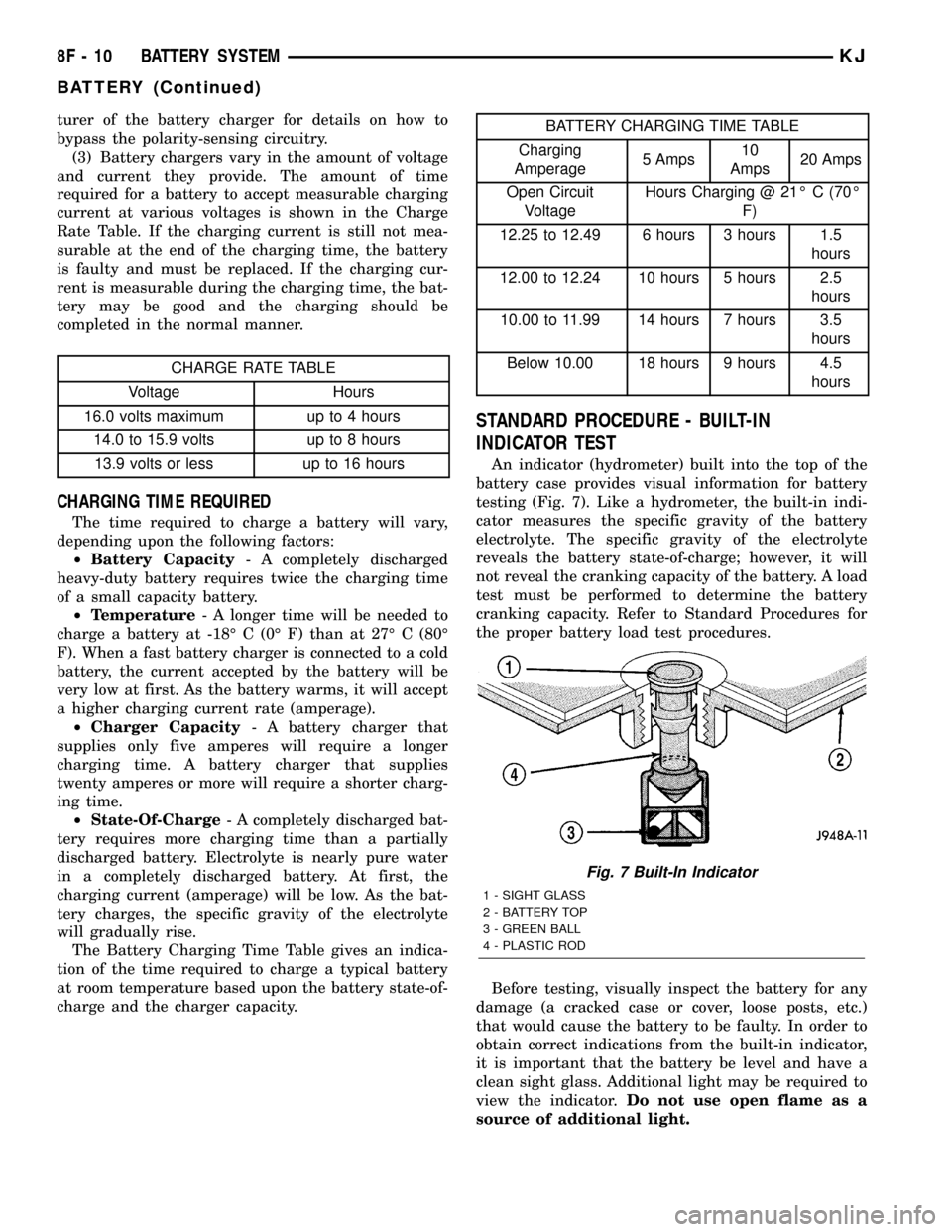
An indicator (hydrometer) built into the top of the
battery case provides visual information for battery
testing (Fig. 7). Like a hydrometer, the built-in indi-
cator measures the specific gravity of the battery
electrolyte. The specific gravity of the electrolyte
reveals the battery state-of-charge; however, it will
not reveal the cranking capacity of the battery. A load
test must be performed to determine the battery
cranking capacity. Refer to Standard Procedures for
the proper battery load test procedures.
Before testing, visually inspect the battery for any
damage (a cracked case or cover, loose posts, etc.)
that would cause the battery to be faulty. In order to
obtain correct indications from the built-in indicator,
it is important that the battery be level and have a
clean sight glass. Additional light may be required to
view the indicator.Do not use open flame as a
source of additional light.
Fig. 7 Built-In Indicator
1 - SIGHT GLASS
2 - BATTERY TOP
3 - GREEN BALL
4 - PLASTIC ROD
8F - 10 BATTERY SYSTEMKJ
BATTERY (Continued)