wire JEEP LIBERTY 2002 KJ / 1.G User Guide
[x] Cancel search | Manufacturer: JEEP, Model Year: 2002, Model line: LIBERTY, Model: JEEP LIBERTY 2002 KJ / 1.GPages: 1803, PDF Size: 62.3 MB
Page 214 of 1803

CLUTCH PEDAL
REMOVAL
(1) Remove steering column lower cover and knee
blocker for access.
(2) Disconnect clutch pedal position switch wires.
(3) Disengage captured bushing lock tabs attach-
ing clutch master cylinder actuator to pedal pivot.
(4) Remove nuts attaching pedal and bracket to
dash panel and upper cowl support (Fig. 8).
(5) Separate pedal assemble from vehicle.
INSTALLATION
(1) Place clutch pedal and bracket over studs on
dash panel and cowl support.
(2) Install nuts to attach pedal and bracket to
dash panel and upper cowl support. Tighten nuts to
39 N´m (29 ft. lbs.) torque
(3) Engage captured bushing and actuator on
brake pedal pivot.
(4) Connect clutch pedal position switch wires.
CLUTCH SWITCH OVERRIDE
RELAY
DESCRIPTION
The clutch pedal position switch override relay is
located in the Power Distribution Center (PDC).
Refer to PDC cover label for location within PDC.
OPERATION
Refer to Clutch Pedal Position Switch Operation
for information.
REMOVAL
The Clutch Switch Override Relay is located in the
Power Distribution Center (PDC) (Fig. 9). Refer to
label on PDC cover for relay location.
(1) Remove PDC cover.
(2) Remove relay from PDC.
(3) Check condition of relay terminals and PDC
connector terminals for damage or corrosion. Repair
if necessary before installing relay.
(4) Check for pin height (pin height should be the
same for all terminals within the PDC connector).
Repair if necessary before installing relay.
INSTALLATION
The Clutch Switch Override Relay is located in the
Power Distribution Center (PDC). Refer to label on
PDC cover for relay location.
(1) Install relay to PDC.
(2) Install cover to PDC.
Fig. 8 CLUTCH PEDAL
1 - CYLINDER
2 - ACTUATOR SHAFT
3 - ACTUATOR EYE
4 - PEDAL PIN
5 - CONNECTOR
Fig. 9 POWER DISTRIBUTION CENTER (PDC)
1 - BATTERY
2 - PDC
3 - PDC COVER
6 - 10 CLUTCHKJ
Page 215 of 1803

CLUTCH PEDAL POSITION
SWITCH
DESCRIPTION
The clutch pedal position switch is located under
the instrument panel. It is attached to the clutch
master cylinder push rod (Fig. 10). The wiring har-
ness connection for the switch is made in the engine
compartment (Fig. 10).
The clutch pedal position switch override relay is
located in the Power Distribution Center (PDC).
Refer to PDC cover label for location within PDC.
OPERATION
The clutch pedal position switch is used to prevent
starter motor engagement unless the clutch pedal is
depressed.
4WD Feature:The clutch pedal position switch
override relay will inhibit operation of the position
switch when the vehicle transfer case is in the four±
wheel±drive (4WD) low-range position (only). This
feature will allow operation of the starter motor,
without the need for depressing the clutch pedal, for
certain off-road applications. If any Diagnostic Trou-
ble Codes (DTC's) for either the override relay or
transfer case switch are stored, the override relay
feature will be inhibited.
An input from this switch is also used to either
shut down and/or prevent operation of the speed con-
trol system when the clutch pedal is depressed.
DIAGNOSIS AND TESTING - CLUTCH PEDAL
POSITION SWITCH
(1) Locate switch 2±wire electrical connector in
engine compartment (Fig. 10). Disconnect wiring at
this point.
(2) Check for switch continuity with an ohmmeter
while operating clutch pedal up and down. Continu-ity should be broken and reapplied each time pedal is
pressed.
(3) If continuity is not present, or is always
present at any pedal position, replace switch. Switch
is not serviced separately. Replace clutch master
cylinder.
Fig. 10 CLUTCH PEDAL POSITION SWITCH
1 - CLUTCH MASTER CYLINDER
2 - CLUTCH PEDAL POSITION SWITCH
3 - CLUTCH PEDAL PIN
4 - MASTER CYLINDER PUSHROD
5 - ELECTRICAL CONNECTION (IN ENGINE COMPARTMENT)
KJCLUTCH 6 - 11
Page 219 of 1803

DIAGNOSIS AND TESTING - COOLING SYSTEM
LEAKS
ULTRAVIOLET LIGHT METHOD
A leak detection additive is available through the
parts department that can be added to cooling sys-
tem. The additive is highly visible under ultraviolet
light (black light). Pour one ounce of additive into
cooling system. Place heater control unit in HEAT
position. Start and operate engine until radiator
upper hose is warm to touch. Aim the commercially
available black light tool at components to be
checked. If leaks are present, black light will cause
additive to glow a bright green color.
The black light can be used in conjunction with a
pressure tester to determine if any external leaks
exist (Fig. 3).
PRESSURE TESTER METHOD
The engine should be at normal operating temper-
ature. Recheck the system cold if cause of coolant
loss is not located during the warm engine examina-
tion.
WARNING: HOT, PRESSURIZED COOLANT CAN
CAUSE INJURY BY SCALDING.
Carefully remove radiator pressure cap from pres-
sure bottle and check coolant level. Push down on
cap to disengage it from stop tabs. Wipe inside of
filler neck and examine lower inside sealing seat fornicks, cracks, paint, and dirt. Inspect radiator-to-
reserve/overflow tank hose for internal obstructions.
Insert a wire through the hose to be sure it is not
obstructed.
Inspect cams on outside of filler neck. If cams are
damaged, seating of pressure cap valve and tester
seal will be affected.
Attach pressure tester (7700 or an equivalent) to
radiator filler neck (Fig. 4).
Operate tester pump to apply 110 kPa (16 psi)
pressure to system. If hoses enlarge excessively or
bulges while testing, replace as necessary. Observe
gauge pointer and determine condition of cooling sys-
tem according to following criteria:
Holds Steady:If pointer remains steady for two
minutes, serious coolant leaks are not present in sys-
tem. However, there could be an internal leak that
does not appear with normal system test pressure. If
it is certain that coolant is being lost and leaks can-
not be detected, inspect for interior leakage or per-
form Internal Leakage Test.
Drops Slowly:Indicates a small leak or seepage
is occurring. Examine all connections for seepage or
slight leakage with a flashlight. Inspect radiator,
hoses, gasket edges and heater. Seal small leak holes
with a Sealer Lubricant (or equivalent). Repair leak
holes and inspect system again with pressure
applied.
Drops Quickly:Indicates that serious leakage is
occurring. Examine system for external leakage. If
leaks are not visible, inspect for internal leakage.
Large radiator leak holes should be repaired by a
reputable radiator repair shop.
INTERNAL LEAKAGE INSPECTION
Remove engine oil pan drain plug and drain a
small amount of engine oil. If coolant is present in
Fig. 3 Leak Detection Using Black Light - Typical
1 - TYPICAL BLACK LIGHT TOOL
Fig. 4 Pressure Testing Cooling System - Typical
1 - TYPICAL COOLING SYSTEM PRESSURE TESTER
7 - 4 COOLINGKJ
COOLING (Continued)
Page 235 of 1803

The ECT sensor is a two-wire Negative Thermal
Coefficient (NTC) sensor. Meaning, as engine coolant
temperature increases, resistance (voltage) in the
sensor decreases. As temperature decreases, resis-
tance (voltage) in the sensor increases.
OPERATION
At key-on, the Powertrain Control Module (PCM)
sends out a regulated 5 volt signal to the ECT sensor.
The PCM then monitors the signal as it passes
through the ECT sensor to the sensor ground (sensor
return).
When the engine is cold, the PCM will operate in
Open Loop cycle. It will demand slightly richer air-
fuel mixtures and higher idle speeds. This is done
until normal operating temperatures are reached.
The PCM uses inputs from the ECT sensor for the
following calculations:
²for engine coolant temperature gauge operation
through CCD or PCI (J1850) communications
²Injector pulse-width
²Spark-advance curves
²ASD relay shut-down times
²Idle Air Control (IAC) motor key-on steps
²Pulse-width prime-shot during cranking
²O2 sensor closed loop times
²Purge solenoid on/off times
²EGR solenoid on/off times (if equipped)
²Leak Detection Pump operation (if equipped)
²Radiator fan relay on/off times (if equipped)
²Target idle speed
REMOVAL
2.4L
The Engine Coolant Temperature (ECT) sensor is
installed into a water jacket at left front of cylinder
head (Fig. 1).
WARNING: HOT, PRESSURIZED COOLANT CAN
CAUSE INJURY BY SCALDING. COOLING SYSTEM
MUST BE PARTIALLY DRAINED BEFORE REMOV-
ING THE COOLANT TEMPERATURE SENSOR.
(1) Partially drain cooling system.
(2) Disconnect electrical connector from sensor.
(3) Remove sensor from cylinder head.
3.7L
The Engine Coolant Temperature (ECT) sensor is
installed into a water jacket at front of intake mani-
fold near rear of generator (Fig. 2).
WARNING: HOT, PRESSURIZED COOLANT CAN
CAUSE INJURY BY SCALDING. COOLING SYSTEM
MUST BE PARTIALLY DRAINED BEFORE REMOV-
ING THE COOLANT TEMPERATURE SENSOR.(1) Partially drain cooling system.
(2) Disconnect electrical connector from sensor.
(3) Remove sensor from intake manifold.
Fig. 1 ECT AND UPPER TIMING BELT COVER/
BOLTS-2.4L
1 - UPPER TIMING BELT COVER
2 - ELECTRICAL CONNECTOR (ECT)
3 - MOUNTING BOLTS (3)
Fig. 2 MAP SENSOR / ECT SENSOR - 3.7L
1 - MOUNTING SCREWS
2 - MAP SENSOR
3 - ECT SENSOR
7 - 20 ENGINEKJ
ENGINE COOLANT TEMPERATURE SENSOR (Continued)
Page 242 of 1803

(5) Remove the two fan shroud mounting bolts con-
necting the fan shroud to the radiator (Fig. 14).
(6) Remove the shroud and fan from the vehicle.
INSTALLATION
NOTE: For 3.7L Heavy Duty/Max Cool/Trailer Tow
cooling package, the vicous fan cannot be installed
seperate from the shroud. Both fan and shroud
must be installed together.
(1) Gently lay vicous fan into shroud.
(2) Install fan shroud assembly into the vehicle.
Tighten fan shroud to radiator bolts to (5.5 N´m (50
in. lbs.).
(3) Using special tool 6958 spanner wrench and
8346 adapters, install the vicous fan on the water
pump.
(4) Connect fan motor wire connector to harness
connector, and attach connector to shroud.
(5) Connect battery negative cable.
(6) Start engine and check fan operation.
RADIATOR - FAN - VISCOUS
DESCRIPTION
CAUTION: If the viscous fan drive is replaced
because of mechanical damage, the cooling fan
blades should also be inspected. Inspect for fatigue
cracks, loose blades, or loose rivets that could
have resulted from excessive vibration. Replace fan
blade assembly if any of these conditions are
found. Also inspect water pump bearing and shaft
assembly for any related damage due to a viscous
fan drive malfunction.
The thermal viscous fan drive (Fig. 15) is a sili-
cone-fluid-filled coupling used to connect the fan
blades to the water pump shaft. The coupling allows
the fan to be driven in a normal manner. This is
done at low engine speeds while limiting the top
speed of the fan to a predetermined maximum level
at higher engine speeds.
On the 3.7L engine, an electric fan is standard and
the viscous fan is added on for trailer tow packages
only.
OPERATION
A thermostatic bimetallic spring coil is located on
the front face of the viscous fan drive unit. This
spring coil reacts to the temperature of the radiator
discharge air. It engages the viscous fan drive for
higher fan speed if the air temperature from the
radiator rises above a certain point. Until additional
engine cooling is necessary,the fan will remain at
a reduced rpm regardless of engine speed. Nor-
mally less than three hundred (300) rpm.
Fig. 14 Radiator Cooling Fan - Typical
1 - RADIATOR
2 - ELECTRIC COOLING FAN CONNECTOR
3 - FAN SHROUD
4 - ELECTRIC COOLING FAN
Fig. 15 Viscous Fan Drive - Typical
1 - VISCOUS FAN DRIVE
2 - THERMOSTATIC SPRING
3 - MOUNTING NUT TO WATER PUMP HUB
KJENGINE 7 - 27
RADIATOR FAN - ELECTRIC (Continued)
Page 250 of 1803

The black light can be used in conjunction with a
pressure tester to determine if any external leaks
exist (Fig. 2).
PRESSURE TESTER METHOD
The engine should be at normal operating temper-
ature. Recheck the system cold if cause of coolant
loss is not located during the warm engine examina-
tion.
WARNING: HOT, PRESSURIZED COOLANT CAN
CAUSE INJURY BY SCALDING.
Carefully remove radiator pressure cap from pres-
sure bottle and check coolant level. Push down on
cap to disengage it from stop tabs. Wipe inside of
filler neck and examine lower inside sealing seat for
nicks, cracks, paint, and dirt. Inspect radiator-to-
reserve/overflow tank hose for internal obstructions.
Insert a wire through the hose to be sure it is not
obstructed.
Inspect cams on outside of filler neck. If cams are
damaged, seating of pressure cap valve and tester
seal will be affected.
Attach pressure tester (7700 or an equivalent) to
radiator filler neck (Fig. 3).
Operate tester pump to apply 110 kPa (16 psi)
pressure to system. If hoses enlarge excessively or
bulges while testing, replace as necessary. Observe
gauge pointer and determine condition of cooling sys-
tem according to following criteria:Holds Steady:If pointer remains steady for two
minutes, serious coolant leaks are not present in sys-
tem. However, there could be an internal leak that
does not appear with normal system test pressure. If
it is certain that coolant is being lost and leaks can-
not be detected, inspect for interior leakage or per-
form Internal Leakage Test.
Drops Slowly:Indicates a small leak or seepage
is occurring. Examine all connections for seepage or
slight leakage with a flashlight. Inspect radiator,
hoses, gasket edges and heater. Seal small leak holes
with a Sealer Lubricant (or equivalent). Repair leak
holes and inspect system again with pressure
applied.
Drops Quickly:Indicates that serious leakage is
occurring. Examine system for external leakage. If
leaks are not visible, inspect for internal leakage.
Large radiator leak holes should be repaired by a
reputable radiator repair shop.
INTERNAL LEAKAGE INSPECTION
Remove engine oil pan drain plug and drain a
small amount of engine oil. If coolant is present in
the pan, it will drain first because it is heavier than
oil. An alternative method is to operate engine for a
short period to churn the oil. After this is done,
remove engine dipstick and inspect for water glob-
ules. Also inspect transmission dipstick for water
globules and transmission fluid cooler for leakage.
Fig. 2 Leak Detection Using Black Light - Typical
1 - TYPICAL BLACK LIGHT TOOL
Fig. 3 Pressure Testing Cooling System - Typical
1 - TYPICAL COOLING SYSTEM PRESSURE TESTER
KJCOOLING - 2.4L7s-3
COOLING - 2.4L (Continued)
Page 268 of 1803

ENGINE COOLANT
TEMPERATURE SENSOR
DESCRIPTION
The Engine Coolant Temperature (ECT) sensor is
used to sense engine coolant temperature. The sensor
protrudes into an engine water jacket.
The ECT sensor is a two-wire Negative Thermal
Coefficient (NTC) sensor. Meaning, as engine coolant
temperature increases, resistance (voltage) in the
sensor decreases. As temperature decreases, resis-
tance (voltage) in the sensor increases.
OPERATION
At key-on, the Powertrain Control Module (PCM)
sends out a regulated 5 volt signal to the ECT sensor.
The PCM then monitors the signal as it passes
through the ECT sensor to the sensor ground (sensor
return).
When the engine is cold, the PCM will operate in
Open Loop cycle. It will demand slightly richer air-
fuel mixtures and higher idle speeds. This is done
until normal operating temperatures are reached.
The PCM uses inputs from the ECT sensor for the
following calculations:
²for engine coolant temperature gauge operation
through CCD or PCI (J1850) communications
²Injector pulse-width²Spark-advance curves
²ASD relay shut-down times
²Idle Air Control (IAC) motor key-on steps
²Pulse-width prime-shot during cranking
²O2 sensor closed loop times
²Purge solenoid on/off times
²EGR solenoid on/off times (if equipped)
²Leak Detection Pump operation (if equipped)
²Radiator fan relay on/off times (if equipped)
²Target idle speed
REMOVAL
2.4L
The Engine Coolant Temperature (ECT) sensor is
installed into a water jacket at left front of cylinder
head (Fig. 2).
WARNING: HOT, PRESSURIZED COOLANT CAN
CAUSE INJURY BY SCALDING. COOLING SYSTEM
MUST BE PARTIALLY DRAINED BEFORE REMOV-
ING THE COOLANT TEMPERATURE SENSOR.
(1) Partially drain cooling system.
(2) Disconnect electrical connector from sensor.
(3) Remove sensor from cylinder head.
3.7L
The Engine Coolant Temperature (ECT) sensor is
installed into a water jacket at front of intake mani-
fold near rear of generator (Fig. 3).
Fig. 1 ENGINE BLOCK HEATER 2.4L
1 - CORE HOLE
2 - BLOCK HEATER
3 - POWER CORD
Fig. 2 ECT AND UPPER TIMING BELT COVER/
BOLTS-2.4L
1 - UPPER TIMING BELT COVER
2 - ELECTRICAL CONNECTOR (ECT)
3 - MOUNTING BOLTS (3)
KJENGINE7s-21
ENGINE BLOCK HEATER - 2.4L (Continued)
Page 274 of 1803

(5) Remove the two fan shroud mounting bolts con-
necting the fan shroud to the radiator (Fig. 13).
(6) Remove the shroud and fan from the vehicle.
INSTALLATION
NOTE: For 3.7L Heavy Duty/Max Cool/Trailer Tow
cooling package, the viscous fan cannot be
installed seperate from the shroud. Both fan and
shroud must be installed together.
(1) Gently lay viscous fan into shroud.
(2) Install fan shroud assembly into the vehicle.
Tighten fan shroud to radiator bolts to (5.5 N´m (50
in. lbs.).
(3) Using special tool 6958 spanner wrench and
8346 adapters, install the viscous fan on the water
pump.
(4) Connect fan motor wire connector to harness
connector, and attach connector to shroud.
(5) Connect battery negative cable.
(6) Start engine and check fan operation.
WATER PUMP - 2.4L
DESCRIPTION
The water pump has a cast aluminum body and
housing with a stamped steel impeller. The water
pump bolts directly to the block (Fig. 14). The cylin-
der block to water pump seal is provided by a rubber
O-ring. The water pump is driven by the engine tim-
ing belt.
OPERATION
The water pump is the heart of the cooling system.
The coolant is pumped through the engine block, cyl-
inder head, heater core, and radiator.
REMOVAL - 2.4L ENGINE
(1) Disconnect negative cable from battery.
(2) Raise vehicle on a hoist.
(3) Remove the accessory drive belts (Refer to 7 -
COOLING/ACCESSORY DRIVE/DRIVE BELTS -
REMOVAL).
(4) Remove the belt tensioner.
(5) Drain the cooling system (Refer to 7 - COOL-
ING - STANDARD PROCEDURE).
(6) Remove the generator.
(7) Remove the power steering pump.
(8) Remove the A/C compressor.
Fig. 13 Radiator Cooling Fan - Typical
1 - RADIATOR
2 - ELECTRIC COOLING FAN CONNECTOR
3 - FAN SHROUD
4 - ELECTRIC COOLING FAN
Fig. 14 Water Pump
1 - CYLINDER BLOCK
2 - WATER PUMP
KJENGINE7s-27
RADIATOR FAN - ELECTRIC (Continued)
Page 278 of 1803

AUDIO
TABLE OF CONTENTS
page page
AUDIO
DESCRIPTION..........................1
OPERATION............................1
DIAGNOSIS AND TESTING - AUDIO..........2
AMPLIFIER CHOKE AND RELAY
DESCRIPTION..........................3
OPERATION............................3
DIAGNOSIS AND TESTING - AMPLIFIER
CHOKE AND RELAY....................4
REMOVAL.............................4
INSTALLATION..........................4
ANTENNA BODY & CABLE
DESCRIPTION..........................4
OPERATION............................5
DIAGNOSIS AND TESTING - ANTENNA BODY
AND CABLE..........................5
REMOVAL.............................6
INSTALLATION..........................6
CD CHANGER
DESCRIPTION..........................7
OPERATION............................7
REMOVAL.............................7
INSTALLATION..........................7
INSTRUMENT PANEL ANTENNA CABLE
REMOVAL.............................7INSTALLATION..........................8
RADIO
DESCRIPTION..........................8
OPERATION............................8
REMOVAL.............................9
INSTALLATION..........................9
RADIO NOISE SUPPRESSION GROUND STRAP
DESCRIPTION..........................9
OPERATION...........................10
REMOVAL.............................10
INSTALLATION.........................11
REMOTE SWITCHES
DESCRIPTION.........................11
OPERATION...........................12
DIAGNOSIS AND TESTING - REMOTE
SWITCHES..........................12
REMOVAL.............................13
INSTALLATION.........................13
SPEAKER
DESCRIPTION.........................13
OPERATION...........................14
REMOVAL.............................14
INSTALLATION.........................15
AUDIO
DESCRIPTION
An audio system is standard factory-installed
equipment on this model. Several combinations of
radio receivers and speaker systems are offered on
this model. The audio system uses an ignition
switched source of battery current so that the system
will only operate when the ignition switch is in the
RUN or ACCESSORY positions.
The audio system includes the following compo-
nents:
²Amplifier choke and relay
²Antenna
²Compact disc changer (if equipped)
²Power amplifier mounted to each front door
speaker (with premium speaker system only)
²Radio noise suppression components
²Radio receiver
²Remote radio switches (if equipped)
²SpeakersCertain functions and features of the audio system
rely upon resources shared with other electronic
modules in the vehicle over the Programmable Com-
munication Interface (PCI) bus network. The data
bus network allows the sharing of sensor informa-
tion. For diagnosis of these electronic modules or of
the data bus network, the use of a DRB scan tool and
the proper Diagnostic Procedures manual are recom-
mended.
Refer to the appropriate wiring information for
complete standard and premium audio system circuit
diagrams. The wiring information includes proper
wire and connector repair procedures, further details
on wire harness routing and retention, as well as
pin-out and location views for the various wire har-
ness connectors, splices, and grounds.
OPERATION
The audio system components are designed to pro-
vide audio entertainment and information through
the reception, tuning and amplification of locally
broadcast radio signals in both the Amplitude Modu-
KJAUDIO 8A - 1
Page 279 of 1803
lating (AM) and Frequency Modulating (FM) com-
mercial frequency ranges.
The audio system components operate on battery
current received through a fuse in the Junction Block
(JB) on a fused ignition switch output (run-acc) cir-
cuit so that the system will only operate when the
ignition switch is in the Run or Accessory positions.
On vehicles that are equipped with the optional
remote radio switches, the Body Control Module
(BCM) receives hard wired resistor multiplexed
inputs from the remote radio switches. The program-
ming in the BCM allows it to process those inputs
and send the proper messages to the radio receiver
over the Programmable Communication Interface
(PCI) bus network to control the radio volume up or
down, station seek up or down, preset station
advance, and mode advance functions.
Refer to the owner's manual for more information
on the features, use and operation of each of the
available audio systems.
DIAGNOSIS AND TESTING - AUDIO
Any diagnosis of the Audio system should
begin with the use of the DRB diagnostic tool.For information on the use of the DRB, refer to
the appropriate Diagnostic Service Manual.
Refer to the appropriate wiring information. The
wiring information includes wiring diagrams, proper
wire and connector repair procedures, details of wire
harness routing and retention, connector pin-out
information and location views for the various wire
harness connectors, splices and grounds.
WARNING: DISABLE THE AIRBAG SYSTEM
BEFORE ATTEMPTING ANY STEERING WHEEL,
STEERING COLUMN, SEAT BELT TENSIONER, SIDE
AIRBAG, OR INSTRUMENT PANEL COMPONENT
DIAGNOSIS OR SERVICE. DISCONNECT AND ISO-
LATE THE BATTERY NEGATIVE (GROUND) CABLE,
THEN WAIT TWO MINUTES FOR THE AIRBAG SYS-
TEM CAPACITOR TO DISCHARGE BEFORE PER-
FORMING FURTHER DIAGNOSIS OR SERVICE. THIS
IS THE ONLY SURE WAY TO DISABLE THE AIRBAG
SYSTEM. FAILURE TO TAKE THE PROPER PRE-
CAUTIONS COULD RESULT IN ACCIDENTAL AIR-
BAG DEPLOYMENT AND POSSIBLE PERSONAL
INJURY.
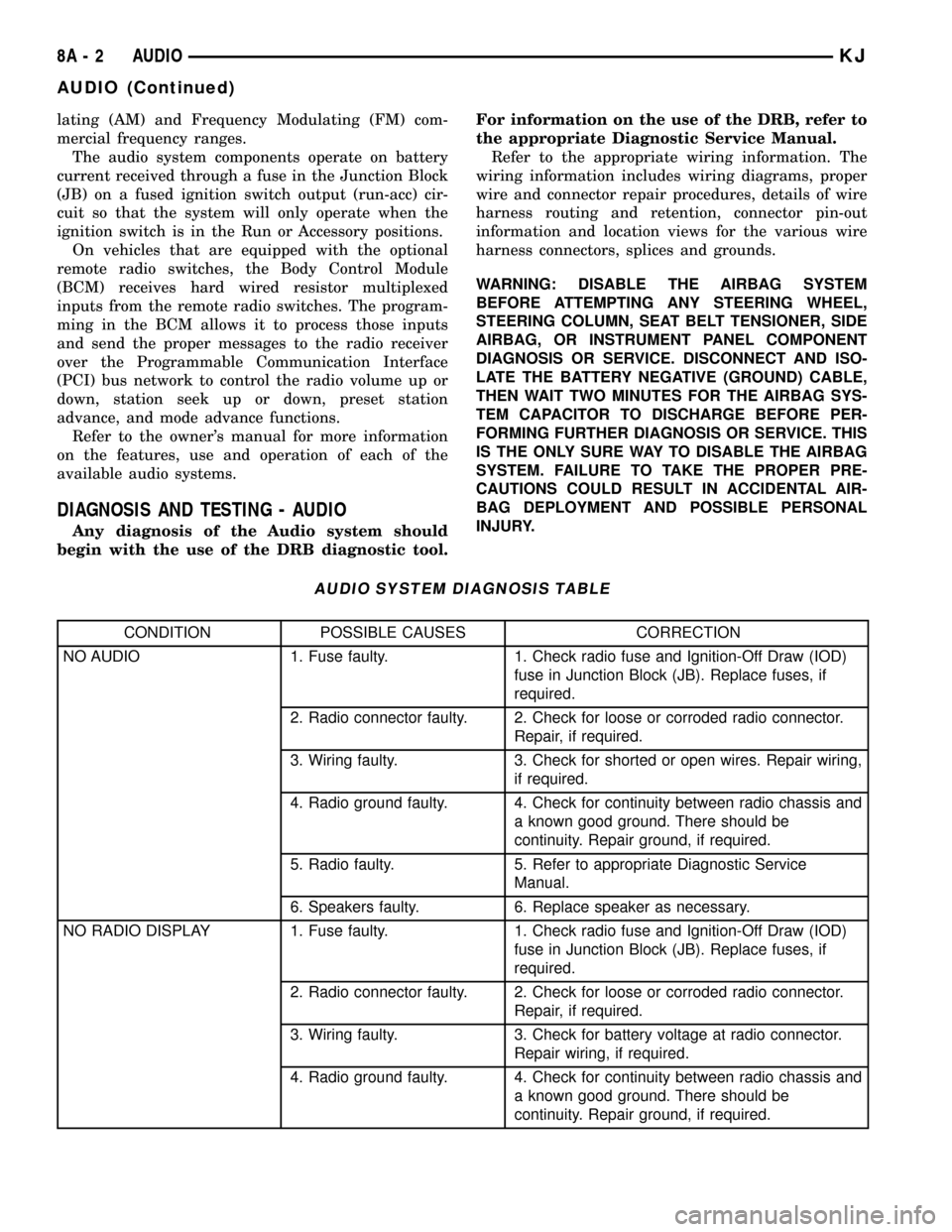
AUDIO SYSTEM DIAGNOSIS TABLE
CONDITION POSSIBLE CAUSES CORRECTION
NO AUDIO 1. Fuse faulty. 1. Check radio fuse and Ignition-Off Draw (IOD)
fuse in Junction Block (JB). Replace fuses, if
required.
2. Radio connector faulty. 2. Check for loose or corroded radio connector.
Repair, if required.
3. Wiring faulty. 3. Check for shorted or open wires. Repair wiring,
if required.
4. Radio ground faulty. 4. Check for continuity between radio chassis and
a known good ground. There should be
continuity. Repair ground, if required.
5. Radio faulty. 5. Refer to appropriate Diagnostic Service
Manual.
6. Speakers faulty. 6. Replace speaker as necessary.
NO RADIO DISPLAY 1. Fuse faulty. 1. Check radio fuse and Ignition-Off Draw (IOD)
fuse in Junction Block (JB). Replace fuses, if
required.
2. Radio connector faulty. 2. Check for loose or corroded radio connector.
Repair, if required.
3. Wiring faulty. 3. Check for battery voltage at radio connector.
Repair wiring, if required.
4. Radio ground faulty. 4. Check for continuity between radio chassis and
a known good ground. There should be
continuity. Repair ground, if required.
8A - 2 AUDIOKJ
AUDIO (Continued)