electrical JEEP LIBERTY 2002 KJ / 1.G Owner's Manual
[x] Cancel search | Manufacturer: JEEP, Model Year: 2002, Model line: LIBERTY, Model: JEEP LIBERTY 2002 KJ / 1.GPages: 1803, PDF Size: 62.3 MB
Page 269 of 1803

WARNING: HOT, PRESSURIZED COOLANT CAN
CAUSE INJURY BY SCALDING. COOLING SYSTEM
MUST BE PARTIALLY DRAINED BEFORE REMOV-
ING THE COOLANT TEMPERATURE SENSOR.
(1) Partially drain cooling system.
(2) Disconnect electrical connector from sensor.
(3) Remove sensor from intake manifold.
INSTALLATION
(1) Apply thread sealant to sensor threads.
(2) Install sensor to engine.
(3) Tighten sensor to 11 N´m (8 ft. lbs.) torque.
(4) Replace any lost engine coolant.
ENGINE COOLANT
THERMOSTAT
REMOVAL - 2.4L ENGINE
(1) Drain cooling system below the thermostat
level.
(2) Remove radiator upper hose from the coolant
outlet housing.
(3) Remove coolant outlet housing bolts and hous-
ing.
(4) Remove thermostat. Discard gasket and clean
both gasket sealing surfaces.
INSTALLATION - 2.4L ENGINE
(1) Place a new gasket (dipped in clean water) on
the coolant outlet connector surface. Position thermo-
stat with air bleed at the 12 o'clock position in ther-
mostat housing.
(2) Position the coolant outlet connector and gas-
ket over the thermostat, making sure thermostat is
seated in the thermostat housing.
(3) Position outlet connector to thermostat housing
and install bolts. Tighten bolts to 28 N´m (250 in.
lbs.).
(4) Install the radiator upper hose to coolant outlet
housing.
(5) Refill the cooling system.
RADIATOR
DESCRIPTION
All vehicles are equipped with a cross flow type
radiator with plastic side tanks (Fig. 4).
Plastic tanks, while stronger than brass, are sub-
ject to damage by impact, such as from tools or
wrenches. Handle radiator with care.
REMOVAL
WARNING: DO NOT REMOVE THE CYLINDER
BLOCK DRAIN PLUGS OR LOOSEN THE RADIATOR
DRAINCOCK WITH THE SYSTEM HOT AND UNDER
PRESSURE. SERIOUS BURNS FROM COOLANT
CAN OCCUR. REFER TO COOLING SYSTEM DRAIN-
ING.
Fig. 3 MAP SENSOR / ECT SENSOR - 3.7L
1 - MOUNTING SCREWS
2 - MAP SENSOR
3 - ECT SENSOR
Fig. 4 Cross Flow Radiator - Typical
1 - RADIATOR
7s - 22 ENGINEKJ
ENGINE COOLANT TEMPERATURE SENSOR (Continued)
Page 273 of 1803

RADIATOR FAN - ELECTRIC
DESCRIPTION
The fan (Fig. 11) is electrically controlled by the
powertrain control module (PCM) through the fan
control relay. This relay is located on the left wheel
house in the engine compartment.
OPERATION
The electric radiator cooling fan is controlled by
the Powertrain Control Module (PCM) through the
radiator cooling fan relay. The PCM regulates fan
operation based on input from the engine coolant
temperature sensor, battery temperature sensor,air
conditioning select switch and vehicle speed.
The fan is not energized during engine cranking
regardless of the electrical input from the tempera-
ture sensors and ,air conditioning switch. However, if
engine operation conditions warrant fan engagement,
the fan will run once engine starts.
On vehicles NOT equipped with AC:The relay
is energized when the coolant temperature is above
80É C (176É F), or battery temperature sensor above ±
12É C (10É F). It will then de-energize when coolant
temperature drops below 82É C (180É F), or batter
temperature sensor below ± 9É C ( 16É F).
Vehicles Equipped with AC:In addition to using
coolant temperature and battery temperature sensorto control cooling fan operation, the cooling fan will
also be engaged when the ,air conditioning system is
activated. The relay is also energized when, air con-
ditioning is selected and coolant temperature is
above 95É C ( 203É F), or , air conditioning is selected
and battery temperature sensor is above 41É C (106É
F). It will then de-energize when , air conditioning is
selected and coolant temperature is below 92É C
(198É F), or , air conditioning is selected and battery
temperature is below 38É C (100É F).
REMOVAL
If the fan blade is bent, warped, cracked or dam-
aged in any way, it must be replacedonlywith a
replacement fan blade.Do not attempt to repair a
damaged fan blade.
NOTE: For 3.7L Heavy Duty/Max Cool/Trailer Tow
cooling package, the viscous fan cannot be
removed seperate from the shroud. Both fan and
shroud must be removed together.
(1) Disconnect battery negative cable.
(2) Using special tool 6958 spanner wrench and
8346 adapters, remove the viscous fan from the
water pump (Fig. 12).
(3) Gently lay fan into shroud.
(4) Disconnect the electrical connector for the elec-
tric fan, then disconnect connector from shroud.
Fig. 11 Radiator Cooling Fan - Typical
1 - RADIATOR
2 - ELECTRIC COOLING FAN CONNECTOR
3 - FAN SHROUD
4 - ELECTRIC COOLING FAN
Fig. 12 Viscous Fan and Fan Drive 3.7L
1 - SPECIAL TOOL 6958 SPANNER WRENCH WITH ADAPTER
PINS 8346
2-FAN
7s - 26 ENGINEKJ
Page 280 of 1803
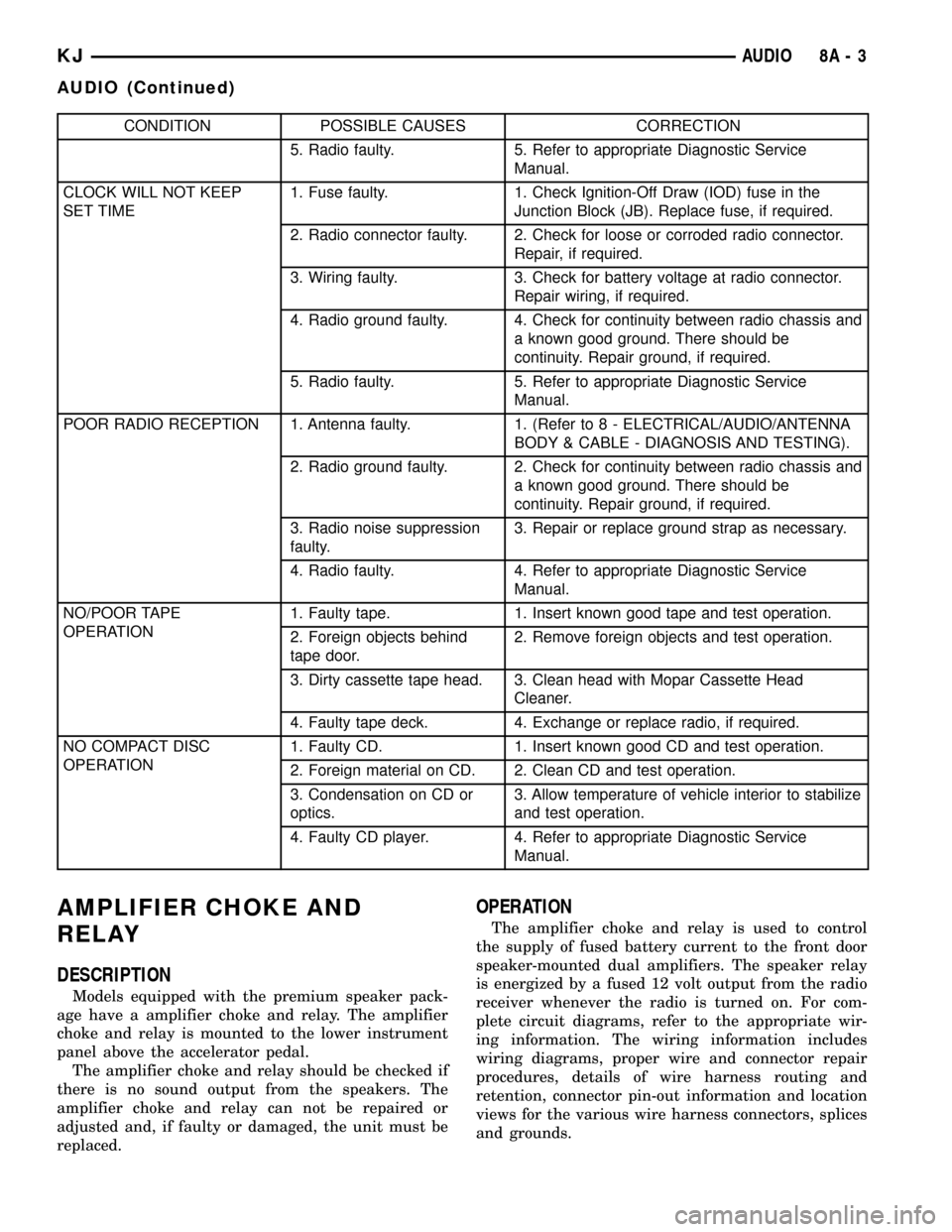
CONDITION POSSIBLE CAUSES CORRECTION
5. Radio faulty. 5. Refer to appropriate Diagnostic Service
Manual.
CLOCK WILL NOT KEEP
SET TIME1. Fuse faulty. 1. Check Ignition-Off Draw (IOD) fuse in the
Junction Block (JB). Replace fuse, if required.
2. Radio connector faulty. 2. Check for loose or corroded radio connector.
Repair, if required.
3. Wiring faulty. 3. Check for battery voltage at radio connector.
Repair wiring, if required.
4. Radio ground faulty. 4. Check for continuity between radio chassis and
a known good ground. There should be
continuity. Repair ground, if required.
5. Radio faulty. 5. Refer to appropriate Diagnostic Service
Manual.
POOR RADIO RECEPTION 1. Antenna faulty. 1. (Refer to 8 - ELECTRICAL/AUDIO/ANTENNA
BODY & CABLE - DIAGNOSIS AND TESTING).
2. Radio ground faulty. 2. Check for continuity between radio chassis and
a known good ground. There should be
continuity. Repair ground, if required.
3. Radio noise suppression
faulty.3. Repair or replace ground strap as necessary.
4. Radio faulty. 4. Refer to appropriate Diagnostic Service
Manual.
NO/POOR TAPE
OPERATION1. Faulty tape. 1. Insert known good tape and test operation.
2. Foreign objects behind
tape door.2. Remove foreign objects and test operation.
3. Dirty cassette tape head. 3. Clean head with Mopar Cassette Head
Cleaner.
4. Faulty tape deck. 4. Exchange or replace radio, if required.
NO COMPACT DISC
OPERATION1. Faulty CD. 1. Insert known good CD and test operation.
2. Foreign material on CD. 2. Clean CD and test operation.
3. Condensation on CD or
optics.3. Allow temperature of vehicle interior to stabilize
and test operation.
4. Faulty CD player. 4. Refer to appropriate Diagnostic Service
Manual.
AMPLIFIER CHOKE AND
RELAY
DESCRIPTION
Models equipped with the premium speaker pack-
age have a amplifier choke and relay. The amplifier
choke and relay is mounted to the lower instrument
panel above the accelerator pedal.
The amplifier choke and relay should be checked if
there is no sound output from the speakers. The
amplifier choke and relay can not be repaired or
adjusted and, if faulty or damaged, the unit must be
replaced.
OPERATION
The amplifier choke and relay is used to control
the supply of fused battery current to the front door
speaker-mounted dual amplifiers. The speaker relay
is energized by a fused 12 volt output from the radio
receiver whenever the radio is turned on. For com-
plete circuit diagrams, refer to the appropriate wir-
ing information. The wiring information includes
wiring diagrams, proper wire and connector repair
procedures, details of wire harness routing and
retention, connector pin-out information and location
views for the various wire harness connectors, splices
and grounds.
KJAUDIO 8A - 3
AUDIO (Continued)
Page 281 of 1803

DIAGNOSIS AND TESTING - AMPLIFIER
CHOKE AND RELAY
Any diagnosis of the Audio system should
begin with the use of the DRB diagnostic tool.
For information on the use of the DRB, refer to
the appropriate Diagnostic Service Manual.
The amplifier choke and relay is used to switch
power to the individual speaker amplifiers used with
the premium speaker package. The amplifier choke
and relay is serviced only as a unit. If all of the
speakers are inoperative the amplifier choke and
relay should be inspected. Before replacement, make
the following inspections of the amplifier choke and
relay circuits. For complete circuit diagrams, refer to
the appropriate wiring information. The wiring infor-
mation includes wiring diagrams, proper wire and
connector repair procedures, details of wire harness
routing and retention, connector pin-out information
and location views for the various wire harness con-
nectors, splices and grounds.
(1)
Check the fused B(+) fuse in the junction block. If
OK, go to Step 2. If not OK, replace the faulty fuse.
(2) Check for battery voltage at the fused B(+) fuse
in the junction block. If OK, go to Step 3. If not OK,
repair the open fused B(+) circuit to the battery as
required.
(3) Disconnect the instrument panel wire harness
connector from the amplifier choke and relay. Check
for battery voltage at the fused B(+) circuit cavity of
the instrument panel wire harness connector for the
amplifier choke and relay. If OK, go to Step 4. If not
OK, repair the open fused B(+) circuit to the junction
block fuse as required.
(4) Probe the ground circuit cavity of the instru-
ment panel wire harness connector for the amplifier
choke and relay. Check for continuity to a good
ground. There should be continuity. If OK, go to Step
5. If not OK, repair the open ground circuit to ground
as required.
(5) Turn the ignition switch to the RUN position
and turn the radio ON. Check for battery voltage at
the radio 12-volt output circuit cavity of the instru-
ment panel wire harness connector for the amplifier
choke and relay. If OK, go to Step 6. If not OK,
repair the open radio 12-volt output circuit to the
radio as required.
(6) Turn the radio and ignition switches to the
OFF position. Reconnect the instrument panel wire
harness connector to the amplifier choke and relay.
Check for battery voltage at the amplified speaker
(+) circuit cavity of the instrument panel wire har-
ness connector for the amplifier choke and relay.
There should be zero volts. Turn the ignition and
radio switches to the ON position. There should now
be battery voltage. If OK, repair the open amplified
speaker (+) circuits to the speaker-mounted amplifi-ers as required. If not OK, replace the faulty ampli-
fier choke and relay.
REMOVAL
(1) Disconnect and isolate the battery negative
cable.
(2) Remove knee blocker cover and knee blocker.
(3) Disconnect the electrical harness connector
from the amplifier choke and relay (Fig. 1).
(4) Remove mounting screws and amplifier choke
and relay.
INSTALLATION
(1) Install the amplifier choke and relay.
(2) Install the mounting screws.
(3) Connect the electrical harness connector.
(4) Install knee blocker cover and knee blocker.
(5) Connect the battery negative cable.
ANTENNA BODY & CABLE
DESCRIPTION
The antenna body and cable is secured below the
fender panel by the antenna cap nut through a
mounting hole in the side of the right front fender.
The primary coaxial antenna cable is then routed
beneath the fender sheet metal and through a entry
hole in the right cowl side panel into the interior of
the vehicle. Inside the vehicle, the primary coaxial
cable is connected to a secondary instrument panel
antenna coaxial cable with an in-line connector that
is located behind the right kick panel. The secondary
coaxial cable is then routed behind the instrument
panel to the back of the radio.
Fig. 1 RADIO CHOKE
1 - RADIO CHOKE
2 - MOUNTING SCREWS
8A - 4 AUDIOKJ
AMPLIFIER CHOKE AND RELAY (Continued)
Page 282 of 1803

OPERATION
The antenna body and cable connects the antenna
mast to the radio. The radio antenna is an electro-
magnetic circuit component used to capture radio fre-
quency signals that are broadcast by local
commercial radio stations in both the Amplitude
Modulating (AM) and Frequency Modulating (FM)
frequency ranges. These electromagnetic radio fre-
quency signals induce small electrical modulations
into the antenna as they move past the mast. The
antenna body transfers the weak electromagnetic
radio waves induced into the rigid antenna mast into
the center conductor of the flexible primary antenna
coaxial cable. The braided outer shield of the
antenna coaxial cable is grounded through both the
antenna body and the radio chassis, effectively
shielding the radio waves as they are conducted to
the radio. The radio then tunes and amplifies the
weak radio signals into stronger electrical signals in
order to operate the audio system speakers.
DIAGNOSIS AND TESTING - ANTENNA BODY
AND CABLE
The following four tests are used to diagnose the
antenna with an ohmmeter:
²Test 1- Mast to ground test
²Test 2- Tip-of-mast to tip-of-conductor test
²Test 3- Body ground to battery ground test
²Test 4- Body ground to antenna coaxial cable
shield test.
WARNING: DISABLE THE AIRBAG SYSTEM
BEFORE ATTEMPTING ANY STEERING WHEEL,
STEERING COLUMN, SEAT BELT TENSIONER, SIDE
AIRBAG, OR INSTRUMENT PANEL COMPONENT
DIAGNOSIS OR SERVICE. DISCONNECT AND ISO-
LATE THE BATTERY NEGATIVE (GROUND) CABLE,
THEN WAIT TWO MINUTES FOR THE AIRBAG SYS-
TEM CAPACITOR TO DISCHARGE BEFORE PER-
FORMING FURTHER DIAGNOSIS OR SERVICE. THIS
IS THE ONLY SURE WAY TO DISABLE THE AIRBAG
SYSTEM. FAILURE TO TAKE THE PROPER PRE-
CAUTIONS COULD RESULT IN ACCIDENTAL AIR-
BAG DEPLOYMENT AND POSSIBLE PERSONAL
INJURY.
The ohmmeter test lead connections for each test
are shown in the illustration (Fig. 2).
NOTE: This model has a two-piece antenna coaxial
cable. Tests 2 and 4 must be conducted in two
steps to isolate an antenna cable problem. First,
test the primary antenna cable (integral to the
antenna body and cable) from the coaxial cable
connector behind the right side kick panel to the
antenna body. Then, test the secondary antennacable (instrument panel antenna cable) from the
coaxial cable connector behind the right side kick
panel to the coaxial cable connector at the radio.
TEST 1
Test 1 determines if the antenna mast is insulated
from ground. Proceed as follows:
(1) Disconnect and isolate the antenna coaxial
cable connector behind the right side kick panel.
(2) Touch one ohmmeter test lead to the tip of the
antenna mast. Touch the other test lead to known
ground. Check the ohmmeter reading for continuity.
(3) There should be no continuity. If OK, go to Test
2. If not OK, replace the faulty antenna body and
cable.
TEST 2
Test 2 checks the antenna conductor components
for an open circuit. This test should be performed
first on the entire antenna circuit, from the antenna
mast to the center conductor of the coaxial cable con-
nector at the radio. If an open circuit is detected,
each of the three antenna conductor components
(antenna mast, antenna body and cable, instrument
panel antenna cable) should be isolated and tested
individually to locate the exact component that is the
source of the open circuit. To begin this test, proceed
as follows:
(1) Disconnect the instrument panel antenna cable
coaxial connector from the back of the radio.
(2) Touch one ohmmeter test lead to the tip of the
antenna mast. Touch the other test lead to the center
conductor pin of the instrument panel antenna cable
coaxial connector for the radio. Check the ohmmeter
reading for continuity.
Fig. 2 Antenna Tests - Typical
KJAUDIO 8A - 5
ANTENNA BODY & CABLE (Continued)
Page 284 of 1803

(8) Install antenna mast.
(9) Tighten fender mounting bolts near door hinge
area.
(10) Install and tighten the upper fender mounting
bolts (Refer to 23 - BODY/EXTERIOR/FRONT
FENDER - INSTALLATION).
(11) Connect the battery negative cable.
CD CHANGER
DESCRIPTION
A factory-installed Compact Disc (CD) changer fea-
turing a six-CD magazine is an available option on
this model. The CD changer is mounted in the cargo
area of the passenger compartment on the right rear
quarter panel.
The controls on the radio receiver operate the CD
changer through messages sent over the Programma-
ble Communications Interface (PCI) data bus net-
work. For diagnosis of the messaging functions of the
radio receiver and the CD changer, or of the PCI data
bus, a DRB scan tool and the proper Diagnostic Pro-
cedures manual are required.
The CD changer can only be serviced by an autho-
rized radio repair station. See the latest Warranty
Policies and Procedures manual for a current listing
of authorized radio repair stations. Refer to the
appropriate wiring information. The wiring informa-
tion includes wiring diagrams, proper wire and con-
nector repair procedures, details of wire harness
routing and retention, connector pin-out information
and location views for the various wire harness con-
nectors, splices and grounds.
OPERATION
The CD changer will only operate when the igni-
tion switch is in the On or Accessory positions, and
the radio is turned on. The six-CD magazine may be
ejected with the ignition in the Off position. For more
information on the features, loading procedures and
radio control functions for the operation of the CD
changer, refer to the owner's manual.
REMOVAL
(1) Disconnect and isolate the battery negative
cable.
(2) Remove the right rear quarter trim panel.
(Refer to 23 - BODY/INTERIOR/QUARTER TRIM
PANEL - REMOVAL).
(3) Disconnect the electrical wire harness connec-
tor (Fig. 4).
(4) Remove the mounting nuts.
(5) Remove the CD Changer from the vehicle.
INSTALLATION
(1) Install the CD Changer to the vehicle.
(2) Install the mounting nuts. Tighten to 11.8 N´m
(104 in. lbs.).
(3) Connect the wire harness connector.
(4) Install the right rear quarter trim panel (Refer
to 23 - BODY/INTERIOR/QUARTER TRIM PANEL -
INSTALLATION).
(5) Connect the battery negative cable.
INSTRUMENT PANEL
ANTENNA CABLE
REMOVAL
WARNING: DISABLE THE AIRBAG SYSTEM
BEFORE ATTEMPTING ANY STEERING WHEEL,
STEERING COLUMN, SEAT BELT TENSIONER, SIDE
AIRBAG, OR INSTRUMENT PANEL COMPONENT
DIAGNOSIS OR SERVICE. DISCONNECT AND ISO-
LATE THE BATTERY NEGATIVE (GROUND) CABLE,
THEN WAIT TWO MINUTES FOR THE AIRBAG SYS-
TEM CAPACITOR TO DISCHARGE BEFORE PER-
FORMING FURTHER DIAGNOSIS OR SERVICE. THIS
IS THE ONLY SURE WAY TO DISABLE THE AIRBAG
SYSTEM. FAILURE TO TAKE THE PROPER PRE-
CAUTIONS COULD RESULT IN ACCIDENTAL AIR-
BAG DEPLOYMENT AND POSSIBLE PERSONAL
INJURY.
(1) Disconnect and isolate the battery negative
cable.
Fig. 4 CD CHANGER
1 - CD CHANGER
2 - WIRE HARNESS CONNECTOR
3 - MOUNTING NUT
KJAUDIO 8A - 7
ANTENNA BODY & CABLE (Continued)
Page 286 of 1803

ness routing and retention, connector pin-out infor-
mation and location views for the various wire
harness connectors, splices and grounds.
REMOVAL
(1) Disconnect and isolate the battery negative
cable.
(2) Remove the instrument panel center trim
panel.
(3) Remove the radio mounting screws (Fig. 7).
(4) Disconnect the antenna cable by pulling the
locking antenna connector away from the radio (Fig.
8).
(5) Disconnect the electrical harness connector(s).
(6) Remove radio from instrument panel.
INSTALLATION
(1) Connect the wire harness connector(s).
(2) Connect the antenna cable.
(3) Install the radio to the instrument panel.
(4) Install the radio mounting screws.
(5) Install the instrument panel center trim panel.
(6) Connect the battery negative cable.
RADIO NOISE SUPPRESSION
GROUND STRAP
DESCRIPTION
Radio noise suppression devices are factory-in-
stalled standard equipment on this vehicle. Radio
Frequency Interference (RFI) and ElectroMagnetic
Interference (EMI) can be produced by any on-board
or external source of electromagnetic energy. These
electromagnetic energy sources can radiate electro-
magnetic signals through the air, or conduct them
through the vehicle electrical system.
When the audio system converts RFI or EMI to an
audible acoustic wave form, it is referred to as radio
noise. This undesirable radio noise is generally man-
ifested in the form of ªbuzzing,º ªhissing,º ªpopping,º
ªclicking,º ªcrackling,º and/or ªwhirringº sounds. In
most cases, RFI and EMI radio noise can be sup-
pressed using a combination of vehicle and compo-
nent grounding, filtering and shielding techniques.
This vehicle is equipped with factory-installed radio
noise suppression devices that were designed to min-
imize exposure to typical sources of RFI and EMI;
thereby, minimizing radio noise complaints.
Factory-installed radio noise suppression is accom-
plished primarily through circuitry or devices that
are integral to the factory-installed radios, audio
power amplifiers and other on-board electrical com-
ponents such as generators, wiper motors, blower
motors, and fuel pumps that have been found to be
potential sources of RFI or EMI. External radio noise
suppression devices that are used on this vehicle to
control RFI or EMI, and can be serviced, include the
following:
²Engine-to-body ground strap- This length of
braided ground strap has an eyelet terminal connec-
tor crimped to each end. One end is secured to the
engine cylinder head(s). The other is secured to the
plenum.
²Resistor-type spark plugs- This type of spark
plug has an internal resistor connected in series
between the spark plug terminal and the center elec-
trode to help reduce the production of electromag-
netic radiation that can result in radio noise.
Fig. 7 RADIO
Fig. 8 ANTENNA TO RADIO
1 - RADIO
2 - LOCKING ANTENNA CONNECTOR
3 - INSTRUMENT PANEL ANTENNA CABLE
KJAUDIO 8A - 9
RADIO (Continued)
Page 289 of 1803
OPERATION
The six switches in the two remote radio switch units
are normally open, resistor multiplexed momentary
switches that are hard wired to the Body Control Mod-
ule (BCM) through the clockspring. The BCM sends a
five volt reference signal to both switch units on one
circuit, and senses the status of all of the switches by
reading the voltage drop on a second circuit.
When the BCM senses an input (voltage drop) from
any one of the remote radio switches, it sends the
proper switch status messages on the Programmable
Communication Interface (PCI) data bus network to
the radio receiver. The electronic circuitry within the
radio receiver is programmed to respond to these
remote radio switch status messages by adjusting the
radio settings as requested. For diagnosis of the
BCM or the PCI data bus, the use of a DRB scan tool
and the proper Diagnostic Procedures manual are
recommended.
For more information on the features and control
functions for each of the remote radio switches, refer
to the owner's manual.
DIAGNOSIS AND TESTING - REMOTE
SWITCHES
Any diagnosis of the Audio system should
begin with the use of the DRB diagnostic tool.
For information on the use of the DRB, refer to
the appropriate Diagnostic Service Manual.
For complete circuit diagrams, refer to the appro-
priate wiring information. The wiring information
includes wiring diagrams, proper wire and connector
repair procedures, details of wire harness routing
and retention, connector pin-out information and
location views for the various wire harness connec-
tors, splices and grounds.
WARNING: DISABLE THE AIRBAG SYSTEM
BEFORE ATTEMPTING ANY STEERING WHEEL,
STEERING COLUMN, SEAT BELT TENSIONER, SIDE
AIRBAG, OR INSTRUMENT PANEL COMPONENT
DIAGNOSIS OR SERVICE. DISCONNECT AND ISO-
LATE THE BATTERY NEGATIVE (GROUND) CABLE,
THEN WAIT TWO MINUTES FOR THE AIRBAG SYS-
TEM CAPACITOR TO DISCHARGE BEFORE PER-
FORMING FURTHER DIAGNOSIS OR SERVICE. THIS
IS THE ONLY SURE WAY TO DISABLE THE AIRBAG
SYSTEM. FAILURE TO TAKE THE PROPER PRE-
CAUTIONS COULD RESULT IN ACCIDENTAL AIR-
BAG DEPLOYMENT AND POSSIBLE PERSONAL
INJURY.
(1) Disconnect and isolate the battery negative
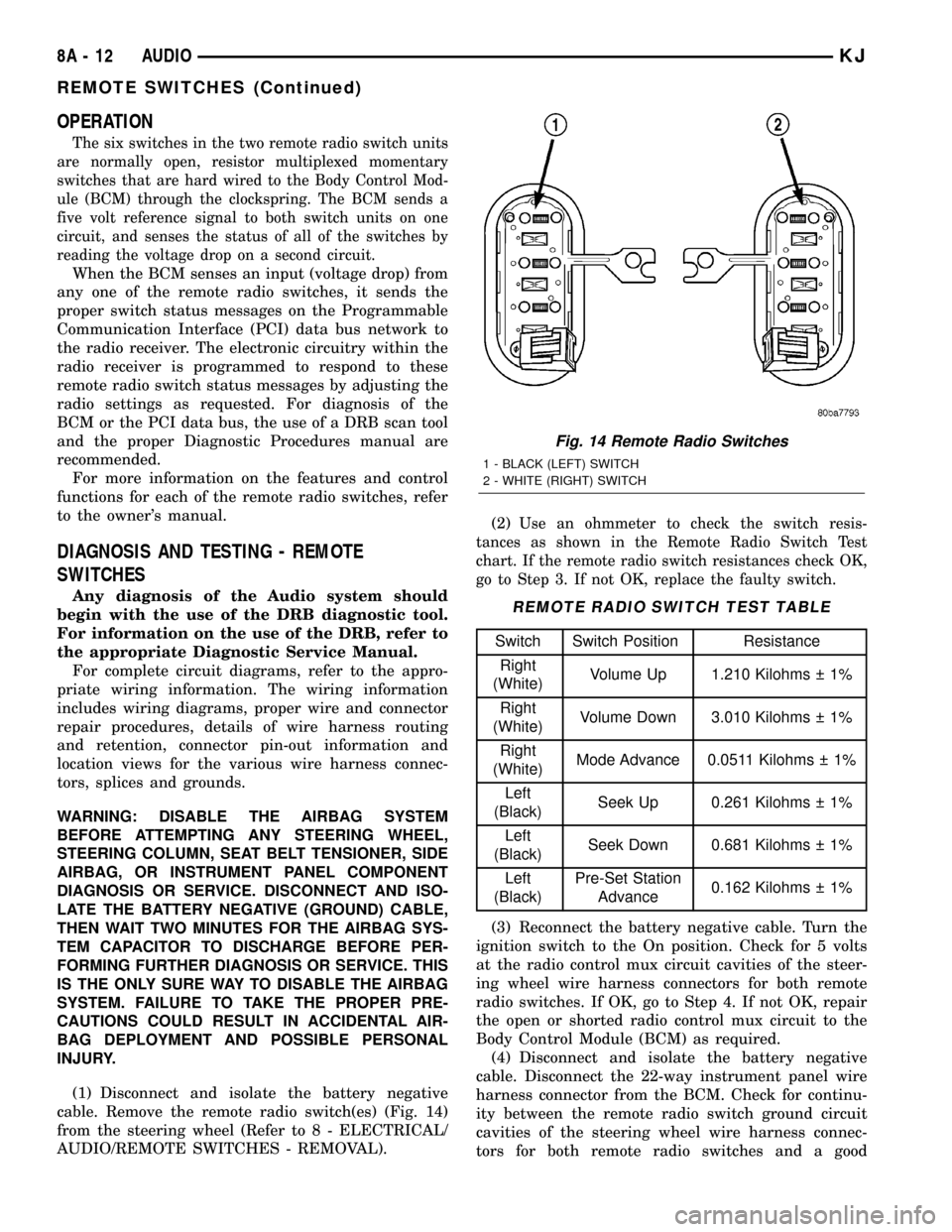
cable. Remove the remote radio switch(es) (Fig. 14)
from the steering wheel (Refer to 8 - ELECTRICAL/
AUDIO/REMOTE SWITCHES - REMOVAL).(2)
Use an ohmmeter to check the switch resis-
tances as shown in the Remote Radio Switch Test
chart. If the remote radio switch resistances check OK,
go to Step 3. If not OK, replace the faulty switch.
REMOTE RADIO SWITCH TEST TABLE
Switch Switch Position Resistance
Right
(White)Volume Up 1.210 Kilohms 1%
Right
(White)Volume Down 3.010 Kilohms 1%
Right
(White)Mode Advance 0.0511 Kilohms 1%
Left
(Black)Seek Up 0.261 Kilohms 1%
Left
(Black)Seek Down 0.681 Kilohms 1%
Left
(Black)Pre-Set Station
Advance0.162 Kilohms 1%
(3) Reconnect the battery negative cable. Turn the
ignition switch to the On position. Check for 5 volts
at the radio control mux circuit cavities of the steer-
ing wheel wire harness connectors for both remote
radio switches. If OK, go to Step 4. If not OK, repair
the open or shorted radio control mux circuit to the
Body Control Module (BCM) as required.
(4) Disconnect and isolate the battery negative
cable. Disconnect the 22-way instrument panel wire
harness connector from the BCM. Check for continu-
ity between the remote radio switch ground circuit
cavities of the steering wheel wire harness connec-
tors for both remote radio switches and a good
Fig. 14 Remote Radio Switches
1 - BLACK (LEFT) SWITCH
2 - WHITE (RIGHT) SWITCH
8A - 12 AUDIOKJ
REMOTE SWITCHES (Continued)
Page 290 of 1803

ground. There should be no continuity. If OK, go to
Step 5. If not OK, repair the shorted remote radio
switch ground circuit to the BCM as required.
(5) Check for continuity between the remote radio
switch ground circuit cavities of the steering wheel
wire harness connectors for both remote radio
switches and the 22-way instrument panel wire har-
ness connector for the BCM. There should be conti-
nuity. If OK, refer to the proper Diagnostic
Procedures manual to test the BCM and the PCI
data bus. If not OK, repair the open remote radio
switch ground circuit as required.
REMOVAL
WARNING:DISABLE THE AIRBAG SYSTEM BEFORE
ATTEMPTING ANY STEERING WHEEL, STEERING
COLUMN, SEAT BELT TENSIONER, SIDE AIRBAG,
OR INSTRUMENT PANEL COMPONENT DIAGNOSIS
OR SERVICE. DISCONNECT AND ISOLATE THE BAT-
TERY NEGATIVE (GROUND) CABLE, THEN WAIT
TWO MINUTES FOR THE AIRBAG SYSTEM CAPACI-
TOR TO DISCHARGE BEFORE PERFORMING FUR-
THER DIAGNOSIS OR SERVICE. THIS IS THE ONLY
SURE WAY TO DISABLE THE AIRBAG SYSTEM.
FAILURE TO TAKE THE PROPER PRECAUTIONS
COULD RESULT IN ACCIDENTAL AIRBAG DEPLOY-
MENT AND POSSIBLE PERSONAL INJURY.
(1) Disconnect and isolate the battery negative
cable.
(2) Remove the driver side airbag module from the
vehicle (Refer to 8 - ELECTRICAL/RESTRAINTS/
DRIVER AIRBAG - REMOVAL).
(3) Remove the cruise control switches (Fig. 15).
(4) Unplug the wire harness connector from the
remote radio switch(es).
(5)
Depress the tabs on each side of each switch and
push the switch through the rear steering wheel cover.
INSTALLATION
WARNING:DISABLE THE AIRBAG SYSTEM BEFORE
ATTEMPTING ANY STEERING WHEEL, STEERING
COLUMN, SEAT BELT TENSIONER, SIDE AIRBAG,
OR INSTRUMENT PANEL COMPONENT DIAGNOSIS
OR SERVICE. DISCONNECT AND ISOLATE THE BAT-
TERY NEGATIVE (GROUND) CABLE, THEN WAIT
TWO MINUTES FOR THE AIRBAG SYSTEM CAPACI-
TOR TO DISCHARGE BEFORE PERFORMING FUR-
THER DIAGNOSIS OR SERVICE. THIS IS THE ONLY
SURE WAY TO DISABLE THE AIRBAG SYSTEM.
FAILURE TO TAKE THE PROPER PRECAUTIONS
COULD RESULT IN ACCIDENTAL AIRBAG DEPLOY-
MENT AND POSSIBLE PERSONAL INJURY.
(1) Install remote radio switch to the steering
wheel.(2) Connect the wire harness to the remote radio
switch.
(3) Install the cruise control switches.
(4) Install the driver side airbag module (Refer to
8 - ELECTRICAL/RESTRAINTS/DRIVER AIRBAG -
INSTALLATION).
(5) Connect the battery negative cable.
SPEAKER
DESCRIPTION
STANDARD
The standard equipment speaker system includes
speakers in six locations. One 6.4 centimeter (2.50
inch) diameter speaker is installed on each end of the
instrument panel top pad. One 16.5 centimeter (6.5
inch) full-range speaker is located in each front door.
There is also one full-range 16.5 centimeter (6.5 inch)
diameter full-range speaker located in each rear door.
PREMIUM
The optional premium speaker system features six
Premium model speakers in six locations. Each of the
standard speakers is replaced with Premium model
speakers. One 6.4 centimeter (2.50 inch) diameter
Fig. 15 REMOTE SWITCH
1 - STEERING WHEEL
2 - SPEED CONTROL SWITCH
3 - SCREW
4 - DRIVER SIDE AIRBAG MODULE
5 - REMOTE RADIO SWITCH
6 - REAR TRIM COVER
KJAUDIO 8A - 13
REMOTE SWITCHES (Continued)
Page 291 of 1803

speaker is installed on each end of the instrument
panel top pad. One 16.5 centimeter (6.5 inch) Pre-
mium woofer is located in each front door. There is
also one full-range 16.5 centimeter (6.5 inch) diame-
ter Premium full-range speaker located in each rear
door. The premium speaker system also includes a
power amplifier mounted to each front door speaker.
The total available power of the premium speaker
system is about 160 watts.
OPERATION
Two wires connected to each speaker, one feed cir-
cuit (+) and one return circuit (±), allow the audio
output signal electrical current to flow through the
voice coil. For complete circuit diagrams, refer to the
appropriate wiring information. The wiring informa-
tion includes wiring diagrams, proper wire and con-
nector repair procedures, details of wire harness
routing and retention, connector pin-out information
and location views for the various wire harness con-
nectors, splices and grounds.
REMOVAL
FRONT DOOR
(1) Disconnect and isolate the battery negative
cable.
(2) Remove the front door trim panel (Refer to 23 -
BODY/DOOR - FRONT/TRIM PANEL - REMOVAL).
(3) Remove the speaker mounting screws (Fig. 16).
(4) Remove the speaker from the door and discon-
nect the wire harness connector.
INSTRUMENT PANEL
(1) Disconnect and isolate the battery negative
cable.
(2) Remove the A-pillar trim (Refer to 23 - BODY/
INTERIOR/A-PILLAR TRIM - REMOVAL).
(3) Remove instrument panel top cover (Refer to
23 - BODY/INSTRUMENT PANEL/INSTRUMENT
PANEL TOP COVER - REMOVAL).
(4) Remove speaker mounting screws (Fig. 17).
(5) Remove speaker and disconnect the wire har-
ness connector.
Fig. 16 FRONT DOOR SPEAKER
1 - FRONT DOOR SPEAKER
2 - MOUNTING SCREW
3 - WIRE HARNESS CONNECTOR
Fig. 17 INSTRUMENT PANEL SPEAKER
1 - INSTRUMENT PANEL SPEAKER
2 - INSTRUMENT PANEL
8A - 14 AUDIOKJ
SPEAKER (Continued)