battery JEEP LIBERTY 2002 KJ / 1.G Workshop Manual
[x] Cancel search | Manufacturer: JEEP, Model Year: 2002, Model line: LIBERTY, Model: JEEP LIBERTY 2002 KJ / 1.GPages: 1803, PDF Size: 62.3 MB
Page 620 of 1803

The individual switches internal to the power seat
switch cannot be repaired. If one switch is damaged
or faulty, the entire power seat switch unit must be
replaced.
OPERATION
The power seat tracks can be adjusted in six differ-
ent ways using the power seat switches. See the own-
er's manual in the vehicle glove box for more
information on the power seat switch functions and
the seat adjusting procedures.
When a power seat switch control knob or knobs
are actuated, a battery feed and a ground path are
applied through the switch contacts to the power seat
track adjuster motor. The selected adjuster motor
operates to move the seat track through its drive
unit in the selected direction until the switch is
released, or until the travel limit of the seat track is
reached. When the switch is moved in the opposite
direction, the battery feed and ground path to the
motor are reversed through the switch contacts. This
causes the adjuster motor to run in the opposite
direction.
No power seat switch should be held applied in any
direction after the seat track has reached its travel
limit. The power seat adjuster motors each contain a
self-resetting circuit breaker to protect them from
overload. However, consecutive or frequent resetting
of the circuit breaker must not be allowed to con-
tinue, or the motor may be damaged.
DIAGNOSIS AND TESTING - LEFT POWER
SEAT SWITCH
For complete circuit diagrams, refer toPower
Seatin Wiring Diagrams.
(1) Disconnect and isolate the battery negative
cable.
(2) Remove the power seat switch from the out-
board seat cushion side shield.
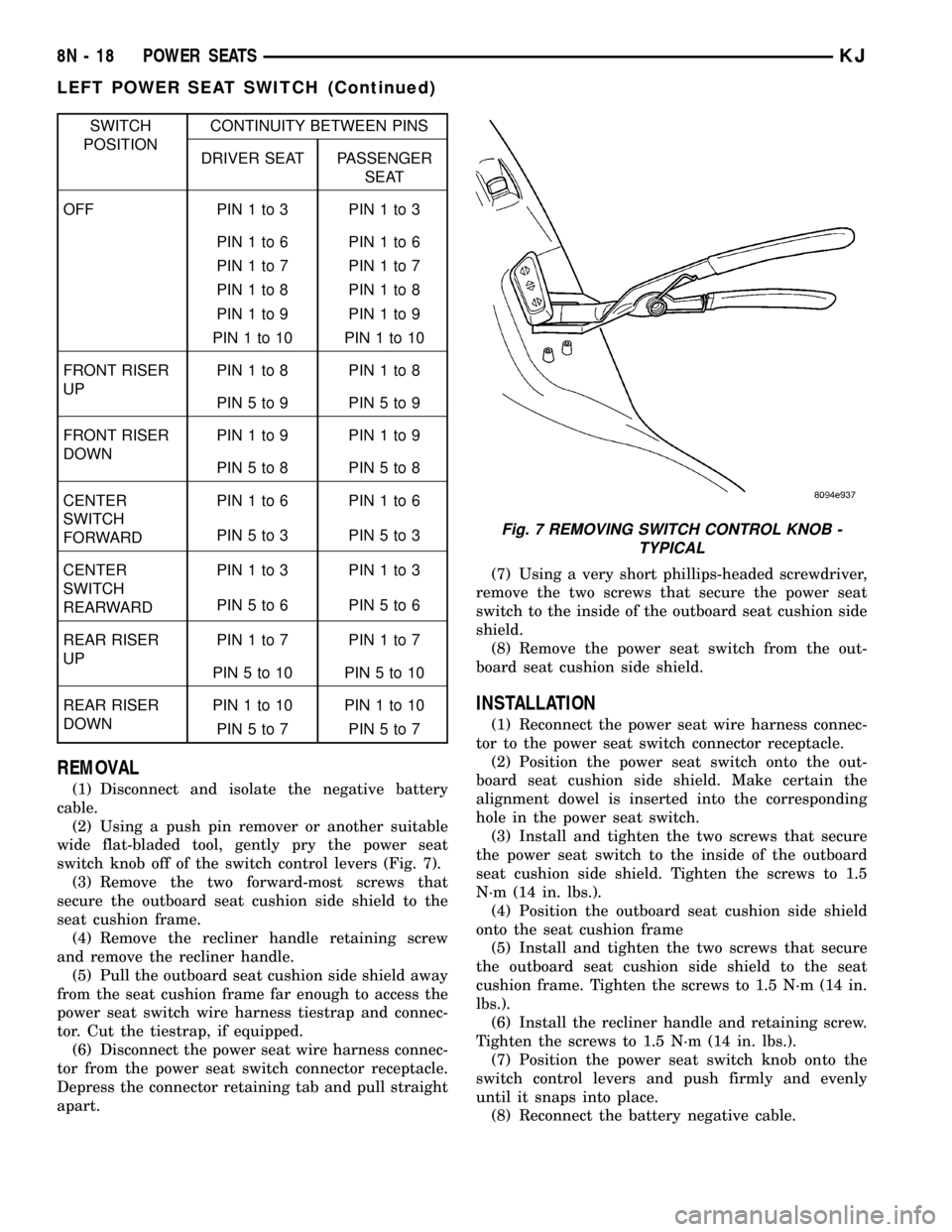
(3) Use an ohmmeter to test the continuity of the
power seat switch in each switch position. See the
Power Seat Switch Continuity chart (Fig. 5) and
switch (Fig. 6) below. If OK, refer toDiagnosis and
Testing the Power Seat Trackin this section. If
not OK, replace the faulty power seat switch unit.
Fig. 5 SIX-WAY POWER SEAT SWITCH CONTINUITY
Fig. 6 DIAGNOSING POWER SEAT SWITCH
1-UP
2 - REARWARD
3 - DOWN
4 - FORWARD
5 - FRONT RISER SWITCH
6 - CENTER SEAT SWITCH
7 - REAR RISER SWITCH
KJPOWER SEATS 8N - 17
LEFT POWER SEAT SWITCH (Continued)
Page 621 of 1803
SWITCH
POSITIONCONTINUITY BETWEEN PINS
DRIVER SEAT PASSENGER
SEAT
OFF PIN1to3 PIN1to3
PIN1to6 PIN1to6
PIN1to7 PIN1to7
PIN1to8 PIN1to8
PIN1to9 PIN1to9
PIN1to10 PIN1to10
FRONT RISER
UPPIN1to8 PIN1to8
PIN5to9 PIN5to9
FRONT RISER
DOWNPIN1to9 PIN1to9
PIN5to8 PIN5to8
CENTER
SWITCH
FORWARDPIN1to6 PIN1to6
PIN5to3 PIN5to3
CENTER
SWITCH
REARWARDPIN1to3 PIN1to3
PIN5to6 PIN5to6
REAR RISER
UPPIN1to7 PIN1to7
PIN5to10 PIN5to10
REAR RISER
DOWNPIN1to10 PIN1to10
PIN5to7 PIN5to7
REMOVAL
(1) Disconnect and isolate the negative battery
cable.
(2) Using a push pin remover or another suitable
wide flat-bladed tool, gently pry the power seat
switch knob off of the switch control levers (Fig. 7).
(3) Remove the two forward-most screws that
secure the outboard seat cushion side shield to the
seat cushion frame.
(4) Remove the recliner handle retaining screw
and remove the recliner handle.
(5) Pull the outboard seat cushion side shield away
from the seat cushion frame far enough to access the
power seat switch wire harness tiestrap and connec-
tor. Cut the tiestrap, if equipped.
(6) Disconnect the power seat wire harness connec-
tor from the power seat switch connector receptacle.
Depress the connector retaining tab and pull straight
apart.(7) Using a very short phillips-headed screwdriver,
remove the two screws that secure the power seat
switch to the inside of the outboard seat cushion side
shield.
(8) Remove the power seat switch from the out-
board seat cushion side shield.
INSTALLATION
(1) Reconnect the power seat wire harness connec-
tor to the power seat switch connector receptacle.
(2) Position the power seat switch onto the out-
board seat cushion side shield. Make certain the
alignment dowel is inserted into the corresponding
hole in the power seat switch.
(3) Install and tighten the two screws that secure
the power seat switch to the inside of the outboard
seat cushion side shield. Tighten the screws to 1.5
N´m (14 in. lbs.).
(4) Position the outboard seat cushion side shield
onto the seat cushion frame
(5) Install and tighten the two screws that secure
the outboard seat cushion side shield to the seat
cushion frame. Tighten the screws to 1.5 N´m (14 in.
lbs.).
(6) Install the recliner handle and retaining screw.
Tighten the screws to 1.5 N´m (14 in. lbs.).
(7) Position the power seat switch knob onto the
switch control levers and push firmly and evenly
until it snaps into place.
(8) Reconnect the battery negative cable.
Fig. 7 REMOVING SWITCH CONTROL KNOB -
TYPICAL
8N - 18 POWER SEATSKJ
LEFT POWER SEAT SWITCH (Continued)
Page 622 of 1803

RIGHT POWER SEAT SWITCH
DESCRIPTION
Vehicles equipped with the power seat option uti-
lize a six-way power seat switch. This six-way power
seat switch features one seat cushion shaped knob,
visible on the outboard seat cushion side shield.
The switch is secured to the back of the seat cush-
ion side shield with two screws. However, the control
knob must be removed before the seat switch can be
removed from the side shield.
The individual switches internal to the power seat
switch cannot be repaired. If one switch is damaged
or faulty, the entire power seat switch unit must be
replaced.
OPERATION
The power seat tracks can be adjusted in six differ-
ent ways using the power seat switches. See the own-
er's manual in the vehicle glove box for more
information on the power seat switch functions and
the seat adjusting procedures.
When a power seat switch control knob or knobs
are actuated, a battery feed and a ground path are
applied through the switch contacts to the power seat
track adjuster motor. The selected adjuster motor
operates to move the seat track through its drive
unit in the selected direction until the switch is
released, or until the travel limit of the seat track is
reached. When the switch is moved in the opposite
direction, the battery feed and ground path to the
motor are reversed through the switch contacts. This
causes the adjuster motor to run in the opposite
direction.
No power seat switch should be held applied in any
direction after the seat track has reached its travel
limit. The power seat adjuster motors each contain a
self-resetting circuit breaker to protect them from
overload. However, consecutive or frequent resetting
of the circuit breaker must not be allowed to con-
tinue, or the motor may be damaged.
DIAGNOSIS AND TESTING - RIGHT POWER
SEAT SWITCH
For complete circuit diagrams, refer toPower
Seatin Wiring Diagrams.
(1) Disconnect and isolate the battery negative
cable.
(2) Remove the power seat switch from the out-
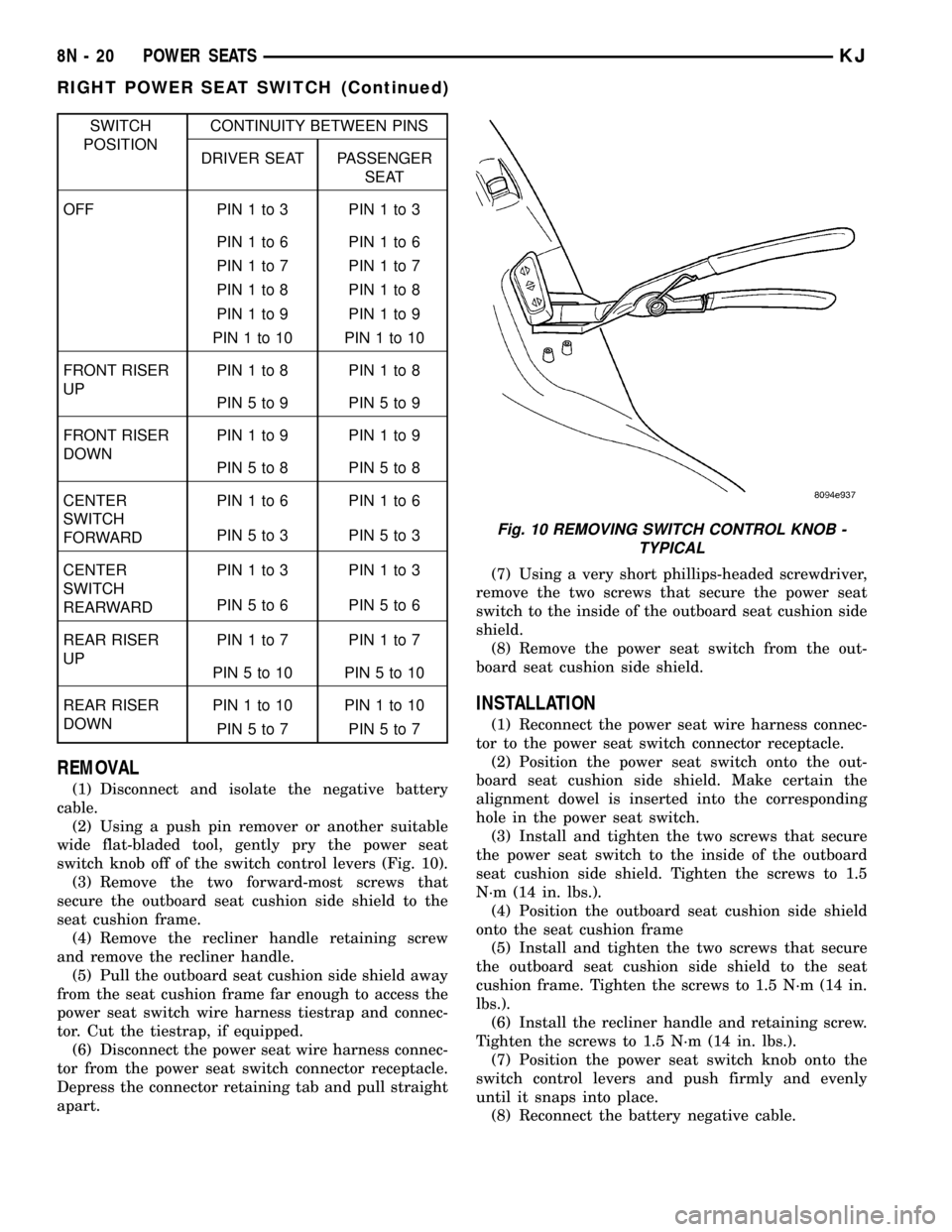
board seat cushion side shield.(3) Use an ohmmeter to test the continuity of the
power seat switch in each switch position. See the
Power Seat Switch Continuity chart (Fig. 8) and
switch (Fig. 9) below. If OK, refer toDiagnosis and
Testing the Power Seat Trackin this section. If
not OK, replace the faulty power seat switch unit.
Fig. 8 SIX-WAY POWER SEAT SWITCH CONTINUITY
Fig. 9 DIAGNOSING POWER SEAT SWITCH
1-UP
2 - REARWARD
3 - DOWN
4 - FORWARD
5 - FRONT RISER SWITCH
6 - CENTER SEAT SWITCH
7 - REAR RISER SWITCH
KJPOWER SEATS 8N - 19
Page 623 of 1803
SWITCH
POSITIONCONTINUITY BETWEEN PINS
DRIVER SEAT PASSENGER
SEAT
OFF PIN1to3 PIN1to3
PIN1to6 PIN1to6
PIN1to7 PIN1to7
PIN1to8 PIN1to8
PIN1to9 PIN1to9
PIN1to10 PIN1to10
FRONT RISER
UPPIN1to8 PIN1to8
PIN5to9 PIN5to9
FRONT RISER
DOWNPIN1to9 PIN1to9
PIN5to8 PIN5to8
CENTER
SWITCH
FORWARDPIN1to6 PIN1to6
PIN5to3 PIN5to3
CENTER
SWITCH
REARWARDPIN1to3 PIN1to3
PIN5to6 PIN5to6
REAR RISER
UPPIN1to7 PIN1to7
PIN5to10 PIN5to10
REAR RISER
DOWNPIN1to10 PIN1to10
PIN5to7 PIN5to7
REMOVAL
(1) Disconnect and isolate the negative battery
cable.
(2) Using a push pin remover or another suitable
wide flat-bladed tool, gently pry the power seat
switch knob off of the switch control levers (Fig. 10).
(3) Remove the two forward-most screws that
secure the outboard seat cushion side shield to the
seat cushion frame.
(4) Remove the recliner handle retaining screw
and remove the recliner handle.
(5) Pull the outboard seat cushion side shield away
from the seat cushion frame far enough to access the
power seat switch wire harness tiestrap and connec-
tor. Cut the tiestrap, if equipped.
(6) Disconnect the power seat wire harness connec-
tor from the power seat switch connector receptacle.
Depress the connector retaining tab and pull straight
apart.(7) Using a very short phillips-headed screwdriver,
remove the two screws that secure the power seat
switch to the inside of the outboard seat cushion side
shield.
(8) Remove the power seat switch from the out-
board seat cushion side shield.
INSTALLATION
(1) Reconnect the power seat wire harness connec-
tor to the power seat switch connector receptacle.
(2) Position the power seat switch onto the out-
board seat cushion side shield. Make certain the
alignment dowel is inserted into the corresponding
hole in the power seat switch.
(3) Install and tighten the two screws that secure
the power seat switch to the inside of the outboard
seat cushion side shield. Tighten the screws to 1.5
N´m (14 in. lbs.).
(4) Position the outboard seat cushion side shield
onto the seat cushion frame
(5) Install and tighten the two screws that secure
the outboard seat cushion side shield to the seat
cushion frame. Tighten the screws to 1.5 N´m (14 in.
lbs.).
(6) Install the recliner handle and retaining screw.
Tighten the screws to 1.5 N´m (14 in. lbs.).
(7) Position the power seat switch knob onto the
switch control levers and push firmly and evenly
until it snaps into place.
(8) Reconnect the battery negative cable.
Fig. 10 REMOVING SWITCH CONTROL KNOB -
TYPICAL
8N - 20 POWER SEATSKJ
RIGHT POWER SEAT SWITCH (Continued)
Page 624 of 1803

POWER WINDOWS
TABLE OF CONTENTS
page page
POWER WINDOWS
DESCRIPTION.........................21
OPERATION...........................21
DIAGNOSIS AND TESTING - POWER
WINDOWS...........................21
WINDOW MOTOR
REMOVAL.............................22WINDOW SWITCH
DIAGNOSIS AND TESTING - WINDOW
SWITCH............................22
REMOVAL.............................23
INSTALLATION.........................23
POWER WINDOWS
DESCRIPTION
The power window system allows each of the door
windows to be raised and lowered electrically by
actuating a switch on the center console. A master
switch on the front of the center console allows the
driver to raise or lower each of the passenger door
windows and to lock out the individual switches on
the rear of the center console from operation. The
power window system receives battery feed through
fuse 13 in the Power Distribution Center (PDC), only
when the ignition switch is in the RUN or ACCES-
SORY position.
OPERATION
WINDOW SWITCH
The power window switches control the battery
and ground feeds to the power window motors. Both
of the rear door power window switches receive their
battery and ground feeds through the circuitry of the
front window switch. When the power window lock-
out switch is in the Lock position, the battery feed
for the rear door window switches is interrupted.
WINDOW MOTOR
Front door window lift motors use permanent type
magnets. The B+ and ground applied at the motor
terminal pins will cause the motor to rotate in one
direction. Reversing current through the motor ter-
minals will cause the motor to rotate in the opposite
direction.
Refer to the appropriate wiring information. The
wiring information includes wiring diagrams, proper
wire and connector repair procedures, details of wire
harness routing and retention, connector pin-out
information and location views for the various wire
harness connectors, splices and grounds.
DIAGNOSIS AND TESTING - POWER
WINDOWS
WIRING VOLTAGE TEST
The following wiring test determines whether or
not voltage is continuous through the body harness
to the front switch.
(1) Remove the power window switch and bezel
(Refer to 8 - ELECTRICAL/POWER WINDOWS/
POWER WINDOW SWITCH - REMOVAL).
(2) Disconnect wire connector from back of power
window switch.
(3) Switch ignition to the ON position.
(4) Connect the clip end of a 12 volt test light to
Pin 14 of the window switch harness connector.
Touch the test light probe to Pin 10.
²If the test light illuminates, the wiring circuit
between the battery and switch is OK.
²If the lamp does not illuminate, first check fuse
13 in the Power Distribution Center (PDC). If fuse 13
is OK, then check for a broken wire.
Refer to the appropriate wiring information. The
wiring information includes wiring diagrams, proper
wire and connector repair procedures, details of wire
harness routing and retention, connector pin-out
information and location views for the various wire
harness connectors, splices and grounds.
POWER WINDOW MOTOR TEST
If the power window motor is receiving proper cur-
rent and ground and does not operate, proceed with
motor test. Refer to the appropriate wiring informa-
tion. The wiring information includes wiring dia-
grams, proper wire and connector repair procedures,
details of wire harness routing and retention, connec-
tor pin-out information and location views for the
various wire harness connectors, splices and grounds.
(1) Remove front door trim panel as necessary to
gain access to power window motor wire connector
KJPOWER WINDOWS 8N - 21
Page 626 of 1803
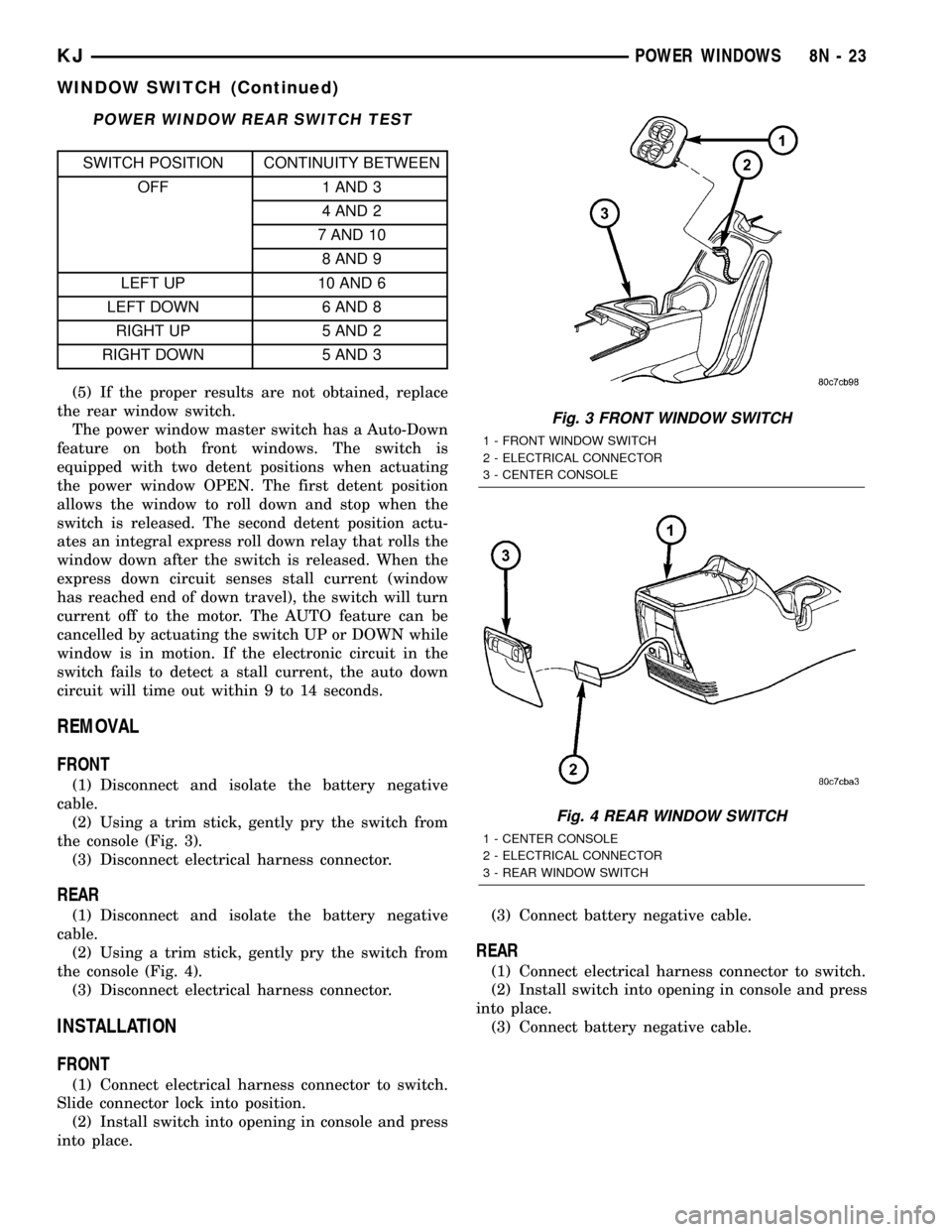
POWER WINDOW REAR SWITCH TEST
SWITCH POSITION CONTINUITY BETWEEN
OFF 1 AND 3
4 AND 2
7 AND 10
8 AND 9
LEFT UP 10 AND 6
LEFT DOWN 6 AND 8
RIGHT UP 5 AND 2
RIGHT DOWN 5 AND 3
(5) If the proper results are not obtained, replace
the rear window switch.
The power window master switch has a Auto-Down
feature on both front windows. The switch is
equipped with two detent positions when actuating
the power window OPEN. The first detent position
allows the window to roll down and stop when the
switch is released. The second detent position actu-
ates an integral express roll down relay that rolls the
window down after the switch is released. When the
express down circuit senses stall current (window
has reached end of down travel), the switch will turn
current off to the motor. The AUTO feature can be
cancelled by actuating the switch UP or DOWN while
window is in motion. If the electronic circuit in the
switch fails to detect a stall current, the auto down
circuit will time out within 9 to 14 seconds.
REMOVAL
FRONT
(1) Disconnect and isolate the battery negative
cable.
(2) Using a trim stick, gently pry the switch from
the console (Fig. 3).
(3) Disconnect electrical harness connector.
REAR
(1) Disconnect and isolate the battery negative
cable.
(2) Using a trim stick, gently pry the switch from
the console (Fig. 4).
(3) Disconnect electrical harness connector.
INSTALLATION
FRONT
(1) Connect electrical harness connector to switch.
Slide connector lock into position.
(2) Install switch into opening in console and press
into place.(3) Connect battery negative cable.
REAR
(1) Connect electrical harness connector to switch.
(2) Install switch into opening in console and press
into place.
(3) Connect battery negative cable.
Fig. 3 FRONT WINDOW SWITCH
1 - FRONT WINDOW SWITCH
2 - ELECTRICAL CONNECTOR
3 - CENTER CONSOLE
Fig. 4 REAR WINDOW SWITCH
1 - CENTER CONSOLE
2 - ELECTRICAL CONNECTOR
3 - REAR WINDOW SWITCH
KJPOWER WINDOWS 8N - 23
WINDOW SWITCH (Continued)
Page 632 of 1803

Typically, the vehicle occupants recall more about
the events preceding and following a collision than
they have of an airbag deployment itself. This is
because the airbag deployment and deflation occur so
rapidly. In a typical 48 kilometer-per-hour (30 mile-
per-hour) barrier impact, from the moment of impact
until the airbags are fully inflated takes about 40
milliseconds. Within one to two seconds from the
moment of impact, the airbags are almost entirely
deflated. The times cited for these events are approx-
imations, which apply only to a barrier impact at the
given speed. Actual times will vary somewhat,
depending upon the vehicle speed, impact angle,
severity of the impact, and the type of collision.
When the ACM monitors a problem in any of the
dual front airbag system circuits or components,
including the seat belt tensioner, it stores a fault
code or Diagnostic Trouble Code (DTC) in its memory
circuit and sends an electronic message to the EMIC
to turn on the airbag indicator. When the SIACM
monitors a problem in any of the side curtain airbag
system circuits or component, it stores a fault code or
Diagnostic Trouble Code (DTC) in its memory circuit
and sends an electronic message to the ACM, and the
ACM sends an electronic message to the EMIC to
turn on the airbag indicator. Proper testing of the
airbag system components, the Programmable Com-
munication Interface (PCI) data bus, the data bus
message inputs to and outputs from the EMIC, the
SIACM, or the ACM, as well as the retrieval or era-
sure of a DTC from the ACM, SIACM, or EMIC
requires the use of a DRBIIItscan tool. Refer to the
appropriate diagnostic information.
See the owner's manual in the vehicle glove box for
more information on the features, use and operation
of all of the factory-installed passive restraints.
WARNING - RESTRAINT SYSTEM
WARNING: DURING AND FOLLOWING ANY SEAT
BELT SERVICE, CAREFULLY INSPECT ALL SEAT
BELTS, BUCKLES, MOUNTING HARDWARE, AND
RETRACTORS FOR PROPER INSTALLATION,
OPERATION, OR DAMAGE. REPLACE ANY BELT
THAT IS CUT, FRAYED, OR TORN. STRAIGHTEN
ANY BELT THAT IS TWISTED. TIGHTEN ANY
LOOSE FASTENERS. REPLACE ANY BELT THAT
HAS A DAMAGED OR INOPERATIVE BUCKLE OR
RETRACTOR. REPLACE ANY BELT THAT HAS A
BENT OR DAMAGED LATCH PLATE OR ANCHOR
PLATE. NEVER ATTEMPT TO REPAIR A SEAT BELT
COMPONENT. ALWAYS REPLACE DAMAGED OR
FAULTY SEAT BELT COMPONENTS WITH THE COR-
RECT, NEW AND UNUSED REPLACEMENT PARTS
LISTED IN THE DAIMLERCHRYSLER MOPAR PARTS
CATALOG.WARNING: ON VEHICLES EQUIPPED WITH AIR-
BAGS, DISABLE THE SUPPLEMENTAL RESTRAINT
SYSTEM BEFORE ATTEMPTING ANY STEERING
WHEEL, STEERING COLUMN, DRIVER AIRBAG,
PASSENGER AIRBAG, SEAT BELT TENSIONER,
FRONT IMPACT SENSOR, SIDE CURTAIN AIRBAG,
OR INSTRUMENT PANEL COMPONENT DIAGNOSIS
OR SERVICE. DISCONNECT AND ISOLATE THE
BATTERY NEGATIVE (GROUND) CABLE, THEN
WAIT TWO MINUTES FOR THE SYSTEM CAPACI-
TOR TO DISCHARGE BEFORE PERFORMING FUR-
THER DIAGNOSIS OR SERVICE. THIS IS THE ONLY
SURE WAY TO DISABLE THE SUPPLEMENTAL
RESTRAINT SYSTEM. FAILURE TO TAKE THE
PROPER PRECAUTIONS COULD RESULT IN ACCI-
DENTAL AIRBAG DEPLOYMENT AND POSSIBLE
PERSONAL INJURY.
WARNING: AN AIRBAG INFLATOR UNIT MAY CON-
TAIN SODIUM AZIDE AND POTASSIUM NITRATE.
THESE MATERIALS ARE POISONOUS AND
EXTREMELY FLAMMABLE. CONTACT WITH ACID,
WATER, OR HEAVY METALS MAY PRODUCE HARM-
FUL AND IRRITATING GASES (SODIUM HYDROXIDE
IS FORMED IN THE PRESENCE OF MOISTURE) OR
COMBUSTIBLE COMPOUNDS. AN AIRBAG INFLA-
TOR UNIT MAY ALSO CONTAIN A GAS CANISTER
PRESSURIZED TO OVER 2500 PSI. DO NOT
ATTEMPT TO DISMANTLE AN AIRBAG UNIT OR
TAMPER WITH ITS INFLATOR. DO NOT PUNCTURE,
INCINERATE, OR BRING INTO CONTACT WITH
ELECTRICITY. DO NOT STORE AT TEMPERATURES
EXCEEDING 93É C (200É F).
WARNING: WHEN HANDLING A SEAT BELT TEN-
SIONER RETRACTOR, PROPER CARE SHOULD BE
EXERCISED TO KEEP FINGERS OUT FROM UNDER
THE RETRACTOR COVER AND AWAY FROM THE
SEAT BELT WEBBING WHERE IT EXITS FROM THE
RETRACTOR COVER.
WARNING: REPLACE ALL RESTRAINT SYSTEM
COMPONENTS ONLY WITH PARTS SPECIFIED IN
THE DAIMLERCHRYSLER MOPAR PARTS CATA-
LOG. SUBSTITUTE PARTS MAY APPEAR INTER-
CHANGEABLE, BUT INTERNAL DIFFERENCES MAY
RESULT IN INFERIOR OCCUPANT PROTECTION.
KJRESTRAINTS 8O - 5
RESTRAINTS (Continued)
Page 633 of 1803

WARNING: THE FASTENERS, SCREWS, AND
BOLTS ORIGINALLY USED FOR THE RESTRAINT
SYSTEM COMPONENTS HAVE SPECIAL COATINGS
AND ARE SPECIFICALLY DESIGNED FOR THE
RESTRAINT SYSTEM. THEY MUST NEVER BE
REPLACED WITH ANY SUBSTITUTES. ANY TIME A
NEW FASTENER IS NEEDED, REPLACE IT WITH
THE CORRECT FASTENERS PROVIDED IN THE
SERVICE PACKAGE OR SPECIFIED IN THE
DAIMLERCHRYSLER MOPAR PARTS CATALOG.
WARNING: WHEN A STEERING COLUMN HAS AN
AIRBAG UNIT ATTACHED, NEVER PLACE THE COL-
UMN ON THE FLOOR OR ANY OTHER SURFACE
WITH THE STEERING WHEEL OR AIRBAG UNIT
FACE DOWN.
DIAGNOSIS AND TESTING - SUPPLEMENTAL
RESTRAINT SYSTEM
Proper diagnosis and testing of the supplemental
restraint system components, the PCI data bus, the
data bus message inputs to and outputs from the
ElectroMechanical Instrument Cluster (EMIC), the
Airbag Control Module (ACM), or the Side Impact
Airbag Control Module (SIACM) as well as the
retrieval or erasure of a Diagnostic Trouble Code
(DTC) from the ACM or SIACM requires the use of a
DRBIIItscan tool. Refer to the appropriate diagnos-
tic information.
WARNING: ON VEHICLES EQUIPPED WITH AIR-
BAGS, DISABLE THE SUPPLEMENTAL RESTRAINT
SYSTEM BEFORE ATTEMPTING ANY STEERING
WHEEL, STEERING COLUMN, DRIVER AIRBAG,
PASSENGER AIRBAG, SEAT BELT TENSIONER,
FRONT IMPACT SENSORS, SIDE CURTAIN AIRBAG,
OR INSTRUMENT PANEL COMPONENT DIAGNOSIS
OR SERVICE. DISCONNECT AND ISOLATE THE
BATTERY NEGATIVE (GROUND) CABLE, THEN
WAIT TWO MINUTES FOR THE SYSTEM CAPACI-
TOR TO DISCHARGE BEFORE PERFORMING FUR-
THER DIAGNOSIS OR SERVICE. THIS IS THE ONLY
SURE WAY TO DISABLE THE SUPPLEMENTAL
RESTRAINT SYSTEM. FAILURE TO TAKE THE
PROPER PRECAUTIONS COULD RESULT IN ACCI-
DENTAL AIRBAG DEPLOYMENT AND POSSIBLE
PERSONAL INJURY.
STANDARD PROCEDURE
STANDARD PROCEDURE - HANDLING
NON-DEPLOYED SUPPLEMENTAL RESTRAINTS
At no time should any source of electricity be per-
mitted near the inflator on the back of a non-de-
ployed airbag or seat belt tensioner. When carrying a
non-deployed airbag, the trim cover or airbag cushion
side of the unit should be pointed away from the
body to minimize injury in the event of an accidental
deployment. If the airbag unit is placed on a bench or
any other surface, the trim cover or airbag cushion
side of the unit should be face up to minimize move-
ment in the event of an accidental deployment. When
handling a non-deployed seat belt tensioner, take
proper care to keep fingers out from under the
retractor cover and away from the seat belt webbing
where it exits from the retractor cover. In addition,
the supplemental restraint system should be dis-
armed whenever any steering wheel, steering col-
umn, seat belt tensioner, driver airbag, passenger
airbag, front impact sensor, side curtain airbag, or
instrument panel components require diagnosis or
service. Failure to observe this warning could result
in accidental airbag deployment and possible per-
sonal injury.
All damaged, faulty or non-deployed airbags and
seat belt tensioners which are replaced on vehicles
are to be handled and disposed of properly. If an air-
bag or seat belt tensioner unit is faulty or damaged
and non-deployed, refer to the Hazardous Substance
Control System for proper disposal. Dispose of all
non-deployed and deployed airbags and seat belt ten-
sioners in a manner consistent with state, provincial,
local and federal regulations.
SUPPLEMENTAL RESTRAINT STORAGE
Airbags and seat belt tensioners must be stored in
their original, special container until they are used
for service. Also, they must be stored in a clean, dry
environment; away from sources of extreme heat,
sparks, and high electrical energy. Always place or
store any airbag on a surface with its trim cover or
airbag cushion side facing up, to minimize movement
in case of an accidental deployment.
STANDARD PROCEDURE - SERVICE AFTER A
SUPPLEMENTAL RESTRAINT DEPLOYMENT
Any vehicle which is to be returned to use follow-
ing a supplemental restraint deployment, must have
the deployed restraints replaced. In addition, if the
driver airbag has been deployed, the clockspring
must be replaced. If the passenger airbag is
deployed, the passenger airbag door and both passen-
ger airbag mounting brackets must be replaced. If a
side curtain airbag has been deployed, the complete
8O - 6 RESTRAINTSKJ
RESTRAINTS (Continued)
Page 635 of 1803

Ifnone of the Driver or Passenger Squib 1 or 2
open are active codes, the status of the airbag squibs
is unknown. In this case the airbag should be han-
dled and disposed of as if the squibs were both live.
CLEANUP PROCEDURE
Following a supplemental restraint deployment,
the vehicle interior will contain a powdery residue.
This residue consists primarily of harmless particu-
late by-products of the small pyrotechnic charge that
initiates the propellant used to deploy a supplemen-
tal restraint. However, this residue may also contain
traces of sodium hydroxide powder, a chemical
by-product of the propellant material that is used to
generate the inert gas that inflates the airbag. Since
sodium hydroxide powder can irritate the skin, eyes,
nose, or throat, be sure to wear safety glasses, rubber
gloves, and a long-sleeved shirt during cleanup (Fig.
3).
WARNING: IF YOU EXPERIENCE SKIN IRRITATION
DURING CLEANUP, RUN COOL WATER OVER THE
AFFECTED AREA. ALSO, IF YOU EXPERIENCE IRRITA-
TION OF THE NOSE OR THROAT, EXIT THE VEHICLE
FOR FRESH AIR UNTIL THE IRRITATION CEASES. IF
IRRITATION CONTINUES, SEE A PHYSICIAN.
(1) Begin the cleanup by using a vacuum cleaner
to remove any residual powder from the vehicle inte-
rior. Clean from outside the vehicle and work your
way inside, so that you avoid kneeling or sitting on a
non-cleaned area.
(2) Be certain to vacuum the heater and air condi-
tioning outlets as well (Fig. 4). Run the heater and
air conditioner blower on the lowest speed setting
and vacuum any powder expelled from the outlets.
CAUTION: Deployed front airbags having two initiators
(squibs) in the airbag inflator may or may not have livepyrotechnic material within the inflator. Do not dispose
of these airbags unless you are sure of complete
deployment. Refer to AIRBAG SQUIB STATUS . Refer
to the Hazardous Substance Control System for
proper disposal procedures. Dispose of all non-de-
ployed and deployed airbags in a manner consistent
with state, provincial, local, and federal regulations.
(3) Next, remove the deployed supplemental
restraints from the vehicle. Refer to the appropriate
service removal procedures.
(4) You may need to vacuum the interior of the
vehicle a second time to recover all of the powder.
STANDARD PROCEDURE - VERIFICATION TEST
The following procedure should be performed using
a DRBIIItscan tool to verify proper supplemental
restraint system operation following the service or
replacement of any supplemental restraint system
component.
WARNING: ON VEHICLES EQUIPPED WITH AIR-
BAGS, DISABLE THE SUPPLEMENTAL RESTRAINT
SYSTEM BEFORE ATTEMPTING ANY STEERING
WHEEL, STEERING COLUMN, DRIVER AIRBAG,
PASSENGER AIRBAG, SEAT BELT TENSIONER,
FRONT IMPACT SENSORS, SIDE CURTAIN AIRBAG,
OR INSTRUMENT PANEL COMPONENT DIAGNOSIS
OR SERVICE. DISCONNECT AND ISOLATE THE
BATTERY NEGATIVE (GROUND) CABLE, THEN
WAIT TWO MINUTES FOR THE SYSTEM CAPACI-
TOR TO DISCHARGE BEFORE PERFORMING FUR-
THER DIAGNOSIS OR SERVICE. THIS IS THE ONLY
SURE WAY TO DISABLE THE SUPPLEMENTAL
RESTRAINT SYSTEM. FAILURE TO TAKE THE
PROPER PRECAUTIONS COULD RESULT IN ACCI-
DENTAL AIRBAG DEPLOYMENT AND POSSIBLE
PERSONAL INJURY.
Fig. 3 Wear Safety Glasses and Rubber Gloves -
Typical
Fig. 4 Vacuum Heater and A/C Outlets - Typical
8O - 8 RESTRAINTSKJ
RESTRAINTS (Continued)
Page 636 of 1803

(1) During the following test, the battery negative
cable remains disconnected and isolated, as it was
during the airbag component removal and installa-
tion procedures.
(2) Be certain that the DRBIIItscan tool contains
the latest version of the proper DRBIIItsoftware.
Connect the DRBIIItto the 16-way Data Link Con-
nector (DLC). The DLC is located on the driver side
lower edge of the instrument panel, outboard of the
steering column (Fig. 5).
(3) Turn the ignition switch to the On position and
exit the vehicle with the DRBIIItscan tool.
(4) Check to be certain that nobody is in the vehi-
cle, then reconnect the battery negative cable.
(5) Using the DRBIIIt, read and record the active
(current) Diagnostic Trouble Code (DTC) data.
(6) Next, use the DRBIIItto read and record any
stored (historical) DTC data.
(7) If any DTC is found in Step 5 or Step 6, refer
to the appropriate diagnostic information.
(8) Use the DRBIIItto erase the stored DTC data.
If any problems remain, the stored DTC data will not
erase. Refer to the appropriate diagnostic informa-
tion to diagnose any stored DTC that will not erase.
If the stored DTC information is successfully erased,
go to Step 9.
(9) Turn the ignition switch to the Off position for
about fifteen seconds, and then back to the On posi-
tion. Observe the airbag indicator in the instrument
cluster. It should illuminate for six to eight seconds,and then go out. This indicates that the supplemen-
tal restraint system is functioning normally and that
the repairs are complete. If the airbag indicator fails
to light, or lights and stays on, there is still an active
supplemental restraint system fault or malfunction.
Refer to the appropriate diagnostic information to
diagnose the problem.
AIRBAG CONTROL MODULE
DESCRIPTION
The Airbag Control Module (ACM) is also some-
times referred to as the Occupant Restraint Control-
ler (ORC) (Fig. 6). The ACM is secured with two long
screws within a tray-like stamped steel mounting
bracket welded onto the top of the floor panel trans-
mission tunnel forward of the instrument panel cen-
ter support bracket and below the instrument panel
center stack in the passenger compartment of the
vehicle.
Concealed within a hollow in the center of the die
cast aluminum ACM housing is the electronic cir-
cuitry of the ACM which includes a microprocessor,
an electronic impact sensor, an electromechanical saf-
ing sensor, and an energy storage capacitor. A
stamped metal cover plate is secured to the bottom of
the ACM housing with four screws to enclose and
protect the internal electronic circuitry and compo-
nents. An arrow cast into the top of the ACM housing
near the front provides a visual verification of the
proper orientation of the unit, and should always be
pointed toward the front of the vehicle.
Fig. 5 16-Way Data Link Connector - Typical
1 - 16±WAY DATA LINK CONNECTOR
2 - BOTTOM OF INSTRUMENT PANEL
Fig. 6 Airbag Control Module
1 - AIRBAG CONTROL MODULE
2 - ORIENTATION ARROW
3 - CONNECTOR RECEPTACLES
4 - MOUNTING HOLES
5 - GROUND LUG
KJRESTRAINTS 8O - 9
RESTRAINTS (Continued)