cable JEEP LIBERTY 2002 KJ / 1.G Owner's Guide
[x] Cancel search | Manufacturer: JEEP, Model Year: 2002, Model line: LIBERTY, Model: JEEP LIBERTY 2002 KJ / 1.GPages: 1803, PDF Size: 62.3 MB
Page 251 of 1803

WARNING: WITH RADIATOR PRESSURE TESTER
TOOL INSTALLED ON RADIATOR, DO NOT ALLOW
PRESSURE TO EXCEED 124 KPA (18 PSI). PRES-
SURE WILL BUILD UP QUICKLY IF A COMBUSTION
LEAK IS PRESENT. TO RELEASE PRESSURE,
ROCK TESTER FROM SIDE TO SIDE. WHEN
REMOVING TESTER, DO NOT TURN TESTER MORE
THAN 1/2 TURN IF SYSTEM IS UNDER PRESSURE.
Operate engine without pressure cap on radiator
until thermostat opens. Attach a Pressure Tester to
filler neck. If pressure builds up quickly it indicates a
combustion leak exists. This is usually the result of a
cylinder head gasket leak or crack in engine. Repair
as necessary.
If there is not an immediate pressure increase,
pump the Pressure Tester. Do this until indicated
pressure is within system range of 110 kPa (16 psi).
Fluctuation of gauge pointer indicates compression or
combustion leakage into cooling system.
Because the vehicle is equipped with a catalytic
converter,do notremove spark plug cables or short
out cylinders to isolate compression leak.
If the needle on dial of pressure tester does not
fluctuate, race engine a few times to check for an
abnormal amount of coolant or steam. This would be
emitting from exhaust pipe. Coolant or steam from
exhaust pipe may indicate a faulty cylinder head gas-
ket, cracked engine cylinder block or cylinder head.
A convenient check for exhaust gas leakage into
cooling system is provided by a commercially avail-able Block Leak Check tool. Follow manufacturers
instructions when using this product.
COMBUSTION LEAKAGE TEST - WITHOUT
PRESSURE TESTER
DO NOT WASTE reusable coolant. If solution is
clean, drain coolant into a clean container for reuse.
WARNING: DO NOT REMOVE CYLINDER BLOCK
DRAIN PLUGS OR LOOSEN RADIATOR DRAIN-
COCK WITH SYSTEM HOT AND UNDER PRESSURE.
SERIOUS BURNS FROM COOLANT CAN OCCUR.
Drain sufficient coolant to allow thermostat
removal. (Refer to 7 - COOLING/ENGINE/ENGINE
COOLANT THERMOSTAT - REMOVAL). Remove
accessory drive belt (Refer to 7 - COOLING/ACCES-
SORY DRIVE/DRIVE BELTS - REMOVAL).
Add coolant to radiator to bring level to within 6.3
mm (1/4 in) of top of thermostat housing.
CAUTION: Avoid overheating. Do not operate
engine for an excessive period of time. Open drain-
cock immediately after test to eliminate boil over.
Start engine and accelerate rapidly three times, to
approximately 3000 rpm while observing coolant. If
internal engine combustion gases are leaking into
cooling system, bubbles will appear in coolant. If bub-
bles do not appear, internal combustion gas leakage
is not present.
7s - 4 COOLING - 2.4LKJ
COOLING - 2.4L (Continued)
Page 263 of 1803

CONDITION POSSIBLE CAUSES CORRECTION
BELT SLIPS 1. Belt slipping because of
insufficient tension.1. Replace automatic belt tensioner.
2. Belt routed 2. Verify belt routing.
incorrectly
3. Incorrect belt. 3. Replace belt.
4. Belt or pulley subjected to
substance (belt dressing, oil
ethylene glycol) that has reduced
friction.4. Replace belt and clean pulleys.
5. Driven component bearing failure. 5. Replace faulty component
bearing.
6. Belt glazed and hardened from
heat and excessive slippage.6. Replace belt.
ªGROOVE JUMPING9(BELT
DOES NOT MAINTAIN CORRECT
POSITION ON PULLEY)1. Belt tension either too high or too
low.1. Replace automatic belt tensioner.
2. Belt routed 2. Verify belt routing.
incorrectly.
3. Incorrect belt. 3. Replace belt.
4. Pulley(s) not within design
tolerance.4. Replace pulley(s).
5. Foreign object(s) in grooves. 5. Remove foreign objects from
grooves.
6. Pulley misalignment. 6. Check and replace.
7. Belt cord line is broken. 7. Replace belt.
BELT BROKEN (NOTE: IDENTIFY
AND CORRECT PROBLEM
BEFORE NEW BELT IS
INSTALLED)1. Excessive tension. 1. Replace belt and automatic belt
tensioner.
2. Incorrect belt. 2. Replace belt.
3. Tensile member damaged during
belt installation.3. Replace belt.
4. Severe misalignment. 4. Check and replace.
5. Bracket, pulley, or bearing failure. 5. Replace defective component and
belt.
NOISE (OBJECTIONABLE
SQUEAL, SQUEAK, OR RUMBLE
IS HEARD OR FELT WHILE
DRIVE BELT IS IN OPERATION)1. Belt slippage. 1. Replace belt or automatic belt
tensioner.
2. Bearing noise. 2. Locate and repair.
3. Belt misalignment. 3. Replace belt.
4. Belt-to-pulley mismatch. 4. Install correct belt.
REMOVAL - 2.4L ENGINE
NOTE: The belt routing schematics are published
from the latest information available at the time of
publication. If anything differs between these sche-
matics and the Belt Routing Label, use the sche-
matics on Belt Routing Label. This label is located
in the engine compartment.CAUTION: DO NOT LET TENSIONER ARM SNAP
BACK TO THE FREEARM POSITION, SEVERE DAM-
AGE MAY OCCUR TO THE TENSIONER.
Belt tension is not adjustable. Belt adjustment is
maintained by an automatic ( spring load ) belt ten-
sioner.
(1) Disconnect negative battery cable from battery.
(2) Rotate belt tensioner until it contacts its stop.
Remove belt, then slowly rotate the tensioner into
the freearm position.
7s - 16 ACCESSORY DRIVEKJ
DRIVE BELTS -2.4L (Continued)
Page 270 of 1803

Do not waste reusable coolant. If the solution is
clean, drain the coolant into a clean container for
reuse.
WARNING: CONSTANT TENSION HOSE CLAMPS
ARE USED ON MOST COOLING SYSTEM HOSES.
WHEN REMOVING OR INSTALLING, USE ONLY
TOOLS DESIGNED FOR SERVICING THIS TYPE OF
CLAMP, SUCH AS SPECIAL CLAMP TOOL (NUMBER
6094) (Fig. 5). SNAP-ON CLAMP TOOL (NUMBER
HPC-20) MAY BE USED FOR LARGER CLAMPS.
ALWAYS WEAR SAFETY GLASSES WHEN SERVIC-
ING CONSTANT TENSION CLAMPS.
CAUTION: A number or letter is stamped into the
tongue of constant tension clamps (Fig. 6). If
replacement is necessary, use only an original
equipment clamp with matching number or letter.
CAUTION: When removing the radiator or A/C con-
denser for any reason, note the location of all radi-
ator-to-body and radiator-to-A/C condenser rubber
air seals (Fig. 7). These are used at the top, bottom
and sides of the radiator and A/C condenser. To
prevent overheating, these seals must be installed
to their original positions.
(1) Disconnect the negative battery cable at bat-
tery.
(2) Drain coolant from radiator (Refer to 7 -
COOLING - STANDARD PROCEDURE).
(3) Remove the front grill (Refer to 23 - BODY/EX-
TERIOR/GRILLE - REMOVAL).
(4) Remove the cooling fan from the engine, if
equipped.
(5) Remove the two radiator mounting bolts.(6) Disconnect both transmission cooler lines from
radiator.
(7) Disconnect the connector for the electric fan.
Fig. 5 Hose Clamp Tool - Typical
1 - HOSE CLAMP TOOL 6094
2 - HOSE CLAMP
Fig. 6 Clamp Number/Letter Location - Typical
1 - TYPICAL CONSTANT TENSION HOSE CLAMP
2 - CLAMP NUMBER/LETTER LOCATION
3 - TYPICAL HOSE
Fig. 7 Air Seals - Typical
1 - AIR DAM
2 - RADIATOR
3 - AIR DAM
4 - A/C CONDENSER
5 - AIR SEAL
KJENGINE7s-23
RADIATOR (Continued)
Page 271 of 1803

(8) Disconnect the power steering cooler line from
cooler.
(9) Disconnect the radiator upper and lower hoses.
(10) Disconnect the overflow hose from radiator.
(11) The lower part of radiator is equipped with
two alignment dowel pins (Fig. 8). They are located
on the bottom of radiator tank and fit into rubber
grommets. These rubber grommets are pressed into
the radiator lower crossmember.
WARNING: THE AIR CONDITIONING SYSTEM (IF
EQUIPPED) IS UNDER A CONSTANT PRESSURE
EVEN WITH THE ENGINE OFF. REFER TO REFRIG-
ERANT WARNINGS IN, HEATING AND AIR CONDI-
TIONING BEFORE HANDLING ANY AIR
CONDITIONING COMPONENT.
NOTE: The radiator and radiator cooling fan can be
removed as an assembly. It is not necessary to
remove the cooling fan before removing or install-
ing the radiator.
(12) Gently lift up and remove radiator from vehi-
cle. Be careful not to scrape the radiator fins against
any other component. Also be careful not to disturb
the air conditioning condenser (if equipped).CLEANING
Clean radiator fins With the engine cold, apply cold
water and compressed air to the back (engine side) of
the radiator to flush the radiator and/or A/C con-
denser of debris.
INSPECTION
The radiator cooling fins should be checked for
damage or deterioration. Inspect cooling fins to make
sure they are not bent or crushed, these areas result
in reduced heat exchange causing the cooling system
to operate at higher temperatures. Inspect the plastic
end tanks for cracks, damage or leaks.
Inspect the radiator neck for damage or distortion.
INSTALLATION
CAUTION: Before installing the radiator or A/C con-
denser, be sure the radiator-to-body and radiator-to-
A/C condenser rubber air seals are properly
fastened to their original positions. These are used
at the top, bottom and sides of the radiator and A/C
condenser. To prevent overheating, these seals
must be installed to their original positions.
(1) Gently lower the radiator and fan shroud into
the vehicle. Guide the two radiator alignment dowels
into the rubber grommets located in lower radiator
crossmember.
(2) Connect the radiator upper and lower hoses
and hose clamps to radiator.
CAUTION: The tangs on the hose clamps must be
positioned straight down.
(3) Install coolant reserve/overflow tank hose at
radiator.
(4) Connect both transmission cooler lines at the
radiator.
(5) Install both radiator mounting bolts.
(6) Reconnect the electric cooling fan.
(7) Install the grill (Refer to 23 - BODY/EXTERI-
OR/GRILLE - INSTALLATION).
(8) Reinstall the cooling fan to the engine.
(9) Rotate the fan blades (by hand) and check for
interference at fan shroud.
(10) Refill cooling system (Refer to 7 - COOLING -
STANDARD PROCEDURE).
(11) Connect battery cable at battery.
(12) Start and warm engine. Check for leaks.
Fig. 8 Radiator Alignment Dowels - Typical
1 - RADIATOR
2 - ALIGNMENT DOWEL
3 - RADIATOR LOWER ISOLATOR
4 - RADIATOR LOWER CROSSMEMBER
7s - 24 ENGINEKJ
RADIATOR (Continued)
Page 273 of 1803

RADIATOR FAN - ELECTRIC
DESCRIPTION
The fan (Fig. 11) is electrically controlled by the
powertrain control module (PCM) through the fan
control relay. This relay is located on the left wheel
house in the engine compartment.
OPERATION
The electric radiator cooling fan is controlled by
the Powertrain Control Module (PCM) through the
radiator cooling fan relay. The PCM regulates fan
operation based on input from the engine coolant
temperature sensor, battery temperature sensor,air
conditioning select switch and vehicle speed.
The fan is not energized during engine cranking
regardless of the electrical input from the tempera-
ture sensors and ,air conditioning switch. However, if
engine operation conditions warrant fan engagement,
the fan will run once engine starts.
On vehicles NOT equipped with AC:The relay
is energized when the coolant temperature is above
80É C (176É F), or battery temperature sensor above ±
12É C (10É F). It will then de-energize when coolant
temperature drops below 82É C (180É F), or batter
temperature sensor below ± 9É C ( 16É F).
Vehicles Equipped with AC:In addition to using
coolant temperature and battery temperature sensorto control cooling fan operation, the cooling fan will
also be engaged when the ,air conditioning system is
activated. The relay is also energized when, air con-
ditioning is selected and coolant temperature is
above 95É C ( 203É F), or , air conditioning is selected
and battery temperature sensor is above 41É C (106É
F). It will then de-energize when , air conditioning is
selected and coolant temperature is below 92É C
(198É F), or , air conditioning is selected and battery
temperature is below 38É C (100É F).
REMOVAL
If the fan blade is bent, warped, cracked or dam-
aged in any way, it must be replacedonlywith a
replacement fan blade.Do not attempt to repair a
damaged fan blade.
NOTE: For 3.7L Heavy Duty/Max Cool/Trailer Tow
cooling package, the viscous fan cannot be
removed seperate from the shroud. Both fan and
shroud must be removed together.
(1) Disconnect battery negative cable.
(2) Using special tool 6958 spanner wrench and
8346 adapters, remove the viscous fan from the
water pump (Fig. 12).
(3) Gently lay fan into shroud.
(4) Disconnect the electrical connector for the elec-
tric fan, then disconnect connector from shroud.
Fig. 11 Radiator Cooling Fan - Typical
1 - RADIATOR
2 - ELECTRIC COOLING FAN CONNECTOR
3 - FAN SHROUD
4 - ELECTRIC COOLING FAN
Fig. 12 Viscous Fan and Fan Drive 3.7L
1 - SPECIAL TOOL 6958 SPANNER WRENCH WITH ADAPTER
PINS 8346
2-FAN
7s - 26 ENGINEKJ
Page 274 of 1803

(5) Remove the two fan shroud mounting bolts con-
necting the fan shroud to the radiator (Fig. 13).
(6) Remove the shroud and fan from the vehicle.
INSTALLATION
NOTE: For 3.7L Heavy Duty/Max Cool/Trailer Tow
cooling package, the viscous fan cannot be
installed seperate from the shroud. Both fan and
shroud must be installed together.
(1) Gently lay viscous fan into shroud.
(2) Install fan shroud assembly into the vehicle.
Tighten fan shroud to radiator bolts to (5.5 N´m (50
in. lbs.).
(3) Using special tool 6958 spanner wrench and
8346 adapters, install the viscous fan on the water
pump.
(4) Connect fan motor wire connector to harness
connector, and attach connector to shroud.
(5) Connect battery negative cable.
(6) Start engine and check fan operation.
WATER PUMP - 2.4L
DESCRIPTION
The water pump has a cast aluminum body and
housing with a stamped steel impeller. The water
pump bolts directly to the block (Fig. 14). The cylin-
der block to water pump seal is provided by a rubber
O-ring. The water pump is driven by the engine tim-
ing belt.
OPERATION
The water pump is the heart of the cooling system.
The coolant is pumped through the engine block, cyl-
inder head, heater core, and radiator.
REMOVAL - 2.4L ENGINE
(1) Disconnect negative cable from battery.
(2) Raise vehicle on a hoist.
(3) Remove the accessory drive belts (Refer to 7 -
COOLING/ACCESSORY DRIVE/DRIVE BELTS -
REMOVAL).
(4) Remove the belt tensioner.
(5) Drain the cooling system (Refer to 7 - COOL-
ING - STANDARD PROCEDURE).
(6) Remove the generator.
(7) Remove the power steering pump.
(8) Remove the A/C compressor.
Fig. 13 Radiator Cooling Fan - Typical
1 - RADIATOR
2 - ELECTRIC COOLING FAN CONNECTOR
3 - FAN SHROUD
4 - ELECTRIC COOLING FAN
Fig. 14 Water Pump
1 - CYLINDER BLOCK
2 - WATER PUMP
KJENGINE7s-27
RADIATOR FAN - ELECTRIC (Continued)
Page 276 of 1803

(8) Install the accessory drive mounting bracket
(Fig. 17).(9) Install the power steering pump.
(10) Install the generator.
(11) Install the A/C compressor.
(12) Install the belt tensioner.
(13) Install the accessory drive belts (Refer to 7 -
COOLING/ACCESSORY DRIVE/DRIVE BELTS -
INSTALLATION).
(14) Fill the cooling system (Refer to 7 - COOLING
- STANDARD PROCEDURE).
(15) Lower vehicle and connect battery cable.
Fig. 17 ACCESSORY DRIVE BRACKET
1- UPPER TIMING BELT COVER
2- LOWER TIMING BELT COVER
3- BELT TENSIONER
4- ACCESSORY DRIVE BRACKET
KJENGINE7s-29
WATER PUMP - 2.4L (Continued)
Page 278 of 1803

AUDIO
TABLE OF CONTENTS
page page
AUDIO
DESCRIPTION..........................1
OPERATION............................1
DIAGNOSIS AND TESTING - AUDIO..........2
AMPLIFIER CHOKE AND RELAY
DESCRIPTION..........................3
OPERATION............................3
DIAGNOSIS AND TESTING - AMPLIFIER
CHOKE AND RELAY....................4
REMOVAL.............................4
INSTALLATION..........................4
ANTENNA BODY & CABLE
DESCRIPTION..........................4
OPERATION............................5
DIAGNOSIS AND TESTING - ANTENNA BODY
AND CABLE..........................5
REMOVAL.............................6
INSTALLATION..........................6
CD CHANGER
DESCRIPTION..........................7
OPERATION............................7
REMOVAL.............................7
INSTALLATION..........................7
INSTRUMENT PANEL ANTENNA CABLE
REMOVAL.............................7INSTALLATION..........................8
RADIO
DESCRIPTION..........................8
OPERATION............................8
REMOVAL.............................9
INSTALLATION..........................9
RADIO NOISE SUPPRESSION GROUND STRAP
DESCRIPTION..........................9
OPERATION...........................10
REMOVAL.............................10
INSTALLATION.........................11
REMOTE SWITCHES
DESCRIPTION.........................11
OPERATION...........................12
DIAGNOSIS AND TESTING - REMOTE
SWITCHES..........................12
REMOVAL.............................13
INSTALLATION.........................13
SPEAKER
DESCRIPTION.........................13
OPERATION...........................14
REMOVAL.............................14
INSTALLATION.........................15
AUDIO
DESCRIPTION
An audio system is standard factory-installed
equipment on this model. Several combinations of
radio receivers and speaker systems are offered on
this model. The audio system uses an ignition
switched source of battery current so that the system
will only operate when the ignition switch is in the
RUN or ACCESSORY positions.
The audio system includes the following compo-
nents:
²Amplifier choke and relay
²Antenna
²Compact disc changer (if equipped)
²Power amplifier mounted to each front door
speaker (with premium speaker system only)
²Radio noise suppression components
²Radio receiver
²Remote radio switches (if equipped)
²SpeakersCertain functions and features of the audio system
rely upon resources shared with other electronic
modules in the vehicle over the Programmable Com-
munication Interface (PCI) bus network. The data
bus network allows the sharing of sensor informa-
tion. For diagnosis of these electronic modules or of
the data bus network, the use of a DRB scan tool and
the proper Diagnostic Procedures manual are recom-
mended.
Refer to the appropriate wiring information for
complete standard and premium audio system circuit
diagrams. The wiring information includes proper
wire and connector repair procedures, further details
on wire harness routing and retention, as well as
pin-out and location views for the various wire har-
ness connectors, splices, and grounds.
OPERATION
The audio system components are designed to pro-
vide audio entertainment and information through
the reception, tuning and amplification of locally
broadcast radio signals in both the Amplitude Modu-
KJAUDIO 8A - 1
Page 279 of 1803
lating (AM) and Frequency Modulating (FM) com-
mercial frequency ranges.
The audio system components operate on battery
current received through a fuse in the Junction Block
(JB) on a fused ignition switch output (run-acc) cir-
cuit so that the system will only operate when the
ignition switch is in the Run or Accessory positions.
On vehicles that are equipped with the optional
remote radio switches, the Body Control Module
(BCM) receives hard wired resistor multiplexed
inputs from the remote radio switches. The program-
ming in the BCM allows it to process those inputs
and send the proper messages to the radio receiver
over the Programmable Communication Interface
(PCI) bus network to control the radio volume up or
down, station seek up or down, preset station
advance, and mode advance functions.
Refer to the owner's manual for more information
on the features, use and operation of each of the
available audio systems.
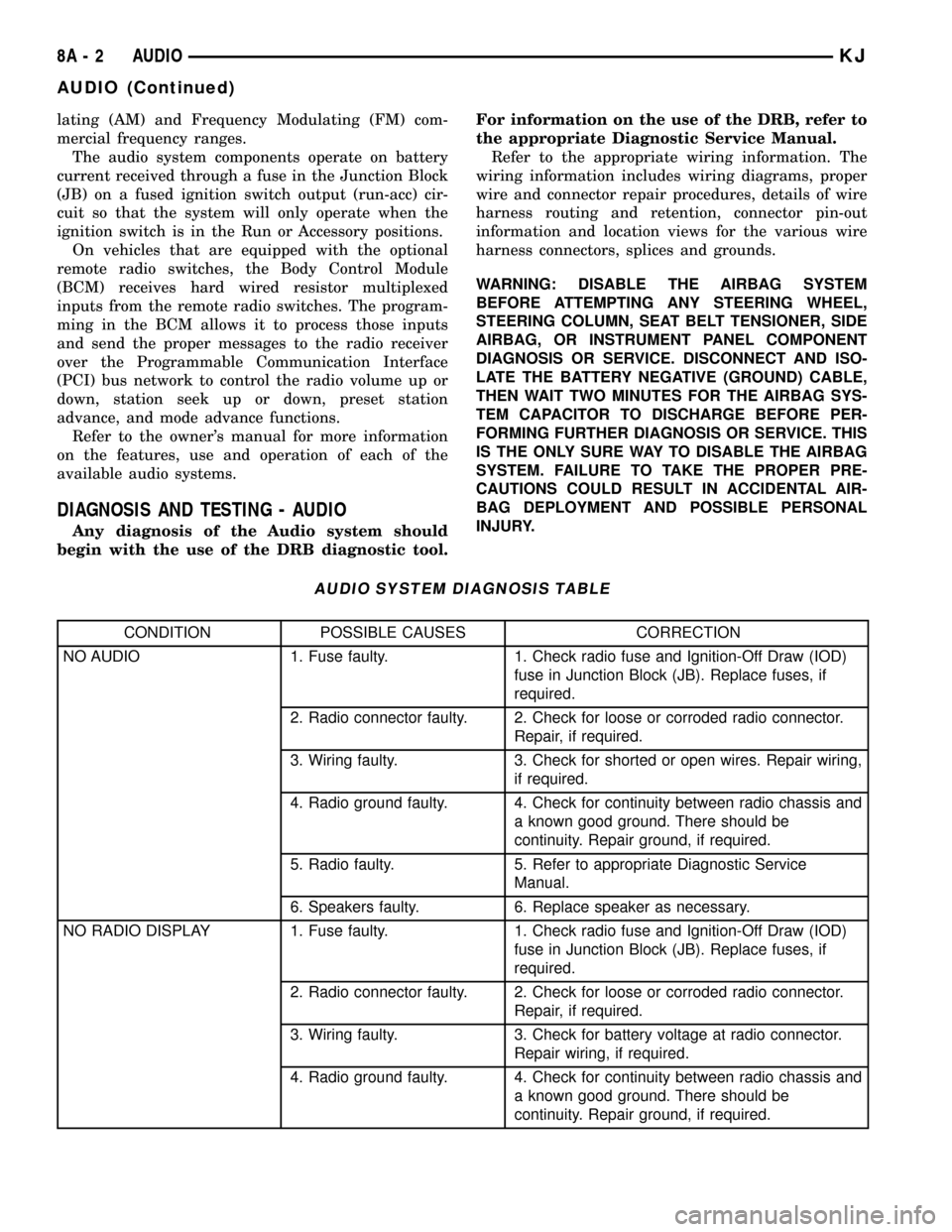
DIAGNOSIS AND TESTING - AUDIO
Any diagnosis of the Audio system should
begin with the use of the DRB diagnostic tool.For information on the use of the DRB, refer to
the appropriate Diagnostic Service Manual.
Refer to the appropriate wiring information. The
wiring information includes wiring diagrams, proper
wire and connector repair procedures, details of wire
harness routing and retention, connector pin-out
information and location views for the various wire
harness connectors, splices and grounds.
WARNING: DISABLE THE AIRBAG SYSTEM
BEFORE ATTEMPTING ANY STEERING WHEEL,
STEERING COLUMN, SEAT BELT TENSIONER, SIDE
AIRBAG, OR INSTRUMENT PANEL COMPONENT
DIAGNOSIS OR SERVICE. DISCONNECT AND ISO-
LATE THE BATTERY NEGATIVE (GROUND) CABLE,
THEN WAIT TWO MINUTES FOR THE AIRBAG SYS-
TEM CAPACITOR TO DISCHARGE BEFORE PER-
FORMING FURTHER DIAGNOSIS OR SERVICE. THIS
IS THE ONLY SURE WAY TO DISABLE THE AIRBAG
SYSTEM. FAILURE TO TAKE THE PROPER PRE-
CAUTIONS COULD RESULT IN ACCIDENTAL AIR-
BAG DEPLOYMENT AND POSSIBLE PERSONAL
INJURY.
AUDIO SYSTEM DIAGNOSIS TABLE
CONDITION POSSIBLE CAUSES CORRECTION
NO AUDIO 1. Fuse faulty. 1. Check radio fuse and Ignition-Off Draw (IOD)
fuse in Junction Block (JB). Replace fuses, if
required.
2. Radio connector faulty. 2. Check for loose or corroded radio connector.
Repair, if required.
3. Wiring faulty. 3. Check for shorted or open wires. Repair wiring,
if required.
4. Radio ground faulty. 4. Check for continuity between radio chassis and
a known good ground. There should be
continuity. Repair ground, if required.
5. Radio faulty. 5. Refer to appropriate Diagnostic Service
Manual.
6. Speakers faulty. 6. Replace speaker as necessary.
NO RADIO DISPLAY 1. Fuse faulty. 1. Check radio fuse and Ignition-Off Draw (IOD)
fuse in Junction Block (JB). Replace fuses, if
required.
2. Radio connector faulty. 2. Check for loose or corroded radio connector.
Repair, if required.
3. Wiring faulty. 3. Check for battery voltage at radio connector.
Repair wiring, if required.
4. Radio ground faulty. 4. Check for continuity between radio chassis and
a known good ground. There should be
continuity. Repair ground, if required.
8A - 2 AUDIOKJ
AUDIO (Continued)
Page 280 of 1803
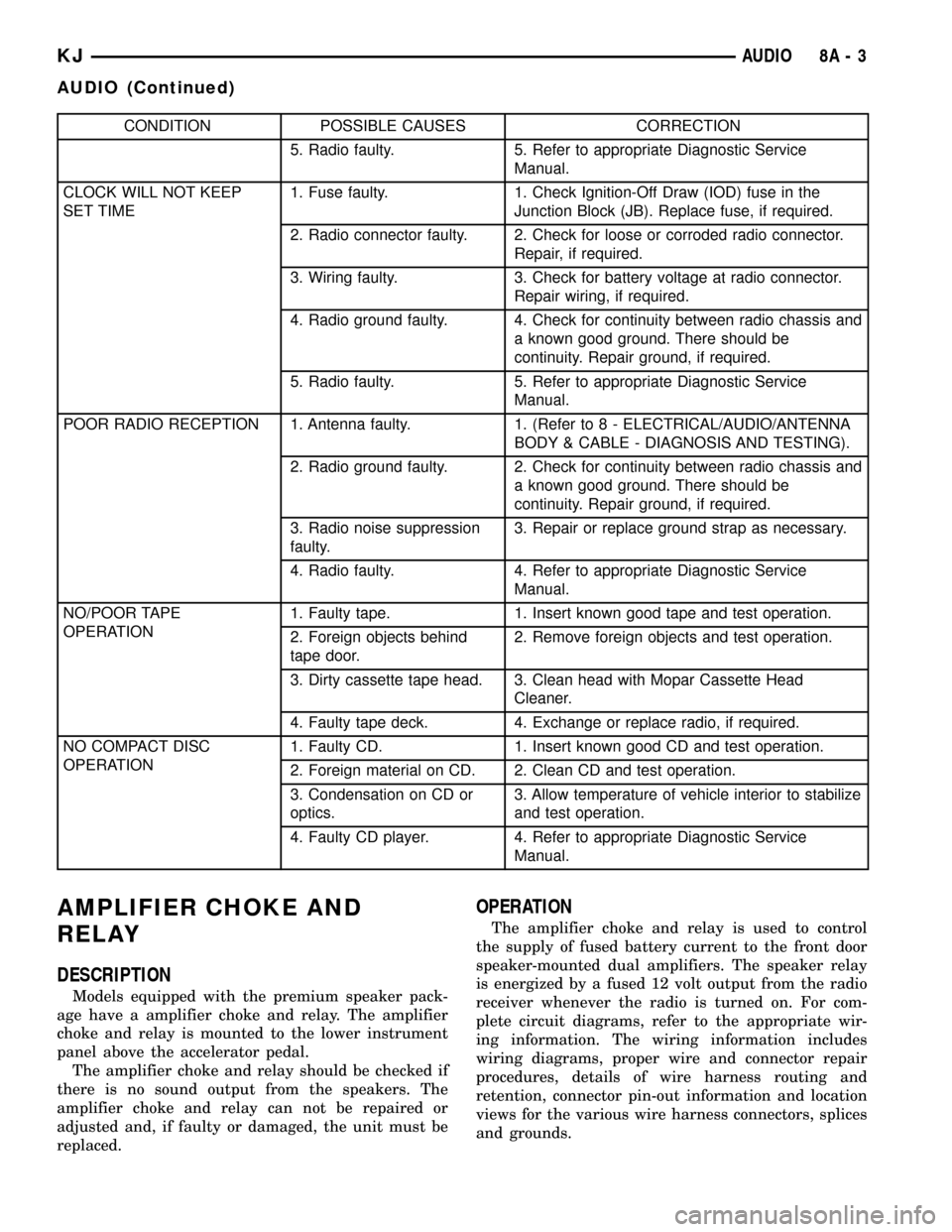
CONDITION POSSIBLE CAUSES CORRECTION
5. Radio faulty. 5. Refer to appropriate Diagnostic Service
Manual.
CLOCK WILL NOT KEEP
SET TIME1. Fuse faulty. 1. Check Ignition-Off Draw (IOD) fuse in the
Junction Block (JB). Replace fuse, if required.
2. Radio connector faulty. 2. Check for loose or corroded radio connector.
Repair, if required.
3. Wiring faulty. 3. Check for battery voltage at radio connector.
Repair wiring, if required.
4. Radio ground faulty. 4. Check for continuity between radio chassis and
a known good ground. There should be
continuity. Repair ground, if required.
5. Radio faulty. 5. Refer to appropriate Diagnostic Service
Manual.
POOR RADIO RECEPTION 1. Antenna faulty. 1. (Refer to 8 - ELECTRICAL/AUDIO/ANTENNA
BODY & CABLE - DIAGNOSIS AND TESTING).
2. Radio ground faulty. 2. Check for continuity between radio chassis and
a known good ground. There should be
continuity. Repair ground, if required.
3. Radio noise suppression
faulty.3. Repair or replace ground strap as necessary.
4. Radio faulty. 4. Refer to appropriate Diagnostic Service
Manual.
NO/POOR TAPE
OPERATION1. Faulty tape. 1. Insert known good tape and test operation.
2. Foreign objects behind
tape door.2. Remove foreign objects and test operation.
3. Dirty cassette tape head. 3. Clean head with Mopar Cassette Head
Cleaner.
4. Faulty tape deck. 4. Exchange or replace radio, if required.
NO COMPACT DISC
OPERATION1. Faulty CD. 1. Insert known good CD and test operation.
2. Foreign material on CD. 2. Clean CD and test operation.
3. Condensation on CD or
optics.3. Allow temperature of vehicle interior to stabilize
and test operation.
4. Faulty CD player. 4. Refer to appropriate Diagnostic Service
Manual.
AMPLIFIER CHOKE AND
RELAY
DESCRIPTION
Models equipped with the premium speaker pack-
age have a amplifier choke and relay. The amplifier
choke and relay is mounted to the lower instrument
panel above the accelerator pedal.
The amplifier choke and relay should be checked if
there is no sound output from the speakers. The
amplifier choke and relay can not be repaired or
adjusted and, if faulty or damaged, the unit must be
replaced.
OPERATION
The amplifier choke and relay is used to control
the supply of fused battery current to the front door
speaker-mounted dual amplifiers. The speaker relay
is energized by a fused 12 volt output from the radio
receiver whenever the radio is turned on. For com-
plete circuit diagrams, refer to the appropriate wir-
ing information. The wiring information includes
wiring diagrams, proper wire and connector repair
procedures, details of wire harness routing and
retention, connector pin-out information and location
views for the various wire harness connectors, splices
and grounds.
KJAUDIO 8A - 3
AUDIO (Continued)