Light JEEP LIBERTY 2002 KJ / 1.G Repair Manual
[x] Cancel search | Manufacturer: JEEP, Model Year: 2002, Model line: LIBERTY, Model: JEEP LIBERTY 2002 KJ / 1.GPages: 1803, PDF Size: 62.3 MB
Page 302 of 1803

There are two different versions of the BCM: base
and premium. The base BCM is a subset of the com-
ponents in the premium version. Basically, the base
version BCM does not support the following features:
Compass Mini-Trip Computer (CMTC), fog lamps
(front and/or rear), Remote Keyless Entry (RKE),
remote radio switches, or Vehicle Theft Security Sys-
tem (VTSS). Both versions of the BCM utilize inte-
grated circuitry and information carried on the
Programmable Communications Interface (PCI) databus network along with many hard wired inputs to
monitor many sensor and switch inputs throughout
the vehicle. In response to those inputs, the internal
circuitry and programming of the BCM allow it to
control and integrate many electronic functions and
features of the vehicle through both hard wired out-
puts and the transmission of electronic message out-
puts to other electronic modules in the vehicle over
the PCI data bus. The electronic functions and fea-
tures that the BCM supports or controls include the
following:
²A/C Select Switch Status- The BCM monitors
an input from, and transmits the status of the A/C
switch on the heater-A/C control.
²Ambient Temperature Data- The premium
BCM monitors and transmits the ambient tempera-
ture sensor input data.
²Cargo Lamp Disable- The BCM monitors an
input from the cargo lamp switch to provide an inte-
rior lighting disable feature.
²Chimes- The chime tone generator is located
on the ElectroMechanical Instrument Cluster (EMIC)
circuit board, but the EMIC goes to sleep with the
ignition switch in the Off position. The BCM provides
a wake-up output to the EMIC based upon inputs
from the key-in ignition switch or the exterior light-
ing switch, then sends electronic chime request mes-
sages to the EMIC for the headlamps-on warning
and key-in ignition warning.
²Door Lock Inhibit- The BCM monitors the
key-in ignition switch and the driver side front door
ajar switch to provide a door lock inhibit feature.
²Exterior Lamp Load Shedding- The BCM
provides a battery saver feature which will automat-
ically turn off exterior lamps that remain on after a
timed interval.
²Exterior Lamp Status- The BCM monitors
the status of the park lamp, low beam, high beam or
Daytime Running Lamp (DRL - Canada only), front
fog lamp (optional), and rear fog lamp (in required
markets only) relays.
²Exterior Lighting Control- The BCM pro-
vides exterior lamp control for standard head and
park lamps, as well as Daytime Running Lamps
(DRL - Canada only), front fog lamps (optional), and
rear fog lamps (in required markets only). This
includes support for features including optical horn
(also known as flash-to-pass) and headlamp time
delay.
²Flip-Up Glass Control- The BCM monitors
the tailgate cylinder lock switch, the tailgate handle
switch, the Remote Keyless Entry (RKE) module
inputs and the rear wiper switch to provide control
for the rear flip-up glass actuator.
Fig. 1 Body Control Module Location
1 - DRIVER DOOR
2 - INSTRUMENT PANEL END BRACKET
3 - JUNCTION BLOCK
4 - BODY CONTROL MODULE
Fig. 2 Body Control Module
1 - BODY CONTROL MODULE (FRONT VIEW)
2 - REMOTE KEYLESS ENTRY MODULE RECEPTACLE
3 - BCM-RKE CONNECTOR
4 - BODY CONTROL MODULE (BACK VIEW)
5 - JB-BCM CONNECTOR
6 - CONNECTOR RECEPTACLE (2)
KJELECTRONIC CONTROL MODULES 8E - 3
BODY CONTROL MODULE (Continued)
Page 303 of 1803

²Fog Lamp Control- The premium BCM pro-
vides fog lamp control for front fog lamps (optional),
and rear fog lamps (in required markets only).
²Front Wiper System Status- The BCM moni-
tors the status of the front wiper motor park switch.
²Fuel Economy and Distance to Empty Cal-
culations- The BCM calculates and transmits the
fuel economy and Distance To Empty (DTE) data.
²Headlamp Time Delay- The BCM provides a
headlamp time delay feature with the ignition switch
in the Off position.
²Heated Rear Glass Control- The BCM pro-
vides control and timer functions for the heated rear
glass feature and transmits the system status.
²Ignition On/Off Timer- The BCM monitors
and transmits the elapsed ignition On timer data
and monitors the ignition Off time.
²Ignition Switch Position Status- The BCM
monitors and transmits the status of the ignition
switch.
²Instrument Panel Dimming- The BCM mon-
itors and transmits the selected illumination inten-
sity level of the panel lamps dimmer switch.
²Interior Lamp Load Shedding- The BCM
provides a battery saver feature which will automat-
ically turn off all interior lamps that remain on after
a timed interval.
²Interior Lighting Control- The BCM moni-
tors inputs from the interior lighting switch, the door
ajar switches, the flip-up glass ajar switch, the tail-
gate ajar switch, the cargo lamp switch, the reading
lamp switches, and the Remote Keyless Entry (RKE)
module to provide courtesy lamp control. This
includes support for timed illuminated entry with
theater-style fade-to-off and courtesy illumination
defeat features.
²Intermittent Wipe and Front Wiper System
Control- The BCM monitors inputs from the front
wiper and washer switch and the front wiper motor
park switch to provide front wiper system control
through the wiper on/off and high/low relays. This
includes support for adjustable intermittent wipe,
mist wipe (also known as pulse wipe), and wipe-after-
wash features.
²Key-In-Ignition Switch Status- The BCM
monitors and transmits the status of the key-in-igni-
tion switch.
²Panic Mode- The BCM provides support for
the Remote Keyless Entry (RKE) system panic mode
feature.
²Parade Mode- The BCM provides a parade
mode (also known as funeral mode) that allows the
interior Vacuum Fluorescent Displays (VFD) to be
illuminated at full intensity while driving in daylight
with the exterior lamps On.²Power Locks- The BCM monitors inputs from
the power lock switches and the Remote Keyless
Entry (RKE) module (optional) to provide control of
the power lock motors through outputs to the lock,
unlock, and driver unlock (RKE only) relays. This
includes support for rolling door locks (also known as
automatic door locks) and a door lock inhibit mode.
²Programmable Features- The BCM provides
support for several standard and optional program-
mable features, including: rolling door locks, head-
lamp time delay interval, Remote Keyless Entry
(RKE) driver-door-only or unlock-all-doors, RKE opti-
cal chirp, and RKE audible chirp.
²Remote Keyless Entry- The premium BCM
provides the optional Remote Keyless Entry (RKE)
system features, including support for the RKE Lock,
Unlock (with optional driver-door-only unlock, and
unlock-all-doors), rear flip-up glass control, Panic,
audible chirp, optical chirp, and illuminated entry
modes, as well as the ability to be programmed to
recognize up to four RKE transmitters.
²Rolling Door Locks- The BCM provides sup-
port for the power lock system rolling door locks fea-
ture (also known as automatic door locks).
²Tailgate and Flip-Up Glass Ajar Status- The
BCM monitors and transmits the status of the tail-
gate and rear flip-up glass ajar switches.
²Remote Radio Switch Interface- The pre-
mium BCM monitors and transmits the status of the
optional remote radio switches.
²Self-Diagnostics- The BCM provides support
for diagnostics through communication with the
DRBIIItscan tool over the PCI data bus network.
Each analog and digital input can be verified, and
each output can be actuated through the use of this
diagnostic protocol. The BCM also stores Diagnostic
Trouble Codes (DTCs) to assist in troubleshooting
this unit.
²Vacuum Fluorescent Display Synchroniza-
tion- The BCM transmits panel lamp intensity data
which allows modules with Vacuum Fluorescent Dis-
plays (VFD) to coordinate their illumination inten-
sity.
²Vehicle Speed System- The BCM monitors a
vehicle speed input from the vehicle speed sensor
(without Antilock Brake System [ABS]) or from the
Controller Antilock Brake (CAB)(with ABS), calcu-
lates the vehicle speed based upon a programmed
axle ratio/tire size (electronic pinion factor), and
transmits the vehicle speed information to the Pow-
ertrain Control Module (PCM) on a hard wired out-
put circuit.
²Vehicle Theft Security System- The pre-
mium BCM monitors inputs from the door cylinder
lock switches, the tailgate cylinder lock switch, the
door ajar switches, the tailgate ajar switch, the
8E - 4 ELECTRONIC CONTROL MODULESKJ
BODY CONTROL MODULE (Continued)
Page 305 of 1803

²RKE antenna (two circuits) - premium with
RKE only
²Tailgate ajar switch sense
²Tailgate cylinder lock switch sense
²Vehicle speed sensor
Refer to the appropriate wiring information for
additional details.
HARD WIRED OUTPUTS The hard wired outputs
of the BCM include the following:
²Courtesy lamp driver
²Courtesy lamp load shed
²Door lock relay control
²Driver door unlock relay control - premium
with RKE only
²Flip-up glass release motor driver
²Front fog lamp relay control - premium
with front fog lamps only
²Front wiper high/low relay control
²Front wiper on/off relay control
²Hazard lamp control
²High beam relay control
²Horn relay control - premium with RKE
only
²Instrument cluster wake up signal
²Low beam relay control
²Park lamp relay control
²Passenger door unlock relay control
²Rear fog lamp relay control - premium with
rear fog lamps in markets where required only
²Rear window defogger relay control
²RKE supply - premium with RKE only
²Tailgate lock driver
²Tailgate unlock driver
²Vehicle speed output
²Vehicle speed sensor supply
²VTSS indicator driver - premium with
VTSS only
Refer to the appropriate wiring information for
additional details.
GROUNDS The BCM receives ground through five
separate circuits, and also supplies a ground path to
several switches through the following hard wired
circuits:
²Ambient temperature sensor return
²Door lock switch ground
²Headlamp switch return
²Radio control mux return
²RKE ground - premium with RKE only
²Tailgate switch ground
Refer to the appropriate wiring information for
additional details.
COMMUNICATION Not including the two RKE
antenna circuits (RKE antenna + and ±), which
merely pass through the premium BCM from the
RKE module to the external RKE antenna in theinstrument panel wire harness, the BCM has the fol-
lowing communication circuits:
²PCI bus
²RKE program serial data - premium with
RKE only
²RKE transmit serial data - premium with
RKE only
Refer to the appropriate wiring information for
additional details.
MESSAGING The BCM uses the following mes-
sages received from other electronic modules over the
PCI data bus:
²Battery Temperature (PCM)
²Compass Mini-Trip Computer Button Sta-
tus (CMTC) - premium only
²Coolant Temperature (PCM)
²Distance Pulses (PCM)
²Engine Speed (PCM)
²Fuel Tank Level (PCM)
²Fuel Used (PCM)
²Intrusion Transceiver Module Commands
(ITM) - premium in markets where required
only
²Manifold Absolute Pressure (PCM)
²OK to Lock - Rolling Locks (PCM)
²SKIS Status (SKIM)
²Vehicle Identification Number (PCM)
²Vehicle Speed (PCM)
The BCM provides the following messages to other
electronic modules over the PCI data bus:
²A/C Select Switch Status (PCM)
²Country Code (EMIC, PCM, CMTC)
²Distance to Empty (CMTC) - premium only
²Door Ajar Status (EMIC)
²Exterior Lighting Status (EMIC)
²Flip-up Glass Ajar Status (EMIC)
²Fuel Economy (Average and Instantaneous)
(CMTC) - premium only
²Hood Ajar Status (ITM) - premium in mar-
kets where required only
²Ignition On Timer (CMTC) - premium only
²Intrusion Transceiver Module Commands
(ITM) - premium in markets where required
only
²Key-In Ignition Switch Status (EMIC)
²Outside Temperature (CMTC) - premium
only
²Panel Lamp Intensity (CMTC, Radio)
²Tailgate Ajar Status (EMIC)
²Radio Mode (Radio) - premium only
²Radio Preset Scan (Radio) - premium only
²Radio Seek Down (Radio) - premium only
²Radio Seek Up (Radio) - premium only
²Radio Volume Down (Radio) - premium
only
²Radio Volume Up (Radio) - premium only
8E - 6 ELECTRONIC CONTROL MODULESKJ
BODY CONTROL MODULE (Continued)
Page 320 of 1803

Schedule Condition Expected Operation
OverheatOil temperature above 240É F or
engine coolant temperature above
244É F- Delayed 2-3 upshift
- Delayed 3-4 upshift
- 3rd gear FEMCC from 30-48 mph
- 3rd gear PEMCC above 35 mph
- Above 25 mph the torque
converter will not unlock unless the
throttle is closed or if a wide open
throttle 2nd PEMCC to 1 kickdown
is made
STANDARD PROCEDURE - TCM QUICK LEARN
The quick learn procedure requires the use of the
DRBtscan tool.
This program allows the electronic transmission
system to recalibrate itself. This will provide the
proper transmission operation. The quick learn pro-
cedure should be performed if any of the following
procedures are performed:
²Transmission Assembly Replacement
²Transmission Control Module Replacement
²Solenoid Pack Replacement
²Clutch Plate and/or Seal Replacement
²Valve Body Replacement or Recondition
To perform the Quick Learn Procedure, the follow-
ing conditions must be met:
²The brakes must be applied
²The engine speed must be above 500 rpm
²The throttle angle (TPS) must be less than 3
degrees
²The shift lever position must stay in PARK until
prompted to shift to overdrive
²The shift lever position must stay in overdrive
after the Shift to Overdrive prompt until the DRBt
indicates the procedure is complete
²The calculated oil temperature must be above
60É and below 200É
HEATED SEAT MODULE
DESCRIPTION
The heated seat module is also known as the Seat
Heat Interface Module. The heated seat module (Fig.
14) is located under the left front seat cushion, where
it is secured to a mounting bracket via two push-pin
retainers. The heated seat module has a single con-
nector receptacle that allows the module to be con-
nected to all of the required inputs and outputs
through the seat wire harness.
The heated seat module is an electronic micropro-
cessor controlled device designed and programmed to
use inputs from the heated seat relay, the two heatedseat switches and the two heated seat sensors to
operate and control the heated seat elements in both
front seats and the two heated seat indicator lamp
Light-Emitting Diodes (LEDs) in each heated seat
switch. The heated seat module is also programmed
to perform self-diagnosis of certain heated seat sys-
tem functions and provide feedback of that diagnosis
through the heated seat switch indicator lamps.
The heated seat module cannot be repaired. If the
heated seat module is damaged or faulty, the entire
module must be replaced.
OPERATION
The heated seat module operates on fused battery
current received from a fuse in the junction block.
The module is grounded at all times. Inputs to the
module include a resistor multiplexed heated seat
switch request circuit for each of the two heated seat
switches and the heated seat sensor inputs from the
seat cushions of each front seat. In response to those
inputs, the heated seat module controls battery cur-
rent to the heated seat elements and sensors, and
Fig. 14 Heated Seat Module
1 - Mounting Tabs (Not Used On KJ)
2 - Heated Seat Module
3 - Connector Receptacle
KJELECTRONIC CONTROL MODULES 8E - 21
TRANSMISSION CONTROL MODULE (Continued)
Page 333 of 1803
turer of the battery charger for details on how to
bypass the polarity-sensing circuitry.
(3) Battery chargers vary in the amount of voltage
and current they provide. The amount of time
required for a battery to accept measurable charging
current at various voltages is shown in the Charge
Rate Table. If the charging current is still not mea-
surable at the end of the charging time, the battery
is faulty and must be replaced. If the charging cur-
rent is measurable during the charging time, the bat-
tery may be good and the charging should be
completed in the normal manner.
CHARGE RATE TABLE
Voltage Hours
16.0 volts maximum up to 4 hours
14.0 to 15.9 volts up to 8 hours
13.9 volts or less up to 16 hours
CHARGING TIME REQUIRED
The time required to charge a battery will vary,
depending upon the following factors:
²Battery Capacity- A completely discharged
heavy-duty battery requires twice the charging time
of a small capacity battery.
²Temperature- A longer time will be needed to
charge a battery at -18É C (0É F) than at 27É C (80É
F). When a fast battery charger is connected to a cold
battery, the current accepted by the battery will be
very low at first. As the battery warms, it will accept
a higher charging current rate (amperage).
²Charger Capacity- A battery charger that
supplies only five amperes will require a longer
charging time. A battery charger that supplies
twenty amperes or more will require a shorter charg-
ing time.
²State-Of-Charge- A completely discharged bat-
tery requires more charging time than a partially
discharged battery. Electrolyte is nearly pure water
in a completely discharged battery. At first, the
charging current (amperage) will be low. As the bat-
tery charges, the specific gravity of the electrolyte
will gradually rise.
The Battery Charging Time Table gives an indica-
tion of the time required to charge a typical battery
at room temperature based upon the battery state-of-
charge and the charger capacity.
BATTERY CHARGING TIME TABLE
Charging
Amperage5 Amps10
Amps20 Amps
Open Circuit
VoltageHours Charging @ 21É C (70É
F)
12.25 to 12.49 6 hours 3 hours 1.5
hours
12.00 to 12.24 10 hours 5 hours 2.5
hours
10.00 to 11.99 14 hours 7 hours 3.5
hours
Below 10.00 18 hours 9 hours 4.5
hours
STANDARD PROCEDURE - BUILT-IN
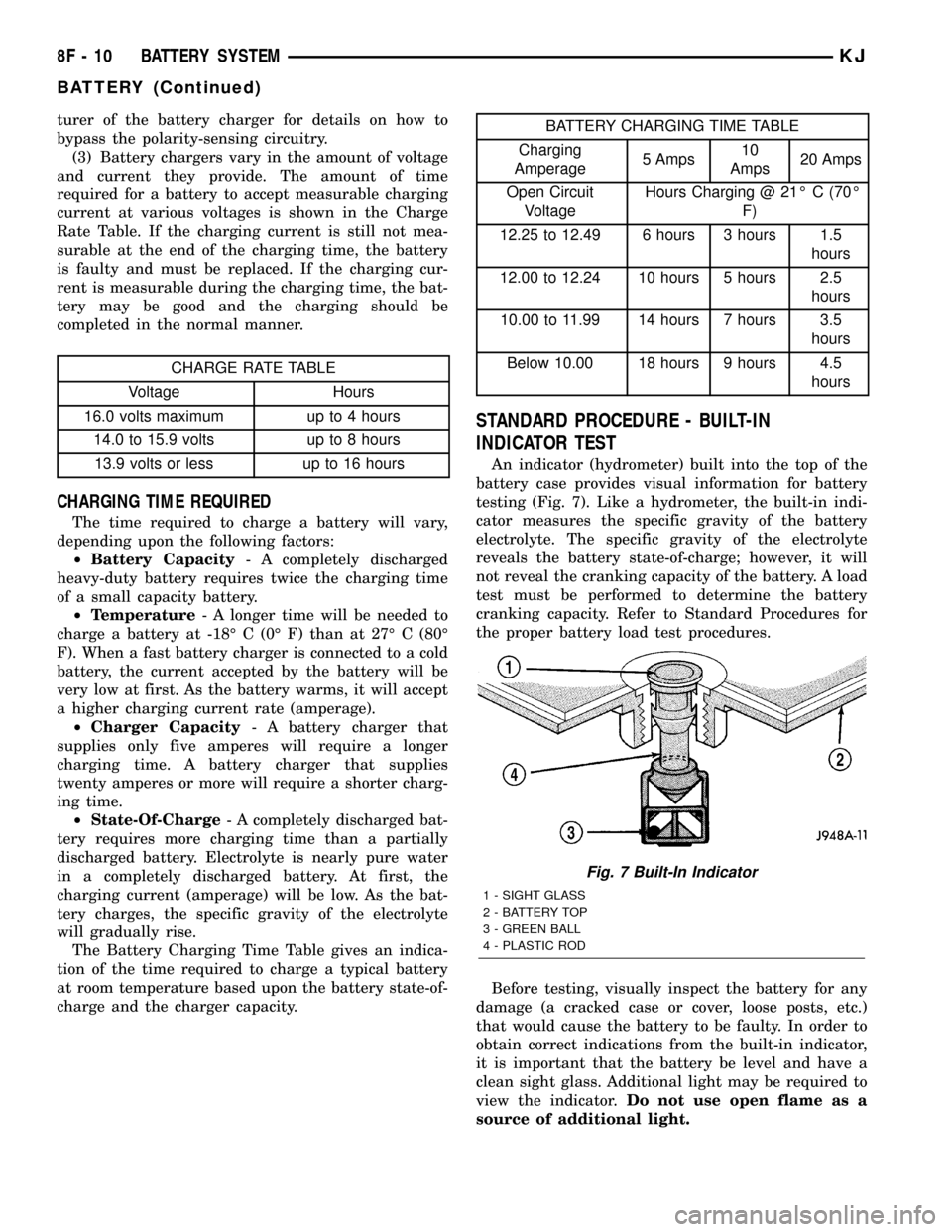
INDICATOR TEST
An indicator (hydrometer) built into the top of the
battery case provides visual information for battery
testing (Fig. 7). Like a hydrometer, the built-in indi-
cator measures the specific gravity of the battery
electrolyte. The specific gravity of the electrolyte
reveals the battery state-of-charge; however, it will
not reveal the cranking capacity of the battery. A load
test must be performed to determine the battery
cranking capacity. Refer to Standard Procedures for
the proper battery load test procedures.
Before testing, visually inspect the battery for any
damage (a cracked case or cover, loose posts, etc.)
that would cause the battery to be faulty. In order to
obtain correct indications from the built-in indicator,
it is important that the battery be level and have a
clean sight glass. Additional light may be required to
view the indicator.Do not use open flame as a
source of additional light.
Fig. 7 Built-In Indicator
1 - SIGHT GLASS
2 - BATTERY TOP
3 - GREEN BALL
4 - PLASTIC ROD
8F - 10 BATTERY SYSTEMKJ
BATTERY (Continued)
Page 343 of 1803

nection at the starter solenoid B(+) terminal stud.
Repeat the test. If the reading is still above 0.2 volt,
replace the faulty battery positive cable.
(4) Connect the voltmeter to measure between the
battery negative cable terminal clamp and a good
clean ground on the engine block (Fig. 22). Rotate
and hold the ignition switch in the Start position.
Observe the voltmeter. If the reading is above 0.2
volt, clean and tighten the battery negative cable
eyelet terminal connection to the engine block.
Repeat the test. If the reading is still above 0.2 volt,
replace the faulty battery negative cable.THERMAL GUARD
DESCRIPTION
A flexible plastic bubble-wrap style thermal guard
(Fig. 23) slides over the battery case to enclose the
sides of the battery. The thermal guard consists of a
heavy black plastic outer skin and two lighter plies of
plastic that have been formed into a sheet with hun-
dreds of small air pockets entrapped between them.
The resulting material is very similar to the bubble-
wrap used to protect items in many parcel packaging
and shipping applications.
OPERATION
The thermal guard protects the battery from
engine compartment temperature extremes. The tem-
perature of the battery can affect battery perfor-
mance. The air trapped between the plastic plies of
the thermal guard create a dead air space, which
helps to insulate the sides of the battery case from
the air temperature found in the surrounding engine
compartment.
REMOVAL
(1) Remove the battery and the battery thermal
guard from the battery tray as a unit. Refer to Bat-
tery Removal for the proper battery removal proce-
dures.
(2) Carefully and evenly slide the battery thermal
guard up off of the battery case (Fig. 24).
INSTALLATION
(1) Clean and inspect the battery thermal guard.
Refer to Battery System Cleaning for the proper
cleaning procedures, and refer to Battery System
Inspection for the proper inspection procedures.
Fig. 21 TEST BATTERY POSITIVE CABLE
RESISTANCE - TYPICAL
1 - BATTERY
2 - VOLTMETER
3 - STARTER MOTOR
Fig. 22 TEST GROUND CIRCUIT RESISTANCE -
TYPICAL
1 - VOLTMETER
2 - BATTERY
3 - ENGINE GROUND
Fig. 23 Battery Thermal guard
1 - THERMAL GUARD
2 - BATTERY
8F - 20 BATTERY SYSTEMKJ
BATTERY CABLES (Continued)
Page 363 of 1803

3.7L V-6
(1) Disconnect and isolate negative battery cable.
(2) Raise and support vehicle.
(3) Remove 2 flange bolts securing left exhaust
downpipe to crossover pipe. Lower pipe slightly to
allow front propeller shaft removal.
(4) Remove front propeller shaft.
(5) Remove 2 starter heat shield bolts at side of
starter (Fig. 10).
(6) Remove starter heat shield nut at front of
starter (Fig. 10).
(7) Remove starter heat shield.
(8) Remove solenoid wire from solenoid terminal
(Fig. 11).
(9) Remove battery cable from stud on starter sole-
noid (Fig. 11).
(10) Remove 2 starter mounting bolts (Fig. 12).
(11) Position front of starter to face rear of vehicle.
Rotate starter until solenoid position is located below
starter.
(12) Remove starter from vehicle by passing it
between exhaust pipe and transmission bellhousing.
Fig. 7 CONTINUITY BETWEEN SOLENOID AND
FIELD COIL TERMINALS - TYPICAL
1 - OHMMETER
2 - SOLENOID TERMINAL
3 - FIELD COIL TERMINAL
Fig. 8 CONTINUITY BETWEEN SOLENOID
TERMINAL AND CASE - TYPICAL
1 - SOLENOID TERMINAL
2 - OHMMETER
3 - SOLENOID
Fig. 9 STARTER - 2.4L
1-STARTER
2 - MOUNTING BOLTS (2)
Fig. 10 STARTER HEAT SHIELD - 3.7L
1 - STARTER HEAT SHIELD
2 - HEAT SHIELD BOLTS
3 - HEAT SHIELD BOLTS
4-STARTER
8F - 40 STARTING SYSTEMKJ
STARTER MOTOR (Continued)
Page 370 of 1803

WINDOW DEFOGGER
TABLE OF CONTENTS
page page
WINDOW DEFOGGER
DESCRIPTION - REAR WINDOW DEFOGGER . . 3
OPERATION - REAR WINDOW DEFOGGER....3
DIAGNOSIS AND TESTING - REAR WINDOW
DEFOGGER SYSTEM...................4
STANDARD PROCEDURE - REAR GLASS
HEATING GRID REPAIR.................4
REAR WINDOW DEFOGGER GRID
DESCRIPTION..........................5
OPERATION............................5
DIAGNOSIS AND TESTING - REAR WINDOW
DEFOGGER GRID......................5
REAR WINDOW DEFOGGER RELAY
DESCRIPTION..........................6
OPERATION............................6DIAGNOSIS AND TESTING - REAR WINDOW
DEFOGGER RELAY.....................6
REMOVAL.............................7
INSTALLATION..........................7
REAR WINDOW DEFOGGER SWITCH
DESCRIPTION..........................8
OPERATION............................8
DIAGNOSIS AND TESTING
DIAGNOSIS AND TESTING - REAR
WINDOW DEFOGGER SWITCH...........8
DIAGNOSIS AND TESTING - REAR HVAC
CONTROL ASSEMBLY WINDOW
DEFOGGER FUNCTION.................9
REMOVAL.............................9
INSTALLATION..........................9
WINDOW DEFOGGER
DESCRIPTION - REAR WINDOW DEFOGGER
The rear window defogger system will only operate
when the ignition switch is in the run position. When
the defogger switch is in the run position, an electric
heater grid on the rear window glass is energized.
Vehicles with the heated mirror options also have
heater grids located behind the outside rear view
mirror glass. Each of these grids produce heat to help
clear the rear window glass and outside rear view
mirrors of ice, snow, or fog.
OPERATION - REAR WINDOW DEFOGGER
The rear window defogger system is controlled by a
switch installed with the HVAC control assembly. An
amber indicator lamp in the switch button will light
to indicate when the rear window defogger system is
turned on. The HVAC control head circuitry, which
contains the defogger system timer logic, monitors
the state of the defogger switch through a hard-wired
input. The instrument cluster circuitry controls therear window defogger system through a hard-wired
control output to the rear window defogger relay. The
rear window defogger timer and logic circuitry cannot
be adjusted or repaired and, if faulty or damaged, the
HVAC control head assembly must be replaced.
The rear window defogger system will be automat-
ically turned off after a programmed time interval of
about ten minutes. After the initial time interval has
expired, if the rear window defogger switch is turned
on again during the same ignition cycle, the defogger
system will automatically turn off after about five
minutes.
The rear window defogger system will automati-
cally shut off if the ignition switch is turned to the
Off position, or it can be turned off manually by
depressing the instrument panel switch. Following
are general descriptions of the major components in
the rear window defogger system. Refer to the own-
er's manual in the vehicle glove box for more infor-
mation on the features, use and operation of the
defogger system.
KJWINDOW DEFOGGER 8G - 3
Page 372 of 1803

(2) Follow the instructions in the repair kit for
preparing the damaged area.
(3) Remove the package separator clamp and mix
the two conductive epoxy components thoroughly
within the packaging. Fold the package in half and
cut the center corner to dispense the epoxy.
(4) For grid line repairs, mask the area to be
repaired with masking tape or a template.
(5) Apply the epoxy through the slit in the mask-
ing tape or template. Overlap both ends of the break
by at least 19 millimeters (0.75 inch).
(6) For a terminal or pigtail wire replacement,
mask the adjacent areas so the epoxy can be
extended onto the adjacent grid line as well as the
bus bar. Apply a thin layer of epoxy to the area
where the terminal or pigtail wire was fastened and
onto the adjacent grid line.
(7) Apply a thin layer of conductive epoxy to the
terminal or bare wire end of the pigtail and place it
in the proper location on the bus bar. To prevent the
terminal or pigtail wire from moving while the epoxy
is curing, it must be wedged or clamped.
(8)
Carefully remove the masking tape or template.
CAUTION: Do not allow the glass surface to exceed
204É C (400É F) or the glass may fracture.
(9) Allow the epoxy to cure 24 hours at room tem-
perature, or use a heat gun that will not over heat
the glass. Hold the heat gun approximately 25.4 cen-
timeters (10 inches) from the repair.
(10) After the conductive epoxy is properly cured,
remove the wedge or clamp from the terminal or pig-
tail wire. Do not attach the wire harness connectors
until the curing process is complete.
(11) Check the operation of the rear window defog-
ger glass heating grid.
REAR WINDOW DEFOGGER
GRID
DESCRIPTION
The heated rear window glass has two electrically
conductive vertical bus bars and a series of 11 hori-
zontal grid lines made of a silver-ceramic material,
which is baked on and bonded to the inside surface of
the glass. The grid lines and bus bars comprise a
parallel electrical circuit.
OPERATION
When the rear window defogger switch is placed in
the On position, electrical current is directed to the
rear window grid lines through the bus bars. The
grid lines heat the rear window to clear the surface
of fog or snow. Protection for the heated grid circuit
is provided by a fuse in the Power Distribution Cen-
ter (PDC).
The grid lines and bus bars are highly resistant to
abrasion. However, it is possible for an open circuit
to occur in an individual grid line, resulting in no
current flow through the line.
The grid lines can be damaged or scraped off with
sharp instruments. Care should be taken when clean-
ing the glass or removing foreign materials, decals,
or stickers from the glass. Normal glass cleaning sol-
vents or hot water used with rags or toweling is rec-
ommended.
A repair kit is available to repair the grid lines and
bus bars, or to reinstall the heated glass pigtail
wires.
DIAGNOSIS AND TESTING - REAR WINDOW
DEFOGGER GRID
For circuit descriptions and diagrams, (Refer to
Appropriate Wiring Information). To detect breaks in
the grid lines, the following procedure is required:
(1) Turn the ignition switch to the run position.
Set the defogger switch in the On position. The indi-
cator lamp should light. If OK, go to Step 2. If not
OK, (Refer to 8 - ELECTRICAL/HEATED GLASS/
REAR WINDOW DEFOGGER RELAY - DIAGNOSIS
AND TESTING)
(2) Using a 12-volt DC voltmeter, contact the ver-
tical bus bar on the right side of the vehicle with the
negative lead. With the positive lead, contact the ver-
tical bus bar on the left side of the vehicle. The volt-
meter should read battery voltage. If OK, go to Step
3. If not OK, repair the open circuit to the defogger
relay as required.
(3) With the negative lead of the voltmeter, contact
a good body ground point. The voltage reading should
not change. If OK, go to Step 4. If not OK, repair the
circuit to ground as required.
Fig. 2 GRID LINE REPAIR
1 - BREAK
2 - GRID LINE
3 - MASKING TAPE
KJWINDOW DEFOGGER 8G - 5
WINDOW DEFOGGER (Continued)
Page 374 of 1803

no continuity between terminals 87 and 30. If OK, go
to Step 2. If not OK, replace the faulty relay.
(2) Resistance between terminals 85 and 86 (elec-
tromagnet) should be 60.7 to 80.3 ohms. If OK, go to
Step 3. If not OK, replace the faulty relay.
(3) Connect a battery to terminals 85 and 86.
There should now be continuity between terminals
30 and 87, and no continuity between terminals 87A
and 30. If OK, see the Relay Circuit Test in this
group. If not OK, replace the faulty relay.
30 - COMMON FEED
85 - COIL GROUND
86 - COIL BATTERY
87 - NORMALLY OPEN
87A - NORMALLY CLOSED
RELAY CIRCUIT TEST
(1) The relay common feed terminal cavity (30) is
connected to battery voltage and should be hot at all
times. If OK, go to Step 2. If not OK, repair the open
circuit to the PDC fuse as required.
(2) The relay normally closed terminal (87A) is
connected to terminal 30 in the de-energized position,
but is not used for this application. Go to Step 3.
(3) The relay normally open terminal (87) is con-
nected to the common feed terminal (30) in the ener-
gized position. This terminal supplies battery voltage
to the rear glass and outside rear view mirror heat-
ing grids and the defogger switch indicator lamp.
There should be continuity between the cavity for
relay terminal 87 and the rear window defogger relay
output circuit cavities of the rear glass heating grid
connector, both outside rear view mirror heating grid
connectors, and the defogger switch connector at all
times. If OK, go to Step 4. If not OK, repair the open
circuit(s) as required.(4) The coil ground terminal (85) is connected to
the electromagnet in the relay. This terminal is pro-
vided with ground by the instrument cluster rear
window defogger timer and logic circuitry to energize
the defogger relay. There should be continuity to
ground at the cavity for relay terminal 85 when the
defogger switch is turned On. However, with the
defogger relay removed, the defogger switch indicator
lamp will not light to show that the defogger system
is turned On. Be certain that you depress the defog-
ger switch at least twice to confirm that the system
is turned on during this test. If OK, go to Step 5. If
not OK, repair the open circuit to the HVAC control
head as required.
(5) The coil battery terminal (86) is connected to
the electromagnet in the relay. It is connected to
fused ignition switch output voltage and should be
hot when the ignition switch is in the run position.
Check for battery voltage at the cavity for relay ter-
minal 86 with the ignition switch in the run position.
If OK, see the diagnosis for Instrument Cluster in
this group. If not OK, repair the open circuit to the
fuse in the junction block as required.
REMOVAL
WARNING: ON VEHICLES EQUIPPED WITH AIR-
BAGS, DISABLE THE AIRBAG SYSTEM BEFORE
ATTEMPTING ANY STEERING WHEEL, STEERING
COLUMN, OR INSTRUMENT PANEL COMPONENT
DIAGNOSIS OR SERVICE. DISCONNECT AND ISO-
LATE THE BATTERY NEGATIVE (GROUND) CABLE,
THEN WAIT TWO MINUTES FOR THE AIRBAG SYS-
TEM CAPACITOR TO DISCHARGE BEFORE PER-
FORMING FURTHER DIAGNOSIS OR SERVICE. THIS
IS THE ONLY SURE WAY TO DISABLE THE AIRBAG
SYSTEM. FAILURE TO TAKE THE PROPER PRE-
CAUTIONS COULD RESULT IN AN ACCIDENTAL
AIRBAG DEPLOYMENT AND POSSIBLE PERSONAL
INJURY.
(1) Disconnect and isolate the battery negative
cable.
(2) Unplug the rear window defogger relay from
the junction block.
INSTALLATION
(1) Install the rear window defogger relay by align-
ing the relay terminals with the cavities in the junc-
tion block and pushing the relay firmly into place.
(2) Connect the battery negative cable.
(3) Test the relay operation.
Fig. 4 DEFOGGER RELAY- TERMINAL LEGEND
KJWINDOW DEFOGGER 8G - 7
REAR WINDOW DEFOGGER RELAY (Continued)