display JEEP LIBERTY 2004 KJ / 1.G Owners Manual
[x] Cancel search | Manufacturer: JEEP, Model Year: 2004, Model line: LIBERTY, Model: JEEP LIBERTY 2004 KJ / 1.GPages: 374, PDF Size: 5.71 MB
Page 18 of 374

DOORS AND DOOR LOCKS
The vacuum fluorescent (VF) display located in the
odometer area displays the word ªdoorº as an indication
of a door ajar or door not completely closed. When the
vehicle is not moving and the door is ajar or not
completely closed, the VF display will show the word
ªdoorº and then show the odometer/trip odometer
mileage (each for 2 seconds). The display will continue to
cycle.
NOTE:If vehicle is equipped with the optional Elec-
tronic Vehicle Information Center (EVIC) in the overhead
console, all warnings including ªdoorº, ªGATEº,
ªGLASSº, and ªLOWASHº will only be displayed in the
EVIC display (not in the instrument cluster). For addi-
tional information, refer to ªOverhead Console Ð If
Equippedº in Section 3.If any other active warnings including ªGATEº,
ªGLASSº, or ªLOWASHº are present, they will be shown
in the VF display and will also continue to cycle. If the
vehicle is moving, three single chimes will occur (One
chime for each complete display cycle (three cycles total).
After this, the display will continue to cycle only (no
chimes).
18 THINGS TO KNOW BEFORE STARTING YOUR VEHICLE
Page 19 of 374

If the trip/reset button is pressed while the VF warnings
are being displayed, the VF display will revert back to
only displaying the odometer/trip odometer mileage.
Manual Door Locks
Use the manual door lock plunger to lock the doors from
inside the vehicle. If the plunger is down when the door
is closed, the door will lock. Therefore, make sure the
keys are not inside the vehicle before closing the door.
THINGS TO KNOW BEFORE STARTING YOUR VEHICLE 19
2
Page 26 of 374

To Program Additional Transmitters
NOTE:If vehicle is equipped with the optional Elec-
tronic Vehicle Information Center (EVIC) in the overhead
console, the transmitters may also be programmed
through the EVIC display. For additional information,
refer to ªOverhead Console Ð If Equippedº in Section 3.
Up to 4 transmitters can be programmed to your vehicle.
To obtain additional transmitters, contact your autho-
rized dealer. To program a transmitter (within 23±50 feet
(7±15 meters) of the vehicle), perform the following
procedure:
1. Gather every transmitter that is to be used with the
vehicle including any transmitters that are currently
programmed.
2.Enter Program Mode:Turn the ignition to the ON
position, and using a currently programmed transmitter;
press and hold the9Unlock9button on the transmitter.Continue to hold the ªUnlockº button, wait at least 4 but
no longer than 10 seconds, then press and hold the
PANIC button for at least 1 second. Release both buttons
simultaneously.
3.Program Each Transmitter:All transmitters to be used
with your vehicle must be programmed as follows:
Press and release the9Lock9and9Unlock9buttons simul-
taneously, followed by a press and release of ANY button
on each transmitter to be programmed. You will hear a
chime when a transmitter has been successfully pro-
grammed.
General Information
This transmitter complies with FCC rules part 15 and
with RSS-210 of Industry Canada. Operation is subject to
the following two conditions:
1. This device may not cause harmful interference.
26 THINGS TO KNOW BEFORE STARTING YOUR VEHICLE
Page 30 of 374
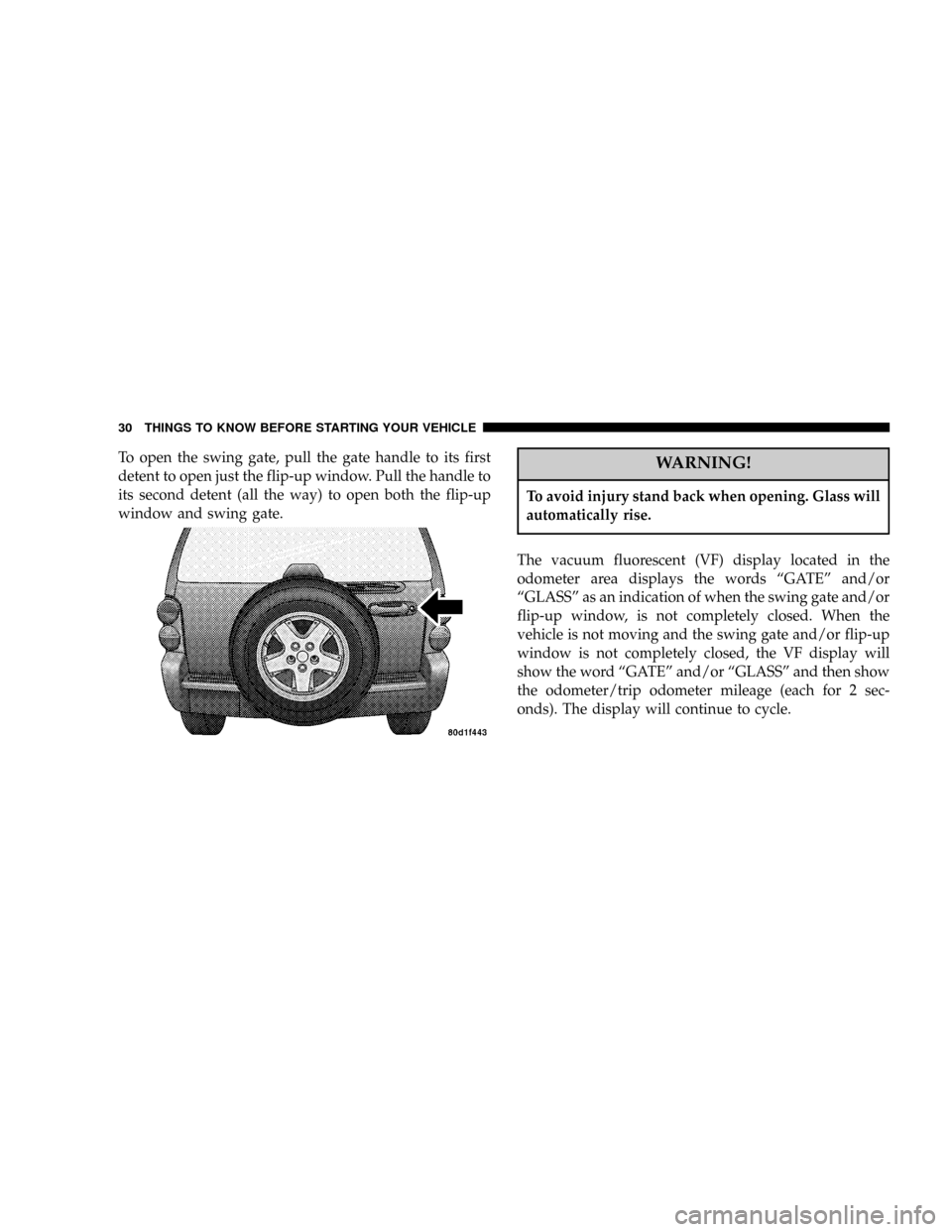
To open the swing gate, pull the gate handle to its first
detent to open just the flip-up window. Pull the handle to
its second detent (all the way) to open both the flip-up
window and swing gate.WARNING!
To avoid injury stand back when opening. Glass will
automatically rise.
The vacuum fluorescent (VF) display located in the
odometer area displays the words ªGATEº and/or
ªGLASSº as an indication of when the swing gate and/or
flip-up window, is not completely closed. When the
vehicle is not moving and the swing gate and/or flip-up
window is not completely closed, the VF display will
show the word ªGATEº and/or ªGLASSº and then show
the odometer/trip odometer mileage (each for 2 sec-
onds). The display will continue to cycle.
30 THINGS TO KNOW BEFORE STARTING YOUR VEHICLE
Page 31 of 374

NOTE:If vehicle is equipped with the optional Elec-
tronic Vehicle Information Center (EVIC) in the overhead
console, all warnings including ªdoorº, ªGATEº,
ªGLASSº, and ªLOWASHº will only be displayed in the
EVIC display (not in the instrument cluster). For addi-
tional information, refer to ªOverhead Console Ð If
Equippedº in Section 3.
If any other active warnings including ªdoorº or ªLO-
WASHº are present, they will be shown in the VF display
and will also continue to cycle. If the vehicle is moving,
two single chimes will occur if the rear glass is open or
three single chimes will occur if the rear swing gate is
open (one chime for each complete display cycle). After
this, the VF display will continue to sequence only (no
chimes).
THINGS TO KNOW BEFORE STARTING YOUR VEHICLE 31
2
Page 32 of 374
If the trip/reset button is pressed while the VF warnings
are being displayed, the VF display will revert back to
only displaying the odometer/trip odometer mileage.
NOTE:Close swing gate before flip-up window.
CAUTION!
Do not press on rear wiper blade when closing
swing gate, as damage to the blade will result.
WARNING!
Driving with the flip-up window open can allow
poisonous exhaust gases into your vehicle. You and
your passengers could be injured by these fumes.
Keep the flip-up window closed when you are
operating the vehicle.
NOTE: The rear swing gate will lock while the rear
wiper is operating. The gate will stay locked until the
wiper is turned off and the gate is unlocked (by key,
lock switch, or key fob).
WINDOWS
Power Windows Ð If Equipped
The power window switches are located on the center
floor console. The top left switch controls the left rear
passenger window and the top right switch controls the
right rear passenger window. The lower left switch
controls the left front window, and the lower right switch
controls the right front window. The switches will oper-
ate only when the ignition is in the ON or ACCESSORY
position.
The window lock switch located next to the window
switches allows you to disable the rear passenger win-
dow switches that are located on the back of the center
floor console.
32 THINGS TO KNOW BEFORE STARTING YOUR VEHICLE
Page 80 of 374

cellular phone has a different profile (i.e. headset profile),
you will not be able to use any UConnectŸ features.
The UConnectŸ system is fully integrated into your
vehicle, including your vehicle's stereo system. All voice
prompts as well as the other party's voice in a conversa-
tion will be played over your vehicle's stereo system. The
volume of the UConnectŸ system can be controlled
through your normal stereo controls.
The radio display will be used for visual prompts from
the UConnectŸ system such as caller ID.
Operation
Voice commands can be used in the operation of the
UConnectŸ system and to navigate through the UCon-
nectŸ menu structure. Voice commands should be given
after each UConnectŸ system prompt. You will be
prompted for a specific command and then guided
through the available options. There are two ways to give
commands to the UConnectŸ system:
²You can say9Dial9at the9Ready9prompt. When
prompted for the phone number you wish to dial, say
the phone number (9123 456 78909).
²Alternatively as you become familiar with the UCon-
nectŸ system, you can combine the commands and
say9Dial 123 456 78909.
Pairing a Cellular Phone to the UConnectŸ System
To begin using your UConnectŸ system, you must pair
your compatible BluetoothŸ enabled cellular phone. To
complete the registration process, you will need to refer-
ence your cellular phone owner's manual.
²Press the 'Phone' button to begin.
²After the9Ready9prompt, say9Setup Phone Pairing9.
²You will be asked to say a four-digit pin number into
the UConnectŸ system which you will later need to
enter into your cellular phone during the cellular
phone pairing process. You can enter any four-digit
80 UNDERSTANDING THE FEATURES OF YOUR VEHICLE
Page 105 of 374

Windshield Washers
To use the washer, pull the lever toward you and hold
while spray is desired. If the lever is pulled while in the
delay range, the wiper will operate for two wipe cycles
after the lever is released, and then resume the intermit-
tent interval previously selected.NOTE:If vehicle is equipped with the optional Elec-
tronic Vehicle Information Center (EVIC) in the overhead
console, all warnings including ªdoorº, ªGATEº,
ªGLASSº, and ªLOWASHº will only be displayed in the
EVIC display (not in the instrument cluster). For addi-
tional information, refer to ªOverhead Console Ð If
Equippedº in Section 3.
The vacuum fluorescent (VF) display located in the
odometer area displays the word ªLOWASHº when the
washer solvent needs to be refilled. If the vehicle is not
moving, when a low washer fluid condition is detected,
the VF display will show the word ªLOWASHº and then
show the odometer/trip odometer mileage (each for 2
seconds). The display will continue to cycle.
If any other active warnings including ªdoorº, ªGATEº,
or ªGLASSº are present, they will be shown in the VF
display and will continue to cycle. If the vehicle starts
moving, two single chimes will occur (one chime for each
UNDERSTANDING THE FEATURES OF YOUR VEHICLE 105
3
Page 106 of 374

complete display cycle). After this, the display will
continue to sequence. After fifteen ªLOWASHº se-
quences, the VF display will no longer provide this
warning.
If the trip/reset button is pressed while the VF warnings
are being displayed, the VF display will revert back to
only displaying the odometer/trip odometer mileage.
Once the warning is removed from the display, it will not
return for the duration of the ignition cycle.
If the lever is pulled while in the OFF position, the wipers
will operate for several wipe cycles, then turn off.
Mist Feature
Push down on the wiper lever to activate a single wipe to
clear off road mist or spray from a passing vehicle. As
long as the lever is held down, the wipers will continue
to operate.
CAUTION!
In cold weather, always turn off the wiper switch
and allow the wipers to return to the park position
before turning off the engine. If the wiper switch is
left on and the wipers freeze to the windshield,
damage to the wiper motor may occur when the
vehicle is restarted.
Windshield Wiper Operation
Turn the control lever end cap upward to the middle
mark (sixth detent) for Low speed wiper operation, or to
the upper mark (seventh detent) for High speed opera-
tion.
106 UNDERSTANDING THE FEATURES OF YOUR VEHICLE
Page 110 of 374
NOTE:When driving uphill, at elevations above 2,000
ft. (610 meters), or when the vehicle is heavily loaded
(especially when towing) the vehicle may slow below the
SET speed. (If the vehicle speed drops below 30 mph (48
km/h), the Speed Control will automatically disengage).
If this happens, you can push down on the accelerator
pedal to maintain the desired speed.
A full throttle (high RPM) acceleration, while the system
is engaged, will cause the system to disengage.
Vehicles may exhibit several 4-3 downshifts under the
above conditions. To reduce the frequency of the down-
shifts and to improve vehicle performance, it is advisable
to lock out overdrive. Press the O/D OFF button on the
right side of the shift lever.WARNING!
Leaving the Speed Control on when not in use is
dangerous. You could accidentally set the system or
cause it to go faster than you want. You could lose
control and have an accident. Always turn the system
off when you are not using it.
OVERHEAD CONSOLE Ð IF EQUIPPED
The overhead console contains dome/reading lights, an
optional universal garage door opener (HomeLinkt), an
optional sunroof switch, and an Electronic Vehicle Infor-
mation Center (EVIC) that consists of the following:
²Compass/temperature display
²Trip information displays
²Vehicle information warning message displays
²Customer programmable features
110 UNDERSTANDING THE FEATURES OF YOUR VEHICLE