light JEEP LIBERTY 2008 KK / 2.G Owners Manual
[x] Cancel search | Manufacturer: JEEP, Model Year: 2008, Model line: LIBERTY, Model: JEEP LIBERTY 2008 KK / 2.GPages: 493
Page 432 of 493
use polishes, oils, cleaning fluids, solvents, detergents, or
ammonia-based cleaners to clean leather upholstery. Ap-
plication of a leather conditioner is not required to
maintain the original condition.
WARNING!
Do not use volatile solvents for cleaning purposes.
Many are potentially flammable, and if used in
closed areas they may cause respiratory harm.
YES EssentialstFabric Cleaning Procedure ± If
Equipped
YES Essentialstseats may be cleaned in the following
manner:
²Remove as much of the stain as possible by blotting
with a clean, dry towel.
²Blot any remaining stain with a clean, damp towel.
²For tough stains, apply MopartTotal Clean or a mild
soap solution to a clean, damp cloth and remove the
stain. Use a fresh, damp towel to remove the soap
residue.
²For grease stains, apply MopartMulti-Purpose
Cleaner to a clean, damp cloth and remove the stain.
Use a fresh, damp towel to remove the soap residue.
²Do not use any solvents or protectants on Yes Essen-
tialstproducts.
Cleaning Headlights
Your vehicle has plastic headlights that are lighter and
less susceptible to stone breakage than glass headlights.
Plastic is not as scratch resistant as glass and therefore
different lens cleaning procedures must be followed.
432 MAINTAINING YOUR VEHICLE
Page 433 of 493

To minimize the possibility of scratching the lenses and
reducing light output, avoid wiping with a dry cloth. To
remove road dirt, wash with a mild soap solution fol-
lowed by rinsing.
Do not use abrasive cleaning components, solvents, steel
wool or other aggressive material to clean the lenses.
Glass Surfaces
All glass surfaces should be cleaned on a regular basis
with MopartGlass Cleaner or any commercial
household-type glass cleaner. Never use an abrasive type
cleaner. Use caution when cleaning the inside rear win-
dow equipped with electric defrosters or the right rear
quarter window equipped with the radio antenna. Do
not use scrapers or other sharp instruments, which may
scratch the elements.
When cleaning the rear view mirror, spray cleaner on the
towel or rag that you are using. Do not spray cleaner
directly on the mirror.
Cleaning Plastic Instrument Cluster Lenses
The lenses in front of the instruments in this vehicle are
molded in clear plastic. When cleaning the lenses, care
must be taken to avoid scratching the plastic.
1. Clean with a wet soft rag. A mild soap solution may be
used, but do not use high alcohol content or abrasive
cleaners. If soap is used, wipe clean with a clean damp
rag.
2. Dry with a soft tissue.
Seat Belt Maintenance
Do not bleach, dye, or clean the belts with chemical
solvents or abrasive cleaners. This will weaken the fabric.
Sun damage can also weaken the fabric.
If the belts need cleaning, use a mild soap solution or
lukewarm water. Dry with a soft tissue. Do not remove
the belts from the car to wash them.
MAINTAINING YOUR VEHICLE 433
7
Page 438 of 493
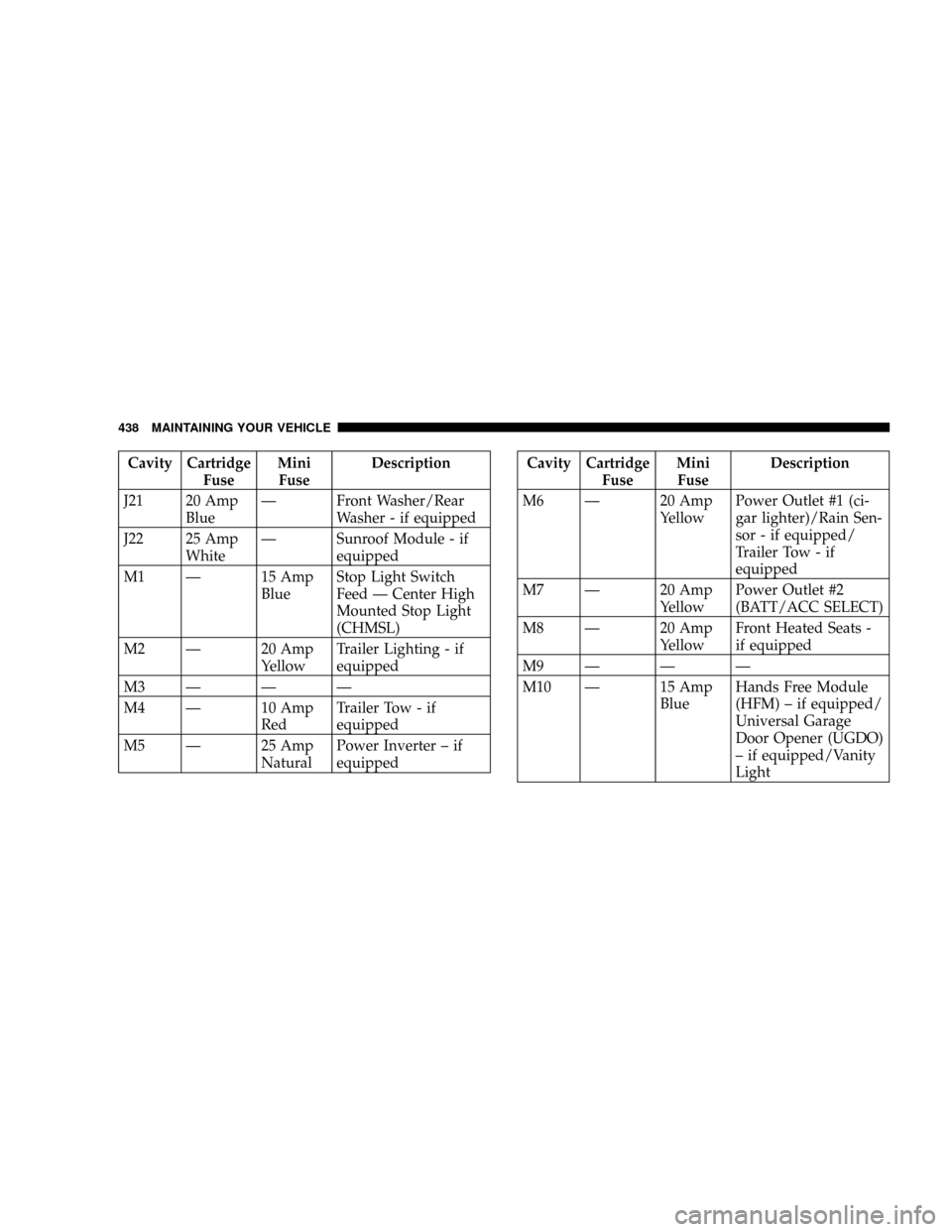
Cavity Cartridge
FuseMini
FuseDescription
J21 20 Amp
BlueÐ Front Washer/Rear
Washer - if equipped
J22 25 Amp
WhiteÐ Sunroof Module - if
equipped
M1 Ð 15 Amp
BlueStop Light Switch
Feed Ð Center High
Mounted Stop Light
(CHMSL)
M2 Ð 20 Amp
YellowTrailer Lighting - if
equipped
M3ÐÐÐ
M4 Ð 10 Amp
RedTrailer Tow - if
equipped
M5 Ð 25 Amp
NaturalPower Inverter ± if
equippedCavity Cartridge
FuseMini
FuseDescription
M6 Ð 20 Amp
YellowPower Outlet #1 (ci-
gar lighter)/Rain Sen-
sor - if equipped/
Trailer Tow - if
equipped
M7 Ð 20 Amp
YellowPower Outlet #2
(BATT/ACC SELECT)
M8 Ð 20 Amp
YellowFront Heated Seats -
if equipped
M9ÐÐÐ
M10 Ð 15 Amp
BlueHands Free Module
(HFM) ± if equipped/
Universal Garage
Door Opener (UGDO)
± if equipped/Vanity
Light
438 MAINTAINING YOUR VEHICLE
Page 440 of 493
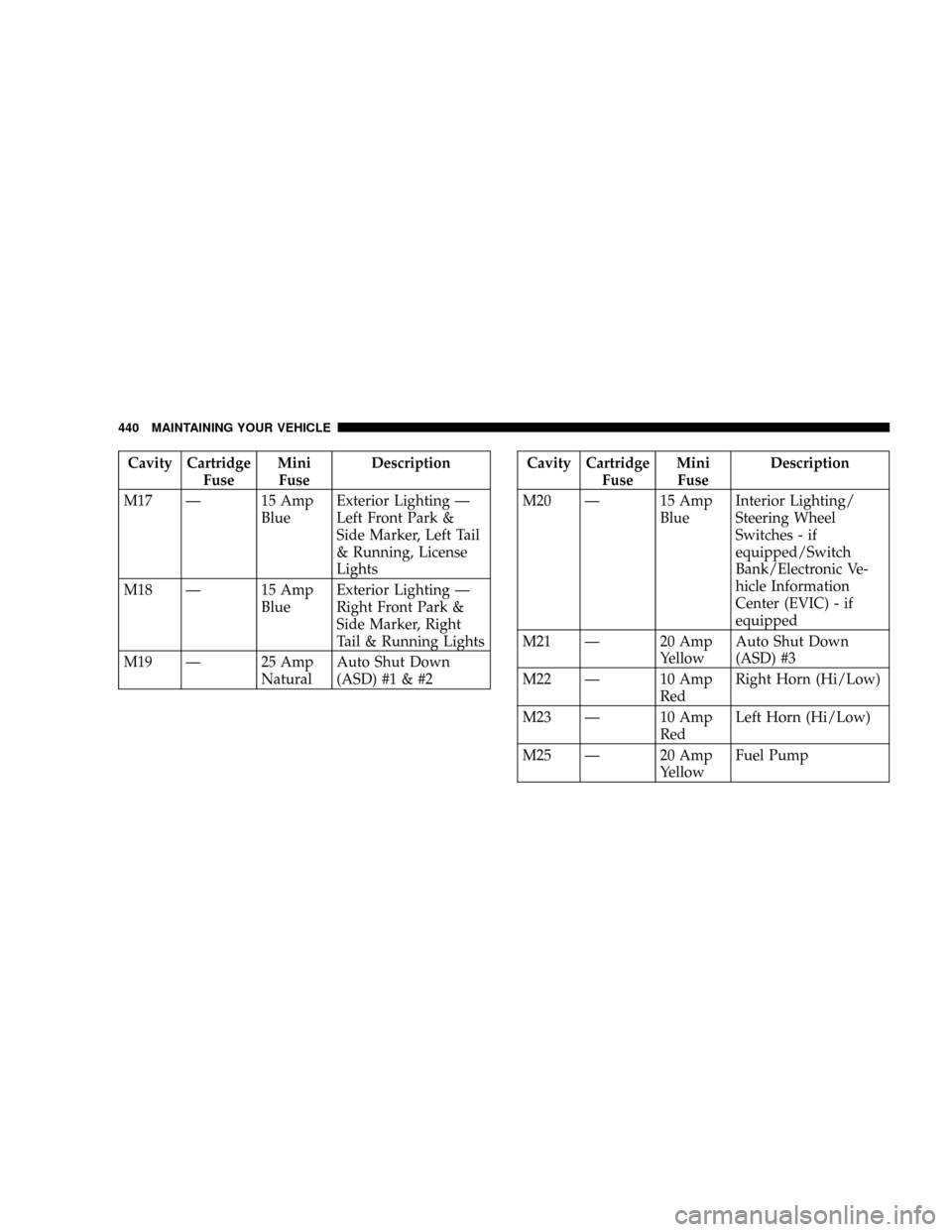
Cavity Cartridge
FuseMini
FuseDescription
M17 Ð 15 Amp
BlueExterior Lighting Ð
Left Front Park &
Side Marker, Left Tail
& Running, License
Lights
M18 Ð 15 Amp
BlueExterior Lighting Ð
Right Front Park &
Side Marker, Right
Tail & Running Lights
M19 Ð 25 Amp
NaturalAuto Shut Down
(ASD) #1 & #2Cavity Cartridge
FuseMini
FuseDescription
M20 Ð 15 Amp
BlueInterior Lighting/
Steering Wheel
Switches - if
equipped/Switch
Bank/Electronic Ve-
hicle Information
Center (EVIC) - if
equipped
M21 Ð 20 Amp
YellowAuto Shut Down
(ASD) #3
M22 Ð 10 Amp
RedRight Horn (Hi/Low)
M23 Ð 10 Amp
RedLeft Horn (Hi/Low)
M25 Ð 20 Amp
YellowFuel Pump
440 MAINTAINING YOUR VEHICLE
Page 441 of 493
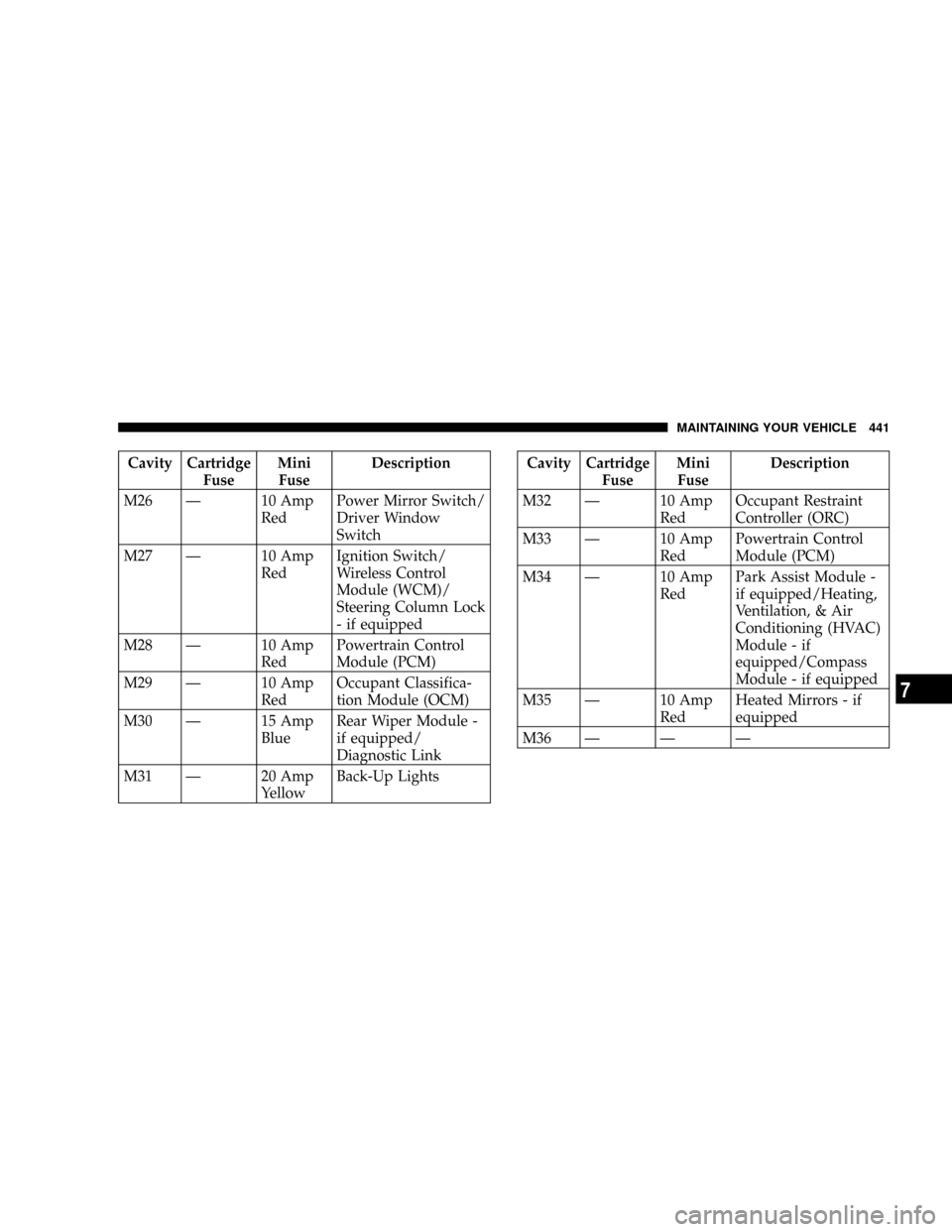
Cavity Cartridge
FuseMini
FuseDescription
M26 Ð 10 Amp
RedPower Mirror Switch/
Driver Window
Switch
M27 Ð 10 Amp
RedIgnition Switch/
Wireless Control
Module (WCM)/
Steering Column Lock
- if equipped
M28 Ð 10 Amp
RedPowertrain Control
Module (PCM)
M29 Ð 10 Amp
RedOccupant Classifica-
tion Module (OCM)
M30 Ð 15 Amp
BlueRear Wiper Module -
if equipped/
Diagnostic Link
M31 Ð 20 Amp
YellowBack-Up LightsCavity Cartridge
FuseMini
FuseDescription
M32 Ð 10 Amp
RedOccupant Restraint
Controller (ORC)
M33 Ð 10 Amp
RedPowertrain Control
Module (PCM)
M34 Ð 10 Amp
RedPark Assist Module -
if equipped/Heating,
Ventilation, & Air
Conditioning (HVAC)
Module - if
equipped/Compass
Module - if equipped
M35 Ð 10 Amp
RedHeated Mirrors - if
equipped
M36 Ð Ð Ð
MAINTAINING YOUR VEHICLE 441
7
Page 442 of 493
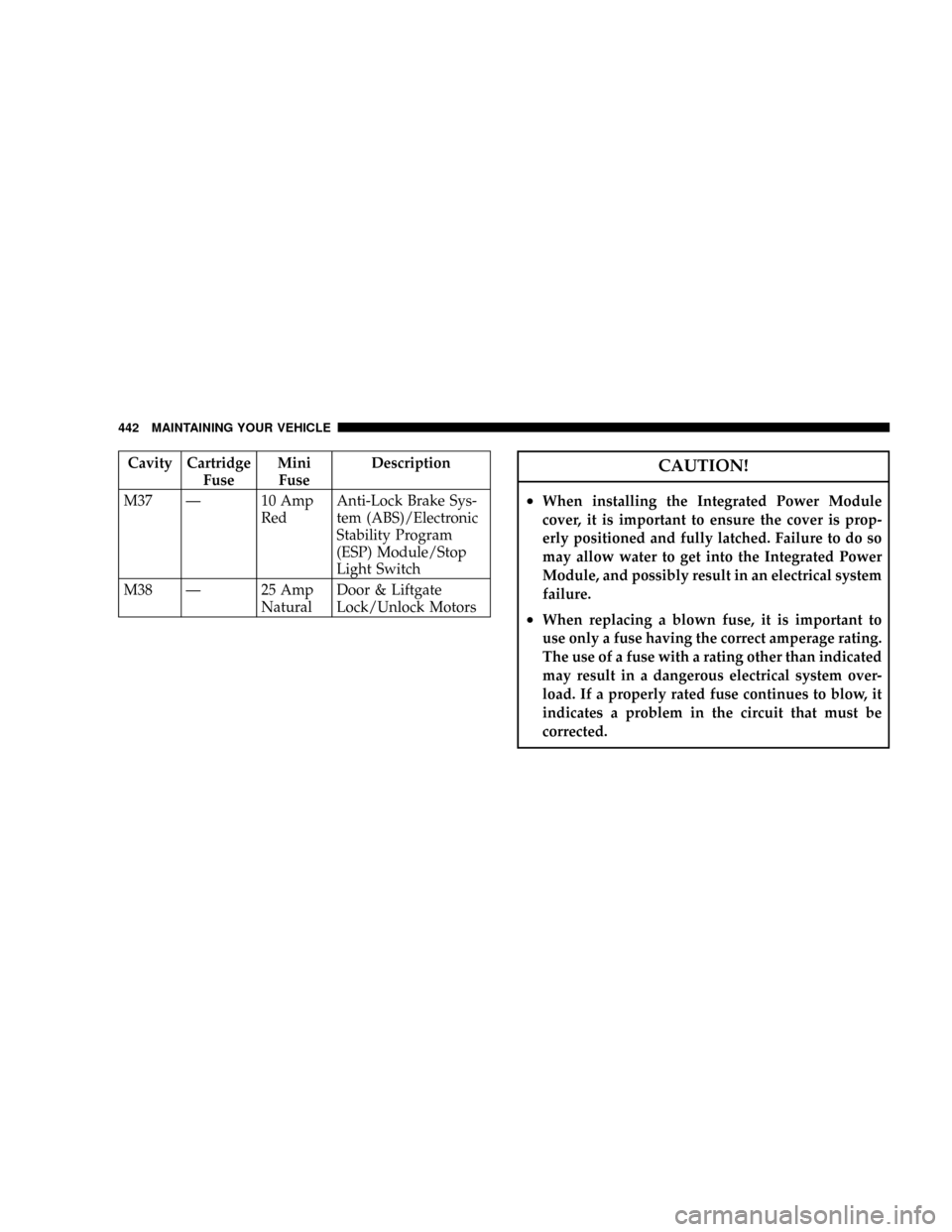
Cavity Cartridge
FuseMini
FuseDescription
M37 Ð 10 Amp
RedAnti-Lock Brake Sys-
tem (ABS)/Electronic
Stability Program
(ESP) Module/Stop
Light Switch
M38 Ð 25 Amp
NaturalDoor & Liftgate
Lock/Unlock MotorsCAUTION!
²When installing the Integrated Power Module
cover, it is important to ensure the cover is prop-
erly positioned and fully latched. Failure to do so
may allow water to get into the Integrated Power
Module, and possibly result in an electrical system
failure.
²When replacing a blown fuse, it is important to
use only a fuse having the correct amperage rating.
The use of a fuse with a rating other than indicated
may result in a dangerous electrical system over-
load. If a properly rated fuse continues to blow, it
indicates a problem in the circuit that must be
corrected.
442 MAINTAINING YOUR VEHICLE
Page 443 of 493

REPLACEMENT LIGHT BULBS
LIGHT BULBS Ð Interior Bulb No.
Cargo Light........................WL212±2
Overhead Console Light.............. PLW214±2A
Reading Light.......................WL212±2
LIGHT BULBS Ð Exterior Bulb No.
Headlight..........................9008 H13
Front Park/Turn Signal Light.............3757AK
Front Side Marker Light.................... 168
Back-Up Light.........................3157K
Center High Mounted Stop Light
(CHMSL)............................. LED
(Serviced at Dealer)
Fog Light.......................... H109145
License Plate Light....................... 168
Rear Tail/Stop.........................3157K
Rear Turn Signal Light..................3757AK
BULB REPLACEMENT
Headlight
1. Open the hood.
2. Reach behind the headlight housing to access the
headlight bulb lock ring.
3. Firmly grasp the lock ring and rotate it counterclock-
wise to unlock it.
4. Remove the bulb and connector assembly from the
headlight housing.
5. Disconnect the bulb from the electrical connector and
then connect the replacement bulb.
MAINTAINING YOUR VEHICLE 443
7
Page 444 of 493
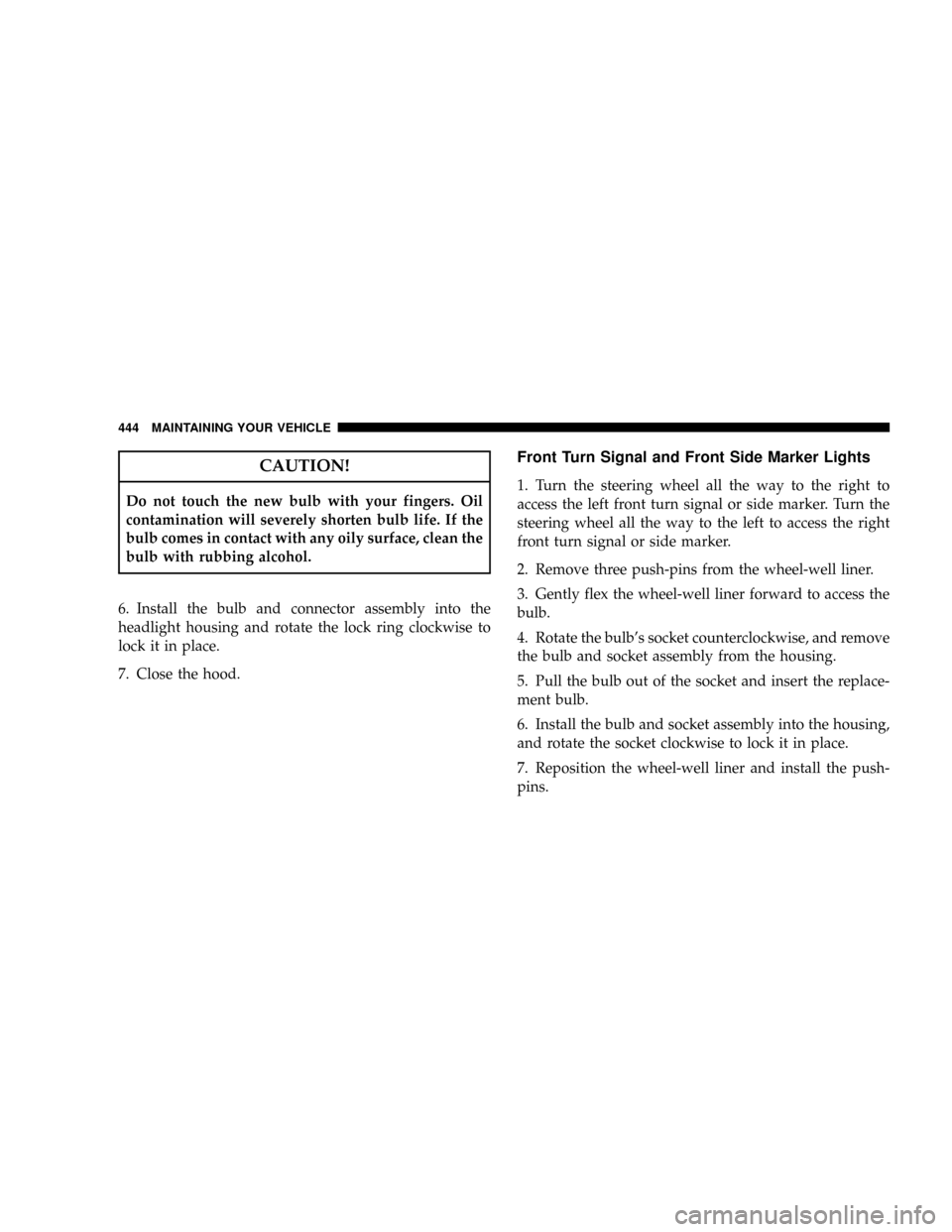
CAUTION!
Do not touch the new bulb with your fingers. Oil
contamination will severely shorten bulb life. If the
bulb comes in contact with any oily surface, clean the
bulb with rubbing alcohol.
6. Install the bulb and connector assembly into the
headlight housing and rotate the lock ring clockwise to
lock it in place.
7. Close the hood.
Front Turn Signal and Front Side Marker Lights
1. Turn the steering wheel all the way to the right to
access the left front turn signal or side marker. Turn the
steering wheel all the way to the left to access the right
front turn signal or side marker.
2. Remove three push-pins from the wheel-well liner.
3. Gently flex the wheel-well liner forward to access the
bulb.
4. Rotate the bulb's socket counterclockwise, and remove
the bulb and socket assembly from the housing.
5. Pull the bulb out of the socket and insert the replace-
ment bulb.
6. Install the bulb and socket assembly into the housing,
and rotate the socket clockwise to lock it in place.
7. Reposition the wheel-well liner and install the push-
pins.
444 MAINTAINING YOUR VEHICLE
Page 445 of 493

Front Fog Light
1. Open the hood.
2. Reach behind the headlight housing to access the bulb.
3. Rotate the bulb's socket counterclockwise, and remove
the bulb and socket assembly from the fog light housing.
4. Pull the bulb out of the socket and insert the replace-
ment bulb.
CAUTION!
Do not touch the new bulb with your fingers. Oil
contamination will severely shorten bulb life. If the
bulb comes in contact with any oily surface, clean the
bulb with rubbing alcohol.5. Install the bulb and socket assembly into the into the
fog light housing, and rotate the connector clockwise to
lock it in place.
6. Close the hood.
Rear Tail/Stop, Turn Signal, and Back-Up Lights
1. Open the liftgate.
2. Remove the screws that fasten the taillight housing to
the vehicle.
3. Pull the taillight housing straight back to separate it
from the vehicle.
4. Disconnect the electrical connector.
MAINTAINING YOUR VEHICLE 445
7
Page 446 of 493

5. Remove the two screws that fasten the back plate to
the taillight housing.
6. Separate the back plate from the taillight housing.
7. Pull the appropriate bulb(s) out of the back plate and
insert the replacement bulb(s).8. Install the back plate and screws into the taillight
housing.
9. Connect the electrical connector.
10. Install the taillight housing and screws.
11. Close the liftgate.
446 MAINTAINING YOUR VEHICLE