reset JEEP LIBERTY 2008 KK / 2.G User Guide
[x] Cancel search | Manufacturer: JEEP, Model Year: 2008, Model line: LIBERTY, Model: JEEP LIBERTY 2008 KK / 2.GPages: 493
Page 227 of 493

By pressing the SEEK button when the Music Type icon
is displayed, the radio will be tuned to the next frequency
station with the same selected Music Type name. The
Music Type function only operates when in the FM
mode.
If a preset button is activated while in the Music Type
(Program Type) mode, the Music Type mode will be
exited and the radio will tune to the preset station.
SETUP Button
Pressing the SETUP button allows you to select between
the following items:
NOTE:Use the Tune Control Knob to scroll through the
entries. Push the Audio/Select button to select an entry
and make changes.
²DVD Enter -When the disc is in DVD Menu mode,
selecting DVD Enter will allow you to play the current
highlighted selection. Use the remote control to scroll
up and down the menu (If Equipped).
²DISC Play/Pause -You can toggle between
playing the DVD and pausing the DVD by
pushing the SELECT button (If Equipped).
²DVD Play Options -Selecting the DVD Play Options
will display the following:
²Subtitle ± Repeatedly Pressing SELECT will switch
subtitles to different subtitle languages that are
available on the disc (If Equipped).
²Audio Stream ± Repeatedly Pressing SELECT will
switch to different audio languages (if supported on
the disc) (If Equipped).
INSTRUMENT PANEL AND CONTROLS 227
4
Page 230 of 493

NOTE:The user will have to set these defaults before
loading a disc. If changes are made to these settings after
a disc is loaded, changes will not be effective. Also, the
defaults are effective only if the disc supports the
customer-preferred settings.
AM and FM Buttons (Radio Mode)
Press the buttons to select AM or FM Modes.
SET Button (Radio Mode) Ð To Set the
Push-Button Memory
When you are receiving a station that you wish to
commit to push-button memory, press the SET button.
The symbol SET 1 will now show in the display window.
Select the button (1-6) you wish to lock onto this station
and press and release that button. If a button is not
selected within 5 seconds after pressing the SET button,
the station will continue to play but will not be stored
into push-button memory.You may add a second station to each push-button by
repeating the above procedure with this exception: Press
the SET button twice and SET 2 will show in the display
window. Each button can be set for SET 1 and SET 2 in
both AM and FM. This allows a total of 12 AM, 12 FM,
and 12 Satellite (if equipped) stations to be stored into
push-button memory. The stations stored in SET 2
memory can be selected by pressing the push-button
twice.
Every time a preset button is used, a corresponding
button number will display.
Buttons1-6(Radio Mode)
These buttons tune the Radio to the stations that you
commit to push-button memory {12 AM, 12 FM, and 12
Satellite (if equipped) stations}.
DISC Button
Pressing the DISC button will allow you to switch from
AM/FM modes to Disc modes.
230 INSTRUMENT PANEL AND CONTROLS
Page 246 of 493
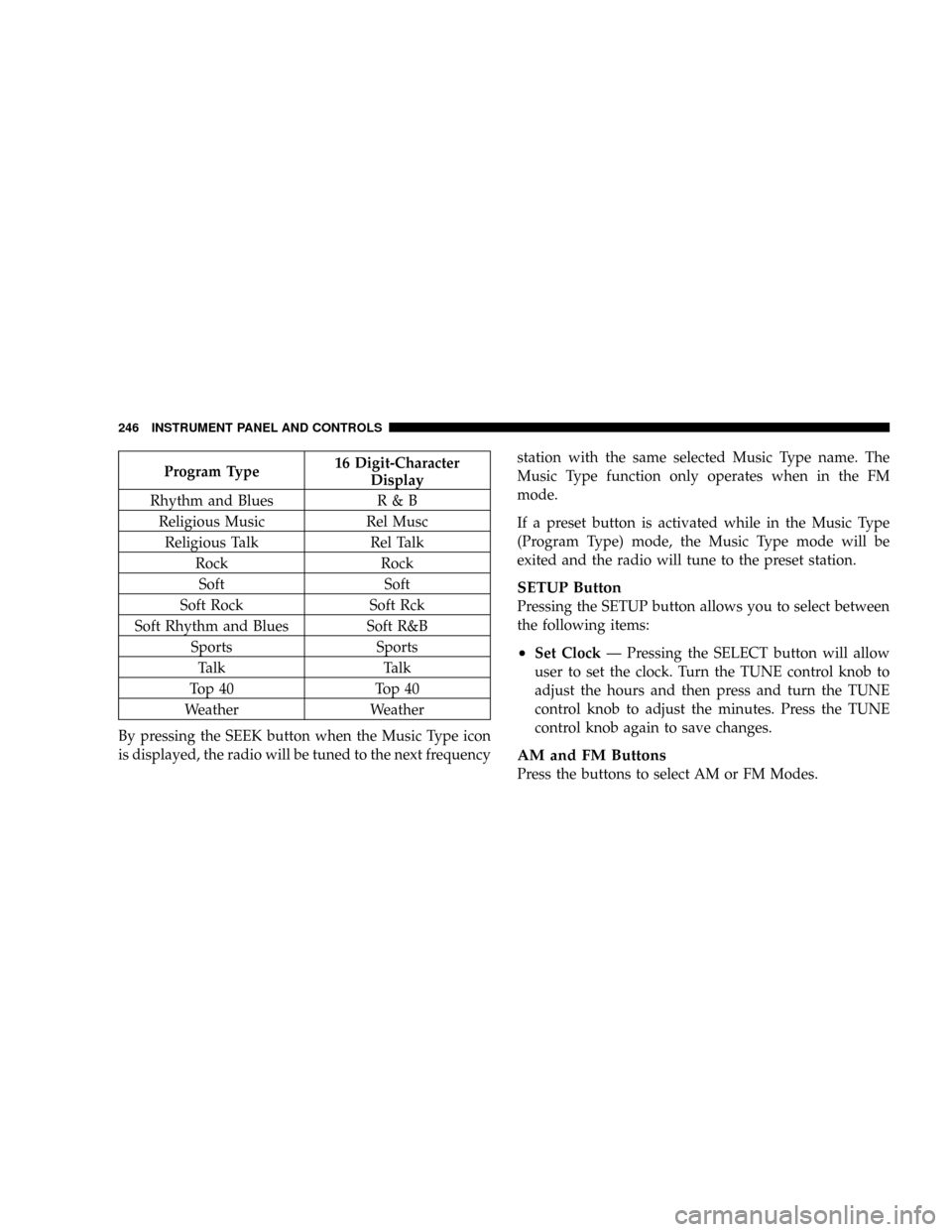
Program Type16 Digit-Character
Display
Rhythm and Blues R & B
Religious Music Rel Musc
Religious Talk Rel Talk
Rock Rock
Soft Soft
Soft Rock Soft Rck
Soft Rhythm and Blues Soft R&B
Sports Sports
Talk Talk
Top 40 Top 40
Weather Weather
By pressing the SEEK button when the Music Type icon
is displayed, the radio will be tuned to the next frequencystation with the same selected Music Type name. The
Music Type function only operates when in the FM
mode.
If a preset button is activated while in the Music Type
(Program Type) mode, the Music Type mode will be
exited and the radio will tune to the preset station.
SETUP Button
Pressing the SETUP button allows you to select between
the following items:
²Set ClockÐ Pressing the SELECT button will allow
user to set the clock. Turn the TUNE control knob to
adjust the hours and then press and turn the TUNE
control knob to adjust the minutes. Press the TUNE
control knob again to save changes.
AM and FM Buttons
Press the buttons to select AM or FM Modes.
246 INSTRUMENT PANEL AND CONTROLS
Page 247 of 493

SET Button Ð To Set the Push-Button Memory
When you are receiving a station that you wish to
commit to push-button memory, press the SET button.
The symbol SET 1 will now show in the display window.
Select the button (1-6) you wish to lock onto this station
and press and release that button. If a button is not
selected within 5 seconds after pressing the SET button,
the station will continue to play but will not be stored
into push-button memory.
You may add a second station to each push-button by
repeating the above procedure with this exception: Press
the SET button twice and SET 2 will show in the display
window. Each button can be set for SET 1 and SET 2 in
both AM and FM. This allows a total of 12 AM and 12 FM
stations to be stored into push-button memory. The
stations stored in SET 2 memory can be selected by
pressing the push-button twice.Every time a preset button is used, a corresponding
button number will display.
Buttons1-6
These buttons tune the radio to the stations that you
commit to push-button memory {12 AM and 12 FM
stations}.
DISC Button
Pressing the DISC button will allow you to switch from
AM/FM modes to Disc modes.
Operation Instructions - CD MODE for CD and
MP3 Audio Play
NOTE:The ignition switch must be in the ON or ACC
position to operate the radio.
NOTE:This Radio is capable of playing compact discs
(CD), recordable compact discs (CD-R), rewritable com-
pact discs (CD-RW) compact discs with MP3 tracks and
multisession compact discs with CD and MP3 tracks.
INSTRUMENT PANEL AND CONTROLS 247
4
Page 257 of 493

By pressing the SEEK button when the Music Type
function is active, the radio will be tuned to the next
channel with the same selected Music Type name.
If a preset button is activated while in the Music Type
(Program Type) mode, the Music Type mode will be
exited and the radio will tune to the preset channel.
SETUP Button
Pressing the SETUP button allows you to select the
following items:
²Display Sirius ID number Ð Press the SELECT button
to display the Sirius ID number. This number is used
to activate, deactivate, or change the Sirius subscrip-
tion.
SET Button Ð To Set the Push-Button Memory
When you are receiving a channel that you wish to
commit to push-button memory, press the SET button.
The symbol SET 1 will now show in the display window.Select the button (1-6) you wish to lock onto this channel
and press and release that button. If a button is not
selected within 5 seconds after pressing the SET button,
the channel will continue to play but will not be stored
into push-button memory.
You may add a second channel to each push-button by
repeating the above procedure with this exception: Press
the SET button twice and SET 2 will show in the display
window. Each button can be set for SET 1 and SET 2. This
allows a total of 12 Satellite channels to be stored into
push-button memory. The channels stored in SET 2
memory can be selected by pressing the push-button
twice.
Every time a preset button is used, a corresponding
button number will display.Buttons1-6
These buttons tune the radio to the channels that you
commit to push-button memory {12 Satellite stations}.
INSTRUMENT PANEL AND CONTROLS 257
4
Page 259 of 493

Left-Hand Switch Functions for Radio Operation
²
Press the top of the switch to SEEK the next listenable
station up from the current setting.
²Press the bottom of the switch to SEEK the next
listenable station down from the current setting.
²Press the button in the center of the switch to tune to
the next preset that you have programmed.
Left-Hand Switch Functions for Media (i.e. CD)
Operation
²
Press the top of the switch once to listen to the next
track.
²Press the bottom of the switch once either to listen to
the beginning of the current track or to listen to the
beginning of the previous track if it is within one
second after the current track begins to play.
²Press the switch up or down twice to listen to the
second track, three times to listen to the third track,
and so forth.
²Press the button located in the center of the switch to
change to the next preset that you have programmed.
CD/DVD DISC MAINTENANCE
To keep the CD/DVD discs in good condition, take the
following precautions:
1. Handle the disc by its edge; avoid touching the
surface.
2. If the disc is stained, clean the surface with a soft cloth,
wiping from center to edge.
3. Do not apply paper, paper CD labels, or tape to the
disc; avoid scratching the disc.
4. Do not use solvents such as benzine, thinner, cleaners,
or antistatic sprays.
INSTRUMENT PANEL AND CONTROLS 259
4
Page 288 of 493

A Reset feature allows the vehicle to be driven to a dealer
for service without damaging the transmission. To reset
the transmission, perform the following procedure:
1. Stop the vehicle.
2. Move the selector lever to the ªPº (Park) position.
3. Turn off the engine; be sure to turn the key to the
LOCK position.
4. Wait approximately 10 seconds, and then restart the
engine.
5. Move the selector lever to the desired gear range.
If the problem is no longer detected, the transmission will
return to normal operation. If the problem persists, ªPº
(Park), ªRº (Reverse), and ªNº (Neutral) will continue to
operate. Only Second gear range will operate in the ªDº
(Drive) position. Have the transmission checked at your
authorized dealer as soon as possible.MANUAL TRANSMISSION Ð IF EQUIPPED
Clutch Interlocking Ignition System
Vehicles equipped with a manual transmission are
equipped with a clutch interlock safety feature. The
clutch pedal must be fully depressed to allow cranking of
the engine.
To enhance off-road performance, 4-wheel drive models
equipped with a manual transmission will start with or
without pressing the clutch pedal when in 4-wheel drive
low range. The 4 LOW indicator light will illuminate
when the transfer case is in 4-wheel drive low range.
288 STARTING AND OPERATING
Page 361 of 493

NOTE:
²Tighten the gas cap until you hear a ªclickingº sound.
This is an indication that the gas cap is tightened
properly. The Malfunction Indicator Light in the in-
strument cluster may turn on if the gas cap is not
secured properly. Make sure that the gas cap is tight-
ened each time the vehicle is refueled.
²When the fuel nozzle ªclicksº or shuts off, the fuel
tank is full.
Loose Fuel Filler Cap Message
If the vehicle diagnostic system determines that the fuel
filler cap in loose, improperly installed, or damaged, a
ªgASCAPº message will display in the instrument clus-
ter. Tighten the gas cap until a ªclickingº sound is heard.
This is an indication that the gas cap is properly tight-
ened. Press the trip odometer reset button to turn off the
message. If the problem persists, the message will appear
the next time the vehicle is started. This might indicate adamaged cap. If the problem is detected twice in a row,
the system will turn on the Malfunction Indicator Light
(MIL). Resolving the problem will turn the MIL light off.
VEHICLE LOADING
Certification Label
As required by National Highway Traffic Safety Admin-
istration Regulations, your vehicle has a certification
label affixed to the driver's side door or pillar.
This label contains the month and year of manufacture,
Gross Vehicle Weight Rating (GVWR), Gross Axle Weight
Rating (GAWR) front and rear, and Vehicle Identification
Number (VIN). A Month-Day-Hour (MDH) number is
included on this label and indicates the Month, Day, and
Hour of manufacture. The bar code that appears on the
bottom of the label is your Vehicle Identification Number
(VIN).
STARTING AND OPERATING 361
5
Page 400 of 493

Loose Fuel Filler Cap Message
If the vehicle diagnostic system determines that the fuel
filler cap in loose, improperly installed, or damaged, a
ªgASCAPº message will display in the instrument clus-
ter. Tighten the gas cap until a ªclickingº sound is heard.
This is an indication that the gas cap is properly tight-
ened. Press the trip odometer reset button to turn off the
message. If the problem persists, the message will appear
the next time the vehicle is started. This might indicate a
damaged cap. If the problem is detected twice in a row,
the system will turn on the Malfunction Indicator Light
(MIL). Resolving the problem will turn the MIL light off.
EMISSIONS INSPECTION AND MAINTENANCE
PROGRAMS
In some localities, it may be a legal requirement to pass
an inspection of your vehicle's emissions control system.
Failure to pass could prevent vehicle registration.For states, which have an I/M (Inspection and
Maintenance) requirement, this check verifies the
following: the MIL (Malfunction Indicator Light)
is functioning and is not on when the engine is running,
and that the OBD (On Board Diagnostic) system is ready
for testing.
Normally, the OBD system will be ready. The OBD
system maynotbe ready if your vehicle was recently
serviced, if you recently had a dead battery, or a battery
replacement. If the OBD system should be determined
not ready for the I/M test, your vehicle may fail the test.
Your vehicle has a simple ignition key actuated test,
which you can use prior to going to the test station. To
check if your vehicle's OBD system is ready, you must do
the following:
1. Insert your ignition key into the ignition switch.
400 MAINTAINING YOUR VEHICLE
Page 453 of 493

NOTE:
²The oil change indicator message will not monitor the
time since the last oil change. Change your vehicles oil
if it has been 6 months since your last oil change even
if the oil change indicator message is NOT illumi-
nated.
²Change your engine oil more often if you drive your
vehicle off-road for an extended period of time.
²Under no circumstances should oil change intervals
exceed 6,000 miles (10,000 km) or 6 months, whichever
comes first.
Your dealer will reset the oil change indicator message
after completing the scheduled oil change. If a scheduled
oil change is performed by someone other than your
dealer, the message can be reset by referring to the steps
described under ªOil Change Requiredº under ªElec-
tronic Vehicle Information Center (EVIC)º in Section 3 ofthis manual or under ªOdometer/Trip Odometerº under
ªInstrument Cluster Descriptionsº in Section 3 of this
manual.
At Each Stop for Fuel
²Check the engine oil level about 5 minutes after a fully
warmed engine is shut off. Checking the oil level while
the vehicle is on level ground will improve the accu-
racy of the oil level reading. Add oil only when the
level is at or below the ADD or MIN mark.
²Check the windshield washer solvent and add if
required.
MAINTENANCE SCHEDULES 453
8
M
A
I
N
T
E
N
A
N
C
E
S
C
H
E
D
U
L
E
S