ECU JEEP LIBERTY 2008 KK / 2.G Owner's Manual
[x] Cancel search | Manufacturer: JEEP, Model Year: 2008, Model line: LIBERTY, Model: JEEP LIBERTY 2008 KK / 2.GPages: 493
Page 86 of 493

NUsing HomeLinkt.....................159
NReprogramming a Single HomeLinkt
Button.............................160
NSecurity............................160
NTroubleshooting Tips...................160
NGeneral Information...................161
mPower Sunroof Ð If Equipped.............161
NOpening Sunroof - Express..............162
NClosing Sunroof - Express...............162
NPinch Protect Feature...................162
NPinch Protect Override.................163
NVenting Sunroof - Express...............163
NSunshade Operation...................163NWind Buffeting.......................163
NSunroof Maintenance...................164
NIgnition Off Operation..................164
mSky SlidertFull Length Open Roof..........164
NSky SlidertUsage Precautions............164
NPower Top Control....................166
NOpening The Sky Slidert................166
NClosing The Sky Slidert.................167
NAnti-Pinch Protect Feature...............168
NWind Buffeting.......................168
NSky SlidertMaintenance................169
mElectrical Power Outlet...................169
NElectrical Outlet Use With Engine Off.......170
86 UNDERSTANDING THE FEATURES OF YOUR VEHICLE
Page 126 of 493
4. If desired, push down on the seatback to lock it in the
folded position.
To Raise the Rear Seat
NOTE:If interference from the cargo area prevents the
seatback from fully locking, you will have difficulty
returning the seat to its proper position.
1. If locked in the folded position, pull the release strap
(toward the front of the vehicle).
2. Raise the seatback and lock it into place.
WARNING!
Be certain that the seatback is securely locked into
position. If the seatback in not securely locked into
position the seat will not provide the proper stability
for child seats and/or passengers. An improperly
latched seat could cause serious injury.
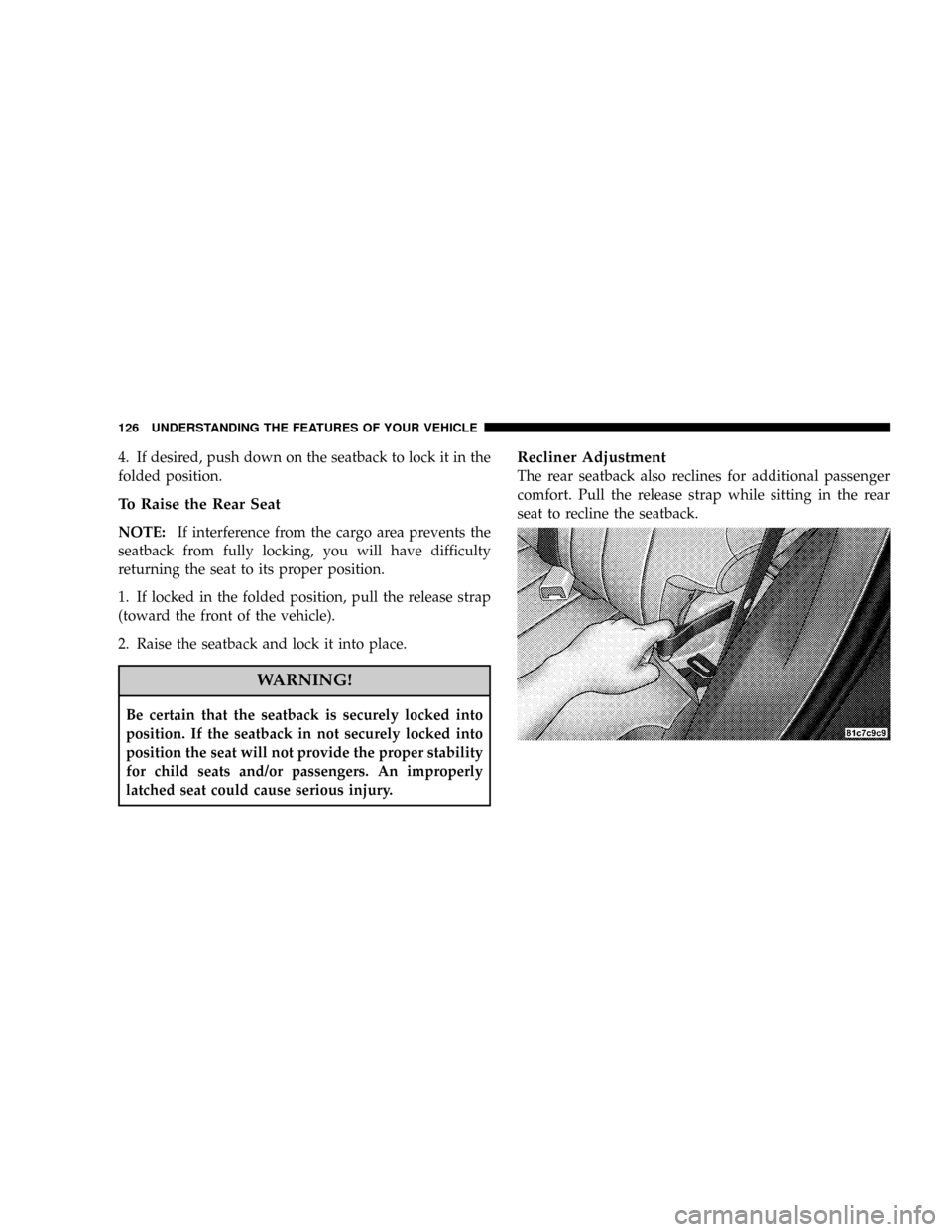
Recliner Adjustment
The rear seatback also reclines for additional passenger
comfort. Pull the release strap while sitting in the rear
seat to recline the seatback.
126 UNDERSTANDING THE FEATURES OF YOUR VEHICLE
Page 132 of 493

Use the hood prop rod to secure the hood in the open
position. Place the upper end of the prop rod in the hole
on the underside of the hood.To prevent possible damage:
²Before closing hood, make sure the hood prop rod is
fully seated into its storage retaining clips.
²Do not slam the hood to close it. Use a firm downward
push at the center front edge of the hood to ensure that
both latches engage. Never drive your vehicle unless
the hood is fully closed, with both latches engaged.
WARNING!
If the hood is not fully latched, it could fly up when
the vehicle is moving and block your forward vision.
Be sure all hood latches are fully latched before
driving.
Hood Prop Rod Hole Location
132 UNDERSTANDING THE FEATURES OF YOUR VEHICLE
Page 155 of 493

GARAGE DOOR OPENER Ð IF EQUIPPED
HomeLinktreplaces up to three remote controls (hand
held transmitters) that operate devices such as garage
door openers, motorized gates, lighting, or home security
systems. The HomeLinktunit operates off your vehicle's
battery.
NOTE:HomeLinktis disabled when the Vehicle Secu-
rity Alarm is active.WARNING!
Your motorized door or gate will open and close while
you are training the Universal Transceiver. Do not train
the transceiver if people or pets are in the path of the
door or gate. Only use this transceiver with a garage
door opener that has a ªstop and reverseº feature as
required by federal safety standards. This includes
most garage door opener models manufactured after
1982. Do not use a garage door opener without these
safety features. Call toll-free 1±800±355±3515 or, on the
Internet at www.HomeLink.com for safety information
or assistance.
UNDERSTANDING THE FEATURES OF YOUR VEHICLE 155
3
Page 159 of 493

Gate Operator/Canadian Programming
Canadian radio-frequency laws require transmitter sig-
nals to ªtime-outº (or quit) after several seconds of
transmission ± which may not be long enough for
HomeLinktto pick up the signal during programming.
Similar to this Canadian law, some U.S. gate operators are
designed to ªtime-outº in the same manner.
It may be helpful to unplug the device during the cycling
process to prevent possible overheating of the garage
door or gate motor.
If you are having difficulties programming a garage door
opener or a gate operator, replace ªProgramming
HomeLinktº Step 3 with the following:
3. Continue to press and hold the HomeLinktbutton
while you press and release - every two seconds
(ªcycleº) your hand-held transmitter until HomeLinkthas successfully accepted the frequency signal. The
indicator light will flash slowly and then rapidly when
fully trained.
If you unplugged the device for training, plug it back in
at this time.
Then proceed with Step 4 under ªProgramming
HomeLinkt.º earlier in this section.
Using HomeLinkT
To operate, simply press and release the programmed
HomeLinktbutton. Activation will now occur for the
trained device (i.e. garage door opener, gate operator,
security system, entry door lock, home/office lighting,
etc. The hand-held transmitter of the device may also be
used at any time.
UNDERSTANDING THE FEATURES OF YOUR VEHICLE 159
3
Page 160 of 493

Reprogramming a Single HomeLinkTButton
To re-program a channel that has been previously
trained, follow these steps:
1. Turn the ignition switch to the ON/RUN position.
2. Press and hold the desired HomeLinktbutton until
the indicator light begins to flash after 20 seconds.Do not
release the button.
3.Without releasing the button,proceed with PRO-
GRAMMING HOMELINKtStep #2 and follow all re-
maining steps.
Security
It is advised to erase all channels before you sell or turn
in your vehicle.
To do this, press and hold the two outside buttons for 20
seconds until the red indicator flashes. Note that all
channels will be erased. Individual channels cannot be
erased.The HomeLinktUniversal Transceiver is disabled when
the Vehicle Security Alarm is active.
Troubleshooting Tips
If you are having trouble programming HomeLinkt, here
are some of the most common solutions:
²Replace the battery in the original transmitter.
²Press the Learn Button on the Garage Door Opener to
complete the training for Rolling Code.
²Did you unplug the device for training, and remember
to plug it back in?
If you are have any problems, or require assistance,
please call toll-free 1±800±355±3515 or, on the Internet at
www.HomeLink.com for information or assistance.
160 UNDERSTANDING THE FEATURES OF YOUR VEHICLE
Page 162 of 493

WARNING!
²Never leave children in a vehicle, with the keys in
the ignition switch. Occupants, particularly unat-
tended children, can become entrapped by the
power sunroof while operating the power sunroof
switch. Such entrapment may result in serious
injury or death.
²In an accident, there is a greater risk of being
thrown from a vehicle with an open sunroof. You
could also be seriously injured or killed. Always
fasten your seat belt properly and make sure all
passengers are properly secured too.
²Do not allow small children to operate the sun-
roof. Never allow fingers or other body parts, or
any object to project through the sunroof opening.
Injury may result.
Opening Sunroof - Express
Press the switch rearward and release, and the sunroof
will open automatically from any position. The sunroof
will open fully and stop automatically. This is called
Express Open. During Express Open operation, any
movement of the sunroof switch will stop the sunroof.
Closing Sunroof - Express
Press the switch forward and release, and the sunroof
will close automatically from any position. The sunroof
will close fully and stop automatically. This is called
Express Close. During Express Close operation, any
movement of the switch will stop the sunroof.
Pinch Protect Feature
This feature will detect an obstruction in the opening of
the sunroof during Express Close operation. If an ob-
struction in the path of the sunroof is detected, the
162 UNDERSTANDING THE FEATURES OF YOUR VEHICLE
Page 164 of 493

Sunroof Maintenance
Use only a non-abrasive cleaner and a soft cloth to clean
the glass panel.
Ignition Off Operation
For vehicles not equipped with the Electronic Vehicle
Information Center (EVIC), the power sunroof switch
will remain active for 45 seconds after the ignition switch
is turned to the LOCK position. Opening either front
door will cancel this feature.
For vehicles equipped with the EVIC, the power sunroof
switch will remain active for up to 10 minutes after the
ignition switch is turned to the LOCK position. Opening
either front door will cancel this feature. The time is
programmable. For details, refer to ªDelay Power Off to
Accessories Until Exit,º under ªPersonal Settings (Cus-
tomer Programmable Features),º under ªElectronic Ve-
hicle Information Center (EVIC)º in Section 4 of this
manual.
SKY SLIDERTFULL LENGTH OPEN ROOF
The Sky Slidertis a full-length, soft-top, power-roof that
opens front to rear or rear to front.
Sky SliderTUsage Precautions
NOTE:
²The system prohibits Sky Slidertoperation when
ambient temperature is at ±4ÉF (±20ÉC) or lower.
²The system prohibits Sky Slidertoperation at vehicle
speeds of 86 mph (138 km/h) or above.
²Opening and closing the Sky Slidertconsecutively
without the engine running may run the battery down.
164 UNDERSTANDING THE FEATURES OF YOUR VEHICLE
Page 165 of 493

CAUTION!
²Never attempt to open or close the Sky Slidertwhen
it is frozen. Wait until the Sky Slidertis thawed
before operating.
²Opening the Sky Slidertwhen damp, wet, or dirty
can cause stains, mildew, and damage to the soft-top
material and the inside of your vehicle. Make sure
the Sky Slidertis dry before opening.
²Always close the Sky Slidertwhen leaving your
vehicle so as not to leave the interior exposed to
potentially damaging outdoor conditions.
²Do not leave the Sky Slidertopen for several weeks
at a time. Close it occasionally to prevent discolora-
tion in the folds of the fabric and to allow the creases
to smooth out. This is especially important if the Sky
Slidertwas opened when not completely dry.
Failure to follow these cautions can cause damage to the
Sky Slider,tvehicle contents, and the vehicle interior.
WARNING!
²In an accident, there is a greater risk of being thrown from a
vehicle with the Sky Slidertopen. Always fasten your seat belt
properly and make sure all passengers are properly secured too.
²Before operating the Sky Slider,tmake sure that no moving parts
of the Sky Slidertcan injure a person or animal.
²Never place any extremities (hands, feet, etc.) near the Sky Slidert
components or the roof area while operating the Sky Slider.t
²If potential danger exists while opening or closing the Sky Slidert
in Automatic Mode, press and release the switch immediately to
interrupt the operation.
²If potential danger exists while opening or closing the Sky Slidert
in Operator Mode, release the switch immediately to interrupt the
operation.
²Do not allow small children to operate the Sky Slider.t
²Never leave children in a vehicle, with the key in the ignition
switch. Occupants, particularly unattended children, can become
entrapped by the Sky Slidertwhile operating the Power Top
switch. Such entrapment may result in serious injury or death.
Failure to follow these warnings can result in injuries that are serious
or fatal to you, your passengers, and others around you.
UNDERSTANDING THE FEATURES OF YOUR VEHICLE 165
3
Page 176 of 493

Cargo Tie-Down Hooks & Loops
The tie-downs located on cargo area floor should be used
to secure loads safely when the vehicle is moving.NOTE: The spring-loaded latches that retain the
storage bin cover to the cargo load floor should not be
used as cargo tie-downs.
Cargo tie-down loops are located on the trim panels.
Cargo Tie-Down Hooks
Cargo Tie-Down Loops
176 UNDERSTANDING THE FEATURES OF YOUR VEHICLE