CD player JEEP PATRIOT 2007 1.G User Guide
[x] Cancel search | Manufacturer: JEEP, Model Year: 2007, Model line: PATRIOT, Model: JEEP PATRIOT 2007 1.GPages: 440, PDF Size: 7.26 MB
Page 207 of 440
SCAN Button (CD MODE for CD Audio Play)
Press the Scan button to scan through each track on the
CD currently playing.
LOAD/EJECT Button (CD Mode for CD Audio
Play)
LOAD/ EJECT - Load
Press the LOAD/ EJECT button and the push-
button with the corresponding number where
the CD is being loaded. The radio will display
PLEASE WAIT and prompt when to INSERT
DISC. After the radio displays9LOAD DISC9insert the
CD into the player.
Radio display will show9LOADING DISC9when the disc
is loading, and ªREADING DISCº when the radio is
reading the disc.
LOAD / EJT - Eject
Press the LOAD/ EJT button and the push-
button with the corresponding number where
the CD was loaded and the disc will unload
and move to the entrance for easy removal.
Radio display will show9EJECTING DISC9when the disc
is being ejected and prompt the user to remove the disc.
Press and hold the LOAD/ EJT button for 5 seconds and
all CDs will be ejected from the radio.
If you have ejected a disc and have not removed it within
15 seconds, it will be reloaded. If the CD is not removed,
the radio will continue to play the non-removed CD. If
the CD is removed and there are other CD's in the radio,
the radio will play the next CD after a 2 minute timeout.
If the CD is removed and there are no other CD's in the
radio, the radio will remain in CD mode and display
206 UNDERSTANDING YOUR INSTRUMENT PANEL
Page 208 of 440
9INSERT DISCº for 10 seconds. If no discs are inserted
within 10 seconds ªNO DISCS LOADEDº will be dis-
played.
On some vehicles a disc can be ejected with the radio and
ignition OFF.
TIME Button (CD MODE for CD Audio Play)
Press this button to change the display from a large CD
playing time display to a small CD playing time display.
RW/FF (CD MODE for CD Audio Play)
Press and hold FF (Fast Forward) and the CD player will
begin to fast forward until FF is released or RW or
another CD button is pressed. The RW (Reverse) button
works in a similar manner.
TUNE Control (CD MODE for CD Audio Play)
Pressing the TUNE control allows the setting of the Tone,
Fade, and Balance. See Radio Mode.
AM/FM Button (CD MODE for CD Audio Play)
Switches the Radio to the Radio mode.
RND/PTY Button (Random Play Button) (CD
MODE for CD Audio Play)
Press this button while the CD is playing to activate
Random Play. This feature plays the selections on the
compact disc in random order to provide an interesting
change of pace.
Press the SEEK button to move to the next randomly
selected track.
Press and hold the FF button to fast forward through the
tracks. Release the FF button to stop the fast forward
feature.
Press the RND button a second time to stop Random
Play.
Buttons1-6(CDMODE for CD Audio Play)
Selects disc positions1-6forPlay/Load/Eject.
UNDERSTANDING YOUR INSTRUMENT PANEL 207
4
Page 211 of 440
Playback of MP3 Files
When a medium containing MP3 data is loaded, the
radio checks all files on the medium. If the medium
contains a lot of folders or files, the radio will take more
time to start playing the MP3 files.
Loading times for playback of MP3 files may be affected
by the following:
²Media - CD-RW media may take longer to load than
CD-R media
²Medium formats - Multisession discs may take longer
to load than non-multisession discs
²Number of files and folders - Loading times will
increase with more files and folders
To increase the speed of disc loading, it is recommended
to use CD-R media and single-session discs. To create a
single-session disc, enable the Disc at Once option before
writing to the disc.
Operation Instructions - (CD Mode for MP3 Audio
Play)
SEEK Button (CD Mode for MP3 Play)
Pressing the right side of the SEEK button plays the next
MP3 File. Pressing the left side of the SEEK button plays
the beginning of the MP3 file. Pressing the button within
the first ten seconds plays the previous file.
LOAD/EJECT Button (CD Mode for MP3 Play)
LOAD/ EJECT - Load
Press the LOAD/ EJECT button and the push-
button with the corresponding number where
the CD is being loaded. The radio will display
PLEASE WAIT and prompt when to INSERT
DISC. After the radio displays9LOAD DISC9insert the
CD into the player.
Radio display will show9LOADING DISC9when the disc
is loading.
210 UNDERSTANDING YOUR INSTRUMENT PANEL
Page 214 of 440
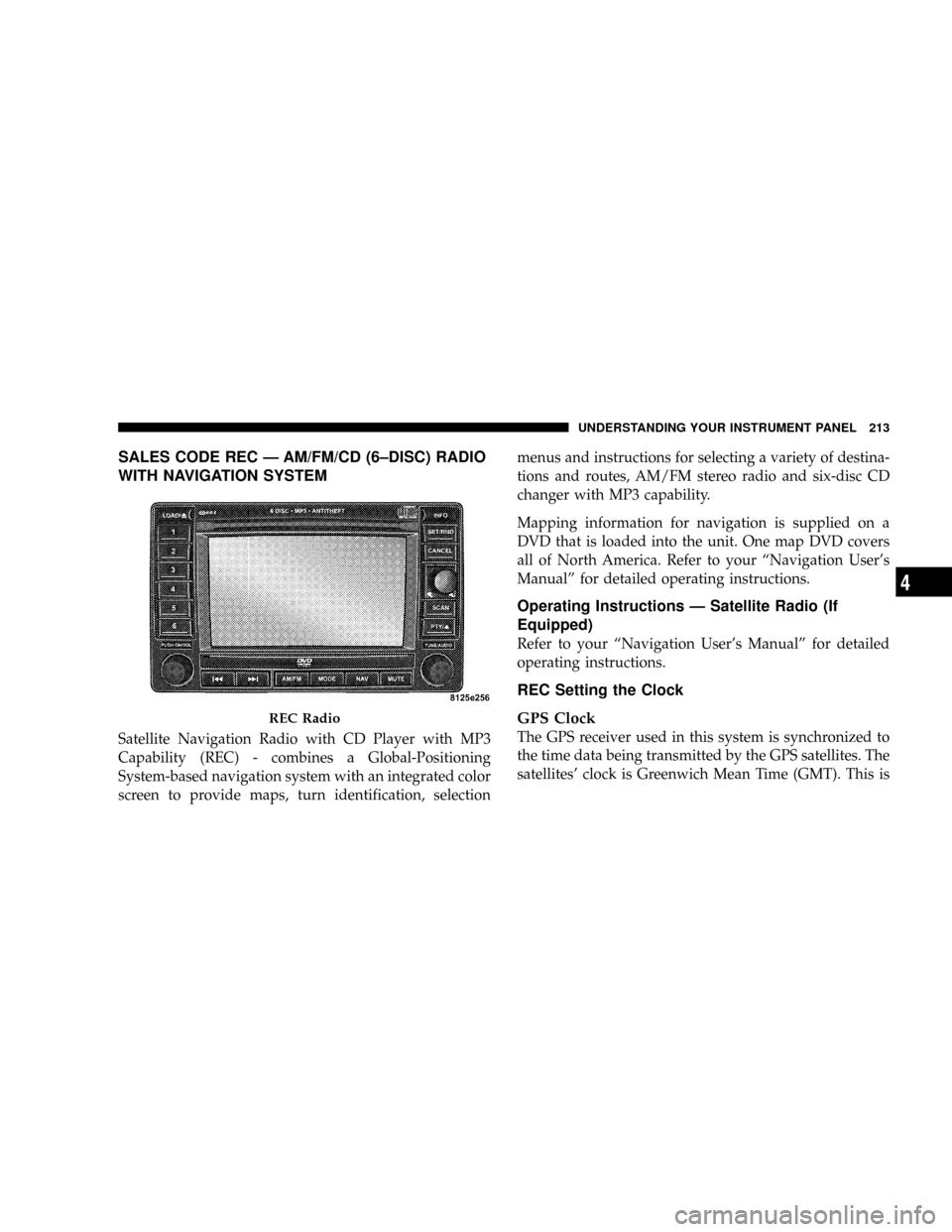
SALES CODE REC Ð AM/FM/CD (6±DISC) RADIO
WITH NAVIGATION SYSTEM
Satellite Navigation Radio with CD Player with MP3
Capability (REC) - combines a Global-Positioning
System-based navigation system with an integrated color
screen to provide maps, turn identification, selectionmenus and instructions for selecting a variety of destina-
tions and routes, AM/FM stereo radio and six-disc CD
changer with MP3 capability.
Mapping information for navigation is supplied on a
DVD that is loaded into the unit. One map DVD covers
all of North America. Refer to your ªNavigation User's
Manualº for detailed operating instructions.
Operating Instructions Ð Satellite Radio (If
Equipped)
Refer to your ªNavigation User's Manualº for detailed
operating instructions.
REC Setting the Clock
GPS Clock
The GPS receiver used in this system is synchronized to
the time data being transmitted by the GPS satellites. The
satellites' clock is Greenwich Mean Time (GMT). This is
REC Radio
UNDERSTANDING YOUR INSTRUMENT PANEL 213
4
Page 223 of 440
The button located in the center of the left hand control
will tune to the next pre-set station that you have
programmed in the radio pre-set push-buttons.
CD Player
Pressing the top of the switch once will go to the next
track on the CD. Pressing the bottom of the switch once
will go to the beginning of the current track or to the
beginning of the previous track if it is within one second
after the current track begins to play.
If you press the switch up or down twice it plays the
second track, three times, it will play the third, etc.
The button in the center of the left hand switch changes
CD's on the 6±Disc in-dash CD changer radio. This
button does not function for all other radios.
CD/DVD DISC MAINTENANCE
To keep the CD/DVD discs in good condition, take the
following precautions:
1. Handle the disc by its edge; avoid touching the
surface.
2. If the disc is stained, clean the surface with a soft cloth,
wiping from center to edge.
3. Do not apply paper, paper CD labels, or tape to the
disc; avoid scratching the disc.
4. Do not use solvents such as benzine, thinner, cleaners,
or antistatic sprays.
5. Store the disc in its case after playing.
6. Do not expose the disc to direct sunlight.
7. Do not store the disc where temperatures may become
too high.
222 UNDERSTANDING YOUR INSTRUMENT PANEL
Page 424 of 440
Battery............................... 354
Keyless Transmitter Replacement (RKE)....... 29
Belts, Drive............................ 351
Body Mechanism Lubrication............... 358
B-Pillar Location........................ 281
Brake Assist System...................... 138
Brake Fluid............................ 389
Brake, Parking.......................... 270
Brake System........................272,366
Anti-Lock (ABS).................136,137,273
Hoses.............................. 366
Master Cylinder....................... 367
Parking............................. 270
Warning Light........................ 172
Brakes.............................272,366
Brake/Transmission Interlock............... 241
Break-In Recommendations, New Vehicle........ 69
Bulb Replacement.....................380,381
Bulbs, Light............................ 380Calibration, Compass..................... 188
Capacities, Antifreeze (Engine Coolant)........ 388
Capacities, Fluid........................ 388
Caps, Filler
Fuel................................ 307
Oil (Engine).......................342,349
Car Washes............................ 372
Carbon Monoxide Warning................. 306
Cargo Area Cover....................... 154
Cargo Area Features...................... 152
Cargo Compartment
Light............................... 152
Luggage Carrier....................... 160
Cargo Light............................ 152
Cargo Load Floor........................ 156
Cargo Tie-Downs........................ 156
Catalytic Converter...................... 351
Caution, Exhaust Gas...................... 69
CD (Compact Disc) Player...............191,199
INDEX 423
10
Page 425 of 440
CD (Compact Disc) Player Maintenance........ 222
Cellular Phone........................82,223
Center High Mounted Stop Light............ 387
Chains, Tire............................ 301
Changing A Flat Tire..................... 326
Chart, Tire Sizing........................ 278
Check Engine Light (Malfunction Indicator Light) . 344
Child Restraint.......................... 60
Child Restraint Tether Anchors............... 64
Child Restraint with Automatic Belts........... 63
Child Safety Locks........................ 23
Child Seat.............................. 66
Clean Air Gasoline....................... 303
Cleaning
Wheels............................. 373
Climate Control......................... 223
Clock........................190,193,201,213
Clutch............................... 367
Clutch Fluid........................... 367Coin Holder........................... 151
Compact Disc (CD) Maintenance............. 222
Compact Spare Tire...................... 289
Compass.............................. 188
Compass Calibration..................... 188
Compass Variance....................... 186
Console.............................. 151
Contract, Service........................ 414
Coolant (Antifreeze)...................... 388
Cooling System......................... 360
Adding Coolant (Antifreeze).............. 362
Coolant Level......................360,363
Disposal of Used Coolant................ 363
Drain, Flush, and Refill.................. 360
Inspection........................... 363
Points to Remember.................362,364
Pressure Cap......................... 362
Selection of Coolant (Antifreeze)........... 361
Corrosion Protection..................... 371
424 INDEX