warning JEEP PATRIOT 2019 Owner handbook (in English)
[x] Cancel search | Manufacturer: JEEP, Model Year: 2019, Model line: PATRIOT, Model: JEEP PATRIOT 2019Pages: 332, PDF Size: 1.99 MB
Page 144 of 332
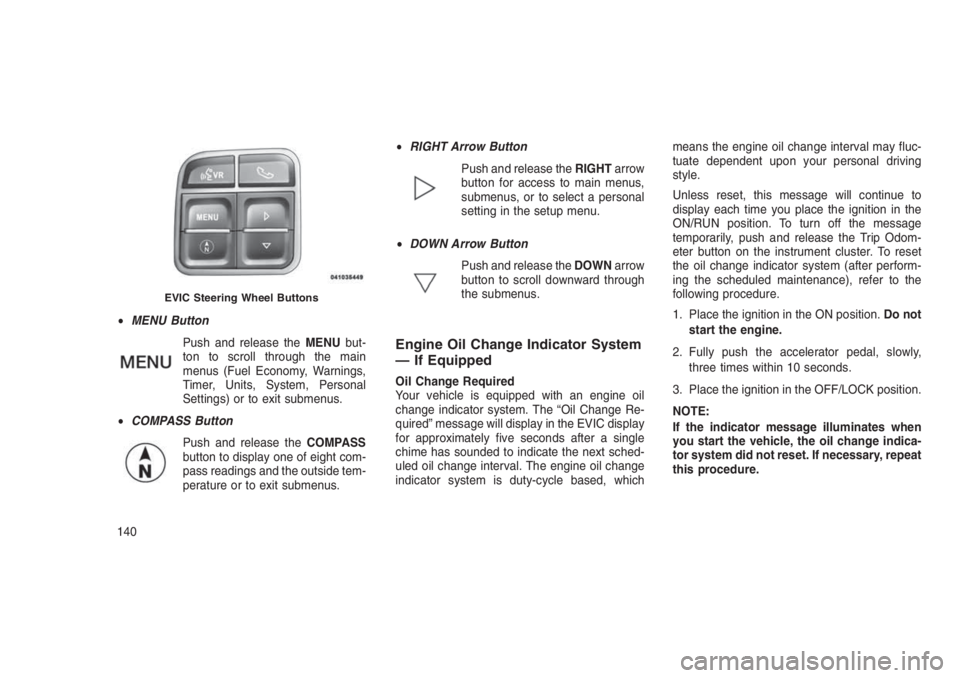
•MENU Button
Push and release theMENUbut-
ton to scroll through the main
menus (Fuel Economy, Warnings,
Timer, Units, System, Personal
Settings) or to exit submenus.
•COMPASS Button
Push and release theCOMPASS
button to display one of eight com-
pass readings and the outside tem-
perature or to exit submenus.•RIGHT Arrow Button
Push and release theRIGHTarrow
button for access to main menus,
submenus, or to select a personal
setting in the setup menu.
•DOWN Arrow Button
Push and release theDOWNarrow
button to scroll downward through
the submenus.
Engine Oil Change Indicator System
— If Equipped
Oil Change Required
Your vehicle is equipped with an engine oil
change indicator system. The “Oil Change Re-
quired” message will display in the EVIC display
for approximately five seconds after a single
chime has sounded to indicate the next sched-
uled oil change interval. The engine oil change
indicator system is duty-cycle based, whichmeans the engine oil change interval may fluc-
tuate dependent upon your personal driving
style.
Unless reset, this message will continue to
display each time you place the ignition in the
ON/RUN position. To turn off the message
temporarily, push and release the Trip Odom-
eter button on the instrument cluster. To reset
the oil change indicator system (after perform-
ing the scheduled maintenance), refer to the
following procedure.
1. Place the ignition in the ON position.Do not
start the engine.
2. Fully push the accelerator pedal, slowly,
three times within 10 seconds.
3. Place the ignition in the OFF/LOCK position.
NOTE:
If the indicator message illuminates when
you start the vehicle, the oil change indica-
tor system did not reset. If necessary, repeat
this procedure.
EVIC Steering Wheel Buttons
140
Page 145 of 332
Compass/Temperature/AudioPush and release theCOMPASSbutton to dis-
play one of eight compass headings to indicate
the direction the vehicle is facing, the outside
temperature, and the current radio station.
Refer to “Personal Settings (Customer-
Programmable Features)” in this section for
additional information regarding the compass.
Average Fuel EconomyShows the average fuel economy since the last
reset (pushing and holding theRIGHTarrow
button as prompted in the EVIC display to
reset). When the fuel economy is reset, the
display will read “RESET” or show dashes for
two seconds. Then, the history information will
be erased, and the averaging will continue from
the last fuel reading before the reset.
Distance To Empty (DTE)Shows the estimated distance that can be trav-
elled with the fuel remaining in the tank. This
estimated distance is determined by a weighted
average of the instantaneous and average fuel
economy, according to the current fuel tank
level. This is not resettable.NOTE:
Significant changes in driving style or ve-
hicle loading will greatly affect the actual
drivable distance of the vehicle, regardless
of the DTE displayed value.
When the DTE value is less than 30 miles
(48 km) estimated driving distance, the DTE
display will change to a text display of"LOW
FUEL.” This display will continue until the ve-
hicle runs out of fuel. Adding a significant
amount of fuel to the vehicle will turn off the
"LOW FUEL"text and a new DTE value will be
displayed, based on the current values in the
DTE calculation and the current fuel tank level.
Tire Pressure Monitor (TPM) — If
Equipped
Refer to “Starting And Operating,” “Tire Pres-
sure Monitoring System (TPMS) for system
operation.
Elapsed TimeShows the total elapsed time of travel since the
last reset. Elapsed time will increment when the
ignition is placed in the RUN/START position.Elapsed time is displayed as follows:
hours: minutes: seconds
Elapsed time can be reset by pushing and
holding theRIGHT
arrow button (as
prompted in the EVIC display). Upon reset, all
digits will change to zeros, and time will start
again if the ignition is in the RUN or START
position.
EVIC Units Selection (Units In
Display)
Displays the units used for the Outside Tem-
perature, Average Fuel Economy, Distance to
Empty, and Tire Pressure features. Push and
release theRIGHT
arrow button to toggle
units between"U.S."and"METRIC."
System WarningsDisplays “SYSTEM OK” if there are no active
Warning Messages stored. Pushing and releas-
ing theDOWN
arrow button when “SYSTEM
OK” is displayed will do nothing. Displays “SYS-
TEM WARNINGS PRESENT” if there are active
Warning Messages stored. Pushing and releas-
ing theDOWN
arrow button when “SYSTEM
141
Page 146 of 332
WARNINGS PRESENT” is displayed will dis-
play each stored warning for each button push.
Push and release theMENUbutton to return to
the Main Menu.
Personal Settings (Customer-
Programmable Features)
This allows the driver to set and recall features
when the transmission is in PARK (automatic
transmission) or the vehicle is stopped (manual
transmission).
Push and release theDOWN
arrow button
until “Personal Settings” is displayed in the
EVIC then push theRIGHT
arrow button.
Use theRIGHT
arrow button to display one
of the following choices:
Language
When in this display, you may select different
languages for all display nomenclature, includ-
ing the trip functions. Pushing theDOWN
ar-
row button while in this display selects English,
Espanol, Deutsch, Italiano, Francais, or NL
depending on availability. As you continue, the
displayed information will be shown in the se-
lected language.Auto Lock Doors — If Equipped
When ON is selected, all doors lock automati-
cally when the speed of the vehicle reaches 15
MPH (24 km/h). Push and hold theRIGHT
arrow button when in this display until “ON”
or “OFF” appears to make your selection.
Auto Unlock On Exit
When ON is selected, all the vehicle’s doors will
unlock when the driver’s door is opened if the
vehicle is stopped (manual transmission) or the
vehicle is stopped and the transmission is in
PARK or NEUTRAL position (automatic trans-
mission). Push and hold theRIGHT
arrow
button when in this display until “ON” or “OFF”
appears to make your selection.
RKE Unlock
When Driver’s Door 1st is selected, only the
driver’s door will unlock on the first push of the
RKE Key Fob UNLOCK button and require a
second push to unlock the remaining locked
doors. When Remote Unlock All Doors is se-
lected, all of the doors will unlock at the first
push of the RKE Key Fob UNLOCK button.
Push and hold theRIGHT
arrow button
when in this display until “Driver’s Door 1st” or
“All Doors” appears to make your selection.Flash Lights with Lock
When ON is selected, the front and rear turn
signals will flash when the doors are locked or
unlocked using the RKE Key Fob. Push and
hold theRIGHT
arrow button when in this
display until “ON” or “OFF” appears to make
your selection.
Headlamp Off Delay
When this feature is selected, the driver can
choose to have the headlamps remain on for 0,
30, 60, or 90 seconds when exiting the vehicle.
Push and hold theRIGHT
arrow button
when in this display until 0, 30, 60, or 90
appears to make your selection.
Key Off Power Delay
When this feature is selected, the power win-
dow switches, radio, Uconnect phone, power
sunroof, and power outlets will remain active for
up to 10 minutes after the ignition switch has
been turned off. Opening either front vehicle
door will cancel this feature. Push and hold the
RIGHT
arrow button when in this display
until “Off,” “45 sec,” “5 min,” or “10 min.” ap-
pears to make your selection.
142
Page 148 of 332
message displayed in the EVIC turns off. The
compass will now function normally.
NOTE:
A good calibration requires a level surface
and an environment free from large metallic
objects such as buildings, bridges, under-
ground cables, railroad tracks, etc.
Manual Compass Calibration
If the compass appears erratic and the “CAL”
indicator does not appear in the EVIC display,
you must put the compass into the Calibration
Mode manually as follows:
1. Start the engine. Leave the gear selector in
PARK in order to enter the EVIC Program-
ming Menus.
2.
Push and release theMENUbutton until the
Personal Settings (Customer-Programmable
Features) menu displays in the EVIC.
3. Push and release theDOWNarrow but-
ton until “Calibrate Compass” displays in the
EVIC.4. Push and release theRIGHT
arrow but-
ton to start the calibration. The “CAL” indica-
tor will display in the EVIC.
5. Complete one or more 360–degree turns (in
an area free from large metal or metallic
objects) until the “CAL” indicator turns off.
The compass will now function normally.
CYBERSECURITY
Your vehicle may be a connected vehicle and
may be equipped with both wired and wireless
networks. These networks allow your vehicle to
send and receive information. This information
allows systems and features in your vehicle to
function properly.
Your vehicle may be equipped with certain
security features to reduce the risk of unauthor-
ized and unlawful access to vehicle systems
and wireless communications. Vehicle software
technology continues to evolve over time and
FCA US LLC, working with its suppliers, evalu-
ates and takes appropriate steps as needed.
Similar to a computer or other devices, your
vehicle may require software updates to im-prove the usability and performance of your
systems or to reduce the potential risk of unau-
thorized and unlawful access to your vehicle
systems.
The risk of unauthorized and unlawful access to
your vehicle systems may still exist, even if the
most recent version of vehicle software (such
as Uconnect software) is installed.WARNING!
•It is not possible to know or to predict all of
the possible outcomes if your vehicle’s
systems are breached. It may be possible
that vehicle systems, including safety re-
lated systems, could be impaired or a loss
of vehicle control could occur that may
result in an accident involving serious in-
jury or death.
(Continued)
144
Page 149 of 332
WARNING!(Continued)
•ONLY insert media (e.g., USB, SD card, or
CD) into your vehicle if it came from a
trusted source. Media of unknown origin
could possibly contain malicious software,
and if installed in your vehicle, it may
increase the possibility for vehicle systems
to be breached.
•As always, if you experience unusual ve-
hicle behavior, take your vehicle to your
nearest authorized dealer immediately.
NOTE:
•FCA or your dealer may contact you di-
rectly regarding software updates.
•To help further improve vehicle security
and minimize the potential risk of a secu-
rity breach, vehicle owners should:
•
Routinely checkwww.driveuconnect.com/
software-updateto learn about available
Uconnect software updates.•Only connect and use trusted media de-
vices (e.g. personal mobile phones,
USBs, CDs).
Privacy of any wireless and wired communica-
tions cannot be assured. Third parties may
unlawfully intercept information and private
communications without your consent. For fur-
ther information, refer to “Onboard Diagnostic
System (OBD II) Cybersecurity” in “Maintaining
Your Vehicle”.
SOUND SYSTEMS
Refer to your Uconnect Owner’s Manual
Supplement.
iPod/USB/MP3 CONTROL — IF
EQUIPPED
This feature allows an iPod or external USB
device to be plugged into the USB port, located
in the center console or glove compartment.
iPod control supports Mini, 4G, Photo, Nano,
5G iPod and iPhone devices. Some iPod soft-ware versions may not fully support the iPod
control features. Please visit Apple’s website for
software updates.
NOTE:
•If the radio has a USB port, refer to the
appropriate Uconnect Owner’s Manual
Supplement for iPod or external USB de-
vice support capability.
•Connecting an iPod or consumer elec-
tronic audio device to the AUX port lo-
cated in the radio faceplate, plays media,
but does not use the iPod/MP3 control
feature to control the connected device.
Connecting The iPod Or External
USB Device
Use the connection cable to connect an iPod or
external USB device to the vehicle’s USB/AUX
connector port which is located in the center
console or glove compartment.
145
Page 152 of 332
Pushing a PRESET button will display the cur-
rent list on the top line and the first item in that
list on the second line.
To exit List mode without selecting a track, push
the samePRESETbutton again to go back to
Play mode.
LISTbutton: TheLISTbutton will display the top
level menu of the iPod or external USB device.
•Turn theTUNEcontrol knob to list the top-
menu item to be selected and push the
TUNEcontrol knob. This will display the next
sub-menu list item on the audio device, then
follow the same steps to go to the desired
track in that list. Not all iPod or external USB
device sub-menu levels are available on this
system.
MUSIC TYPEbutton: TheMUSIC TYPEbutton
is another shortcut button to the genre listing on
your audio device.CAUTION!
•Leaving the iPod or external USB device
(or any supported device) anywhere in the
vehicle in extreme heat or cold can alter
the operation or damage the device. Fol-
low the device manufacturer’s guidelines.
•Placing items on the iPod or external USB
device, or connections to the iPod or ex-
ternal USB device in the vehicle, can
cause damage to the device and/or to the
connectors.
WARNING!
Do not plug in or remove the iPod or external
USB device while driving. Failure to follow
this warning could result in an accident.
Bluetooth Streaming Audio (BTSA)Music can be streamed from your cellular
phone to the Uconnect phone system.Refer to the Uconnect Owner’s Manual Supple-
ment for further information on Bluetooth con-
nectivity.
Controlling BTSA Using Radio Buttons
To enter BTSA mode, push either “AUX” button
on the radio or push the VR
button and say
“Bluetooth Streaming Audio.”
Play Mode
When switched to BTSA mode, some audio
devices can start playing music over the vehi-
cle’s audio system, but some devices require
the music to be initiated on the device first, then
it will get streamed to the Uconnect phone
system. Seven devices can be paired to the
Uconnect phone system, but just one can be
selected and played.
Selecting A Different Audio Device
1. Push the Phone
button to begin.
2. After the"Ready"prompt and following the
beep, say"Setup", then say"Select Audio
Devices."
148
Page 166 of 332
•AutoStick (CVT) — If Equipped.....................177•FOUR-WHEEL DRIVE OPERATION — IF EQUIPPED . . . . . . . . . .178
•ON-ROAD DRIVING TIPS . . . . . . . . . . . . . . . . . .........179
•OFF-ROAD DRIVING TIPS..........................179
•When To Use Low (L Off-Road) With The 4WD Lock Lever Engaged —
If Equipped..................................179
•Driving In Snow, Mud And Sand.....................180
•Hill Climbing.................................181
•Driving Through Water...........................182
•After Driving Off-Road...........................183
•POWER STEERING . . . . . . . . . .....................184•Power Steering Fluid Check.......................184•PARKING BRAKE . ..............................185
•BRAKE SYSTEM . . . . . . . . . . . . . . . . . ..............186
•ELECTRONIC BRAKE CONTROL SYSTEM . . . . . . . . . ......187
•Electronic Brake Force Distribution (EBD)...............187
•Brake System Warning Light.......................187
•Anti-Lock Brake System (ABS)......................187
•Anti-Lock Brake Warning Light......................188
•Brake Assist System (BAS)........................189
•Hill Start Assist (HSA)...........................189
•Traction Control System (TCS)......................191
•Electronic Stability Control (ESC)....................191
•Electronic Roll Mitigation (ERM).....................194
•Hill Descent Control (HDC) — If Equipped...............195
•TIRES — GENERAL INFORMATION . . . . . . . . . . . . . . . . . . . .195•Tire Pressure................................195
162
Page 169 of 332
STARTING PROCEDURES
Before starting your vehicle, adjust your seat,
adjust both inside and outside mirrors, and
fasten your seat belts.
WARNING!
•When leaving the vehicle, always remove
the Key Fob from the ignition and lock your
vehicle.
•Never leave children alone in a vehicle, or
with access to an unlocked vehicle. Allow-
ing children to be in a vehicle unattended
is dangerous for a number of reasons. A
child or others could be seriously or fatally
injured. Children should be warned not to
touch the parking brake, brake pedal or the
transmission gear selector.
•Do not leave the key fob in or near the
vehicle, or in a location accessible to chil-
dren. A child could operate power win-
dows, other controls, or move the vehicle.
(Continued)
WARNING!(Continued)
•Do not leave children or animals inside
parked vehicles in hot weather. Interior
heat build-up may cause serious injury or
death.
Manual Transmission — If EquippedBefore starting the engine fully apply the park-
ing brake, press the clutch pedal to the floor and
place the gear selector in NEUTRAL.
NOTE:
The engine will not start unless the clutch
pedal is pressed to the floor.
Automatic Transmission — If
Equipped
The gear selector must be in the PARK or
NEUTRAL position before you can start the
engine. Press the brake pedal before shifting to
any driving gear.
NOTE:
You must press the brake pedal before shift-
ing out of PARK.Tip Start
Do notpress the accelerator. Turn the ignition
switch to the START position and release it as
soon as the starter engages. The starter motor
will continue to run, and it will disengage auto-
matically when the engine is running. If the
engine fails to start, the starter will disengage
automatically in 10 seconds. If this occurs, turn
the ignition switch to the LOCK position, wait 10
to 15 seconds, then repeat the “Normal Start-
ing” procedure.
NOTE:
Normal starting of either a cold or a warm
engine is obtained without pumping or
pressing the accelerator pedal.
Normal StartingNormal starting of either a cold or a warm
engine does not require pumping or pressing
the accelerator pedal. Simply turn the ignition
switch to the START position and release when
the engine starts. If the engine fails to start
within 15 seconds, turn the ignition switch to the
OFF position, wait 10 to 15 seconds, then
repeat the “Normal Starting” procedure.
165
Page 170 of 332
WARNING!
Do not attempt to push or tow your vehicle to
get it started. Vehicles equipped with an
automatic transmission cannot be started
this way. Unburned fuel could enter the cata-
lytic converter and once the engine has
started, ignite and damage the converter and
vehicle. If the vehicle has a discharged bat-
tery, booster cables may be used to obtain a
start from another vehicle. This type of start
can be dangerous if done improperly, so
follow the procedure carefully. Refer to
“Jump-Starting” in “What To Do In Emergen-
cies” for further information.
Extreme Cold Weather (below −20°F
or −29°C)
To ensure reliable starting at these tempera-
tures, use of an externally powered electric
engine block heater (available from your autho-
rized dealer) is recommended.
If Engine Fails To StartIf the engine fails to start after you have followed
the “Normal Starting” procedure, it may be
flooded. Push the accelerator pedal all the way
to the floor and hold it there. Crank the engine
for no more than 15 seconds. This should clear
any excess fuel in case the engine is flooded.
Leave the ignition key in the ON position, re-
lease the accelerator pedal and repeat the
“Normal Starting” procedure.
WARNING!
Never pour fuel or other flammable liquid into
the throttle body air inlet opening in an
attempt to start the vehicle. This could result
in flash fire causing serious personal injury.
CAUTION!
To prevent damage to the starter, do not
crank the engine for more than 15 seconds
at a time. Wait 10 to 15 seconds before trying
again.
After StartingThe idle speed will automatically decrease as
the engine warms up.
MANUAL TRANSMISSION — IF
EQUIPPED
Five-Speed Manual Transmission
WARNING!
You or others could be injured if you leave
the vehicle unattended without having the
parking brake fully applied. The parking
brake should always be applied when the
driver is not in the vehicle, especially on an
incline.
Fully press the clutch pedal before you shift
gears. As you release the clutch pedal, lightly
press the accelerator pedal.
166
Page 172 of 332
DownshiftingProper downshifting will improve fuel economy
and prolong engine life.
CAUTION!
If you skip a gear while downshifting or
downshift at too high of a vehicle speed,
these conditions may cause the engine to
overspeed if too low of a gear is selected and
the clutch pedal is released. Damage to the
clutch and the transmission can result from
skipping a gear while downshifting or down-
shifting at too high of a vehicle speed even if
the clutch pedal is held pressed (i.e., not
released).
To maintain a safe speed and prolong brake life,
shift down to second or first gear when de-
scending a steep grade.
When turning a corner or driving up a steep
grade, downshift early so that the engine will not
be overburdened.
AUTOMATIC TRANSMISSION
— IF EQUIPPED
CAUTION!
Damage to the transmission may occur if
the following precautions are not observed:
•Shift into or out of PARK or REVERSE only
after the vehicle has come to a complete
stop.
•Do not shift between PARK, REVERSE,
NEUTRAL, or DRIVE when the engine is
above idle speed.
•Before shifting into any gear, make sure
your foot is firmly pressing the brake pedal.
NOTE:
You must press and hold the brake pedal
while shifting out of PARK.
WARNING!
•It is dangerous to shift out of PARK or
NEUTRAL if the engine speed is higher
than idle speed. If your foot is not firmly
pressing the brake pedal, the vehicle could
accelerate quickly forward or in reverse.
You could lose control of the vehicle and
hit someone or something. Only shift into
gear when the engine is idling normally
and your foot is firmly pressing the brake
pedal.
•Unintended movement of a vehicle could
injure those in or near the vehicle. As with
all vehicles, you should never exit a ve-
hicle while the engine is running. Before
exiting a vehicle, always shift the transmis-
sion into PARK, apply the parking brake,
turn the engine OFF, and remove the igni-
tion key. Once the key is removed, the
transmission is locked in PARK, securing
the vehicle against unwanted movement.
(Continued)
168