instrument panel JEEP PATRIOT 2021 Owner handbook (in English)
[x] Cancel search | Manufacturer: JEEP, Model Year: 2021, Model line: PATRIOT, Model: JEEP PATRIOT 2021Pages: 332, PDF Size: 1.99 MB
Page 126 of 332
NOTE:
Some of the above warnings will be dis-
played in the Electronic Vehicle Information
Center Display Area located in the instru-
ment cluster.
Refer to ”Electronic Vehicle Information Center
(EVIC) — If Equipped” in this section for further
information.
LoW tirE
When the appropriate condition exists, the
odometer display will toggle between LoW and
tirE for three cycles.
gASCAP
If the vehicle diagnostic system determines that
the fuel filler cap is loose, improperly installed,
or damaged, a “gASCAP” message will display
in the odometer display area. Tighten the fuel
filler cap properly and push the STEP button on
the steering wheel to turn off the message. If the
problem continues, the message will appear the
next time the vehicle is started.noFUSE
If the vehicle diagnostic system determines that
the Ignition Off Draw (IOD) fuse is improperly
installed, or damaged, a “noFUSE” message
will display in the odometer display area. Refer
to “Fuses” in “Maintaining Your Vehicle” for
further information on fuses and fuse locations.
CHAngE OIL
Your vehicle is equipped with an engine oil
change indicator system. The odometer display
will toggle betweenCHAngEandOilfor ap-
proximately 12 seconds, after a single chime
has sounded, to indicate the next scheduled oil
change interval. The engine oil change indicator
system is duty cycle-based, which means the
engine oil change interval may fluctuate depen-
dent upon your personal driving style.
5. Fuel Gauge
•The pointer shows the level of fuel in the
fuel tank when the ignition is placed in the
ON/RUN position.•The fuel pump symbol points to the
side of the vehicle where the fuel door is
located.
WARNING AND INDICATOR
LIGHTS
IMPORTANT:The warning / indicator lights
switch on in the instrument panel together with
a dedicated message and/or acoustic signal
when applicable. These indications are indica-
tive and precautionary and as such must not be
considered as exhaustive and/or alternative to
the information contained in the Owner’s
Manual, which you are advised to read carefully
in all cases. Always refer to the information in
this chapter in the event of a failure indication.
All active telltales will display first if applicable.
The system check menu may appear different
based upon equipment options and current
vehicle status. Some telltales are optional and
may not appear.
122
Page 147 of 332
Illuminated Approach
When this feature is selected, the headlights will
activate and remain on for up to 90 seconds
when the doors are unlocked using the RKE
Key Fob. Push and hold theRIGHT
arrow
button when in this display until “OFF,” “30 sec,”
“60 sec,” or “90 sec.” appears to make your
selection.
Hill Start Assist (HSA) — If Equipped
When “On” is selected, the HSA system is
active. Refer to “Electronic Brake Control Sys-
tem” in “Starting And Operating” for system
function and operating information. To make
your selection, push and release theRIGHT
arrow button until “On” or “Off” appears.
Display Units In
The EVIC, odometer, and Uconnect GPS sys-
tem units can be changed between US and
Metric.
Push and hold theRIGHT
arrow button
when in this display until “US” or “METRIC”
appears to make your selection.
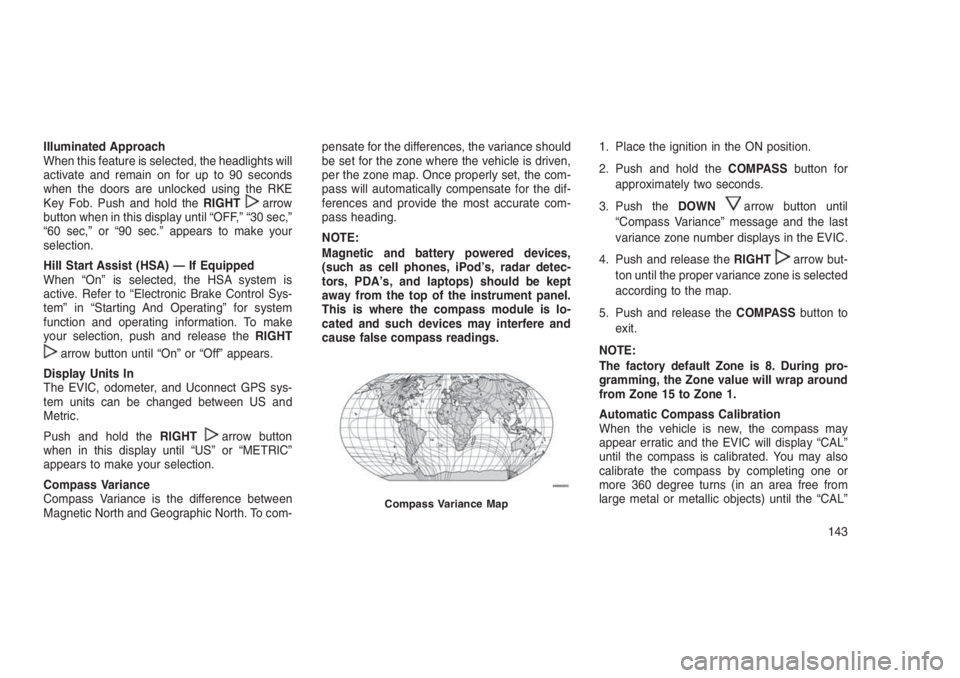
Compass Variance
Compass Variance is the difference between
Magnetic North and Geographic North. To com-pensate for the differences, the variance should
be set for the zone where the vehicle is driven,
per the zone map. Once properly set, the com-
pass will automatically compensate for the dif-
ferences and provide the most accurate com-
pass heading.
NOTE:
Magnetic and battery powered devices,
(such as cell phones, iPod’s, radar detec-
tors, PDA’s, and laptops) should be kept
away from the top of the instrument panel.
This is where the compass module is lo-
cated and such devices may interfere and
cause false compass readings.1. Place the ignition in the ON position.
2. Push and hold theCOMPASSbutton for
approximately two seconds.
3. Push theDOWN
arrow button until
“Compass Variance” message and the last
variance zone number displays in the EVIC.
4. Push and release theRIGHT
arrow but-
ton until the proper variance zone is selected
according to the map.
5. Push and release theCOMPASSbutton to
exit.
NOTE:
The factory default Zone is 8. During pro-
gramming, the Zone value will wrap around
from Zone 15 to Zone 1.
Automatic Compass Calibration
When the vehicle is new, the compass may
appear erratic and the EVIC will display “CAL”
until the compass is calibrated. You may also
calibrate the compass by completing one or
more 360 degree turns (in an area free from
large metal or metallic objects) until the “CAL”
Compass Variance Map
143
Page 156 of 332
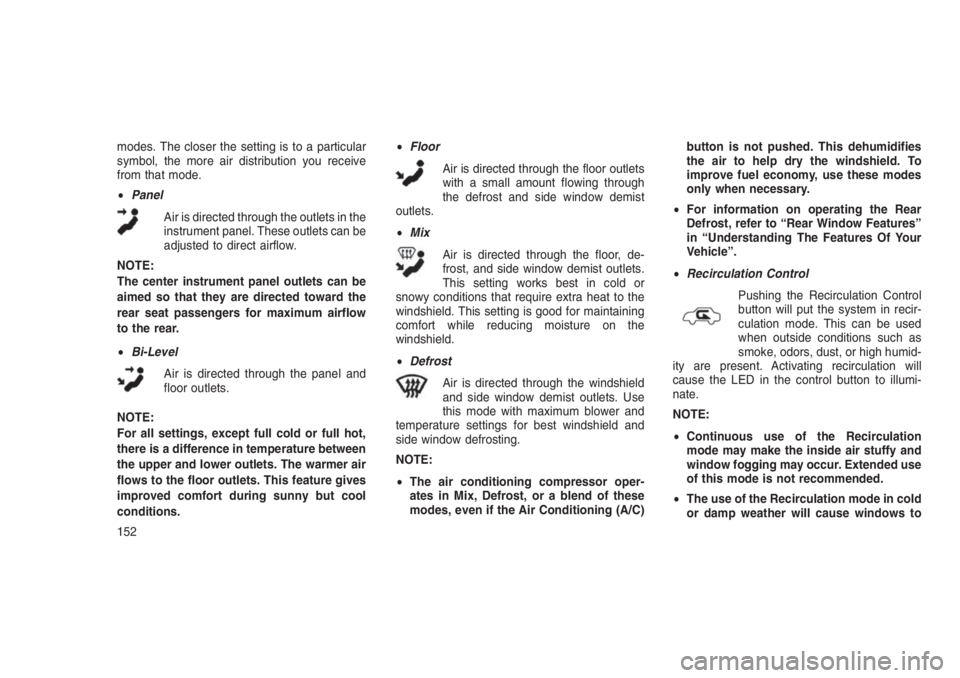
modes. The closer the setting is to a particular
symbol, the more air distribution you receive
from that mode.
•Panel
Air is directed through the outlets in the
instrument panel. These outlets can be
adjusted to direct airflow.
NOTE:
The center instrument panel outlets can be
aimed so that they are directed toward the
rear seat passengers for maximum airflow
to the rear.
•Bi-Level
Air is directed through the panel and
floor outlets.
NOTE:
For all settings, except full cold or full hot,
there is a difference in temperature between
the upper and lower outlets. The warmer air
flows to the floor outlets. This feature gives
improved comfort during sunny but cool
conditions.•Floor
Air is directed through the floor outlets
with a small amount flowing through
the defrost and side window demist
outlets.
•Mix
Air is directed through the floor, de-
frost, and side window demist outlets.
This setting works best in cold or
snowy conditions that require extra heat to the
windshield. This setting is good for maintaining
comfort while reducing moisture on the
windshield.
•Defrost
Air is directed through the windshield
and side window demist outlets. Use
this mode with maximum blower and
temperature settings for best windshield and
side window defrosting.
NOTE:
•The air conditioning compressor oper-
ates in Mix, Defrost, or a blend of these
modes, even if the Air Conditioning (A/C)button is not pushed. This dehumidifies
the air to help dry the windshield. To
improve fuel economy, use these modes
only when necessary.
•For information on operating the Rear
Defrost, refer to “Rear Window Features”
in “Understanding The Features Of Your
Vehicle”.
•Recirculation Control
Pushing the Recirculation Control
button will put the system in recir-
culation mode. This can be used
when outside conditions such as
smoke, odors, dust, or high humid-
ity are present. Activating recirculation will
cause the LED in the control button to illumi-
nate.
NOTE:
•Continuous use of the Recirculation
mode may make the inside air stuffy and
window fogging may occur. Extended use
of this mode is not recommended.
•The use of the Recirculation mode in cold
or damp weather will cause windows to
152
Page 160 of 332
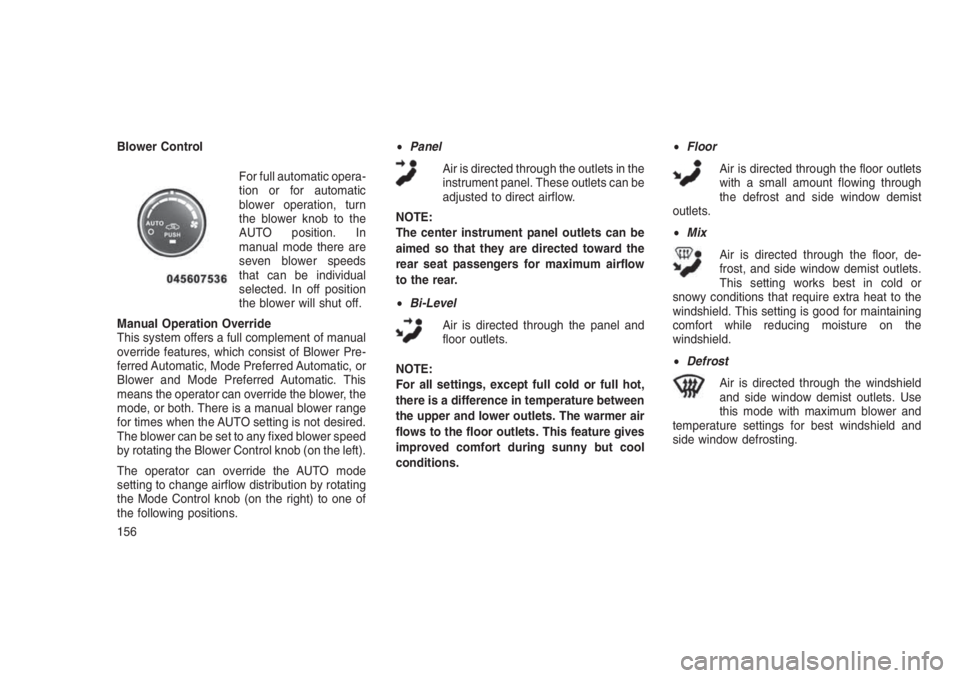
Blower Control
For full automatic opera-
tion or for automatic
blower operation, turn
the blower knob to the
AUTO position. In
manual mode there are
seven blower speeds
that can be individual
selected. In off position
the blower will shut off.
Manual Operation Override
This system offers a full complement of manual
override features, which consist of Blower Pre-
ferred Automatic, Mode Preferred Automatic, or
Blower and Mode Preferred Automatic. This
means the operator can override the blower, the
mode, or both. There is a manual blower range
for times when the AUTO setting is not desired.
The blower can be set to any fixed blower speed
by rotating the Blower Control knob (on the left).
The operator can override the AUTO mode
setting to change airflow distribution by rotating
the Mode Control knob (on the right) to one of
the following positions.•Panel
Air is directed through the outlets in the
instrument panel. These outlets can be
adjusted to direct airflow.
NOTE:
The center instrument panel outlets can be
aimed so that they are directed toward the
rear seat passengers for maximum airflow
to the rear.
•Bi-Level
Air is directed through the panel and
floor outlets.
NOTE:
For all settings, except full cold or full hot,
there is a difference in temperature between
the upper and lower outlets. The warmer air
flows to the floor outlets. This feature gives
improved comfort during sunny but cool
conditions.•Floor
Air is directed through the floor outlets
with a small amount flowing through
the defrost and side window demist
outlets.
•Mix
Air is directed through the floor, de-
frost, and side window demist outlets.
This setting works best in cold or
snowy conditions that require extra heat to the
windshield. This setting is good for maintaining
comfort while reducing moisture on the
windshield.
•Defrost
Air is directed through the windshield
and side window demist outlets. Use
this mode with maximum blower and
temperature settings for best windshield and
side window defrosting.
156
Page 162 of 332
Summer Operation
The engine cooling system must be protected
with a high-quality antifreeze coolant to provide
proper corrosion protection and to protect
against engine overheating. A solution of 50%
OAT (Organic Additive Technology) coolant that
meets the requirements of FCA Material Stan-
dard MS.90032 and 50% water is recom-
mended. Refer to “Maintenance Procedures” in
“Maintaining Your Vehicle” for proper coolant
selection.
Winter Operation
Use of the air Recirculation Mode during winter
months is not recommended because it may
cause window fogging.
Vacation Storage
Anytime you store your vehicle, or keep it out of
service (i.e., vacation) for two weeks or more,
run the air conditioning system at idle for about
five minutes in the fresh air and high blower
settings. This will ensure adequate system lu-
brication to minimize the possibility of compres-
sor damage when the system is started again.Window Fogging
Interior fogging on the windshield can be quickly
removed by turning the mode selector to De-
frost. The Defrost/Floor mode can be used to
maintain a clear windshield and provide suffi-
cient heating. If side window fogging becomes a
problem, increase blower speed. Vehicle win-
dows tend to fog on the inside in mild but rainy
or humid weather.
NOTE:
Recirculate without A/C should not be used
for long periods as fogging may occur.
Side Window Demisters
A side window demister outlet is located at each
end of the instrument panel. These non-
adjustable outlets direct air toward the side
windows when the system is in the FLOOR,
MIX, or DEFROST mode. The air is directed at
the area of the windows through which you view
the outside mirrors.Outside Air Intake
Make sure the air intake, located directly in front
of the windshield, is free of obstructions such as
leaves. Leaves collected in the air intake may
reduce airflow, and if they enter the plenum,
they could plug the water drains. In winter
months, make sure the air intake is clear of ice,
slush, and snow.
A/C Air Filter — If Equipped
The A/C Filter prevents most dust and pollen
from entering the cabin. The filter acts on air
coming from outside the vehicle and recircu-
lated air within the passenger compartment.
Refer to “Maintenance Procedures” in “Main-
taining Your Vehicle” for A/C Air Filter service
information or see your authorized dealer for
service. Refer to “Maintenance Schedules” in
“Maintaining Your Vehicle” for filter service inter-
vals.
158
Page 194 of 332
WARNING!(Continued)
vehicles, people, and objects, and most im-
portantly brake operation to ensure safe
operation of the vehicle under all road con-
ditions. Your complete attention is always
required while driving to maintain safe con-
trol of your vehicle. Failure to follow these
warnings can result in a collision or serious
personal injury.
Towing With HSA
HSA will also provide assistance to mitigate roll
back while towing a trailer.
WARNING!
•If you use a trailer brake controller with
your trailer, the trailer brakes may be acti-
vated and deactivated with the brake
switch. If so, there may not be enough
brake pressure to hold both the vehicle
and the trailer on a hill when the brake
(Continued)
WARNING!(Continued)
pedal is released. In order to avoid rolling
down an incline while resuming accelera-
tion, manually activate the trailer brake or
apply more vehicle brake pressure prior to
releasing the brake pedal.
•HSA is not a parking brake. Always apply
the parking brake fully when leaving your
vehicle. Also, be certain to leave the trans-
mission in PARK.
•Failure to follow these warnings may
cause the vehicle to roll down the incline
and could collide with another vehicle,
object or person, and cause serious or
fatal injury. Always remember to use the
parking brake while parking on a hill and
that the driver is responsible for braking
the vehicle.
Disabling And Enabling HSA
This feature can be turned on or turned off. To
change the current setting, proceed as follows:•For vehicles equipped with the Electronic
Vehicle Information Center (EVIC), refer to
“Electronic Vehicle Information Center
(EVIC)” in “Understanding Your Instrument
Panel” for further information.
•If disabling HSA using Uconnect Settings,
refer to “Uconnect Settings” in “Understand-
ing Your Instrument Panel” for further
information.
For vehicles not equipped with the EVIC, per-
form the following steps:
1. Center the steering wheel (front wheels
pointing straight forward).
2. Shift the transmission into PARK.
3. Apply the parking brake.
4. Start the engine.
5. Rotate the steering wheel slightly more than
one-half turn to the left.
6. Push the “ESC Off” button located in the
lower switch bank below the climate control
190
Page 216 of 332
WARNING!(Continued)
•Guard against carbon monoxide with
proper maintenance. Have the exhaust
system inspected every time the vehicle is
raised. Have any abnormal conditions re-
paired promptly. Until repaired, drive with
all side windows fully open.
•Keep the liftgate closed when driving your
vehicle to prevent carbon monoxide and
other poisonous exhaust gases from en-
tering the vehicle.
ADDING FUEL
Locking Fuel Filler Cap (Gas Cap)The locking gas cap is inside the fuel filler door,
on the left side of the vehicle. If the gas cap is
lost or damaged, be sure the replacement cap
is for use with this vehicle.
1. Turn off the engine.2. Insert the ignition key into the fuel cap and
turn the key one-quarter turn to the right,
then rotate the fuel cap to the left to remove.
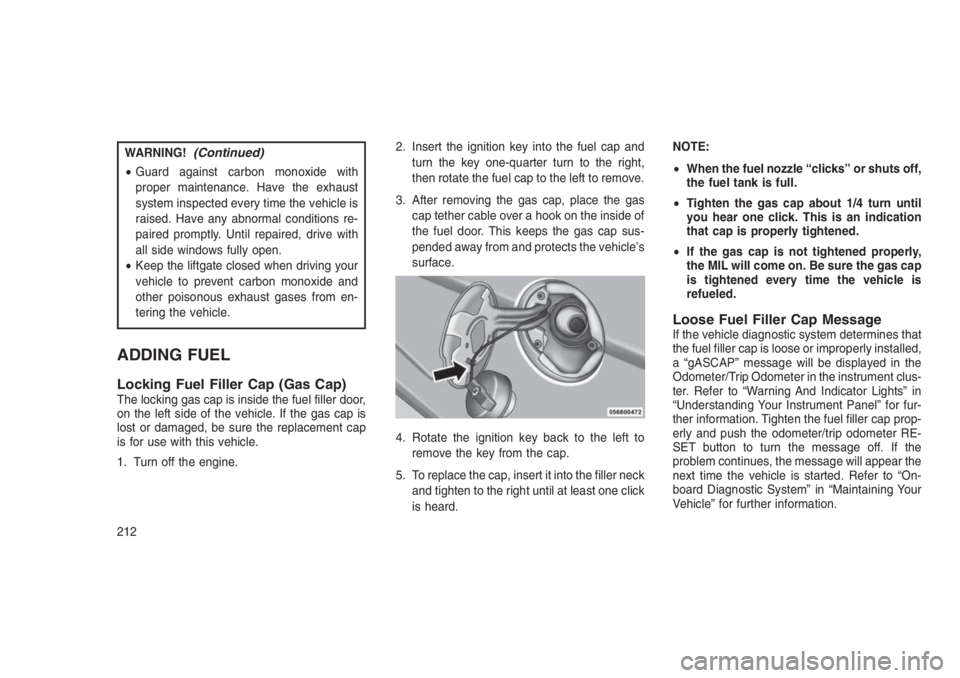
3. After removing the gas cap, place the gas
cap tether cable over a hook on the inside of
the fuel door. This keeps the gas cap sus-
pended away from and protects the vehicle’s
surface.
4. Rotate the ignition key back to the left to
remove the key from the cap.
5. To replace the cap, insert it into the filler neck
and tighten to the right until at least one click
is heard.NOTE:
•When the fuel nozzle “clicks” or shuts off,
the fuel tank is full.
•Tighten the gas cap about 1/4 turn until
you hear one click. This is an indication
that cap is properly tightened.
•If the gas cap is not tightened properly,
the MIL will come on. Be sure the gas cap
is tightened every time the vehicle is
refueled.
Loose Fuel Filler Cap MessageIf the vehicle diagnostic system determines that
the fuel filler cap is loose or improperly installed,
a “gASCAP” message will be displayed in the
Odometer/Trip Odometer in the instrument clus-
ter. Refer to “Warning And Indicator Lights” in
“Understanding Your Instrument Panel” for fur-
ther information. Tighten the fuel filler cap prop-
erly and push the odometer/trip odometer RE-
SET button to turn the message off. If the
problem continues, the message will appear the
next time the vehicle is started. Refer to “On-
board Diagnostic System” in “Maintaining Your
Vehicle” for further information.
212
Page 231 of 332
HAZARD WARNING FLASHERS
The Hazard Warning flasher switch is located
on the instrument panel below the climate
controls.
Push the switch to turn on the Hazard
Warning flasher. When the switch is
activated, all directional turn signals
will flash on and off to warn oncoming traffic of
an emergency. Push the switch a second time
to turn off the Hazard Warning flashers.
This is an emergency warning system and it
should not be used when the vehicle is in
motion. Use it when your vehicle is disabled and
it is creating a safety hazard for other motorists.
When you must leave the vehicle to seek assis-
tance, the Hazard Warning flashers will con-
tinue to operate even though the ignition is
placed in the OFF position.
NOTE:
With extended use the Hazard Warning
flashers may wear down your battery.
IF YOUR ENGINE OVERHEATS
In any of the following situations, you can
reduce the potential for overheating by taking
the appropriate action.
•On the highways — slow down.
•In city traffic — while stopped, place the
transmission in NEUTRAL, but do not in-
crease engine idle speed.
NOTE:
There are steps that you can take to slow
down an impending overheat condition:
•If your air conditioner (A/C) is on, turn it
off. The A/C system adds heat to the
engine cooling system and turning the
A/C off can help remove this heat.
•You can also turn the temperature control
to maximum heat, the mode control to
floor and the blower control to high. This
allows the heater core to act as a supple-
ment to the radiator and aids in removing
heat from the engine cooling system.CAUTION!
Driving with a hot cooling system could dam-
age your vehicle. If the pointer rises to the
H(red) mark, the instrument cluster will
sound a chime. When safe, pull over and
stop the vehicle with the engine at idle. Turn
off the air conditioning and wait until the
pointer drops back into the normal range. If
the pointer remains on theH(red) mark for
more than a minute, turn the engine off
immediately and call for service.
WARNING!
You or others can be badly burned by hot
engine coolant (antifreeze) or steam from
your radiator. If you see or hear steam com-
ing from under the hood, do not open the
hood until the radiator has had time to cool.
Never try to open a cooling system pressure
cap when the radiator or coolant bottle is hot.
227
Page 243 of 332
NOTE:
If the tire becomes over-inflated, push the
Deflation Button to reduce the tire pressure
to the recommended inflation pressure be-
fore continuing.
If the tire inflates to the recommended pres-
sure or is at least 26 psi (1.8 Bar) pressure
within 15 minutes:
1. Push the Power Button (4) to turn off the Tire
Service Kit.
2. Remove the Speed Limit sticker from the top
of the Sealant Bottle (1) and place the sticker
on the instrument panel.
3. Immediately disconnect the Sealant Hose
(6) from the valve stem, reinstall the cap on
the fitting at the end of the hose, and place
the Tire Service Kit in the vehicle storage
location. Quickly proceed to (D) “Drive Ve-
hicle.”CAUTION!
•The metal end fitting from Power Plug (8)
may get hot after use, so it should be
handled carefully.
•Failure to reinstall the cap on the fitting at
the end of the Sealant Hose (6) can result
in sealant contacting your skin, clothing,
and the vehicle’s interior. It can also result
in sealant contacting internal Tire Service
Kit components which may cause perma-
nent damage to the kit.
(D) Drive Vehicle:
Immediately after injecting sealant and inflating
the tire, drive the vehicle 5 miles (8 km) or 10
minutes to ensure distribution of the Tire Ser-
vice Kit Sealant within the tire. Do not exceed
55 mph (90 km/h).
WARNING!
Tire Service Kit is not a permanent flat tire
repair. Have the tire inspected and repaired
(Continued)
WARNING!(Continued)
or replaced after using Tire Service Kit. Do
not exceed 55 mph (90 km/h) until the tire is
repaired or replaced. Failure to follow this
warning can result in injuries that are serious
or fatal to you, your passengers, and others
around you.
(E) After Driving:
Pull over to a safe location. Refer to “Whenever
You Stop to Use Tire Service Kit” before con-
tinuing.
1. Push in the Mode Select Knob (5) and turn to
the Air Mode position.
2. Uncoil the power plug and insert the plug
into the vehicle’s 12 Volt power outlet.
3. Uncoil the Air Pump Hose (7) (black in color)
and screw the fitting at the end of hose (7)
onto the valve stem.
4. Check the pressure in the tire by reading the
Pressure Gauge (3).
239
Page 244 of 332
If tire pressure is less than 19 psi (1.3 Bar):
The tire is too badly damaged. Do not attempt to
drive the vehicle further. Call for assistance.
If the tire pressure is 19 psi (1.3 Bar) or
higher:
1. Push the Power Button (4) to turn on Tire
Service Kit and inflate the tire to the pressure
indicated on the tire and loading information
label on the driver-side door opening.
NOTE:
If the tire becomes over-inflated, push the
Deflation Button to reduce the tire pressure
to the recommended inflation pressure be-
fore continuing.
2. Disconnect the Tire Service Kit from the
valve stem, reinstall the cap on the valve
stem and unplug from 12 Volt outlet.
3. Place the Tire Service Kit in its proper stor-
age area in the vehicle.
4. Have the tire inspected and repaired or
replaced at the earliest opportunity at an
authorized dealer or tire service center.5. Remove the Speed Limit sticker from the
instrument panel after the tire has been
repaired.
6. Replace the Sealant Bottle (1) and Sealant
Hose (6) assembly at your authorized dealer
as soon as possible. Refer to (F) “Sealant
Bottle and Hose Replacement”.
NOTE:
When having the tire serviced, advise the
authorized dealer or service center that the
tire has been sealed using the Tire Service
Kit.
(F) Sealant Bottle And Hose Replacement:
1. Uncoil the Sealant Hose (6) (clear in color).
2. Locate the round Sealant Bottle release but-
ton in the recessed area under the sealant
bottle.
3. Push the Sealant Bottle release button. The
Sealant Bottle (1) will pop up. Remove the
bottle and dispose of it accordingly.4. Clean any remaining sealant from the Tire
Service Kit housing.
5. Position the new Sealant Bottle (1) in the
housing so that the Sealant Hose (6) aligns
with the hose slot in the front of the housing.
Push the bottle into the housing. An audible
click will be heard indicating the bottle is
locked into place.
6. Verify that the cap is installed on the fitting at
the end of the Sealant Hose (6) and return
the hose to its storage area (located on the
bottom of the air pump).
7. Return the Tire Service Kit to its storage
location in the vehicle.
240