instrument panel JEEP PATRIOT 2021 Owner handbook (in English)
[x] Cancel search | Manufacturer: JEEP, Model Year: 2021, Model line: PATRIOT, Model: JEEP PATRIOT 2021Pages: 332, PDF Size: 1.99 MB
Page 49 of 332
WARNING!
Ignoring the Air Bag Warning Light in your
instrument panel could mean you won’t have
the air bags to protect you in a collision. If the
light does not come on as a bulb check when
the ignition is first turned on, stays on after
you start the vehicle, or if it comes on as you
drive, have an authorized dealer service the
air bag system immediately.
Maintaining Your Air Bag System
WARNING!
•Modifications to any part of the air bag
system could cause it to fail when you
need it. You could be injured if the air bag
system is not there to protect you. Do not
modify the components or wiring, including
adding any kind of badges or stickers to
the steering wheel hub trim cover or the
upper right side of the instrument panel.
(Continued)
WARNING!(Continued)
Do not modify the front bumper, vehicle
body structure, or add aftermarket side
steps or running boards.
•It is dangerous to try to repair any part of
the air bag system yourself. Be sure to tell
anyone who works on your vehicle that it
has an air bag system.
•
Do not attempt to modify any part of your air
bag system. The air bag may inflate acciden-
tally or may not function properly if modifica-
tions are made. Take your vehicle to an
authorized dealer for any air bag system
service. If your seat, including your trim
cover and cushion, needs to be serviced in
any way (including removal or loosening/
tightening of seat attachment bolts), take the
vehicle to your authorized dealer. Only
manufacturer approved seat accessories
may be used. If it is necessary to modify the
air bag system for persons with disabilities,
contact your authorized dealer.
Event Data Recorder (EDR)
This vehicle is equipped with an event data
recorder (EDR). The main purpose of an EDR is
to record, in certain crash or near crash-like
situations, such as an air bag deployment or
hitting a road obstacle, data that will assist in
understanding how a vehicle’s systems per-
formed. The EDR is designed to record data
related to vehicle dynamics and safety systems
for a short period of time, typically 30 seconds
or less. The EDR in this vehicle is designed to
record such data as:
•How various systems in your vehicle were
operating;
•Whether or not the driver and passenger
safety belts were buckled/fastened;
•How far (if at all) the driver was depressing
the accelerator and/or brake pedal; and,
•How fast the vehicle was traveling.
These data can help provide a better under-
standing of the circumstances in which crashes
and injuries occur.
45
Page 64 of 332
WARNING!(Continued)
•Always make sure that objects cannot fall
into the driver footwell while the vehicle is
moving. Objects can become trapped un-
der the brake pedal and accelerator pedal
causing a loss of vehicle control.
•If required, mounting posts must be prop-
erly installed, if not equipped from the
factory.
Failure to properly follow floor mat installa-
tion or mounting can cause interference with
the brake pedal and accelerator pedal opera-
tion causing loss of control of the vehicle.
Periodic Safety Checks You Should
Make Outside The Vehicle
Tires
Examine tires for excessive tread wear and
uneven wear patterns. Check for stones, nails,
glass, or other objects lodged in the tread or
sidewall. Inspect the tread for cuts and cracks.
Inspect sidewalls for cuts, cracks, and bulges.
Check the wheel nuts for tightness. Check the
tires (including spare) for proper cold inflation
pressure.
Lights
Have someone observe the operation of brake
lights and exterior lights while you work the
controls. Check turn signal and high beam
indicator lights on the instrument panel.Door Latches
Check for proper closing, latching, and locking.
Fluid Leaks
Check area under vehicle after overnight park-
ing for fuel, engine coolant, oil, or other fluid
leaks. Also, if gasoline fumes are detected or if
fuel, power steering fluid (if equipped), or brake
fluid leaks are suspected. The cause should be
located and corrected immediately.
60
Page 66 of 332
•Commands..................................86
•Voice Training.................................88
•SEATS ......................................88•Power Seats — If Equipped........................88
•Heated Seats — If Equipped........................89
•Manual Front Seat Adjustment.......................90
•Manual Seat Height Adjustment — If Equipped.............90
•Manual Lumbar — If Equipped......................91
•Driver’s Seatback Recline.........................91
•Fold-Flat Front Passenger Seat — If Equipped.............92
•Head Restraints...............................92
•Folding Rear Seat..............................94
•Reclining Rear Seat — If Equipped....................95
•TO OPEN AND CLOSE THE HOOD . ....................95
•LIGHTS......................................96
•Multifunction Lever.............................96
•Headlights And Parking Lights......................96
•Daytime Running Lights — If Equipped.................97
•Lights-On Reminder.............................97
•Front Fog Lights...............................97
•Rear Fog Lights................................97
•Turn Signals.................................97
•Lane Change Assist.............................98
•High/Low Beam Switch...........................98
•Flash-To-Pass................................98
•Instrument Panel Dimmer..........................98
•Headlight Leveling System — If Equipped................98
62
Page 79 of 332
tomer service line. Some services require im-
mediate response selection. In some instances,
that may be too quick for use of the Uconnect
Phone.
When calling a number with your Uconnect
Phone that normally requires you to enter in a
touch-tone sequence on your mobile phone
keypad, you can push the Voice Command
button and say the sequence you wish to
enter, followed by the word “Send.” For ex-
ample, if required to enter your PIN followed
with a pound, (3746#),youcanpush the
Voice Command
button and say, “3746#
Send.” Saying a number, or sequence of num-
bers, followed by “Send,” is also to be used for
navigating through an automated customer ser-
vice center menu structure, and to leave a
number on a pager.
You can also send stored Uconnect phonebook
entries as tones for fast and easy access to
voice mail and pager entries. To use this fea-
ture, dial the number you wish to call and then
push the Voice Command
button and say
“Send.” The system will prompt you to enter the
name or number and say the name of the
phonebook entry you wish to send. TheUconnect Phone will then send the correspond-
ing phone number associated with the phone-
book entry, as tones over the phone.
NOTE:
•You may not hear all of the tones due to
mobile phone network configurations.
This is normal.
•Some paging and voice mail systems
have system time out settings that are too
short and may not allow the use of this
feature.
Barge In — Overriding Prompts
The “Voice Command” button can be used
when you wish to skip part of a prompt and
issue your voice command immediately. For
example, if a prompt is asking “Would you like to
pair a phone, clear a...,” you could push the
Voice Command
button and say, “Pair a
Phone” to select that option without having to
listen to the rest of the voice prompt.Turning Confirmation Prompts ON/OFF
Turning confirmation prompts off will stop the
system from confirming your choices (e.g., the
Uconnect Phone will not repeat a phone num-
ber before you dial it).
1. Push the Phone
button to begin.
2. After the “Ready” prompt and the following
beep, say one of the following:
•“Setup Confirmation Prompts On”
•“Setup Confirmation Prompts Off”
Phone And Network Status Indicators
If available on the radio and/or on a premium
display such as the instrument panel cluster,
and supported by your mobile phone, the
Uconnect Phone will provide notification to in-
form you of your phone and network status
when you are attempting to make a phone call
using Uconnect Phone. The status is given for
network signal strength, phone battery strength,
etc.
75
Page 93 of 332
WARNING!
•Adjusting a seat while driving may be
dangerous. Moving a seat while driving
could result in loss of control which could
cause a collision and serious injury or
death.
•Seats should be adjusted before fastening
the seat belts and while the vehicle is
parked. Serious injury or death could result
from a poorly adjusted seat belt.
CAUTION!
Do not place any article under a power seat
or impede its ability to move as it may cause
damage to the seat controls. Seat travel may
become limited if movement is stopped by an
obstruction in the seat’s path.
Adjusting The Seat Forward Or Rearward
The seat can be adjusted both forward and
rearward. Push the seat switch forward or rear-
ward. The seat will move in the direction of theswitch. Release the switch when the desired
position has been reached.
Adjusting The Seat Up Or Down
The height of the seats can be adjusted up or
down. Pull upward or push downward on the
seat switch. The seat will move in the direction
of the switch. Release the switch when the
desired position is reached.
Tilting The Seat Up Or Down
The angle of the seat cushion can be adjusted
in four directions. Pull upward or push down-
ward on the front or rear of the seat switch, the
front or rear of the seat cushion will move in the
direction of the switch. Release the switch when
the desired position is reached.
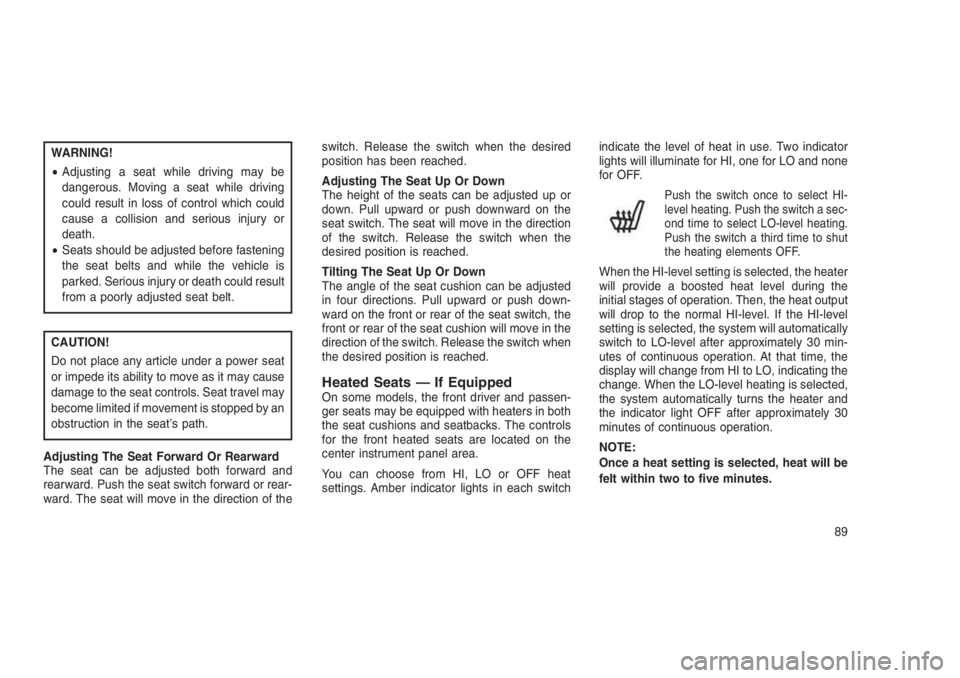
Heated Seats — If EquippedOn some models, the front driver and passen-
ger seats may be equipped with heaters in both
the seat cushions and seatbacks. The controls
for the front heated seats are located on the
center instrument panel area.
You can choose from HI, LO or OFF heat
settings. Amber indicator lights in each switchindicate the level of heat in use. Two indicator
lights will illuminate for HI, one for LO and none
for OFF.
Push the switch once to select HI-
level heating. Push the switch a sec-
ond time to select LO-level heating.
Push the switch a third time to shut
the heating elements OFF.
When the HI-level setting is selected, the heater
will provide a boosted heat level during the
initial stages of operation. Then, the heat output
will drop to the normal HI-level. If the HI-level
setting is selected, the system will automatically
switch to LO-level after approximately 30 min-
utes of continuous operation. At that time, the
display will change from HI to LO, indicating the
change. When the LO-level heating is selected,
the system automatically turns the heater and
the indicator light OFF after approximately 30
minutes of continuous operation.
NOTE:
Once a heat setting is selected, heat will be
felt within two to five minutes.
89
Page 100 of 332

CAUTION!
To prevent possible damage:
•Before closing hood, make sure the hood
prop rod is fully seated into its storage
retaining clips.
•
Do not slam the hood to close it. Use a firm
downward push at the center front edge of the
hood to ensure that both latches engage.
Never drive your vehicle unless the hood is
fully closed, with both latches engaged.
WARNING!
Be sure the hood is fully latched before
driving your vehicle. If the hood is not fully
latched, it could open when the vehicle is in
motion and block your vision. Failure to
follow this warning could result in serious
injury or death.
LIGHTS
Multifunction LeverThe multifunction lever controls the operation of
the headlights, position lights, side marker
lights, turn signals, headlight beam selection,
instrument panel light dimming, interior lights,
the passing lights and fog lights. The lever is
located on the left side of the steering column.Headlights And Parking LightsTurn the end of the multifunction lever to the first
detent to activate parking lights. Turn to the
second detent for headlight operation.
Prop Rod LocationMultifunction Lever
96
Page 102 of 332
Lane Change AssistTap the lever up or down once, without moving
beyond the detent, and the turn signal (right or
left) will flash three times then automatically turn
off.
High/Low Beam SwitchPush the multifunction lever away from you to
switch the headlights to high beam. Pull the
multifunction lever toward you to switch the
headlights back to low beam.
Flash-To-PassYou can signal another vehicle with your head-
lights by lightly pulling the multifunction lever
toward you. This will turn on the high beam
headlights until the lever is released.
NOTE:
If the multifunction lever is held in the flash-
to-pass position for more than 15 seconds,
the high beams will shut off. If this occurs,
wait 30 seconds for the next flash-to-pass
operation.
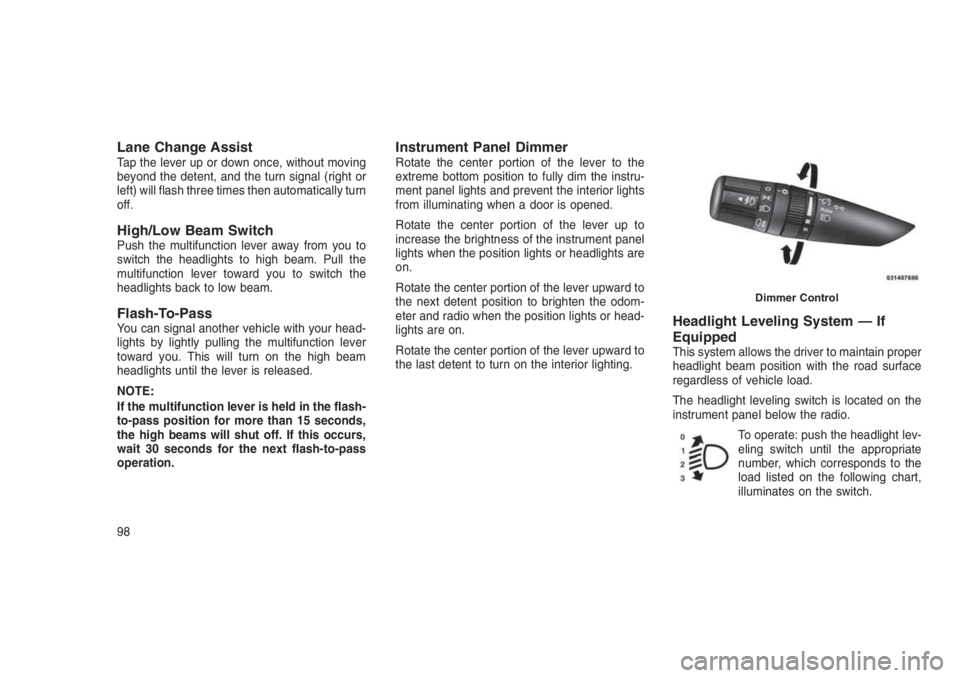
Instrument Panel DimmerRotate the center portion of the lever to the
extreme bottom position to fully dim the instru-
ment panel lights and prevent the interior lights
from illuminating when a door is opened.
Rotate the center portion of the lever up to
increase the brightness of the instrument panel
lights when the position lights or headlights are
on.
Rotate the center portion of the lever upward to
the next detent position to brighten the odom-
eter and radio when the position lights or head-
lights are on.
Rotate the center portion of the lever upward to
the last detent to turn on the interior lighting.
Headlight Leveling System — If
Equipped
This system allows the driver to maintain proper
headlight beam position with the road surface
regardless of vehicle load.
The headlight leveling switch is located on the
instrument panel below the radio.
To operate: push the headlight lev-
eling switch until the appropriate
number, which corresponds to the
load listed on the following chart,
illuminates on the switch.
Dimmer Control
98
Page 107 of 332
WARNING!(Continued)
to go faster than you want. You could lose
control and have an accident. Always leave
the system OFF when you are not using it.
To Set A Desired SpeedTurn the Electronic Speed Control ON. When
the vehicle has reached the desired speed,
push the SET (-) button and release. Release
the accelerator and the vehicle will operate at
the selected speed.
NOTE:
The vehicle should be traveling at a steady
speed and on level ground before pushing
the SET (-) button.
To DeactivateA soft tap on the brake pedal, pushing the
CANCEL button, normal braking or pressing the
clutch pedal while slowing the vehicle will deac-
tivate Electronic Speed Control without erasing
the set speed memory. Pushing the ON/OFF
button or turning the ignition switch OFF erases
the set speed memory.
To Resume SpeedTo resume a previously set speed, push the
RES (+) button and release. Resume can be
used at any speed above 20 mph (32 km/h).
To Vary The Speed SettingTo Increase Speed
When the Electronic Speed Control is set, you
can increase speed by pushing the RES (+)
button.
The drivers preferred units can be selected
through the instrument panel settings if
equipped. Refer to “Understanding Your Instru-
ment Panel” for more information. The speed
increment shown is dependant on the chosen
speed unit of U.S. (mph) or Metric (km/h):
U.S. Speed (mph)
•Pushing the RES (+) button once will result in
a 1 mph increase in set speed. Each subse-
quent tap of the button results in an increase
of 1 mph.•If the button is continually pushed, the set
speed will continue to increase until the but-
ton is released, then the new set speed will
be established.
Metric Speed (km/h)
•Pushing the RES (+) button once will result in
a 1 km/h increase in set speed. Each subse-
quent tap of the button results in an increase
of 1 km/h.
•If the button is continually pushed, the set
speed will continue to increase until the but-
ton is released, then the new set speed will
be established.
To Decrease Speed
When the Electronic Speed Control is set, you
can decrease speed by pushing the SET (-)
button.
The drivers preferred units can be selected
through the instrument panel settings if
equipped. Refer to “Understanding Your Instru-
ment Panel” for more information. The speed
decrement shown is dependant on the chosen
speed unit of U.S. (mph) or Metric (km/h):
103
Page 121 of 332
4
UNDERSTANDING YOUR INSTRUMENT
PANEL
•INSTRUMENT PANEL FEATURES...................119
•INSTRUMENT CLUSTER . . . . . . . . . . . . . . . . . . . . . . . . .120
•WARNING AND INDICATOR LIGHTS. . .. . . . . . . . . . . . . . .122
•Red Telltale Indicator Lights.....................123
•Yellow Telltale Indicator Lights....................129
•Green Telltale Indicator Lights....................136
•Blue Telltale Indicator Lights.....................137
•White Telltale Indicator Lights....................138
•ELECTRONIC VEHICLE INFORMATION CENTER (EVIC) — IF
EQUIPPED . . . . . . . ..........................139
•Engine Oil Change Indicator System — If Equipped.......140
•Compass/Temperature/Audio.....................141
•Average Fuel Economy........................141
•Distance To Empty (DTE).......................141
•Tire Pressure Monitor (TPM) — If Equipped............141
•Elapsed Time..............................141
•EVIC Units Selection (Units In Display)...............141
•System Warnings............................141
11 7
Page 123 of 332
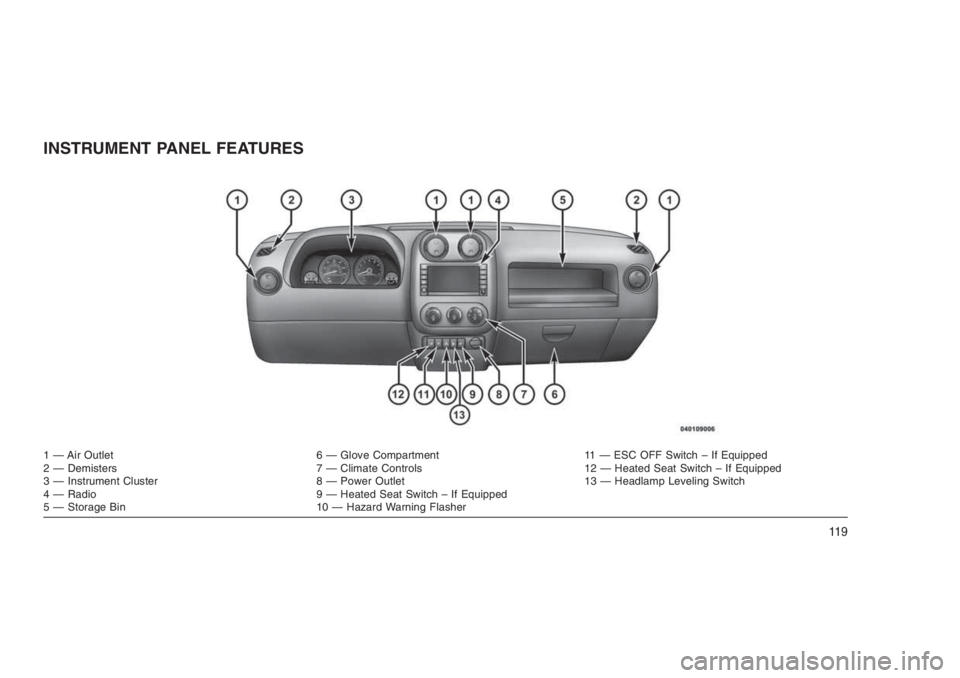
INSTRUMENT PANEL FEATURES
1 — Air Outlet 6 — Glove Compartment 11 — ESC OFF Switch – If Equipped
2 — Demisters 7 — Climate Controls 12 — Heated Seat Switch – If Equipped
3 — Instrument Cluster 8 — Power Outlet 13 — Headlamp Leveling Switch
4 — Radio 9 — Heated Seat Switch – If Equipped
5 — Storage Bin 10 — Hazard Warning Flasher
11 9