warning JEEP PATRIOT 2021 Owner handbook (in English)
[x] Cancel search | Manufacturer: JEEP, Model Year: 2021, Model line: PATRIOT, Model: JEEP PATRIOT 2021Pages: 332, PDF Size: 1.99 MB
Page 70 of 332
WARNING!(Continued)
ing too much on your passenger side convex
mirror could cause you to collide with an-
other vehicle or other object. Use your inside
mirror when judging the size or distance of a
vehicle seen in the passenger side convex
mirror. Some vehicles will not have a convex
passenger side mirror.
Folding Outside MirrorsThe outside mirrors are hinged and may be
moved, manually, either forward or rearward to
resist damage. The hinges have three detent
positions; full forward, full rearward and normal.
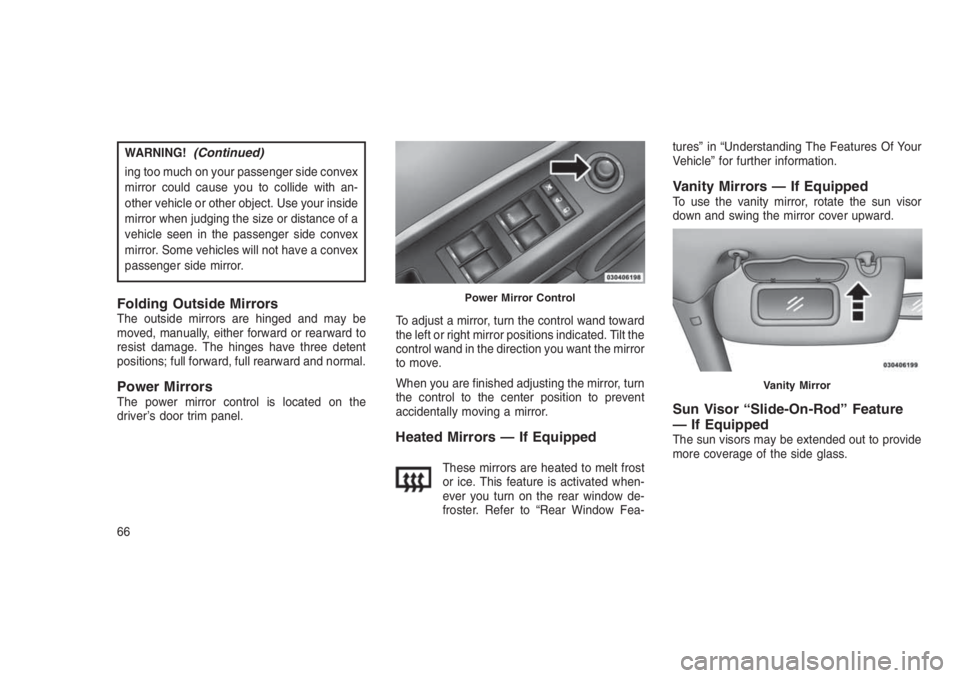
Power MirrorsThe power mirror control is located on the
driver’s door trim panel.To adjust a mirror, turn the control wand toward
the left or right mirror positions indicated. Tilt the
control wand in the direction you want the mirror
to move.
When you are finished adjusting the mirror, turn
the control to the center position to prevent
accidentally moving a mirror.
Heated Mirrors — If Equipped
These mirrors are heated to melt frost
or ice. This feature is activated when-
ever you turn on the rear window de-
froster. Refer to “Rear Window Fea-tures” in “Understanding The Features Of Your
Vehicle” for further information.
Vanity Mirrors — If EquippedTo use the vanity mirror, rotate the sun visor
down and swing the mirror cover upward.
Sun Visor “Slide-On-Rod” Feature
— If Equipped
The sun visors may be extended out to provide
more coverage of the side glass.
Power Mirror Control
Vanity Mirror
66
Page 71 of 332
UCONNECT PHONE — IF
EQUIPPED
Uconnect Phone is a voice-activated, hands-
free, in-vehicle communications system.
Uconnect Phone allows you to dial a phone
number with your mobile phone using simple
voice commands (e.g., “Call”…“Mike”…
“Work” or “Dial”…“151-1234-5555”). Your mo-
bile phone’s audio is transmitted through your
vehicle’s audio system; the system will auto-
matically mute your radio when using the
Uconnect Phone.
NOTE:
The Uconnect Phone requires a mobile
phone equipped with the Bluetooth “Hands-
Free Profile”, Version 0.96 or higher. See the
Uconnect website for supported phones.
For Uconnect Customer Support visit
UconnectPhone.com.
Uconnect Phone allows you to transfer calls
between the system and your mobile phone as
you enter or exit your vehicle and enables you
to mute the system’s microphone for private
conversation.The Uconnect Phone is driven through your
Bluetooth “Hands-Free Profile” mobile phone.
Uconnect features Bluetooth technology - the
global standard that enables different electronic
devices to connect to each other without wires
or a docking station, so Uconnect Phone works
no matter where you stow your mobile phone
(be it your purse, pocket, or briefcase), as long
as your phone is turned on and has been paired
to the vehicle’s Uconnect Phone. The Uconnect
Phone allows up to seven mobile phones to be
linked to the system. Only one linked (or paired)
mobile phone can be used with the system at a
time. The system is available in many lan-
guages.
WARNING!
Any voice commanded system should be
used only in safe driving conditions following
all applicable laws, including laws regarding
phone use. Your attention should be focused
on safely operating the vehicle. Failure to do
so may result in a collision causing serious
injury or death.Uconnect Phone Button
The radio or steering wheel con-
trols (if equipped) will contain the
two control buttons (Uconnect
Phone
button and Voice Com-
mandbutton) that will enable
you to access the system. When you push the
button you will hear the word Uconnect followed
by a BEEP. The beep is your signal to give a
command.
Voice Command Button
Actual button location may vary
with the radio. The individual but-
tons are described in the “Opera-
tion” section.
The Uconnect Phone can be used with any
Hands-Free Profile certified Bluetooth mobile
phone. See the Uconnect website for supported
phones. Refer to your mobile service provider
or the phone manufacturer for details.
The Uconnect Phone is fully integrated with the
vehicle’s audio system. The volume of the
Uconnect Phone can be adjusted either from
67
Page 78 of 332
•After the “Ready” prompt and the following
beep, say the name of the language you wish
to switch to (English, Dutch, French, Ger-
man, Italian, or Spanish, if so equipped).
•Continue to follow the system prompts to
complete the language selection.
After selecting one of the languages, all
prompts and voice commands will be in that
language.
Emergency Assistance
If you are in an emergency and the mobile
phone is reachable:
•Pick up the phone and manually dial the
emergency number for your area.
If the phone is not reachable and the Uconnect
Phone is operational, you may reach the emer-
gency number as follows:
•Push the Phone
button to begin.
•After the “Ready” prompt and the following
beep, say “Emergency” and the Uconnect
Phone will instruct the paired mobile phone
to call the emergency number.NOTE:
•The default number is 112. The number
dialed may not be applicable with the
available mobile service and area.
•If supported, this number may be pro-
grammable on some systems. To do this,
push the Phone
button and say
“Setup,” followed by “Emergency.”
•The Uconnect Phone does slightly lower
your chances of successfully making a
phone call as to that for the mobile phone
directly.
WARNING!
To use your Uconnect Phone System in an
emergency, your mobile phone must be:
•Turned on.
•Paired to the Uconnect System.
•Have network coverage.
Breakdown Service — If Equipped
If you need Breakdown service:
1. Push the Phone
button to begin.2. After the “Ready” prompt and the following
beep, say “Breakdown service.”
NOTE:
The Breakdown service number has to be
setup before using. To setup, push the
Phone
button and say “Setup, Break-
down Service” and follow prompts.
Paging
To learn how to page, refer to “Working with
Automated Systems.” Paging works properly
except for pagers of certain companies, which
time out a little too soon to work properly with
the Uconnect Phone.
Voice Mail Calling
To learn how to access your voice mail, refer to
“Working with Automated Systems.”
Working With Automated Systems
This method is used in instances where one
generally has to push numbers on the mobile
phone keypad while navigating through an au-
tomated telephone system.
You can use your Uconnect Phone to access a
voice mail system or an automated service,
such as a paging service or automated cus-
74
Page 89 of 332
Primary Alternate (s)
send
set up phone settings or
phone set up
transfer call
Uconnect Tutorial
voice training
work
yes
VOICE COMMAND — IF
EQUIPPED
Voice Command System Operation
The Uconnect Voice Command
system allows you to control your
AM, FM radio, disc player, USB
Mass Storage Class device, iPod
family of devices, Bluetooth
Streaming Audio device, and a
memo recorder.NOTE:
Take care to speak into the Voice Interface
System as calmly and normally as possible.
The ability of the Voice Interface System to
recognize user voice commands may be
negatively affected by rapid speaking or a
raised voice level.
WARNING!
Any voice commanded system should be
used only in safe driving conditions following
all applicable laws, including laws regarding
phone use. Your attention should be focused
on safely operating the vehicle. Failure to do
so may result in a collision causing serious
injury or death.
When you push the Voice Command
button,
you will hear a beep. The beep is your signal to
give a command.NOTE:
If you do not say a command within a few
seconds, the system will present you with a
list of options.
If you ever wish to interrupt the system while it
lists options, push the Voice Command
but-
ton, listen for the beep, and say your command.
Pushing the Voice Command
button while
the system is speaking is known as “barging in.”
The system will be interrupted, and after the
beep, you can add or change commands. This
will become helpful once you start to learn the
options.
NOTE:
At any time, you can say the words “Can-
cel,” “Help” or “Main Menu.”
These commands are universal and can be
used from any menu. All other commands can
be used depending upon the active application.
When using this system, you should speak
clearly and at a normal speaking volume.
85
Page 92 of 332
NOTE:
Keep in mind that you have to push the
Voice Command
button first and wait for
the beep before speaking the “Barge In”
commands.
Voice TrainingFor users experiencing difficulty with the system
recognizing their voice commands or numbers
the Uconnect Voice “Voice Training” feature
may be used.
1. Push the Voice Command
button, say
“System Setup” and once you are in that
menu then say “Voice Training.”
•This will train your own voice to the system
and will improve recognition.
2. Repeat the words and phrases when
prompted by Uconnect Voice.
•For best results, the Voice Training ses-
sion should be completed when the ve-
hicle is parked, engine running, all win-
dows closed, and the blower fan switchedoff. This procedure may be repeated with a
new user. The system will adapt to the last
trained voice only.
SEATS
Seats are a part of the Occupant Restraint
System of the vehicle.
WARNING!
•It is dangerous to ride in a cargo area,
inside or outside of a vehicle. In a collision,
people riding in these areas are more likely
to be seriously injured or killed.
•Do not allow people to ride in any area of
your vehicle that is not equipped with seats
and seat belts. In a collision, people riding
in these areas are more likely to be seri-
ously injured or killed.
•Be sure everyone in your vehicle is in a
seat and using a seat belt properly.
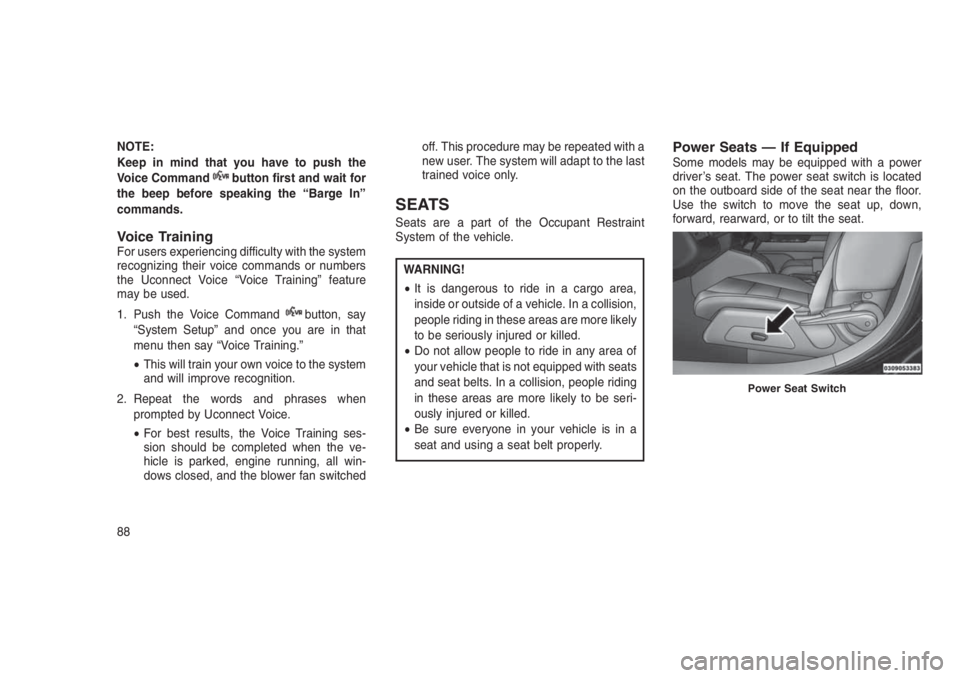
Power Seats — If EquippedSome models may be equipped with a power
driver’s seat. The power seat switch is located
on the outboard side of the seat near the floor.
Use the switch to move the seat up, down,
forward, rearward, or to tilt the seat.
Power Seat Switch
88
Page 93 of 332
WARNING!
•Adjusting a seat while driving may be
dangerous. Moving a seat while driving
could result in loss of control which could
cause a collision and serious injury or
death.
•Seats should be adjusted before fastening
the seat belts and while the vehicle is
parked. Serious injury or death could result
from a poorly adjusted seat belt.
CAUTION!
Do not place any article under a power seat
or impede its ability to move as it may cause
damage to the seat controls. Seat travel may
become limited if movement is stopped by an
obstruction in the seat’s path.
Adjusting The Seat Forward Or Rearward
The seat can be adjusted both forward and
rearward. Push the seat switch forward or rear-
ward. The seat will move in the direction of theswitch. Release the switch when the desired
position has been reached.
Adjusting The Seat Up Or Down
The height of the seats can be adjusted up or
down. Pull upward or push downward on the
seat switch. The seat will move in the direction
of the switch. Release the switch when the
desired position is reached.
Tilting The Seat Up Or Down
The angle of the seat cushion can be adjusted
in four directions. Pull upward or push down-
ward on the front or rear of the seat switch, the
front or rear of the seat cushion will move in the
direction of the switch. Release the switch when
the desired position is reached.
Heated Seats — If EquippedOn some models, the front driver and passen-
ger seats may be equipped with heaters in both
the seat cushions and seatbacks. The controls
for the front heated seats are located on the
center instrument panel area.
You can choose from HI, LO or OFF heat
settings. Amber indicator lights in each switchindicate the level of heat in use. Two indicator
lights will illuminate for HI, one for LO and none
for OFF.
Push the switch once to select HI-
level heating. Push the switch a sec-
ond time to select LO-level heating.
Push the switch a third time to shut
the heating elements OFF.
When the HI-level setting is selected, the heater
will provide a boosted heat level during the
initial stages of operation. Then, the heat output
will drop to the normal HI-level. If the HI-level
setting is selected, the system will automatically
switch to LO-level after approximately 30 min-
utes of continuous operation. At that time, the
display will change from HI to LO, indicating the
change. When the LO-level heating is selected,
the system automatically turns the heater and
the indicator light OFF after approximately 30
minutes of continuous operation.
NOTE:
Once a heat setting is selected, heat will be
felt within two to five minutes.
89
Page 94 of 332
WARNING!
•Persons who are unable to feel pain to the
skin because of advanced age, chronic
illness, diabetes, spinal cord injury, medi-
cation, alcohol use, exhaustion or other
physical condition must exercise care
when using the seat heater. It may cause
burns even at low temperatures, especially
if used for long periods of time.
•Do not place anything on the seat or
seatback that insulates against heat, such
as a blanket or cushion. This may cause
the seat heater to overheat. Sitting in a
seat that has been overheated could
cause serious burns due to the increased
surface temperature of the seat.
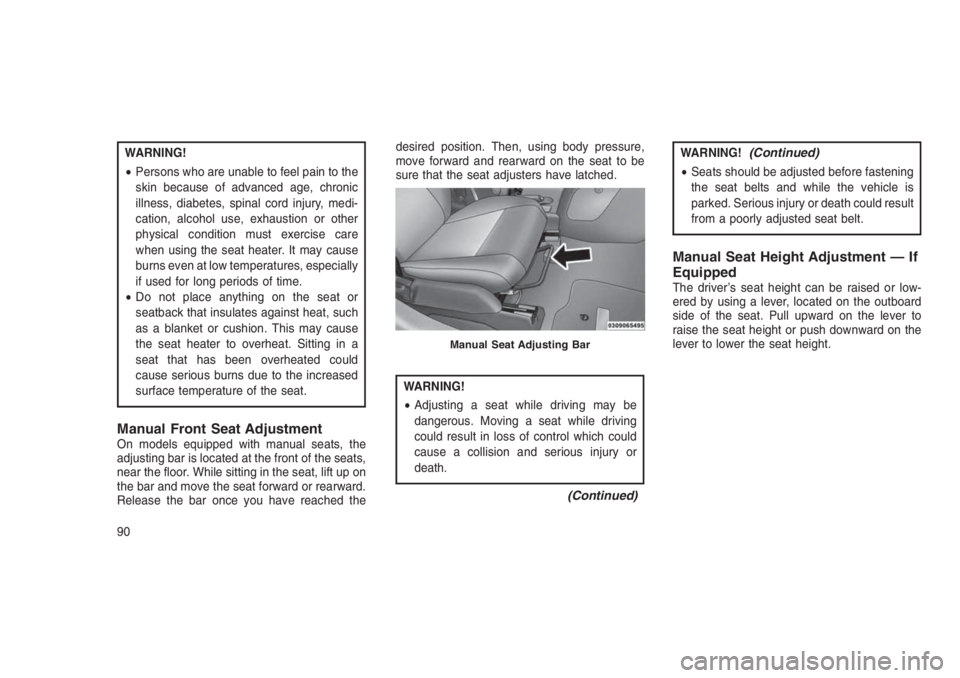
Manual Front Seat AdjustmentOn models equipped with manual seats, the
adjusting bar is located at the front of the seats,
near the floor. While sitting in the seat, lift up on
the bar and move the seat forward or rearward.
Release the bar once you have reached thedesired position. Then, using body pressure,
move forward and rearward on the seat to be
sure that the seat adjusters have latched.
WARNING!
•Adjusting a seat while driving may be
dangerous. Moving a seat while driving
could result in loss of control which could
cause a collision and serious injury or
death.
(Continued)
WARNING!(Continued)
•Seats should be adjusted before fastening
the seat belts and while the vehicle is
parked. Serious injury or death could result
from a poorly adjusted seat belt.
Manual Seat Height Adjustment — If
Equipped
The driver’s seat height can be raised or low-
ered by using a lever, located on the outboard
side of the seat. Pull upward on the lever to
raise the seat height or push downward on the
lever to lower the seat height.
Manual Seat Adjusting Bar
90
Page 95 of 332
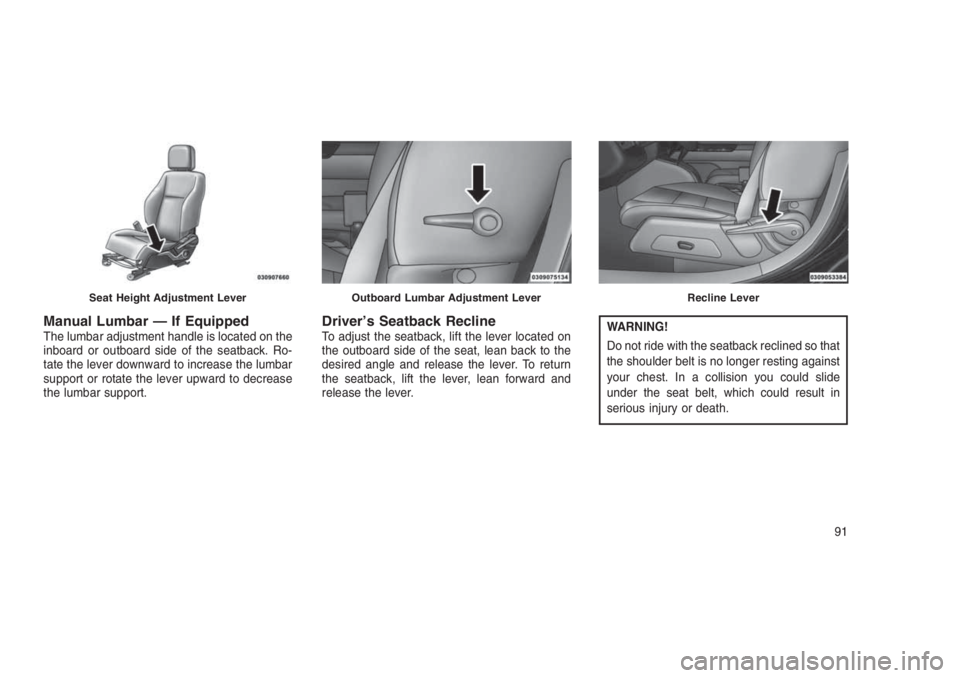
Manual Lumbar — If EquippedThe lumbar adjustment handle is located on the
inboard or outboard side of the seatback. Ro-
tate the lever downward to increase the lumbar
support or rotate the lever upward to decrease
the lumbar support.Driver’s Seatback ReclineTo adjust the seatback, lift the lever located on
the outboard side of the seat, lean back to the
desired angle and release the lever. To return
the seatback, lift the lever, lean forward and
release the lever.WARNING!
Do not ride with the seatback reclined so that
the shoulder belt is no longer resting against
your chest. In a collision you could slide
under the seat belt, which could result in
serious injury or death.
Seat Height Adjustment LeverOutboard Lumbar Adjustment LeverRecline Lever
91
Page 96 of 332
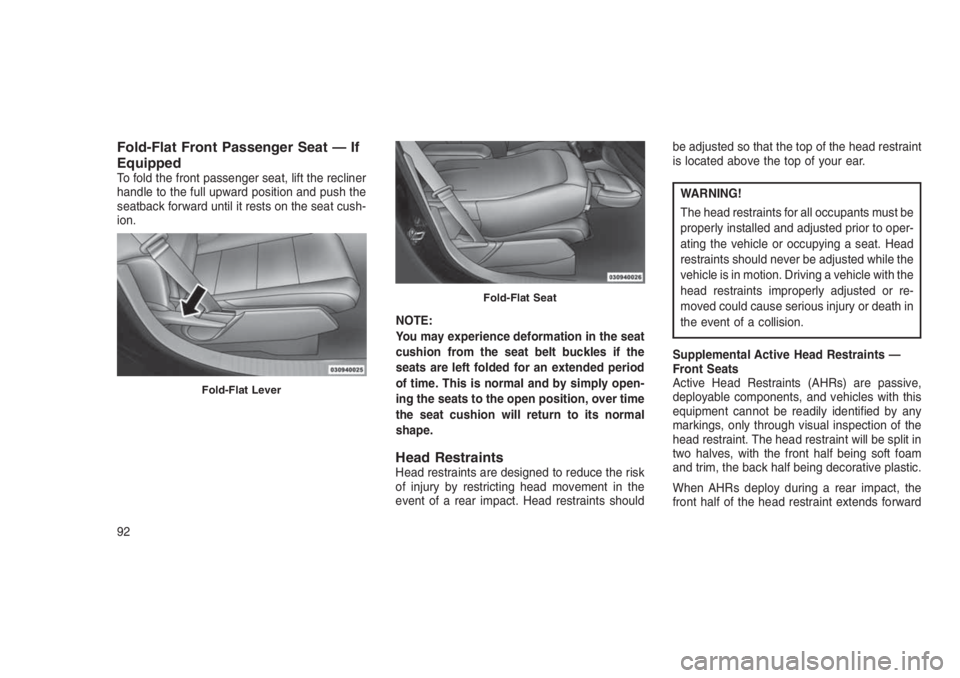
Fold-Flat Front Passenger Seat — If
Equipped
To fold the front passenger seat, lift the recliner
handle to the full upward position and push the
seatback forward until it rests on the seat cush-
ion.
NOTE:
You may experience deformation in the seat
cushion from the seat belt buckles if the
seats are left folded for an extended period
of time. This is normal and by simply open-
ing the seats to the open position, over time
the seat cushion will return to its normal
shape.
Head RestraintsHead restraints are designed to reduce the risk
of injury by restricting head movement in the
event of a rear impact. Head restraints shouldbe adjusted so that the top of the head restraint
is located above the top of your ear.
WARNING!
The head restraints for all occupants must be
properly installed and adjusted prior to oper-
ating the vehicle or occupying a seat. Head
restraints should never be adjusted while the
vehicle is in motion. Driving a vehicle with the
head restraints improperly adjusted or re-
moved could cause serious injury or death in
the event of a collision.
Supplemental Active Head Restraints —
Front Seats
Active Head Restraints (AHRs) are passive,
deployable components, and vehicles with this
equipment cannot be readily identified by any
markings, only through visual inspection of the
head restraint. The head restraint will be split in
two halves, with the front half being soft foam
and trim, the back half being decorative plastic.
When AHRs deploy during a rear impact, the
front half of the head restraint extends forward
Fold-Flat Lever
Fold-Flat Seat
92
Page 98 of 332
WARNING!
•All occupants, including the driver, should
not operate a vehicle or sit in a vehicle’s
seat until the head restraints are placed in
their proper positions in order to minimize
the risk of neck injury in the event of a
collision.
•
Do not place items over the top of the Active
Head Restraint, such as coats, seat covers
or portable DVD players. These items may
interfere with the operation of the Active
Head Restraint in the event of a collision and
could result in serious injury or death.
•Active Head Restraints may be deployed if
they are struck by an object such as a hand,
foot or loose cargo. To avoid accidental
deployment of the Active Head Restraint
ensure that all cargo is secured, as loose
cargo could contact the Active Head Re-
straint during sudden stops. Failure to follow
this warning could cause personal injury if
the Active Head Restraint is deployed.
Rear Head Restraints
The head restraints in the rear are non adjust-
able. Refer to “Occupant Restraints” in “Things
To Know Before Starting Your Vehicle” for infor-
mation on Tether routing.
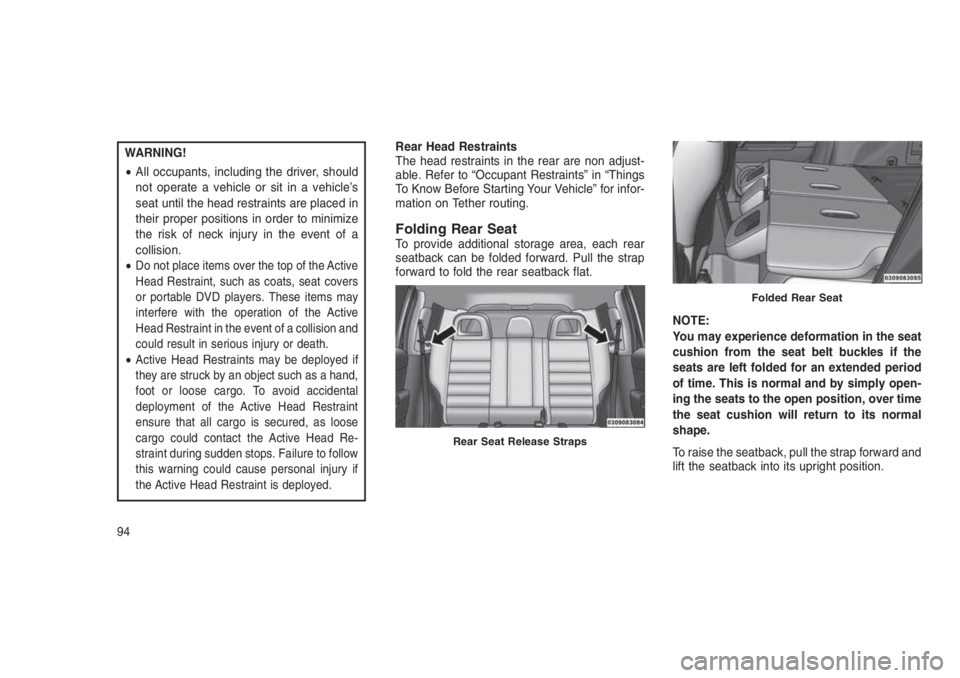
Folding Rear SeatTo provide additional storage area, each rear
seatback can be folded forward. Pull the strap
forward to fold the rear seatback flat.
NOTE:
You may experience deformation in the seat
cushion from the seat belt buckles if the
seats are left folded for an extended period
of time. This is normal and by simply open-
ing the seats to the open position, over time
the seat cushion will return to its normal
shape.
To raise the seatback, pull the strap forward and
lift the seatback into its upright position.
Rear Seat Release Straps
Folded Rear Seat
94