ECO mode JEEP RENEGADE 2014 1.G User Guide
[x] Cancel search | Manufacturer: JEEP, Model Year: 2014, Model line: RENEGADE, Model: JEEP RENEGADE 2014 1.GPages: 212, PDF Size: 17.48 MB
Page 73 of 212
"Blind spot alert", "Visual" mode:
when this mode is active, the BSM
system sends a visual warning to the
relevant door mirror, according to
the detected object. When operating in
RCP mode, the system sends visual
and acoustic warnings when the
presence of an approaching object is
detected. When an acoustic warning is
sent, theUconnect™volume is
lowered.
"Blind spot alert", "Visual &
acoustic" mode: when this mode is
active, the BSM system sends a visual
warning to the relevant door mirror,
according to the detected object. If the
direction indicator on the side where
an obstacle has been detected is
activated, an acoustic warning is
emitted as well. When the acoustic
warning is emitted, theUconnect™
volume is lowered.
"Blind spot alert" function
deactivation: when the system is
deactivated ("Blind spot alert" mode at
"OFF"), the BSM or RCP systems will
not emit neither acoustic nor visual
warnings. The BSM system will store
the operating mode running when
the engine was switched off: each time
the engine is started, the operating
mode stored previously will be recalled
and used.FORWARD COLLISION
WARNING PLUS SYSTEM
64) 65) 66) 67)
23) 24) 25) 26) 27) 28) 29) 30) 31)
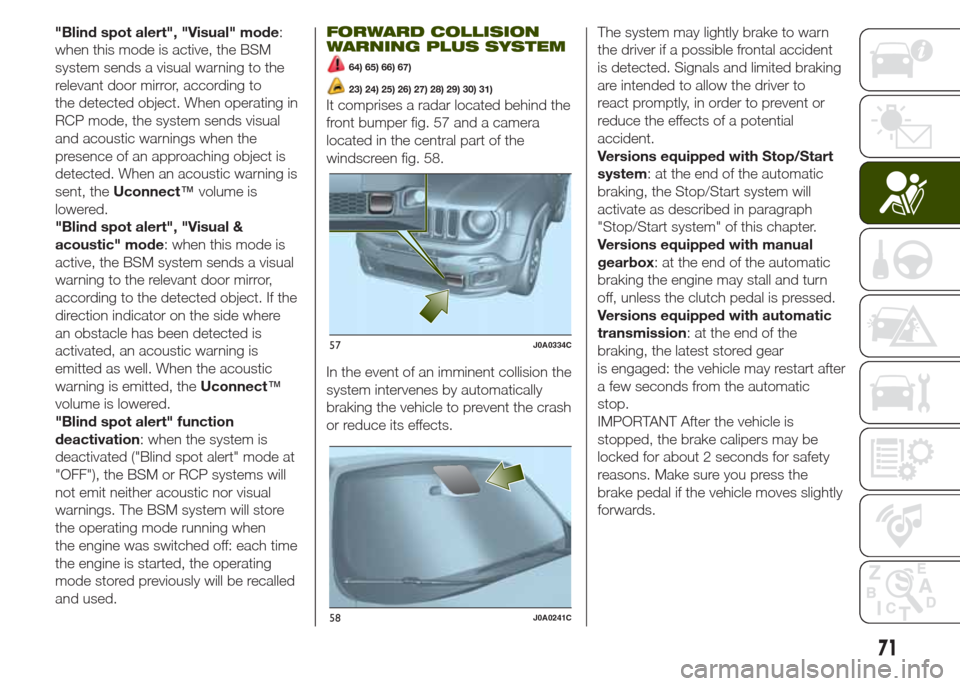
It comprises a radar located behind the
front bumper fig. 57 and a camera
located in the central part of the
windscreen fig. 58.
In the event of an imminent collision the
system intervenes by automatically
braking the vehicle to prevent the crash
or reduce its effects.The system may lightly brake to warn
the driver if a possible frontal accident
is detected. Signals and limited braking
are intended to allow the driver to
react promptly, in order to prevent or
reduce the effects of a potential
accident.
Versions equipped with Stop/Start
system: at the end of the automatic
braking, the Stop/Start system will
activate as described in paragraph
"Stop/Start system" of this chapter.
Versions equipped with manual
gearbox: at the end of the automatic
braking the engine may stall and turn
off, unless the clutch pedal is pressed.
Versions equipped with automatic
transmission: at the end of the
braking, the latest stored gear
is engaged: the vehicle may restart after
a few seconds from the automatic
stop.
IMPORTANT After the vehicle is
stopped, the brake calipers may be
locked for about 2 seconds for safety
reasons. Make sure you press the
brake pedal if the vehicle moves slightly
forwards.
57J0A0334C
58J0A0241C
71
Page 105 of 212
MANUAL GEARBOX
115)38)
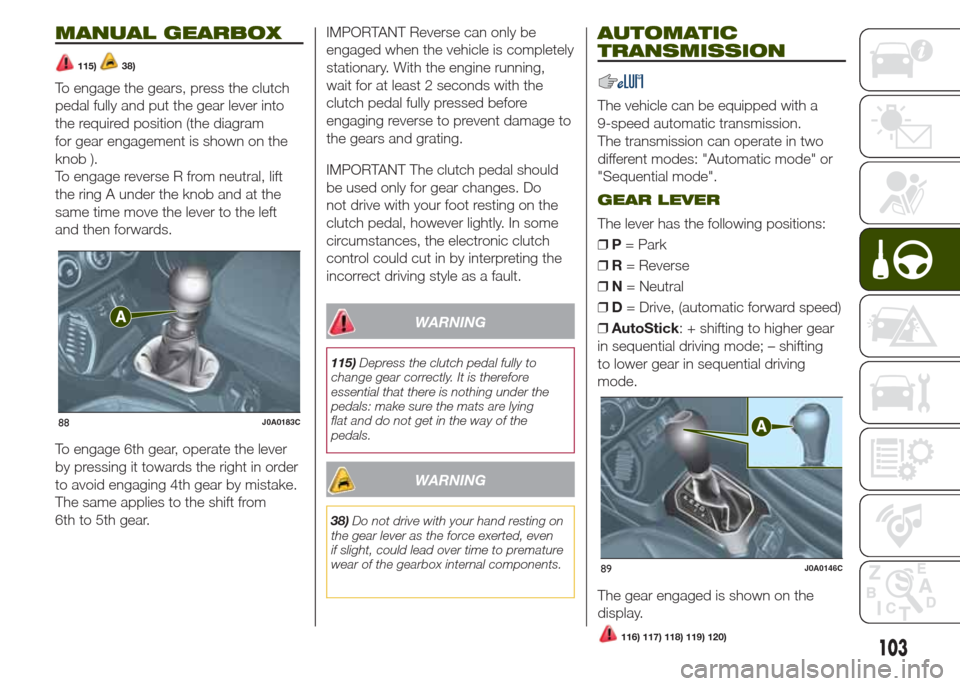
To engage the gears, press the clutch
pedal fully and put the gear lever into
the required position (the diagram
for gear engagement is shown on the
knob ).
To engage reverse R from neutral, lift
the ring A under the knob and at the
same time move the lever to the left
and then forwards.
To engage 6th gear, operate the lever
by pressing it towards the right in order
to avoid engaging 4th gear by mistake.
The same applies to the shift from
6th to 5th gear.IMPORTANT Reverse can only be
engaged when the vehicle is completely
stationary. With the engine running,
wait for at least 2 seconds with the
clutch pedal fully pressed before
engaging reverse to prevent damage to
the gears and grating.
IMPORTANT The clutch pedal should
be used only for gear changes. Do
not drive with your foot resting on the
clutch pedal, however lightly. In some
circumstances, the electronic clutch
control could cut in by interpreting the
incorrect driving style as a fault.
WARNING
115)Depress the clutch pedal fully to
change gear correctly. It is therefore
essential that there is nothing under the
pedals: make sure the mats are lying
flat and do not get in the way of the
pedals.
WARNING
38)Do not drive with your hand resting on
the gear lever as the force exerted, even
if slight, could lead over time to premature
wear of the gearbox internal components.
AUTOMATIC
TRANSMISSION
The vehicle can be equipped with a
9-speed automatic transmission.
The transmission can operate in two
different modes: "Automatic mode" or
"Sequential mode".
GEAR LEVER
The lever has the following positions:
❒P= Park
❒R= Reverse
❒N= Neutral
❒D= Drive, (automatic forward speed)
❒AutoStick: + shifting to higher gear
in sequential driving mode; – shifting
to lower gear in sequential driving
mode.
The gear engaged is shown on the
display.
88J0A0183C
89J0A0146C
103116) 117) 118) 119) 120)
Page 106 of 212
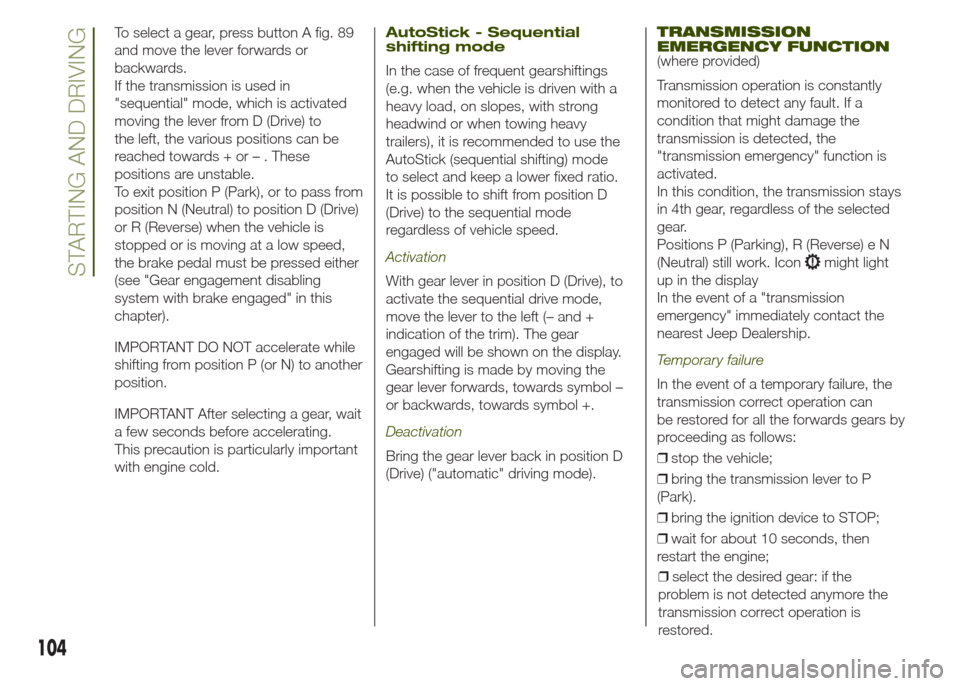
To select a gear, press button A fig. 89
and move the lever forwards or
backwards.
If the transmission is used in
"sequential" mode, which is activated
moving the lever from D (Drive) to
the left, the various positions can be
reached towards + or – . These
positions are unstable.
To exit position P (Park), or to pass from
position N (Neutral) to position D (Drive)
or R (Reverse) when the vehicle is
stopped or is moving at a low speed,
the brake pedal must be pressed either
(see "Gear engagement disabling
system with brake engaged" in this
chapter).
IMPORTANT DO NOT accelerate while
shifting from position P (or N) to another
position.
IMPORTANT After selecting a gear, wait
a few seconds before accelerating.
This precaution is particularly important
with engine cold.AutoStick - Sequential
shifting mode
In the case of frequent gearshiftings
(e.g. when the vehicle is driven with a
heavy load, on slopes, with strong
headwind or when towing heavy
trailers), it is recommended to use the
AutoStick (sequential shifting) mode
to select and keep a lower fixed ratio.
It is possible to shift from position D
(Drive) to the sequential mode
regardless of vehicle speed.
Activation
With gear lever in position D (Drive), to
activate the sequential drive mode,
move the lever to the left (– and +
indication of the trim). The gear
engaged will be shown on the display.
Gearshifting is made by moving the
gear lever forwards, towards symbol –
or backwards, towards symbol +.
Deactivation
Bring the gear lever back in position D
(Drive) ("automatic" driving mode).
TRANSMISSION
EMERGENCY FUNCTION
(where provided)
Transmission operation is constantly
monitored to detect any fault. If a
condition that might damage the
transmission is detected, the
"transmission emergency" function is
activated.
In this condition, the transmission stays
in 4th gear, regardless of the selected
gear.
Positions P (Parking), R (Reverse) e N
(Neutral) still work. Icon
might light
up in the display
In the event of a "transmission
emergency" immediately contact the
nearest Jeep Dealership.
Temporary failure
In the event of a temporary failure, the
transmission correct operation can
be restored for all the forwards gears by
proceeding as follows:
❒stop the vehicle;
❒bring the transmission lever to P
(Park).
❒bring the ignition device to STOP;
❒wait for about 10 seconds, then
restart the engine;
104
STARTING AND DRIVING
❒select the desired gear: if the
problem is not detected anymore the
transmission correct operation is
restored.
Page 112 of 212
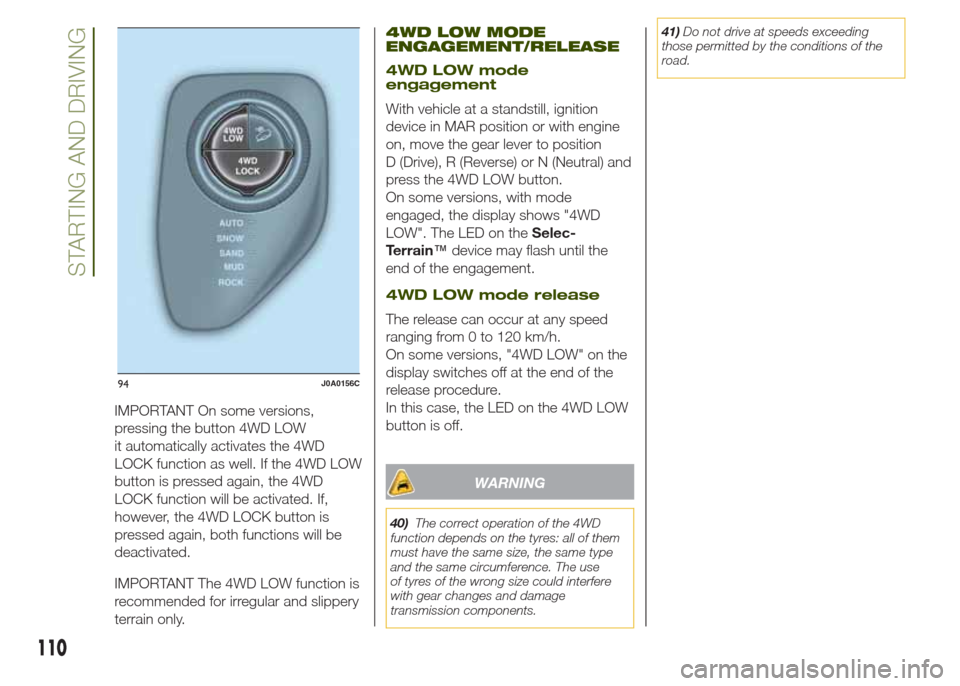
IMPORTANT On some versions,
pressing the button 4WD LOW
it automatically activates the 4WD
LOCK function as well. If the 4WD LOW
button is pressed again, the 4WD
LOCK function will be activated. If,
however, the 4WD LOCK button is
pressed again, both functions will be
deactivated.
IMPORTANT The 4WD LOW function is
recommended for irregular and slippery
terrain only.
4WD LOW MODE
ENGAGEMENT/RELEASE
4WD LOW mode
engagement
With vehicle at a standstill, ignition
device in MAR position or with engine
on, move the gear lever to position
D (Drive), R (Reverse) or N (Neutral) and
press the 4WD LOW button.
On some versions, with mode
engaged, the display shows "4WD
LOW". The LED on theSelec-
Terrain™device may flash until the
end of the engagement.
4WD LOW mode release
The release can occur at any speed
ranging from 0 to 120 km/h.
On some versions, "4WD LOW" on the
display switches off at the end of the
release procedure.
In this case, the LED on the 4WD LOW
button is off.
WARNING
40)The correct operation of the 4WD
function depends on the tyres: all of them
must have the same size, the same type
and the same circumference. The use
of tyres of the wrong size could interfere
with gear changes and damage
transmission components.41)Do not drive at speeds exceeding
those permitted by the conditions of the
road.
94J0A0156C
110
STARTING AND DRIVING
Page 140 of 212
❒Raising the vehicle any more than
necessary may lower its stability: the
jack may slip and injure those nearby.
Do not raise the vehicle any more
than required for the removal of the
wheel.
❒Tyres with unidirectional tread can be
recognised by arrows on the side of
the tyre which indicate the direction of
rotation. This must of necessity be
complied with. Only in this way can the
tyres maintain their characteristics in
terms of grip, noise, resistance to wear
and drainage on wet surfaces.
❒If, after a puncture, it is necessary to
fit such a tyre the wrong way round,
it will be necessary to continue driving
with great care, since the tyre’s
performance is limited in these
conditions. This precaution must be
borne in mind above all when the road
surface is wet.
❒In order to benefit completely from
the unidirectional tread, it is advisable to
restore all wheels to the correct
direction of rotation as soon as
possible.
❒Make sure that the spare wheel is
fitted with the valve facing outwards.
The wheel may be damaged if fitted
incorrectly.❒If the vehicle has a hub cap or wheel
cover, do not attempt to fit it on the
spare wheel.
❒To prevent injury to persons, the
complete tightening of the bolts must
only be carried out when all of the
vehicle’s wheels are on the ground, to
prevent the vehicle falling from the jack.
❒After having travelled for about
40 km, stop and check that the bolts
are tightened correctly.
WARNING
141)If left in the passenger compartment,
the punctured wheel and jack constitute
a serious risk to the safety of occupants in
the event of accidents or sharp braking.
Therefore, always place both the jack and
punctured wheel in the dedicated housing
in the luggage compartment.
142)It is extremely dangerous to attempt
to change a wheel on the side of the
vehicle next to the driving lane: make sure
that the vehicle is at a sufficient distance
from the road, to avoid being run over.
143)Indicate the presence of the stationary
vehicle in accordance with current
regulations: hazard warning lights, warning
triangle, etc. Those on board should get
out of the vehicle, particularly if it is heavily
laden, and wait for the wheel to be
changed away from the threat posed by
the traffic. On slopes or on unsurfaced
roads, chock the wheels with the chocks
provided.144)The vehicle's driving characteristics
will be modified with the space-saver wheel
fitted. Avoid violent acceleration and
braking, abrupt steering and fast cornering.
The overall duration of the space-saver
wheel is of about 3000 km, after which the
relevant tyre must be replaced with another
one of the same type. Never install a
standard tyre on a rim that is designed for
use with a space-saver wheel. Have the
wheel repaired and refitted as soon as
possible. Using two or more space-saver
wheels at the same time is forbidden.
Do not grease the threads of the bolts
before fitting them: they might slip out
when driving!
145)The space-saver wheel (where
provided) is specific to your vehicle: do not
use it on other models, or use the
space-saver wheel of other models on your
vehicle. The space-saver wheel must only
be used in the event of emergency. It
must only be used for the distance
necessary to reach a service point and the
vehicle speed must not exceed 80 km/h.
The space-saver wheel has an orange label
that summarises the main cautions for
use and limitations. Never remove or cover
the label. Never apply a hub cap on a
space-saver wheel.
138
IN AN EMERGENCY
Page 141 of 212
146)The jack is a tool developed and
designed only for changing a wheel, if a
tyre gets punctured or damaged, on the
vehicle with which it is supplied or on other
vehicles of the same model. It must not
be used, for example, to jack other vehicle
models or objects. Never use the jack to
carry out maintenance or repairs under the
vehicle. Never position yourself under a
jacked vehicle. Should it be necessary to
work under the vehicle, contact a Jeep
Dealership. Incorrectly positioning the jack
may cause the vehicle to fall: use it only
in the positions indicated. Do not use the
jack for loads higher than the one shown
on its label.
147)The space-saver wheel cannot be
fitted with snow chains. If a front (drive) tyre
is punctured and chains are needed, use
a standard wheel from the rear axle and
install the space-saver wheel on the rear
axle. In this way, with two normal drive
wheels at the front axle, it is possible to use
snow chains.
148)Incorrect hub cap assembly, if
present, may cause it to come off when the
vehicle is moving. Never tamper with the
inflation valve. Never introduce tools of any
kind between the rim and the tyre. Check
tyre and space-saver wheel pressures
regularly, complying with the values given in
the "Technical specifications" chapter.TIREKIT
(where provided)
DESCRIPTION
The TireKit is located in the luggage
compartment inside a dedicated
container.
The container is also equipped with a
screwdriver, the tow hook and the
refuelling adaptor.
To access the TireKit, open the tailgate,
remove the reconfigurable load platform
and lift the carpet.
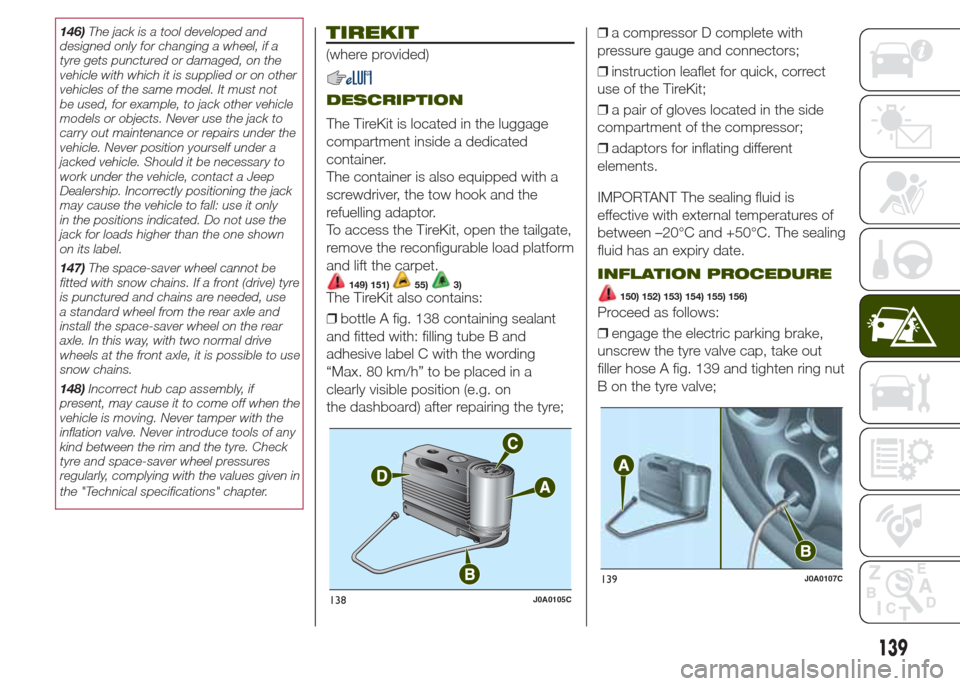
149) 151)55)3)The TireKit also contains:
❒bottle A fig. 138 containing sealant
and fitted with: filling tube B and
adhesive label C with the wording
“Max. 80 km/h” to be placed in a
clearly visible position (e.g. on
the dashboard) after repairing the tyre;❒a compressor D complete with
pressure gauge and connectors;
❒instruction leaflet for quick, correct
use of the TireKit;
❒a pair of gloves located in the side
compartment of the compressor;
❒adaptors for inflating different
elements.
IMPORTANT The sealing fluid is
effective with external temperatures of
between –20°C and +50°C. The sealing
fluid has an expiry date.
INFLATION PROCEDURE
150) 152) 153) 154) 155) 156)
Proceed as follows:
❒engage the electric parking brake,
unscrew the tyre valve cap, take out
filler hose A fig. 139 and tighten ring nut
B on the tyre valve;
138J0A0105C
139J0A0107C
139
Page 189 of 212
USB/iPod/AUX SUPPORT
Versions with Uconnect 5" Radio:
the vehicle has a USB/AUX port located
on the central tunnel.
Versions with Uconnect 5" Radio
Nav: the vehicle has a USB/AUX port
located in the centre tunnel and a USB
port located inside the front armrest.
RADIO MODE
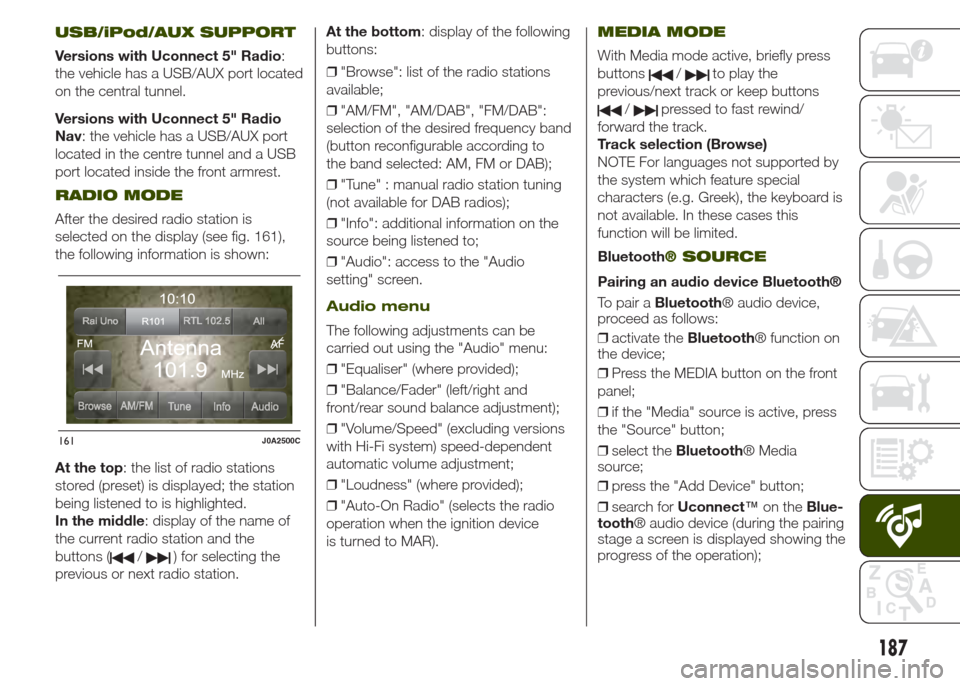
After the desired radio station is
selected on the display (see fig. 161),
the following information is shown:
At the top: the list of radio stations
stored (preset) is displayed; the station
being listened to is highlighted.
In the middle: display of the name of
the current radio station and the
buttons (
/) for selecting the
previous or next radio station.At the bottom: display of the following
buttons:
❒"Browse": list of the radio stations
available;
❒"AM/FM", "AM/DAB", "FM/DAB":
selection of the desired frequency band
(button reconfigurable according to
the band selected: AM, FM or DAB);
❒"Tune" : manual radio station tuning
(not available for DAB radios);
❒"Info": additional information on the
source being listened to;
❒"Audio": access to the "Audio
setting" screen.
Audio menu
The following adjustments can be
carried out using the "Audio" menu:
❒"Equaliser" (where provided);
❒"Balance/Fader" (left/right and
front/rear sound balance adjustment);
❒"Volume/Speed" (excluding versions
with Hi-Fi system) speed-dependent
automatic volume adjustment;
❒"Loudness" (where provided);
❒"Auto-On Radio" (selects the radio
operation when the ignition device
is turned to MAR).
MEDIA MODE
With Media mode active, briefly press
buttons
/to play the
previous/next track or keep buttons
/pressed to fast rewind/
forward the track.
Track selection (Browse)
NOTE For languages not supported by
the system which feature special
characters (e.g. Greek), the keyboard is
not available. In these cases this
function will be limited.
Bluetooth
® SOURCE
Pairing an audio device Bluetooth®
To pair aBluetooth® audio device,
proceed as follows:
❒activate theBluetooth® function on
the device;
❒Press the MEDIA button on the front
panel;
❒if the "Media" source is active, press
the "Source" button;
❒select theBluetooth® Media
source;
❒press the "Add Device" button;
❒search forUconnect™on theBlue-
tooth® audio device (during the pairing
stage a screen is displayed showing the
progress of the operation);
161J0A2500C
187
Page 198 of 212
STEERING WHEEL
CONTROLS
For the operation of the controls on the
steering wheel see paragraph Uconnect
5" Radio/Uconnect 5" Radio Nav.
USB/iPod/AUX SUPPORT
The vehicle has a USB/AUX port
located in the centre tunnel and a USB
port located inside the front armrest.
RADIO MODE
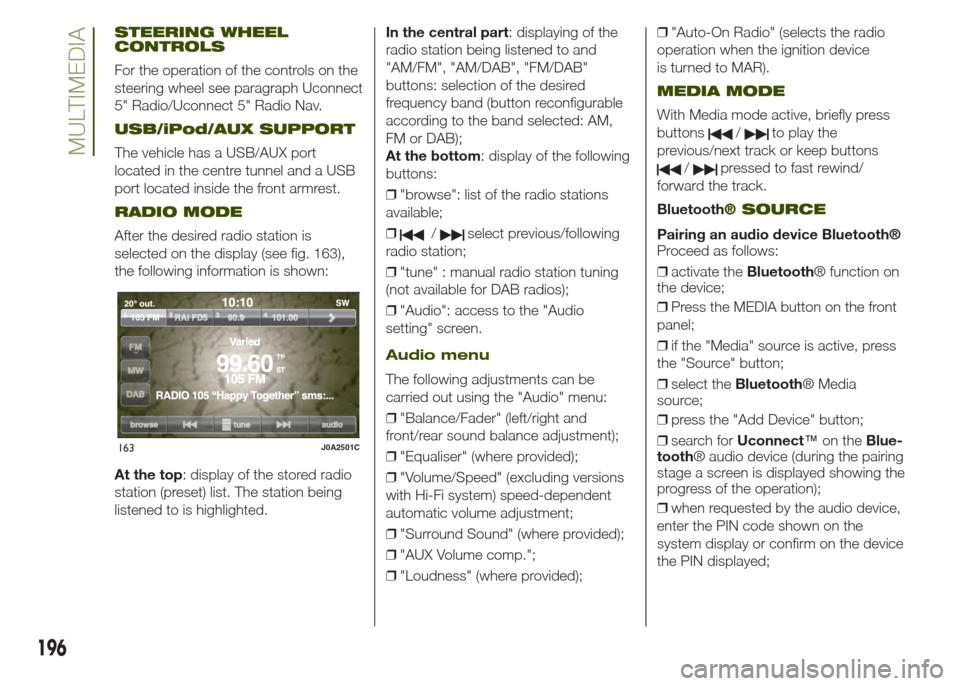
After the desired radio station is
selected on the display (see fig. 163),
the following information is shown:
At the top: display of the stored radio
station (preset) list. The station being
listened to is highlighted.In the central part: displaying of the
radio station being listened to and
"AM/FM", "AM/DAB", "FM/DAB"
buttons: selection of the desired
frequency band (button reconfigurable
according to the band selected: AM,
FM or DAB);
At the bottom: display of the following
buttons:
❒"browse": list of the radio stations
available;
❒/select previous/following
radio station;
❒"tune" : manual radio station tuning
(not available for DAB radios);
❒"Audio": access to the "Audio
setting" screen.
Audio menu
The following adjustments can be
carried out using the "Audio" menu:
❒"Balance/Fader" (left/right and
front/rear sound balance adjustment);
❒"Equaliser" (where provided);
❒"Volume/Speed" (excluding versions
with Hi-Fi system) speed-dependent
automatic volume adjustment;
❒"Surround Sound" (where provided);
❒"AUX Volume comp.";
❒"Loudness" (where provided);❒"Auto-On Radio" (selects the radio
operation when the ignition device
is turned to MAR).
MEDIA MODE
With Media mode active, briefly press
buttons
/to play the
previous/next track or keep buttons
/pressed to fast rewind/
forward the track.
Bluetooth
® SOURCE
Pairing an audio device Bluetooth®
Proceed as follows:
❒activate theBluetooth® function on
the device;
❒Press the MEDIA button on the front
panel;
❒if the "Media" source is active, press
the "Source" button;
❒select theBluetooth® Media
source;
❒press the "Add Device" button;
❒search forUconnect™on theBlue-
tooth® audio device (during the pairing
stage a screen is displayed showing the
progress of the operation);
❒when requested by the audio device,
enter the PIN code shown on the
system display or confirm on the device
the PIN displayed;
163J0A2501C
196
MULTIMEDIA
Page 209 of 212
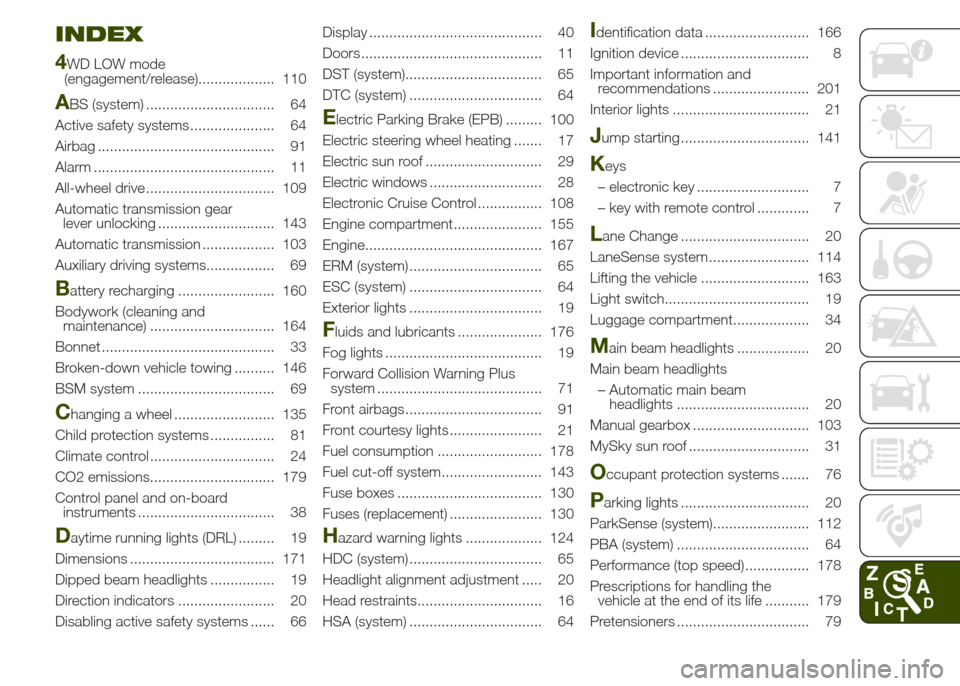
INDEX
4
WD LOW mode
(engagement/release)................... 110
ABS (system) ................................ 64
Active safety systems ..................... 64
Airbag ............................................ 91
Alarm ............................................. 11
All-wheel drive ................................ 109
Automatic transmission gear
lever unlocking ............................. 143
Automatic transmission .................. 103
Auxiliary driving systems................. 69
Battery recharging ........................ 160
Bodywork (cleaning and
maintenance) ............................... 164
Bonnet ........................................... 33
Broken-down vehicle towing .......... 146
BSM system .................................. 69
Changing a wheel ......................... 135
Child protection systems ................ 81
Climate control ............................... 24
CO2 emissions............................... 179
Control panel and on-board
instruments .................................. 38
Daytime running lights (DRL) ......... 19
Dimensions .................................... 171
Dipped beam headlights ................ 19
Direction indicators ........................ 20
Disabling active safety systems ...... 66Display ........................................... 40
Doors ............................................. 11
DST (system).................................. 65
DTC (system) ................................. 64
Electric Parking Brake (EPB) ......... 100
Electric steering wheel heating ....... 17
Electric sun roof ............................. 29
Electric windows ............................ 28
Electronic Cruise Control ................ 108
Engine compartment...................... 155
Engine............................................ 167
ERM (system) ................................. 65
ESC (system) ................................. 64
Exterior lights ................................. 19
Fluids and lubricants ..................... 176
Fog lights ....................................... 19
Forward Collision Warning Plus
system ......................................... 71
Front airbags .................................. 91
Front courtesy lights ....................... 21
Fuel consumption .......................... 178
Fuel cut-off system......................... 143
Fuse boxes .................................... 130
Fuses (replacement) ....................... 130
Hazard warning lights ................... 124
HDC (system) ................................. 65
Headlight alignment adjustment ..... 20
Head restraints............................... 16
HSA (system) ................................. 64
Identification data .......................... 166
Ignition device ................................ 8
Important information and
recommendations ........................ 201
Interior lights .................................. 21
Jump starting ................................ 141
Keys
– electronic key ............................ 7
– key with remote control ............. 7
Lane Change ................................ 20
LaneSense system ......................... 114
Lifting the vehicle ........................... 163
Light switch.................................... 19
Luggage compartment................... 34
Main beam headlights .................. 20
Main beam headlights
– Automatic main beam
headlights ................................. 20
Manual gearbox ............................. 103
MySky sun roof .............................. 31
Occupant protection systems ....... 76
Parking lights ................................ 20
ParkSense (system)........................ 112
PBA (system) ................................. 64
Performance (top speed) ................ 178
Prescriptions for handling the
vehicle at the end of its life ........... 179
Pretensioners ................................. 79