ECO mode JEEP RENEGADE 2014 1.G Owners Manual
[x] Cancel search | Manufacturer: JEEP, Model Year: 2014, Model line: RENEGADE, Model: JEEP RENEGADE 2014 1.GPages: 212, PDF Size: 17.48 MB
Page 3 of 212
Dear Customer,
We would like to congratulate and thank you for choosing a Jeep.
We have written this handbook to help you get to know all the features of your vehicle and use it in the best possible way. This vehicle
is intended for daily use as well as for specific uses, so even routes and uses not suitable for traditional vehicles on the market can
be tackled. Ride and handling capabilities are different from most other vehicles, both on and off road; we thus recommend you to
spend all the time necessary to know the vehicle dynamics.
Here you will find information, advice and important warnings regarding use of your vehicle and how to achieve the best performance
from the technical features of your Jeep.
You are advised to read it right through before taking to the road for the first time, to become familiar with the controls and above all
with those concerning brakes, steering and gearbox; at the same time, you can understand the vehicle behaviour on different road
surfaces.
This document also provides a description of special features and tips, as well as essential information for the safe driving, care and
maintenance of your Jeep over time.
After reading it, you are advised to keep the handbook inside the vehicle, for an easy reference and for making sure it remains onboard
the vehicle should it be sold.
In the attached Warranty Booklet you will also find a description of the Services that Jeep offers to its customers, the Warranty
Certificate and the detail of the terms and conditions for maintaining its validity.
We are sure that these will help you to get in touch with and appreciate your new vehicle and the service provided by the people at
Jeep.
Enjoy reading. Happy motoring!
WARNING
This Owner Handbook describes all Jeep Renegade versions. Options, equipment dedicated to specific Markets or
versions are not explicitly indicated in the text: as a consequence, you should only consider the information which is
related to the trim level, engine and version that you have purchased. Any content introduced throughout the production
of the model, outside the specific request of options at the time of purchase, will be identified with the wording(where
provided).
All data contained in this publication are intended to help you use your vehicle in the best possible way. Chrysler Group
LLC effort aims at a constant improvement of the vehicles produced. For this reason it reserves the right to make
changes at the model described for technical and/or commercial reasons.
For further information, contact a Jeep Dealership.
Page 14 of 212
LOCKING/UNLOCKING
DOORS FROM THE
OUTSIDE
2)
Door locking from outside: with the
doors closed, press the
button on
the key or fit and then turn the metal
insert (located inside the key) in the
driver side door lock.Door unlocking from outside: with
the doors closed, press the
button
on the key or fit and then turn the metal
insert (located inside the key) in the
driver side door lock.
PASSIVE ENTRY
3)
The Passive Entry system can identify
the presence of an electronic key near
the doors and the tailgate. Thanks to it,
you can unlock/lock the doors (or the
tailgate) without having to press any
button on the electronic key.
If the system identifies that the
electronic key found is valid, the owner
of the key can simply grasp one of
the front handles to release the alarm
and unlock the door and tailgate
opening mechanism.
After the unlocking, pulling the opening
handle all doors can be opened
depending on the mode set through the
display menu or the Uconnect system.
You can also access the luggage
compartment by pressing the
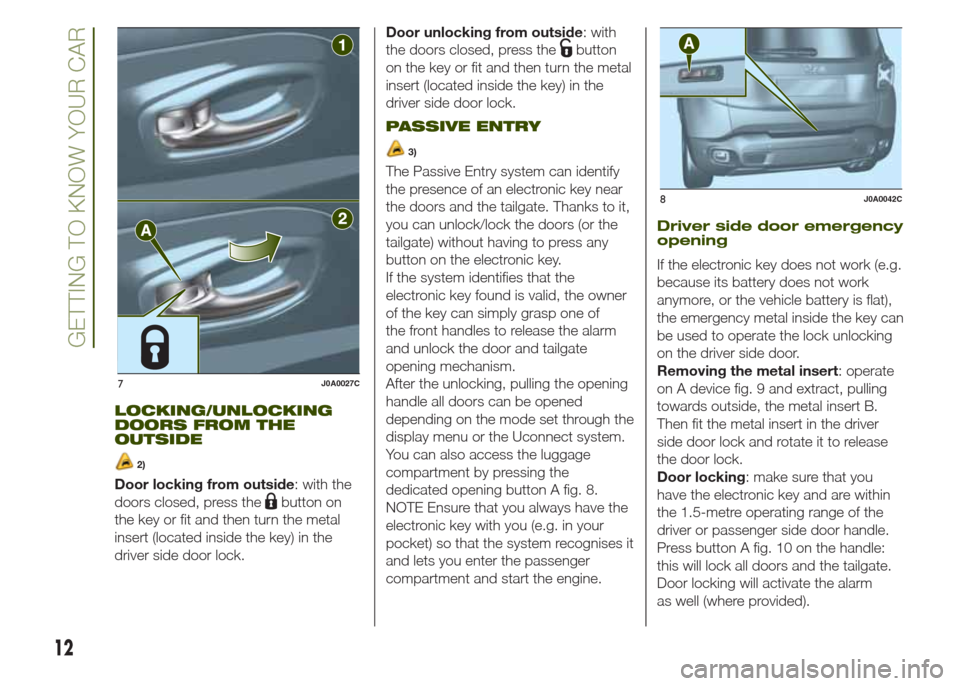
dedicated opening button A fig. 8.
NOTE Ensure that you always have the
electronic key with you (e.g. in your
pocket) so that the system recognises it
and lets you enter the passenger
compartment and start the engine.
Driver side door emergency
opening
If the electronic key does not work (e.g.
because its battery does not work
anymore, or the vehicle battery is flat),
the emergency metal inside the key can
be used to operate the lock unlocking
on the driver side door.
Removing the metal insert: operate
on A device fig. 9 and extract, pulling
towards outside, the metal insert B.
Then fit the metal insert in the driver
side door lock and rotate it to release
the door lock.
Door locking: make sure that you
have the electronic key and are within
the 1.5-metre operating range of the
driver or passenger side door handle.
Press button A fig. 10 on the handle:
this will lock all doors and the tailgate.
Door locking will activate the alarm
as well (where provided).
7J0A0027C
8J0A0042C
12
GETTING TO KNOW YOUR CAR
Page 24 of 212
WINDSCREEN/REAR
WINDOW WIPER
WINDSCREEN
WIPER/WASHER
20)7) 8)
This operates only with the ignition
device at MAR.
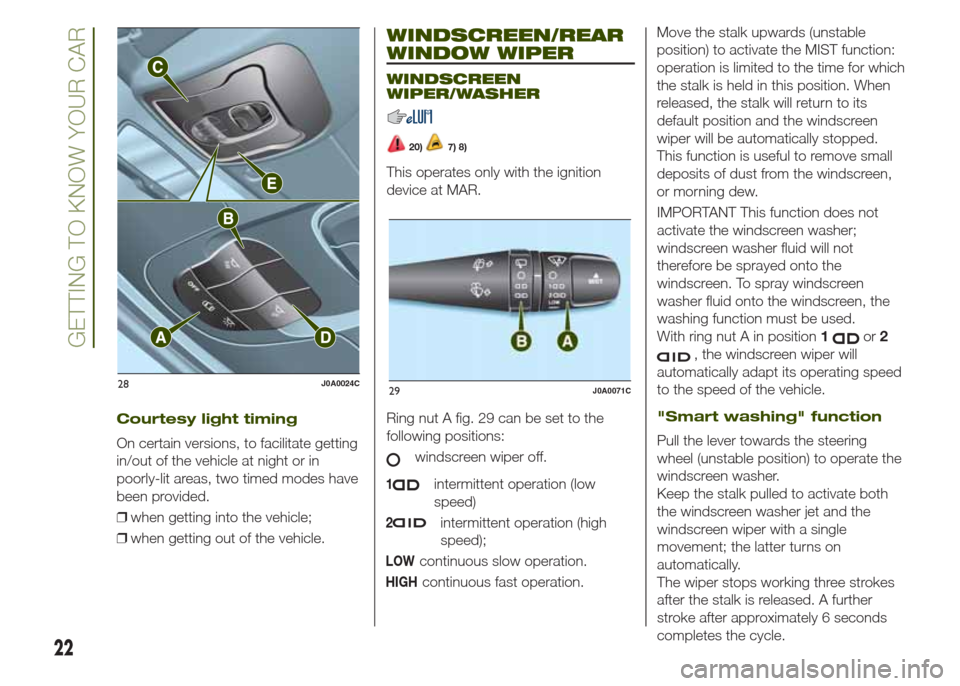
Ring nut A fig. 29 can be set to the
following positions:
windscreen wiper off.
1intermittent operation (low
speed)
2intermittent operation (high
speed);
LOWcontinuous slow operation.
HIGHcontinuous fast operation.Move the stalk upwards (unstable
position) to activate the MIST function:
operation is limited to the time for which
the stalk is held in this position. When
released, the stalk will return to its
default position and the windscreen
wiper will be automatically stopped.
This function is useful to remove small
deposits of dust from the windscreen,
or morning dew.
IMPORTANT This function does not
activate the windscreen washer;
windscreen washer fluid will not
therefore be sprayed onto the
windscreen. To spray windscreen
washer fluid onto the windscreen, the
washing function must be used.
With ring nut A in position1
or2
, the windscreen wiper will
automatically adapt its operating speed
to the speed of the vehicle.
"Smart washing" function
Pull the lever towards the steering
wheel (unstable position) to operate the
windscreen washer.
Keep the stalk pulled to activate both
the windscreen washer jet and the
windscreen wiper with a single
movement; the latter turns on
automatically.
The wiper stops working three strokes
after the stalk is released. A further
stroke after approximately 6 seconds
completes the cycle.
28J0A0024C29J0A0071C
22
GETTING TO KNOW YOUR CAR
Courtesy light timing
On certain versions, to facilitate getting
in/out of the vehicle at night or in
poorly-lit areas, two timed modes have
been provided.
❒when getting into the vehicle;
❒when getting out of the vehicle.
Page 25 of 212
RAIN SENSOR(where provided)
This is located behind the interior rear
view mirror, in contact with the
windscreen and can detect the
presence of rain and, consequently,
manage the cleaning of the windscreen
in accordance with the amount of
water on the screen.
Activation/deactivation
9) 10)
By acting on the display menu or on the
Uconnect™system you can
activate/deactivate the rain sensor. The
sensor can also be deactivated by
bringing the ignition device to STOP.
The activation of the sensor is signalled
by a "stroke" to show that the
command has been acquired.
If the ignition device is moved to STOP
position, leaving the ring nut A fig. 29
in1
or2, when the vehicle is
next started (ignition device at MAR),
no wiping cycle occurs even if it rains.
REAR WINDOW
WIPER/WASHER
Activation
Turn ring nut B fig. 29 from positionO
to position
to operate the rear
window wiper as follows:
❒in intermittent mode when the
windscreen wiper is not operating;❒in synchronous mode (at half the
speed of the windscreen wiper) when
the windscreen wiper is operating;
❒in continuous mode with reverse gear
engaged and the control active.
Position1
: intermittent operation
(low speed).
Position2
: continuous slow
operation.
With reverse gear engaged and
windscreen wiper on, the rear window
wiper is activated in continuous mode.
Pushing the stalk towards the
dashboard (unstable position) will
activate the rear window washer jet.
Keep the stalk pushed for more than
half a second to activate the rear
window wiper as well. Releasing the
stalk will activate the smart washing
function, as described for the
windscreen wiper.
Deactivation
Release the lever.
WARNING
20)Make sure the device is switched off
whenever the windscreen must be
cleaned.
WARNING
7)Do not use the screen wiper to remove
layers of snow or ice from the windscreen.
In such conditions, the windscreen wiper
may be subjected to excessive stress
and the motor cut-out switch, which
prevents operation for a few seconds, may
intervene. If operation is not subsequently
restored, even after the vehicle is restarted,
contact a Jeep Dealership.
8)Do not operate the windscreen wiper
with blades lifted from the windscreen.
9)Do not activate the rain sensor while
washing the vehicle in an automatic
washing system.
10)If ice is found on the windscreen, make
sure that the device was disconnected
properly.
23
Page 29 of 212
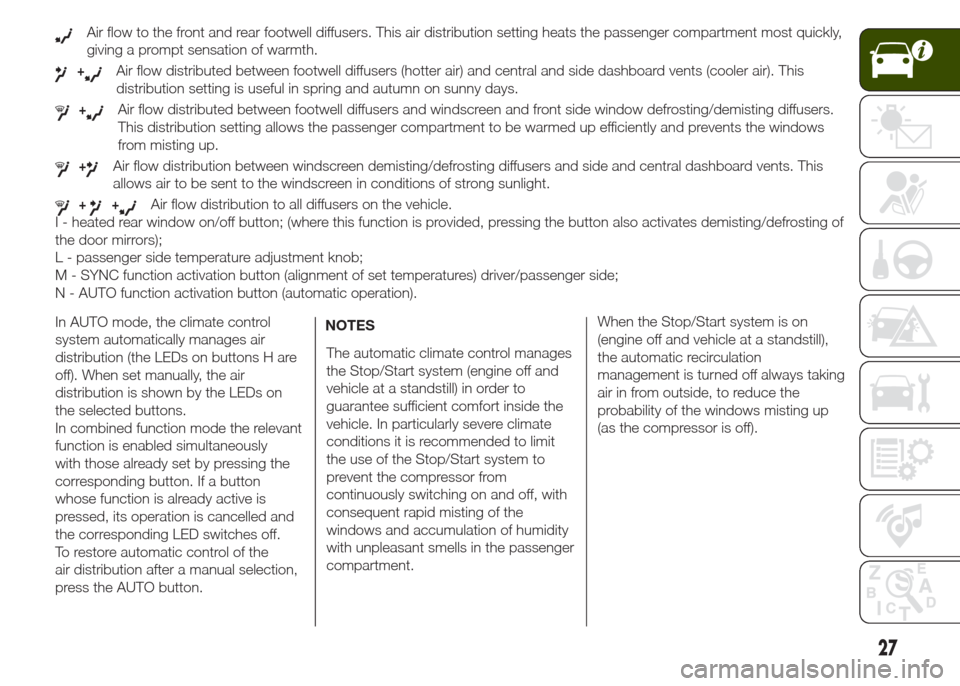
Air flow to the front and rear footwell diffusers. This air distribution setting heats the passenger compartment most quickly,
giving a prompt sensation of warmth.
+Air flow distributed between footwell diffusers (hotter air) and central and side dashboard vents (cooler air). This
distribution setting is useful in spring and autumn on sunny days.
+Air flow distributed between footwell diffusers and windscreen and front side window defrosting/demisting diffusers.
This distribution setting allows the passenger compartment to be warmed up efficiently and prevents the windows
from misting up.
+Air flow distribution between windscreen demisting/defrosting diffusers and side and central dashboard vents. This
allows air to be sent to the windscreen in conditions of strong sunlight.
++Air flow distribution to all diffusers on the vehicle.
I - heated rear window on/off button; (where this function is provided, pressing the button also activates demisting/defrosting of
the door mirrors);
L - passenger side temperature adjustment knob;
M - SYNC function activation button (alignment of set temperatures) driver/passenger side;
N - AUTO function activation button (automatic operation).
In AUTO mode, the climate control
system automatically manages air
distribution (the LEDs on buttons H are
off). When set manually, the air
distribution is shown by the LEDs on
the selected buttons.
In combined function mode the relevant
function is enabled simultaneously
with those already set by pressing the
corresponding button. If a button
whose function is already active is
pressed, its operation is cancelled and
the corresponding LED switches off.
To restore automatic control of the
air distribution after a manual selection,
press the AUTO button.NOTES
The automatic climate control manages
the Stop/Start system (engine off and
vehicle at a standstill) in order to
guarantee sufficient comfort inside the
vehicle. In particularly severe climate
conditions it is recommended to limit
the use of the Stop/Start system to
prevent the compressor from
continuously switching on and off, with
consequent rapid misting of the
windows and accumulation of humidity
with unpleasant smells in the passenger
compartment.When the Stop/Start system is on
(engine off and vehicle at a standstill),
the automatic recirculation
management is turned off always taking
air in from outside, to reduce the
probability of the windows misting up
(as the compressor is off).
27
Page 31 of 212
❒after the window has reached the
upper end of travel, hold the up button
down for at least 3 seconds.
WARNING
21)Incorrect use of the electric windows
may be dangerous. Before and during their
operation, ensure that any passengers
are not at risk from the moving glass either
by personal objects getting caught in the
mechanism or by being hit by it directly.
When leaving the vehicle (equipped with
mechanical key with remote control),
always remove the key from the ignition
device to prevent accidental operation of
the electric windows from being a hazard
for those still on board.
ELECTRIC SUN
ROOF
22)11)The electric sun roof comprises two
glass panels (the front one is mobile
and the rear one fixed) and is fitted with
an electrically operated sun blind.
The sun roof and the blind can
be operated only with the ignition
device turned to MAR.
CONTROL BUTTONS
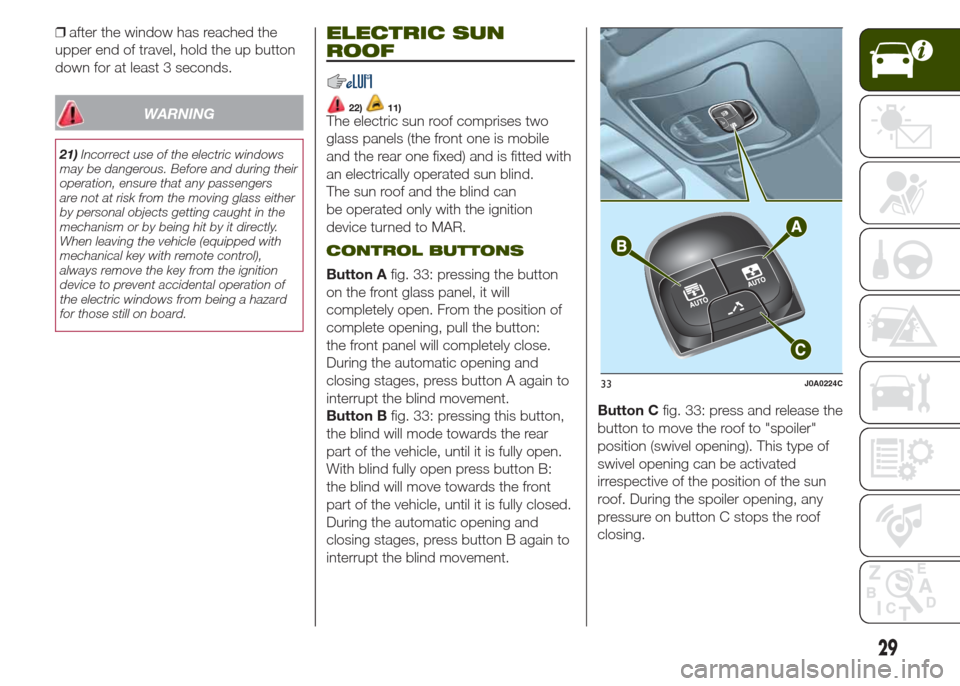
Button Afig. 33: pressing the button
on the front glass panel, it will
completely open. From the position of
complete opening, pull the button:
the front panel will completely close.
During the automatic opening and
closing stages, press button A again to
interrupt the blind movement.
Button Bfig. 33: pressing this button,
the blind will mode towards the rear
part of the vehicle, until it is fully open.
With blind fully open press button B:
the blind will move towards the front
part of the vehicle, until it is fully closed.
During the automatic opening and
closing stages, press button B again to
interrupt the blind movement.Button Cfig. 33: press and release the
button to move the roof to "spoiler"
position (swivel opening). This type of
swivel opening can be activated
irrespective of the position of the sun
roof. During the spoiler opening, any
pressure on button C stops the roof
closing.
33J0A0224C
29
Page 43 of 212
CONTROL BUTTONS
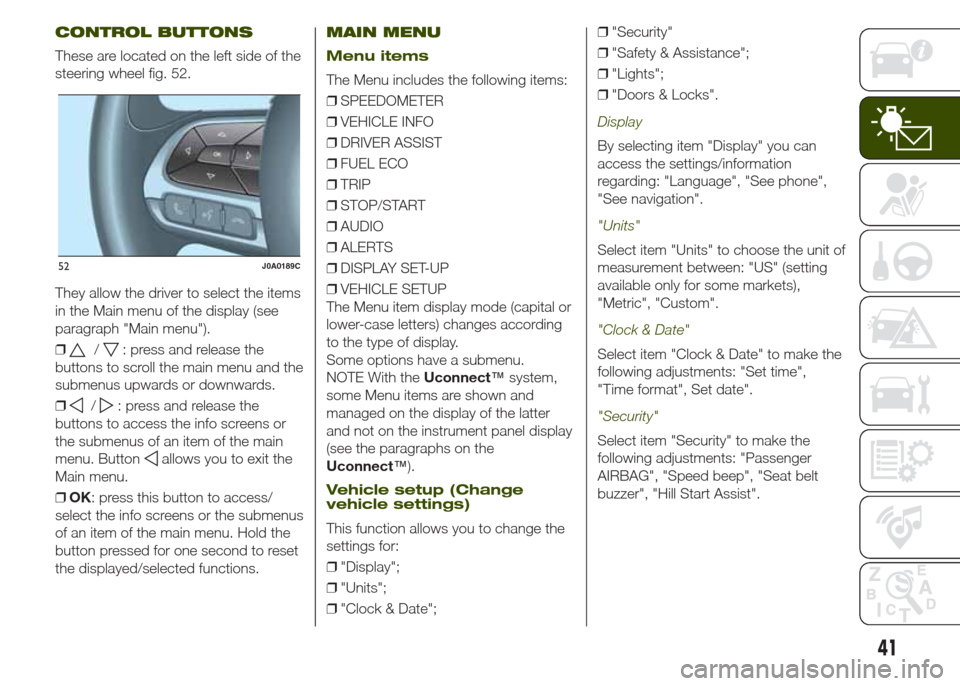
These are located on the left side of the
steering wheel fig. 52.
They allow the driver to select the items
in the Main menu of the display (see
paragraph "Main menu").
❒
/: press and release the
buttons to scroll the main menu and the
submenus upwards or downwards.
❒
/: press and release the
buttons to access the info screens or
the submenus of an item of the main
menu. Button
allows you to exit the
Main menu.
❒OK: press this button to access/
select the info screens or the submenus
of an item of the main menu. Hold the
button pressed for one second to reset
the displayed/selected functions.
MAIN MENU
Menu items
The Menu includes the following items:
❒SPEEDOMETER
❒VEHICLE INFO
❒DRIVER ASSIST
❒FUEL ECO
❒TRIP
❒STOP/START
❒AUDIO
❒ALERTS
❒DISPLAY SET-UP
❒VEHICLE SETUP
The Menu item display mode (capital or
lower-case letters) changes according
to the type of display.
Some options have a submenu.
NOTE With theUconnect™system,
some Menu items are shown and
managed on the display of the latter
and not on the instrument panel display
(see the paragraphs on the
Uconnect™).
Vehicle setup (Change
vehicle settings)
This function allows you to change the
settings for:
❒"Display";
❒"Units";
❒"Clock & Date";❒"Security"
❒"Safety & Assistance";
❒"Lights";
❒"Doors & Locks".
Display
By selecting item "Display" you can
access the settings/information
regarding: "Language", "See phone",
"See navigation".
"Units"
Select item "Units" to choose the unit of
measurement between: "US" (setting
available only for some markets),
"Metric", "Custom".
"Clock & Date"
Select item "Clock & Date" to make the
following adjustments: "Set time",
"Time format", Set date".
"Security"
Select item "Security" to make the
following adjustments: "Passenger
AIRBAG", "Speed beep", "Seat belt
buzzer", "Hill Start Assist".
52J0A0189C
41
Page 68 of 212
With gear lever in neutral, speed
adjustment using the accelerator pedal
is not available.
The driver can cancel the intervention of
the HDC system at any time by
completely depressing the accelerator
pedal or the brake pedal.
System deactivation
The HDC system is deactivated, but
remains available, if one of the following
conditions is met:
❒the speed of the vehicle exceeds
25 km/h but remains below 40 km/h;
❒the vehicle is on a descent with
insufficient gradient, below 8%, or a
level surface, or is going uphill;
❒the gear lever is in P (Park) position.
Disabling the system
The system is deactivated and disabled
if one of the following conditions is
met:
❒button press fig. 53;
❒activation of mode other than 4WD
LOW;
❒electric parking brake (EPB)
engagement;
❒driver side door open;
❒speed of 40 km/h exceeded
(immediate exit from HDC function).
57) 58)
DISABLING ACTIVE
SAFETY SYSTEMS
Depending on the versions, there are 3
configurations for the active safety
systems on the vehicle:
❒systems enabled;
❒systems partially disabled;
❒systems disabled.
Systems enabled
All active safety systems are enabled.
This is the normal operating mode
when driving a four-wheel-drive vehicle.
This mode should be used in most
driving conditions. The system will be in
"Systems enabled" mode every time
the engine is started.
IMPORTANT You are advised to select
"Systems partially disabled" or
"Systems disabled" modes only for
specific driving requirements.
Systems partially disabled
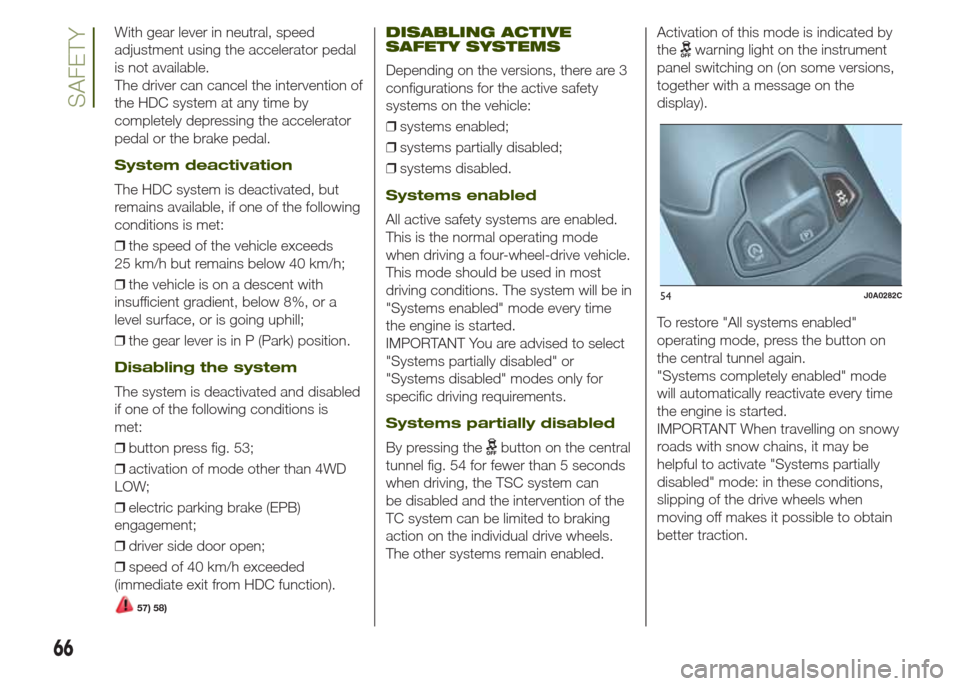
By pressing thebutton on the central
tunnel fig. 54 for fewer than 5 seconds
when driving, the TSC system can
be disabled and the intervention of the
TC system can be limited to braking
action on the individual drive wheels.
The other systems remain enabled.Activation of this mode is indicated by
the
warning light on the instrument
panel switching on (on some versions,
together with a message on the
display).
To restore "All systems enabled"
operating mode, press the button on
the central tunnel again.
"Systems completely enabled" mode
will automatically reactivate every time
the engine is started.
IMPORTANT When travelling on snowy
roads with snow chains, it may be
helpful to activate "Systems partially
disabled" mode: in these conditions,
slipping of the drive wheels when
moving off makes it possible to obtain
better traction.
54J0A0282C
66
SAFETY
Page 69 of 212
Systems disabled
Pressing thebutton on the central
tunnel for more than 5 seconds
completely deactivates the ESC
system, as well as the TSC and ERM
systems; the TC system will be limited
to braking action on the individual
drive wheels. The other systems remain
enabled.
Activation of this mode is highlighted by
the
warning light on the instrument
panel switching on (on some versions,
together with a message on the
display).
IMPORTANT If a speed of
approximately 65 km/h (40 mph) is
exceeded, the systems will behave as
described for "Systems partially
disabled" mode.
To restore "Systems enabled" operating
mode, press the button on the central
tunnel again.
"Systems enabled" mode will
automatically reactivate every time the
engine is started.
Versions withSelec-Terrain™
device
On versions withSelec-Terrain™
device, the activation of certain driving
modes partially or totally deactivates
certain active safety systems in order to
optimise performance in the specific
mode.When active safety systems are partially
or totally deactivated, the
warning
light will turn on in the instrument panel.
In "SAND" and "MUD" modes, the
active safety systems are partially
disabled and fine-tuned to ensure
maximum performance in the specific
operating modes. It is in any case
possible to reactivate them completely
at any time by pressing the
button on
the central tunnel should you wish to
favour safety over "off-road"
performance.
IMPORTANT In 4WD LOW modes, the
active safety systems are completely
disabled in order to ensure maximum
off-road driving performance and it will
not be possible to reactivate them.
59) 60) 61) 62)
WARNING
31)When the ABS intervenes and you feel
the brake pedal pulsating, do not reduce
the pressure, but hold it down firmly and
confidently; in doing so you will brake
in the shortest distance possible,
depending on the current road conditions.
32)For maximum efficiency of the braking
system, a bedding-in period of about
500 km is required: during this period it is
advisable to avoid sharp, repeated and
prolonged braking.33)If the ABS intervenes, this indicates
that the grip of the tyres on the road is
nearing its limit: you must slow down to a
speed compatible with the available grip.
34)The ABS can’t overrule the natural laws
of physics, and can’t increase the grip
available according to the condition of the
road.
35)The ABS cannot prevent accidents,
including those due to excessive speed on
corners, driving on low-grip surfaces or
aquaplaning.
36)The capability of the ABS must never
be tested irresponsibly and dangerously, in
such a way as to compromise personal
safety and the safety of others.
37)For the correct operation of the ABS,
the tyres must of necessity be the same
make and type on all wheels, in perfect
condition and, above all, of the prescribed
type and size.
38)The ESC system cannot alter the
natural laws of physics, and cannot
increase grip, which depends on the
condition of the road.
39)The ESC system cannot prevent
accidents, including those due to excessive
speed on corners, driving on low-grip
surfaces or aquaplaning.
40)The capability of the ESC system must
never be tested irresponsibly and
dangerously, in such a way as to
compromise personal safety and the safety
of others.
41)For the correct operation of the ESC
system, the tyres must of necessity be the
same make and type on all wheels, in
perfect condition and, above all, of the
prescribed type and size.
67
Page 72 of 212
The detection area of the system
covers about a lane on both sides of
the vehicle (around 3 metres). This area
begins from the door mirror and
extends for about 6 metres towards the
rear part of the vehicle.
When the sensors are active the system
monitors the detection areas on both
sides of the vehicle and warns the
driver about the possible presence of
vehicles in these areas.
While driving the system monitors the
detection area from three different input
points (side, rear and front) to check
whether a signal needs to be sent
to the driver. The system can detect the
presence of a vehicle in one of these
three areas.
Important
63)The system does not signal the
presence of fixed object (e.g. safety
barriers, poles, walls, etc.). However, in
some circumstances, the system may
activate in the presence of these
objects. This is normal and does not
indicate a system malfunction.
The system does not warn the driver
about the presence of vehicles coming
from the opposite direction, in the
adjacent lanes.
If a trailer is hitched to the vehicle, the
system automatically deactivates.The rear bumper area where the radar
sensors are located must stay free from
snow, ice and dirt gathered from the
road surface for the system to operate
correctly.
Do not cover the rear bumper area
where the radar sensors are located
with any object (e.g. adhesives, bike
rack, etc.).
Rear view: the system detects vehicles
approaching to the rear part of your
vehicle on both sides and entering the
rear detection area with a speed delta
lower than 50 km/h with respect to your
vehicle.
Overtaking vehicles: if another vehicle
is overtaken slowly (with a speed delta
lower than about 25 km/h) and this
stays in the blind spot for about 1.5
seconds, the warning light on the door
mirror of the corresponding side lights
up. If the speed delta between the
two vehicles is higher than about 25
km/h, the warning light does not light
up.
RCP (Rear Cross Path
detection) system
This system helps the driver during
reverse manoeuvres in the case of
reduced visibility. During "RCP"
operating mode, the system emits
acoustic and visual warnings if
the presence of an object is detected.
When an acoustic warning is sent,
theUconnect™volume is lowered.
The system can be activated/
deactivated through the display Menu
or theUconnect™system.
The system monitors the rear detection
areas on both sides of the vehicle, to
detect objects moving towards the
sides of the vehicle at a minimum
speed comprised between about 1
km/h and 3 km/h and objects moving
at a maximum speed of 35 km/h, as
generally happens in the parking areas.
The system activation is signalled to
the driver by means of a visual and
acoustic warning.
IMPORTANT If the sensors are covered
by objects or vehicles, the system will
not warn the driver.
70
SAFETY