mirror JEEP RENEGADE 2014 1.G User Guide
[x] Cancel search | Manufacturer: JEEP, Model Year: 2014, Model line: RENEGADE, Model: JEEP RENEGADE 2014 1.GPages: 212, PDF Size: 17.48 MB
Page 101 of 212
STARTING THE
ENGINE
Before starting the engine, adjust the
seat, the interior rear view mirrors,
the door mirrors and fasten the seat
belt correctly.
Never press the accelerator pedal for
starting the engine.
If necessary, messages indicating the
starting procedure can be shown on
the display.
109) 110) 111)34) 35) 36) 37)
PROCEDURE FOR
VERSIONS WITH MANUAL
GEARBOX
Proceed as follows:
❒engage the electric parking brake
and place the gear lever in neutral;
❒bring the ignition device to MAR. On
Diesel versions, waning light
lights
up in the instrument panel: wait for the
warning light to switch off;
❒fully depress the clutch pedal without
touching the accelerator;
❒turn the ignition device to AVV and
release it as soon as the engine starts;❒if the engine does not start within 10
seconds, bring the ignition device
back to STOP and wait for 10-15
seconds before repeating the starting
procedure.
PROCEDURE FOR
VERSIONS WITH
AUTOMATIC
TRANSMISSION
Proceed as follows:
❒engage the electric parking brake
and place the gear lever to P (Park) or
N (Neutral);
❒fully depress the brake pedal without
touching the accelerator;
❒place the ignition device to AVV;
❒if the engine does not start, bring the
ignition device back to STOP and
wait for 10-15 seconds before
repeating the starting procedure.
IMPORTANT If, with the ignition device
at MAR, the
symbol on the
instrument panel stays on together with
warning light
, turn the ignition
device to STOP and then back to MAR.
If the warning light (or the symbol on
the display) remains on, try with the
other keys provided with the vehicle.
Contact a Jeep Dealership if the engine
still does not start.
STOPPING THE ENGINE
Proceed as follows:
❒park the car in a position that is not
dangerous for oncoming traffic; engage
a gear (versions with manual gearbox)
or position the gear lever to P (Parking)
(versions with automatic transmission);
❒turn the ignition device to STOP
with the engine idling.
Cars equipped with electronic key
(Keyless Enter-N-Go):at a car speed
over 8 km/h (5 mph) it is possible to
switch the engine off, also with
automatic transmission lever in a
position other than P (Parking). To
switch off the engine in this situation,
hold down the ignition device button for
a while or press it 3 times in a row
within a few seconds. In this case the
engine will stop and the ignition device
will switch to MAR.
WARNING
109)It is dangerous to run the engine in
enclosed areas. The engine takes in
oxygen and releases carbon dioxide,
carbon monoxide and other toxic gases.
110)The brake servo is not active until the
engine is started, so you would need to
apply much more force than usual to the
brake pedal.
99
Page 117 of 212
WARNING
44)The camera may have limited or absent
operation due to weather conditions such
as: heavy rain, hail, thick fog, heavy snow,
formation of ice layers on the windscreen.
45)Camera operation may also be
compromised by the presence of dust,
condensation, dirt or ice on the
windscreen, by traffic conditions (e.g.
vehicles that are driving not aligned with
yours, vehicle driving in a transverse or
opposite way on the same lane, bend with
a small radius of curvature), by road
surface conditions and by driving
conditions (e.g. off-road driving). Make sure
the windscreen is always clean. Use
specific detergents and clean cloths to
avoid scratching the windscreen. The
camera operation may also be limited or
absent in some driving, traffic and road
surface conditions.
46)Projecting loads on the roof of the
vehicle may interfere with the correct
operation of the camera. Before starting
make sure the load is correctly positioned,
in order not to cover the camera operating
range.
47)If the windscreen must be replaced
due to scratches, chipping or breakage,
contact exclusively a Jeep Dealership. Do
not replace the windscreen on your own,
risk of malfunction! It is advisable to replace
the windscreen if it is damaged in the area
of the camera.48)Do not tamper nor operate on the
camera. Do not close the openings in the
aesthetic cover located under the interior
rear view mirror. In the event of a failure
of the camera, contact a Jeep Dealership.
49)Do not cover the operating range of the
camera with stickers or other objects.
Also pay attention to other objects on the
bonnet (e.g. a layer of snow) and make
sure they do not interfere with the camera.
REAR CAMERA
(PARKVIEW® REAR
BACKUP CAMERA)
DESCRIPTION
127)50)The camera is located on the tailgate
fig. 99.
Every time reverse is engaged, the
display fig. 100 of theUconnect™
system shows the area around the
vehicle, as seen by the rear camera.
SYMBOLS AND
MESSAGES ON THE
DISPLAY
The active line grid is positioned on the
image to illustrate the width of the
vehicle and the expected reversing path
in accordance with the steering wheel
position.
99J0A0102C
115
Page 127 of 212
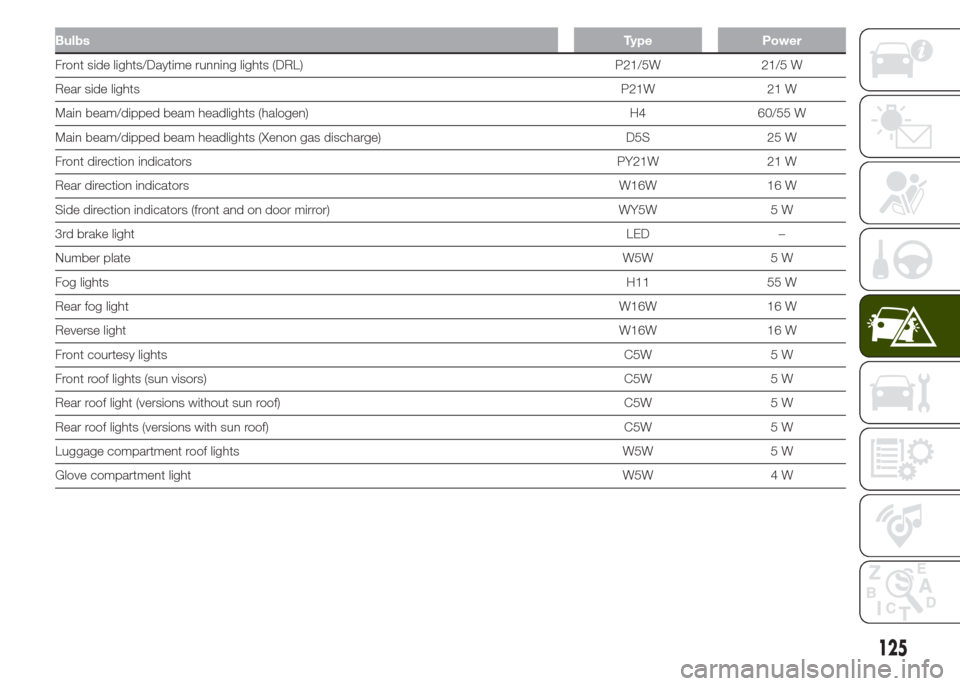
BulbsType Power
Front side lights/Daytime running lights (DRL) P21/5W 21/5 W
Rear side lightsP21W 21 W
Main beam/dipped beam headlights (halogen) H4 60/55 W
Main beam/dipped beam headlights (Xenon gas discharge) D5S 25 W
Front direction indicatorsPY21W 21 W
Rear direction indicatorsW16W 16 W
Side direction indicators (front and on door mirror) WY5W 5 W
3rd brake lightLED –
Number plateW5W 5 W
Fog lightsH11 55 W
Rear fog lightW16W 16 W
Reverse lightW16W 16 W
Front courtesy lightsC5W 5 W
Front roof lights (sun visors)C5W 5 W
Rear roof light (versions without sun roof) C5W 5 W
Rear roof lights (versions with sun roof) C5W 5 W
Luggage compartment roof lights W5W 5 W
Glove compartment lightW5W 4 W
125
Page 129 of 212
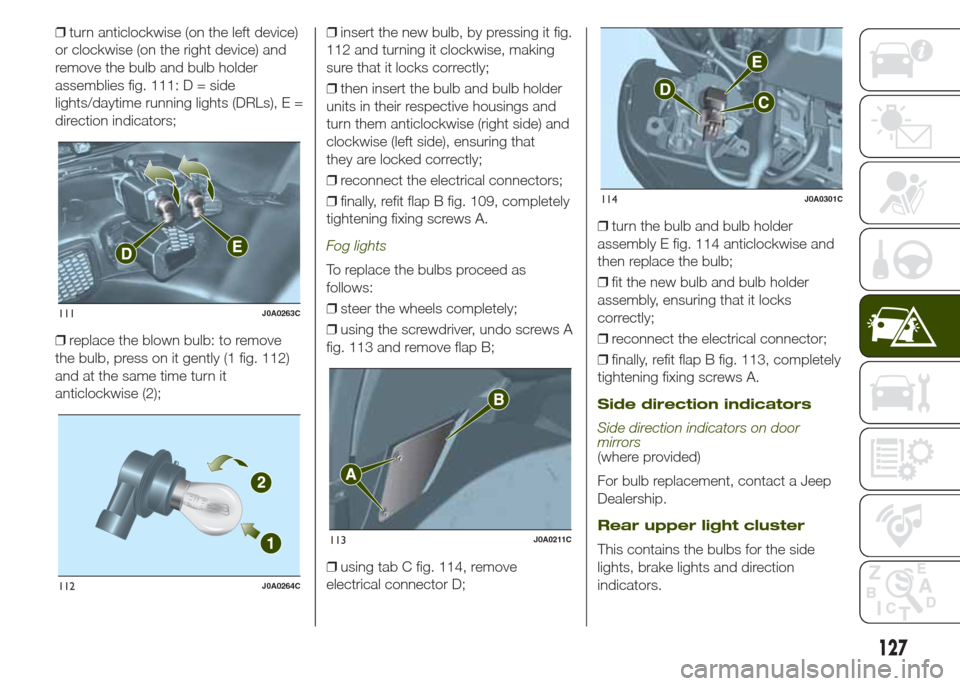
❒turn anticlockwise (on the left device)
or clockwise (on the right device) and
remove the bulb and bulb holder
assemblies fig. 111: D = side
lights/daytime running lights (DRLs), E =
direction indicators;
❒replace the blown bulb: to remove
the bulb, press on it gently (1 fig. 112)
and at the same time turn it
anticlockwise (2);❒insert the new bulb, by pressing it fig.
112 and turning it clockwise, making
sure that it locks correctly;
❒then insert the bulb and bulb holder
units in their respective housings and
turn them anticlockwise (right side) and
clockwise (left side), ensuring that
they are locked correctly;
❒reconnect the electrical connectors;
❒finally, refit flap B fig. 109, completely
tightening fixing screws A.
Fog lights
To replace the bulbs proceed as
follows:
❒steer the wheels completely;
❒using the screwdriver, undo screws A
fig. 113 and remove flap B;
❒using tab C fig. 114, remove
electrical connector D;❒turn the bulb and bulb holder
assembly E fig. 114 anticlockwise and
then replace the bulb;
❒fit the new bulb and bulb holder
assembly, ensuring that it locks
correctly;
❒reconnect the electrical connector;
❒finally, refit flap B fig. 113, completely
tightening fixing screws A.
Side direction indicators
Side direction indicators on door
mirrors
(where provided)
For bulb replacement, contact a Jeep
Dealership.
Rear upper light cluster
This contains the bulbs for the side
lights, brake lights and direction
indicators.
111J0A0263C
112J0A0264C
113J0A0211C
114J0A0301C
127
Page 135 of 212
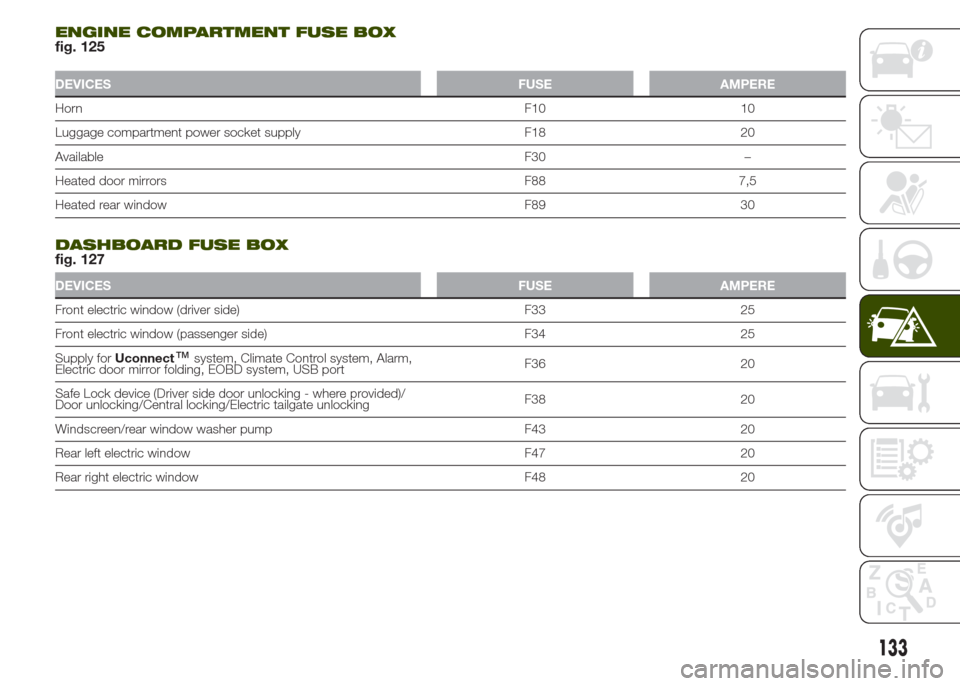
ENGINE COMPARTMENT FUSE BOXfig. 125
DEVICES FUSE AMPERE
HornF10 10
Luggage compartment power socket supply F18 20
AvailableF30 –
Heated door mirrors F88 7,5
Heated rear window F89 30
.
DASHBOARD FUSE BOXfig. 127
DEVICES FUSE AMPERE
Front electric window (driver side) F33 25
Front electric window (passenger side) F34 25
Supply forUconnect
™system, Climate Control system, Alarm,
Electric door mirror folding, EOBD system, USB portF36 20
Safe Lock device (Driver side door unlocking - where provided)/
Door unlocking/Central locking/Electric tailgate unlockingF38 20
Windscreen/rear window washer pump F43 20
Rear left electric window F47 20
Rear right electric window F48 20
133
Page 192 of 212
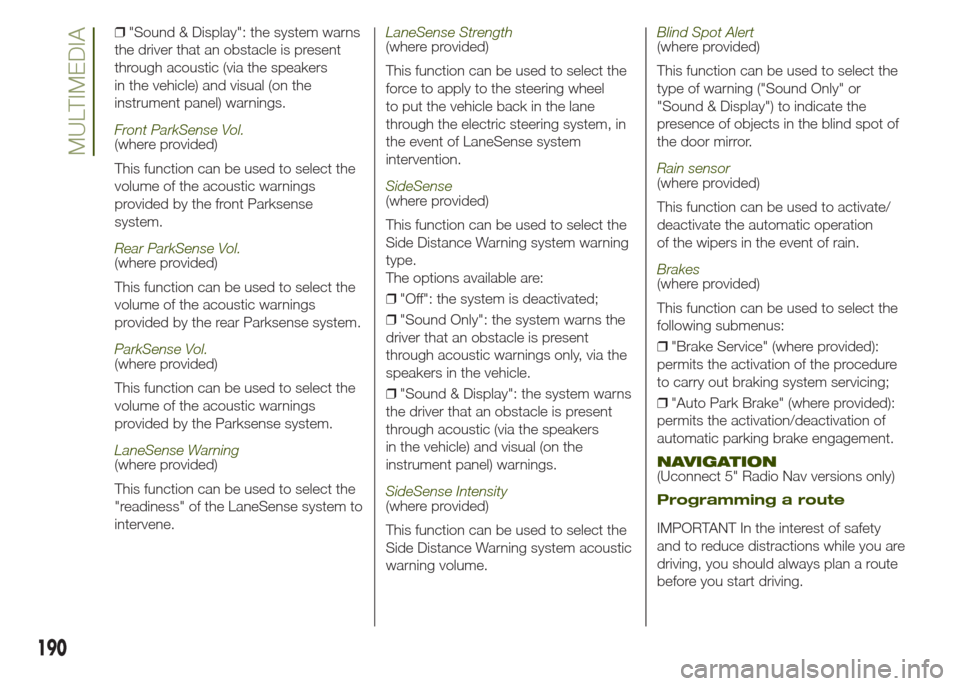
❒"Sound & Display": the system warns
the driver that an obstacle is present
through acoustic (via the speakers
in the vehicle) and visual (on the
instrument panel) warnings.
Front ParkSense Vol.(where provided)
This function can be used to select the
volume of the acoustic warnings
provided by the front Parksense
system.
Rear ParkSense Vol.(where provided)
This function can be used to select the
volume of the acoustic warnings
provided by the rear Parksense system.
ParkSense Vol.(where provided)
This function can be used to select the
volume of the acoustic warnings
provided by the Parksense system.
LaneSense Warning(where provided)
This function can be used to select the
"readiness" of the LaneSense system to
intervene.
LaneSense Strength(where provided)
This function can be used to select the
force to apply to the steering wheel
to put the vehicle back in the lane
through the electric steering system, in
the event of LaneSense system
intervention.
SideSense(where provided)
This function can be used to select the
Side Distance Warning system warning
type.
The options available are:
❒"Off": the system is deactivated;
❒"Sound Only": the system warns the
driver that an obstacle is present
through acoustic warnings only, via the
speakers in the vehicle.
❒"Sound & Display": the system warns
the driver that an obstacle is present
through acoustic (via the speakers
in the vehicle) and visual (on the
instrument panel) warnings.
SideSense Intensity(where provided)
This function can be used to select the
Side Distance Warning system acoustic
warning volume.
Blind Spot Alert(where provided)
This function can be used to select the
type of warning ("Sound Only" or
"Sound & Display") to indicate the
presence of objects in the blind spot of
the door mirror.
Rain sensor(where provided)
This function can be used to activate/
deactivate the automatic operation
of the wipers in the event of rain.
Brakes(where provided)
This function can be used to select the
following submenus:
❒"Brake Service" (where provided):
permits the activation of the procedure
to carry out braking system servicing;
❒"Auto Park Brake" (where provided):
permits the activation/deactivation of
automatic parking brake engagement.
NAVIGATION(Uconnect 5" Radio Nav versions only)
Programming a route
IMPORTANT In the interest of safety
and to reduce distractions while you are
driving, you should always plan a route
before you start driving.
190
MULTIMEDIA
Page 210 of 212
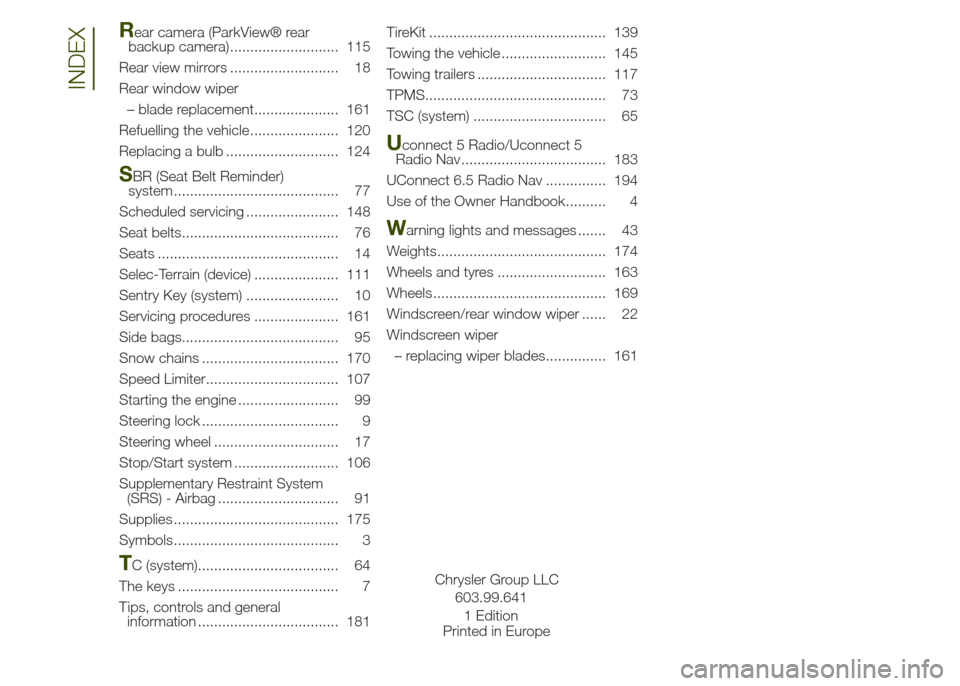
Rear camera (ParkView® rear
backup camera) ........................... 115
Rear view mirrors ........................... 18
Rear window wiper
– blade replacement..................... 161
Refuelling the vehicle ...................... 120
Replacing a bulb ............................ 124
SBR (Seat Belt Reminder)
system ......................................... 77
Scheduled servicing ....................... 148
Seat belts....................................... 76
Seats ............................................. 14
Selec-Terrain (device) ..................... 111
Sentry Key (system) ....................... 10
Servicing procedures ..................... 161
Side bags....................................... 95
Snow chains .................................. 170
Speed Limiter................................. 107
Starting the engine ......................... 99
Steering lock .................................. 9
Steering wheel ............................... 17
Stop/Start system .......................... 106
Supplementary Restraint System
(SRS) - Airbag .............................. 91
Supplies ......................................... 175
Symbols......................................... 3
TC (system)................................... 64
The keys ........................................ 7
Tips, controls and general
information ................................... 181TireKit ............................................ 139
Towing the vehicle .......................... 145
Towing trailers ................................ 117
TPMS............................................. 73
TSC (system) ................................. 65
Uconnect 5 Radio/Uconnect 5
Radio Nav .................................... 183
UConnect 6.5 Radio Nav ............... 194
Use of the Owner Handbook.......... 4
Warning lights and messages ....... 43
Weights.......................................... 174
Wheels and tyres ........................... 163
Wheels ........................................... 169
Windscreen/rear window wiper ...... 22
Windscreen wiper
– replacing wiper blades............... 161
INDEX
Chrysler Group LLC
603.99.641
Printed in Europe1 Edition