warning JEEP RENEGADE 2014 1.G User Guide
[x] Cancel search | Manufacturer: JEEP, Model Year: 2014, Model line: RENEGADE, Model: JEEP RENEGADE 2014 1.GPages: 212, PDF Size: 17.48 MB
Page 18 of 212
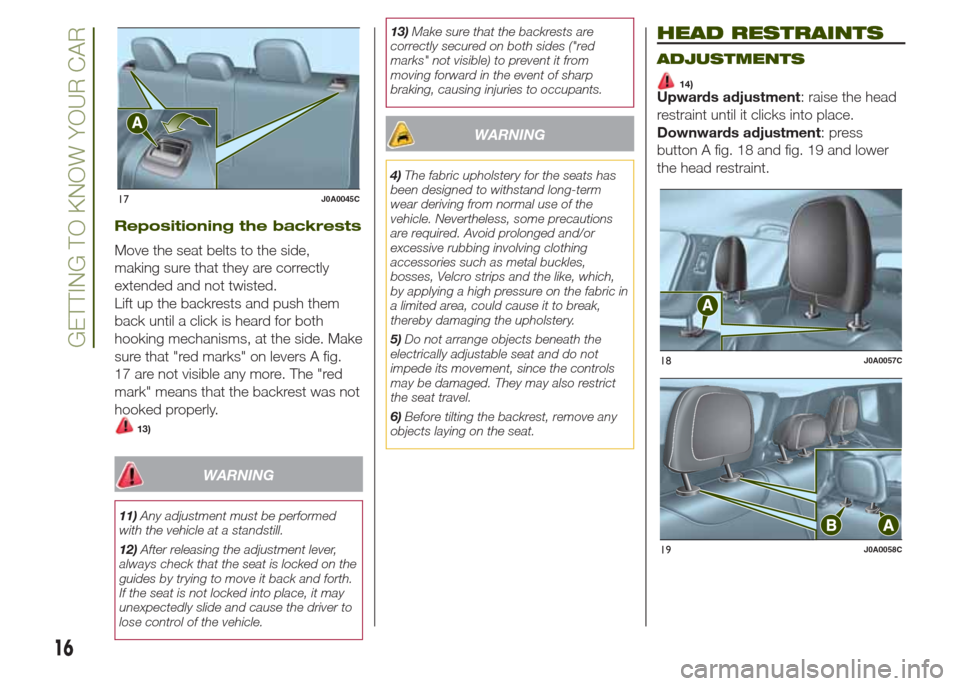
Repositioning the backrests
Move the seat belts to the side,
making sure that they are correctly
extended and not twisted.
Lift up the backrests and push them
back until a click is heard for both
hooking mechanisms, at the side. Make
sure that "red marks" on levers A fig.
17 are not visible any more. The "red
mark" means that the backrest was not
hooked properly.
13)
WARNING
11)Any adjustment must be performed
with the vehicle at a standstill.
12)After releasing the adjustment lever,
always check that the seat is locked on the
guides by trying to move it back and forth.
If the seat is not locked into place, it may
unexpectedly slide and cause the driver to
lose control of the vehicle.13)Make sure that the backrests are
correctly secured on both sides ("red
marks" not visible) to prevent it from
moving forward in the event of sharp
braking, causing injuries to occupants.
WARNING
4)The fabric upholstery for the seats has
been designed to withstand long-term
wear deriving from normal use of the
vehicle. Nevertheless, some precautions
are required. Avoid prolonged and/or
excessive rubbing involving clothing
accessories such as metal buckles,
bosses, Velcro strips and the like, which,
by applying a high pressure on the fabric in
a limited area, could cause it to break,
thereby damaging the upholstery.
5)Do not arrange objects beneath the
electrically adjustable seat and do not
impede its movement, since the controls
may be damaged. They may also restrict
the seat travel.
6)Before tilting the backrest, remove any
objects laying on the seat.
HEAD RESTRAINTS
ADJUSTMENTS
14)Upwards adjustment: raise the head
restraint until it clicks into place.
Downwards adjustment: press
button A fig. 18 and fig. 19 and lower
the head restraint.
17J0A0045C
18J0A0057C
19J0A0058C
16
GETTING TO KNOW YOUR CAR
Page 19 of 212
REAR HEAD RESTRAINTS
(removal)
Proceed as follows to remove the head
restraints:
❒raise the head restraints to their
maximum height;
❒press buttons A and B fig. 19 at the
side of the two supports, then remove
the head restraints by pulling them
upwards.
WARNING
14)The head restraints must be adjusted
so that the head, rather than the neck,
rests on them. Only in this case can they
protect your head correctly.
STEERING WHEEL
15) 16)
ADJUSTMENTS
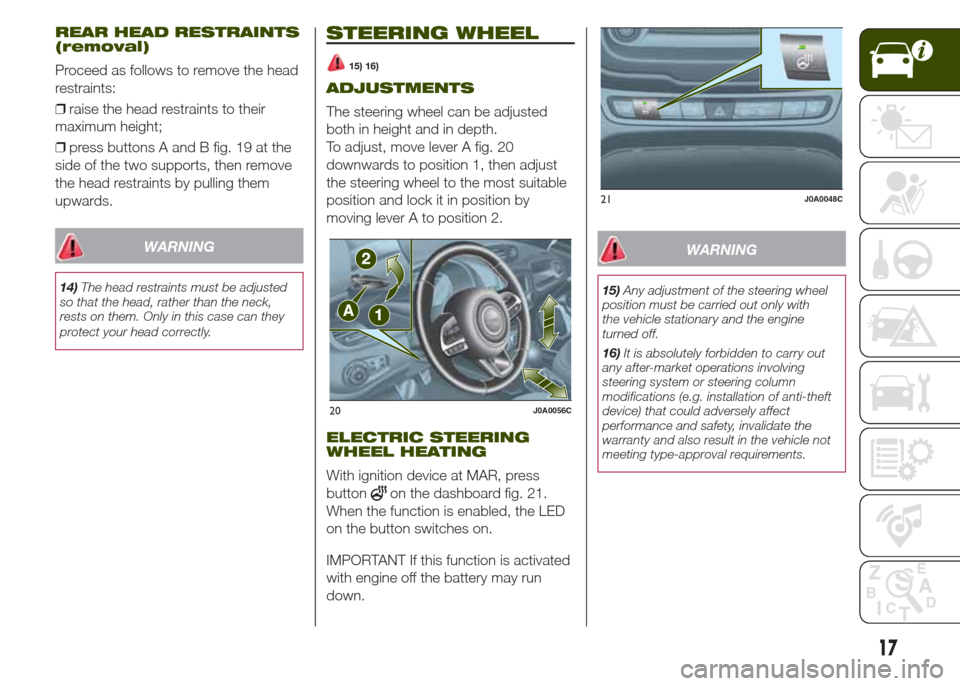
The steering wheel can be adjusted
both in height and in depth.
To adjust, move lever A fig. 20
downwards to position 1, then adjust
the steering wheel to the most suitable
position and lock it in position by
moving lever A to position 2.
ELECTRIC STEERING
WHEEL HEATING
With ignition device at MAR, press
button
on the dashboard fig. 21.
When the function is enabled, the LED
on the button switches on.
IMPORTANT If this function is activated
with engine off the battery may run
down.
WARNING
15)Any adjustment of the steering wheel
position must be carried out only with
the vehicle stationary and the engine
turned off.
16)It is absolutely forbidden to carry out
any after-market operations involving
steering system or steering column
modifications (e.g. installation of anti-theft
device) that could adversely affect
performance and safety, invalidate the
warranty and also result in the vehicle not
meeting type-approval requirements.
20J0A0056C
21J0A0048C
17
Page 20 of 212
REAR VIEW
MIRRORS
INTERIOR MIRROR
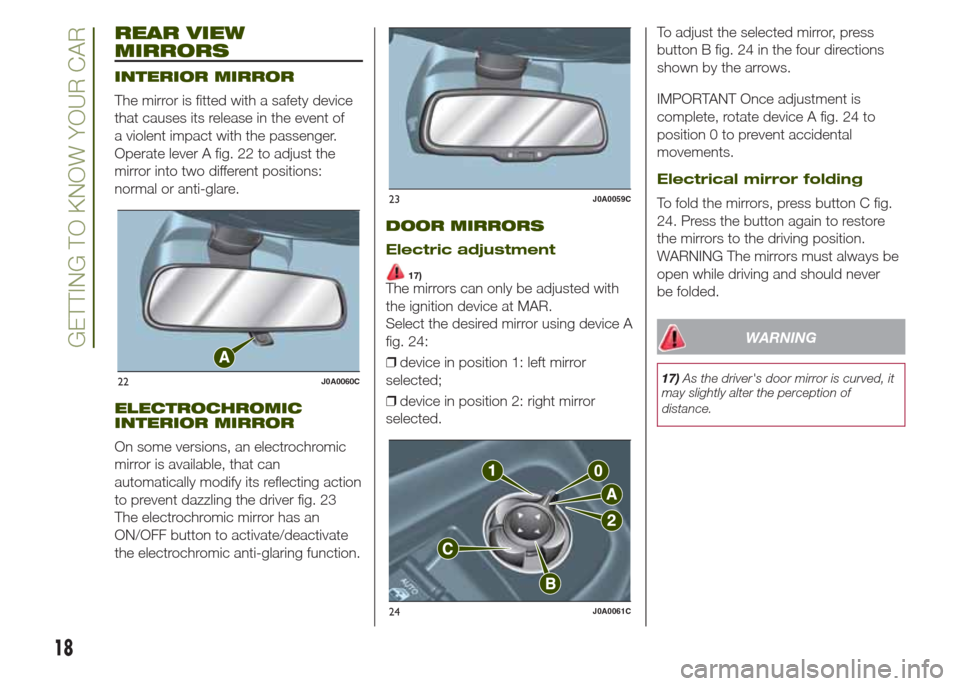
The mirror is fitted with a safety device
that causes its release in the event of
a violent impact with the passenger.
Operate lever A fig. 22 to adjust the
mirror into two different positions:
normal or anti-glare.
ELECTROCHROMIC
INTERIOR MIRROR
On some versions, an electrochromic
mirror is available, that can
automatically modify its reflecting action
to prevent dazzling the driver fig. 23
The electrochromic mirror has an
ON/OFF button to activate/deactivate
the electrochromic anti-glaring function.
DOOR MIRRORS
Electric adjustment
17)The mirrors can only be adjusted with
the ignition device at MAR.
Select the desired mirror using device A
fig. 24:
❒device in position 1: left mirror
selected;
❒device in position 2: right mirror
selected.To adjust the selected mirror, press
button B fig. 24 in the four directions
shown by the arrows.
IMPORTANT Once adjustment is
complete, rotate device A fig. 24 to
position 0 to prevent accidental
movements.
Electrical mirror folding
To fold the mirrors, press button C fig.
24. Press the button again to restore
the mirrors to the driving position.
WARNING The mirrors must always be
open while driving and should never
be folded.
WARNING
17)As the driver's door mirror is curved, it
may slightly alter the perception of
distance.22J0A0060C
23J0A0059C
24J0A0061C
18
GETTING TO KNOW YOUR CAR
Page 21 of 212
EXTERIOR LIGHTS
LIGHT SWITCH
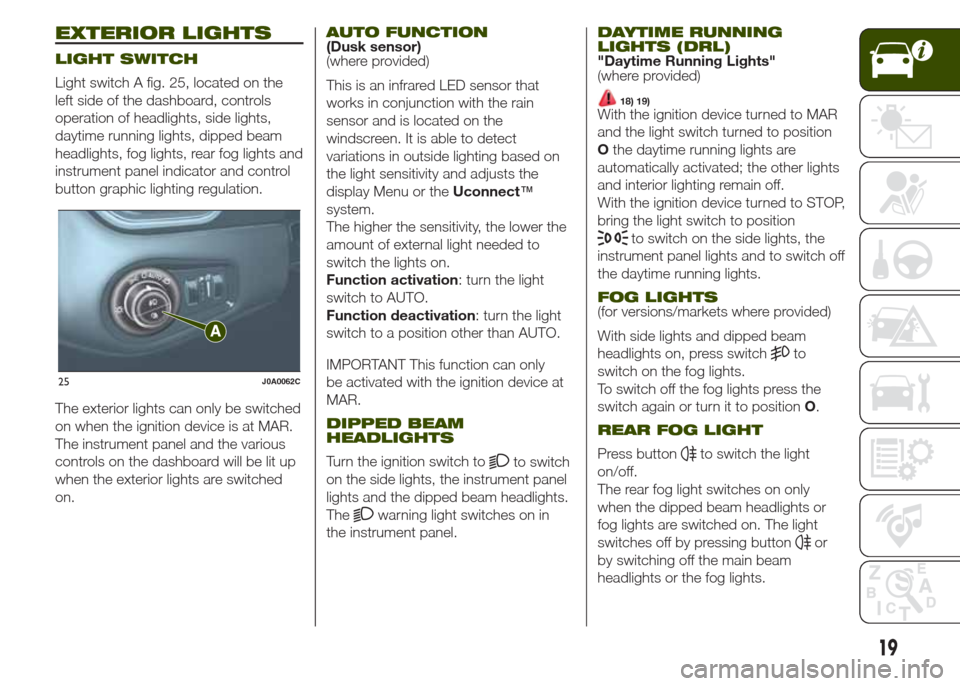
Light switch A fig. 25, located on the
left side of the dashboard, controls
operation of headlights, side lights,
daytime running lights, dipped beam
headlights, fog lights, rear fog lights and
instrument panel indicator and control
button graphic lighting regulation.
The exterior lights can only be switched
on when the ignition device is at MAR.
The instrument panel and the various
controls on the dashboard will be lit up
when the exterior lights are switched
on.
AUTO FUNCTION(Dusk sensor)
(where provided)
This is an infrared LED sensor that
works in conjunction with the rain
sensor and is located on the
windscreen. It is able to detect
variations in outside lighting based on
the light sensitivity and adjusts the
display Menu or theUconnect™
system.
The higher the sensitivity, the lower the
amount of external light needed to
switch the lights on.
Function activation: turn the light
switch to AUTO.
Function deactivation: turn the light
switch to a position other than AUTO.
IMPORTANT This function can only
be activated with the ignition device at
MAR.
DIPPED BEAM
HEADLIGHTS
Turn the ignition switch toto switch
on the side lights, the instrument panel
lights and the dipped beam headlights.
The
warning light switches on in
the instrument panel.
DAYTIME RUNNING
LIGHTS (DRL)
"Daytime Running Lights"
(where provided)
18) 19)With the ignition device turned to MAR
and the light switch turned to position
Othe daytime running lights are
automatically activated; the other lights
and interior lighting remain off.
With the ignition device turned to STOP,
bring the light switch to position
to switch on the side lights, the
instrument panel lights and to switch off
the daytime running lights.
FOG LIGHTS(for versions/markets where provided)
With side lights and dipped beam
headlights on, press switch
to
switch on the fog lights.
To switch off the fog lights press the
switch again or turn it to positionO.
REAR FOG LIGHT
Press buttonto switch the light
on/off.
The rear fog light switches on only
when the dipped beam headlights or
fog lights are switched on. The light
switches off by pressing button
or
by switching off the main beam
headlights or the fog lights.
25J0A0062C
19
Page 22 of 212
PARKING LIGHTS
These lights can be switched on with
ignition device at STOP or with key
removed, by moving the light switch to
positionOand then to position
.
The
warning light switches on
in the instrument panel.
HEADLIGHTS OFF TIMER
Function activation: with lights on,
bring the ignition device to STOP. Then
switch off the headlights within 45
seconds: timing will start when the light
switch is turned toO.
IMPORTANT To activate this functions
the headlights must be deactivated
within 45 seconds after the ignition
device has been taken to STOP.
Function deactivation: this function is
deactivated by switching on the
headlights, the side lights or bringing
the ignition device to MAR. If the
headlights are switched off before
ignition, they will go out normally.
MAIN BEAM HEADLIGHTS
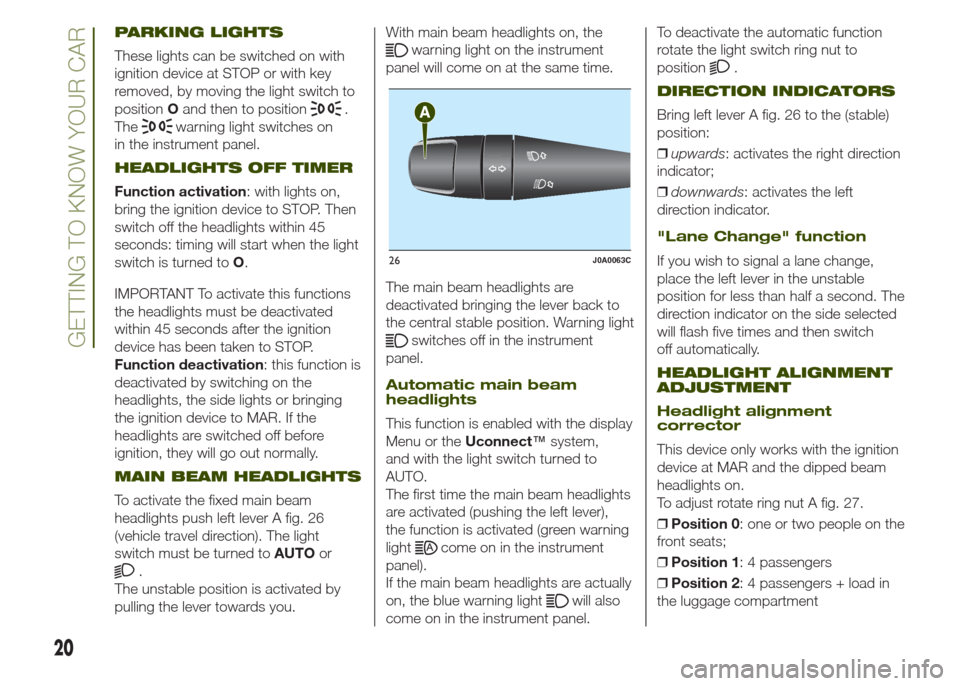
To activate the fixed main beam
headlights push left lever A fig. 26
(vehicle travel direction). The light
switch must be turned toAUTOor
.
The unstable position is activated by
pulling the lever towards you.With main beam headlights on, the
warning light on the instrument
panel will come on at the same time.
The main beam headlights are
deactivated bringing the lever back to
the central stable position. Warning light
switches off in the instrument
panel.
Automatic main beam
headlights
This function is enabled with the display
Menu or theUconnect™system,
and with the light switch turned to
AUTO.
The first time the main beam headlights
are activated (pushing the left lever),
the function is activated (green warning
light
come on in the instrument
panel).
If the main beam headlights are actually
on, the blue warning light
will also
come on in the instrument panel.To deactivate the automatic function
rotate the light switch ring nut to
position
.
DIRECTION INDICATORS
Bring left lever A fig. 26 to the (stable)
position:
❒upwards: activates the right direction
indicator;
❒downwards: activates the left
direction indicator.
"Lane Change" function
If you wish to signal a lane change,
place the left lever in the unstable
position for less than half a second. The
direction indicator on the side selected
will flash five times and then switch
off automatically.
HEADLIGHT ALIGNMENT
ADJUSTMENT
Headlight alignment
corrector
This device only works with the ignition
device at MAR and the dipped beam
headlights on.
To adjust rotate ring nut A fig. 27.
❒Position 0: one or two people on the
front seats;
❒Position 1: 4 passengers
❒Position 2: 4 passengers + load in
the luggage compartment
26J0A0063C
20
GETTING TO KNOW YOUR CAR
Page 23 of 212
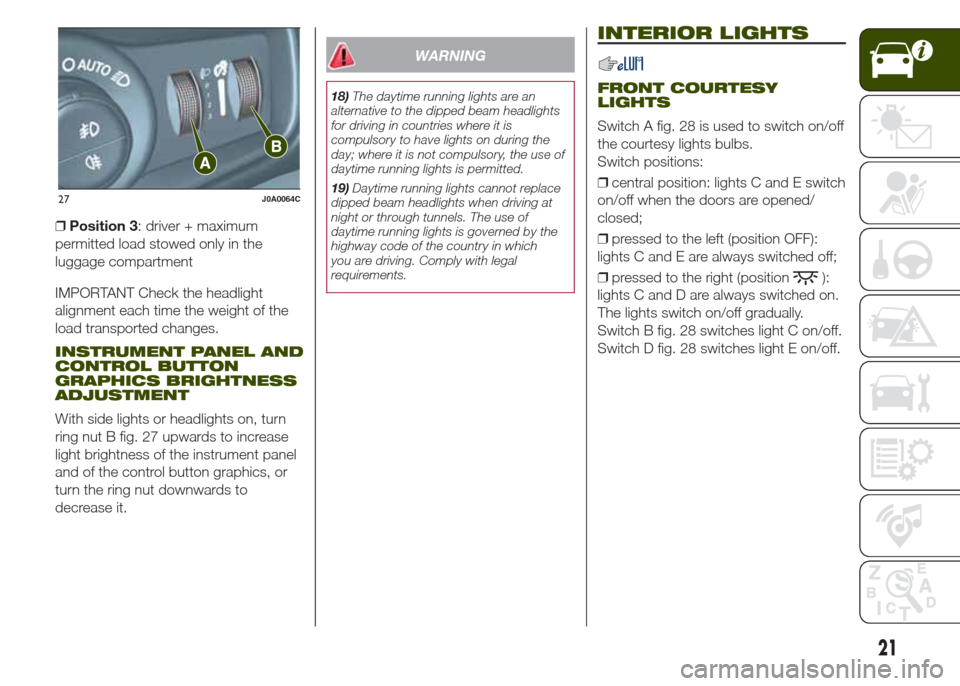
❒Position 3: driver + maximum
permitted load stowed only in the
luggage compartment
IMPORTANT Check the headlight
alignment each time the weight of the
load transported changes.
INSTRUMENT PANEL AND
CONTROL BUTTON
GRAPHICS BRIGHTNESS
ADJUSTMENT
With side lights or headlights on, turn
ring nut B fig. 27 upwards to increase
light brightness of the instrument panel
and of the control button graphics, or
turn the ring nut downwards to
decrease it.
WARNING
18)The daytime running lights are an
alternative to the dipped beam headlights
for driving in countries where it is
compulsory to have lights on during the
day; where it is not compulsory, the use of
daytime running lights is permitted.
19)Daytime running lights cannot replace
dipped beam headlights when driving at
night or through tunnels. The use of
daytime running lights is governed by the
highway code of the country in which
you are driving. Comply with legal
requirements.
INTERIOR LIGHTS
FRONT COURTESY
LIGHTS
Switch A fig. 28 is used to switch on/off
the courtesy lights bulbs.
Switch positions:
❒central position: lights C and E switch
on/off when the doors are opened/
closed;
❒pressed to the left (position OFF):
lights C and E are always switched off;
❒pressed to the right (position
):
lights C and D are always switched on.
The lights switch on/off gradually.
Switch B fig. 28 switches light C on/off.
Switch D fig. 28 switches light E on/off.
27J0A0064C
21
Page 25 of 212
RAIN SENSOR(where provided)
This is located behind the interior rear
view mirror, in contact with the
windscreen and can detect the
presence of rain and, consequently,
manage the cleaning of the windscreen
in accordance with the amount of
water on the screen.
Activation/deactivation
9) 10)
By acting on the display menu or on the
Uconnect™system you can
activate/deactivate the rain sensor. The
sensor can also be deactivated by
bringing the ignition device to STOP.
The activation of the sensor is signalled
by a "stroke" to show that the
command has been acquired.
If the ignition device is moved to STOP
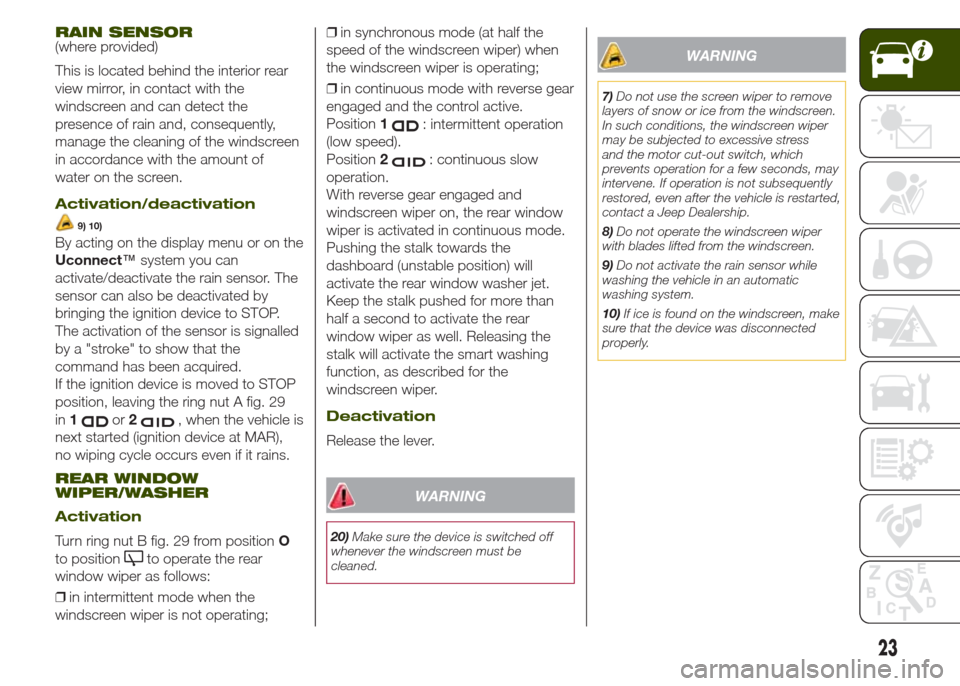
position, leaving the ring nut A fig. 29
in1
or2, when the vehicle is
next started (ignition device at MAR),
no wiping cycle occurs even if it rains.
REAR WINDOW
WIPER/WASHER
Activation
Turn ring nut B fig. 29 from positionO
to position
to operate the rear
window wiper as follows:
❒in intermittent mode when the
windscreen wiper is not operating;❒in synchronous mode (at half the
speed of the windscreen wiper) when
the windscreen wiper is operating;
❒in continuous mode with reverse gear
engaged and the control active.
Position1
: intermittent operation
(low speed).
Position2
: continuous slow
operation.
With reverse gear engaged and
windscreen wiper on, the rear window
wiper is activated in continuous mode.
Pushing the stalk towards the
dashboard (unstable position) will
activate the rear window washer jet.
Keep the stalk pushed for more than
half a second to activate the rear
window wiper as well. Releasing the
stalk will activate the smart washing
function, as described for the
windscreen wiper.
Deactivation
Release the lever.
WARNING
20)Make sure the device is switched off
whenever the windscreen must be
cleaned.
WARNING
7)Do not use the screen wiper to remove
layers of snow or ice from the windscreen.
In such conditions, the windscreen wiper
may be subjected to excessive stress
and the motor cut-out switch, which
prevents operation for a few seconds, may
intervene. If operation is not subsequently
restored, even after the vehicle is restarted,
contact a Jeep Dealership.
8)Do not operate the windscreen wiper
with blades lifted from the windscreen.
9)Do not activate the rain sensor while
washing the vehicle in an automatic
washing system.
10)If ice is found on the windscreen, make
sure that the device was disconnected
properly.
23
Page 27 of 212
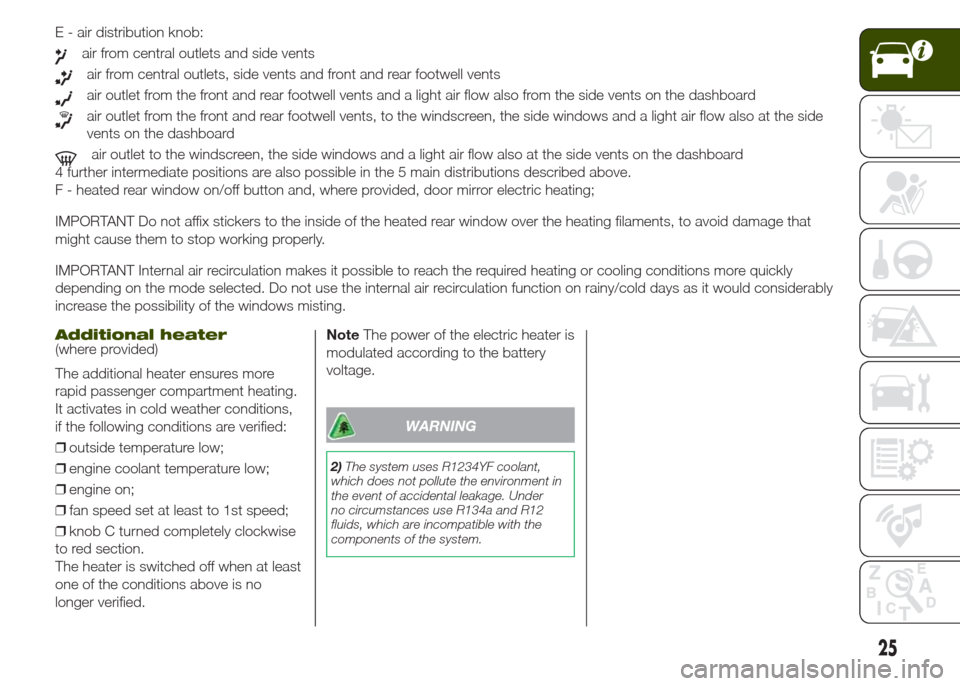
E - air distribution knob:
air from central outlets and side vents
air from central outlets, side vents and front and rear footwell vents
air outlet from the front and rear footwell vents and a light air flow also from the side vents on the dashboard
air outlet from the front and rear footwell vents, to the windscreen, the side windows and a light air flow also at the side
vents on the dashboard
air outlet to the windscreen, the side windows and a light air flow also at the side vents on the dashboard
4 further intermediate positions are also possible in the 5 main distributions described above.
F - heated rear window on/off button and, where provided, door mirror electric heating;
IMPORTANT Do not affix stickers to the inside of the heated rear window over the heating filaments, to avoid damage that
might cause them to stop working properly.
IMPORTANT Internal air recirculation makes it possible to reach the required heating or cooling conditions more quickly
depending on the mode selected. Do not use the internal air recirculation function on rainy/cold days as it would considerably
increase the possibility of the windows misting.
Additional heater(where provided)
The additional heater ensures more
rapid passenger compartment heating.
It activates in cold weather conditions,
if the following conditions are verified:
❒outside temperature low;
❒engine coolant temperature low;
❒engine on;
❒fan speed set at least to 1st speed;
❒knob C turned completely clockwise
to red section.
The heater is switched off when at least
one of the conditions above is no
longer verified.NoteThe power of the electric heater is
modulated according to the battery
voltage.
WARNING
2)The system uses R1234YF coolant,
which does not pollute the environment in
the event of accidental leakage. Under
no circumstances use R134a and R12
fluids, which are incompatible with the
components of the system.
25
Page 31 of 212
❒after the window has reached the
upper end of travel, hold the up button
down for at least 3 seconds.
WARNING
21)Incorrect use of the electric windows
may be dangerous. Before and during their
operation, ensure that any passengers
are not at risk from the moving glass either
by personal objects getting caught in the
mechanism or by being hit by it directly.
When leaving the vehicle (equipped with
mechanical key with remote control),
always remove the key from the ignition
device to prevent accidental operation of
the electric windows from being a hazard
for those still on board.
ELECTRIC SUN
ROOF
22)11)The electric sun roof comprises two
glass panels (the front one is mobile
and the rear one fixed) and is fitted with
an electrically operated sun blind.
The sun roof and the blind can
be operated only with the ignition
device turned to MAR.
CONTROL BUTTONS
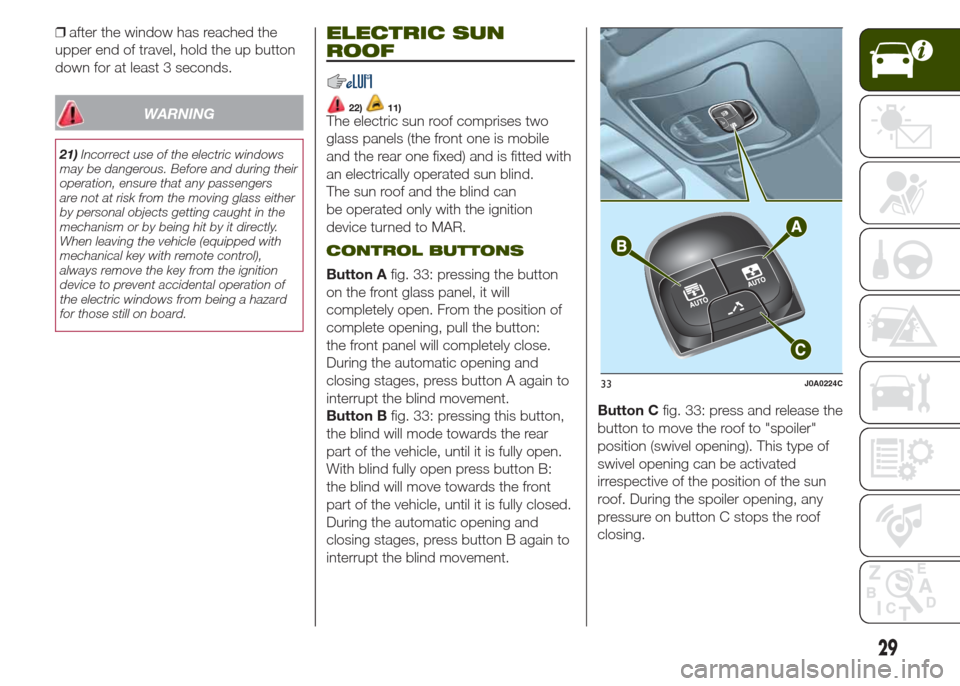
Button Afig. 33: pressing the button
on the front glass panel, it will
completely open. From the position of
complete opening, pull the button:
the front panel will completely close.
During the automatic opening and
closing stages, press button A again to
interrupt the blind movement.
Button Bfig. 33: pressing this button,
the blind will mode towards the rear
part of the vehicle, until it is fully open.
With blind fully open press button B:
the blind will move towards the front
part of the vehicle, until it is fully closed.
During the automatic opening and
closing stages, press button B again to
interrupt the blind movement.Button Cfig. 33: press and release the
button to move the roof to "spoiler"
position (swivel opening). This type of
swivel opening can be activated
irrespective of the position of the sun
roof. During the spoiler opening, any
pressure on button C stops the roof
closing.
33J0A0224C
29
Page 32 of 212
ANTI-PINCH DEVICE
The sun roof and the electric blind are
equipped with an anti-pinch safety
system capable of detecting the
presence of an obstacle whilst the roof
is closing: if this happens, the system
intervenes and the movement of the
glass is immediately reversed.
EMERGENCY OPERATION
If the control buttons fail to operate, the
sun blind and the sun roof can be
moved manually, proceeding as
described below:
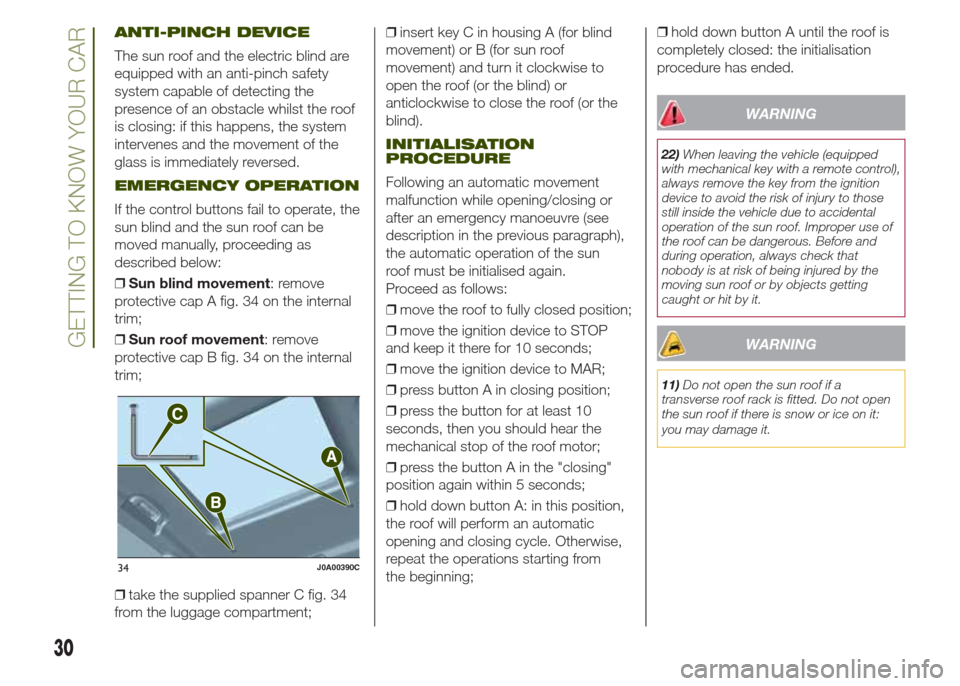
❒Sun blind movement: remove
protective cap A fig. 34 on the internal
trim;
❒Sun roof movement: remove
protective cap B fig. 34 on the internal
trim;
❒take the supplied spanner C fig. 34
from the luggage compartment;❒insert key C in housing A (for blind
movement) or B (for sun roof
movement) and turn it clockwise to
open the roof (or the blind) or
anticlockwise to close the roof (or the
blind).
INITIALISATION
PROCEDURE
Following an automatic movement
malfunction while opening/closing or
after an emergency manoeuvre (see
description in the previous paragraph),
the automatic operation of the sun
roof must be initialised again.
Proceed as follows:
❒move the roof to fully closed position;
❒move the ignition device to STOP
and keep it there for 10 seconds;
❒move the ignition device to MAR;
❒press button A in closing position;
❒press the button for at least 10
seconds, then you should hear the
mechanical stop of the roof motor;
❒press the button A in the "closing"
position again within 5 seconds;
❒hold down button A: in this position,
the roof will perform an automatic
opening and closing cycle. Otherwise,
repeat the operations starting from
the beginning;❒hold down button A until the roof is
completely closed: the initialisation
procedure has ended.
WARNING
22)When leaving the vehicle (equipped
with mechanical key with a remote control),
always remove the key from the ignition
device to avoid the risk of injury to those
still inside the vehicle due to accidental
operation of the sun roof. Improper use of
the roof can be dangerous. Before and
during operation, always check that
nobody is at risk of being injured by the
moving sun roof or by objects getting
caught or hit by it.
WARNING
11)Do not open the sun roof if a
transverse roof rack is fitted. Do not open
the sun roof if there is snow or ice on it:
you may damage it.
34J0A00390C
30
GETTING TO KNOW YOUR CAR