torque JEEP RENEGADE 2015 1.G User Guide
[x] Cancel search | Manufacturer: JEEP, Model Year: 2015, Model line: RENEGADE, Model: JEEP RENEGADE 2015 1.GPages: 678, PDF Size: 29.84 MB
Page 361 of 678
maximize traction and allow the highest steering ca-
pacity for off-road surfaces. This mode gives you the
maximum performance off-road. Use for low speed
obstacles such as large rocks, deep ruts, etc.
NOTE:
•Rock mode is only available on the vehicles equipped
with the Off-Road package.
•Activate the Hill Descent Control or Selec Speed
Control for steep downhill control. See “Electronic
Brake Control System” in this section for further
information.
LANESENSE — IF EQUIPPED
LaneSense Operation
The LaneSense system is operational at speeds above
37 mph (60 km/h) and below 112 mph (180 km/h). The
LaneSense system uses a forward looking camera to
detect lane markings and measure vehicle position
within the lane boundaries.
When both lane markings are detected and the driver
unintentionally drifts out of the lane (no turn signal
applied), the LaneSense system provides a haptic warn-
ing in the form of torque applied to the steering wheel to
prompt the driver to remain within the lane boundaries.
If the driver continues to unintentionally drift out of the
lane, the LaneSense system provides a visual warning
through the Electronic Vehicle Information Center (EVIC)
or Driver Information Display (DID) to prompt the driver
to remain within the lane boundaries.
The driver may manually override the haptic warning by
applying torque into the steering wheel at any time.
When only a single lane marking is detected and the
driver unintentionally drifts across the lane marking (no
turn signal applied), the LaneSense system provides a
7
STARTING AND OPERATING 359
Page 362 of 678
visual warning through the EVIC/DID to prompt the
driver to remain within the lane. When only a single lane
marking is detected, a haptic (torque) warning will not be
provided.
NOTE:When operating conditions have been met, the
LaneSense system will monitor if the driver ’s hands are
on the steering wheel and provides an audible warning
to the driver when the driver ’s hands are not detected on
the steering wheel. The system will cancel if the driver
does not return their hands to the wheel.
Turning LaneSense ON Or OFF
The default status of LaneSense is “OFF”.
The LaneSense button is located on the switch panel
below the Uconnect® display.
To turn the LaneSense system ON, push the
LaneSense button (LED turns on). A “Lane
Sense On” message is shown in the EVIC/DID.
To turn the LaneSense system OFF, push the LaneSense
button once (LED turns off).
NOTE:The LaneSense system will retain the last system
state ON or OFF from the last ignition cycle when the
ignition is changed to the ON/RUN position.
LaneSense Warning Message
The LaneSense system will indicate the current lane drift
condition through the Electronic Vehicle Information
Center (EVIC) or Driver Information Display (DID).
3.5 EVIC Screen — If Equipped
When the LaneSense system is ON, the lane lines are gray
when both of the lane boundaries have not been detected
and the LaneSense indicator is solid white.
360 STARTING AND OPERATING
Page 364 of 678
NOTE:The LaneSense system operates with the similar
behavior for a right lane departure when only the right
lane marking has been detected.
Left Lane Departure — Both Lanes Detected
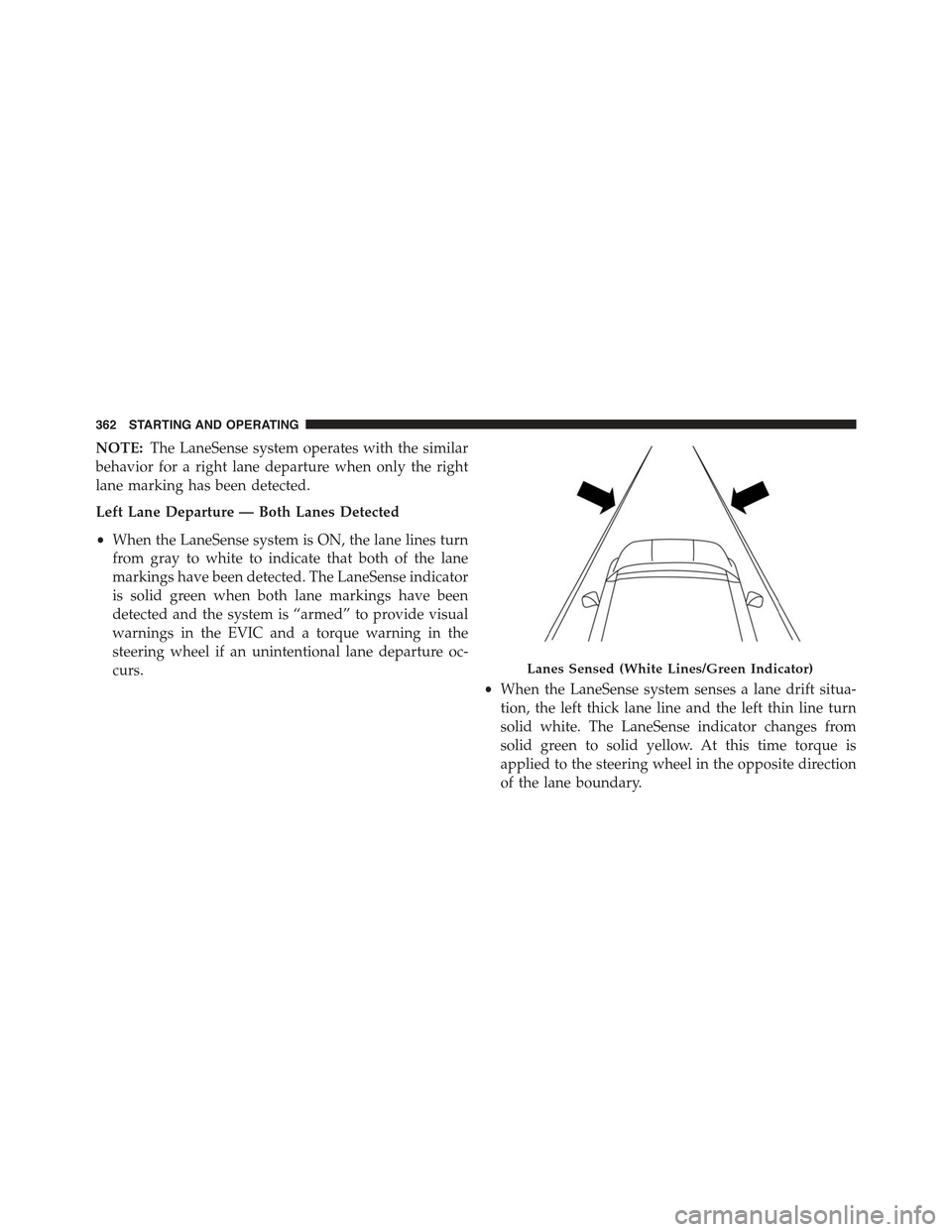
•When the LaneSense system is ON, the lane lines turn
from gray to white to indicate that both of the lane
markings have been detected. The LaneSense indicator
is solid green when both lane markings have been
detected and the system is “armed” to provide visual
warnings in the EVIC and a torque warning in the
steering wheel if an unintentional lane departure oc-
curs.
•When the LaneSense system senses a lane drift situa-
tion, the left thick lane line and the left thin line turn
solid white. The LaneSense indicator changes from
solid green to solid yellow. At this time torque is
applied to the steering wheel in the opposite direction
of the lane boundary.
Lanes Sensed (White Lines/Green Indicator)
362 STARTING AND OPERATING
Page 365 of 678
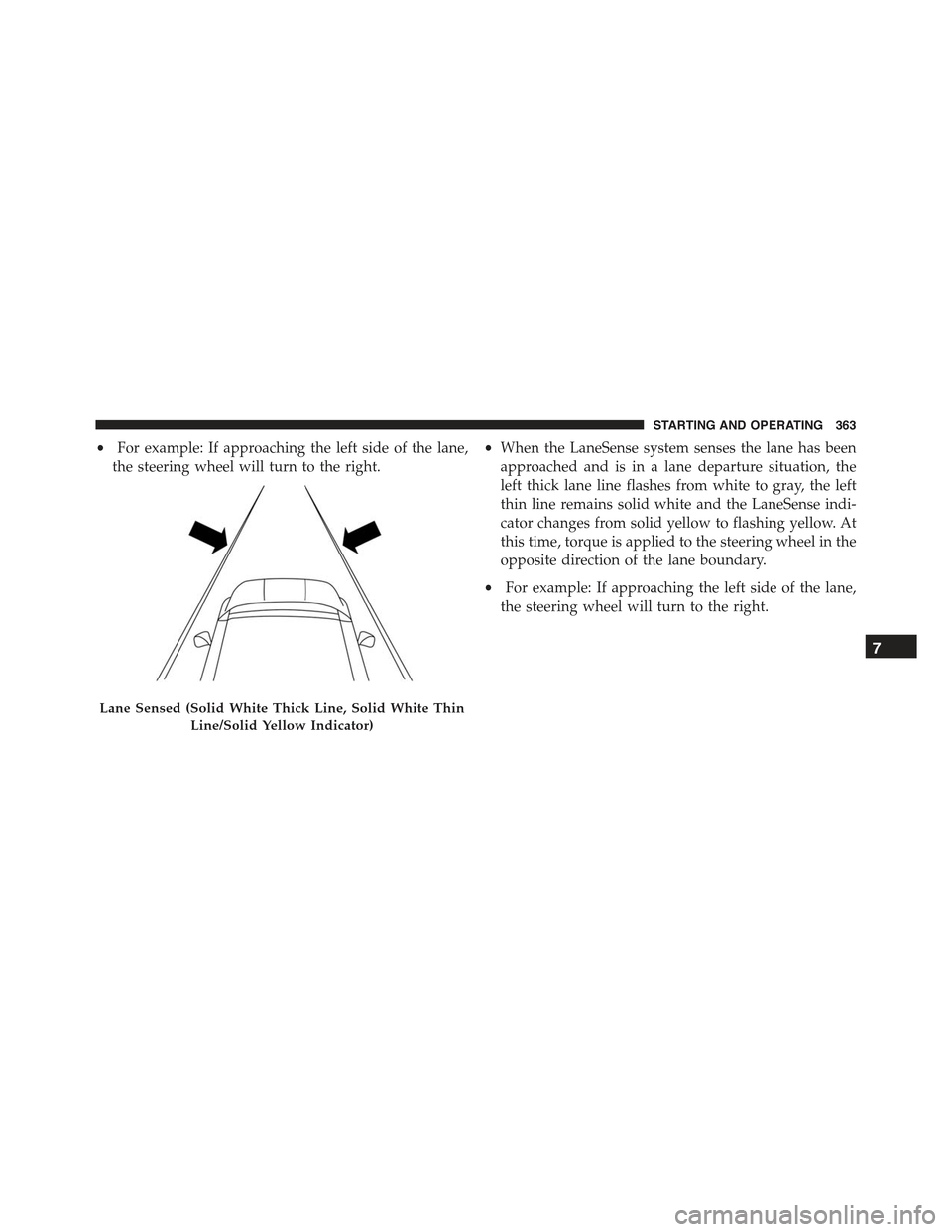
•For example: If approaching the left side of the lane,
the steering wheel will turn to the right.
•When the LaneSense system senses the lane has been
approached and is in a lane departure situation, the
left thick lane line flashes from white to gray, the left
thin line remains solid white and the LaneSense indi-
cator changes from solid yellow to flashing yellow. At
this time, torque is applied to the steering wheel in the
opposite direction of the lane boundary.
•For example: If approaching the left side of the lane,
the steering wheel will turn to the right.
Lane Sensed (Solid White Thick Line, Solid White Thin
Line/Solid Yellow Indicator)
7
STARTING AND OPERATING 363
Page 368 of 678
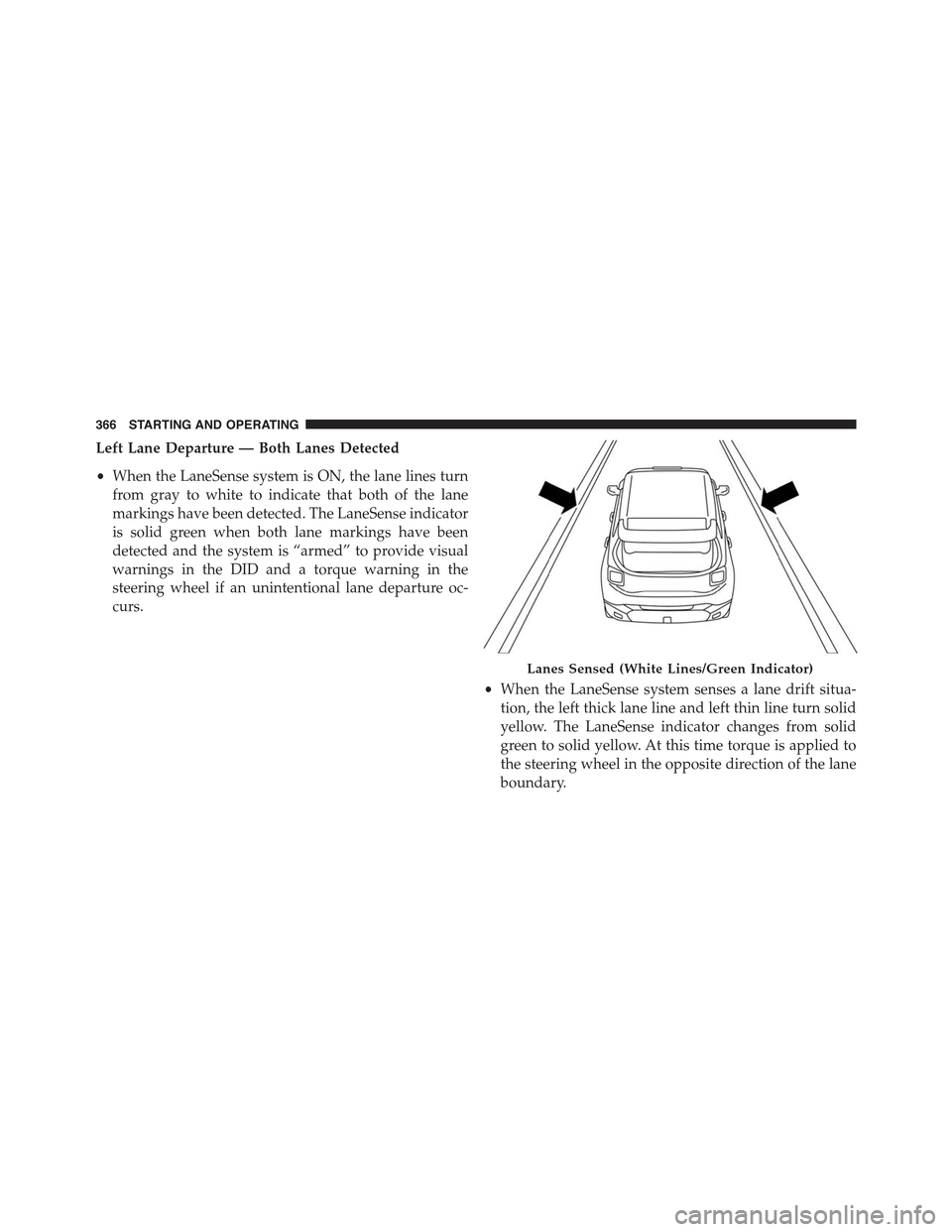
Left Lane Departure — Both Lanes Detected
•When the LaneSense system is ON, the lane lines turn
from gray to white to indicate that both of the lane
markings have been detected. The LaneSense indicator
is solid green when both lane markings have been
detected and the system is “armed” to provide visual
warnings in the DID and a torque warning in the
steering wheel if an unintentional lane departure oc-
curs.
•When the LaneSense system senses a lane drift situa-
tion, the left thick lane line and left thin line turn solid
yellow. The LaneSense indicator changes from solid
green to solid yellow. At this time torque is applied to
the steering wheel in the opposite direction of the lane
boundary.
Lanes Sensed (White Lines/Green Indicator)
366 STARTING AND OPERATING
Page 369 of 678
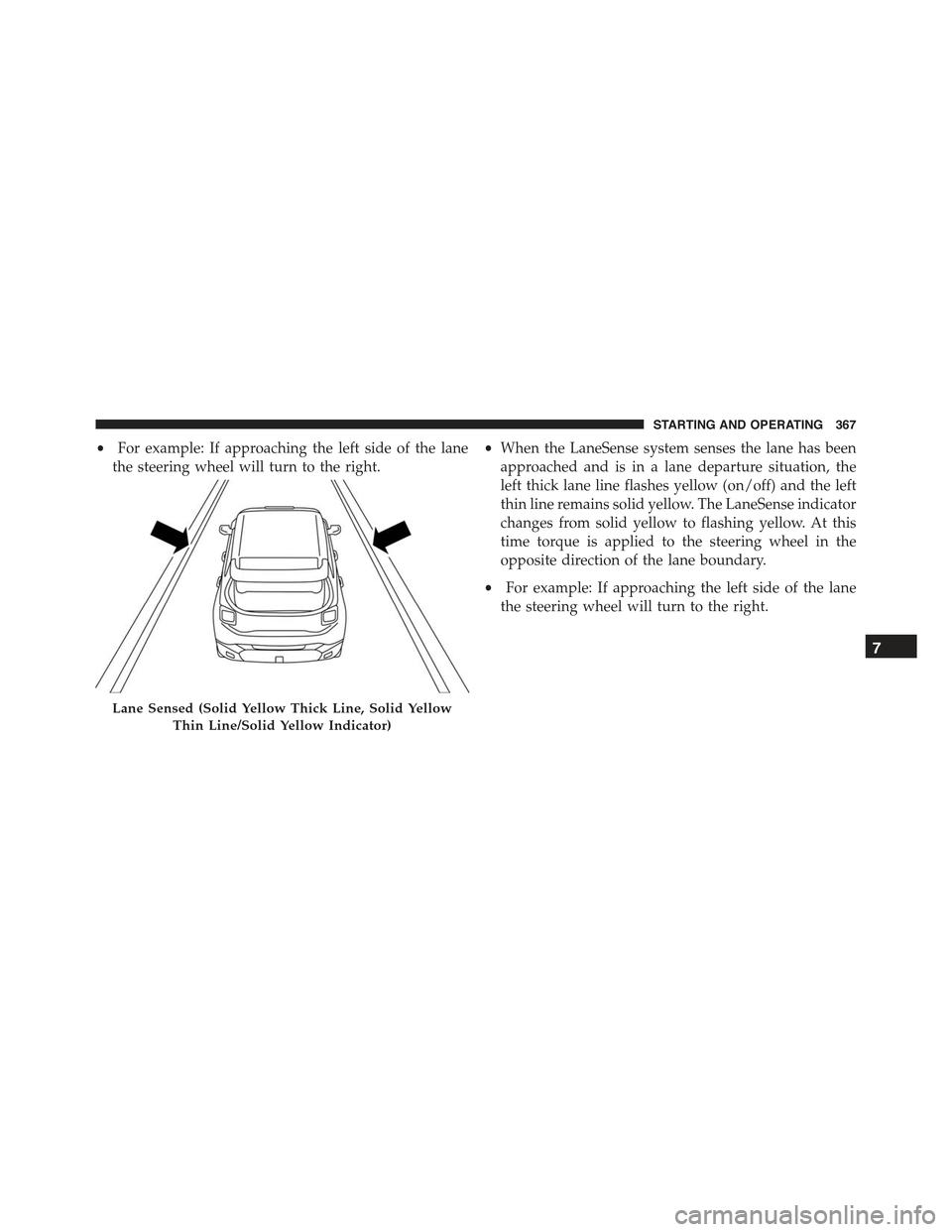
•For example: If approaching the left side of the lane
the steering wheel will turn to the right.
•When the LaneSense system senses the lane has been
approached and is in a lane departure situation, the
left thick lane line flashes yellow (on/off) and the left
thin line remains solid yellow. The LaneSense indicator
changes from solid yellow to flashing yellow. At this
time torque is applied to the steering wheel in the
opposite direction of the lane boundary.
•For example: If approaching the left side of the lane
the steering wheel will turn to the right.
Lane Sensed (Solid Yellow Thick Line, Solid Yellow
Thin Line/Solid Yellow Indicator)
7
STARTING AND OPERATING 367
Page 370 of 678
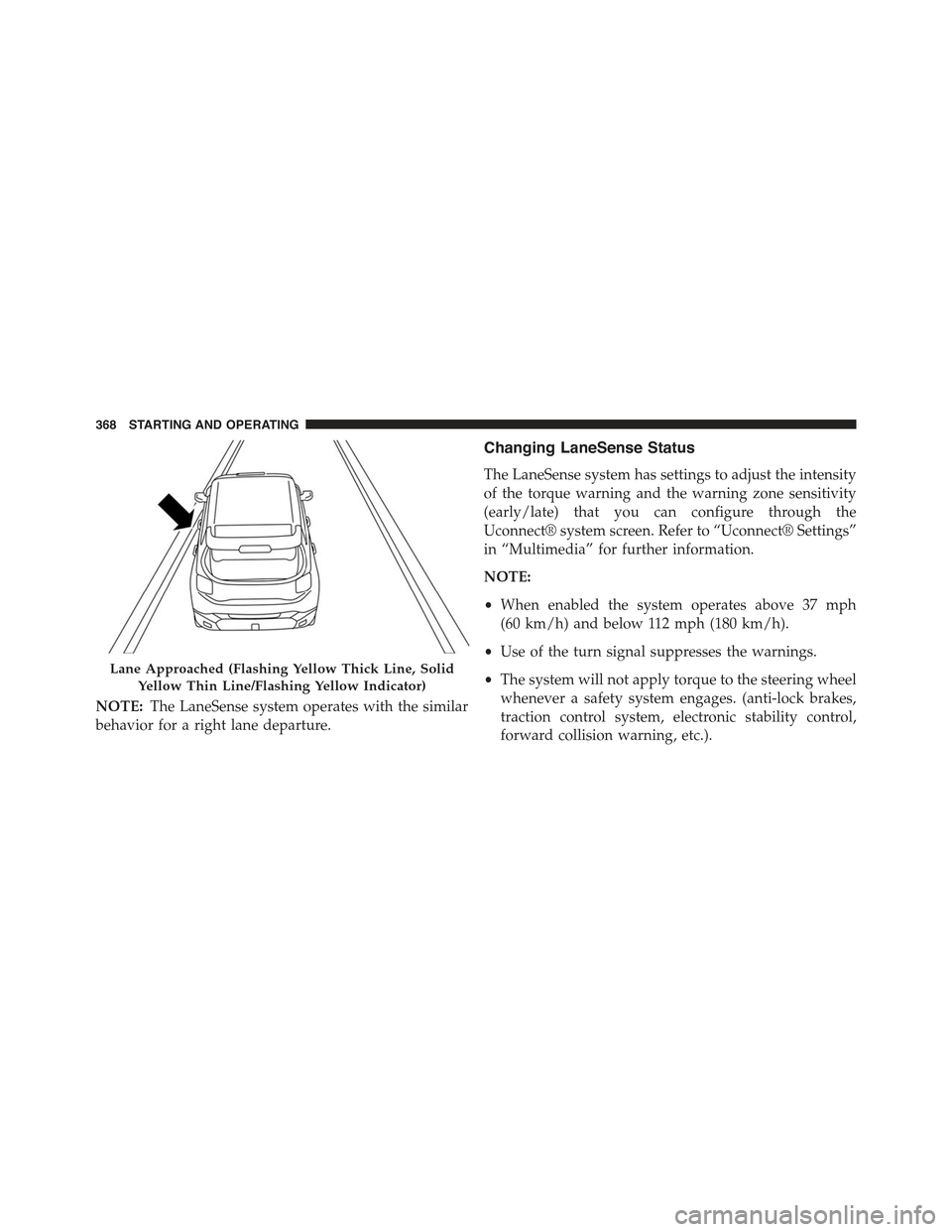
NOTE:The LaneSense system operates with the similar
behavior for a right lane departure.
Changing LaneSense Status
The LaneSense system has settings to adjust the intensity
of the torque warning and the warning zone sensitivity
(early/late) that you can configure through the
Uconnect® system screen. Refer to “Uconnect® Settings”
in “Multimedia” for further information.
NOTE:
•When enabled the system operates above 37 mph
(60 km/h) and below 112 mph (180 km/h).
•Use of the turn signal suppresses the warnings.
•The system will not apply torque to the steering wheel
whenever a safety system engages. (anti-lock brakes,
traction control system, electronic stability control,
forward collision warning, etc.).
Lane Approached (Flashing Yellow Thick Line, Solid
Yellow Thin Line/Flashing Yellow Indicator)
368 STARTING AND OPERATING
Page 408 of 678
turning against engine compression drag. This will per-
mit you to control the vehicle speed and direction.
When descending mountains or hills, repeated braking
can cause brake fade with loss of braking control. Avoid
repeated heavy braking by downshifting the transmis-
sion whenever possible.
After Driving Off-Road
Off-road operation puts more stress on your vehicle than
does most on-road driving. After going off-road, it is
always a good idea to check for damage. That way you
can get any problems taken care of right away and have
your vehicle ready when you need it.
•Completely inspect the underbody of your vehicle.
Check tires, body structure, steering, suspension, and
exhaust system for damage.
•Inspect the radiator for mud and debris and clean as
required.
•Check threaded fasteners for looseness, particularly on
the chassis, drivetrain components, steering, and sus-
pension. Retighten them, if required, and torque to the
values specified in the Service Manual.
•Check for accumulations of plants or brush. These
things could be a fire hazard. They might hide damage
to fuel lines, brake hoses, axle pinion seals, and
propeller shafts.
•After extended operation in mud, sand, water, or
similar dirty conditions, have the radiator, fan, brake
rotors, wheels, brake linings, and axle yokes inspected
and cleaned as soon as possible.
WARNING!
Abrasive material in any part of the brakes may cause
excessive wear or unpredictable braking. You might
(Continued)
406 STARTING AND OPERATING
Page 427 of 678
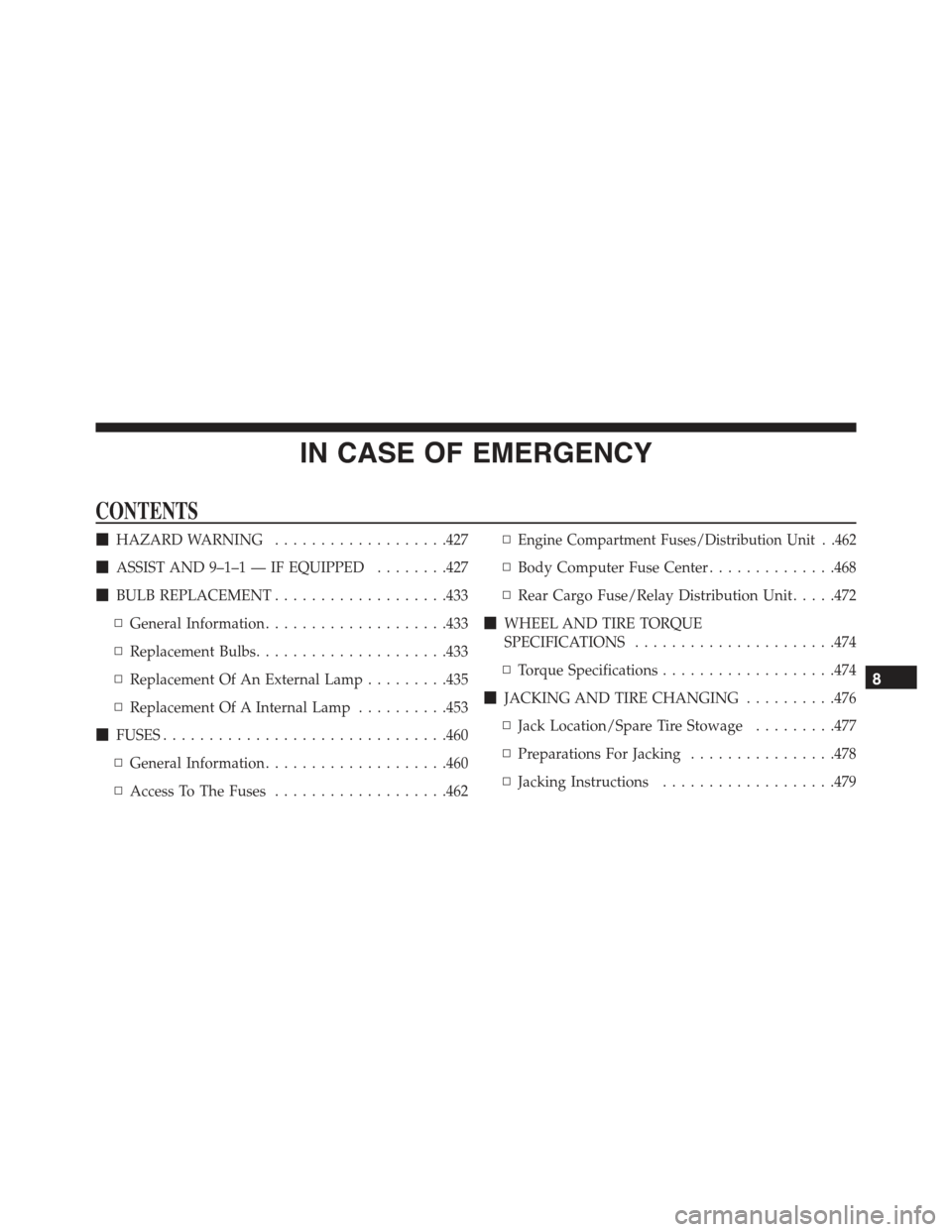
IN CASE OF EMERGENCY
CONTENTS
!HAZARD WARNING...................427
!ASSIST AND 9–1–1 — IF EQUIPPED........427
!BULB REPLACEMENT...................433
▫General Information....................433
▫Replacement Bulbs.....................433
▫Replacement Of An External Lamp.........435
▫Replacement Of A Internal Lamp..........453
!FUSES...............................460
▫General Information....................460
▫Access To The Fuses...................462
▫Engine Compartment Fuses/Distribution Unit . .462
▫Body Computer Fuse Center..............468
▫Rear Cargo Fuse/Relay Distribution Unit.....472
!WHEEL AND TIRE TORQUE
SPECIFICATIONS......................474
▫Torque Specifications...................474
!JACKING AND TIRE CHANGING..........476
▫Jack Location/Spare Tire Stowage.........477
▫Preparations For Jacking................478
▫Jacking Instructions...................479
8
Page 476 of 678
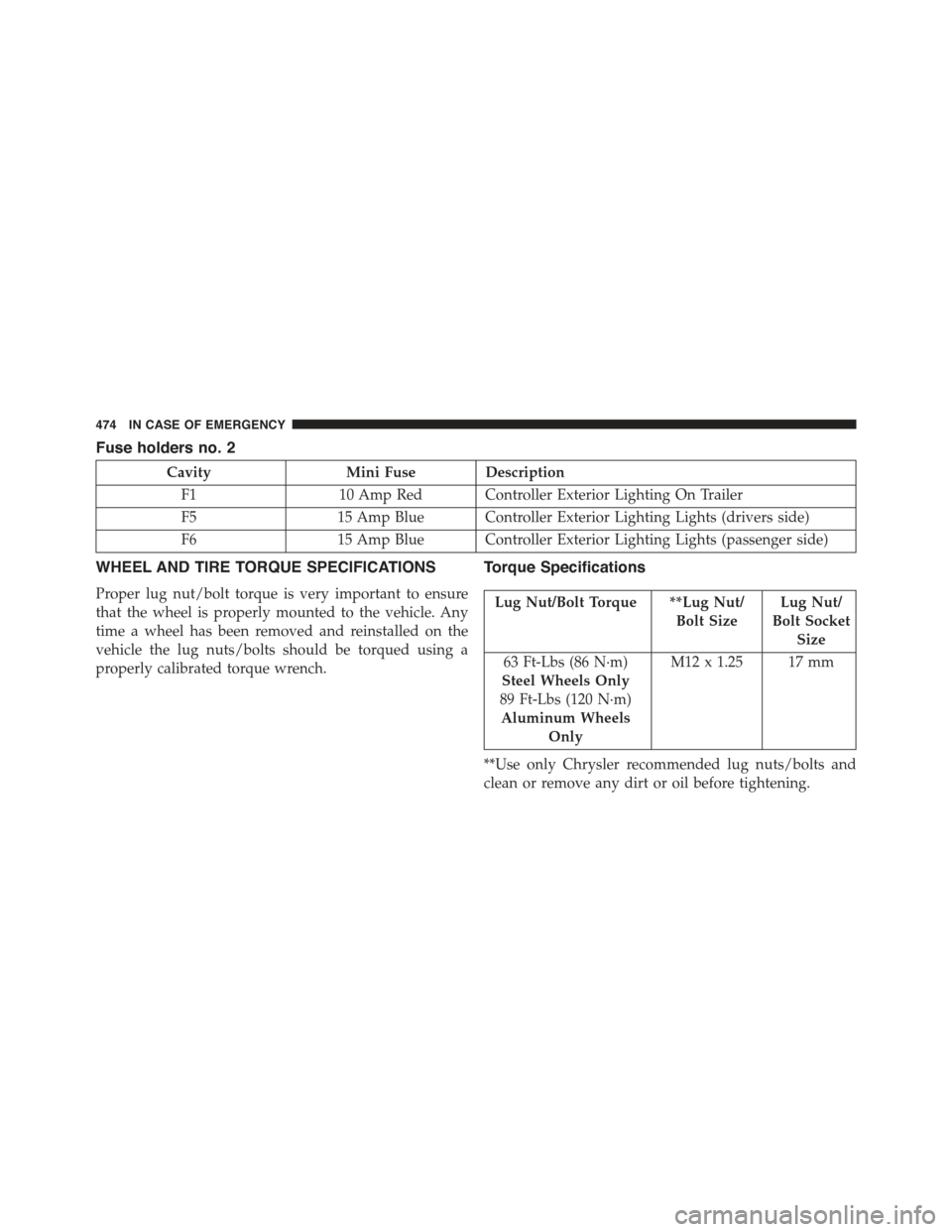
Fuse holders no. 2
CavityMini Fuse Description
F110 Amp Red Controller Exterior Lighting On Trailer
F515 Amp Blue Controller Exterior Lighting Lights (drivers side)
F615 Amp Blue Controller Exterior Lighting Lights (passenger side)
WHEEL AND TIRE TORQUE SPECIFICATIONS
Proper lug nut/bolt torque is very important to ensure
that the wheel is properly mounted to the vehicle. Any
time a wheel has been removed and reinstalled on the
vehicle the lug nuts/bolts should be torqued using a
properly calibrated torque wrench.
Torque Specifications
Lug Nut/Bolt Torque **Lug Nut/
Bolt Size
Lug Nut/
Bolt Socket
Size
63 Ft-Lbs (86 N·m)
Steel Wheels Only
89 Ft-Lbs (120 N·m)
Aluminum Wheels
Only
M12 x 1.25 17 mm
**Use only Chrysler recommended lug nuts/bolts and
clean or remove any dirt or oil before tightening.
474 IN CASE OF EMERGENCY