lock JEEP RENEGADE 2015 1.G Owner's Guide
[x] Cancel search | Manufacturer: JEEP, Model Year: 2015, Model line: RENEGADE, Model: JEEP RENEGADE 2015 1.GPages: 678, PDF Size: 29.84 MB
Page 82 of 678
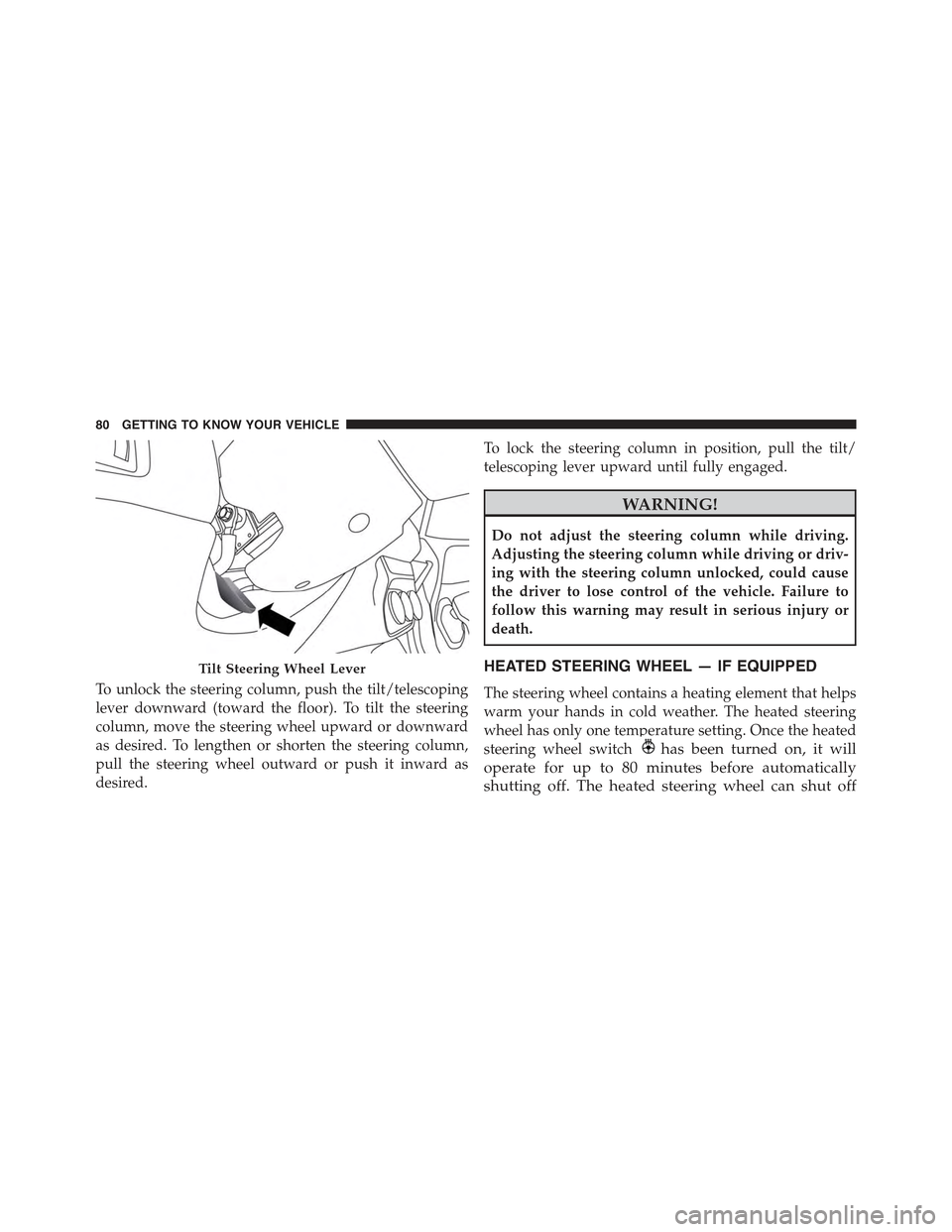
To unlock the steering column, push the tilt/telescoping
lever downward (toward the floor). To tilt the steering
column, move the steering wheel upward or downward
as desired. To lengthen or shorten the steering column,
pull the steering wheel outward or push it inward as
desired.
To lock the steering column in position, pull the tilt/
telescoping lever upward until fully engaged.
WARNING!
Do not adjust the steering column while driving.
Adjusting the steering column while driving or driv-
ing with the steering column unlocked, could cause
the driver to lose control of the vehicle. Failure to
follow this warning may result in serious injury or
death.
HEATED STEERING WHEEL — IF EQUIPPED
The steering wheel contains a heating element that helps
warm your hands in cold weather. The heated steering
wheel has only one temperature setting. Once the heated
steering wheel switchhas been turned on, it will
operate for up to 80 minutes before automatically
shutting off. The heated steering wheel can shut off
Tilt Steering Wheel Lever
80 GETTING TO KNOW YOUR VEHICLE
Page 88 of 678
The BSM detection zone covers approximately one lane
width on both sides of the vehicle 10 ft (3 m). The zone
length starts at the outside mirror and extends approxi-
mately 20 ft (6 m) beyond the rear bumper of the vehicle.
The BSM system monitors the detection zones on both
sides of the vehicle when the vehicle speed reaches
approximately 6 mph (10 km/h) or higher and will alert
the driver of vehicles in these areas.
NOTE:
•The BSM system does NOT alert the driver about
rapidly approaching vehicles that are outside the de-
tection zones.
•The BSM system detection zone DOES NOT change if
your vehicle is towing a trailer. Therefore, visually
verify the adjacent lane is clear for both your vehicle
and trailer before making a lane change. If the trailer or
other object (i.e., bicycle, sports equipment) extends
beyond the side of your vehicle, this may result in the
BSM warning light remaining illuminated the entire
time the vehicle is in a forward gear. It may be
necessary to deactivate BSM system manually by
related menu to avoid a miss-detection.
The area on the rear fascia where the radar sensors are
located must remain free of snow, ice, and dirt/road
contamination so that the BSM system can function
properly. Do not block the radar sensors located on the
rear fascia with foreign objects (bumper stickers, bicycle
racks, etc.).
86 GETTING TO KNOW YOUR VEHICLE
Page 93 of 678
WARNING!
The Blind Spot Monitoring system is only an aid to
help detect objects in the blind spot zones. The BSM
(Continued)
WARNING!(Continued)
system is not designed to detect pedestrians, bicy-
clists, or animals. Even if your vehicle is equipped
with the BSM system, always check your vehicles
mirrors, glance over your shoulder, and use your turn
signal before changing lanes. Failure to do so can
result in serious injury or death.
Rear Cross Path (RCP)
The Rear Cross Path (RCP) feature is intended to aid the
driver when backing out of parking spaces where their
vision of oncoming vehicles may be blocked. Proceed
slowly and cautiously out of the parking space until the
rear end of the vehicle is exposed. The RCP system will
then have a clear view of the cross traffic and if an
oncoming vehicle is detected, alert the driver.
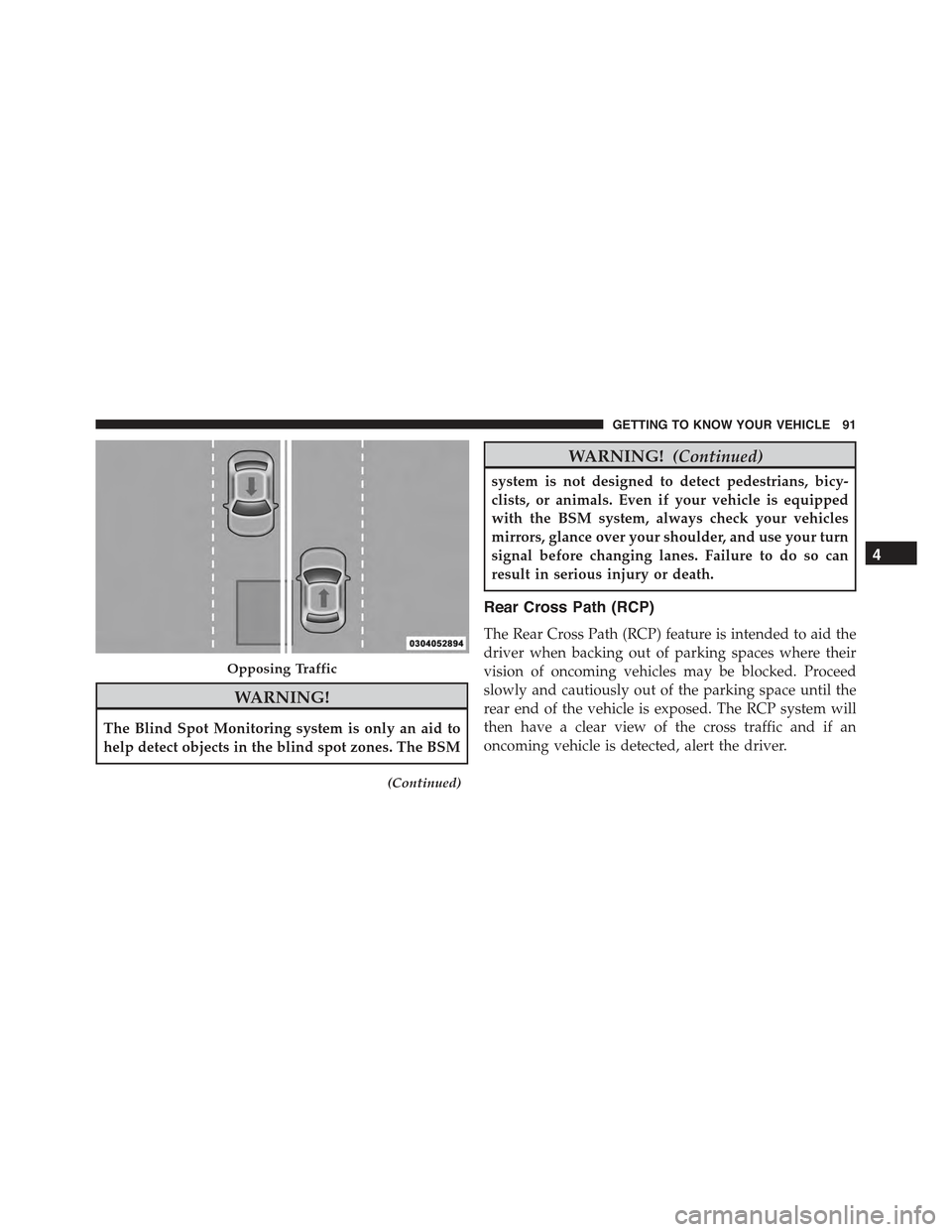
Opposing Traffic
4
GETTING TO KNOW YOUR VEHICLE 91
Page 94 of 678
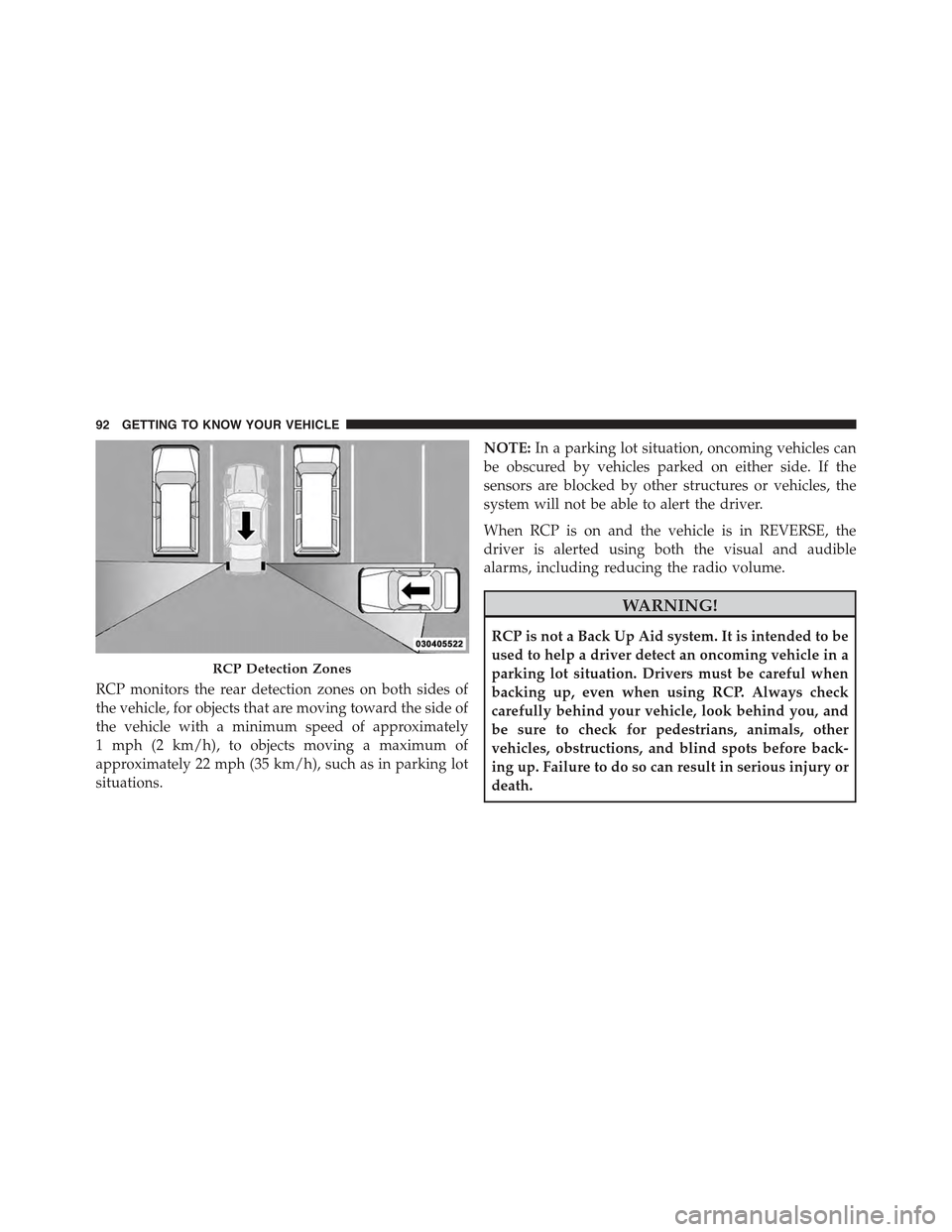
RCP monitors the rear detection zones on both sides of
the vehicle, for objects that are moving toward the side of
the vehicle with a minimum speed of approximately
1 mph (2 km/h), to objects moving a maximum of
approximately 22 mph (35 km/h), such as in parking lot
situations.
NOTE:In a parking lot situation, oncoming vehicles can
be obscured by vehicles parked on either side. If the
sensors are blocked by other structures or vehicles, the
system will not be able to alert the driver.
When RCP is on and the vehicle is in REVERSE, the
driver is alerted using both the visual and audible
alarms, including reducing the radio volume.
WARNING!
RCP is not a Back Up Aid system. It is intended to be
used to help a driver detect an oncoming vehicle in a
parking lot situation. Drivers must be careful when
backing up, even when using RCP. Always check
carefully behind your vehicle, look behind you, and
be sure to check for pedestrians, animals, other
vehicles, obstructions, and blind spots before back-
ing up. Failure to do so can result in serious injury or
death.
RCP Detection Zones
92 GETTING TO KNOW YOUR VEHICLE
Page 103 of 678
NOTE:
•Before exiting the vehicle, make sure that the interior
lights are turned off. This will prevent the battery from
discharging once the doors are closed.
•If a light is left on it will automatically be turned off
after approximately 15 minutes after the ignition is in
the STOP/OFF position.
Dome Light Timing
The Dome Light will automatically illuminate when the
doors are unlocked, the doors are opened or after the
doors are closed.
Timing Entering The Vehicle
The dome lights illuminate in the following ways:
•When the doors are unlocked, the dome light will
illuminate for approximately 10 seconds.
•When one of the doors is opened, the dome light will
illuminate for approximately three minutes.
•When the doors are closed, the dome light will auto-
matically shut off after approximately 10 seconds.
The timing stops once the ignition is placed in the
MAR/RUN or AVV/ON position.
The dome light will turn off under any of the following
conditions:
•The dome light is disabled when the ignition is placed
in the MAR/RUN or AVV/ON position.
•The dome lights will turn off automatically when the
doors are locked.
•The dome lights will automatically turn off after
approximately fifteen minutes of inactivity to preserve
the battery.
4
GETTING TO KNOW YOUR VEHICLE 101
Page 104 of 678
Timing Exiting The Vehicle
The dome light will illuminate under the following
conditions when the ignition is turned to the STOP/OFF
position and the key is removed:
•The dome light will illuminate for 10 seconds after the
key is removed from the ignition.
•The opening of one of the doors (approximately three
minutes).
•After closing a door (approximately 10 seconds).
The dome light timing is disabled when the doors are
locked.
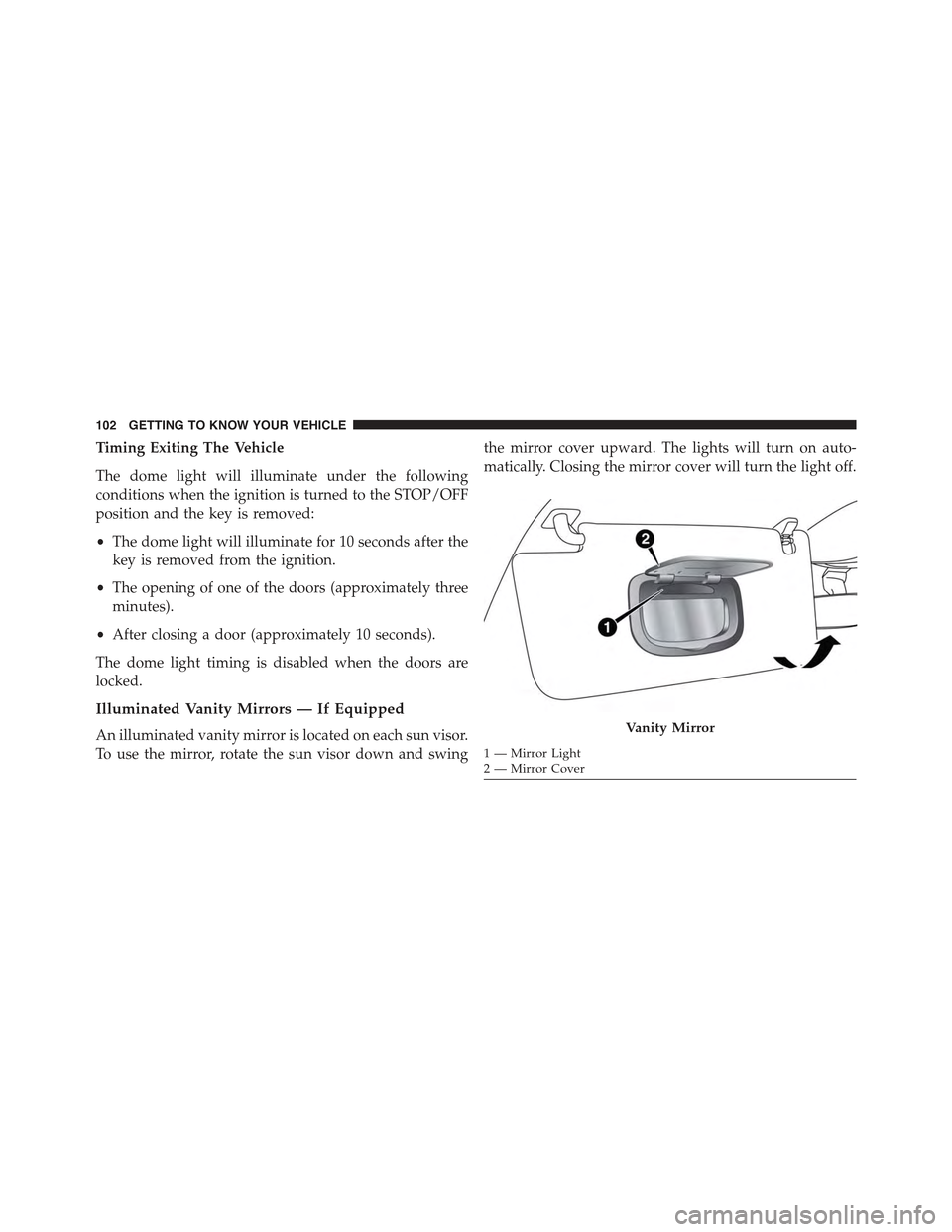
Illuminated Vanity Mirrors — If Equipped
An illuminated vanity mirror is located on each sun visor.
To use the mirror, rotate the sun visor down and swing
the mirror cover upward. The lights will turn on auto-
matically. Closing the mirror cover will turn the light off.
Vanity Mirror
1—MirrorLight2—MirrorCover
102 GETTING TO KNOW YOUR VEHICLE
Page 112 of 678
WINDOWS
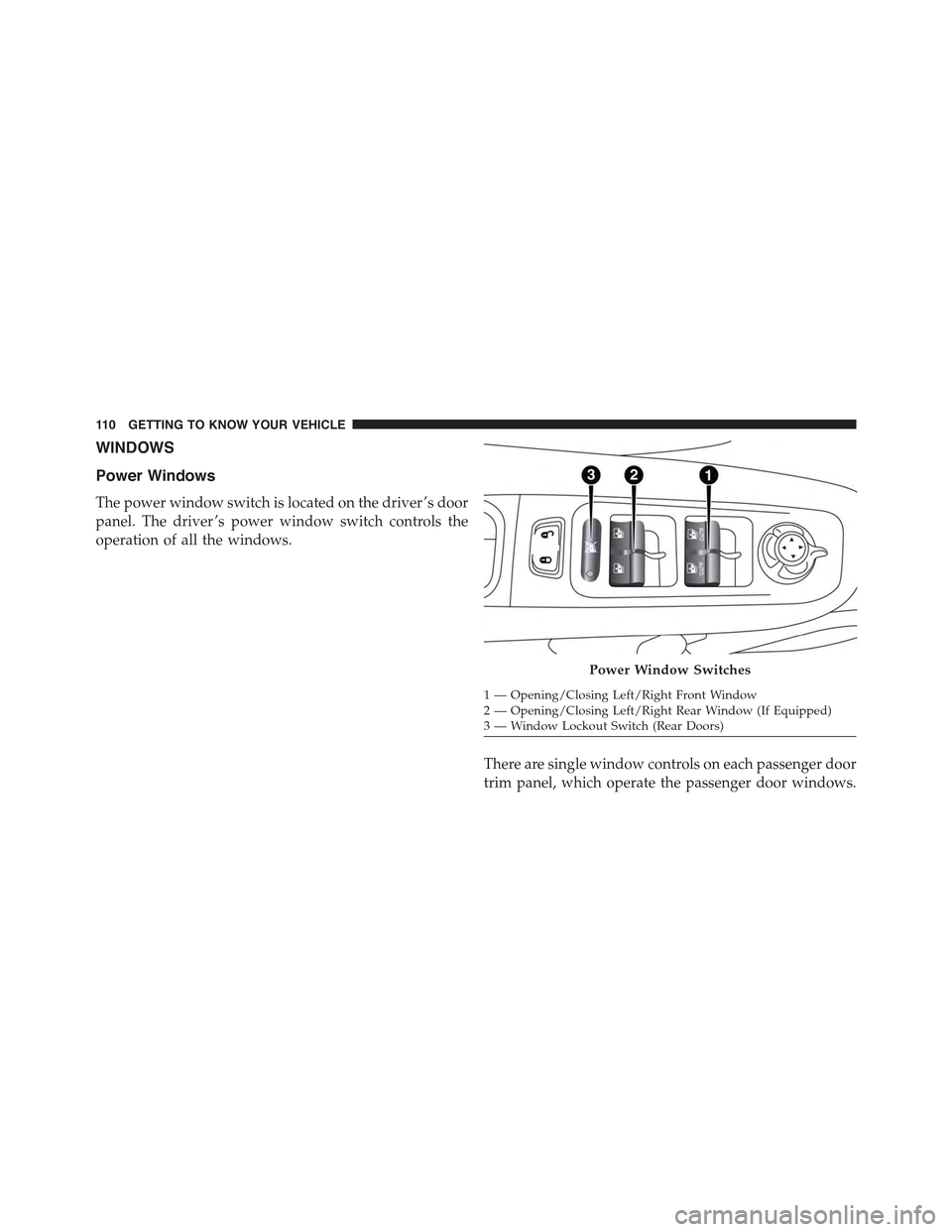
Power Windows
The power window switch is located on the driver ’s door
panel. The driver ’s power window switch controls the
operation of all the windows.
There are single window controls on each passenger door
trim panel, which operate the passenger door windows.
Power Window Switches
1—Opening/ClosingLeft/RightFrontWindow2—Opening/ClosingLeft/RightRearWindow(IfEquipped)3—WindowLockoutSwitch(RearDoors)
11 0 G E T T I N G TO K N O W Y O U R V E H I C L E
Page 117 of 678
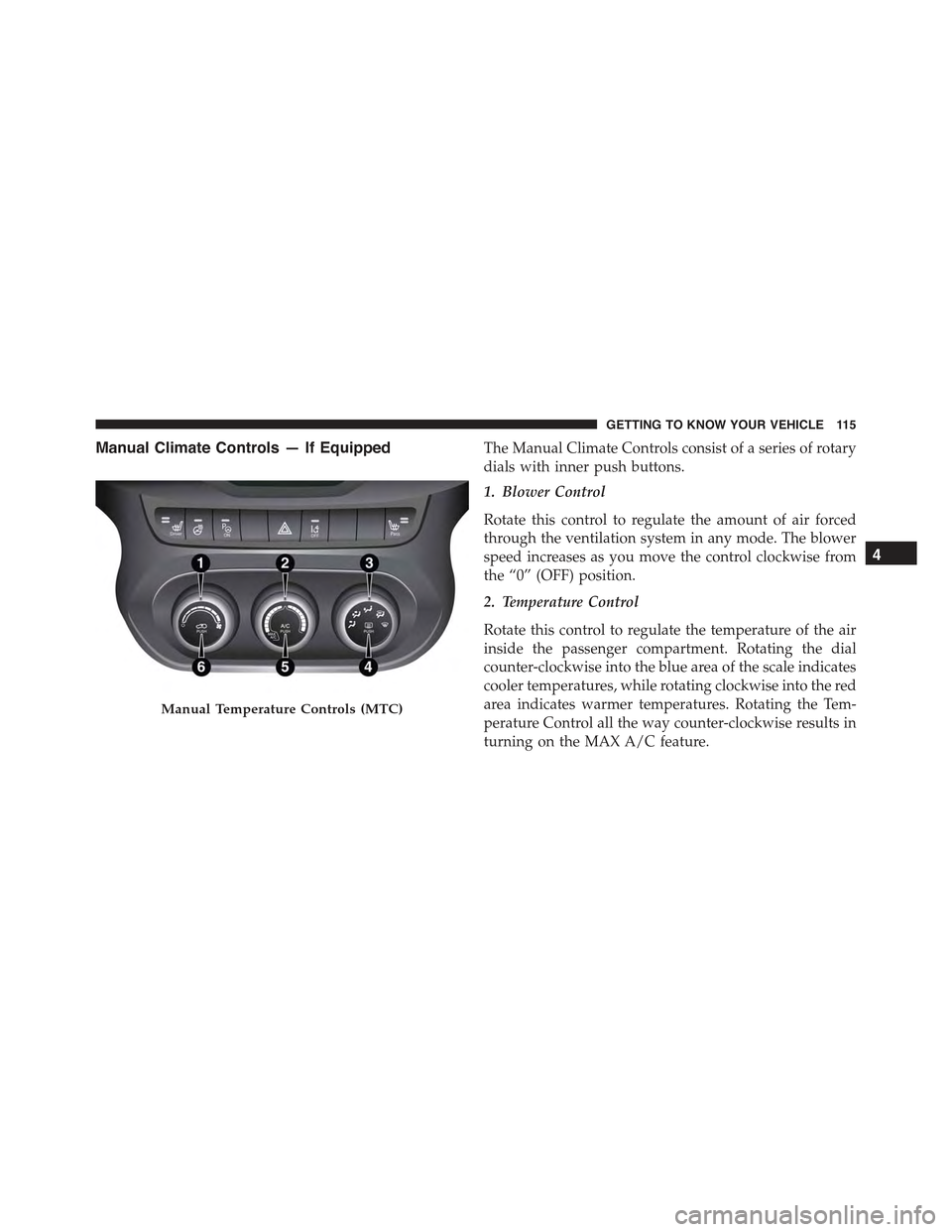
Manual Climate Controls — If EquippedThe Manual Climate Controls consist of a series of rotary
dials with inner push buttons.
1. Blower Control
Rotate this control to regulate the amount of air forced
through the ventilation system in any mode. The blower
speed increases as you move the control clockwise from
the “0” (OFF) position.
2. Temperature Control
Rotate this control to regulate the temperature of the air
inside the passenger compartment. Rotating the dial
counter-clockwise into the blue area of the scale indicates
cooler temperatures, while rotating clockwise into the red
area indicates warmer temperatures. Rotating the Tem-
perature Control all the way counter-clockwise results in
turning on the MAX A/C feature.
Manual Temperature Controls (MTC)
4
GETTING TO KNOW YOUR VEHICLE 115
Page 121 of 678
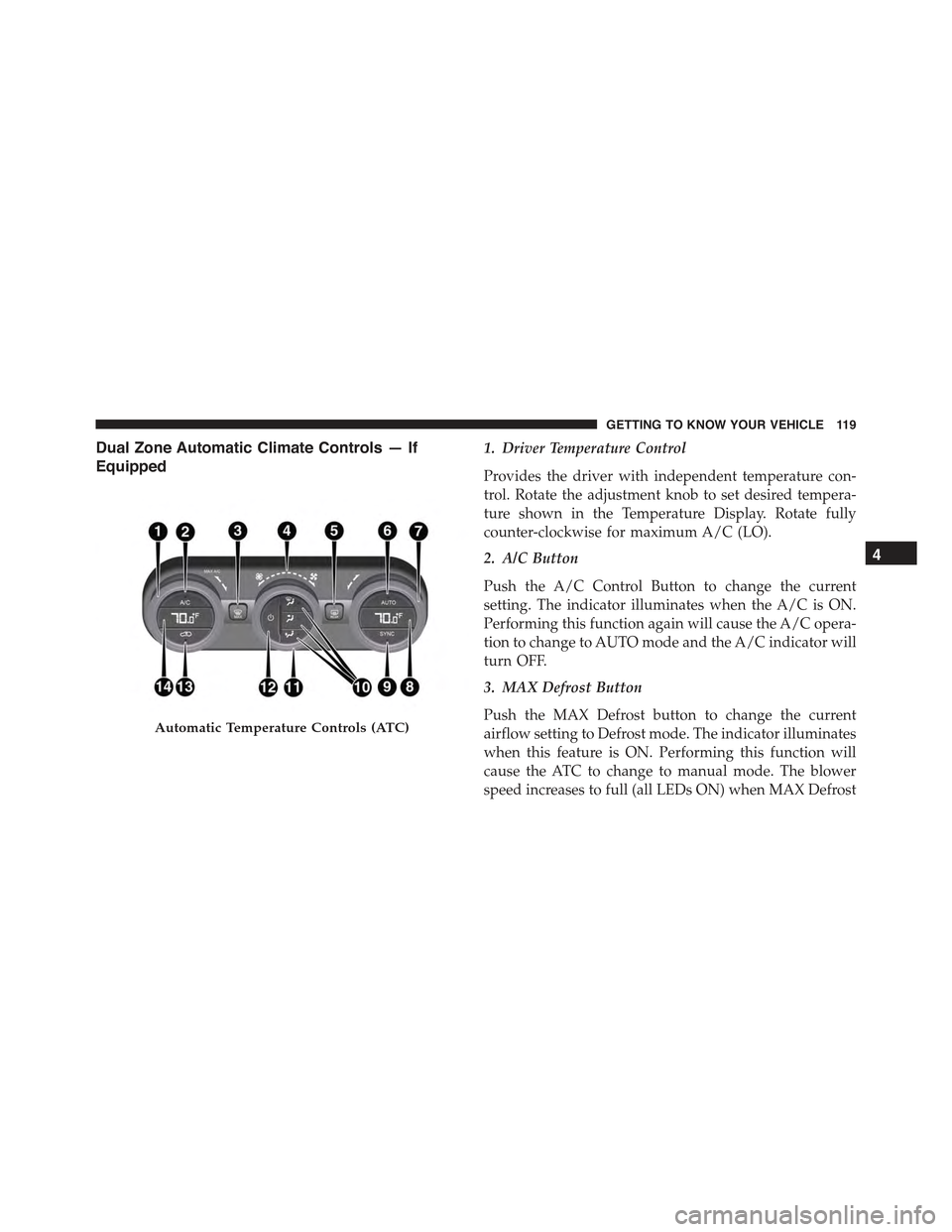
Dual Zone Automatic Climate Controls — If
Equipped
1. Driver Temperature Control
Provides the driver with independent temperature con-
trol. Rotate the adjustment knob to set desired tempera-
ture shown in the Temperature Display. Rotate fully
counter-clockwise for maximum A/C (LO).
2. A/C Button
Push the A/C Control Button to change the current
setting. The indicator illuminates when the A/C is ON.
Performing this function again will cause the A/C opera-
tion to change to AUTO mode and the A/C indicator will
turn OFF.
3. MAX Defrost Button
Push the MAX Defrost button to change the current
airflow setting to Defrost mode. The indicator illuminates
when this feature is ON. Performing this function will
cause the ATC to change to manual mode. The blower
speed increases to full (all LEDs ON) when MAX Defrost
Automatic Temperature Controls (ATC)
4
GETTING TO KNOW YOUR VEHICLE 119
Page 122 of 678
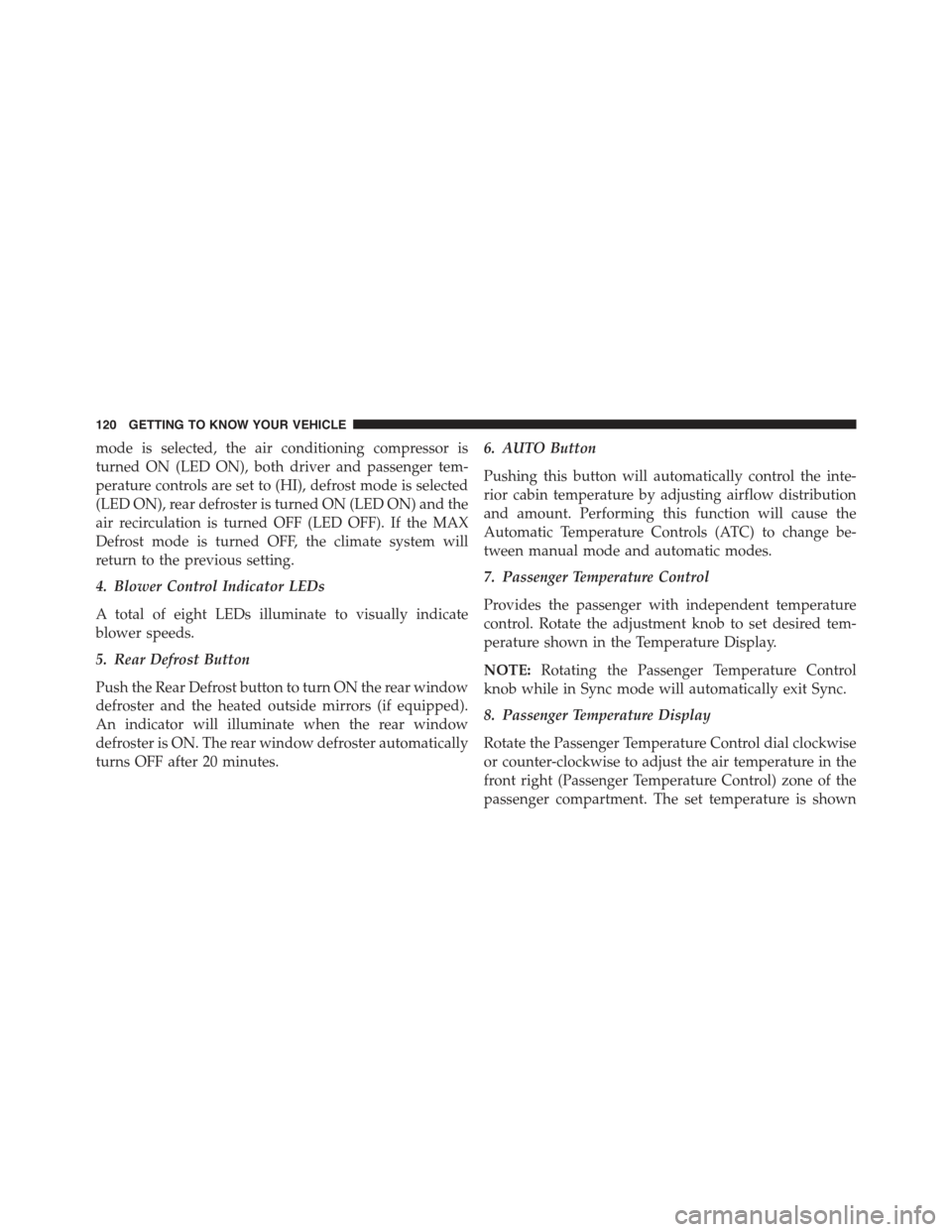
mode is selected, the air conditioning compressor is
turned ON (LED ON), both driver and passenger tem-
perature controls are set to (HI), defrost mode is selected
(LED ON), rear defroster is turned ON (LED ON) and the
air recirculation is turned OFF (LED OFF). If the MAX
Defrost mode is turned OFF, the climate system will
return to the previous setting.
4. Blower Control Indicator LEDs
A total of eight LEDs illuminate to visually indicate
blower speeds.
5. Rear Defrost Button
Push the Rear Defrost button to turn ON the rear window
defroster and the heated outside mirrors (if equipped).
An indicator will illuminate when the rear window
defroster is ON. The rear window defroster automatically
turns OFF after 20 minutes.
6. AUTO Button
Pushing this button will automatically control the inte-
rior cabin temperature by adjusting airflow distribution
and amount. Performing this function will cause the
Automatic Temperature Controls (ATC) to change be-
tween manual mode and automatic modes.
7. Passenger Temperature Control
Provides the passenger with independent temperature
control. Rotate the adjustment knob to set desired tem-
perature shown in the Temperature Display.
NOTE:Rotating the Passenger Temperature Control
knob while in Sync mode will automatically exit Sync.
8. Passenger Temperature Display
Rotate the Passenger Temperature Control dial clockwise
or counter-clockwise to adjust the air temperature in the
front right (Passenger Temperature Control) zone of the
passenger compartment. The set temperature is shown
120 GETTING TO KNOW YOUR VEHICLE