AUX JEEP RENEGADE 2015 1.G Owners Manual
[x] Cancel search | Manufacturer: JEEP, Model Year: 2015, Model line: RENEGADE, Model: JEEP RENEGADE 2015 1.GPages: 678, PDF Size: 29.84 MB
Page 524 of 678
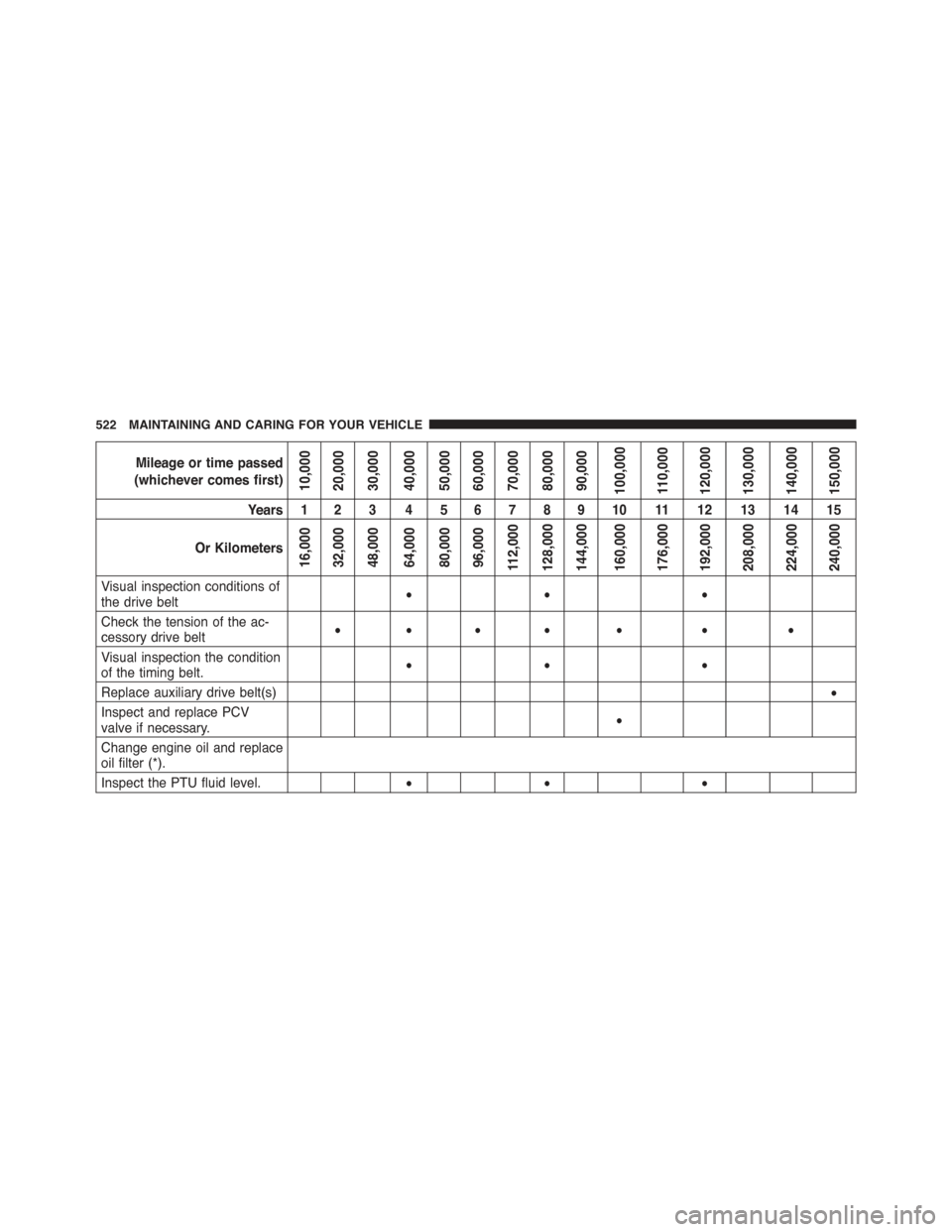
Mileage or time passed
(whichever comes first)10,00020,00030,00040,00050,00060,00070,00080,00090,000100,000110,000120,000130,000140,000150,000
Years 1 2 3 4 5 6 7 8 9 10 11 12 13 14 15
Or Kilometers16,00032,00048,00064,00080,00096,000112,000128,000144,000160,000176,000192,000208,000224,000240,000
Visual inspection conditions ofthe drive belt•• •
Check the tension of the ac-cessory drive belt•••• • • •
Visual inspection the conditionof the timing belt.•• •
Replace auxiliary drive belt(s)•
Inspect and replace PCVvalve if necessary.•
Change engine oil and replaceoil filter (*).
Inspect the PTU fluid level.•• •
522 MAINTAINING AND CARING FOR YOUR VEHICLE
Page 616 of 678
•Balance/Fade
When in this display you may adjust the Balance and
Fade settings.
•Speed Adjusted Volume
This feature increases or decreases volume relative to
vehicle speed. To change the Speed Adjusted Volume
press the “Off,” “1,” “2” or “3” button on the touchscreen.
Then press the back arrow button on the touchscreen.
•Surround Sound — If Equipped
This feature provides simulated surround sound mode.
To make your selection, press the “Surround Sound”
button on the touchscreen, select “On” or “Off” followed
by pressing the back arrow button on the touchscreen.
•Loudness — If Equipped
Loudness improves sound quality at lower volumes. To
make your selection, press the “Loudness” button on the
touchscreen, then choose “Yes” or “No.” The button will
highlight indicating that the setting has been selected.
Press the back arrow/Done button on the touchscreen.
•AUX Volume Offset — If Equipped
This feature provides the ability to tune the audio level
for portable devices connected through the AUX input.
To make your selection, press the “AUX Volume Offset”
button on the touchscreen, select “On” or “Off” followed
by pressing the back arrow button on the touchscreen.
•Auto-On Radio
The Radio automatically turns on when vehicle is in run
or will recall whether it was on or off at last ignition off.
To make your selection, press the “Loudness” button on
the touchscreen, select “On,” “Off” or “Recall Last”
followed by pressing the back arrow button on the
touchscreen.
614 MULTIMEDIA
Page 634 of 678
•Speed Adjusted Volume
This feature increases or decreases volume relative to
vehicle speed. To change the Speed Adjusted Volume
press the “Off,” “1,” “2” or ”3” button on the touchscreen.
Then press the back arrow button on the touchscreen.
•Surround Sound — If Equipped
This feature provides simulated surround sound mode.
To make your selection, press the “Surround Sound”
button on the touchscreen, select On or Off followed by
pressing the back arrow button on the touchscreen.
•AUX Volume Offset — If Equipped
This feature provides the ability to tune the audio level
for portable devices connected through the AUX input.
To make your selection, press the “AUX Volume Offset”
button on the touchscreen, select any point on the scale
between the “+” and “–” buttons on the touchscreen
followed by pressing the back arrow button on the
touchscreen.
•Auto-On Radio
The Radio automatically turns on when vehicle is in run
or will recall whether it was on or off at last ignition off.
To make your selection, press the “Loudness” button on
the touchscreen, select “On,” “Off” or “Recall Last”
followed by pressing the back arrow button on the
touchscreen.
Phone/Bluetooth®
After pressing the “Phone/Bluetooth®” button on the
touchscreen the following settings will be available:
•Paired Phones
This feature shows which mobile phones are paired to the
Phone/Bluetooth® system.
632 MULTIMEDIA
Page 637 of 678
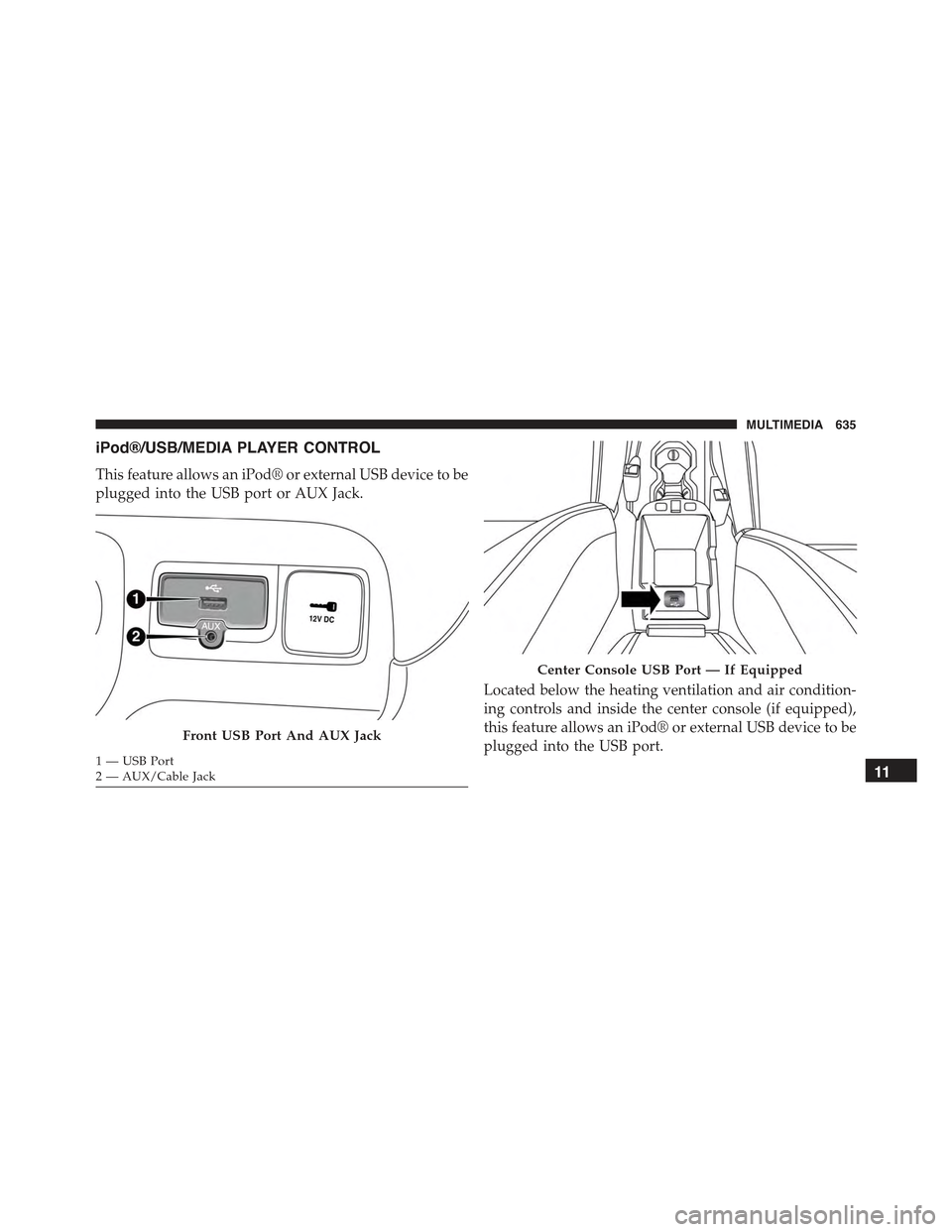
iPod®/USB/MEDIA PLAYER CONTROL
This feature allows an iPod® or external USB device to be
plugged into the USB port or AUX Jack.
Located below the heating ventilation and air condition-
ing controls and inside the center console (if equipped),
this feature allows an iPod® or external USB device to be
plugged into the USB port.Front USB Port And AUX Jack
1—USBPort2—AUX/CableJack
Center Console USB Port — If Equipped
11
MULTIMEDIA 635
Page 639 of 678
Pushing the center button will make the radio switch
between the various modes available (AM/FM/SAT/
AUX/Media Player, etc.) and can also be used to select/
enter an item while scrolling through menu.
The left-hand control is a rocker-type switch with a
pushbutton in the center. The function of the left-hand
control is different depending on which mode you are in.
The following describes the left-hand control operation in
each mode.
Radio Operation
Pushing the top of the switch will “Seek” up for the next
listenable station and pushing the bottom of the switch
will “Seek” down for the next listenable station.
The button located in the center of the left-hand control
will tune to the next preset station that you have pro-
grammed in the radio preset button.
Media Mode
Pushing the top of the switch once will go to the next
track on the selected media (AUX/USB, Bluetooth®).
Pushing the bottom of the switch once will go to the
beginning of the current track, or to the beginning of the
previous track if it is within eight seconds after the
current track begins to play.
If you push the switch up or down twice, it plays the
second track; three times, it will play the third, etc.
RADIO OPERATION AND MOBILE PHONES
Under certain conditions, the mobile phone being on in
your vehicle can cause erratic or noisy performance from
your radio. This condition may be lessened or eliminated
by relocating the mobile phone antenna. This condition is
not harmful to the radio. If your radio performance does
not satisfactorily “clear” by the repositioning of the11
MULTIMEDIA 637
Page 640 of 678
antenna, it is recommended that the radio volume be
turned down or off during mobile phone operation when
not using Uconnect® (if equipped).
Regulatory And Safety Information
USA/CANADA
Exposure to Radio Frequency Radiation
The radiated output power of the internal wireless radio
is far below the FCC radio frequency exposure limits.
Nevertheless, the wireless radio will be used in such a
manner that the radio is 20 cm or further from the human
body.
The internal wireless radio operates within guidelines
found in radio frequency safety standards and recom-
mendations, which reflect the consensus of the scientific
community.
The radio manufacturer believes the internal wireless
radio is safe for use by consumers. The level of energy
emitted is far less than the electromagnetic energy emit-
ted by wireless devices such as mobile phones. However,
the use of wireless radios may be restricted in some
situations or environments, such as aboard airplanes. If
you are unsure of restrictions, you are encouraged to ask
for authorization before turning on the wireless radio.
This device complies with Part 15 of the FCC Rules and
with Industry Canada license-exempt RSS standard(s).
Operation is subject to the following two conditions:
1. This device may not cause harmful interference.
2. This device must accept any interference received,
including interference that may cause undesired op-
eration.
Le présent appareil est conforme aux CNR d’Industrie
Canada applicables aux appareils radio exempts de li-
cence. L’exploitation est autorisée aux deux conditions
suivantes: (1) l’appareil ne doit pas produire de brouil-
lage, et (2) l’utilisateur de l’appareil doit accepter tout
638 MULTIMEDIA
Page 648 of 678
Media
Uconnect® offers connections via USB Port, Bluetooth®
and Auxiliary Ports (If Equipped). Voice operation is only
available for connected USB and iPod® devices. (Remote
CD player optional and not available on all vehicles.)
Push the VR button. After the beep, say one of the
following commands and follow the prompts to
switch your media source or choose an artist.
•Change sourceto Bluetooth®.
•Change sourceto iPod®.
•Change sourceto USB.
•Play artistBeethoven;Play albumGreatest Hits;Play
songMoonlight Sonata;Play genreClassical.
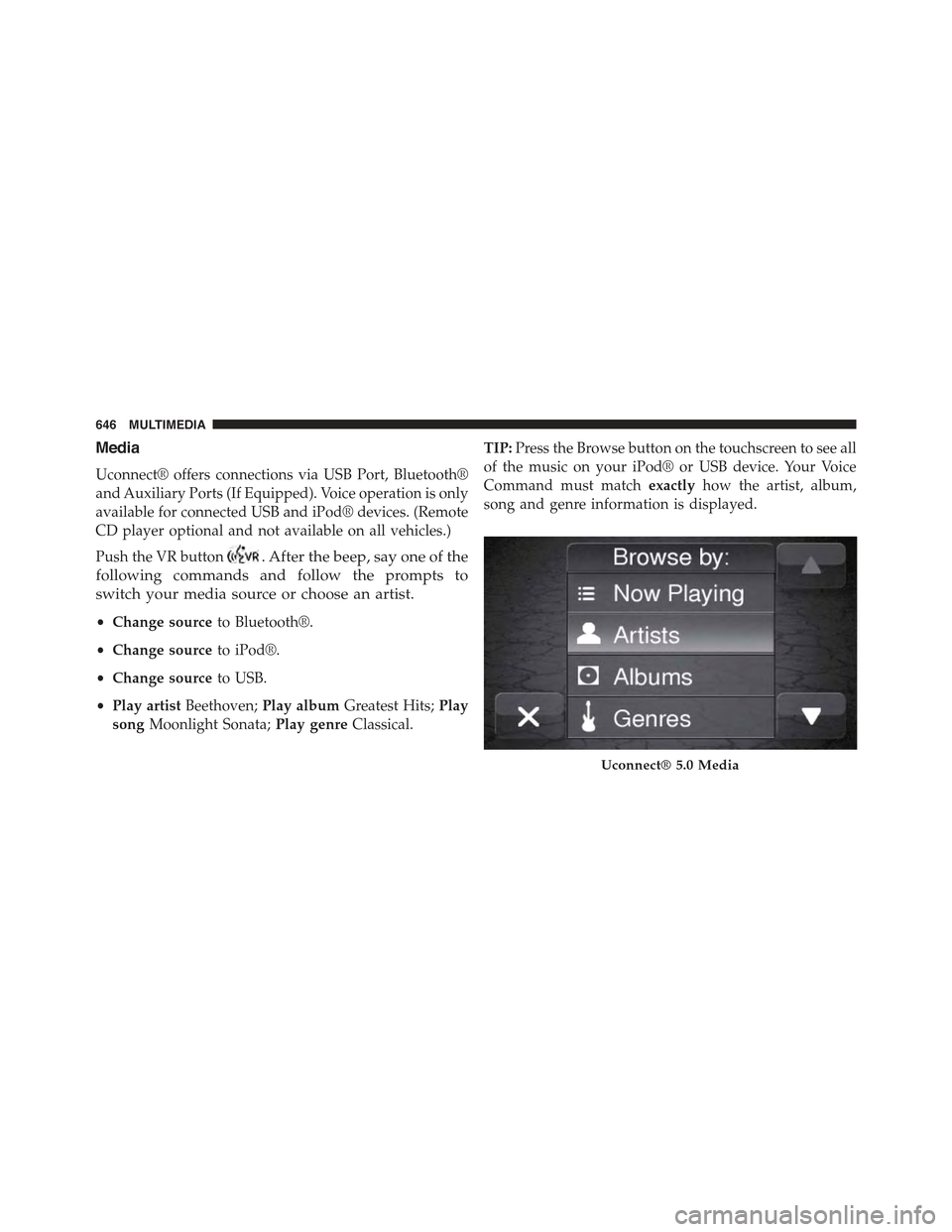
TIP:Press the Browse button on the touchscreen to see all
of the music on your iPod® or USB device. Your Voice
Command must matchexactlyhow the artist, album,
song and genre information is displayed.
Uconnect® 5.0 Media
646 MULTIMEDIA
Page 661 of 678
Alterations/Modifications, Vehicle...............7
Antifreeze (Engine Coolant)..................543
Disposal..............................546
Anti-Lock Brake System (ABS)................225
Appearance Care.........................553
Arming System (Security Alarm)...............50
Assist, Hill Start..........................229
Audio Systems (Radio).....................634
Auto Down Power Windows.................111
Automatic Headlights.......................96
Automatic Temperature Control (ATC)
SYNC Temperature Button.................128
Automatic Transmission....................336
Adding Fluid..........................552
Fluid and Filter Changes..................552
Fluid Change..........................552
Fluid Level Check.......................552
Fluid Type............................551
Special Additives.......................551
Auto Up Power Windows...................111
Auxiliary Electrical Outlet (Power Outlet)........164
Auxiliary Power Outlet.....................164
Axle Fluid..............................594
Axle Lubrication..........................594
Battery.................................533
Belts, Seat...............................311
Blind Spot Monitoring.......................85
Body Mechanism Lubrication.................536
B-Pillar Location..........................568
Brake Assist System.......................227
Brake Fluid.............................594
Brakes.................................223
Brake System............................223
Anti-Lock (ABS)........................225
Fluid Check...........................594
Master Cylinder........................548
Brightness, Interior Lights...................105
12
INDEX 659
Page 664 of 678
Remote Keyless Entry (RKE)................53
Driver’s Seat Back Tilt.......................66
Driving................................402
E-85 Fuel...............................393
Electrical Outlet, Auxiliary (Power Outlet)........164
Electric Park Brake........................325
Electric Parking Brake......................325
Electronic Roll Mitigation (ERM)..............228
Electronic Speed Control (Cruise Control)........348
Electronic Stability Control (ESC)..............224
Electronic Vehicle Information Center (EVIC)......375
Electronic Vehicle Information Center (EVIC) . . . .201
Emergency, In Case of
Hazard Warning Flasher..................427
Jacking...............................476
Jump Starting..........................492
Overheating...........................498
Tow Hooks............................507
Towing..............................505
Emission Control System Maintenance..........513
Engine
Air Cleaner...........................532
Break-In Recommendations................324
Checking Oil Level......................529
Compartment..........................527
Coolant (Antifreeze).....................593
Cooling..............................542
Exhaust Gas Caution.....................310
Fails to Start...........................320
Flooded, Starting.......................320
Fuel Requirements......................388
Jump Starting..........................492
Oil . . . . . . . . . . . . . . . . . . . . . . . . . . . . . . . . ..529
Oil Filler Cap..........................531
Oil Selection...........................531
Overheating...........................498
Starting..............................319
662 INDEX
Page 670 of 678
New Vehicle Break-In Period.................324
Occupant Restraints.......................252
Octane Rating, Gasoline (Fuel)................388
Oil, Engine..............................529
Capacity.............................592
Change Interval........................530
Checking.............................529
Disposal..............................532
Filter................................532
Filter Disposal.........................532
Materials Added to......................532
Recommendation.......................531
Viscosity.............................531
Oil Filter, Selection........................532
Onboard Diagnostic System..................513
Operating Precautions......................513
Operator Manual (Owner’s Manual).............5
Outside Rearview Mirrors....................83
Overheating, Engine.......................498
Owner’s Manual (Operator Manual).............5
Paint Care..............................553
Parking Brake............................325
ParkSense® System, Rear....................369
Pets...................................309
Placard, Tire and Loading Information..........569
Power
Brakes...............................223
Inverter..............................165
Outlet (Auxiliary Electrical Outlet)...........164
Windows.............................110
Pregnant Women and Seat Belts...............266
Preparation for Jacking.....................478
Pretensioners
Seat Belts.............................266
Radial Ply Tires..........................576
668 INDEX