phone JEEP RENEGADE 2015 1.G Owners Manual
[x] Cancel search | Manufacturer: JEEP, Model Year: 2015, Model line: RENEGADE, Model: JEEP RENEGADE 2015 1.GPages: 678, PDF Size: 29.84 MB
Page 13 of 678
facilities, factory-trained technicians, special tools, and
the latest information to ensure the vehicle is fixed
correctly and in a timely manner.
This is why you should always talk to an authorized
dealer service manager first. Most matters can be re-
solved with this process.
•If for some reason you are still not satisfied, talk to the
general manager or owner of the authorized dealer.
They want to know if you need assistance.
•If an authorized dealer is unable to resolve the con-
cern, you may contact the manufacturer’s customer
center.
Any communication to the manufacturer’s customer cen-
ter should include the following information:
•Owner’s name and address
•Owner’s telephone number (home and office)
•Authorized dealer name
•Vehicle Identification Number (VIN)
•Vehicle delivery date and mileage
Chrysler Group LLC Customer Center
P.O. Box 21–8004
Auburn Hills, MI 48321–8004
Phone: (877) 426–5337
Chrysler Canada Inc. Customer Center
P.O. Box 1621
Windsor, Ontario N9A 4H6
Phone: (800) 465–2001 English / (800) 387–9983 French
2
CUSTOMER ASSISTANCE 11
Page 16 of 678
REPORTING SAFETY DEFECTS
In The 50 United States And Washington, D.C.
If you believe that your vehicle has a defect that could
cause a crash or cause injury or death, you should
immediately inform the National Highway Traffic Safety
Administration (NHTSA) in addition to notifying the
manufacturer.
If NHTSA receives similar complaints, it may open an
investigation, and if it finds that a safety defect exists in
a group of vehicles, it may order a recall and remedy
campaign. However, NHTSA cannot become involved in
individual problems between you, your authorized
dealer, and the manufacturer.
To contact NHTSA, you may either call the Auto Safety
Hotline toll free at 1-888-327-4236 (TTY: 1-800-424- 9153),
or go to http://www.safercar.gov; or write to: Adminis-
trator, NHTSA, 1200 New Jersey Avenue, SE., West
Building, Washington, D.C. 20590.
You can also obtain other information about motor
vehicle safety from http://www.safercar.gov.
In Canada
If you believe that your vehicle has a safety defect, you
should contact the Customer Service Department imme-
diately. Canadian customers who wish to report a safety
defect to the Canadian government should contact Trans-
port Canada, Motor Vehicle Defect Investigations and
Recalls at 1-800-333-0510 or go to http://www.tc.gc.ca/
roadsafety/
PUBLICATION ORDER FORMS
To order the following manuals, you may use either the
website or the phone numbers listed below. Visa, Mas-
tercard, American Express, and Discover orders are ac-
cepted. If you prefer mailing your payment, please call
for an order form.
14 CUSTOMER ASSISTANCE
Page 167 of 678
CAUTION!
Do not connect devices with power higher than 180
Watts (15 Amps) to the socket. Do not damage the
socket by using unsuitable adaptors. If the 180 Watt
(15 Amp) power rating is exceeded the fuse protect-
ing the system will need to be replaced.
WARNING!
To avoid serious injury or death:
•Only devices designed for use in this type of outlet
should be inserted into any 12 Volt outlet.
•Do not touch with wet hands.
•Close the lid when not in use and while driving the
vehicle.
•If this outlet is mishandled, it may cause an electric
shock and failure.
Power Inverter — If Equipped
There is a 115 Volt, 150 Watt Power Inverter outlet located
on the back of the center console to convert DC current to
AC current. The Power Inverter can power cellular
phones, electronics and other low power devices requir-
ing up to 150 Watts. Certain high-end video game
consoles, such as Playstation®4 and XBox One will
exceed this power limit, as will most power tools.
4
GETTING TO KNOW YOUR VEHICLE 165
Page 212 of 678
Trip
This menu item allows you to view information about the
#Trip Computer.#
The information displayed, for Trip A and for Trip B, are:
•Distance
(Miles or Km)
•Average Consumption
(MPG, or l/ 100km or km/l)
•Travel Time
(Hour/Minute)
Audio
This menu item allows you to view the instrument
cluster display and the information present on the dis-
play of the Uconnect® system.
The information displayed is:
•“Radio (AM or FM)”
View Radio Station Name (if equipped), frequency, and
graphical icon
•$MP3”
Title display or number song playing
•$USB$
Title display or number song playing
•$Ipod$
Display song title (if equipped)
See Phone
The instrument cluster display can also display the
information concerning phone mode.
210 GETTING TO KNOW YOUR INSTRUMENT PANEL
Page 213 of 678
The information that can be displayed is the connection
status of the mobile phone (phone connected or discon-
nected), the active telephone calls/incoming/on hold,
and the management of double calls (first incoming
second waiting, etc.).
Alerts (Messages Stored)
This menu item allows you to display the information
messages/malfunction stored.
Vehicles With Multi-Functional Display Reconfigu-
rable
The background color of the display varies according to
the priorities of the failure:
•Failed Messages with low priority
Displays in yellow
•Failed Messages with high priority
Displays in red
Display Setup
This menu item allows you to change the position of the
information on the display.
Display Gears (Vehicles With Reconfigurable Multi-
Functional Display And Automatic Transmission)
By selecting this item, you can select the display mode,
the particulars relating to the automatic transmission,
and choose between the following options:
•$Single digit$
The right side of the display will show the letter concern-
ing the automatic transmission shift lever (P,N,R or D)
position. After approximately two seconds, the letter will
be displayed in a central position.
5
GETTING TO KNOW YOUR INSTRUMENT PANEL 211
Page 215 of 678
Restore Default Settings
Selecting this item, and you can reset and restore the
default settings.
Vehicle Setup
This menu item allows you to change the settings for the
following:
•Display
•Units of measure
•Clock and Data
•Safety
•Safety and Assistance
•Lights
•Doors and Locks
•Compass (If Equipped)
Vehicles Equipped With Multifunctional Display
Reconfigurable:Menu items#Display#(you can select
only the items#See Phone#and#See Navigation,##Secu-
rity,#and#Safety & Assistance#(only#Volume Alerts#is
selectable) are present.
All other entries are displayed and selected on the
display of the Uconnect® system.
“Display”
By selecting the#Display,#you can access the following
settings:
•Language: allows you to select the language in which
to display the information/warnings.
•See Phone:allows you to view, on the instrument
cluster display, the information relating to Phone
mode displayed on the display of the Uconnect®
system.
5
GETTING TO KNOW YOUR INSTRUMENT PANEL 213
Page 220 of 678
Variance
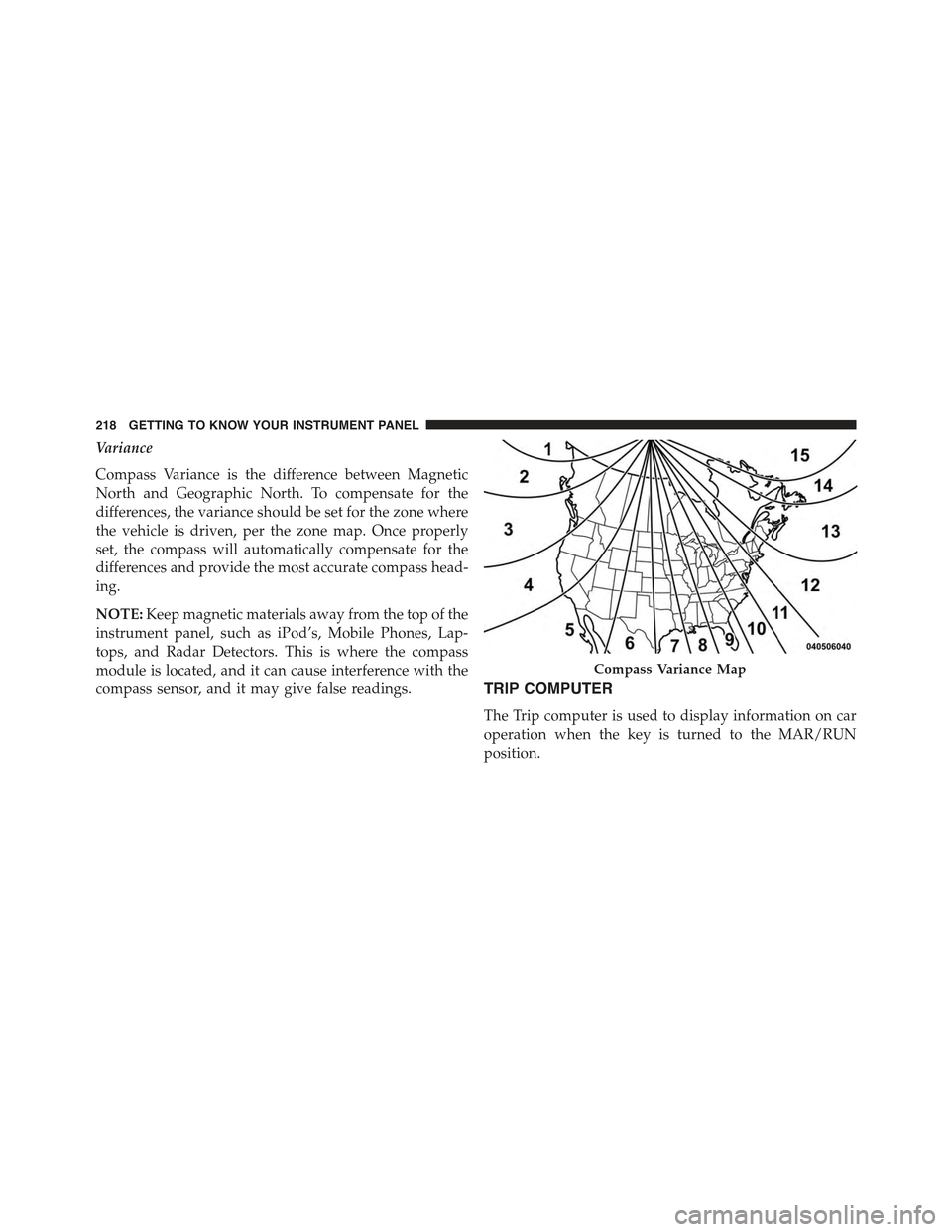
Compass Variance is the difference between Magnetic
North and Geographic North. To compensate for the
differences, the variance should be set for the zone where
the vehicle is driven, per the zone map. Once properly
set, the compass will automatically compensate for the
differences and provide the most accurate compass head-
ing.
NOTE:Keep magnetic materials away from the top of the
instrument panel, such as iPod’s, Mobile Phones, Lap-
tops, and Radar Detectors. This is where the compass
module is located, and it can cause interference with the
compass sensor, and it may give false readings.TRIP COMPUTER
The Trip computer is used to display information on car
operation when the key is turned to the MAR/RUN
position.
Compass Variance Map
218 GETTING TO KNOW YOUR INSTRUMENT PANEL
Page 228 of 678
WARNING!
•Pumping of the Anti-Lock Brakes will diminish
their effectiveness and may lead to a collision.
Pumping makes the stopping distance longer. Just
press firmly on your brake pedal when you need to
slow down or stop.
•The ABS cannot prevent the natural laws of phys-
ics from acting on the vehicle, nor can it increase
braking or steering efficiency beyond that afforded
by the condition of the vehicle brakes and tires or
the traction afforded.
•The ABS cannot prevent collisions, including those
resulting from excessive speed in turns, following
another vehicle too closely, or hydroplaning.
•The capabilities of an ABS equipped vehicle must
never be exploited in a reckless or dangerous
manner, which could jeopardize the user’s safety or
the safety of others.
CAUTION!
The ABS is subject to possible detrimental effects of
electronic interference caused by improperly in-
stalled aftermarket radios or telephones.
NOTE:During severe braking conditions, a pulsing sen-
sation may occur and a clicking noise will be heard. This
is normal, indicating that the ABS is functioning.
•Do not “ride” the brakes by resting your foot on the
pedal. This could overheat the brakes and result in
unpredictable braking action, longer stopping dis-
tances, or brake damage.
•When descending mountains or hills, repeated braking
can cause brake fade with loss of braking control.
Avoid repeated heavy braking by downshifting the
transmission or locking out overdrive whenever pos-
sible.
226 SAFETY
Page 255 of 678
2. If a child from 2 to 12 years old (not in a rear-facing
child restraint) must ride in the front passenger seat,
move the seat as far back as possible and use the
proper child restraint. (Refer to “Child Restraints”)
3. Children that are not big enough to wear the vehicle
seat belt properly (Refer to#Child Restraints#) should
be secured in a vehicle with a rear seat in child
restraints or belt-positioning booster seats. Older chil-
dren who do not use child restraints or belt-
positioning booster seats should ride properly buckled
up in a vehicle with a rear seat.
4. Never allow children to slide the shoulder belt behind
them or under their arm.
5. You should read the instructions provided with your
child restraint to make sure that you are using it
properly.
6. All occupants should always wear their lap and
shoulder belts properly.
7. The driver and front passenger seats should be moved
back as far as practical to allow the Advanced Front
Air Bags room to inflate.
8. Do not lean against the door or window. If your
vehicle has side air bags, and deployment occurs, the
side air bags will inflate forcefully into the space
between you and the door and you could be injured.
9. If the air bag system in this vehicle needs to be
modified to accommodate a disabled person, contact
the Customer Center. Phone numbers are provided
under#If You Need Assistance.#
6
SAFETY 253
Page 401 of 678
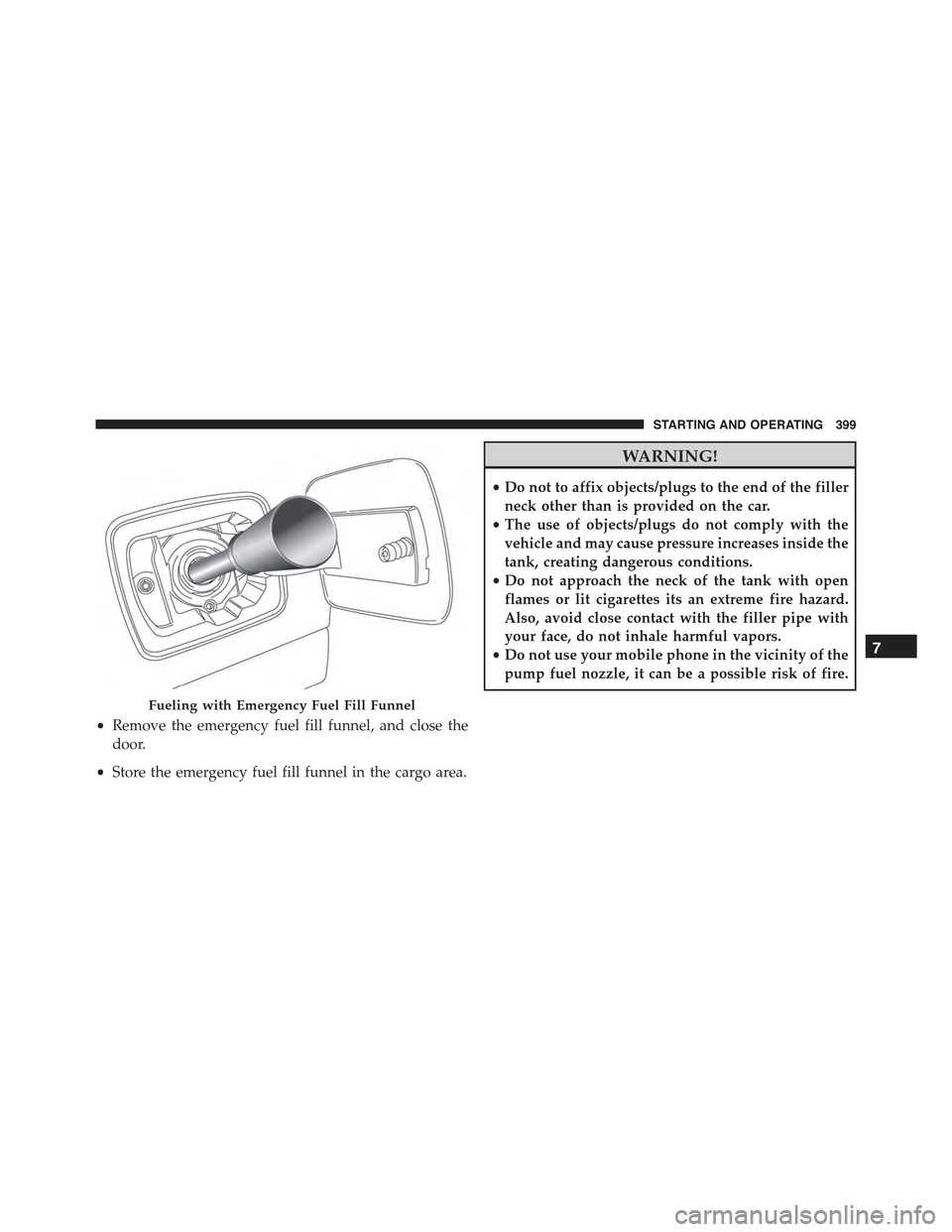
•Remove the emergency fuel fill funnel, and close the
door.
•Store the emergency fuel fill funnel in the cargo area.
WARNING!
•Do not to affix objects/plugs to the end of the filler
neck other than is provided on the car.
•The use of objects/plugs do not comply with the
vehicle and may cause pressure increases inside the
tank, creating dangerous conditions.
•Do not approach the neck of the tank with open
flames or lit cigarettes its an extreme fire hazard.
Also, avoid close contact with the filler pipe with
your face, do not inhale harmful vapors.
•Do not use your mobile phone in the vicinity of the
pump fuel nozzle, it can be a possible risk of fire.
Fueling with Emergency Fuel Fill Funnel
7
STARTING AND OPERATING 399