light JEEP RENEGADE 2017 1.G Owners Manual
[x] Cancel search | Manufacturer: JEEP, Model Year: 2017, Model line: RENEGADE, Model: JEEP RENEGADE 2017 1.GPages: 516, PDF Size: 5.73 MB
Page 273 of 516
3. Push and hold the ignition switch until the engine turnsOFF.
4. Wait approximately 30 seconds.
5. Restart the engine.
6. Shift into the desired gear range. If the problem is no longer detected, the transmission will return to normal
operation.
NOTE: Even if the transmission can be reset, we recom-
mend that you visit your authorized dealer at your earliest
possible convenience. Your authorized dealer has diagnos-
tic equipment to determine if the problem could recur. If
the transmission cannot be reset, authorized dealer service
is required.
Ignition Park Interlock
Vehicles Equipped With Keyless Enter-N-Go:
This vehicle is equipped with an Ignition Park Interlock,
which requires the transmission to be in PARK before the
ignition can be turned to the OFF mode. Also, the trans-
mission is locked in PARK whenever the ignition is in the
OFF mode.
Brake/Transmission Shift Interlock System
This vehicle is equipped with a Brake Transmission Shift
Interlock system (BTSI) that holds the transmission gear
selector in PARK unless the brakes are applied. To shift the
transmission out of PARK, the ignition must be in the RUN
mode (engine running or not) and the brake pedal must be
pressed.
The brake pedal must also be pressed before pushing the
button on the gear selector to shift from NEUTRAL into
DRIVE or REVERSE when the vehicle is stopped or mov-
ing at low speeds.
POWER STEERING
The electric power steering system will give you good
vehicle response and increased ease of maneuverability in
tight spaces. The system will vary its assist to provide light
efforts while parking and good feel while driving. If the
electric steering system experiences a fault that reduces
assist or prevents the vehicle from providing assist, you
will still have the ability to steer the vehicle manually.
6
STARTING AND OPERATING 271
Page 275 of 516
NOTE:
•In order to ensure proper operation, the Speed Control
System has been designed to shut down if multiple
Speed Control functions are operated at the same time. If
this occurs, the Speed Control System can be reactivated
by pushing the Speed Control on/off button and reset-
ting the desired vehicle set speed.
• The Speed Control function will not work in 4WD Low
Range.
Activation
Push the on/off button to activate the Speed Control. The
Cruise Indicator Light in the instrument cluster display
will illuminate. To turn the system off, push the on/off
button a second time. The Cruise Indicator Light will turn
off. The system should be turned off when not in use.
WARNING!
Leaving the Speed Control system on when not in use
is dangerous. You could accidentally set the system or
cause it to go faster than you want. You could lose
control and have an accident. Always leave the system
off when you are not using it.
Setting A Desired Speed
Turn the Speed Control on.
NOTE: The vehicle should be traveling at a steady speed
and on level ground before pushing the SET (+) or SET (-)
button.
When the vehicle has reached the desired speed, push the
SET (+) or SET (-) button and release. Release the accelera-
tor and the vehicle will operate at the selected speed.
Varying The Speed
To Increase Speed
When the Speed Control is set, you can increase speed by
pushing the SET (+)button.
The driver ’s preferred units can be selected through the
Uconnect system if equipped. Refer to “Uconnect Settings”
in “Multimedia” for more information. The speed incre-
ment shown is dependant on the chosen speed unit of
U.S. (mph) or Metric (km/h):
U.S. Speed (mph)
• Pushing the SET (+)button once will result ina1mph
increase in set speed. Each subsequent tap of the button
results in an increase of 1 mph.
6
STARTING AND OPERATING 273
Page 300 of 516
WARNING!
•An improperly adjusted Weight Distributing Hitch
system may reduce handling, stability, braking per-
formance, and could result in a collision.
• Weight Distributing Systems may not be compatible
with Surge Brake Couplers. Consult with your hitch
and trailer manufacturer or a reputable Recreational
Vehicle dealer for additional information.
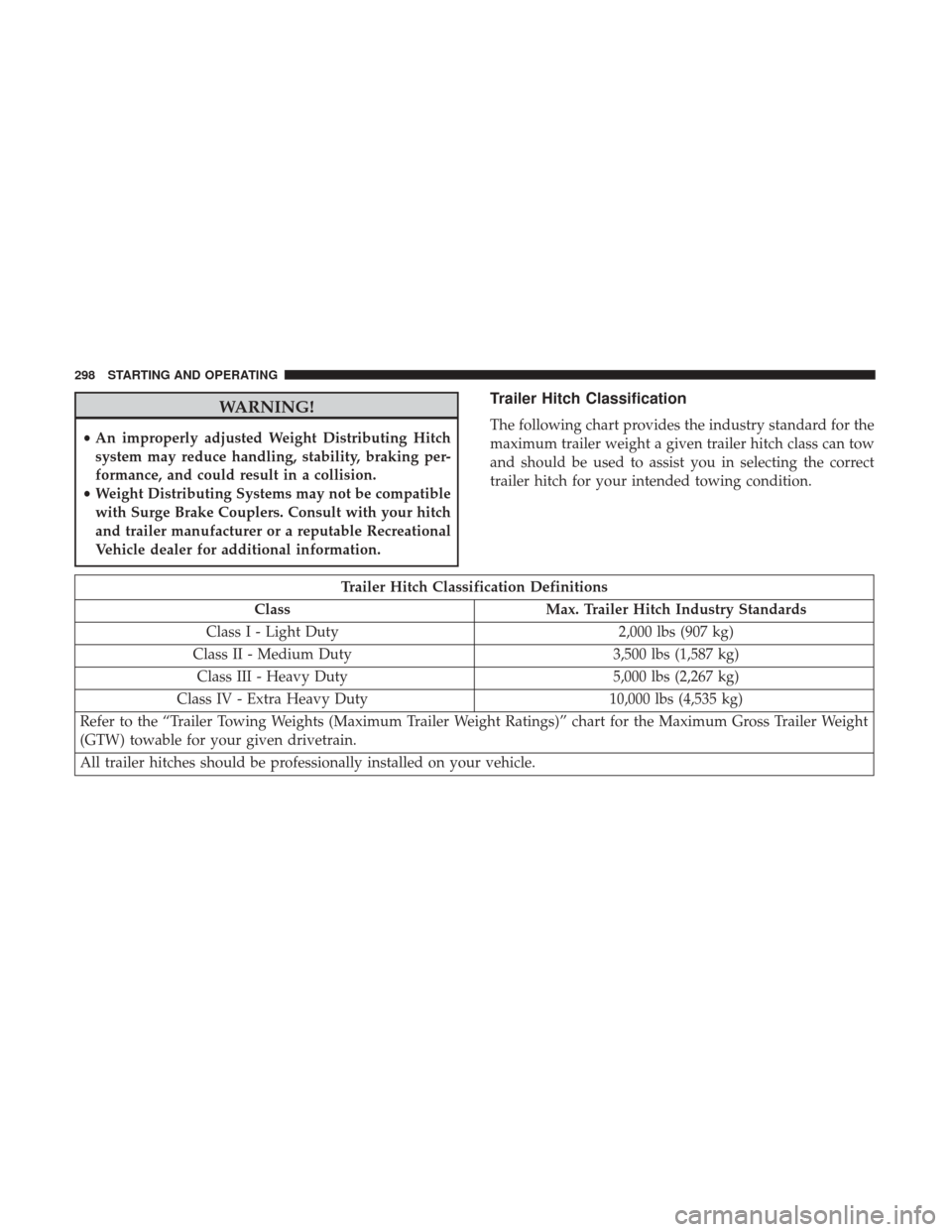
Trailer Hitch Classification
The following chart provides the industry standard for the
maximum trailer weight a given trailer hitch class can tow
and should be used to assist you in selecting the correct
trailer hitch for your intended towing condition.
Trailer Hitch Classification Definitions
Class Max. Trailer Hitch Industry Standards
Class I - Light Duty 2,000 lbs (907 kg)
Class II - Medium Duty 3,500 lbs (1,587 kg)
Class III - Heavy Duty 5,000 lbs (2,267 kg)
Class IV - Extra Heavy Duty 10,000 lbs (4,535 kg)
Refer to the “Trailer Towing Weights (Maximum Trailer Weight Ratings)” chart for the Maximum Gross Trailer Weight
(GTW) towable for your given drivetrain.
All trailer hitches should be professionally installed on your vehicle.
298 STARTING AND OPERATING
Page 304 of 516
•An electronically actuated trailer brake controller is
required when towing a trailer with electronically actu-
ated brakes. When towing a trailer equipped with a
hydraulic surge actuated brake system, an electronic
brake controller is not required.
• Trailer brakes are recommended for trailers over
1,000 lbs (453 kg) and required for trailers in excess of
2,000 lbs (907 kg).
WARNING!
• Do not connect trailer brakes to your vehicle’s hy-
draulic brake lines. It can overload your brake sys-
tem and cause it to fail. You might not have brakes
when you need them and could have a collision.
• Towing any trailer will increase your stopping dis-
tance. When towing you should allow for additional
space between your vehicle and the vehicle in front
of you. Failure to do so could result in a collision.
CAUTION!
If the trailer weighs more than 1,000 lbs (453 kg)
loaded, it should have its own brakes and they should
(Continued)
CAUTION! (Continued)
be of adequate capacity. Failure to do this could lead to
accelerated brake lining wear, higher brake pedal
effort, and longer stopping distances.
Towing Requirements — Trailer Lights And Wiring
(If Equipped)
Whenever you pull a trailer, regardless of the trailer size,
stoplights and turn signals on the trailer are required for
motoring safety.
The Trailer Tow Package may include a four- and seven-pin
wiring harness. Use a factory approved trailer harness and
connector.
NOTE:Do not cut or splice wiring into the vehicles wiring
harness.
The electrical connections are all complete to the vehicle
but you must mate the harness to a trailer connector. Refer
to the following illustrations.
302 STARTING AND OPERATING
Page 306 of 516
Automatic Transmission — If Equipped
Select the DRIVE range when towing. The transmission
controls include a drive strategy to avoid frequent shifting
when towing. However, if frequent shifting does occur
while in DRIVE, you can use the AutoStick shift control to
manually select a lower gear.
NOTE:Using a lower gear while operating the vehicle
under heavy loading conditions will improve performance
and extend transmission life by reducing excessive shifting
and heat build up. This action will also provide better
engine braking.
AutoStick
• When using the AutoStick shift control, select the high-
est gear that allows for adequate performance and
avoids frequent downshifts. For example, choose “5” if
the desired speed can be maintained. Choose “4” or “3”
if needed to maintain the desired speed.
• To prevent excess heat generation, avoid continuous
driving at high RPM. Reduce vehicle speed as necessary
to avoid extended driving at high RPM. Return to a
higher gear or vehicle speed when grade and road
conditions allow.
Speed Control — If Equipped
• Do not use in hilly terrain or with heavy loads.
• When using the speed control, if you experience speed
drops greater than 10 mph (16 km/h), disengage until
you can get back to cruising speed.
• Use speed control in flat terrain and with light loads to
maximize fuel efficiency.
Cooling System
To reduce potential for engine and transmission overheat-
ing, take the following actions:
City Driving
When stopped for short periods of time, shift the transmis-
sion into NEUTRAL and increase engine idle speed.
Highway Driving
Reduce speed.
Air Conditioning
Turn off temporarily.
304 STARTING AND OPERATING
Page 310 of 516
Standing Water — Trailhawk Only
Avoid driving in standing water deeper than 19 inches (48
cm), and reduce speed appropriately to minimize wave
effects. Maximum speed in 19 inches (48 cm) of water is
less than 5 mph (8 km/h).
Maintenance
After driving through deep water, inspect your vehicle
fluids and lubricants (engine, transmission, Power Transfer
Unit and Rear Drive Module) to assure they have not been
contaminated. Contaminated fluids and lubricants (milky,
foamy in appearance) should be flushed/changed as soon
as possible to prevent component damage.
Driving In Snow, Mud And Sand
In heavy snow, when pulling a load, or for additional
control at slower speeds, shift the transmission to a low
gear and shift the 4WD system to the appropriate terrain
mode, using 4WD LOW if necessary. Refer to “Four-Wheel
Drive Operation” in “Starting And Operating” for further
information. Do not shift to a lower gear than necessary to
maintain headway. Over-revving the engine can spin the
wheels and traction will be lost.
Avoid abrupt downshifts on icy or slippery roads because
engine braking may cause skidding and loss of control.
Hill Climbing
NOTE:Before attempting to climb a hill, determine the
conditions at the crest and/or on the other side.
Before climbing a steep hill, shift the transmission to a
lower gear and shift the 4WD System to 4WD LOW. Use
first gear and 4WD LOW for very steep hills.
If you stall or begin to lose headway while climbing a
steep hill, allow your vehicle to come to a stop and
immediately apply the brakes. Restart the engine and shift
to REVERSE. Back slowly down the hill allowing the
compression braking of the engine to help regulate your
speed. If the brakes are required to control vehicle speed,
apply them lightly and avoid locking or skidding the tires.
WARNING!
If the engine stalls or you lose headway or cannot
make it to the top of a steep hill or grade, never attempt
to turn around. To do so may result in tipping and
rolling the vehicle. Always back straight down a hill in
REVERSE gear carefully. Never back down a hill in
NEUTRAL using only the brake.
308 STARTING AND OPERATING
Page 316 of 516
NOTE:
•Your vehicle may be transmitting data as authorized by
the subscriber.
• The ASSIST and 9–1–1 features operate through the
Uconnect Access service. These buttons will only oper-
ate as long as your Uconnect Access service is active.
Refer to your Uconnect Radio Supplement for further
information.
ASSIST Call
The ASSIST Button is used to automatically connect you to
any one of the following support centers:
• Roadside Assistance – If you get a flat tire, or need a tow,
just push the Assist button and you’ll be connected to
someone who can help. Roadside Assistance will know
what vehicle you’re driving and its location. Additional
fees may apply for Roadside Assistance.
• Uconnect Access Customer Care – In-vehicle support for
Uconnect Access and Uconnect Access Via Mobile fea-
tures.
• Vehicle Customer Care – Total support for all other
vehicle issues. 9-1-1 Call
1. Push the 9-1-1 Call button on the overhead console.
NOTE:
In case the 9-1-1 Call button is pushed in error,
there will be a 10 second delay before the 9-1-1 Call system
initiates a call to a 9-1-1 operator. To cancel the 9-1-1 Call
connection, push the 9-1-1 Call button on the overhead
console or press the cancellation button on the Device
Screen. Termination of the 9-1-1 Call will turn the green
LED light on the overhead console off.
2. The LED light located on the Assist and 9-1-1 buttons in the overhead console will turn green once you push
these buttons and will remain on until the call is ended.
3. Once a connection between the vehicle and a 9-1-1 operator is made, the 9-1-1 Call system may transmit the
following important vehicle information to a 9-1-1 op-
erator:
• Indication that the occupant placed a 9-1-1 Call.
• The vehicle brand.
• The last known GPS coordinates of the vehicle.
314 IN CASE OF EMERGENCY
Page 318 of 516
WARNING!(Continued)
•Modifications to any part of the 9-1-1 Call system
could cause the air bag system to fail when you need
it. You could be injured if the air bag system is not
there to help protect you.
9-1-1 Call System Limitations
Vehicles sold in Canada and Mexico DO NOThave 9-1-1
Call system capabilities.
9-1-1 or other emergency line operators in Canada and
Mexico may not answer or respond to 9-1-1 system calls.
If the 9-1-1 Call system detects a malfunction, any of the
following may occur at the time the malfunction is de-
tected, and at the beginning of each ignition cycle:
• The overhead console lights located on the Assist and
9-1-1 buttons will continuously be illuminated red.
• The Device Screen will display the following message
“Vehicle Device Requires Service. Please Contact Your
Dealer.”
• An In-Vehicle Audio message will state “Vehicle Device
Requires Service. Please Contact Your Dealer.”
WARNING!
• Ignoring the Assist and 9-1-1 buttons light could
mean you will not have 9-1-1 Call services. If the
Assist and 9-1-1 buttons light is illuminated, have an
authorized dealer service the 9-1-1 Call system im-
mediately.
• The Occupant Restraint Control module turns on the
air bag Warning Light on the instrument panel if a
malfunction in any part of the system is detected. If
the air bag Warning Light is illuminated, have an
authorized dealer service the ORC system immedi-
ately.
Even if the 9-1-1 Call system is fully functional, factors
beyond FCA US LLC’s control may prevent or stop the
9-1-1 Call system operation. These include, but are not
limited to, the following factors:
• The ignition key is in OFF position.
• The vehicle’s electrical systems are not intact.
• The 9-1-1 Call system software and/or hardware are
damaged during a crash.
316 IN CASE OF EMERGENCY
Page 320 of 516
•After replacing a light bulb, always check the correct
orientation.
• Before replacing a bulb that is not functioning, check
that the fuse is intact. NOTE:
Lens fogging can occur under certain atmospheric
conditions. This will usually clear as atmospheric condi-
tions change to allow the condensation to change back into
a vapor. Turning the lamps on will usually accelerate the
clearing process.
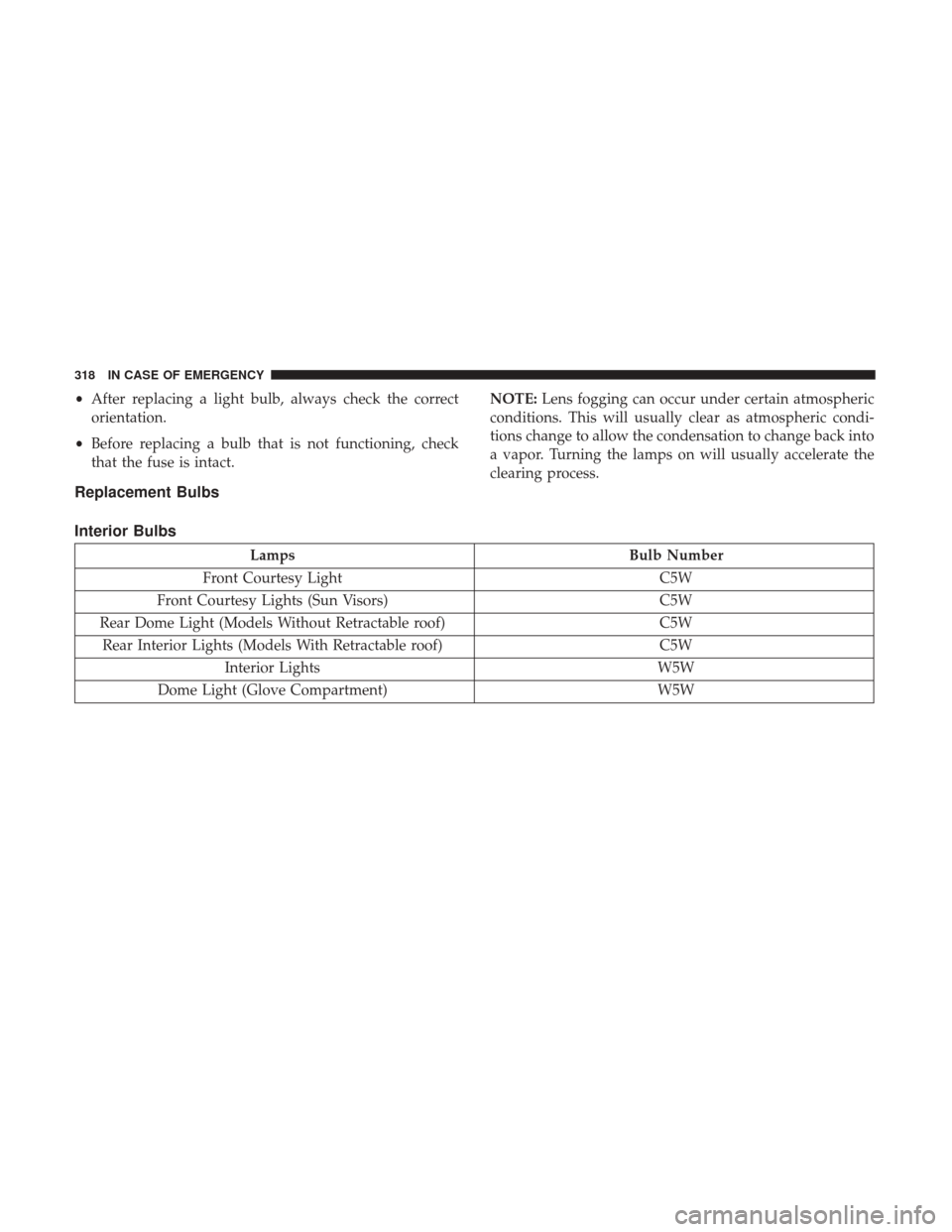
Replacement Bulbs
Interior Bulbs
Lamps Bulb Number
Front Courtesy Light C5W
Front Courtesy Lights (Sun Visors) C5W
Rear Dome Light (Models Without Retractable roof) C5W
Rear Interior Lights (Models With Retractable roof) C5W
Interior Lights W5W
Dome Light (Glove Compartment) W5W
318 IN CASE OF EMERGENCY
Page 321 of 516
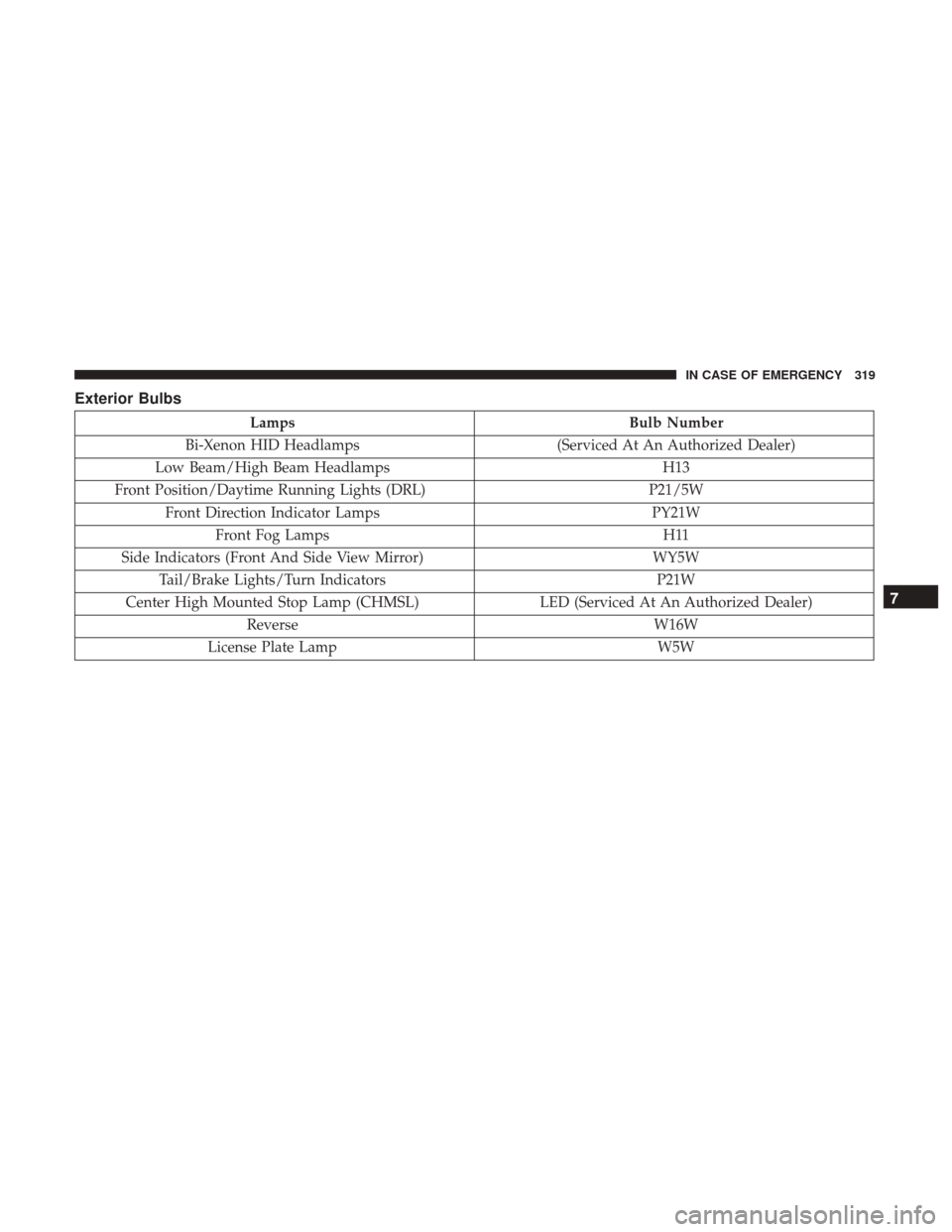
Exterior Bulbs
LampsBulb Number
Bi-Xenon HID Headlamps (Serviced At An Authorized Dealer)
Low Beam/High Beam Headlamps H13
Front Position/Daytime Running Lights (DRL) P21/5W
Front Direction Indicator Lamps PY21W
Front Fog Lamps H11
Side Indicators (Front And Side View Mirror) WY5W
Tail/Brake Lights/Turn Indicators P21W
Center High Mounted Stop Lamp (CHMSL) LED (Serviced At An Authorized Dealer)
Reverse W16W
License Plate Lamp W5W
7
IN CASE OF EMERGENCY 319