light JEEP RENEGADE 2017 1.G Owners Manual
[x] Cancel search | Manufacturer: JEEP, Model Year: 2017, Model line: RENEGADE, Model: JEEP RENEGADE 2017 1.GPages: 516, PDF Size: 5.73 MB
Page 227 of 516
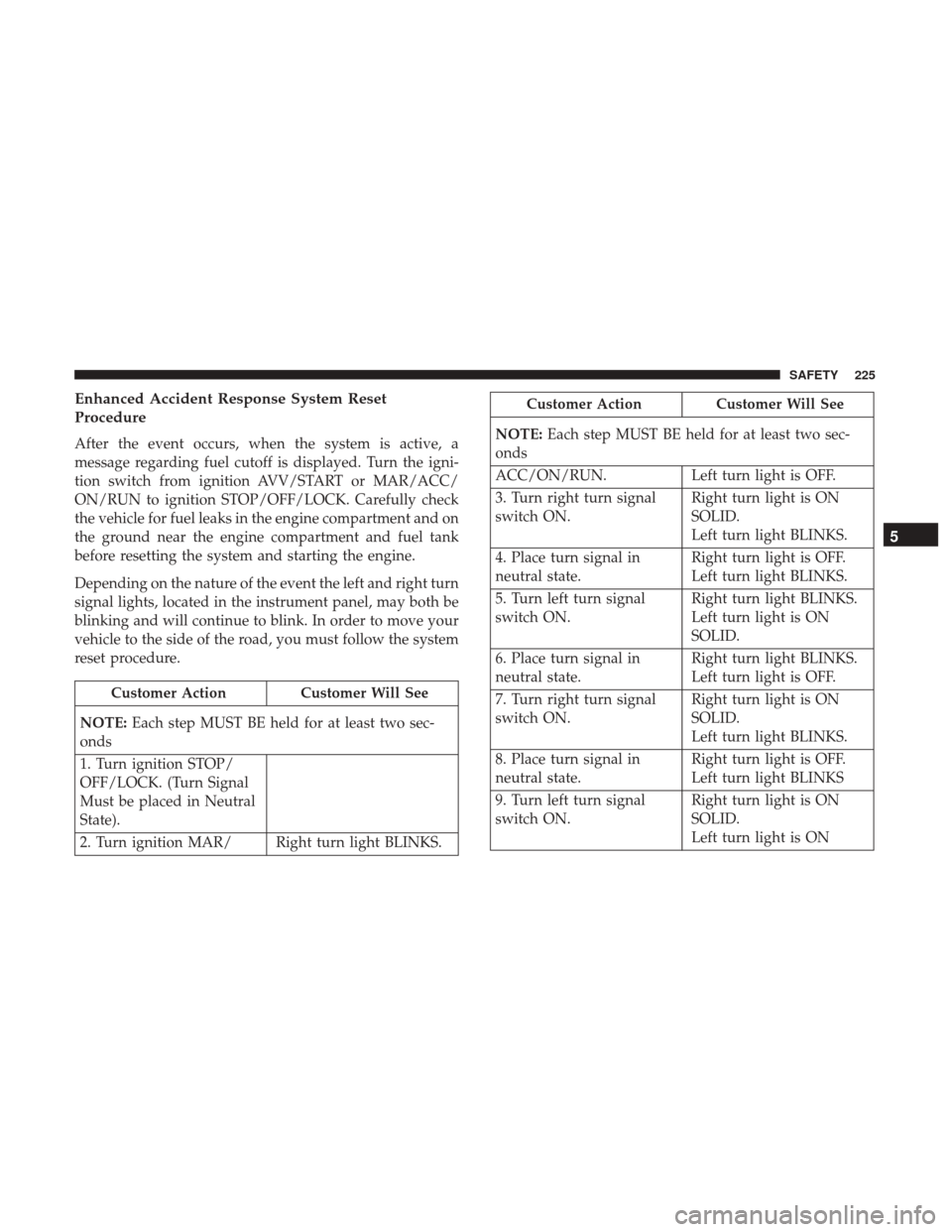
Enhanced Accident Response System Reset
Procedure
After the event occurs, when the system is active, a
message regarding fuel cutoff is displayed. Turn the igni-
tion switch from ignition AVV/START or MAR/ACC/
ON/RUN to ignition STOP/OFF/LOCK. Carefully check
the vehicle for fuel leaks in the engine compartment and on
the ground near the engine compartment and fuel tank
before resetting the system and starting the engine.
Depending on the nature of the event the left and right turn
signal lights, located in the instrument panel, may both be
blinking and will continue to blink. In order to move your
vehicle to the side of the road, you must follow the system
reset procedure.
Customer ActionCustomer Will See
NOTE: Each step MUST BE held for at least two sec-
onds
1. Turn ignition STOP/
OFF/LOCK. (Turn Signal
Must be placed in Neutral
State).
2. Turn ignition MAR/ Right turn light BLINKS.
Customer Action Customer Will See
NOTE: Each step MUST BE held for at least two sec-
onds
ACC/ON/RUN. Left turn light is OFF.
3. Turn right turn signal
switch ON. Right turn light is ON
SOLID.
Left turn light BLINKS.
4. Place turn signal in
neutral state. Right turn light is OFF.
Left turn light BLINKS.
5. Turn left turn signal
switch ON. Right turn light BLINKS.
Left turn light is ON
SOLID.
6. Place turn signal in
neutral state. Right turn light BLINKS.
Left turn light is OFF.
7. Turn right turn signal
switch ON. Right turn light is ON
SOLID.
Left turn light BLINKS.
8. Place turn signal in
neutral state. Right turn light is OFF.
Left turn light BLINKS
9. Turn left turn signal
switch ON. Right turn light is ON
SOLID.
Left turn light is ON
5
SAFETY 225
Page 228 of 516
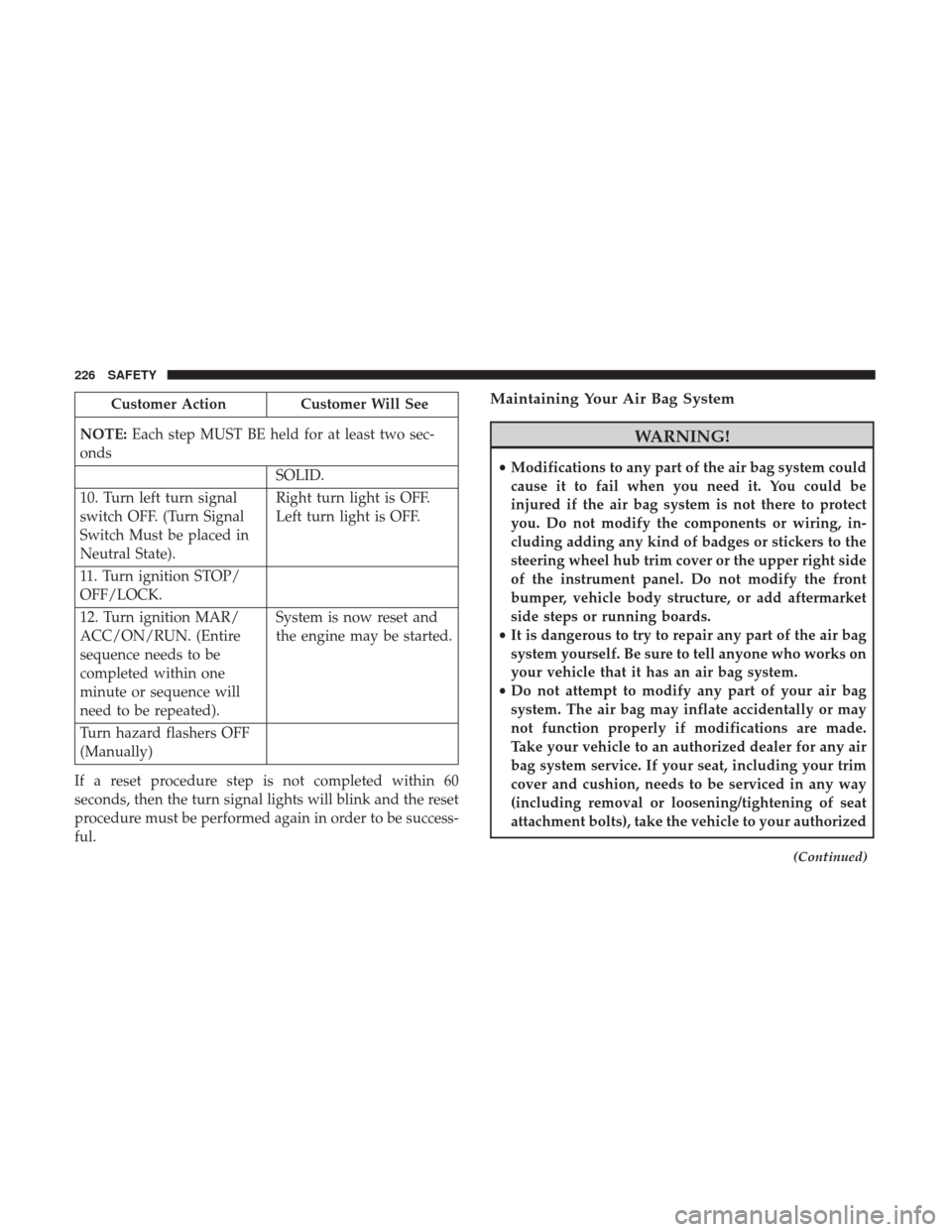
Customer ActionCustomer Will See
NOTE: Each step MUST BE held for at least two sec-
onds
SOLID.
10. Turn left turn signal
switch OFF. (Turn Signal
Switch Must be placed in
Neutral State). Right turn light is OFF.
Left turn light is OFF.
11. Turn ignition STOP/
OFF/LOCK.
12. Turn ignition MAR/
ACC/ON/RUN. (Entire
sequence needs to be
completed within one
minute or sequence will
need to be repeated). System is now reset and
the engine may be started.
Turn hazard flashers OFF
(Manually)
If a reset procedure step is not completed within 60
seconds, then the turn signal lights will blink and the reset
procedure must be performed again in order to be success-
ful.Maintaining Your Air Bag System
WARNING!
• Modifications to any part of the air bag system could
cause it to fail when you need it. You could be
injured if the air bag system is not there to protect
you. Do not modify the components or wiring, in-
cluding adding any kind of badges or stickers to the
steering wheel hub trim cover or the upper right side
of the instrument panel. Do not modify the front
bumper, vehicle body structure, or add aftermarket
side steps or running boards.
• It is dangerous to try to repair any part of the air bag
system yourself. Be sure to tell anyone who works on
your vehicle that it has an air bag system.
• Do not attempt to modify any part of your air bag
system. The air bag may inflate accidentally or may
not function properly if modifications are made.
Take your vehicle to an authorized dealer for any air
bag system service. If your seat, including your trim
cover and cushion, needs to be serviced in any way
(including removal or loosening/tightening of seat
attachment bolts), take the vehicle to your authorized
(Continued)
226 SAFETY
Page 247 of 516
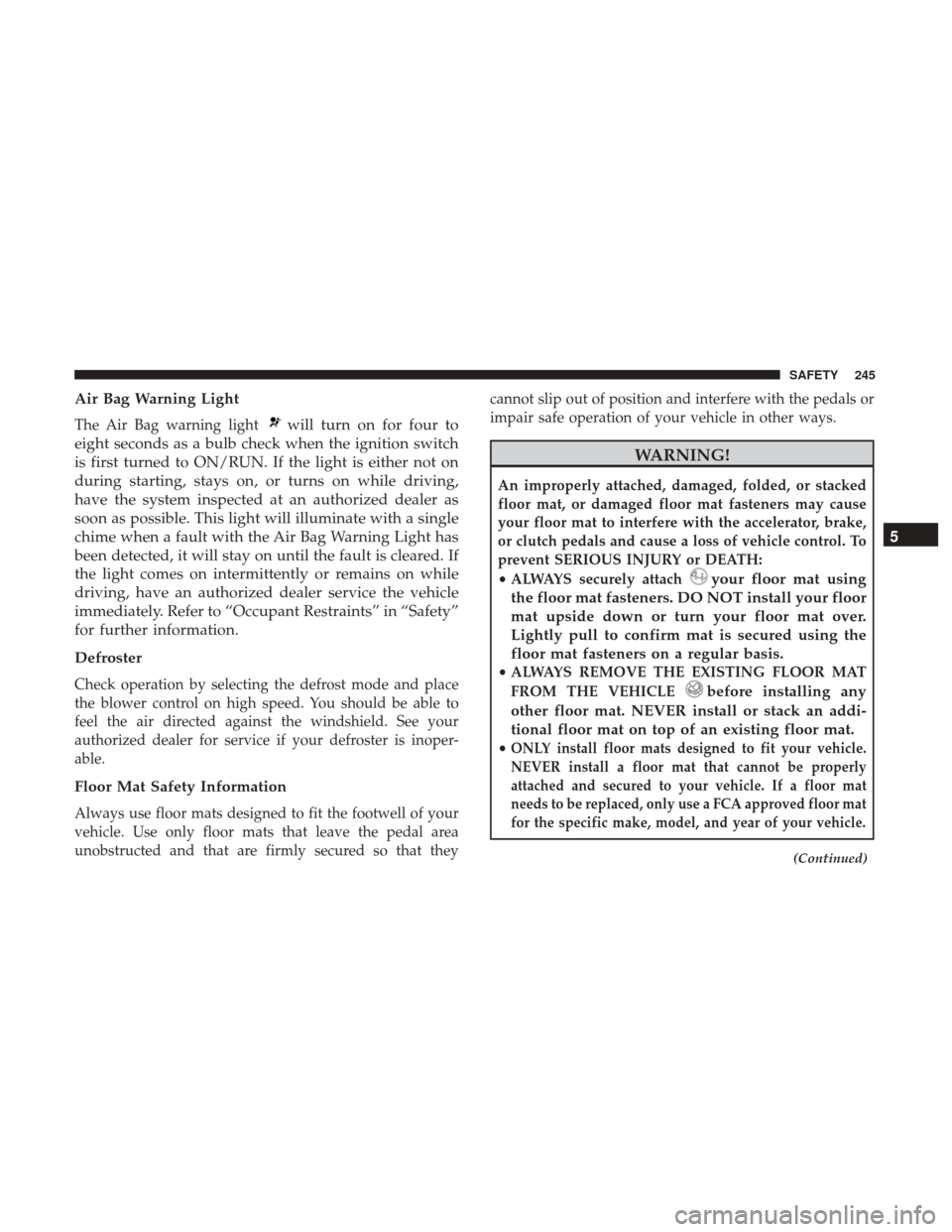
Air Bag Warning Light
The Air Bag warning lightwill turn on for four to
eight seconds as a bulb check when the ignition switch
is first turned to ON/RUN. If the light is either not on
during starting, stays on, or turns on while driving,
have the system inspected at an authorized dealer as
soon as possible. This light will illuminate with a single
chime when a fault with the Air Bag Warning Light has
been detected, it will stay on until the fault is cleared. If
the light comes on intermittently or remains on while
driving, have an authorized dealer service the vehicle
immediately. Refer to “Occupant Restraints” in “Safety”
for further information.
Defroster
Check operation by selecting the defrost mode and place
the blower control on high speed. You should be able to
feel the air directed against the windshield. See your
authorized dealer for service if your defroster is inoper-
able.
Floor Mat Safety Information
Always use floor mats designed to fit the footwell of your
vehicle. Use only floor mats that leave the pedal area
unobstructed and that are firmly secured so that they cannot slip out of position and interfere with the pedals or
impair safe operation of your vehicle in other ways.
WARNING!
An improperly attached, damaged, folded, or stacked
floor mat, or damaged floor mat fasteners may cause
your floor mat to interfere with the accelerator, brake,
or clutch pedals and cause a loss of vehicle control. To
prevent SERIOUS INJURY or DEATH:
•
ALWAYS securely attach
your floor mat using
the floor mat fasteners. DO NOT install your floor
mat upside down or turn your floor mat over.
Lightly pull to confirm mat is secured using the
floor mat fasteners on a regular basis.
• ALWAYS REMOVE THE EXISTING FLOOR MAT
FROM THE VEHICLE
before installing any
other floor mat. NEVER install or stack an addi-
tional floor mat on top of an existing floor mat.
•ONLY install floor mats designed to fit your vehicle.
NEVER install a floor mat that cannot be properly
attached and secured to your vehicle. If a floor mat
needs to be replaced, only use a FCA approved floor mat
for the specific make, model, and year of your vehicle.
(Continued)
5
SAFETY 245
Page 248 of 516
WARNING!(Continued)
•ONLY use the driver ’s side floor mat on the driver ’s
side floor area. To check for interference, with the
vehicle properly parked with the engine off, fully
depress the accelerator, the brake, and the clutch
pedal (if present) to check for interference. If your
floor mat interferes with the operation of any pedal,
or is not secure to the floor, remove the floor mat
from the vehicle and place the floor mat in your
trunk.
• ONLY use the passenger ’s side floor mat on the
passenger ’s side floor area.
• ALWAYS make sure objects cannot fall or slide into
the driver ’s side floor area when the vehicle is
moving. Objects can become trapped under accelera-
tor, brake, or clutch pedals and could cause a loss of
vehicle control.
• NEVER place any objects under the floor mat (e.g.,
towels, keys, etc.). These objects could change the
position of the floor mat and may cause interference
with the accelerator, brake, or clutch pedals.
(Continued)
WARNING! (Continued)
•If the vehicle carpet has been removed and re-
installed, always properly attach carpet to the floor
and check the floor mat fasteners are secure to the
vehicle carpet. Fully depress each pedal to check for
interference with the accelerator, brake, or clutch
pedals then re-install the floor mats.
• It is recommended to only use mild soap and water
to clean your floor mats. After cleaning, always check
your floor mat has been properly installed and is
secured to your vehicle using the floor mat fasteners
by lightly pulling mat.
246 SAFETY
Page 249 of 516
Periodic Safety Checks You Should Make Outside
The Vehicle
Tires
Examine tires for excessive tread wear and uneven wear
patterns. Check for stones, nails, glass, or other objects
lodged in the tread or sidewall. Inspect the tread for cuts
and cracks. Inspect sidewalls for cuts, cracks, and bulges.
Check the wheel nuts for tightness. Check the tires (includ-
ing spare) for proper cold inflation pressure.
Lights
Have someone observe the operation of brake lights and
exterior lights while you work the controls. Check turn
signal and high beam indicator lights on the instrument
panel.
Door Latches
Check for proper closing, latching, and locking.
Fluid Leaks
Check area under vehicle after overnight parking for fuel,
engine coolant, oil, or other fluid leaks. Also, if gasoline
fumes are detected, or if fuel or brake fluid leaks are
suspected, the cause should be located and corrected
immediately.
5
SAFETY 247
Page 258 of 516
To apply the EPB manually, pull up on the switch momen-
tarily. You may hear a slight whirring sound from the back
of the vehicle while the EPB engages. Once the parking
brake is fully engaged, the BRAKE warning lamp in the
instrument cluster and an indicator on the switch will
illuminate. If your foot is on the brake pedal while you
apply the EPB, you may notice a small amount of brake
pedal movement. The EPB can be applied even when the
ignition is in the OFF mode however, it can only be
released when the ignition is in the RUN mode.
NOTE:The EPB fault lamp will illuminate if the EPB
switch is held for longer than 60 seconds in either the
released or applied position. The light will extinguish upon
releasing the switch.
If the Auto Park Brake feature is enabled, the EPB will
automatically engage whenever the transmission is moved
into PARK, or with a manual transmission, when the
ignition switch is in the STOP/OFF position. If your foot is
on the brake pedal, you may notice a small amount of
brake pedal movement while the EPB is engaging.
The electric park brake will be automatically released if the
driver’s seat belt is buckled (only in case of automatic
transmission) and driver’s intention to start (in forward or
reverse direction) is recognized by the system To release the EPB manually, the ignition must be in the
RUN mode. Put your foot on the brake pedal, then push
the EPB switch down momentarily. You may hear a slight
whirring sound from the back of the car while the parking
brake disengages. You may also notice a small amount of
movement in the brake pedal. Once the EPB is fully
disengaged, the BRAKE warning lamp in the instrument
cluster and the LED indicator on the switch will extinguish.
NOTE:
•
When parking on a hill, it is important to turn the front
wheels toward the curb on a downhill grade and away
from the curb on an uphill grade. Apply the EPB before
placing the gear selector in PARK, otherwise the load on
the transmission locking mechanism may make it diffi-
cult to move the gear selector out of PARK. The EPB
should always be applied whenever the driver is not in
the vehicle.
• If the clutch pedal is released at the same time the gas
pedal is pressed, the EPB will be automatically released
(manual transmissions only).
256 STARTING AND OPERATING
Page 259 of 516
WARNING!
•When leaving the vehicle, always remove the key fob
from the ignition and lock your vehicle.
• Never leave children alone in a vehicle, or with
access to an unlocked vehicle. Allowing children to
be in a vehicle unattended is dangerous for a number
of reasons. A child or others could be seriously or
fatally injured. Children should be warned not to
touch the parking brake, brake pedal or the trans-
mission gear selector.
• Do not leave the key fob in or near the vehicle (or in
a location accessible to children), and do not leave
the ignition in the ON or RUN mode. A child could
operate power windows, other controls, or move the
vehicle.
• Be sure the parking brake is fully disengaged before
driving; failure to do so can lead to brake failure and
a collision.
• Always fully apply the parking brake when leaving
your vehicle, or it may roll and cause damage or
injury. Also be certain to leave the transmission in
PARK. Failure to do so may allow the vehicle to roll
and cause damage or injury.
CAUTION!
If the Brake System Warning Light remains on with the
parking brake released, a brake system malfunction is
indicated. Have the brake system serviced by an au-
thorized dealer immediately.
If exceptional circumstances should make it necessary to
engage the EPB while the vehicle is in motion, maintain
upward pressure on the EPB switch for as long as engage-
ment is desired. The brake warning lamp could illuminate
in case of the hydraulic system is not available. The rear
stop lamps will also be illuminated automatically while the
vehicle remains in motion.
To disengage the EPB while the vehicle is in motion, release
the switch. If the vehicle is brought to a complete stop
using the EPB, when the vehicle reaches approximately
1.9 mph (3 km/h) the EPB will remain engaged.
WARNING!
Driving the vehicle with the parking brake engaged, or
repeated use of the parking brake to slow the vehicle
may cause serious damage to the brake system. Be sure
(Continued)
6
STARTING AND OPERATING 257
Page 263 of 516
To engage REVERSE gear from the NEUTRAL position, lift
the REVERSE ring, located below the knob and simultane-
ously move the lever to the left and then forward.
Shifting
Fully press the clutch pedal before shifting gears. As you
release the clutch pedal, lightly press the accelerator pedal.
You should always use first gear when starting from a
standing position.
Recommended Vehicle Shift Speeds
To utilize your manual transmission efficiently for fuel
economy and performance, it should be upshifted as listed
in the recommended shift speed chart. Shift at the vehicle
speeds listed for acceleration. When heavily loaded or
pulling a trailer, these recommended up-shift speeds may
not apply.
Manual Transmission Shift Speeds in MPH (KM/H)
All Engines Gear Selection 2 to 33 to 44 to 5 5 to 6
Accel. 24 (39)34 (55)47 (76) 56 (90)
Cruise 19 (31)27 (43)37 (60) 41 (66)
REVERSE Ring
6
STARTING AND OPERATING 261
Page 271 of 516
If the transmission temperature exceeds normal operating
limits, the transmission controller may modify the trans-
mission shift schedule, reduce engine torque, and/or ex-
pand the range of torque converter clutch engagement.
This is done to prevent transmission damage due to
overheating.
If the transmission becomes extremely hot, the “Transmis-
sion Temperature Warning Light” may illuminate and the
transmission may operate differently until the transmission
cools down.
During cold temperatures, transmission operation may be
modified depending on engine and transmission tempera-
ture as well as vehicle speed. This feature improves warm
up time of the engine and transmission to achieve maxi-
mum efficiency. Engagement of the torque converter
clutch, and shifts into 8th or 9th gear, are inhibited until the
transmission fluid is warm. Normal operation will resume
once the transmission temperature has risen to a suitable
level.
AutoStick
AutoStick is a driver-interactive transmission feature pro-
viding manual shift control, giving you more control of the
vehicle. AutoStick allows you to maximize engine braking,eliminate undesirable upshifts and downshifts, and im-
prove overall vehicle performance. This system can also
provide you with more control during passing, city driv-
ing, cold slippery conditions, mountain driving, trailer
towing and many other situations.
Operation
When the gear selector is in the AutoStick position (beside
the DRIVE position), it can be moved forward and rear-
ward. This allows the driver to manually select the trans-
mission gear being used. Moving the gear selector forward
(-) triggers a downshift, and rearward (+) an upshift. The
current gear is displayed in the instrument cluster.
NOTE:
In AutoStick mode, the transmission will only shift
up or down when the driver moves the gear selector
rearward (+) or forward (-), except as described below.
• The transmission will automatically upshift when nec-
essary to prevent engine overspeed.
• The transmission will automatically downshift as the
vehicle slows (to prevent engine lugging) and will
display the current gear.
• The transmission will automatically downshift to first or
second gear (depending on model) when coming to a
6
STARTING AND OPERATING 269
Page 272 of 516
stop. After a stop, the driver should manually upshift (+)
the transmission as the vehicle is accelerated.
• You can start out (from a stop) in first or second gear.
Starting out in second gear can be helpful in snow or icy
conditions. Tap the gear selector forward or rearward to
select the desired gear after the vehicle is brought to a
stop.
• If a requested downshift would cause the engine to
overspeed, that shift will not occur.
• The system will ignore attempts to upshift at too low of
a vehicle speed.
• Avoid using speed control when AutoStick is engaged
because the transmission will not shift automatically.
• Transmission shifting will be more noticeable when
AutoStick is enabled.
• The system may revert to automatic shift mode if a fault
or overheat condition is detected.
To disengage AutoStick mode, return the gear selector to
the DRIVE position. You can shift in or out of the AutoStick
position at any time without taking your foot off the
accelerator pedal.WARNING!
Do not downshift for additional engine braking on a
slippery surface. The drive wheels could lose their grip
and the vehicle could skid, causing a collision or
personal injury.
Transmission Limp Home Mode
Transmission function is electronically monitored for ab-
normal conditions. If a condition is detected that could
result in transmission damage, Transmission Limp Home
Mode is activated. In this mode, the transmission remains
in fourth gear regardless of which forward gear is selected.
PARK, REVERSE, and NEUTRAL will continue to operate.
The Malfunction Indicator Light (MIL) may be illuminated.
Limp Home Mode allows the vehicle to be driven to an
authorized dealer for service without damaging the trans-
mission.
In the event of a momentary problem, the transmission can
be reset to regain all forward gears by performing the
following steps:
1. Stop the vehicle.
2. Shift the transmission into PARK, if possible. If not, shift the transmission to NEUTRAL.
270 STARTING AND OPERATING