audio JEEP RENEGADE 2017 1.G User Guide
[x] Cancel search | Manufacturer: JEEP, Model Year: 2017, Model line: RENEGADE, Model: JEEP RENEGADE 2017 1.GPages: 516, PDF Size: 5.73 MB
Page 469 of 516
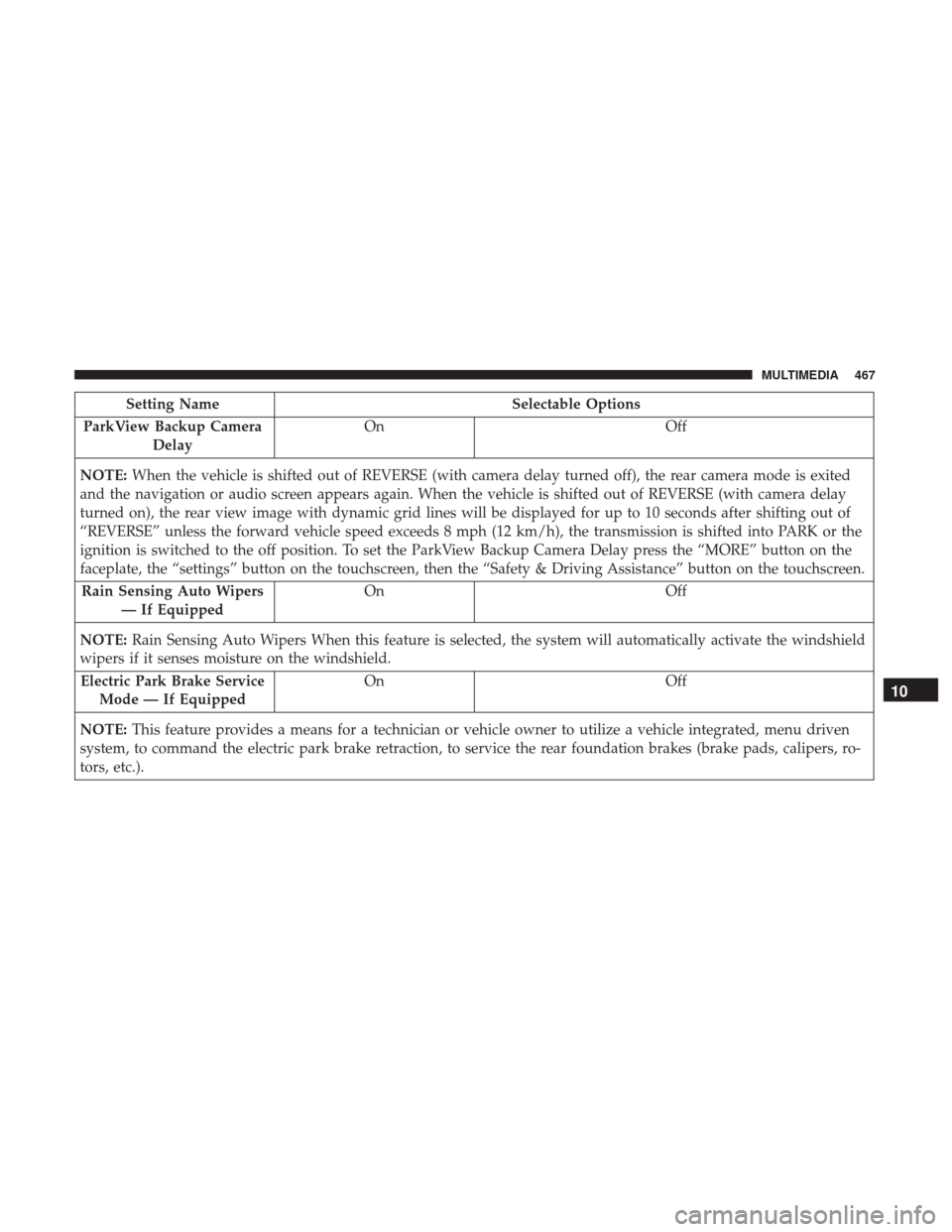
Setting NameSelectable Options
ParkView Backup Camera Delay On
Off
NOTE: When the vehicle is shifted out of REVERSE (with camera delay turned off), the rear camera mode is exited
and the navigation or audio screen appears again. When the vehicle is shifted out of REVERSE (with camera delay
turned on), the rear view image with dynamic grid lines will be displayed for up to 10 seconds after shifting out of
“REVERSE” unless the forward vehicle speed exceeds 8 mph (12 km/h), the transmission is shifted into PARK or the
ignition is switched to the off position. To set the ParkView Backup Camera Delay press the “MORE” button on the
faceplate, the “settings” button on the touchscreen, then the “Safety & Driving Assistance” button on the touchscreen.
Rain Sensing Auto Wipers — If Equipped On
Off
NOTE: Rain Sensing Auto Wipers When this feature is selected, the system will automatically activate the windshield
wipers if it senses moisture on the windshield.
Electric Park Brake Service Mode — If Equipped On
Off
NOTE: This feature provides a means for a technician or vehicle owner to utilize a vehicle integrated, menu driven
system, to command the electric park brake retraction, to service the rear foundation brakes (brake pads, calipers, ro-
tors, etc.).
10
MULTIMEDIA 467
Page 473 of 516
Audio
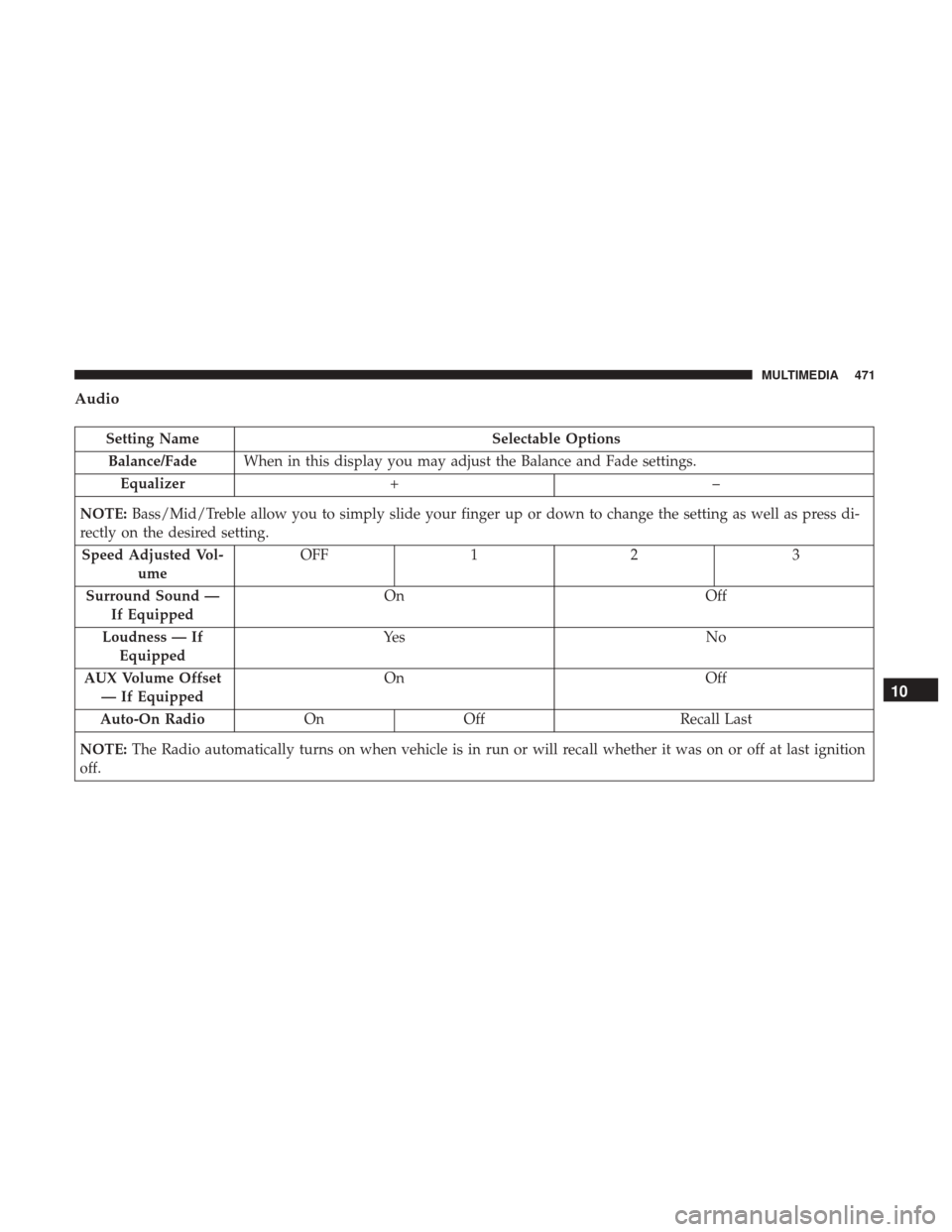
Setting NameSelectable Options
Balance/Fade When in this display you may adjust the Balance and Fade settings.
Equalizer +–
NOTE: Bass/Mid/Treble allow you to simply slide your finger up or down to change the setting as well as press di-
rectly on the desired setting.
Speed Adjusted Vol- ume OFF
12 3
Surround Sound — If Equipped On
Off
Loudness — If Equipped Ye s
N o
AUX Volume Offset — If Equipped On
Off
Auto-On Radio OnOff Recall Last
NOTE: The Radio automatically turns on when vehicle is in run or will recall whether it was on or off at last ignition
off.
10
MULTIMEDIA 471
Page 474 of 516
Phone/Bluetooth
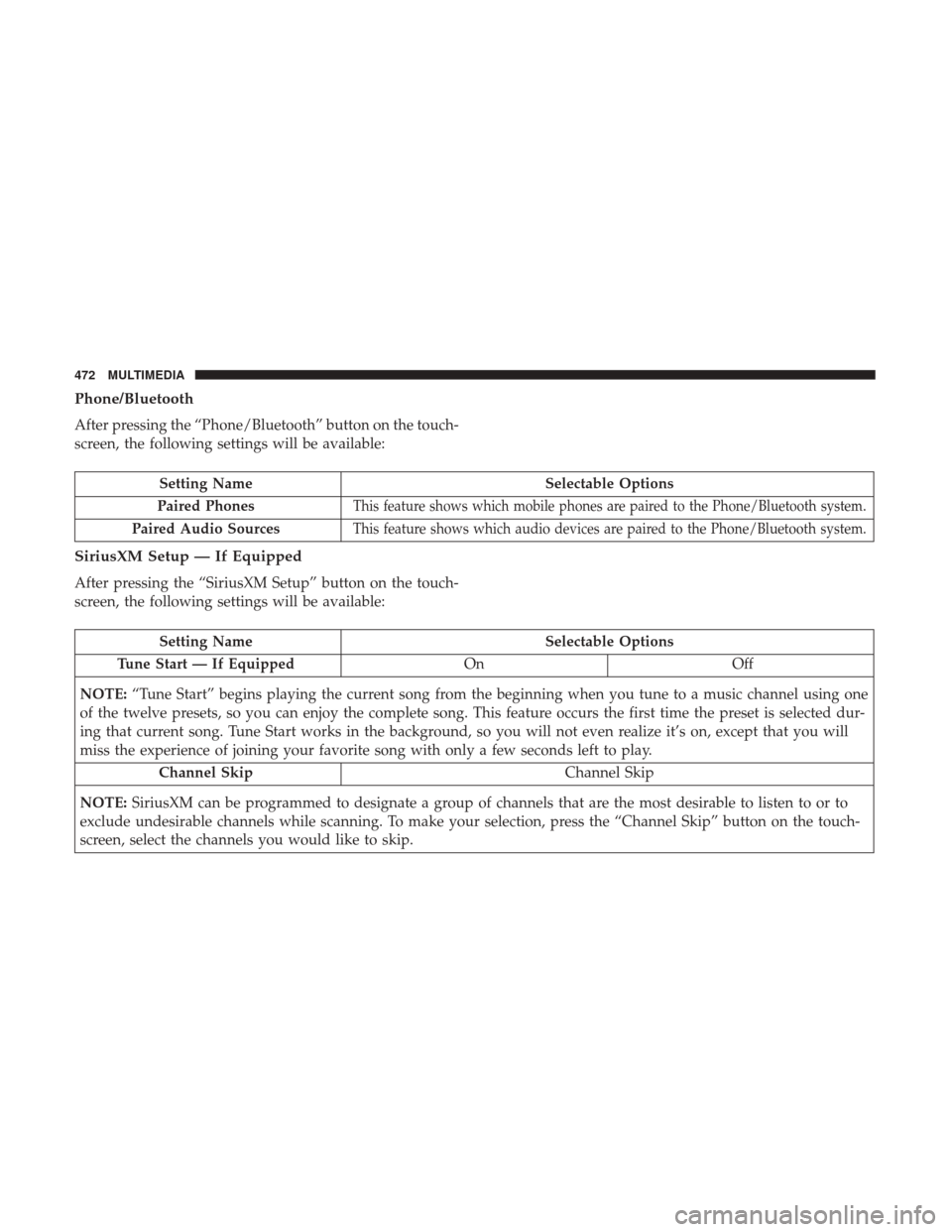
After pressing the “Phone/Bluetooth” button on the touch-
screen, the following settings will be available:
Setting NameSelectable Options
Paired Phones
This feature shows which mobile phones are paired to the Phone/Bluetooth system.
Paired Audio SourcesThis feature shows which audio devices are paired to the Phone/Bluetooth system.
SiriusXM Setup — If Equipped
After pressing the “SiriusXM Setup” button on the touch-
screen, the following settings will be available:
Setting Name Selectable Options
Tune Start — If Equipped OnOff
NOTE: “Tune Start” begins playing the current song from the beginning when you tune to a music channel using one
of the twelve presets, so you can enjoy the complete song. This feature occurs the first time the preset is selected dur-
ing that current song. Tune Start works in the background, so you will not even realize it’s on, except that you will
miss the experience of joining your favorite song with only a few seconds left to play.
Channel Skip Channel Skip
NOTE: SiriusXM can be programmed to designate a group of channels that are the most desirable to listen to or to
exclude undesirable channels while scanning. To make your selection, press the “Channel Skip” button on the touch-
screen, select the channels you would like to skip.
472 MULTIMEDIA
Page 476 of 516
Restore Settings Defaults
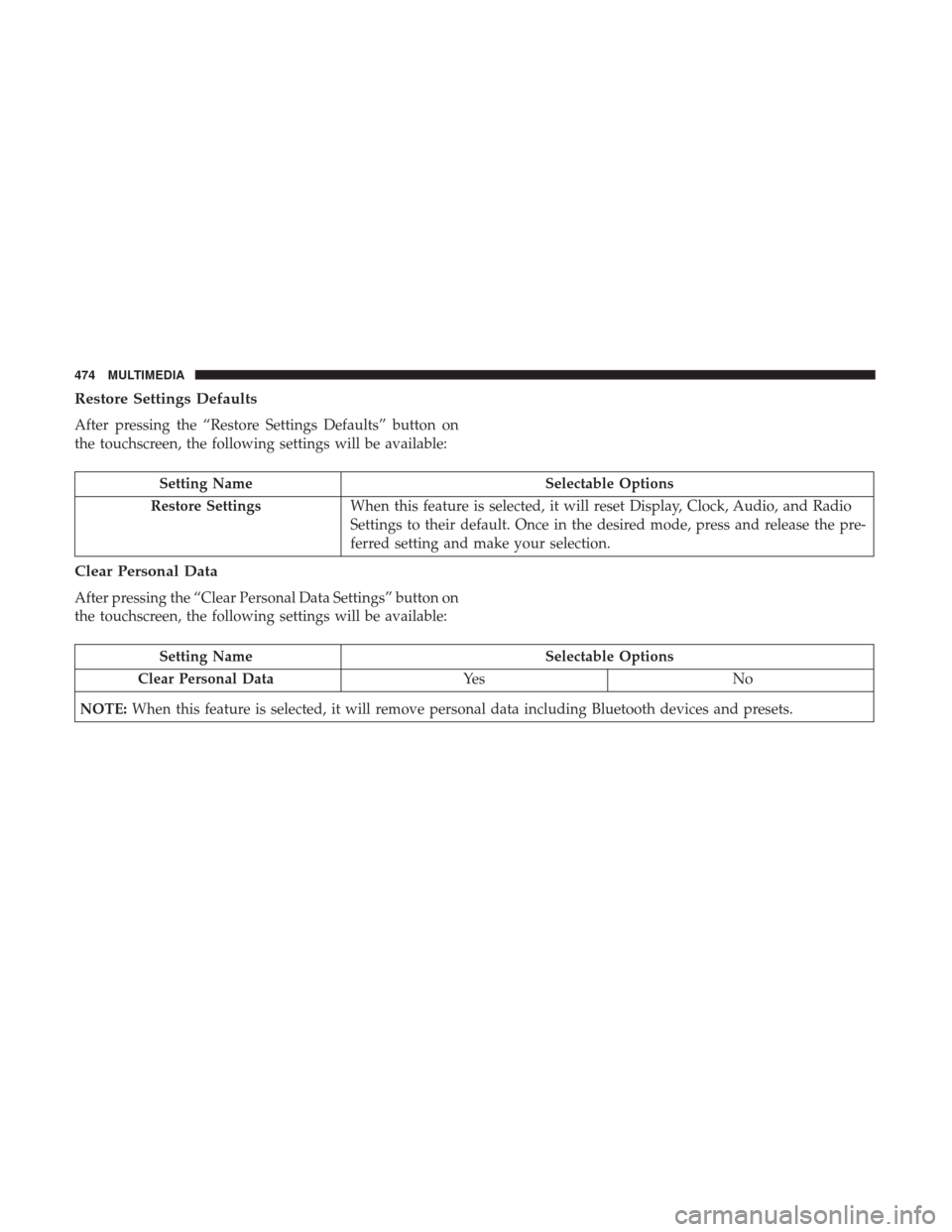
After pressing the “Restore Settings Defaults” button on
the touchscreen, the following settings will be available:
Setting NameSelectable Options
Restore Settings When this feature is selected, it will reset Display, Clock, Audio, and Radio
Settings to their default. Once in the desired mode, press and release the pre-
ferred setting and make your selection.
Clear Personal Data
After pressing the “Clear Personal Data Settings” button on
the touchscreen, the following settings will be available:
Setting Name Selectable Options
Clear Personal Data Ye sN o
NOTE: When this feature is selected, it will remove personal data including Bluetooth devices and presets.
474 MULTIMEDIA
Page 478 of 516
STEERING WHEEL AUDIO CONTROLS
The remote sound system controls are located at the rear of
the steering wheel. Reach behind the wheel to access the
switches.
The right-hand control is a rocker-type switch with a
pushbutton in the center and controls the volume and
mode of the sound system. Pushing the top of the rocker
switch will increase the volume, and pushing the bottom of
the rocker switch will decrease the volume.Pushing the center button will make the radio switch
between the various modes available (AM/FM/SAT/
AUX/Media Player, etc.) and can also be used to select/
enter an item while scrolling through menu.
The left-hand control is a rocker-type switch with a push-
button in the center. The function of the left-hand control is
different depending on which mode you are in.
The following describes the left-hand control operation in
each mode.
Radio Operation
Pushing the top of the switch will “Seek” up for the next
listenable station and pushing the bottom of the switch will
“Seek” down for the next listenable station.
The button located in the center of the left-hand control
will tune to the next preset station that you have pro-
grammed in the radio preset button.
Remote Sound System Controls (Back View Of Steering
Wheel)
476 MULTIMEDIA
Page 502 of 516
About Your Brakes........................ .433
Adding Engine Coolant (Antifreeze) .............395
Adding Fuel ............................. .291
Adding Washer Fluid ....................... .385
Additives, Fuel ........................... .436
Adjust Forward ................................40
Rearward ...............................40
AirBag ................................ .216
Air Bag Operation ....................... .218
Driver Knee Air Bag ..................... .219
Enhanced Accident Response ................372
Event Data Recorder (EDR) .................372
If A Deployment Occurs ....................223
Knee Impact Bolsters ..................... .218
Maintaining Your Air Bag System .............226
Redundant Air Bag Warning Light ............216
Side Air Bags .......................... .219
Transporting Pets ....................... .243
Air Bag Light ......................... .135, 245
Air Bag Maintenance ....................... .226
Air Cleaner, Engine (Engine Air Cleaner Filter) ......388
Air Conditioner Maintenance ..................389
Air Conditioning Filter ....................81, 390
Air Conditioning, Operating Tips ................80Air Conditioning Refrigerant
...............389, 390
Air Conditioning System ...................79, 389
Air Pressure, Tires ......................... .412
Alarm Arm The System ..........................28
Disarm The System ........................29
Alarm (Security Alarm) ................28, 138, 163
Alarm System (Security Alarm) .................28
Alterations/Modifications, Vehicle ................7
Antifreeze (Engine Coolant) ................394, 438
Disposal .............................. .397
Anti-Lock Brake System (ABS) .................168
Anti-Lock Warning Light ..............145, 149, 156
Arming
System (Security Alarm) ................28
Assist, Hill Start .......................... .170
Audio Systems (Radio) ...................... .443
Auto Down Power Windows ...................84
Automatic Headlights ........................53
Automatic High Beams .......................54
Automatic Temperature Control (ATC) ............79
Automatic Transmission ...............263, 400, 401
Adding Fluid ....................... .401, 440
Autostick ............................. .266
Fluid And Filter Changes ...................401
Fluid Change .......................... .401
500 INDEX
Page 512 of 516
Tilting.................................38
Security Alarm ......................... .28, 138
Arm The System ..........................28
Disarm The System ........................29
Selection Of Coolant (Antifreeze) ...............439
Sentry Key Key Programming .........................27
Sentry Key Replacement ....................21, 27
Service Assistance ......................... .494
Service Contract .......................... .496
Service Manuals .......................... .497
Shifting Manual Transmission ..................... .260
Shift Lever Override ....................... .365
Shoulder Belts ............................ .206
Side View Mirror Adjustment ...................50
Signals, Turn ....................... .55, 160, 247
Snow Chains (Tire Chains) ....................421
Snow Tires .............................. .417
Spare Tire ............................ .418, 419
Spark Plugs ............................. .439
Specifications Fuel (Gasoline) ......................... .439
Oil.................................. .439
Speed Control (Cruise Control) .................272Starting
.............................. .23, 251
Cold Weather .......................... .253
Engine Fails To Start ..................... .252
Remote ................................23
Starting And Operating ..................... .251
Starting Procedures ........................ .251
Steering Tilt Column .............................48
Wheel, Heated ...........................48
Wheel, Tilt ..............................48
Steering Wheel Audio Controls .................476
Steering Wheel Mounted Sound System Controls . . . .476
Storage, Vehicle .............................81
Stuck, Freeing ............................ .366
Sun Visor Extension .........................110
Supplemental Restraint System - Air Bag ..........216
Sway
Control, Trailer .....................171, 297
System, Remote Starting ......................23
Telescoping Steering Column ...................48
Temperature Control, Automatic (ATC) ............79
Tilt Steering Column .........................48
Time Delay, Headlight ........................54
Tip Start ................................ .252
Tire And Loading Information Placard ............407
510 INDEX