mirror JEEP RENEGADE 2017 1.G User Guide
[x] Cancel search | Manufacturer: JEEP, Model Year: 2017, Model line: RENEGADE, Model: JEEP RENEGADE 2017 1.GPages: 516, PDF Size: 5.73 MB
Page 73 of 516
CAUTION!
Failure to follow these cautions can cause damage to
the heating elements:
•Use care when washing the inside of the rear win-
dow. Do not use abrasive window cleaners on the
interior surface of the window. Use a soft cloth and a
mild washing solution, wiping parallel to the heat-
ing elements. Labels can be peeled off after soaking
with warm water.
• Do not use scrapers, sharp instruments, or abrasive
window cleaners on the interior surface of the win-
dow.
• Keep all objects a safe distance from the window.
Rear Window Defrosting
Push and release the rear window defrost button to turn
the function on/off.
Activation of this function is indicated by the rear defrost
indicator light on the instrument panel turning on. The
function is automatically deactivated after 20 minutes.
If equipped, push the rear defrost button to activate the
defrosting of door mirrors and heated rear window.
CAUTION!
To avoid causing damage to the rear window defroster
heating filaments do not affix stickers or other objects
to the inside of the rear glass.
Air Recirculation
Push and release the Air Recirculation button so that the
LED is on, to enter recirculation mode. It is recommended
to turn the internal air recirculation on while standing in
traffic or in tunnels to prevent the introduction of polluted
air.
Do not use the function for a long period of time, particu-
larly if there are many passengers in the vehicle, to prevent
the windows from misting up.
NOTE: Internal air recirculation makes it possible to reach
the required heating or cooling conditions quickly depend-
ing on the mode selected. Do not use the internal air
recirculation function on rainy/cold days as it would
considerably increase the possibility of the windows mist-
ing.
3
GETTING TO KNOW YOUR VEHICLE 71
Page 80 of 516
•Turns air recirculation off.
• Sets blower fan to the maximum speed.
• Directs air flow to windshield and front side window
diffusers.
• Activates the heated rear window defrost.
• Activates the heated windshield (if equipped).
• Displays the fan speed (Blower Control Indicator LED
illuminated).
When the function is activated, the AUTO button LED
turns off. With the function activated, the only possible
manual adjustments are pushing the A/C control button,
adjusting the fan speed and turning the heated rear win-
dow off.
When the Recirculation Control or AUTO buttons are
pushed, the Climate Control system will deactivate the
Front Defrost (MAX-DEF) function.
Selecting the footwell/windshield or only windshield dis-
tribution activates the Climate Control system compressor
and the air recirculation is set to outside air intake.
This logic guarantees optimum visibility at the windows.
Max-defrost is also available in manual mode. Rear Window Defrosting
Push and release the rear window defrost button to turn
the function on/off.
Activation of this function is indicated by the rear defrost
indicator light on the instrument panel turning on. The
function is automatically deactivated after 20 minutes. If
equipped, push the rear defrost button to activate the
defrosting of door mirrors and heated rear window.
CAUTION!
To avoid causing damage to the rear window defroster
heating filaments do not affix stickers or other objects
to the inside of the rear glass.
Turning Off The Climate Control System
Push the ON/OFF button.
With the Climate Control system off:
• Air recirculation is on, isolating the passenger compart-
ment from the outside.
• The A/C compressor is off.
• The blower is off.
• The heated rear window can be activated/deactivated.
78 GETTING TO KNOW YOUR VEHICLE
Page 112 of 516
Sun Visors
Sun visors are located on both sides of the rearview mirror.
The visors can be lowered or moved to the side to help
block sunlight from entering the windshield or door glass.
To move the sun visor against the driver or passenger door
glass, remove the sun visor from the hook and turn it
toward the side window.
The visors also have illuminated vanity mirrors to allow
use in low light conditions.Lift upward on the mirror cover to access the mirror.
Extendible Sun Visor
To extend the sun visor, proceed as follows:
1. Place the sun visor against the door glass by detaching
it from the hook and turning it toward the side window.
2. Slide the visor along the rod to provide coverage more to the rear.
Sun Visor Mirror
1 — Sun Visor Mirror CoverSliding Sun Visor
1 — Sun Visor
110 GETTING TO KNOW YOUR VEHICLE
Page 182 of 516
•The vehicle is driven greater than 25 mph (40 km/h)
(HDC exits immediately.)
Feedback To The Driver:
The instrument cluster has an HDC icon and the HDC
switch has an LED which offer feedback to the driver about
the state HDC is in.
• The cluster icon and switch lamp will illuminate and
remain solid when HDC is enabled or activated. This is
the normal operating condition for HDC.
• The switch lamp will flash for several seconds then
extinguish when the driver pushes the HDC switch
when enable conditions have not been met.
The Hill Descent Switch is located within the Selec-Terrain
knob in the upper right position.
WARNING!
HDC is only intended to assist the driver in controlling
vehicle speed when descending hills. The driver must
remain attentive to the driving conditions and is re-
sponsible for maintaining a safe vehicle speed.
AUXILIARY DRIVING SYSTEMS
Blind Spot Monitoring (BSM) — If Equipped
The Blind Spot Monitoring (BSM) system uses two radar-
based sensors, located inside the rear bumper fascia, to
detect highway licensable vehicles (automobiles, trucks,
motorcycles, etc.) that enter the blind spot zones from the
rear/front/side of the vehicle.
When the vehicle is started, the BSM warning light will
momentarily illuminate in both outside rear view mirrors
to let the driver know that the system is operational. The
Rear Detection Zones
180 SAFETY
Page 183 of 516
BSM system sensors operate when the vehicle is in any
forward gear or REVERSE and enters stand-by mode when
the vehicle is in PARK.
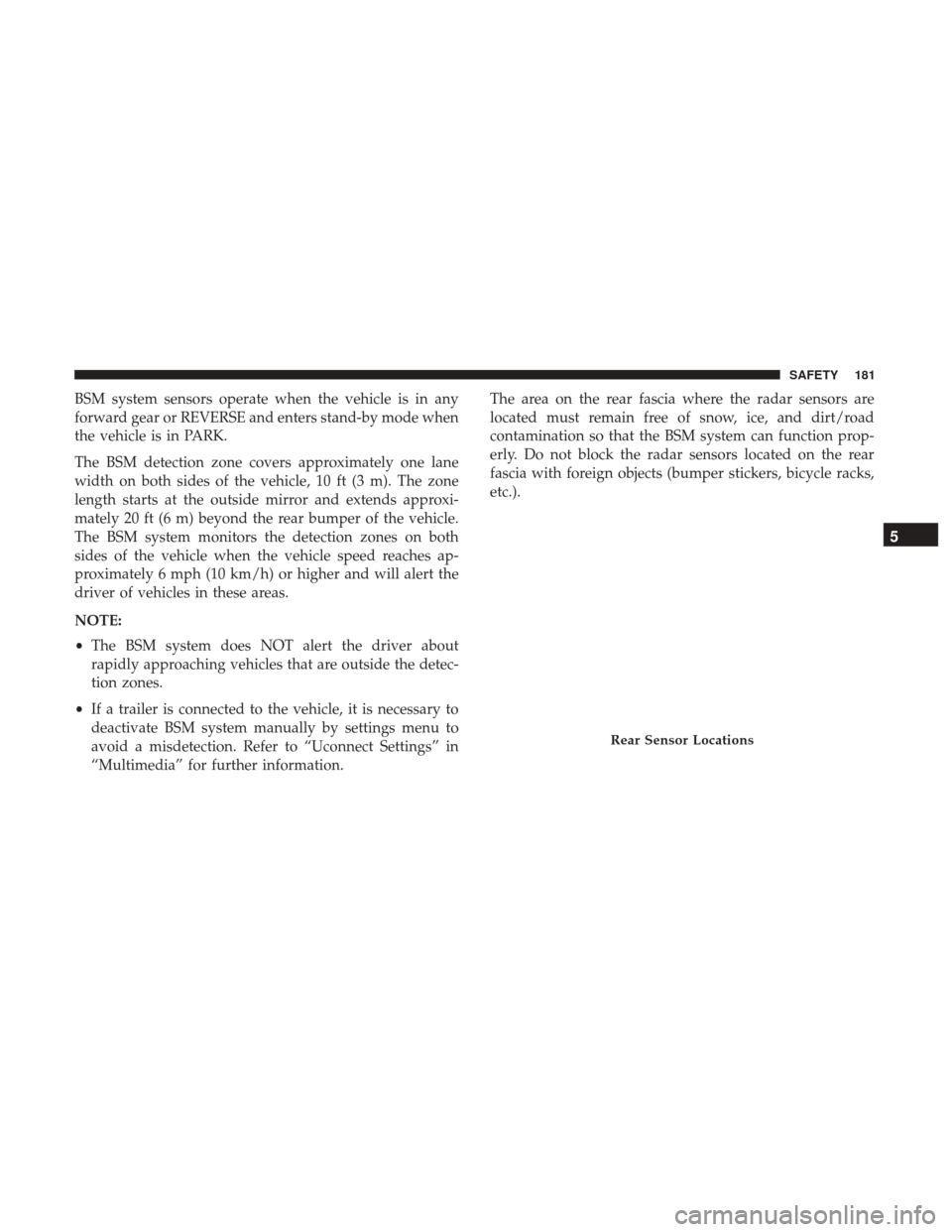
The BSM detection zone covers approximately one lane
width on both sides of the vehicle, 10 ft (3 m). The zone
length starts at the outside mirror and extends approxi-
mately 20 ft (6 m) beyond the rear bumper of the vehicle.
The BSM system monitors the detection zones on both
sides of the vehicle when the vehicle speed reaches ap-
proximately 6 mph (10 km/h) or higher and will alert the
driver of vehicles in these areas.
NOTE:
•The BSM system does NOT alert the driver about
rapidly approaching vehicles that are outside the detec-
tion zones.
• If a trailer is connected to the vehicle, it is necessary to
deactivate BSM system manually by settings menu to
avoid a misdetection. Refer to “Uconnect Settings” in
“Multimedia” for further information. The area on the rear fascia where the radar sensors are
located must remain free of snow, ice, and dirt/road
contamination so that the BSM system can function prop-
erly. Do not block the radar sensors located on the rear
fascia with foreign objects (bumper stickers, bicycle racks,
etc.).
Rear Sensor Locations
5
SAFETY 181
Page 184 of 516
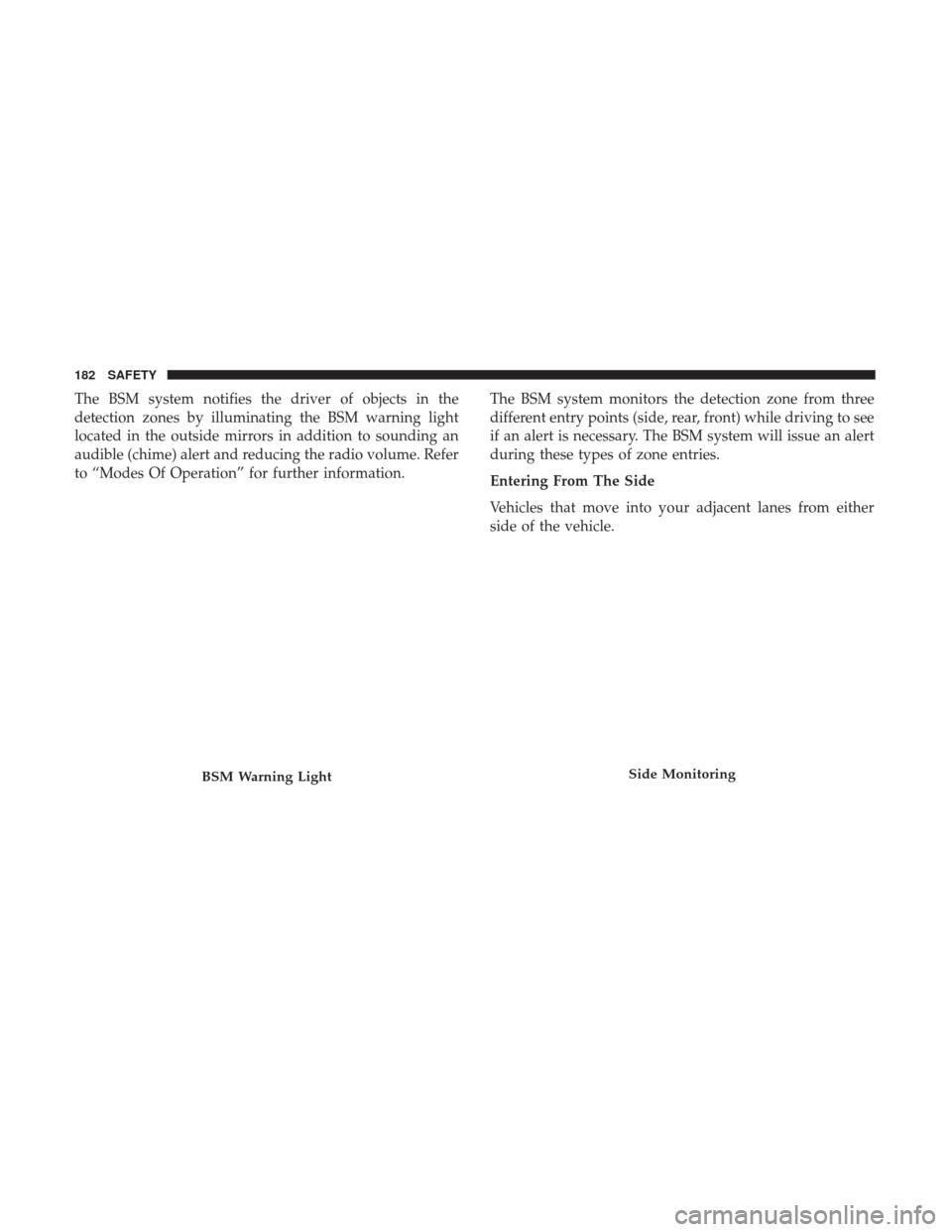
The BSM system notifies the driver of objects in the
detection zones by illuminating the BSM warning light
located in the outside mirrors in addition to sounding an
audible (chime) alert and reducing the radio volume. Refer
to “Modes Of Operation” for further information.The BSM system monitors the detection zone from three
different entry points (side, rear, front) while driving to see
if an alert is necessary. The BSM system will issue an alert
during these types of zone entries.
Entering From The Side
Vehicles that move into your adjacent lanes from either
side of the vehicle.
BSM Warning LightSide Monitoring
182 SAFETY
Page 187 of 516
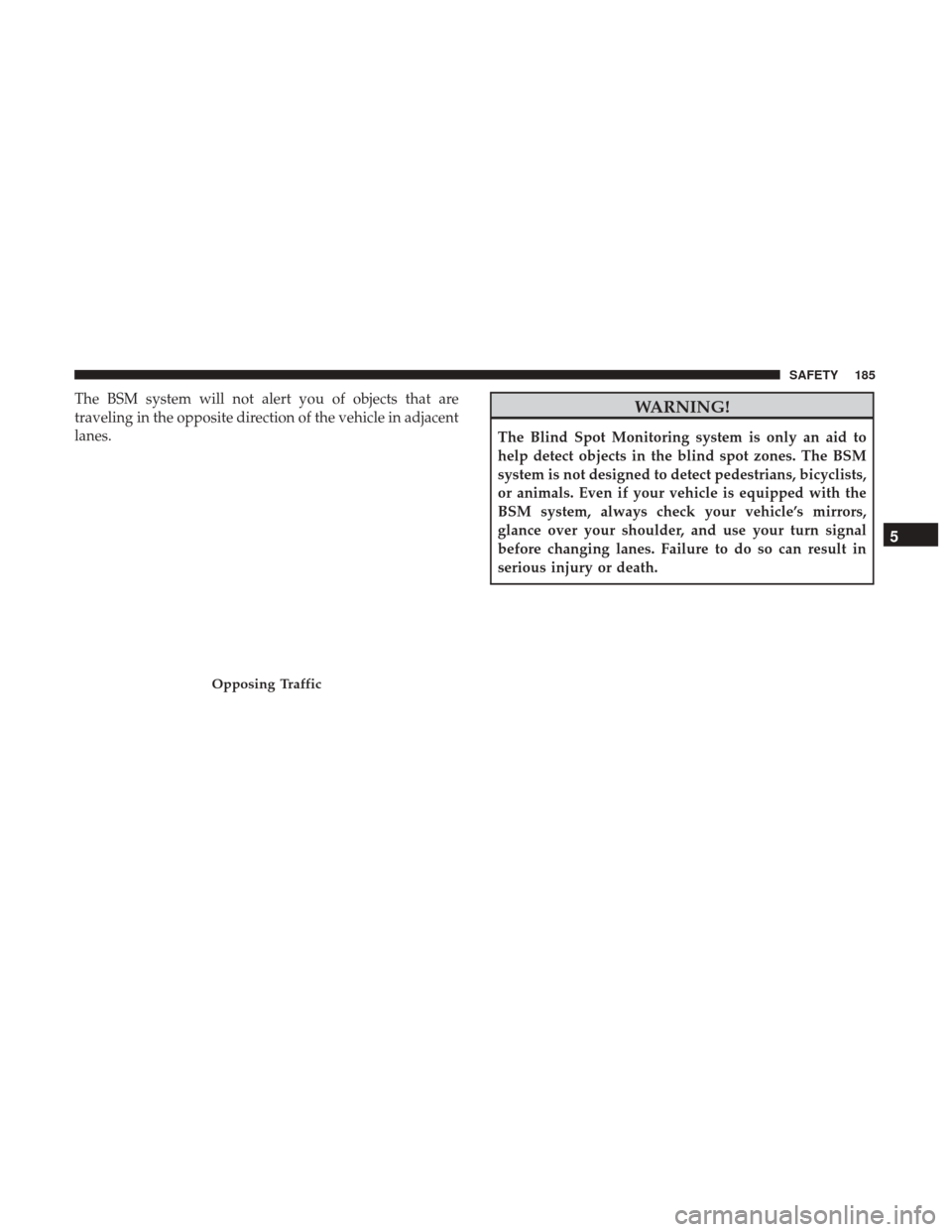
The BSM system will not alert you of objects that are
traveling in the opposite direction of the vehicle in adjacent
lanes.WARNING!
The Blind Spot Monitoring system is only an aid to
help detect objects in the blind spot zones. The BSM
system is not designed to detect pedestrians, bicyclists,
or animals. Even if your vehicle is equipped with the
BSM system, always check your vehicle’s mirrors,
glance over your shoulder, and use your turn signal
before changing lanes. Failure to do so can result in
serious injury or death.
Opposing Traffic
5
SAFETY 185
Page 189 of 516
Modes Of Operation
Three selectable modes of operation are available in the
Uconnect System. Refer to “Uconnect Settings” in “Multi-
media” for further information.
Blind Spot Alert Lights Only
When operating in Blind Spot Alert mode, the BSM system
will provide a visual alert in the appropriate side view
mirror based on a detected object. However, when the
system is operating in Rear Cross Path (RCP) mode, the
system will respond with both visual and audible alerts
when a detected object is present. Whenever an audible
alert is requested, the radio is muted.
Blind Spot Alert Lights/Chime
When operating in Blind Spot Alert Lights/Chime mode,
the BSM system will provide a visual alert in the appro-
priate side view mirror based on a detected object. If the
turn signal is then activated, and it corresponds to an alert
present on that side of the vehicle, an audible chime will
also be sounded. Whenever a turn signal and detected
object are present on the same side at the same time, both
the visual and audible alerts will be issued. In addition to
the audible alert, the radio (if on) will also be muted.NOTE:
Whenever an audible alert is requested by the BSM
system, the radio is also muted.
When the system is in RCP, the system will respond with
both visual and audible alerts when a detected object is
present. Whenever an audible alert is requested, the radio
is also muted. Turn/hazard signal status is ignored; the
RCP state always requests the chime.
Blind Spot Alert Off
When the BSM system is turned off, there will be a related
message on instrument cluster display. If BSM system is
off, this message will be visualized every time the vehicle
is restarted.
NOTE: The BSM system will store the current operating
mode when the vehicle is shut off. Each time the vehicle is
started the previously stored mode will be recalled and
used.
Blind Spot Monitoring Fault Warnings
Sensor Blinded
In the case of a sensor blinded:
• BSM Mirror Warning Lights are turned on continuously.
• A instrument cluster dedicated message will display.
5
SAFETY 187
Page 190 of 516
NOTE:The rear bumper must be clean and free of any
obstructing debris.
System Not Available
In the case of the system being temporary unavailable:
• BSM Mirror Warning Lights are turned on continuously.
• A instrument cluster dedicated message will display.
In the case of the system being completely unavailable:
• A chime will turn on.
• A instrument cluster dedicated message will display.
NOTE: Vehicle must be taken to the nearest authorized
dealer for service.
General Information
This vehicle has systems that operate on radio frequency
that comply with Part 15 of the Federal Communications
Commission (FCC) rules and with Industry Canada Stan-
dards RSS- GEN/210/220/310.
Operation is subject to the following two conditions:
1. The device may not cause harmful interference. 2. The device must accept any interference received, in-
cluding interference that may cause undesired operation
of the device.
Changes or modifications to any of these systems by other
than an authorized service facility could void authorization
to use this equipment.
Forward Collision Warning (FCW) With Mitigation
Operation — If Equipped
The Forward Collision Warning (FCW) System with Miti-
gation provides the driver with audible warnings, visual
warnings (within the instrument cluster display), and may
apply a brake jerk to warn the driver when it detects a
potential frontal collision. The warnings and limited brak-
ing are intended to provide the driver with enough time to
react, avoid or mitigate the potential collision.
188 SAFETY
Page 253 of 516
STARTING THE ENGINE
Before starting your vehicle, adjust your seat, adjust the
inside and outside mirrors, fasten your seat belt, and if
present, instruct all other occupants to buckle their seat
belts.
WARNING!
•Never leave children alone in a vehicle, or with
access to an unlocked vehicle.
• Allowing children to be in a vehicle unattended is
dangerous for a number of reasons. A child or others
could be seriously or fatally injured. Children
should be warned not to touch the parking brake,
brake pedal or the gear selector.
• Do not leave the key fob in or near the vehicle (or in
a location accessible to children), and do not leave
the ignition in the ON or RUN mode. A child could
operate power windows, other controls, or move the
vehicle.
Start the engine with the gear selector in the NEUTRAL or
PARK position. Apply the brake before shifting to any
driving range. Manual Transmission
Proceed as follows:
1. Set the Electric Park Brake (EPB) and put the gear
selector in the NEUTRAL position.
2. Press the clutch pedal to the floor, without pressing the accelerator.
3. Cycle the ignition to the START mode and release it as soon as the engine is started.
4. If the engine does not start, place the ignition in the OFF mode and wait 10-15 seconds before attempting to
restart the engine.
Automatic Transmission
Proceed as follows:
1. Set the Electric Park Brake (EPB) and put the gear selector in the PARK or NEUTRAL position.
2. Press on the brake pedal, without pressing the accelera- tor.
3. Cycle the ignition to the START mode and release it as soon as the engine is started.
6
STARTING AND OPERATING 251