change time JEEP RENEGADE 2017 1.G Owner's Manual
[x] Cancel search | Manufacturer: JEEP, Model Year: 2017, Model line: RENEGADE, Model: JEEP RENEGADE 2017 1.GPages: 516, PDF Size: 5.73 MB
Page 389 of 516
low end of the indicated range will result in the oil level at
the full end of the indicator range.
CAUTION!
Do not overfill the engine with oil. Overfilling the
engine with oil will cause oil aeration, which can lead
to loss of oil pressure and an increase in oil tempera-
ture. This loss of oil pressure and increased oil tem-
perature could damage your engine.
Change Engine Oil — Gasoline Engine
Refer to the “Scheduled Servicing” in this section for the
proper maintenance intervals.
NOTE:Under no circumstances should oil change inter-
vals exceed 10,000 miles (16,000 km), twelve months or 350
hours of engine run time, whichever comes first. The 350
hours of engine run or idle time is generally only a concern
for fleet customers.
Engine Oil Selection — 1.4L Turbo Engine
For best performance and maximum protection for turbo-
charged engines under all types of operating conditions, the manufacturer recommends synthetic engine oils that
are API Certified and meet the requirements of FCA
Material Standard MS-12991.
Engine Oil Selection — 2.4L Engine
For best performance and maximum protection under all
types of operating conditions, the manufacturer only rec-
ommends 0W-20 engine oils that are API Certified and
meet the requirements of FCA Material Standard MS-6395.
Engine Oil Viscosity (SAE Grade) — 1.4L Turbo
Engine
Mopar SAE 5W-40 synthetic engine oil approved to FCA
Material Standard MS-12991 such as Pennzoil, Shell Helix
or equivalent is recommended for all operating tempera-
tures. This engine oil improves low temperature starting
and vehicle fuel economy.
The engine oil filler cap also shows the recommended
engine oil viscosity for your engine. For information on
engine oil filler cap location, refer to “Engine Compart-
ment” in this section.
Lubricants which do not have both the engine oil certifi-
cation mark and the correct SAE viscosity grade number
should not be used.8
SERVICING AND MAINTENANCE 387
Page 394 of 516
2. Grab and hold the wiper arm closest to the wiper bladeend while pushing the wiper blade towards the liftgate
glass to unsnap the blade pivot pin from the wiper blade
holder on the wiper arm.
3. Install the wiper blade pivot pin into the wiper blade holder at the end of the wiper arm, and firmly push the
wiper blade until it snaps into place.
Exhaust System
The best protection against carbon monoxide entry into the
vehicle body is a properly maintained engine exhaust
system.
If you notice a change in the sound of the exhaust system;
or if the exhaust fumes can be detected inside the vehicle;
or when the underside or rear of the vehicle is damaged;
have an authorized technician inspect the complete ex-
haust system and adjacent body areas for broken, dam-
aged, deteriorated, or mispositioned parts. Open seams or
loose connections could permit exhaust fumes to seep into
the passenger compartment. In addition, have the exhaust
system inspected each time the vehicle is raised for lubri-
cation or oil change. Replace as required.
WARNING!
•Exhaust gases can injure or kill. They contain carbon
monoxide (CO), which is colorless and odorless.
Breathing it can make you unconscious and can
eventually poison you. To avoid breathing CO, refer
to “Safety Tips” in “Safety” for further information.
• A hot exhaust system can start a fire if you park over
materials that can burn. Such materials might be
grass or leaves coming into contact with your exhaust
system. Do not park or operate your vehicle in areas
where your exhaust system can contact anything that
can burn.
CAUTION!
• The catalytic converter requires the use of unleaded
fuel only. Leaded gasoline will destroy the effective-
ness of the catalyst as an emissions control device
and may seriously reduce engine performance and
cause serious damage to the engine.
• Damage to the catalytic converter can result if your
vehicle is not kept in proper operating condition. In
(Continued)
392 SERVICING AND MAINTENANCE
Page 446 of 516
NOTE:
•FCA or your dealer may contact you directly regarding
software updates.
• To help further improve vehicle security and minimize
the potential risk of a security breach, vehicle owners
should:
• Routinely check www.driveuconnect.com/software-
update to learn about available Uconnect software
updates.
• Only connect and use trusted media devices (e.g.
personal mobile phones, USBs, CDs).
Privacy of any wireless and wired communications cannot
be assured. Third parties may unlawfully intercept infor-
mation and private communications without your consent.
For further information, refer to “Onboard Diagnostic
System (OBD II) Cybersecurity” in “Getting To Know Your
Instrument Panel”.UCONNECT SETTINGS
The Uconnect system uses a combination of buttons on the
touchscreen and buttons on the faceplate located on the
center of the instrument panel that allow you to access and
change the customer programmable features. Many features
can vary by vehicle.
Uconnect 5.0 Buttons On The Touchscreen And Buttons On The Faceplate
1 — Uconnect Buttons On The Touchscreen
2 — Uconnect Buttons On The Faceplate
444 MULTIMEDIA
Page 447 of 516
Buttons On The Faceplate
Buttons on the faceplate are located below the Uconnect
system in the center of the instrument panel. In addition,
there is a Scroll/Enter control knob located on the right
side of the Climate Controls in the center of the instrument
panel. Turn the control knob to scroll through menus andchange settings (i.e., 30, 60, 90), push the center of the
control knob one or more times to select or change a setting
(i.e., ON, OFF).
Your Uconnect system may also have screen off and back
buttons located below the Uconnect system.
Push the screen off button to turn off the Uconnect touch-
screen. Push the screen off button a second time to turn the
touchscreen on.
Push the back button to exit out of a menu or certain option
on the Uconnect system.
Buttons On The Touchscreen
Buttons on the touchscreen are accessible on the Uconnect
display.
Customer Programmable Features — Uconnect 5.0
Settings
Push the MORE button on the faceplate, then press the
“Settings” button on the touchscreen to display the settings
menu screen. In this mode, the Uconnect system allows
you to access programmable features that may be
equipped such as Display, Clock, Safety/Assistance,
Uconnect 6.5 NAV Buttons On The Touchscreen And
Buttons On The Faceplate
1 — Uconnect Buttons On The Touchscreen
2 — Uconnect Buttons On The Faceplate
10
MULTIMEDIA 445
Page 448 of 516
Lights, Doors & Locks, Engine Off Options, Compass
Settings, Audio, Phone/Bluetooth, Radio Setup, Restore
Settings and Clear Personal Data.
NOTE:Only one touchscreen area may be selected at a
time.
When making a selection, press the button on the touch-
screen to enter the desired mode. Once in the desired
mode, press and release the preferred setting and make
your selection. Once the setting is complete, either press
the Back Arrow button on the touchscreen or the Back
button on the faceplate to return to the previous menu or press the “X” button on the touchscreen to close out of the
settings screen. Pressing the Up or Down Arrow buttons on
the right side of the screen will allow you to toggle up or
down through the available settings.
NOTE:
All settings should be changed with the ignition in
the “RUN” position.
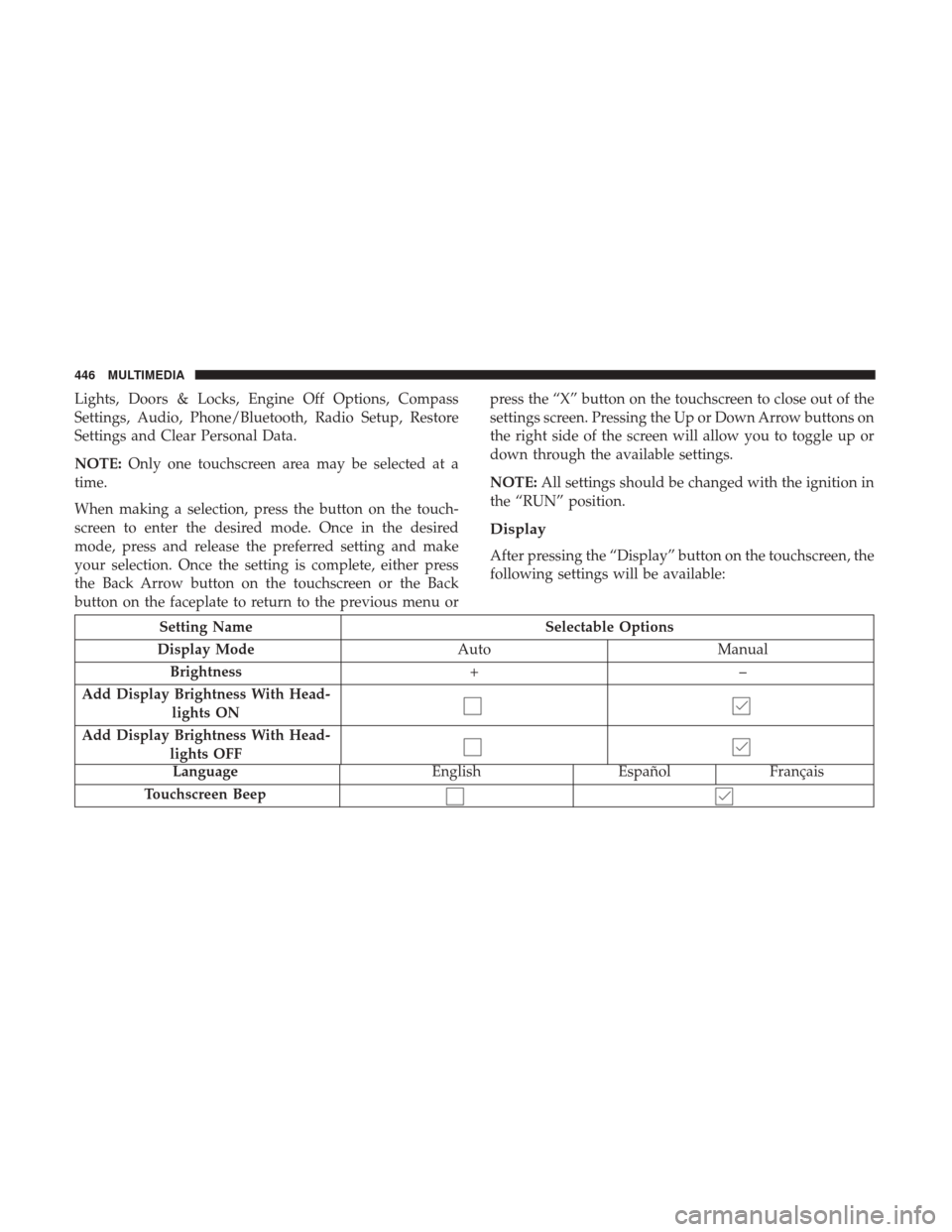
Display
After pressing the “Display” button on the touchscreen, the
following settings will be available:
Setting Name Selectable Options
Display Mode AutoManual
Brightness +–
Add Display Brightness With Head- lights ON
Add Display Brightness With Head- lights OFF
Language EnglishEspañolFrançais
Touchscreen Beep
446 MULTIMEDIA
Page 452 of 516
Setting NameSelectable Options
Forward Collision
Warning-Plus (FCW+) — If Equipped Near
Medium Far
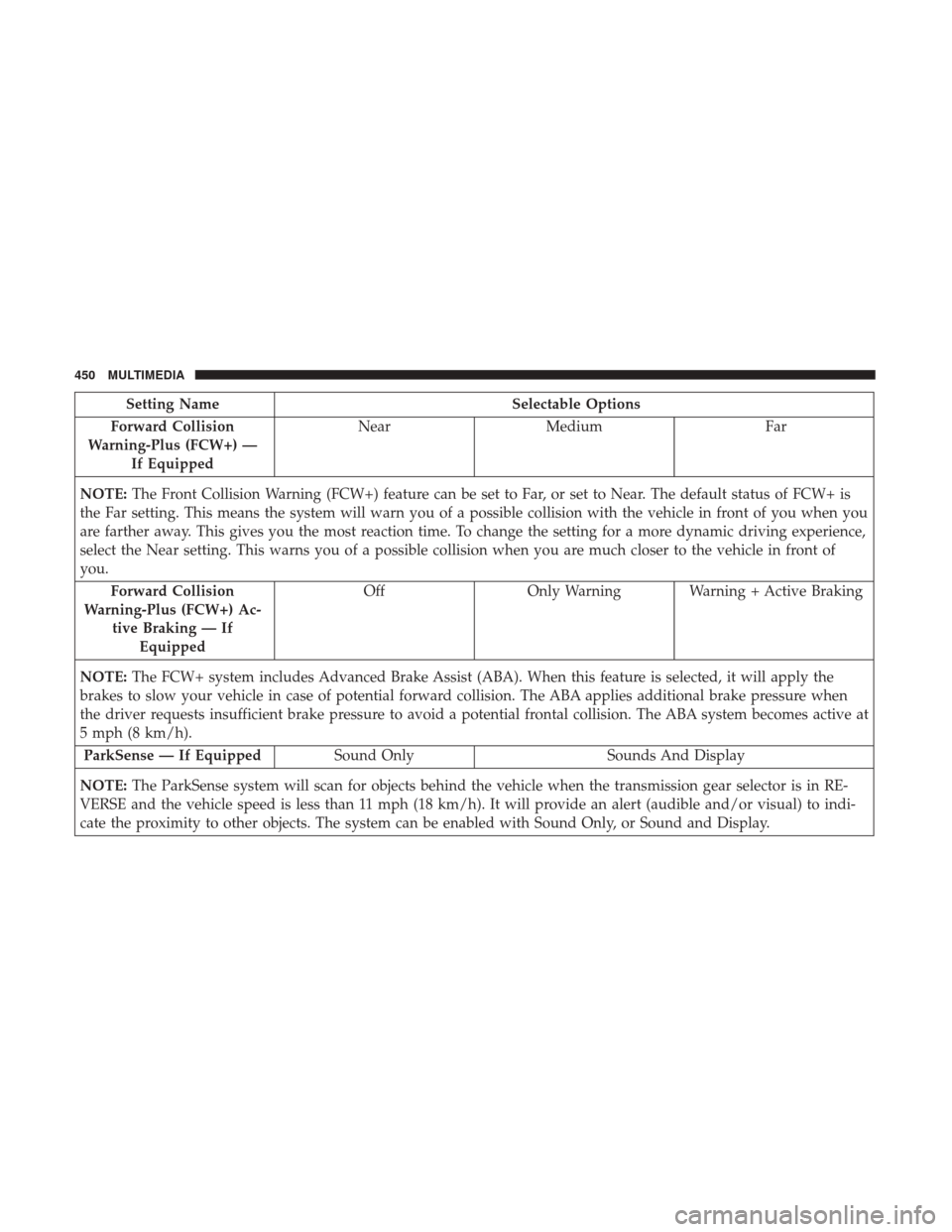
NOTE: The Front Collision Warning (FCW+) feature can be set to Far, or set to Near. The default status of FCW+ is
the Far setting. This means the system will warn you of a possible collision with the vehicle in front of you when you
are farther away. This gives you the most reaction time. To change the setting for a more dynamic driving experience,
select the Near setting. This warns you of a possible collision when you are much closer to the vehicle in front of
you.
Forward Collision
Warning-Plus (FCW+) Ac- tive Braking — IfEquipped Off
Only Warning Warning + Active Braking
NOTE: The FCW+ system includes Advanced Brake Assist (ABA). When this feature is selected, it will apply the
brakes to slow your vehicle in case of potential forward collision. The ABA applies additional brake pressure when
the driver requests insufficient brake pressure to avoid a potential frontal collision. The ABA system becomes active at
5 mph (8 km/h).
ParkSense — If Equipped Sound Only Sounds And Display
NOTE: The ParkSense system will scan for objects behind the vehicle when the transmission gear selector is in RE-
VERSE and the vehicle speed is less than 11 mph (18 km/h). It will provide an alert (audible and/or visual) to indi-
cate the proximity to other objects. The system can be enabled with Sound Only, or Sound and Display.
450 MULTIMEDIA
Page 456 of 516
Lights
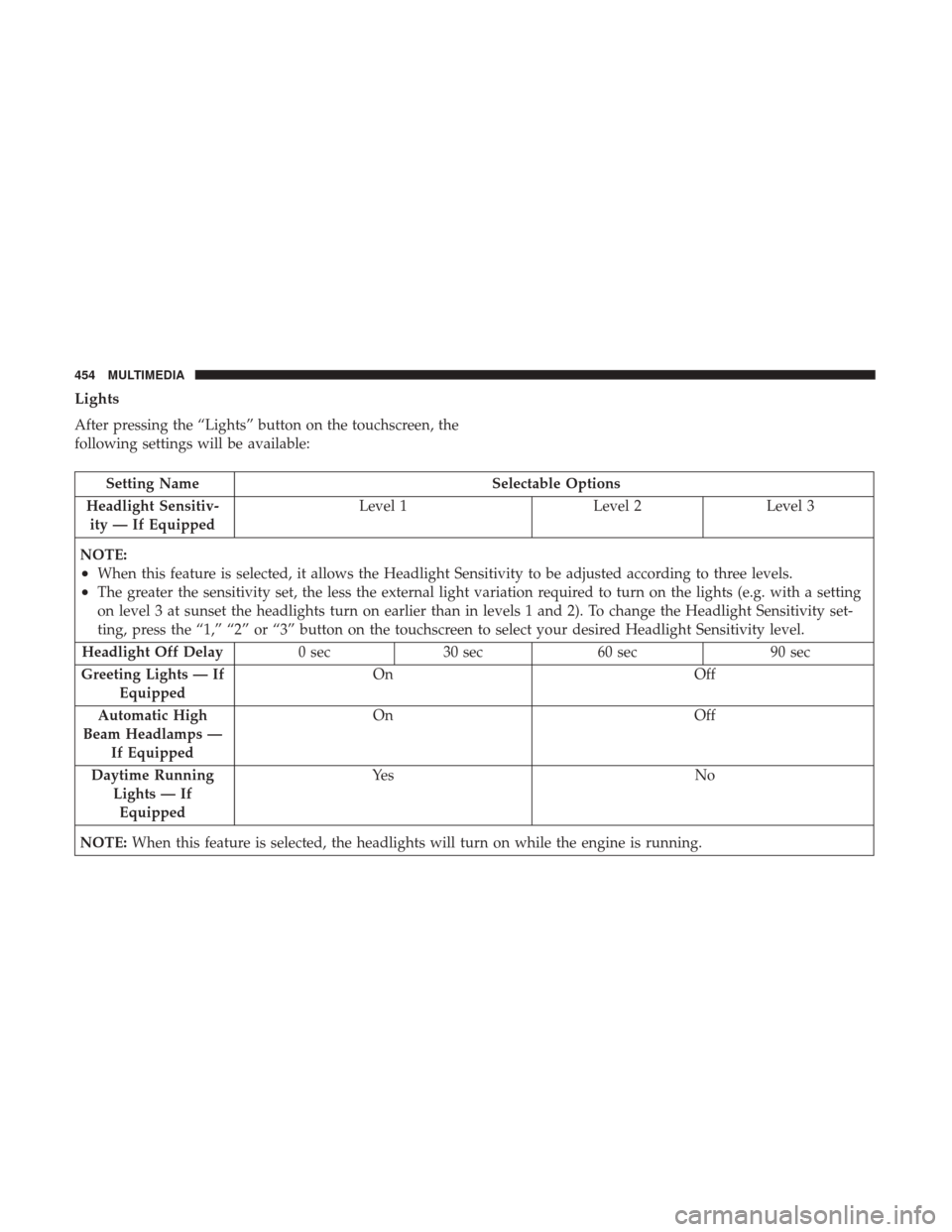
After pressing the “Lights” button on the touchscreen, the
following settings will be available:
Setting NameSelectable Options
Headlight Sensitiv- ity — If Equipped Level 1
Level 2Level 3
NOTE:
•When this feature is selected, it allows the Headlight Sensitivity to be adjusted according to three levels.
•The greater the sensitivity set, the less the external light variation required to turn on the lights (e.g. with a setting
on level 3 at sunset the headlights turn on earlier than in levels 1 and 2). To change the Headlight Sensitivity set-
ting, press the “1,” “2” or “3” button on the touchscreen to select your desired Headlight Sensitivity level.
Headlight Off Delay 0 sec30 sec 60 sec 90 sec
Greeting Lights — If Equipped On
Off
Automatic High
Beam Headlamps — If Equipped On
Off
Daytime Running Lights — IfEquipped Ye s
N o
NOTE: When this feature is selected, the headlights will turn on while the engine is running.
454 MULTIMEDIA
Page 466 of 516
Safety & Driving Assistance
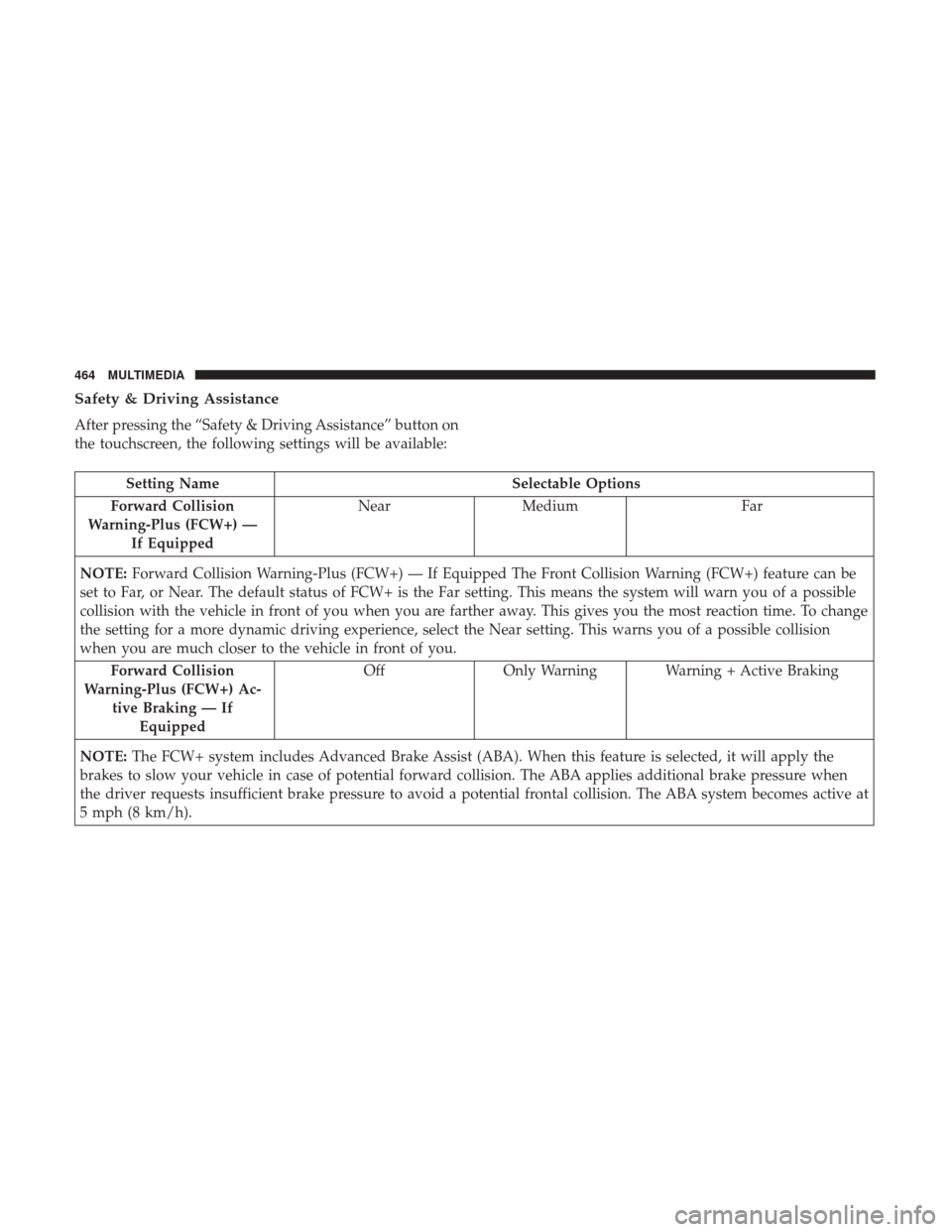
After pressing the “Safety & Driving Assistance” button on
the touchscreen, the following settings will be available:
Setting NameSelectable Options
Forward Collision
Warning-Plus (FCW+) — If Equipped Near
Medium Far
NOTE: Forward Collision Warning-Plus (FCW+) — If Equipped The Front Collision Warning (FCW+) feature can be
set to Far, or Near. The default status of FCW+ is the Far setting. This means the system will warn you of a possible
collision with the vehicle in front of you when you are farther away. This gives you the most reaction time. To change
the setting for a more dynamic driving experience, select the Near setting. This warns you of a possible collision
when you are much closer to the vehicle in front of you.
Forward Collision
Warning-Plus (FCW+) Ac- tive Braking — IfEquipped Off
Only Warning Warning + Active Braking
NOTE: The FCW+ system includes Advanced Brake Assist (ABA). When this feature is selected, it will apply the
brakes to slow your vehicle in case of potential forward collision. The ABA applies additional brake pressure when
the driver requests insufficient brake pressure to avoid a potential frontal collision. The ABA system becomes active at
5 mph (8 km/h).
464 MULTIMEDIA
Page 471 of 516
Setting NameSelectable Options
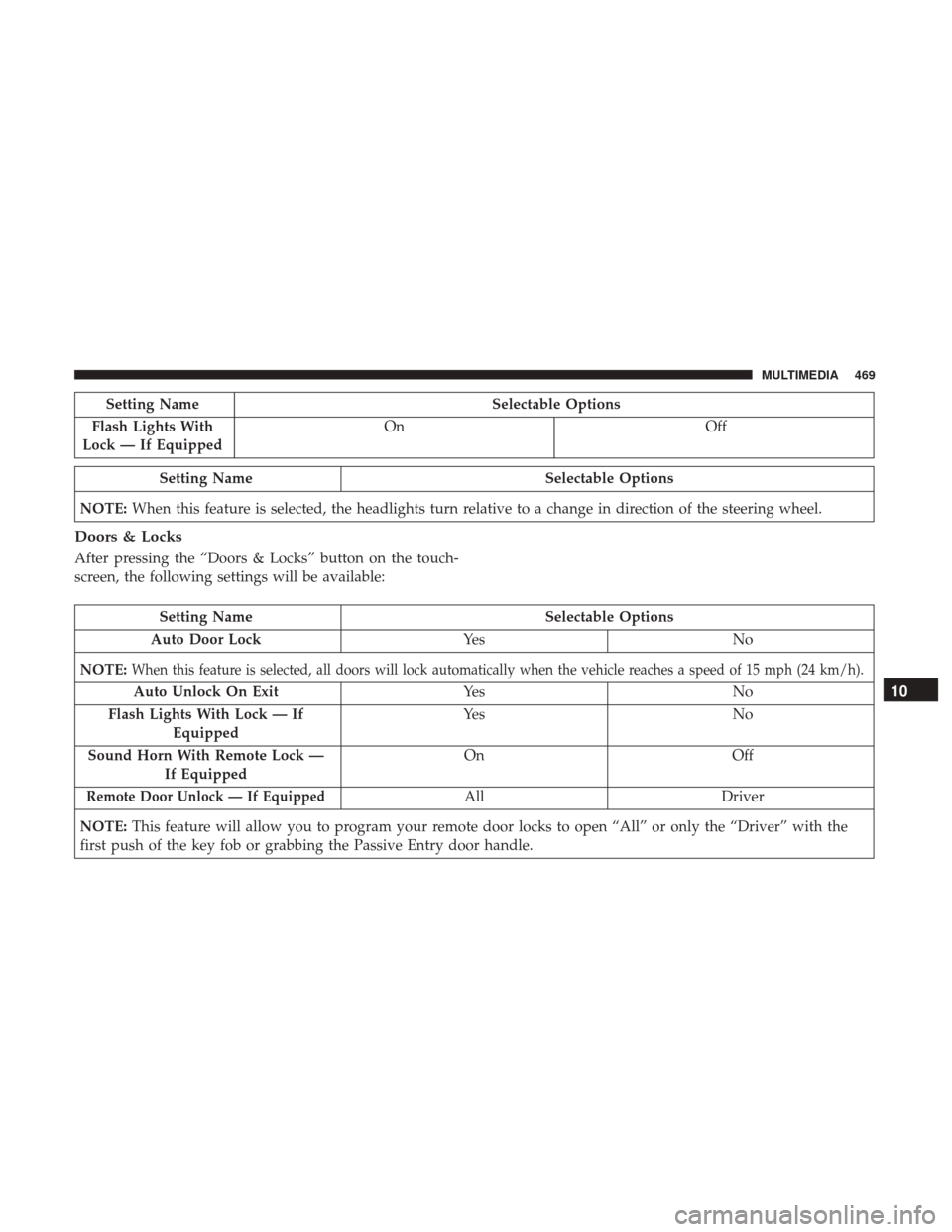
Flash Lights With
Lock — If Equipped On
Off
Setting Name Selectable Options
NOTE: When this feature is selected, the headlights turn relative to a change in direction of the steering wheel.
Doors & Locks
After pressing the “Doors & Locks” button on the touch-
screen, the following settings will be available:
Setting Name Selectable Options
Auto Door Lock Ye sN o
NOTE:
When this feature is selected, all doors will lock automatically when the vehicle reaches a speed of 15 mph (24 km/h).
Auto Unlock On Exit Ye sN o
Flash Lights With Lock — If Equipped Ye s
N o
Sound Horn With Remote Lock — If Equipped On
Off
Remote Door Unlock — If EquippedAllDriver
NOTE: This feature will allow you to program your remote door locks to open “All” or only the “Driver” with the
first push of the key fob or grabbing the Passive Entry door handle.
10
MULTIMEDIA 469
Page 473 of 516
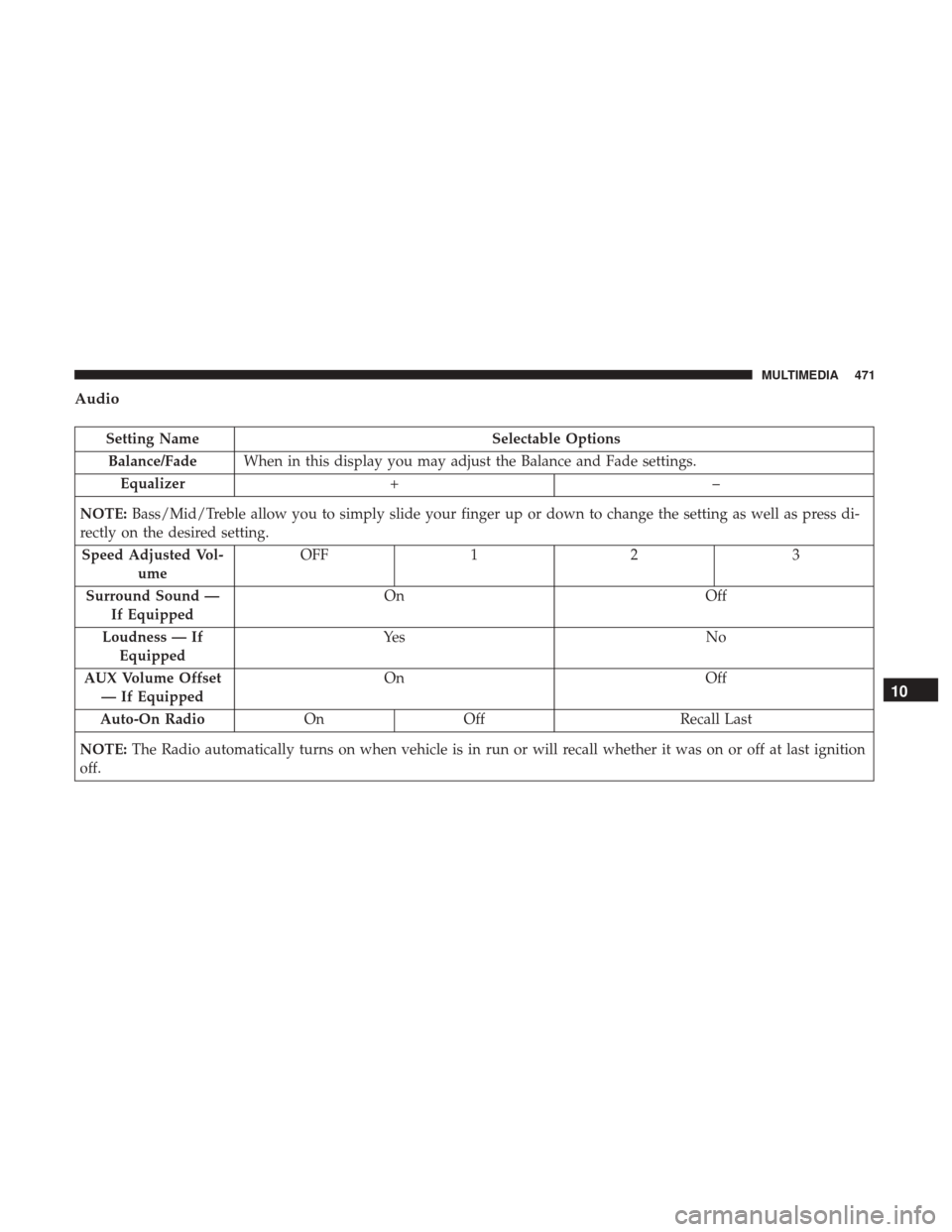
Audio
Setting NameSelectable Options
Balance/Fade When in this display you may adjust the Balance and Fade settings.
Equalizer +–
NOTE: Bass/Mid/Treble allow you to simply slide your finger up or down to change the setting as well as press di-
rectly on the desired setting.
Speed Adjusted Vol- ume OFF
12 3
Surround Sound — If Equipped On
Off
Loudness — If Equipped Ye s
N o
AUX Volume Offset — If Equipped On
Off
Auto-On Radio OnOff Recall Last
NOTE: The Radio automatically turns on when vehicle is in run or will recall whether it was on or off at last ignition
off.
10
MULTIMEDIA 471