ECU JEEP RENEGADE 2023 User Guide
[x] Cancel search | Manufacturer: JEEP, Model Year: 2023, Model line: RENEGADE, Model: JEEP RENEGADE 2023Pages: 364, PDF Size: 18.65 MB
Page 25 of 364
GETTING TO KNOW YOUR VEHICLE 23
NOTE:
Either the driver door only or all doors will unlock
when you grab hold of the front driver’s door
handle, depending on the selected setting in the
Uconnect system
Ú page 133.
All doors will unlock when the front passenger
door handle is grabbed regardless of the
driver’s door unlock preference setting.
Frequency Operated Button Integrated Key
(FOBI K
-Safe)
To minimize the possibility of unintentionally
locking
a Passive Entry key fob inside your vehicle,
the Passive Entry system is equipped with an
automatic door unlock feature which will function if
the ignition switch is in the OFF position.
There are three situations that trigger a
FOBIK -
Safe search in any Passive Entry vehicle:
A lock request is made by a valid Passive Entry
key fob while a door is open.
A lock request is made by the Passive Entry door
handle while a door is open.
A lock request is made by the door panel switch
while the door is open.
When any of these situations occur, after all open
doors ar
e shut, the FOBIK-Safe search will be
executed. If it detects a Passive Entry key fob inside the vehicle and it does not detect any
Passive Entry key fobs outside the vehicle, then the
vehicle will unlock and alert the customer.
NOTE:
The vehicle will only unlock the doors when a valid
Passi v
e Entry key fob is detected inside the
vehicle. The vehicle will not unlock the doors when
any of the following conditions are true:
The doors are manually locked using the door
lock knobs.
Three attempts are made to lock the doors
using the door panel switch and then the doors
are closed.
There is a valid Passive Entry key fob outside the
vehicle and within 5 ft (1.5 m) of either Passive
Entry
door handle.
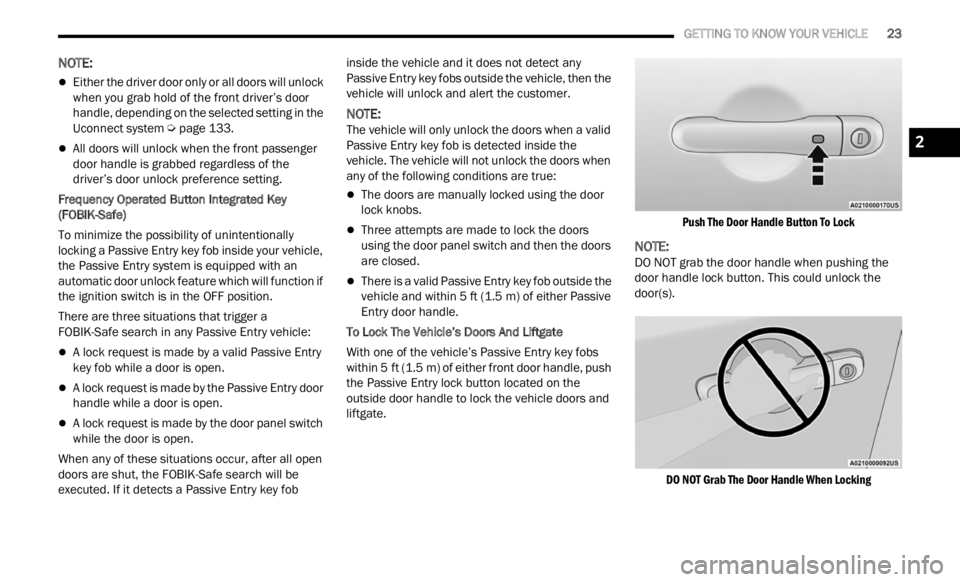
To Lock The Vehicle’s Doors And Liftgate
With one of the vehicle’s Passive Entry key fobs
withi n
5 ft (1.5 m) of either front door handle, push
the P a
ssive Entry lock button located on the
outside door handle to lock the vehicle doors and
liftgate.
Push The Door Handle Button To Lock
NOTE:
DO NOT grab the door handle when pushing the
door ha n
dle lock button. This could unlock the
door(s).
DO NOT Grab The Door Handle When Locking
2
Page 30 of 364
28 GETTING TO KNOW YOUR VEHICLE
Split Rear Seats
The split rear seat has the ability to fold flat which
increases the storage of the rear cargo area.
NOTE:
Prior to folding the rear seat down, it may be
necessary to position the front seat to its
mid-track position. Be sure that the front seats
are fully upright and positioned forward, this will
allow the rear seat to fold down easily.
Prior to folding the rear seat, you must secure
the rear armrest in the upright position.
You may experience deformation in the seat
cushion from the seat belt buckles if the seats
are left folded for an extended period of time.
This is normal and by simply unfolding the seats
to the open position, over time the seat cushion
will return to its normal shape.
Cargo Area Enlargement
Folding both sides of the rear seat provides
additional storage in the rear cargo area.
Proceed as follows:
1. Fully lower the rear seat head restraints.
2. Mov e
the seat belts to the outboard side of the
seat .
3
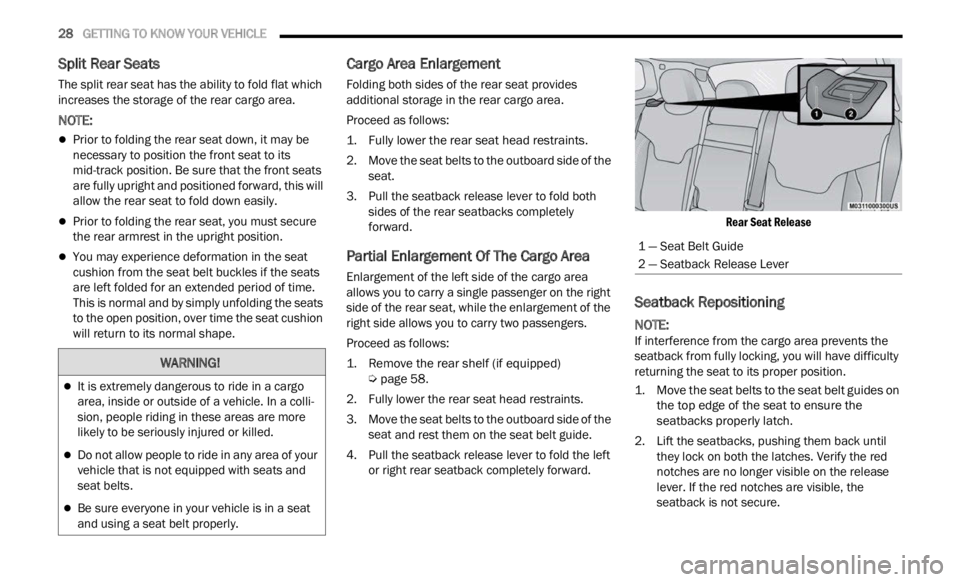
. Pull the seatback release lever to fold both sides
of the rear seatbacks completely
forward.
Partial Enlargement Of The Cargo Area
Enlargement of the left side of the cargo area
allows you to carry a single passenger on the right
side of the rear seat, while the enlargement of the
right side allows you to carry two passengers.
Proceed as follows:
1. Remove the rear shelf (if equipped)
Ú
pag e
58.
2. F ully lower the rear seat head restraints.
3. Move
the seat belts to the outboard side of the
seat
and rest them on the seat belt guide.
4. Pull the seatback release lever to fold the left or rig
ht rear seatback completely forward.
Rear Seat Release
Seatback Repositioning
NOTE:
If interference from the cargo area prevents the
seatb a
ck from fully locking, you will have difficulty
returning the seat to its proper position.
1. Move the seat belts to the seat belt guides on the t o
p edge of the seat to ensure the
seatbacks properly latch.
2. Lift the seatbacks, pushing them back until they
lock on both the latches. Verify the red
notches are no longer visible on the release
lever. If the red notches are visible, the
seatback is not secure.
WARNING!
It is extremely dangerous to ride in a cargo
area, inside or outside of a vehicle. In a colli -
sion, people riding in these areas are more
l ikely
to be seriously injured or killed.
Do not allow people to ride in any area of your
vehicle that is not equipped with seats and
seat belts.
Be sure everyone in your vehicle is in a seat
and using a seat belt properly.
1 — Seat Belt Guide
2 — Seatback Release Lever
Page 33 of 364
GETTING TO KNOW YOUR VEHICLE 31
UNFOLDING THE REAR ARMREST
40/20/40
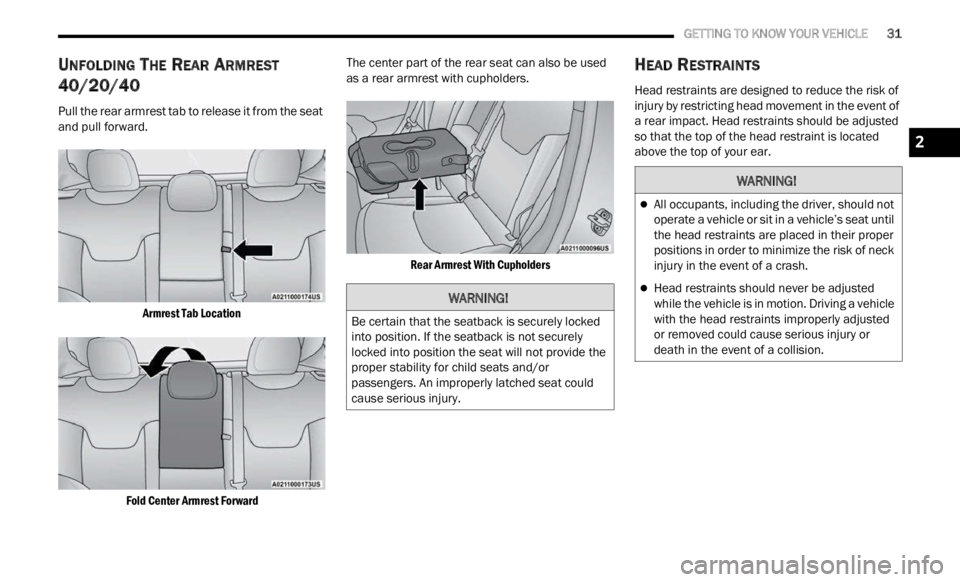
Pull the rear armrest tab to release it from the seat
and pull forward.
Armrest Tab Location
Fold Center Armrest Forward
The center part of the rear seat can also be used
a
s a r
ear armrest with cupholders.
Rear Armrest With Cupholders
HEAD RESTRAINTS
Head restraints are designed to reduce the risk of
injury by restricting head movement in the event of
a rear impact. Head restraints should be adjusted
so that the top of the head restraint is located
above the top of your ear.
WARNING!
Be certain that the seatback is securely locked
into position. If the seatback is not securely
locked into position the seat will not provide the
proper stability for child seats and/or
passengers. An improperly latched seat could
cause serious injury.
WARNING!
All occupants, including the driver, should not
operate a vehicle or sit in a vehicle’s seat until
the head restraints are placed in their proper
positions in order to minimize the risk of neck
injury in the event of a crash.
Head restraints should never be adjusted
while the vehicle is in motion. Driving a vehicle
with the head restraints improperly adjusted
or removed could cause serious injury or
death in the event of a collision.
2
Page 56 of 364
54 GETTING TO KNOW YOUR VEHICLE
WINDOW LOCKOUT SWITCH
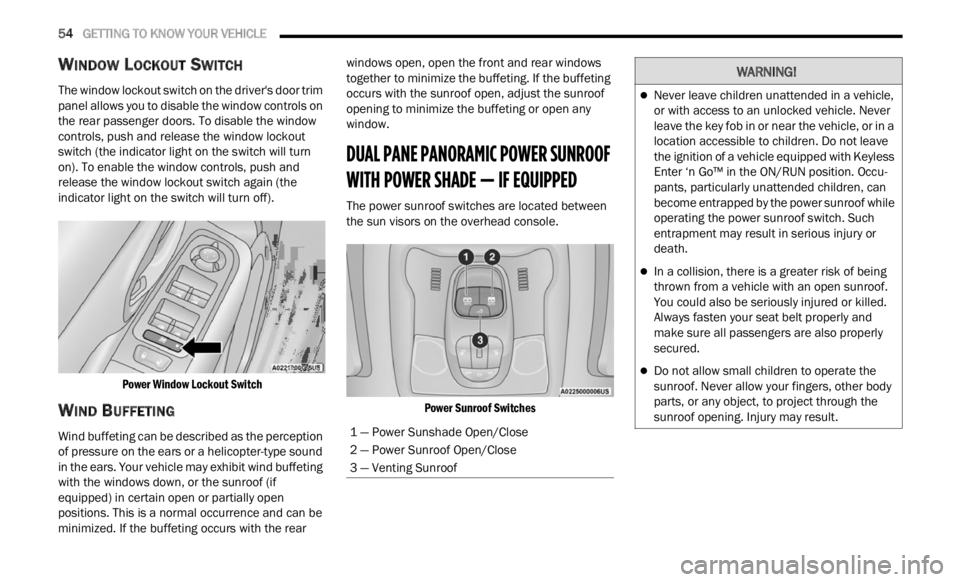
The window lockout switch on the driver's door trim
panel allows you to disable the window controls on
the rear passenger doors. To disable the window
controls, push and release the window lockout
switch (the indicator light on the switch will turn
on). To enable the window controls, push and
release the window lockout switch again (the
indicator light on the switch will turn off).
Power Window Lockout Switch
WIND BUFFETING
Wind buffeting can be described as the perception
of pressure on the ears or a helicopter-type sound
in the ears. Your vehicle may exhibit wind buffeting
with the windows down, or the sunroof (if
equipped) in certain open or partially open
positions. This is a normal occurrence and can be
minimized. If the buffeting occurs with the rear windows open, open the front and rear windows
together to minimize the buffeting. If the buffeting
occurs with the sunroof open, adjust the sunroof
opening to minimize the buffeting or open any
window.
DUAL PANE PANORAMIC POWER SUNROOF
WITH POWER SHADE — IF EQUIPPED
The power sunroof switches are located between
the sun visors on the overhead console.
Power Sunroof Switches
1 — Power Sunshade Open/Close
2 — Power Sunroof Open/Close
3 — Venting Sunroof
WARNING!
Never leave children unattended in a vehicle,
or with access to an unlocked vehicle. Never
leave the key fob in or near the vehicle, or in a
location accessible to children. Do not leave
the ignition of a vehicle equipped with Keyless
Enter ‘n Go™ in the ON/RUN position. Occu -
pants, particularly unattended children, can
b ecom e
entrapped by the power sunroof while
operating the power sunroof switch. Such
entrapment may result in serious injury or
death.
In a collision, there is a greater risk of being
thrown from a vehicle with an open sunroof.
You could also be seriously injured or killed.
Always fasten your seat belt properly and
make sure all passengers are also properly
secured.
Do not allow small children to operate the
sunroof. Never allow your fingers, other body
parts, or any object, to project through the
sunroof opening. Injury may result.
Page 57 of 364

GETTING TO KNOW YOUR VEHICLE 55
OPENING AND CLOSING THE SUNROOF
To retract the sunroof to the open position, push
the Open/Close switch and the sunroof will fully
open. The sunroof can be stopped in any position
by pushing/pulling the switch a second time while
opening.
To close the sunroof completely, pull the Open/
Close s
witch and the sunroof will fully close. The
sunroof can be stopped in any position by pushing/
pulling the switch a second time while it is closing.
VENTING SUNROOF
To vent the sunroof push the vent switch.
NOTE:
The vent switch has the automatic function only at
the op e
ning of the sunroof. During the closing of
the sunroof, the switch must be held until closed.
OPENING AND CLOSING THE POWER
S
UNSHADE
Express Open/Close
Push the shade switch for about one-half second
and t h
e shade will automatically open. During the
automatic open operation, any movement of the
shade switch will stop the shade. Pull the shade switch for about one-half second
and t
h
e shade will automatically close. During the
automatic close operation, any movement of the
shade switch will stop the shade.
Manual Open/Close
To open the shade part way, push the shade switch
brief l
y and release.
To close the shade part way, pull the shade switch
briefl
y and release.
NOTE:
The sunroof and the shade controls will operate
only when the ignition is in the ON/RUN posi -
tion.
If the Remote Start functionality is active, it is
not possible to move the sunroof.
PINCH PROTECT FEATURE
This feature will detect an obstruction in the
opening of the sunroof during Express Close
operation. If an obstruction in the path of the
sunroof is detected, the sunroof will automatically
retract. Remove the obstruction if this occurs.
WARNING!
Do not let children play with the sunroof.
Never leave children unattended in a vehicle,
or with access to an unlocked vehicle. Do not
leave the key fob in or near the vehicle, and do
not leave the ignition of a vehicle equipped
with Keyless Enter ‘n Go™ in the ACC or ON/
RUN position. Occupants, particularly unat -
tended children, can become entrapped by
the p ow
er sunroof while operating the power
sunroof switch. Such entrapment may result
in serious injury or death.
In a collision, there is a greater risk of being
thrown from a vehicle with an open sunroof.
You could also be severely injured or killed.
Always fasten your seat belt properly and
make sure all passengers are properly
secured.
Do not allow small children to operate the
sunroof. Never allow your fingers, other body
parts, or any object to project through the
sunroof opening. Injury may result.
2
Page 61 of 364
GETTING TO KNOW YOUR VEHICLE 59
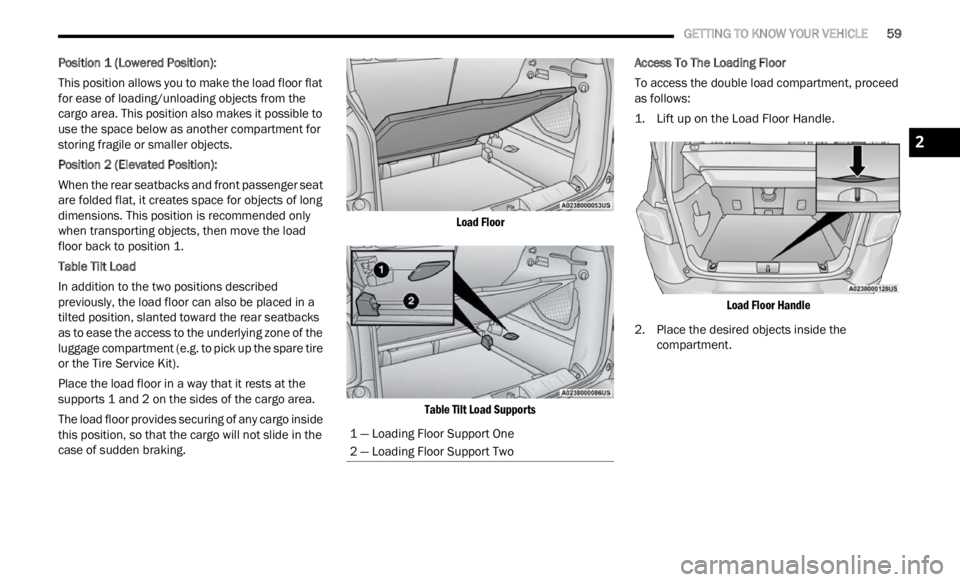
Position 1 (Lowered Position):
This position allows you to make the load floor flat
for ea s
e of loading/unloading objects from the
cargo area. This position also makes it possible to
use the space below as another compartment for
storing fragile or smaller objects.
Position 2 (Elevated Position):
When the rear seatbacks and front passenger seat
a re f ol
ded flat, it creates space for objects of long
dimensions. This position is recommended only
when transporting objects, then move the load
floor back to position 1.
Table Tilt Load
In addition to the two positions described
p reviou
sly, the load floor can also be placed in a
tilted position, slanted toward the rear seatbacks
as to ease the access to the underlying zone of the
luggage compartment (e.g. to pick up the spare tire
or the Tire Service Kit).
Place the load floor in a way that it rests at the
suppor t
s 1 and 2 on the sides of the cargo area.
The load floor provides securing of any cargo inside
this p
osition, so that the cargo will not slide in the
case of sudden braking.
Load Floor
Table Tilt Load Supports
Access To The Loading Floor
To access the double load compartment, proceed
as fol
l
ows:
1. Lift up on the Load Floor Handle.
Load
Floor Handle
2. Place the desired objects inside the compar
tment.
1 — Loading Floor Support One
2 — Loading Floor Support Two
2
Page 62 of 364
60 GETTING TO KNOW YOUR VEHICLE
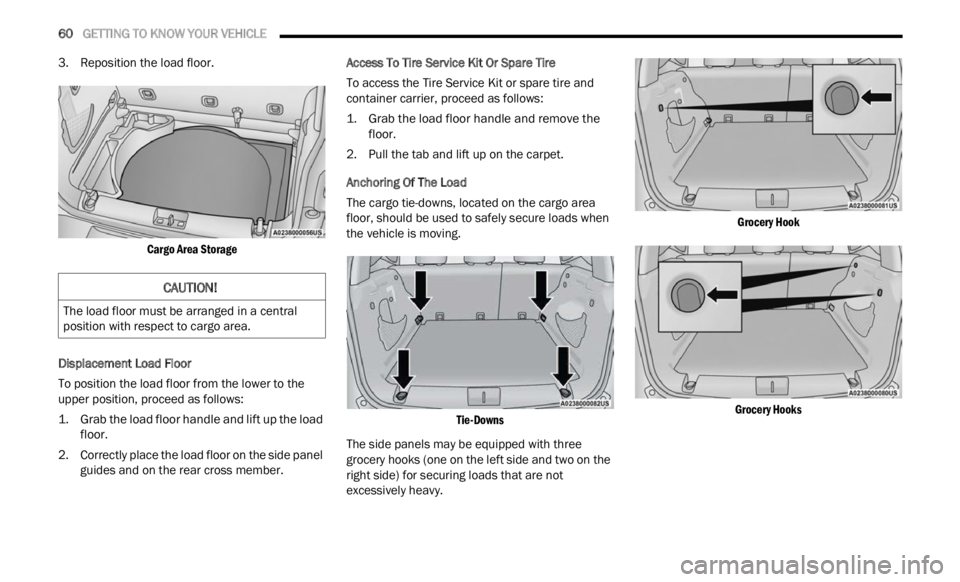
3. Reposition the load floor.
Cargo Area Storage
Displacement Load Floor
To position the load floor from the lower to the
u pper
position, proceed as follows:
1. Grab the load floor handle and lift up the load floor.
2.
Correctly place the load floor on the side panel
guide
s and on the rear cross member. Access To Tire Service Kit Or Spare Tire
To access the Tire Service Kit or spare tire and
c
ontai n
er carrier, proceed as follows:
1. Grab the load floor handle and remove the floor.
2.
Pull the tab and lift up on the carpet.
Anchor
ing Of The Load
The cargo tie-downs, located on the cargo area
f loor, s
hould be used to safely secure loads when
the vehicle is moving.
Tie-Downs
The side panels may be equipped with three
grocery
hooks (one on the left side and two on the
right side) for securing loads that are not
excessively heavy.
Grocery Hook
Grocery Hooks
CAUTION!
The load floor must be arranged in a central
position with respect to cargo area.
Page 63 of 364
GETTING TO KNOW YOUR VEHICLE 61
Cargo Box — If Equipped
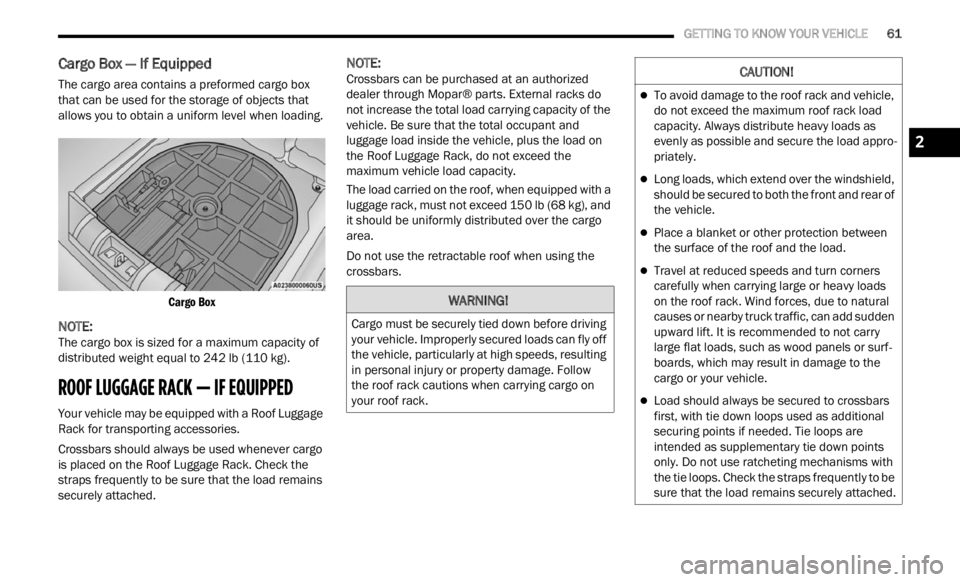
The cargo area contains a preformed cargo box
that can be used for the storage of objects that
allows you to obtain a uniform level when loading.
Cargo Box
NOTE:
The cargo box is sized for a maximum capacity of
distr i
buted weight equal to 242 lb (110 kg).
ROOF LUGGAGE RACK — IF EQUIPPED
Your vehicle may be equipped with a Roof Luggage
Rack for transporting accessories.
Crossbars should always be used whenever cargo
is pla
ced on the Roof Luggage Rack. Check the
straps frequently to be sure that the load remains
securely attached.
NOTE:
Crossbars can be purchased at an authorized
deale r
through Mopar® parts. External racks do
not increase the total load carrying capacity of the
vehicle. Be sure that the total occupant and
luggage load inside the vehicle, plus the load on
the Roof Luggage Rack, do not exceed the
maximum vehicle load capacity.
The load carried on the roof, when equipped with a
lugga g
e rack, must not exceed 150 lb (68 kg), and
it should be uniformly distributed over the cargo
area.
Do not use the retractable roof when using the
crossba
rs.
WARNING!
Cargo must be securely tied down before driving
your vehicle. Improperly secured loads can fly off
the vehicle, particularly at high speeds, resulting
in personal injury or property damage. Follow
the roof rack cautions when carrying cargo on
your roof rack.
CAUTION!
To avoid damage to the roof rack and vehicle,
do not exceed the maximum roof rack load
capacity. Always distribute heavy loads as
evenly as possible and secure the load appro -
priately.
Long loads, which extend over the windshield,
should be secured to both the front and rear of
the vehicle.
Place a blanket or other protection between
the surface of the roof and the load.
Travel at reduced speeds and turn corners
carefully when carrying large or heavy loads
on the roof rack. Wind forces, due to natural
causes or nearby truck traffic, can add sudden
upward lift. It is recommended to not carry
large flat loads, such as wood panels or surf -
boards, which may result in damage to the
c argo or
your vehicle.
Load should always be secured to crossbars
first, with tie down loops used as additional
securing points if needed. Tie loops are
intended as supplementary tie down points
only. Do not use ratcheting mechanisms with
the tie loops. Check the straps frequently to be
sure that the load remains securely attached.
2
Page 69 of 364

GETTING TO KNOW YOUR INSTRUMENT PANEL 67
Audio
Push and release the up or down arrow
button until the Audio menu title is displayed in the
instr u
ment cluster display.
Stored Messages
Push and release the up or down arrow
button until the Messages Menu Icon is highlighted
in th e
instrument cluster display. This feature
shows the number of stored warning messages.
Pushing the left
or right arrow button will
all ow
you to scroll through the stored messages.
Screen Setup
This menu item allows you to change the position
of the information on the display.
Display Gears (Vehicles With Reconfigurable
Multi-
Functional Display And Automatic
Transmission)
By selecting this item, you can select the display
mode, t
he particulars relating to the automatic
transmission, and choose between the following
options:
“Single digit”
The right side of the display will show the letter
concer n
ing the automatic transmission gear
selector (P,R,N or D) position. After approxi -
mately two seconds, the letter will be displayed
in a c
entral position.
“Full PRND”
The letters PRND will display on the right side,
the p o
sition assumed by the gear selector will
be highlighted in the display. During the opera -
tion in sequential mode (“AutoStick”), in place
of the
letter D, the gear will be will be displayed.
In The Upper Left/Top Right
The information relating to the following can be
displ a
yed:
External temperature
Ignition Button — If Equipped
Compass — If Equipped
Date (Month/Day)
Time (Hours/Minutes)
In the central area of the display, you can view all
of t
h e
information listed above as well as the
following:
Compass — If Equipped
Speed Display — If Equipped
Date (Day/Month/Year)
Time
Compass — If Equipped
Ignition Button — If Equipped
External Temp — If equipped
Menu Item
Distance Traveled A (Trip A)
Distance Traveled B (Trip B)
Restore Default Settings
Selecting this item, and you can reset and restore
t he de
fault settings.
Settings
This menu item allows you to change the settings
for the following:
Display
Units
Clock and Date
Security
Safety and Assistance
Lights
Doors and Locks
NOTE:
Some items may be displayed and managed
throug h
the Uconnect system.
Vehicles Equipped With Multi-functional Display
Reconfi
gurable:
The following menu/submenu items are available
in the
cluster display.
3
Page 70 of 364

68 GETTING TO KNOW YOUR INSTRUMENT PANEL
“Vehicle Shut Off (If Equipped)”
By selecting the item “Vehicle Shut Off”, you can
turn of
f the engine from the instrument cluster.
This feature is available in the event of an ignition
switch failure, and will display instructions for
turning off the engine via the instrument cluster
display controls.
“Display”
By selecting the “Display,” you can access the
follow i
ng setting:
Language : allows you to select the language in
which to display the information/warnings.
“Units Of Measure”
By selecting the item “Units of Measure,” you can
selec t
the unit of measure to use for displaying
various magnitudes.
Possible options are:
US
Metric
Custom
“Clock & Date”
By selecting the item, “Clock & Date” you can
a djust
the clock.
Possible options are:
Set Time: adjust hours/minutes
Set Format: adjust the time format “12h”
(12 hours) or “24h” (24 hours)
Set Date: adjust day/month/year
“Security”
By selecting the item “Security,” you can make the
f ollowi
ng adjustments:
Speed Warning:
Set the vehicle speed limit, which the driver is
notifi e
d through a visual and acoustic signaling
(display of a message and a symbol on the
display).
When the speed warning is set, the icon should
remain
visualized for the same duration time of
the pop-up. If the driver exceeded the set speed,
the icon should remain for however long the
vehicle is over the set speed.
Driver may also turn the Speed Warning “OFF”
should
you choose not to use this feature.
Seat Belt Reminder:
This function is only viewable when the Seat Belt
Remin d
er (SBR) system is active.
Hill Start Assist:
Activation/Deactivation of the Hill Start Assist
syste m
.
Passenger Air Bag — If Equipped
Front passenger air bag may be enabled or
disab l
ed. “Lights”
By selecting the item “Lights,” you can make the
followi
n
g adjustments:
Headlight Off Delay: set the delay for headlight
shutoff after engine shutoff
Headlight Sensitivity: adjust the sensitivity of
headlight brightness
Daytime Running Lights: activate/deactivate
the daytime running lights
Cornering lights: activate/deactivate the
cornering lights (If Equipped)
Interior Ambient lights: adjust the level of inte-
rior ambient lights
Greeting Lights: activate / deactivate greeting
lights
“Doors & Locks”
By selecting the item “Doors & Locks,” you can
make t
he following adjustments:
Auto Door Lock: activate/deactivate the auto -
matic locking of the doors with the vehicle
m ov i
n g
Auto Unlock On Exit: automatic unlocking of the
doors when exiting the vehicle
Flash Light with Lock: activate the direction indi
-
cators when closing the doors