instrument panel JEEP RENEGADE 2023 User Guide
[x] Cancel search | Manufacturer: JEEP, Model Year: 2023, Model line: RENEGADE, Model: JEEP RENEGADE 2023Pages: 364, PDF Size: 18.65 MB
Page 52 of 364
50 GETTING TO KNOW YOUR VEHICLE
USB/AUX CONTROL
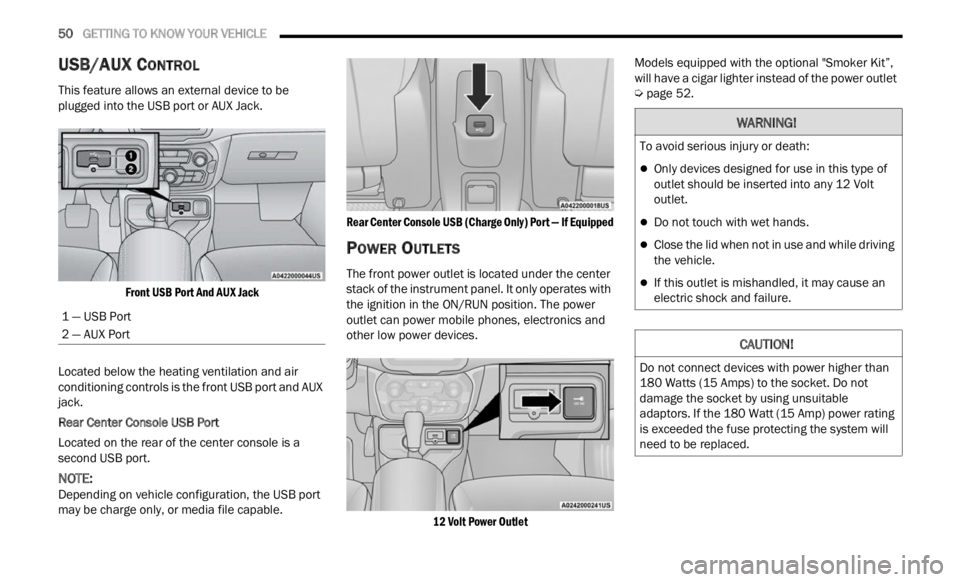
This feature allows an external device to be
plugged into the USB port or AUX Jack.
Front USB Port And AUX Jack
Located below the heating ventilation and air
condit i
oning controls is the front USB port and AUX
jack.
Rear Center Console USB Port
Located on the rear of the center console is a
s econd
USB port.
NOTE:
Depending on vehicle configuration, the USB port
may b e
charge only, or media file capable.
Rear Center Console USB (Charge Only) Port — If Equipped
POWER OUTLETS
The front power outlet is located under the center
stack of the instrument panel. It only operates with
the ignition in the ON/RUN position. The power
outlet can power mobile phones, electronics and
other low power devices.
12 Volt Power Outlet
Models equipped with the optional "Smoker Kit”,
will h
ave a cigar lighter instead of the power outlet
Ú page 52.
1 — USB Port
2 — AUX Port
WARNING!
To avoid serious injury or death:
Only devices designed for use in this type of
outlet should be inserted into any 12 Volt
outlet.
Do not touch with wet hands.
Close the lid when not in use and while driving
the vehicle.
If this outlet is mishandled, it may cause an
electric shock and failure.
CAUTION!
Do not connect devices with power higher than
180 Watts (15 Amps) to the socket. Do not
damage the socket by using unsuitable
adaptors. If the 180 Watt (15 Amp) power rating
is exceeded the fuse protecting the system will
need to be replaced.
Page 53 of 364
GETTING TO KNOW YOUR VEHICLE 51
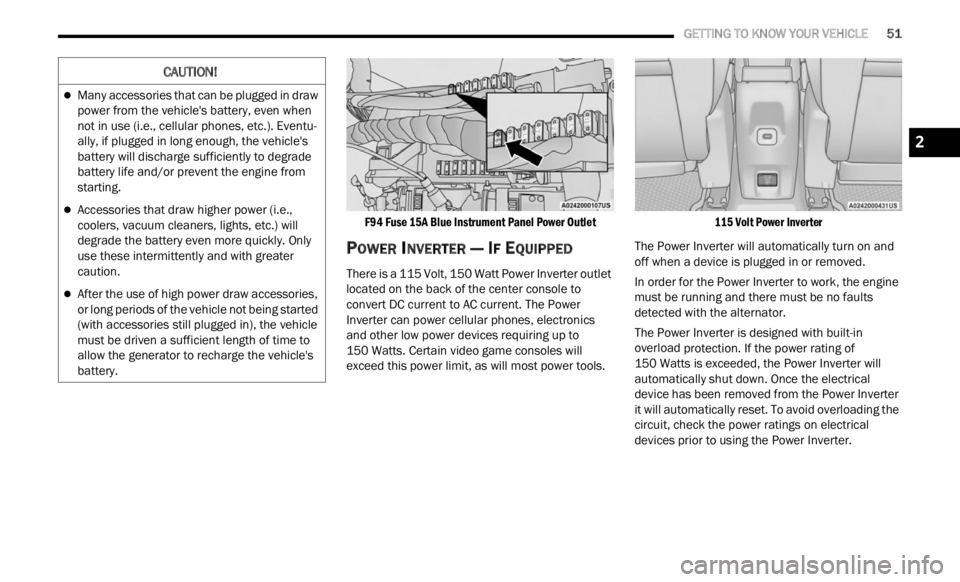
F94 Fuse 15A Blue Instrument Panel Power Outlet
POWER INVERTER — IF EQUIPPED
There is a 115 Volt, 150 Watt Power Inverter outlet
located on the back of the center console to
convert DC current to AC current. The Power
Inverter can power cellular phones, electronics
and other low power devices requiring up to
150 Watts. Certain video game consoles will
excee d
this power limit, as will most power tools.
115 Volt Power Inverter
The Power Inverter will automatically turn on and
off wh e
n a device is plugged in or removed.
In order for the Power Inverter to work, the engine
must b
e running and there must be no faults
detected with the alternator.
The Power Inverter is designed with built-in
overloa d
protection. If the power rating of
150 Watts is exceeded, the Power Inverter will
a utomat
ically shut down. Once the electrical
device has been removed from the Power Inverter
it will automatically reset. To avoid overloading the
circuit, check the power ratings on electrical
devices prior to using the Power Inverter.
CAUTION!
Many accessories that can be plugged in draw
power from the vehicle's battery, even when
not in use (i.e., cellular phones, etc.). Eventu -
ally, if plugged in long enough, the vehicle's
batte r
y will discharge sufficiently to degrade
battery life and/or prevent the engine from
starting.
Accessories that draw higher power (i.e.,
coolers, vacuum cleaners, lights, etc.) will
degrade the battery even more quickly. Only
use these intermittently and with greater
caution.
After the use of high power draw accessories,
or long periods of the vehicle not being started
(with accessories still plugged in), the vehicle
must be driven a sufficient length of time to
allow the generator to recharge the vehicle's
battery.
2
Page 58 of 364
56 GETTING TO KNOW YOUR VEHICLE
SUNROOF MAINTENANCE
Use only a non-abrasive cleaner and a soft cloth to
clean the glass panel. Periodically check for and
clear out any debris that may have collected in the
tracks.
HOOD
TO OPEN THE HOOD
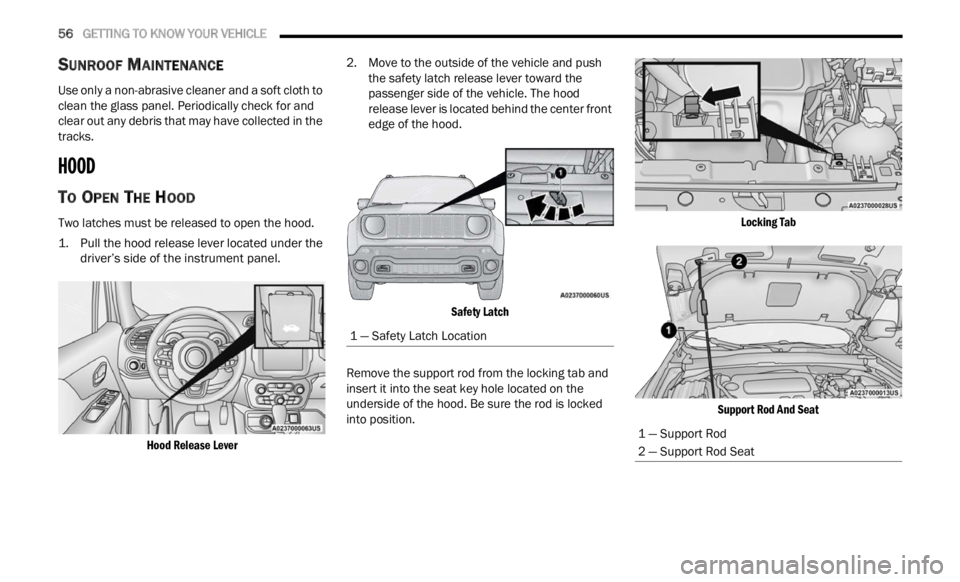
Two latches must be released to open the hood.
1. Pull the hood release lever located under the
driver’ s
side of the instrument panel.
Hood Release Lever
2. Move to the outside of the vehicle and push
the s
afety latch release lever toward the
passenger side of the vehicle. The hood
release lever is located behind the center front
edge of the hood.
Safety Latch
Remove the support rod from the locking tab and
inser t
it into the seat key hole located on the
underside of the hood. Be sure the rod is locked
into position.
Locking Tab
Support Rod And Seat
1 — Safety Latch Location
1 — Support Rod
2 — Support Rod Seat
Page 64 of 364
62
GETTING TO KNOW YOUR INSTRUMENT PANEL
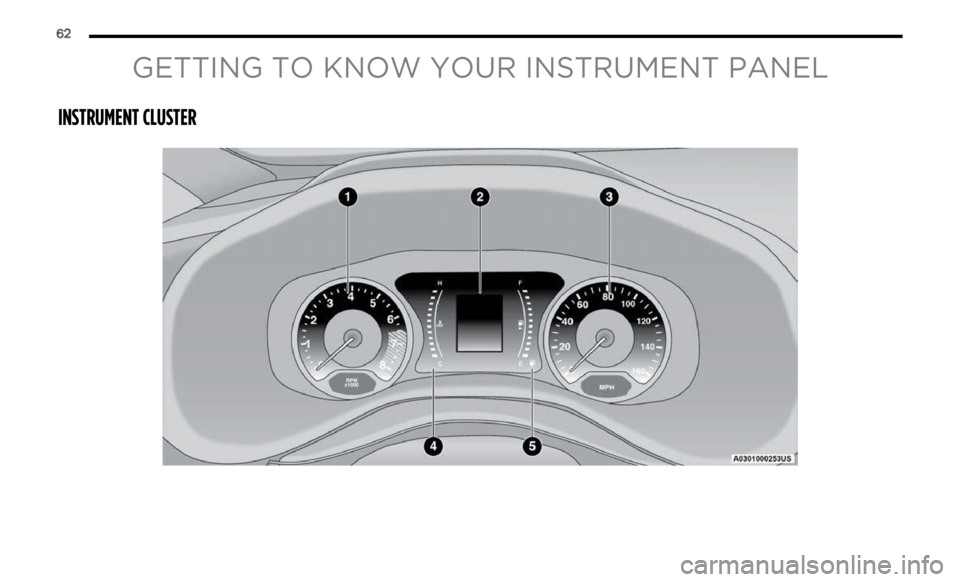
INSTRUMENT CLUSTER
Page 65 of 364
GETTING TO KNOW YOUR INSTRUMENT PANEL 63
3
Page 66 of 364
64 GETTING TO KNOW YOUR INSTRUMENT PANEL
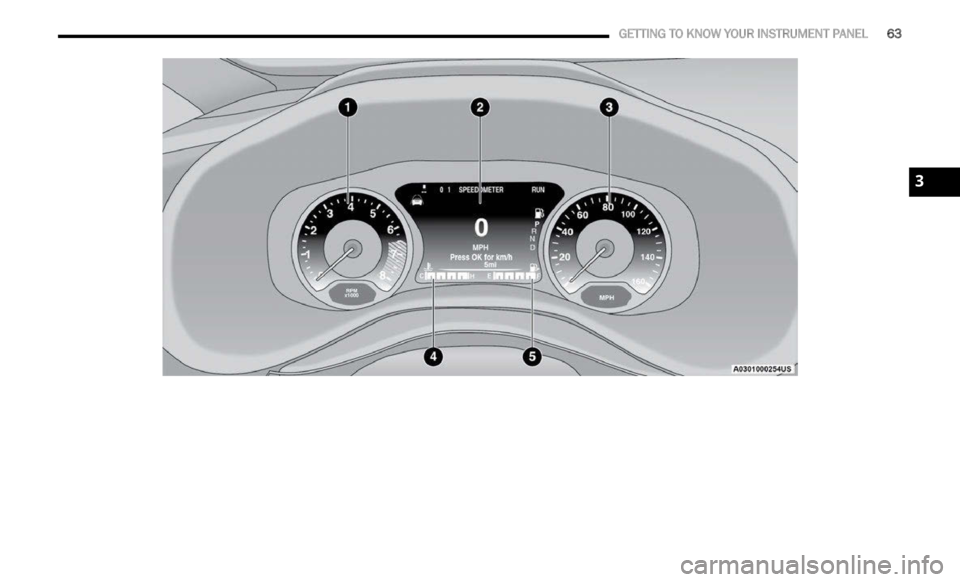
INSTRUMENT CLUSTER DESCRIPTIONS
1. Tachometer
Indicates the engine speed in revolutions
per minute (RPM x 1000).
2. Instrument Cluster Display
The instrument cluster display features a
driver interactive display Ú page 64.
3. Speedometer
Indicates vehicle speed.
4. T emperature Gauge
The temperature gauge shows engine
coolant temperature. Any reading within the
normal range indicates that the engine
cooling system is operating satisfactorily.
The gauge will likely indicate a higher
temperature when driving in hot weather or
up mountain grades. It should not be
allowed to exceed the upper limits of the
normal operating range. 5. Fuel Gauge
The fuel gauge shows the level of fuel in the
fuel tank when the ignition is in the ON/RUN
position.
The fuel pump symbol points to the
side of the vehicle where the fuel
d oor
is
located.
INSTRUMENT CLUSTER DISPLAY
Your vehicle is equipped with an instrument cluster
display, which offers useful information to the
driver. With the ignition in the OFF position,
opening/closing of a door will activate the display
for viewing, and display the total miles, or
kilometers, in the odometer. Your instrument
cluster display is designed to display important
information about your vehicle’s systems and
features. Using a driver interactive display located on the instrument panel, your instrument cluster
display can show you how systems are working and
give you warnings when they aren’t. The steering
wheel mounted controls allow you to scroll through
and enter the main menus and submenus. You can
access the specific information you want and
make selections and adjustments.
INSTRUMENT CLUSTER DISPLAY
L
OCATION AND CONTROLS
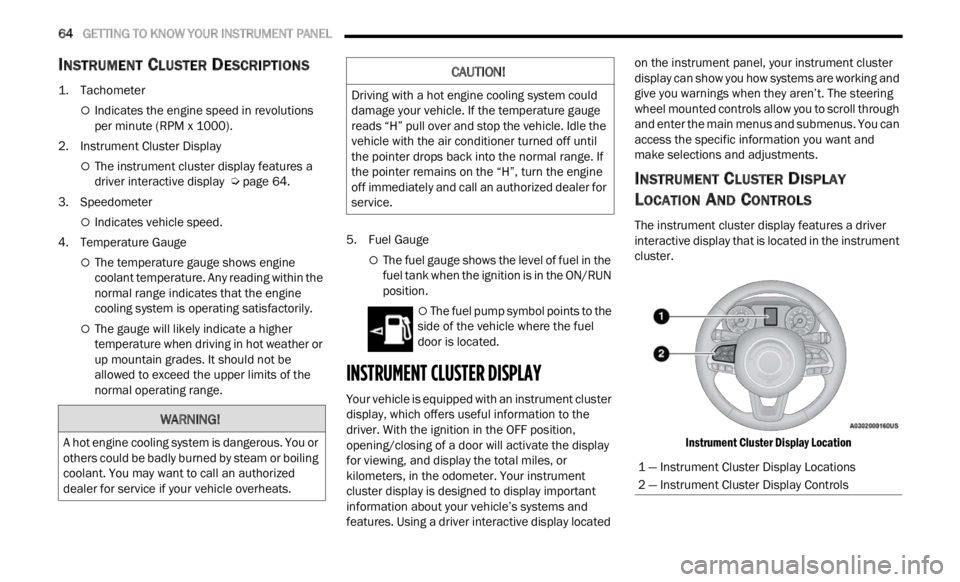
The instrument cluster display features a driver
interactive display that is located in the instrument
cluster.
Instrument Cluster Display Location
WARNING!
A hot engine cooling system is dangerous. You or
others could be badly burned by steam or boiling
coolant. You may want to call an authorized
dealer for service if your vehicle overheats.
CAUTION!
Driving with a hot engine cooling system could
damage your vehicle. If the temperature gauge
reads “H” pull over and stop the vehicle. Idle the
vehicle with the air conditioner turned off until
the pointer drops back into the normal range. If
the pointer remains on the “H”, turn the engine
off immediately and call an authorized dealer for
service.
1 — Instrument Cluster Display Locations
2 — Instrument Cluster Display Controls
Page 67 of 364
GETTING TO KNOW YOUR INSTRUMENT PANEL 65
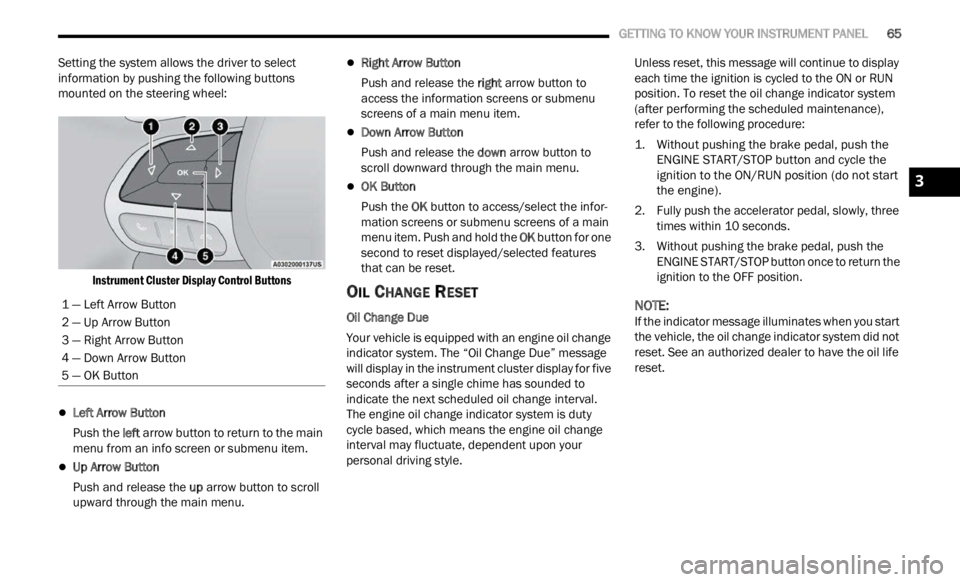
Setting the system allows the driver to select
information by pushing the following buttons
mounted on the steering wheel:
Instrument Cluster Display Control Buttons
Left Arrow Button
Push the l
eft a
rr
ow
button to return to the main
menu from an info screen or submenu item.
Up Arrow Button
Push and release the u
p a
rr
ow
button to scroll
upward through the main menu.
Right Arrow Button
Push and release the right
arrow button to
access the information screens or submenu
screens of a main menu item.
Down Arrow Button
Push and release the d
ow n
a r
r
ow button to
scroll downward through the main menu.
OK Button
Push the O
K b
ut
t
on to access/select the infor -
mation screens or submenu screens of a main
menu i
tem. Push and hold the OK button for one
second to reset displayed/selected features
that can be reset.
OIL CHANGE RESET
Oil Change Due
Your vehicle is equipped with an engine oil change
indic a
tor system. The “Oil Change Due” message
will display in the instrument cluster display for five
seconds after a single chime has sounded to
indicate the next scheduled oil change interval.
The engine oil change indicator system is duty
cycle based, which means the engine oil change
interval may fluctuate, dependent upon your
personal driving style. Unless reset, this message will continue to display
each
t
ime the ignition is cycled to the ON or RUN
position. To reset the oil change indicator system
(after performing the scheduled maintenance),
refer to the following procedure:
1. Without pushing the brake pedal, push the ENGI N
E START/STOP button and cycle the
ignition to the ON/RUN position (do not start
the engine).
2. Fully push the accelerator pedal, slowly, three times
within 10 seconds.
3. Without pushing the brake pedal, push the ENGIN
E START/STOP button once to return the
ignition to the OFF position.
NOTE:
If the indicator message illuminates when you start
the v e
hicle, the oil change indicator system did not
reset. See an authorized dealer to have the oil life
reset.
1 — Left Arrow Button
2 — Up Arrow Button
3 — Right Arrow Button
4 — Down Arrow Button
5 — OK Button
3
Page 68 of 364

66 GETTING TO KNOW YOUR INSTRUMENT PANEL
INSTRUMENT CLUSTER DISPLAY MENU
I
TEMS
NOTE:
The instrument cluster display menu items display
in th e
center of the instrument cluster. Menu items
may vary depending on your vehicle features.
Speedometer
Push and release the up or down arrow
button until the speedometer is displayed in the
i n s
tr
u
ment cluster display. Push and release the
OK button to toggle units (mph or km/h) of the
speedometer.
Vehicle Info
Push and release the up or down arrow
button until “Vehicle Info” is highlighted in the
instr u
ment cluster display. Push and release the
right arrow button and Coolant Temp will be
displayed. Push the right
or left arrow button
to sc
roll through the following information displays:
Tire Pressure — View the information relating to
the Tire Pressure Monitoring System (If
Equipped).
Coolant Temperature — View the engine coolant
temperature.
Trans Temperature — View the trans oil
temperature.
Oil Temperature — View the oil temperature.
Battery Voltage — View the voltage value (state
of charge) of the battery.
Service — View the service status message(s) (If
Equipped).
Driver Assist — If Equipped
Push and release the up or down arrow
button until the Driver Assist menu title displayed
is hi g
hlighted in the instrument cluster display.
LaneSense — If Equipped
The instrument cluster display displays the current
LaneSe n
se status and information. The
information displayed depends on LaneSense
system status and the conditions that need to be
met Ú page 133.
Fuel Economy
This menu item allows you to view the fuel
economy of the vehicle. The following will display:
Range (Miles or km)
Current Consumption (mpg or L/100 km or
km/L)
Average Consumption (mpg or L/100 km or
km/L)
Reset procedure shown at the bottom of the
d ispla
y.
Trip Info
Push and release the up or down arrow
button until the Trip menu title is displayed in the
instr u
ment cluster display. Toggle the left
or
right arrow button to select Trip A or Trip B. The
Trip information will display the following:
Distance – Shows the total distance (mi or km)
traveled for Trip A or Trip B since the last reset.
Average Fuel Economy – Shows the average
fuel economy (MPG or L/100 km or km/L) of
Trip A
or Trip B since the last reset.
Elapsed Time – Shows the total elapsed time of
travel since Trip A or Trip B has been reset.
Hold the OK butt
on to reset feature information.
Stop/Start – If Equipped
Push and release the up or down arrow
button until the Stop/Start menu title is displayed
i n
t h
e
instrument cluster display.
This menu shows messages related to Stop/Start.
Only on
e message can be viewed at a time until the
condition is cleared. When the Stop/Start is
engaged (and the engine is off), the associated
hardware telltale is turned on. Whenever a user
pushes the Stop/Start button on the central stack,
a pop-up message of the Stop/Start status will
appear on the instrument cluster display.
Page 69 of 364

GETTING TO KNOW YOUR INSTRUMENT PANEL 67
Audio
Push and release the up or down arrow
button until the Audio menu title is displayed in the
instr u
ment cluster display.
Stored Messages
Push and release the up or down arrow
button until the Messages Menu Icon is highlighted
in th e
instrument cluster display. This feature
shows the number of stored warning messages.
Pushing the left
or right arrow button will
all ow
you to scroll through the stored messages.
Screen Setup
This menu item allows you to change the position
of the information on the display.
Display Gears (Vehicles With Reconfigurable
Multi-
Functional Display And Automatic
Transmission)
By selecting this item, you can select the display
mode, t
he particulars relating to the automatic
transmission, and choose between the following
options:
“Single digit”
The right side of the display will show the letter
concer n
ing the automatic transmission gear
selector (P,R,N or D) position. After approxi -
mately two seconds, the letter will be displayed
in a c
entral position.
“Full PRND”
The letters PRND will display on the right side,
the p o
sition assumed by the gear selector will
be highlighted in the display. During the opera -
tion in sequential mode (“AutoStick”), in place
of the
letter D, the gear will be will be displayed.
In The Upper Left/Top Right
The information relating to the following can be
displ a
yed:
External temperature
Ignition Button — If Equipped
Compass — If Equipped
Date (Month/Day)
Time (Hours/Minutes)
In the central area of the display, you can view all
of t
h e
information listed above as well as the
following:
Compass — If Equipped
Speed Display — If Equipped
Date (Day/Month/Year)
Time
Compass — If Equipped
Ignition Button — If Equipped
External Temp — If equipped
Menu Item
Distance Traveled A (Trip A)
Distance Traveled B (Trip B)
Restore Default Settings
Selecting this item, and you can reset and restore
t he de
fault settings.
Settings
This menu item allows you to change the settings
for the following:
Display
Units
Clock and Date
Security
Safety and Assistance
Lights
Doors and Locks
NOTE:
Some items may be displayed and managed
throug h
the Uconnect system.
Vehicles Equipped With Multi-functional Display
Reconfi
gurable:
The following menu/submenu items are available
in the
cluster display.
3
Page 70 of 364

68 GETTING TO KNOW YOUR INSTRUMENT PANEL
“Vehicle Shut Off (If Equipped)”
By selecting the item “Vehicle Shut Off”, you can
turn of
f the engine from the instrument cluster.
This feature is available in the event of an ignition
switch failure, and will display instructions for
turning off the engine via the instrument cluster
display controls.
“Display”
By selecting the “Display,” you can access the
follow i
ng setting:
Language : allows you to select the language in
which to display the information/warnings.
“Units Of Measure”
By selecting the item “Units of Measure,” you can
selec t
the unit of measure to use for displaying
various magnitudes.
Possible options are:
US
Metric
Custom
“Clock & Date”
By selecting the item, “Clock & Date” you can
a djust
the clock.
Possible options are:
Set Time: adjust hours/minutes
Set Format: adjust the time format “12h”
(12 hours) or “24h” (24 hours)
Set Date: adjust day/month/year
“Security”
By selecting the item “Security,” you can make the
f ollowi
ng adjustments:
Speed Warning:
Set the vehicle speed limit, which the driver is
notifi e
d through a visual and acoustic signaling
(display of a message and a symbol on the
display).
When the speed warning is set, the icon should
remain
visualized for the same duration time of
the pop-up. If the driver exceeded the set speed,
the icon should remain for however long the
vehicle is over the set speed.
Driver may also turn the Speed Warning “OFF”
should
you choose not to use this feature.
Seat Belt Reminder:
This function is only viewable when the Seat Belt
Remin d
er (SBR) system is active.
Hill Start Assist:
Activation/Deactivation of the Hill Start Assist
syste m
.
Passenger Air Bag — If Equipped
Front passenger air bag may be enabled or
disab l
ed. “Lights”
By selecting the item “Lights,” you can make the
followi
n
g adjustments:
Headlight Off Delay: set the delay for headlight
shutoff after engine shutoff
Headlight Sensitivity: adjust the sensitivity of
headlight brightness
Daytime Running Lights: activate/deactivate
the daytime running lights
Cornering lights: activate/deactivate the
cornering lights (If Equipped)
Interior Ambient lights: adjust the level of inte-
rior ambient lights
Greeting Lights: activate / deactivate greeting
lights
“Doors & Locks”
By selecting the item “Doors & Locks,” you can
make t
he following adjustments:
Auto Door Lock: activate/deactivate the auto -
matic locking of the doors with the vehicle
m ov i
n g
Auto Unlock On Exit: automatic unlocking of the
doors when exiting the vehicle
Flash Light with Lock: activate the direction indi
-
cators when closing the doors