remote control JEEP RENEGADE 2023 User Guide
[x] Cancel search | Manufacturer: JEEP, Model Year: 2023, Model line: RENEGADE, Model: JEEP RENEGADE 2023Pages: 364, PDF Size: 18.65 MB
Page 57 of 364

GETTING TO KNOW YOUR VEHICLE 55
OPENING AND CLOSING THE SUNROOF
To retract the sunroof to the open position, push
the Open/Close switch and the sunroof will fully
open. The sunroof can be stopped in any position
by pushing/pulling the switch a second time while
opening.
To close the sunroof completely, pull the Open/
Close s
witch and the sunroof will fully close. The
sunroof can be stopped in any position by pushing/
pulling the switch a second time while it is closing.
VENTING SUNROOF
To vent the sunroof push the vent switch.
NOTE:
The vent switch has the automatic function only at
the op e
ning of the sunroof. During the closing of
the sunroof, the switch must be held until closed.
OPENING AND CLOSING THE POWER
S
UNSHADE
Express Open/Close
Push the shade switch for about one-half second
and t h
e shade will automatically open. During the
automatic open operation, any movement of the
shade switch will stop the shade. Pull the shade switch for about one-half second
and t
h
e shade will automatically close. During the
automatic close operation, any movement of the
shade switch will stop the shade.
Manual Open/Close
To open the shade part way, push the shade switch
brief l
y and release.
To close the shade part way, pull the shade switch
briefl
y and release.
NOTE:
The sunroof and the shade controls will operate
only when the ignition is in the ON/RUN posi -
tion.
If the Remote Start functionality is active, it is
not possible to move the sunroof.
PINCH PROTECT FEATURE
This feature will detect an obstruction in the
opening of the sunroof during Express Close
operation. If an obstruction in the path of the
sunroof is detected, the sunroof will automatically
retract. Remove the obstruction if this occurs.
WARNING!
Do not let children play with the sunroof.
Never leave children unattended in a vehicle,
or with access to an unlocked vehicle. Do not
leave the key fob in or near the vehicle, and do
not leave the ignition of a vehicle equipped
with Keyless Enter ‘n Go™ in the ACC or ON/
RUN position. Occupants, particularly unat -
tended children, can become entrapped by
the p ow
er sunroof while operating the power
sunroof switch. Such entrapment may result
in serious injury or death.
In a collision, there is a greater risk of being
thrown from a vehicle with an open sunroof.
You could also be severely injured or killed.
Always fasten your seat belt properly and
make sure all passengers are properly
secured.
Do not allow small children to operate the
sunroof. Never allow your fingers, other body
parts, or any object to project through the
sunroof opening. Injury may result.
2
Page 71 of 364

GETTING TO KNOW YOUR INSTRUMENT PANEL 69
Sound Horn With Lock: activate/deactivate the
horn when pushing the LOCK button on the key
fob. The options are “Off,” “First Press,” and
“Second Press”
Horn With Remote Start: activate/deactivate
the horn at the Remote Starting of the engine
with the key fob
Remote Door Unlock: allows you to open the
driver door only on the first push of the UNLOCK
button on the key fob
“Compass”
By selecting the item “Compass” you can make the
f ollowi
ng adjustments:
Compass Calibration
Compass Variance
TRIP COMPUTER
The Trip computer is used to display information on
car operation when the key is turned to the RUN
position.
This function allows you to define two separate
trips
called “Trip A” and “Trip B” where the car's
“complete trips” are monitored in an independent
manner.
Both trips can be reset (reset - start of a new trip).
To perf
orm a reset, push and hold the OK button on
the steering wheel controls. “Trip A” and “Trip B” are used to display the figures
relat
i
ng to:
Distance Traveled
Average Consumption
Travel Time (driving time)
Quantities Displayed
Distance Traveled
Indicates the distance traveled by the start of
the new trip.
Average Consumption
Represents the average fuel consumption since
the start of the new trip.
Travel Time
Elapsed time since the start of the new trip.
OK Button
Short Push Of The Button: display of various
p arame
ters.
Long Push Of The Button: reset quantities and
begin
a new trip.
New trip
Starts after reset:
“Manual” by pushing the OK button.
“Automatic” when the “distance” reaches the
value of 62140 (99999.9 km) or when the “time
travel” reaches the value of 999.59
(999 hours and 59 minutes).
After each disconnection and reconnection of
the battery.
WARNING/INDICATOR LIGHTS AND
MESSAGES
The warning/indicator light switches on in the
instrument panel together with a dedicated
message and/or acoustic signal when applicable.
These indications are indicative and precautionary
and as such must not be considered as exhaustive
and/or alternative to the information contained in
the Owner Manual, which you are advised to read
carefully in all cases. Always refer to the
information in this chapter in the event of a failure
indication.
All active telltales will display first, if applicable.
The sy
stem check menu may appear different
based upon equipment options and current vehicle
status. Some telltales are optional and may not
appear.
The following warning lamps and indicators will
alert
you to a vehicle condition that may become
serious. Some lamps will illuminate when you start
your vehicle to make sure they work. If any lamps
remain on after starting your vehicle, refer to the
respective system warning lamp for further
information.
3
Page 152 of 364
150 MULTIMEDIA
Safe Usage Of The Uconnect System
The Uconnect system is a sophisticated elec -
tronic device. Do not let young children use the
syste m
.
Permanent hearing loss may occur if you play
your music or sound system at loud volumes.
Exercise caution when setting the volume on the
system.
Keep drinks, rain and other sources of moisture
away from the system. Besides damage to the
system, moisture can cause electric shocks as
with any electronic device.
NOTE:
Many features of this system are speed
depen d
ent. For your own safety, it is not possible to
use some of the touchscreen features while the
vehicle is in motion.
Care And Maintenance
Do not press the touchscreen with any hard or
sharp objects (pen, USB stick, jewelry, etc.),
which could scratch the surface.
Do not spray any liquid or chemicals directly on
the screen! Use a clean and dry microfiber lens
cleaning cloth in order to clean the touchscreen.
If necessary, use a lint-free cloth dampened
with a cleaning solution, such as isopropyl
alcohol or an isopropyl alcohol and water solu -tion ratio of 50:50. Be sure to follow the solvent
manuf
a
cturer's precautions and directions
Ú page 349.
UCONNECT MODES
STEERING WHEEL AUDIO CONTROLS
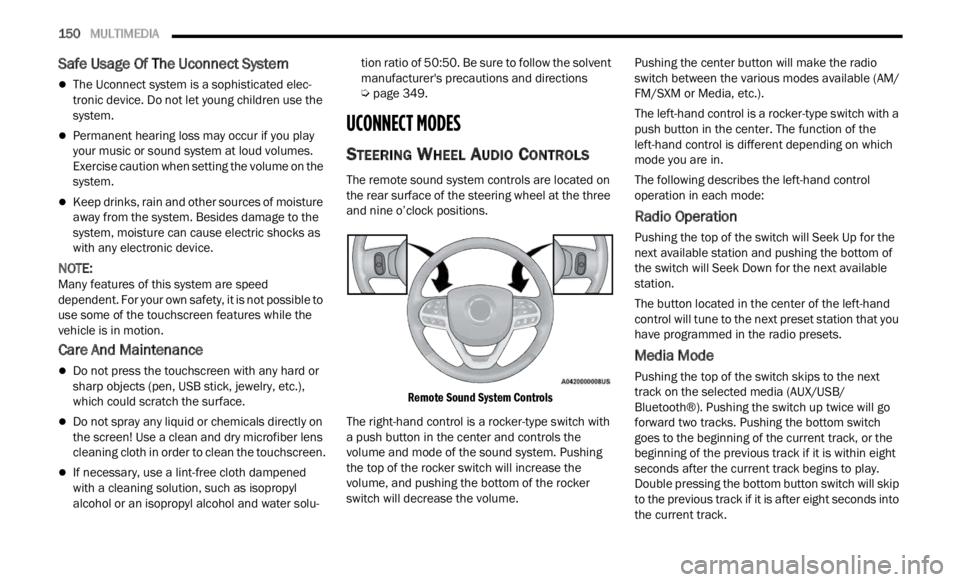
The remote sound system controls are located on
the rear surface of the steering wheel at the three
and nine o’clock positions.
Remote Sound System Controls
The right-hand control is a rocker-type switch with
a pus h
button in the center and controls the
volume and mode of the sound system. Pushing
the top of the rocker switch will increase the
volume, and pushing the bottom of the rocker
switch will decrease the volume. Pushing the center button will make the radio
switc
h
between the various modes available (AM/
FM/SXM or Media, etc.).
The left-hand control is a rocker-type switch with a
push b
utton in the center. The function of the
left-hand control is different depending on which
mode you are in.
The following describes the left-hand control
operati
on in each mode:
Radio Operation
Pushing the top of the switch will Seek Up for the
next available station and pushing the bottom of
the switch will Seek Down for the next available
station.
The button located in the center of the left-hand
control
will tune to the next preset station that you
have programmed in the radio presets.
Media Mode
Pushing the top of the switch skips to the next
track on the selected media (AUX/USB/
Bluetooth®). Pushing the switch up twice will go
forward two tracks. Pushing the bottom switch
goes to the beginning of the current track, or the
beginning of the previous track if it is within eight
seconds after the current track begins to play.
Double pressing the bottom button switch will skip
to the previous track if it is after eight seconds into
the current track.
Page 205 of 364

MULTIMEDIA 203
NOTE:
Certain SiriusXM Guardian™ connected
services are dependent upon an operative
telematics device, a cellular connection, naviga
-
tion map data, and GPS satellite signal recep -
tion, which can limit the ability to reach the
r espons
e center or reach emergency support.
Not all features of SiriusXM Guardian™ are
available everywhere at all times, particularly in
remote or enclosed areas.
Other factors outside the control of SiriusXM
Guardian™ that may limit or prevent service
delivery are hills, structures, buildings, tunnels,
weather, damage to the electrical system or
other important parts of your vehicle, network
congestion, civil disturbances, actions of third
parties or the government, Internet failure, and/
or the physical location of your vehicle, such as
in an underground parking structure or under a
bridge.
Not all SiriusXM Guardian™ features are available
for al l
models.
SiriusXM Guardian™ provides:
The ability to remotely lock/unlock and remote
start your vehicle from virtually anywhere by
using the Mobile App or your computer.
If equipped — Send & Go capability with the
Mobile App. Use the Mobile App to easily search, map and send your locations directly to your
Uconnect Navigation.
The ability to locate your vehicle, when you
forget where you parked, using the Vehicle
Finder function of the Mobile App.
Before you drive, familiarize yourself with the
easy- t
o-use Uconnect system and SiriusXM
Guardian™ connected services.
The ASSIST and SOS Call Buttons On Your
Rearv i
ew Mirror Or Overhead Console
If equipped, the ASSIST Button is used for
contact
ing Roadside Assistance, Vehicle Care,
Uconnect Care, and SiriusXM Guardian™
Customer Care. The SOS Call button connects you
directly to SiriusXM Guardian™ Customer Care for
assistance in an emergency.
Activation — If Equipped
To unlock the full potential of SiriusXM Guardian™
in your vehicle, you must activate your SiriusXM
Guardian™ connected services.
1. Press the Apps icon on the bottom of your in-ve hi
cle touchscreen.
2. Select the Activate Services icon from your list of app
s.
3. For customers in the United States , sel
ect
“Customer Care” to speak with a SiriusXM
Guardian™ Customer Care agent who will activate services in your vehicle, or select
“Enter Email” to activate on the web.
For customers in Canada
, ente
r your email ad-
dress to activate services in your vehicle.
Included Trial Period For New Vehicles
Your new vehicle may come with an included trial*
period for use of SiriusXM Guardian™ connected
services starting on the date of vehicle purchase.
To get started with your trial, enrollment in
SiriusXM Guardian™ is required.
* Included trial applies to new vehicles only.
Features And Packages
After the trial period, you must purchase a
subscription to continue your services by calling a
SiriusXM Guardian™ Customer Care agent.
GETTING STARTED WITH CONNECTED
V
EHICLE SERVICES
Download The Mobile App
Once you have activated your services, you’re only
a few steps away from using connected services.
Download the Mobile App to your mobile device.
Use your Owner Account login and password to
open the app and then set up a PIN.
5
Page 209 of 364

MULTIMEDIA 207
Automatic SOS — If Equipped
Automatic SOS is a hands-free safety service that
can immediately connect you with help in the event
that your vehicle’s airbags deploy. After an
accident, a live agent will contact you through the
Uconnect system and alert emergency services.
NOTE:
An active SiriusXM Guardian™ subscription is
requi r
ed for this feature to function.
After a crash where the airbags deploy:
1. Automatic SOS will initiate a call with an agen t
.
2. An agent will receive the call and confirm the locati
on of the emergency.
3. If needed, the agent will request the assis
tance of emergency services.
4. First responders will arrive on scene. The agent
will remain on the call until emergency
services arrive.
NOTE:
Agents are available 24/7 to assist you in the
case of an emergency.
On your behalf, agents are able to notify family
members about the collision.
Agents can brief first responders of the situation
before they arrive on scene.
In the event vehicle occupants are unable to
speak, emergency services will be dispatched
based on the last known GPS coordinates.
SiriusXM Guardian™ connected services are
dependent upon an operative telematics
device, a cellular connection, navigation map
data, and GPS satellite reception, which can
limit the ability to reach the response center or
reach emergency support.
Terms of service of the Uconnect and the
SiriusXM Guardian™ subscriber agreement
apply. See terms of services for complete
service limitation.
Remote Commands
On the Remote Commands screen, you have
access to several vehicle features that can be
controlled remotely from your mobile device. These
features include locking/unlocking, remote
starting, and activating the horn and lights of the
vehicle.
The Occupant Restraint Controller (ORC) turns
on the Air Bag Warning Light on the instru -
ment panel if a malfunction in any part of the
a ir ba
g system is detected. If the Air Bag
Warning Light is illuminated, the air bag
system may not be working properly and the
SOS Call system may not be able to send a
signal to the SiriusXM Guardian™ Customer
Care center. If the Air Bag Warning Light is illu -
minated, have an authorized dealer service
your v e
hicle immediately.
Ignoring the Rearview Mirror Light could mean
you will not have SOS Call services if needed.
If the Rearview Mirror Light is illuminated,
have an authorized dealer service the SOS
Call system immediately.
If anyone in the vehicle could be in danger
(e.g., fire or smoke is visible, dangerous road
conditions or location), do not wait for voice
contact from a SiriusXM Guardian™ Customer
Care agent. All occupants should exit the
vehicle immediately and move to a safe loca -
tion.
Failure to perform scheduled maintenance
and regular inspection of your vehicle may
result in vehicle damage, accident or injury.
WARNING!
LockPress this button to lock your vehicle.
Vehicle Start Press this button to
start
your vehicle.
Horn & Lights Press this button to
s ound
t
he horn and
activate your lights.
5
Page 211 of 364

MULTIMEDIA 209
Working Vehicle Conditions
The vehicle must in PARK or at a standstill.
The vehicle must be in an open area with cell
tower reception.
Your mobile device must have a cellular or Wi-Fi
connection.
Requirements
Vehicle must be properly equipped with
SiriusXM Guardian™.
Vehicle must have an operable LTE (voice/data)
or 3G or 4G (data) network connection. If using
the Mobile App to command your vehicle, your
device must be compatible and be connected to
an operable LTE (voice/data) or 3G or 4G (data)
network connection.
Vehicle must be registered with SiriusXM
Guardian™ and have an active subscription that
includes the applicable feature.
An ignition cycle is required for some remote
commands, such as Remote Vehicle Start and
Remote Door Lock/Unlock if following a Remote
Horn & Lights activation.
Your Remote Door Lock/Unlock request will not
be processed if the vehicle is in motion, the igni -
tion key is on or during an emergency call.
NOTE:
All other remote services should be performed via
your O w
ner’s Site or through the Mobile App on
your compatible device.
Remote Vehicle Start
Description
The Remote Vehicle Start feature provides you with
the a b
ility to start the engine on your vehicle
without the keys and from virtually any distance.
Once started, the preset climate controls in your
vehicle can warm up or cool down the interior.
You can also send a command to turn off an
engin e
that has been started using Remote Vehicle
Start. After 15 minutes, if you have not entered
your ve
hicle with the key, the engine will shut off
automatically.
This remote function requires your vehicle to be
equip p
ed with a factory-installed Remote Start
system.
You can set up push notifications every time a
comman d
is sent to activate or cancel Remote
Start. Working Vehicle Conditions
The vehicle must be off or in ACC mode.
The vehicle has been started with the key fob
within the last 14 days.
The vehicle must be in PARK or at a standstill.
The vehicle’s security system has been armed
and not triggered since the last vehicle start.
The doors, hood, and trunk/liftgate are closed.
The vehicle’s check engine light must be off.
The vehicle must have at least a quarter tank of
fuel, along with oil and battery power.
The vehicle’s hazard lights must be off.
If equipped, the vehicle must have an automatic
transmission.
The vehicle must be in an open area with cell
tower reception.
Your mobile device must have a cellular or Wi-Fi
connection.
If the Panic button has been pressed, the
vehicle must be started at least once after
alarming the system.
NOTE:
The SiriusXM Guardian™ Customer Care agents
are n ot
authorized for Remote Vehicle Start
services. Contact the Uconnect Care Team for
assistance.
5
Page 354 of 364

352
Body Mechanism Lubrication........................297Brake Assist System......................................222Brake Control System, Electronic..................222Brake Fluid....................................................345Brake System......................................302, 341Anti-Lock (ABS)..........................................341Fluid Check...............................................345Master Cylinder.........................................302Warning Light..............................................70Brakes...........................................................302Brightness, Interior Lights................................40Bulbs, Light....................................................267
C
Camera..........................................................121Camera, Rear................................................121Capacities, Fluid............................................344Caps, Filler
Oil (Engine)................................................293Radiator (Coolant Pressure)......................301Car Washes...................................................338Carbon Monoxide Warning............................267CD..................................................................162Cellular Phone...............................................220Certification Label.........................................123Changing A Flat Tire.......................................271Chart, Tire Sizing............................................323Check Engine Light (Malfunction Indicator
Light)...............................................................78
Checking Your Vehicle For Safety..................265
Checks, Safety..............................................265Child Restraint..............................................255Child Restraints Booster Seats...........................................258Child Seat Installation..............................263How To Stow An unused ALR Seat Belt....262Infant And Child Restraints.......................257LATCH Positions.......................................259Locating The LATCH Anchorages..............260Lower Anchors And Tethers For Children..259Older Children And Child Restraints.........257Seating Positions......................................258Child Safety Locks...........................................25Clean Air Gasoline.........................................342CleaningWheels.....................................................334Climate Control................................................44Clutch...........................................................302Fluid.........................................................302Coin Holder......................................................49Cold Weather Operation..................................81Compact Spare Tire......................................333Connected Services......................................202Connected Services FAQ...............................215Connected Services Features.......................205Connected Services, Getting Started............203Connected Services, Introduction.................202ConnectorUCI...............................................................50
Universal Consumer Interface (UCI).............50
Console............................................................49Floor............................................................49Contract, Service...........................................347Controls........................................................151Cooling Pressure Cap (Radiator Cap)............301Cooling System.............................................299Adding Coolant (Antifreeze)......................300Coolant Level...................................299, 301Cooling Capacity.......................................344Disposal Of Used Coolant.........................301Drain, Flush, And Refill.............................300Inspection.................................................301Points To Remember................................301Pressure Cap............................................301Radiator Cap.............................................301Selection Of Coolant
(Antifreeze).........................300, 344, 345Corrosion Protection.....................................338Cruise Control (Speed Control).........................95Cruise Light...............................................76, 77Customer Assistance....................................346Customer Programmable Features...............134Cybersecurity................................................133
D
Daytime Running Lights...................................37Dealer Service...............................................295Defroster, Rear Window...................................43Defroster, Windshield...................................265
De-Icer, Remote Start......................................20
Page 356 of 364

354
Fuel...............................................................342Adding.......................................................122Additives...................................................343Clean Air....................................................342Ethanol......................................................342Gasoline....................................................342Gauge..........................................................73Materials Added........................................343Methanol...................................................342Octane Rating.................................342, 345Requirements...........................................342Specifications............................................345Fuses.............................................................303
G
Gasoline, (Fuel).............................................342Gasoline, Clean Air........................................342Gasoline, Reformulated.................................342Gauges
Fuel.............................................................73Gear Selector Override..................................281Glass Cleaning...............................................340Gross Axle Weight Rating...............................124GVWR............................................................123
H
Hazard Warning Flashers..............................268Head Restraints...............................................31Head Rests......................................................31
HeadlightsAutomatic....................................................38Automatic High Beam..................................37Cleaning...................................................338Delay...........................................................38High Beam/Low Beam Select Switch..........37Lights On Reminder.....................................38Passing........................................................37Switch..........................................................36Time Delay...................................................38Heated Mirrors.................................................36Heated Seats...................................................30High Beam/Low Beam Select (Dimmer)
Switch..............................................................37Hill Descent Control......................................226Hill Descent Control Indicator.......................226Hill Start Assist..............................................227Hitches Trailer Towing...........................................125Holder, Coin.....................................................49Hood Prop........................................................56Hood Release..................................................56
I
Ignition.............................................................17Switch..........................................................17Inside Rearview Mirror............................34, 268
Instrument Cluster.............................62, 65, 76Descriptions.................................................76Display Controls...........................................64Engine Oil Reset..........................................65Menu Items.................................................66Instrument Cluster Display...............................64Trip..............................................................69Instrument Panel Lens Cleaning...................340Interior Appearance Care..............................339Interior Lights...................................................39Intermittent Wipers (Delay Wipers)..................41InverterPower...........................................................51
J
Jack Location................................................272Jack Operation.....................................271, 273Jacking And Tire Changing............................271Jacking Instructions......................................273Jump Starting................................................278
K
Key FobArm The Alarm
.............................................20Disarm The Alarm........................................21Keyless Entry...............................................22Programming Additional Key Fobs...............16Remote Keyless Entry..................................14Key Fob Battery Service (Remote Keyless
Entry)
...............................................................15
Page 357 of 364

355
Key Fob Programming (Remote Keyless
Entry)...............................................................16Keyless Enter-N-Go..........................................22Enter The Trunk...........................................22Lock The Vehicle’s Doors............................22Passive Entry...............................................22Passive Entry Programming.........................22Remote Control...........................................22Unlock From The Driver’s Side....................22Unlock From The Passenger’s Side.............22Keyless Entry...................................................14Keys.................................................................14
L
Lane Change And Turn Signals........................39LaneSense....................................................117Lap/Shoulder Belts.......................................241Latches..........................................................267Lead Free Gasoline........................................342Leaks, Fluid...................................................267Life Of Tires...................................................331Liftgate.....................................................57, 58Closing........................................................58Opening.......................................................57Liftgate Window Wiper/Washer.......................43Light Bulbs.....................................................267Lights.............................................................267Air Bag.......................................70, 246, 265Automatic Headlights..................................38
Automatic High Beam..................................37
Brake Assist Warning...............................225Brake Warning.............................................70Cruise...................................................76, 77Daytime Running.........................................37Dimmer Switch, Headlight...........................37Exterior.....................................................267Fog..............................................................38Hazard Warning Flasher...........................268Headlight Switch..........................................36Headlights...................................................36Headlights On Reminder.............................38High Beam...................................................37High Beam/Low Beam Select......................37Hill Descent Control Indicator...................226Instrument Cluster.......................................36Intensity Control..........................................40Interior.........................................................39Lights On Reminder.....................................38Malfunction Indicator (Check Engine)..........73Park.............................................................76Passing........................................................37Seat Belt Reminder.....................................72Security Alarm.............................................72Tire Pressure Monitoring (TPMS)..............235Traction Control........................................225Turn Signals................................39, 76, 267Vanity Mirror................................................34Warning Instrument Cluster
Descriptions.....................................71, 76
Loading Vehicle.............................................123Tires..........................................................326Locks Child Protection...........................................25Power Door..................................................22Low Tire Pressure System.............................235Lubrication, Body..........................................297Lug Nuts........................................................341Luggage Carrier................................................61
M
Maintenance....................................................56Maintenance Free Battery............................294Maintenance Schedule.................................286Malfunction Indicator Light (Check
Engine)......................................................73, 78Manual Service......................................................348Master CylinderBrakes......................................................302Media Mode..................................................162Methanol.......................................................342MirrorsHeated.........................................................36Outside........................................................35Rearview............................................34, 268Vanity...........................................................34Mobile App....................................................20311
Page 359 of 364

357
R
Radial Ply Tires..............................................330Radiator Cap (Coolant Pressure Cap)............301RadioPresets......................................................160Radio Controls...............................................151Radio Mode...................................................151Radio Operation..................................151, 220Radio Remote Controls..................................150Rain Sensitive Wiper System...........................42Rear Camera.................................................121Rear Cross Path.............................................230Rear ParkSense System................................105Rear Window Defroster...................................43Rear Wiper/Washer.........................................43Rearview Mirror...............................................34Reclining Front Seats......................................27Recreational Towing......................................129Reformulated Gasoline..................................342Refrigerant....................................................297Registering SiriusXM Guardian......................203Reminder, Lights On........................................38Reminder, Seat Belt......................................241Remote ControlStarting System...........................................18Remote Features, Door Lock/Unlock..208, 215Remote Features, Horn And Lights................210Remote Features, Starting..................209, 217
Remote Keyless Entry......................................14Arm The Alarm.............................................20Disarm The Alarm........................................21Keyless Enter-N-Go......................................22Programming Additional Key Fobs...............16Remote Sound System (Radio) Control.........150Remote StartingUconnect Customer Programmable
Features
..................................................19Uconnect Settings.......................................19Remote Starting System..................................18Replacement Tires........................................332Reporting Safety Defects..............................348Restraints, Child...........................................255Restraints, Head..............................................31Roadside Assistance............................210, 216Roll Over Warning..............................................9Roof Type Carrier.............................................61Rotation, Tires..............................................336
S
Safety...........................................................149Safety Checks Inside Vehicle........................265Safety Checks Outside Vehicle.....................267Safety Defects, Reporting.............................348Safety Features.............................................149Safety Information, Tire................................322Safety Tips....................................................265
Safety, Exhaust Gas......................................267Satellite Radio...............................................155Saved Radio Stations....................................160Schedule, Maintenance................................286Seat Belt Reminder..........................................72Seat Belts............................................241, 265Adjustable Upper Shoulder Anchorage.....244Adjustable Upper Shoulder Belt
Anchorage............................................244Automatic Locking Retractor (ALR)...........245Child Restraints........................................255Energy Management Feature...................245Front Seat........................................241, 243Inspection.................................................265Lap/Shoulder Belt Operation....................243Lap/Shoulder Belt Untwisting...................244Lap/Shoulder Belts...................................241Operating Instructions..............................243Pregnant Women......................................245Pretensioners...........................................245Rear Seat..................................................241Reminder..................................................241Seat Belt Pretensioner..............................245Seat Belt Reminder..................................241Untwisting Procedure................................244Seat Belts Maintenance................................339
11