weight JEEP RENEGADE 2023 User Guide
[x] Cancel search | Manufacturer: JEEP, Model Year: 2023, Model line: RENEGADE, Model: JEEP RENEGADE 2023Pages: 364, PDF Size: 18.65 MB
Page 260 of 364

258 SAFETY
Children Too Large For Booster Seats
Children who are large enough to wear the
shoulder belt comfortably, and whose legs are long
enough to bend over the front of the seat when
their back is against the seatback, should use the
seat belt in a rear seat. Use this simple 5-step test
to decide whether the child can use the vehicle’s
seat belt alone:
1. Can the child sit all the way back against the
back
of the vehicle seat?
2. Do the child’s knees bend comfortably over the f
ront of the vehicle seat while the child is
still sitting all the way back? 3. Does the shoulder belt cross the child’s
shoul d
er between the neck and arm?
4. Is the lap part of the belt as low as possible, touchi
ng the child’s thighs and not the
stomach?
5. Can the child stay seated like this for the whole trip?
I
f the answer to any of these questions was “no”,
then t
he child still needs to use a booster seat in
this vehicle. If the child is using the lap/shoulder
belt, check seat belt fit periodically and make sure
the seat belt buckle is latched. A child’s squirming
or slouching can move the belt out of position. If
the shoulder belt contacts the face or neck, move the child closer to the center of the vehicle, or use
a booster seat to position the seat belt on the child
correctly.
Recommendations For Attaching Child Restraints
WARNING!
Never allow a child to put the shoulder belt
under an arm or behind their back. In a crash,
the shoulder belt will not protect a child properly,
which may result in serious injury or death. A
child must always wear both the lap and
shoulder portions of the seat belt correctly.
Restraint Type
Combined Weight of
the Child + Child Restraint Use Any Attachment Method Shown With An “X” Below
LATCH – Lower Anchors Only Se
a
t Belt OnlyLATCH – Lower Anchors
+ Top Tether Anchor Seat Belt + Top Tether
Anchor
Rear-Facing Child Restraint Up to 65 lbs
(29.5 kg) X
X
Rear-Facing Child Restr
a
int More than 65 lbs
(29.5 kg) X
Forward-Facing Child Restr
a
int Up to 65 lbs
(29.5 kg) X
X
Forward-Facing Child Restr
a
int More than 65 lbs
(29.5 kg) X
Page 261 of 364
SAFETY 259
Lower Anchors And Tethers For CHildren
(LATCH) Restraint System
LATCH Label
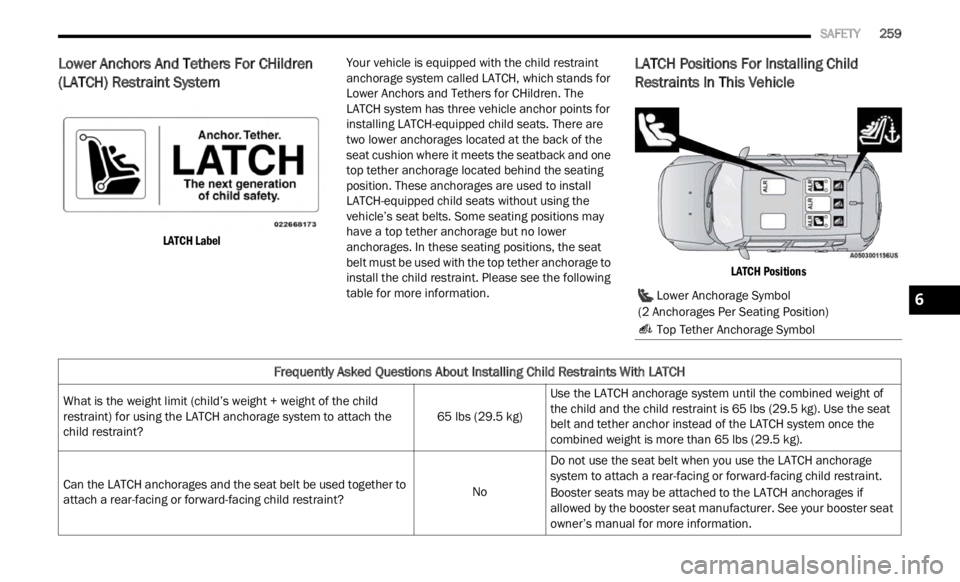
Your vehicle is equipped with the child restraint
anchor
age system called LATCH, which stands for
Lower Anchors and Tethers for CHildren. The
LATCH system has three vehicle anchor points for
installing LATCH-equipped child seats. There are
two lower anchorages located at the back of the
seat cushion where it meets the seatback and one
top tether anchorage located behind the seating
position. These anchorages are used to install
LATCH-equipped child seats without using the
vehicle’s seat belts. Some seating positions may
have a top tether anchorage but no lower
anchorages. In these seating positions, the seat
belt must be used with the top tether anchorage to
install the child restraint. Please see the following
table for more information.LATCH Positions For Installing Child
Restraints In This Vehicle
LATCH Positions
Lower Anchorage Symbol
(2 Anchorages Per Seating Position)
Top Tether Anchorage Symbol
Frequently Asked Questions About Installing Child Restraints With LATCH
What is the weight limit (child’s weight + weight of the child
restraint) for using the LATCH anchorage system to attach the
child restraint? 65 lbs (29.5 kg)Use the LATCH anchorage system until the combined weight of
the c
h
ild and the child restraint is 65 lbs (29.5 kg). Use the seat
belt and tether anchor instead of the LATCH system once the
combined weight is more than 65 lbs (29.5 kg).
Can the LATCH anchorages and the seat belt be used together to
attac h
a rear-facing or forward-facing child restraint? NoDo not use the seat belt when you use the LATCH anchorage
s
yste
m
to attach a rear-facing or forward-facing child restraint.
Booster seats may be attached to the LATCH anchorages if
allowed
by the booster seat manufacturer. See your booster seat
owner’s manual for more information.
6
Page 265 of 364

SAFETY 263
Installing A Child Restraint With A
Switchable Automatic Locking Retractor
(ALR):
Child restraint systems are designed to be secured
in vehicle seats by lap belts or the lap belt portion
of a lap/shoulder belt.
1. Place the child seat in the center of the seating
posit
ion. If the second row seat can be reclined,
you may recline the seat and/or raise the head
restraint (if adjustable) to get a better fit. If the
rear seat can be moved forward and rearward in
the vehicle, you may wish to move it to its
rear-most position to make room for the child
seat. You may also move the front seat forward
to allow more room for the child seat.
2. Pull enough of the seat belt webbing from the retra
ctor to pass it through the belt path of the
child restraint. Do not twist the belt webbing in
the belt path.
3. Slide the latch plate into the buckle until you hear
a “click.”
4. Pull on the webbing to make the lap portion tight again
st the child seat. 5. To lock the seat belt, pull down on the shoulder
part
of the belt until you have pulled all the seat
belt webbing out of the retractor. Then, allow the
webbing to retract back into the retractor. As the
webbing retracts, you will hear a clicking sound.
This means the seat belt is now in the Automatic
Locking mode.
6. Try to pull the webbing out of the retractor. If it is locke
d, you should not be able to pull out any
webbing. If the retractor is not
locked, repeat
step 5.
7. Finally, pull up on any excess webbing to tighten the lap portion around the child restraint while
you push the child restraint rearward and
downward into the vehicle seat.
8. If the child restraint has a top tether strap and the s
eating position has a top tether anchorage,
connect the tether strap to the anchorage and
Frequently Asked Questions About Installing Child Restraints With Seat Belts
What is the weight limit (child’s weight + weight of the child
restraint) for using the Tether Anchor with the seat belt to attach
a forward facing child restraint? Weight limit of the
Child
Restraint Always use the tether anchor when using the seat belt to install a
forwar
d
facing child restraint, up to the recommended weight
limit of the child restraint.
Can the rear-facing child restraint touch the back of the front
passen
ger seat? YesContact between the front passenger seat and the child restraint
is all
owed, if the child restraint manufacturer also allows contact.
Can the rear head restraints be removed? No
Can the buckle stalk be twisted to tighten the seat belt against
the b e
lt path of the child restraint? NoDo not twist the buckle stalk in a seating position with an ALR
retrac
tor.
WARNING!
Improper installation or failure to properly
secure a child restraint can lead to failure of
the restraint. The child could be badly injured
or killed.
Follow the child restraint manufacturer’s
directions exactly when installing an infant or
child restraint.
6
Page 328 of 364
326 SERVICING AND MAINTENANCE
Tire Loading And Tire Pressure
NOTE:
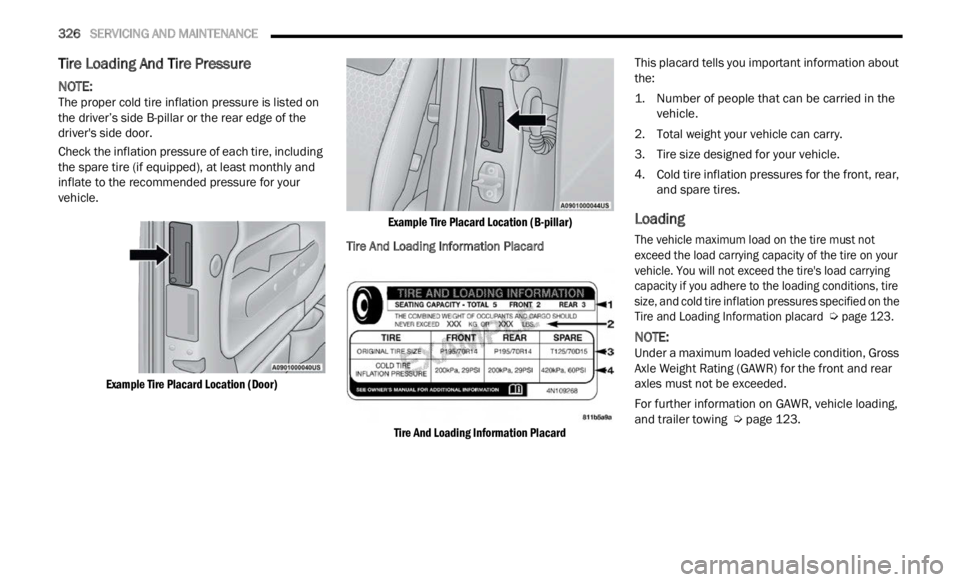
The proper cold tire inflation pressure is listed on
the d r
iver’s side B-pillar or the rear edge of the
driver's side door.
Check the inflation pressure of each tire, including
the s p
are tire (if equipped), at least monthly and
inflate to the recommended pressure for your
vehicle.
Example Tire Placard Location (Door) Example Tire Placard Location (B-pillar)
Tire And Loading Information Placard
Tire And Loading Information Placard
This placard tells you important information about
t
he:
1. N
umber of people that can be carried in the
vehicle
.
2. Total weight your vehicle can carry.
3. T ire
size designed for your vehicle.
4 .
Col
d
tire inflation pressures for the front, rear,
and s
pare tires.
Loading
The vehicle maximum load on the tire must not
exceed the load carrying capacity of the tire on your
vehicle. You will not exceed the tire's load carrying
capacity if you adhere to the loading conditions, tire
size, and cold tire inflation pressures specified on the
Tire and Loading Information placard
Ú
page 123.
NOTE:
Under a maximum loaded vehicle condition, Gross
Axle W
eight Rating (GAWR) for the front and rear
axles must not be exceeded.
For further information on GAWR, vehicle loading,
and t r
ailer towing Ú page 123.
Page 329 of 364

SERVICING AND MAINTENANCE 327
To determine the maximum loading conditions of
your vehicle, locate the statement “The combined
weight of occupants and cargo should never
exceed XXX kg or XXX lbs” on the Tire and Loading
Information placard. The combined weight of
occupants, cargo/luggage and trailer tongue
weight (if applicable) should never exceed the
weight referenced here.
Steps For Determining Correct Load
Limit—
(1) Locate the statement “The combined
weight
of occupants and cargo should
never exceed XXX kg or XXX lbs.” on your
vehicle's placard.
(2) Determine the combined weight of
the dri
ver and passengers that will be
riding in your vehicle.
(3) Subtract the combined weight of the
driver
and passengers from XXX kg or
XXX lbs. (4) The resulting figure equals the
avail
a
ble amount of cargo and luggage
load capacity. For example, if “XXX”
amount equals 1400 lbs. and there will
be five 150 lb passengers in your
vehicle, the amount of available cargo
and luggage load capacity is 650 lbs.
(1400-750 (5x150) = 650 lbs.)
(5) Determine the combined weight of
luggag
e and cargo being loaded on the
vehicle. That weight may not safely
exceed the available cargo and luggage
load capacity calculated in Step 4.
(6) If your vehicle will be towing a trailer,
load fr
om your trailer will be transferred
to your vehicle. Consult this manual to
determine how this reduces the
available cargo and luggage load
capacity of your vehicle.
Metric Example For Load Limit
For example, if “XXX” amount equals 635 kg and
there
will be five 68 kg passengers in your vehicle,
the amount of available cargo and luggage load
capacity is 295 kg (635-340 (5x68) = 295 kg) as
shown in step 4.
NOTE:
If your vehicle will be towing a trailer, load from
your trailer will be transferred to your vehicle.
The following table shows examples on how to
calculate total load, cargo/luggage, and towing
capacities of your vehicle with varying seating
configurations and number and size of occu -
pants. This table is for illustration purposes only
a nd m a
y not be accurate for the seating and
load carry capacity of your vehicle.
For the following example, the combined weight
of occupants and cargo should never exceed
865 lbs (392 kg).
8
Page 356 of 364

354
Fuel...............................................................342Adding.......................................................122Additives...................................................343Clean Air....................................................342Ethanol......................................................342Gasoline....................................................342Gauge..........................................................73Materials Added........................................343Methanol...................................................342Octane Rating.................................342, 345Requirements...........................................342Specifications............................................345Fuses.............................................................303
G
Gasoline, (Fuel).............................................342Gasoline, Clean Air........................................342Gasoline, Reformulated.................................342Gauges
Fuel.............................................................73Gear Selector Override..................................281Glass Cleaning...............................................340Gross Axle Weight Rating...............................124GVWR............................................................123
H
Hazard Warning Flashers..............................268Head Restraints...............................................31Head Rests......................................................31
HeadlightsAutomatic....................................................38Automatic High Beam..................................37Cleaning...................................................338Delay...........................................................38High Beam/Low Beam Select Switch..........37Lights On Reminder.....................................38Passing........................................................37Switch..........................................................36Time Delay...................................................38Heated Mirrors.................................................36Heated Seats...................................................30High Beam/Low Beam Select (Dimmer)
Switch..............................................................37Hill Descent Control......................................226Hill Descent Control Indicator.......................226Hill Start Assist..............................................227Hitches Trailer Towing...........................................125Holder, Coin.....................................................49Hood Prop........................................................56Hood Release..................................................56
I
Ignition.............................................................17Switch..........................................................17Inside Rearview Mirror............................34, 268
Instrument Cluster.............................62, 65, 76Descriptions.................................................76Display Controls...........................................64Engine Oil Reset..........................................65Menu Items.................................................66Instrument Cluster Display...............................64Trip..............................................................69Instrument Panel Lens Cleaning...................340Interior Appearance Care..............................339Interior Lights...................................................39Intermittent Wipers (Delay Wipers)..................41InverterPower...........................................................51
J
Jack Location................................................272Jack Operation.....................................271, 273Jacking And Tire Changing............................271Jacking Instructions......................................273Jump Starting................................................278
K
Key FobArm The Alarm
.............................................20Disarm The Alarm........................................21Keyless Entry...............................................22Programming Additional Key Fobs...............16Remote Keyless Entry..................................14Key Fob Battery Service (Remote Keyless
Entry)
...............................................................15
Page 361 of 364

359
Tires...................................267, 329, 333, 337Aging (Life Of Tires)...................................331Air Pressure...............................................329Chains.......................................................335Changing...................................................271Compact Spare.........................................333General Information........................329, 333High Speed................................................330Inflation Pressure......................................329Jacking......................................................271Life Of Tires...............................................331Load Capacity............................................326Pressure Monitoring System (TPMS)..74, 235Quality Grading..........................................337Radial........................................................330Replacement.............................................332Rotation....................................................336Safety..............................................322, 329Sizes..........................................................323Snow Tires.................................................333Spare Tires......................................333, 334Spinning....................................................331Trailer Towing............................................127Tread Wear Indicators...............................331Tongue Weight/Trailer Weight.......................126Tow HooksEmergency................................................284
Towing..........................................................124Disabled Vehicle.......................................283Guide........................................................126Recreational.............................................129Weight......................................................126Trailer Sway Control (TSC).............................227Trailer Towing...............................................124Hitches.....................................................125Minimum Requirements...........................126Trailer And Tongue Weight........................126Wiring.......................................................128Trailer Towing Guide.....................................126Trailer Weight................................................126TransmissionAutomatic...........................................85, 303Fluid.........................................................345Transporting Pets..........................................265Tread Wear Indicators..................................331Turn Signals..............................................39, 76
U
UconnectPhone Call Features
.................................170Things You Should Know About Your
Uconnect Phone...................................172Uconnect Settings..............................19, 134
Uconnect Phone...................................166, 168Answer Or Ignore An Incoming Call —
Call Currently In Progress.....................171Answer Or Ignore An Incoming Call —
No Call Currently In Progress................171Bluetooth Communication Link................174Call Continuation......................................172Call Controls.............................................170Call Termination.......................................172Cancel Command.....................................166Connecting To A Particular Mobile P
hone Or Audio Device After Pairing.......168Help Command.........................................166Join Calls..................................................172Making A Phone Or Audio Device A Favorite................................................169Making A Second Call While Current Call
Is In Progress........................................172Managing Your Favorites..........................169Natural Speech.........................................166Operation..................................................165Overview...................................................164Pair (Link) Uconnect Phone To A Mobile
Phone...................................................166Pair A Bluetooth Streaming Audio
Device..................................................168
11