fuel JEEP RENEGADE 2023 Owners Manual
[x] Cancel search | Manufacturer: JEEP, Model Year: 2023, Model line: RENEGADE, Model: JEEP RENEGADE 2023Pages: 364, PDF Size: 18.65 MB
Page 6 of 364

4
FOUR-WHEEL DRIVE .............................................. 90
Four-Wheel Drive (4WD) ...... ............................91
SELEC-TERRAIN ..... . ............................................... 92
Mode Selection Guide...... ................................92
ACTIVE GRILLE SHUTTERS — IF EQUIPPED ..... . .. 93
POWER STEERING ...... ........................................... 93
STOP/START SYSTEM ...... ..................................... 93
Autostop Mode ......
...........................................93
Possible Reasons The Engine Does Not
Autostop . ...........................................................94
To Sta
rt The Engine While In Autostop
Mode . ................................................................94
To Man
ually Turn Off The Stop/Start
System . .............................................................95
To Man
ually Turn On The Stop/Start
System . .............................................................95
Syste
m Malfunction ..... . ...................................95
CRUISE CONTROL SYSTEMS — IF EQUIPPED. ..
. .
9 5
Cruise Control ...... ............................................95
Adaptive Cruise Control (ACC) . ..
. .
. ...................97
PARKSENSE FRONT/REAR PARK ASSIST
SYSTEM — IF EQUIPPED ..... .
.............................. 105
ParkSense Sensors ...... ................................. 105
ParkSense Warning Display..... . .................... 105
ParkSense Display . ..
..
. .................................. 105
Enabling And Disabling ParkSense ..... . ........ 108
Service The ParkSense Park Assist System .. 108
C l
eaning The ParkSense System . ..
..
. ........... 108
ParkSense System Usage Precautions ..... . .. 108
Side Distance Warning (SDW) System . ..
. .
. ... 109PARKSENSE ACTIVE PARK ASSIST SYSTEM —
IF EQUIPPED ..... .
.................................................. 111
Enabling And Disabling The ParkSense
Active Park Assist System..... .
....................... 112
Parallel/Perpendicular Parking Space
Assistance Operation . .....
.............................. 113
Exiting The Parking Space ..... . ...................... 115
LANESENSE — IF EQUIPPED . ..
. .
. ....................... 117
LaneSense Operation ...... ............................. 117
Turning LaneSense On Or Off ..... . ................. 117
LaneSense Warning Message . ..
..
. ................ 117
Changing LaneSense Status ..... . .................. 121
REAR BACK UP CAMERA . ..
..
. ............................. 121
REFUELING THE VEHICLE ...... ............................ 122
VEHICLE LOADING ...... ....................................... 123
Certification Label ...... ................................... 123
TRAILER TOWING ..... . .......................................... 124
Common Towing Definitions...... ................... 124
Trailer Hitch Classification ..... . ...................... 125
Trailer Towing Weights (Maximum Trailer
Weight Ratings) . .....
....................................... 126
Trailer And Tongue Weight..... . ...................... 126
Towing Requirements . ..
..
. ............................ 126
Towing Tips ..... . .............................................. 128
RECREATIONAL TOWING . ..
..
. ............................. 129
Towing This Vehicle Behind Another
Vehicle ........................................................... 129
Recr e
ational Towing. ..
..
. ................................ 129 DRIVING TIPS .....
.
................................................. 130
On-Road Driving Tips...... ............................... 130
Off-Road Driving Tips ..... . .............................. 130
MULTIMEDIA
UCONNECT SYSTEMS ......................................... 133
CYBERSECURITY ................................................. 133
UCONNECT SETTINGS ...... ................................... 133
Customer Programmable Features ...... ...... 134
UCONNECT INTRODUCTION..... . .......................... 147
System Overview ...... .................................... 147
Drag & Drop Menu Bar . ..
..
. ........................... 149
Safety And General Information..... . ............. 149
UCONNECT MODES ..... . ....................................... 150
Steering Wheel Audio Controls .................... 150
Radi o Mode ..... . ............................................ 151
Media Mode . ..
. .
. ........................................... 162
Phone Mode ..... . ........................................... 164
ANDROID AUTO™ & APPLE CARPLAY® —
IF EQUIPPED ..... .
................................................... 174
Android Auto™ ...... ........................................ 174
Apple CarPlay® . ..
..
. ....................................... 176
Android Auto™ And Apple CarPlay® Tips
And Tricks . ..................................................... 178
Page 8 of 364
6
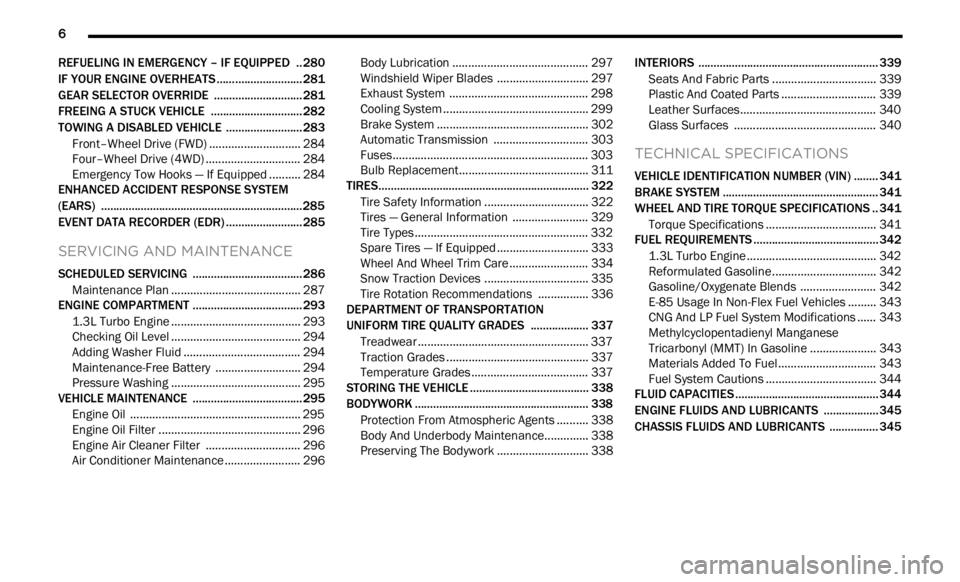
REFUELING IN EMERGENCY – IF EQUIPPED .. 280
IF YOUR ENGINE OVERHEATS ...... ...................... 281
GEAR SELECTOR OVERRIDE ...... ....................... 281
FREEING A STUCK VEHICLE ...... ........................ 282
TOWING A DISABLED VEHICLE ...... ...................283
Front–Wheel Drive (FWD) ...... ....................... 284
Four–Wheel Drive (4WD) ..... . ........................ 284
Emergency Tow Hooks — If Equipped . ..
..
. .... 284
ENHANCED ACCIDENT RESPONSE SYSTEM
(EARS) .................................................................. 285
EVEN T
DATA RECORDER (EDR) ...... ...................285
SERVICING AND MAINTENANCE
SCHEDULED SERVICING .................................... 286
Maintenance Plan ...... ................................... 287
ENGINE COMPARTMENT ..... . .............................. 293
1.3L Turbo Engine ...... ................................... 293
Checking Oil Level ..... . ................................... 294
Adding Washer Fluid . ..
..
. ............................... 294
Maintenance-Free Battery ..... . ..................... 294
Pressure Washing . ..
..
. ................................... 295
VEHICLE MAINTENANCE ..... . .............................. 295
Engine Oil ...................................................... 295
Engin e Oil Filter . ..
..
. ....................................... 296
Engine Air Cleaner Filter ..... . ........................ 296
Air Conditioner Maintenance . ..
..
. .................. 296Body Lubrication .....
.
..................................... 297
Windshield Wiper Blades ..... . ....................... 297
Exhaust System ..... . ...................................... 298
Cooling System . ..
..
. ........................................ 299
Brake System ..... . .......................................... 302
Automatic Transmission . ..
..
. ........................ 303
Fuses.............................................................. 303
Bulb
Replacement. ..
..
. ................................... 311
TIRES..................................................................... 322
Tire
Safety Information ...... ........................... 322
Tires — General Information . ..
..
. .................. 329
Tire Types....................................................... 332
Spar e
Tires — If Equipped . ..
. .
. ....................... 333
Wheel And Wheel Trim Care ..... . ................... 334
Snow Traction Devices . ..
..
. ........................... 335
Tire Rotation Recommendations ..... . .......... 336
DEPARTMENT OF TRANSPORTATION
UNIFORM TIRE QUALITY GRADES ..... .
............. 337
Treadwear ...................................................... 337
Tract ion Grades . ..
..
. ....................................... 337
Temperature Grades ..... . ............................... 337
STORING THE VEHICLE . ..
..
. ................................. 338
BODYWORK ...... ................................................... 338
Protection From Atmospheric Agents ...... .... 338
Body And Underbody Maintenance. ..
..
. ........ 338
Preserving The Bodywork ..... . ....................... 338INTERIORS .....
.
..................................................... 339
Seats And Fabric Parts ...... ........................... 339
Plastic And Coated Parts ..... . ........................ 339
Leather Surfaces. ..
..
. ..................................... 340
Glass Surfaces ..... . ....................................... 340
TECHNICAL SPECIFICATIONS
VEHICLE IDENTIFICATION NUMBER (VIN) ........ 341
BRAKE SYSTEM ...... ............................................. 341
WHEEL AND TIRE TORQUE SPECIFICATIONS .. 341 Tor que Specifications ...... ............................. 341
FUEL REQUIREMENTS . ..
..
. ................................... 342
1.3L Turbo Engine ...... ................................... 342
Reformulated Gasoline..... . ........................... 342
Gasoline/Oxygenate Blends . ..
..
. .................. 342
E-85 Usage In Non-Flex Fuel Vehicles ..... . ... 343
CNG And LP Fuel System Modifications . ..
..
. 343
Methylcyclopentadienyl Manganese
Tricarbonyl (MMT) In Gasoline . .....
............... 343
Materials Added To Fuel ..... . ......................... 343
Fuel System Cautions ..... . ............................. 344
FLUID CAPACITIES . ..
..
. ......................................... 344
ENGINE FLUIDS AND LUBRICANTS ...... ............ 345
CHASSIS FLUIDS AND LUBRICANTS ...... .......... 345
Page 13 of 364
11
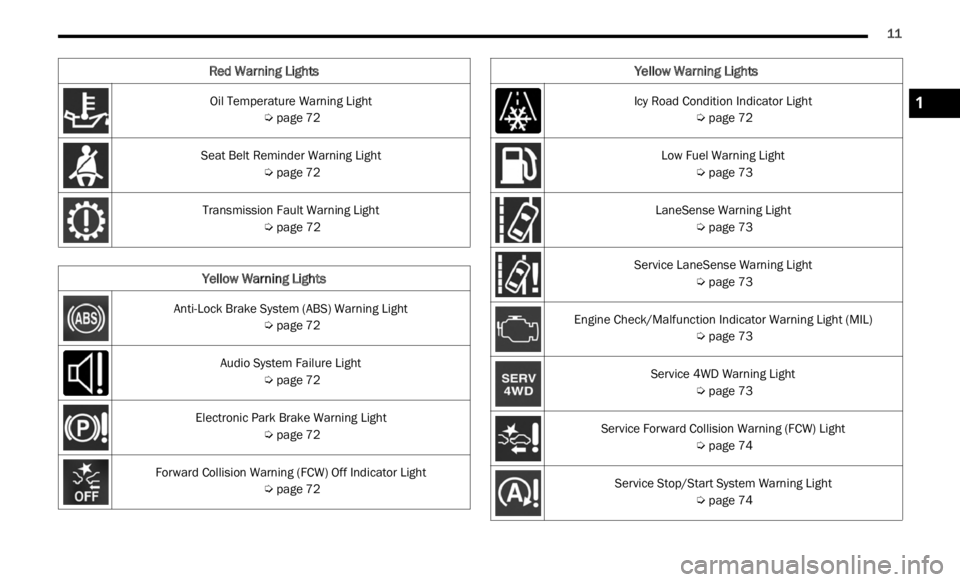
Oil Temperature Warning Light
Ú page 72
Seat Belt Reminder Warning Light Ú page 72
Transmission Fault Warning Light Ú page 72
Yellow Warning Lights
Anti-Lock Brake System (ABS) Warning Light
Ú page 72
Audio System Failure Light Ú page 72
Electronic Park Brake Warning Light Ú page 72
Forward Collision Warning (FCW) Off Indicator Light Ú page 72
Red Warning Lights
Icy Road Condition Indicator Light
Ú page 72
Low Fuel Warning Light Ú page 73
LaneSense Warning Light Ú page 73
Service LaneSense Warning Light Ú page 73
Engine Check/Malfunction Indicator Warning Light (MIL) Ú page 73
Service 4WD Warning Light Ú page 73
Service Forward Collision Warning (FCW) Light Ú page 74
Service Stop/Start System Warning Light Ú page 74
Yellow Warning Lights
1
Page 14 of 364
12
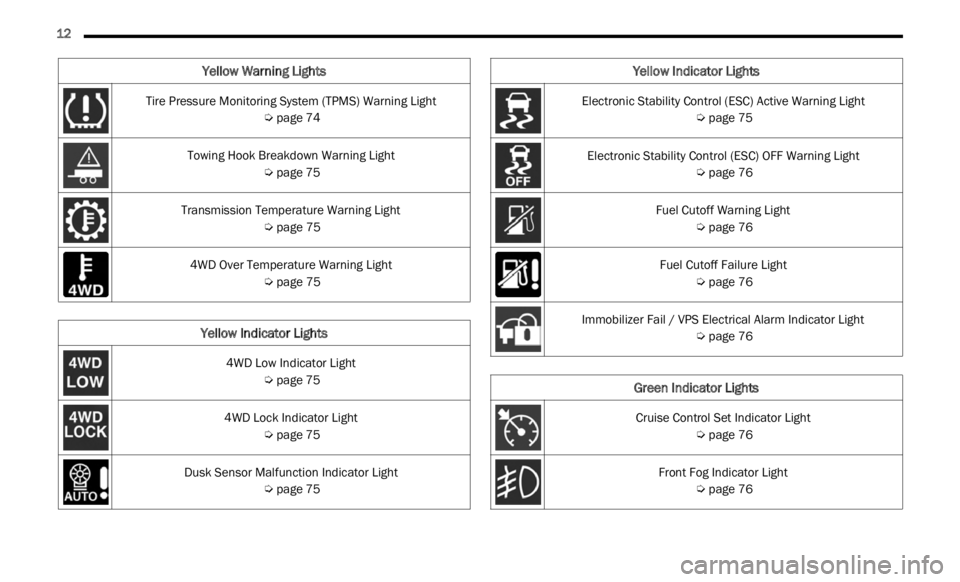
Tire Pressure Monitoring System (TPMS) Warning Light
Ú page 74
Towing Hook Breakdown Warning Light Ú page 75
Transmission Temperature Warning Light Ú page 75
4WD Over Temperature Warning Light Ú page 75
Yellow Indicator Lights
4WD Low Indicator Light
Ú page 75
4WD Lock Indicator Light Ú page 75
Dusk Sensor Malfunction Indicator Light Ú page 75
Yellow Warning Lights
Electronic Stability Control (ESC) Active Warning Light
Ú page 75
Electronic Stability Control (ESC) OFF Warning Light Ú page 76
Fuel Cutoff Warning Light Ú page 76
Fuel Cutoff Failure Light Ú page 76
Immobilizer Fail / VPS Electrical Alarm Indicator Light Ú page 76
Green Indicator Lights
Cruise Control Set Indicator Light
Ú page 76
Front Fog Indicator Light Ú page 76
Yellow Indicator Lights
Page 20 of 364
18 GETTING TO KNOW YOUR VEHICLE
For information on normal starting, see
Ú page 80.
REMOTE START — IF EQUIPPED
This system uses the key fob to start the
engine conveniently from outside the
vehic l
e while still maintaining security.
The system has a range of approximately
328 ft (100 m).
Remote Start is used to defrost windows in cold
w eathe
r, and to reach a comfortable climate in all
ambient conditions before the driver enters the
vehicle.
NOTE:
Obstructions between the vehicle and key fob may
reduc e
this range.
HOW TO USE REMOTE START
Push and release the Remote Start button on the
key fob twice within five seconds. The vehicle
doors will lock, the parking lights will flash, and the
horn will chirp twice (if programmed). Then, the
engine will start, and the vehicle will remain in the
Remote Start mode for a 15 minute cycle. Pushing
the R e
mote Start button a third time shuts the
engine off.
NOTE:
With Remote Start, the engine will only run for
15 minutes.
Remote Start can only be used twice.
If an engine fault is present or fuel level is low,
the vehicle will start and then shut down in
10 seconds.
The parking lights will turn on and remain on
during Remote Start mode.
For security, power window and power sunroof
operation (if equipped) are disabled when the
vehicle is in the Remote Start mode.
The ignition must be placed in the ON/RUN posi -
tion before the Remote Start sequence can be
repea t
ed for a third cycle.
Never leave children alone in a vehicle, or with
access to an unlocked vehicle.
Allowing children to be in a vehicle unattended
is dangerous for a number of reasons. A child
or others could be seriously or fatally injured.
Children should be warned not to touch the
parking brake, brake pedal or the gear
selector.
Do not leave the key fob in or near the vehicle,
or in a location accessible to children, and do
not leave the ignition in the ON or RUN posi -
tion. A child could operate power windows,
other c
ontrols, or move the vehicle.
Do not leave children or animals inside parked
vehicles in hot weather. Interior heat buildup
may cause serious injury or death.
CAUTION!
An unlocked vehicle is an invitation for thieves.
Always remove key fob from the vehicle and lock
all doors when leaving the vehicle unattended.
WARNING!
WARNING!
Do not start or run an engine in a closed
garage or confined area. Exhaust gas contains
Carbon Monoxide (CO) which is odorless and
colorless. Carbon Monoxide is poisonous and
can cause serious injury or death when
inhaled.
Keep key fobs away from children. Operation
of the Remote Start system, windows, door
locks or other controls could cause serious
injury or death.
Page 21 of 364

GETTING TO KNOW YOUR VEHICLE 19
(Continued)
All of the following conditions must be met before
the engine will remote start:
Gear selector in PARK
Doors closed
Hood closed
Liftgate closed
Hazard switch off
Brake switch inactive (brake pedal not pressed)
Battery at an acceptable charge level
PANIC button not pushed
System not disabled from previous Remote
Start event
Vehicle Security system indicator flashing
Ignition in OFF position
Fuel level meets minimum requirement
Vehicle Security system is not signaling an intru -
sion
Malfunction Indicator Light is not illuminated
TO EXIT REMOTE START MODE
To drive the vehicle after starting the Remote Start
system, push and release the START/STOP ignition
button while pressing the brake pedal prior to the
end of the 15 minute cycle.
The Remote Start system will turn the engine off if
t he Re
mote Start button on the key fob is pushed
again, or if the engine is allowed to run for the
entire 15 minute cycle. Once the ignition is placed
in th e
ON/RUN position, the climate controls will
resume previously set operations (temperature,
blower control, etc.).
NOTE:
The message “Remote Start Active — Push Start
Button” will show in the instrument cluster
display until you push the START/STOP ignition
button.
To avoid unintentional shutdowns, the system
will disable for two seconds after receiving a
valid Remote Start request.
REMOTE START FRONT DEFROST
A
CTIVATION — IF EQUIPPED
When Remote Start is active, and the outside
ambient temperature is 40°F (4.4°C) or below, the
system will automatically activate front defrost for
15 minutes or less. The time is dependent on the
ambie n
t temperature. Once the timer expires, the
system will automatically adjust the settings
depending on ambient conditions. See “Remote
Start Comfort Systems — If Equipped” in the next
section for detailed operation.
REMOTE START COMFORT SYSTEMS —
I
F EQUIPPED
When Remote Start is activated, the front and rear
defrost will automatically turn on in cold weather.
The heated steering wheel and driver heated seat
feature will turn on if selected in the comfort menu
screen within Uconnect Settings Ú page 133. The
vehicle will adjust the climate control settings
depen d
ing on the outside ambient temperature.
Automatic Temperature Control (ATC) —
If Equipped
The climate controls will be automatically adjusted
t o the
optimal temperature and mode settings
depending on the outside ambient temperature.
This will occur until the ignition is placed in the ON/
RUN position where the climate controls will
resume their previous settings.
WARNING!
Do not start or run an engine in a closed garage
or confined area. Exhaust gas contains Carbon
Monoxide (CO) which is odorless and colorless.
Carbon Monoxide is poisonous and can cause
serious injury or death when inhaled.
Keep key fobs away from children. Operation of
the Remote Start system, windows, door locks
or other controls could cause serious injury or
death.
WARNING!
2
Page 22 of 364

20 GETTING TO KNOW YOUR VEHICLE
Manual Temperature Control (MTC) — If Equipped
In ambient temperatures at 40°F (4.4°C) or
below, the climate settings will default to
maximum heat, with fresh air entering the
cabin. If the front defrost timer expires, the
vehicle will enter Mix Mode.
In ambient temperatures from 40°F (4.4°C) to
78°F (26°C), the climate settings will be based
on the last settings selected by the driver.
In ambient temperatures at 78°F (26°C) or
above, the climate settings will default to MAX
A/C, Bi-Level Mode, with Recirculation on.
For more information on ATC, MTC, and climate
control
settings, see Ú page 44.
NOTE:
These features will stay on through the duration of
Remote
Start until the ignition is placed in the ON/
RUN position. The climate control settings will
change if manually adjusted by the driver while the
vehicle is in Remote Start mode, and exit auto -
matic override. This includes the OFF button on the
clima t
e controls, which will turn the system off.
REMOTE START WINDSHIELD WIPER
D
E–ICER ACTIVATION — IF EQUIPPED
When Remote Start Is active and the outside
ambient temperature is less than 40°F (4.4°C),
the Windshield Wiper De-Icer will activate. Exiting
Remote Start will resume its previous operation. If the Windshield Wiper De-Icer was active, the timer
and operation will continue
Ú page 349.
REMOTE START CANCEL MESSAGE —
I
F EQUIPPED
The following messages will display in the
instrument cluster display if the vehicle fails to
remote start or exits Remote Start prematurely:
Remote Start Cancelled — Door Open
Remote Start Cancelled — Hood Open
Remote Start Cancelled — Fuel Low
Remote Start Cancelled — Liftgate Open
Remote Start Cancelled — Too Cold
Remote Start Cancelled — Time Expired
Remote Start Disabled — Start Vehicle To Reset
The message will stay active until the ignition is
p la
ce
d
in the ON/RUN position.
VEHICLE SECURITY SYSTEM — IF EQUIPPED
The Vehicle Security system monitors the vehicle
doors, hood, liftgate, and the Keyless Enter ‘n Go™
Ignition for unauthorized operation. While the
Vehicle Security system is armed, interior switches
for door locks and liftgate release are disabled. If
something triggers the system, the Vehicle Security
system will provide the following audible and
visible signals:
The horn will pulse
The turn signals will flash
The Vehicle Security Light in the instrument
cluster will flash
NOTE:
The Vehicle Security system is factory adjusted
to standards from different countries.
The Vehicle Security system is a complementary
security system developed to hinder the occur -
rence of vehicle theft and prevent vandalism. It
does not
prevent the theft of your vehicle; the
system is a deterrent.
The Vehicle Security system does not monitor
glass breakage or the movement of objects or
people inside the vehicle. The alarm does not
intervene in the case of vehicle tilt variations
when it is parked.
TO ARM THE SYSTEM
Follow these steps to arm the Vehicle Security
system:
1. Make sure the vehicle’s ignition is placed in the OF
F position.
2. Perform one of the following methods to lock the v
ehicle:
Push the lock button on the interior power
door lock switch with the driver and/or
passenger door open.
Page 24 of 364
22 GETTING TO KNOW YOUR VEHICLE
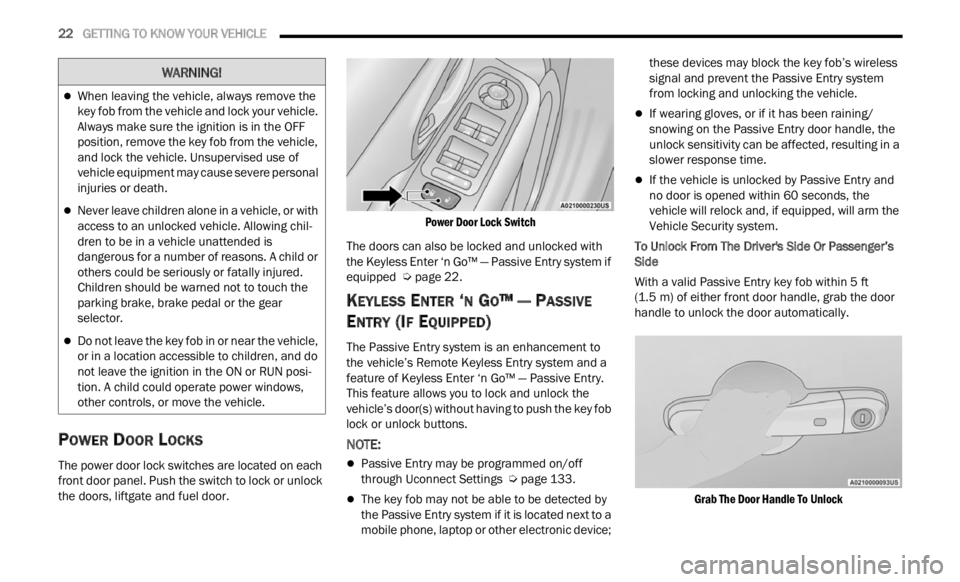
POWER DOOR LOCKS
The power door lock switches are located on each
front door panel. Push the switch to lock or unlock
the doors, liftgate and fuel door.
Power Door Lock Switch
The doors can also be locked and unlocked with
the K e
yless Enter ‘n Go™ — Passive Entry system if
equipped Ú page 22.
KEYLESS ENTER ‘N GO™ — PASSIVE
E
NTRY (IF EQUIPPED)
The Passive Entry system is an enhancement to
the vehicle’s Remote Keyless Entry system and a
feature of Keyless Enter ‘n Go™ — Passive Entry.
This feature allows you to lock and unlock the
vehicle’s door(s) without having to push the key fob
lock or unlock buttons.
NOTE:
Passive Entry may be programmed on/off
through Uconnect Settings Ú page 133.
The key fob may not be able to be detected by
the Passive Entry system if it is located next to a
mobile phone, laptop or other electronic device; these devices may block the key fob’s wireless
signal and prevent the Passive Entry system
from locking and unlocking the vehicle.
If wearing gloves, or if it has been raining/
snowing on the Passive Entry door handle, the
unlock sensitivity can be affected, resulting in a
slower response time.
If the vehicle is unlocked by Passive Entry and
no door is opened within 60 seconds, the
vehicle will relock and, if equipped, will arm the
Vehicle Security system.
To Unlock From The Driver's Side Or Passenger’s
Side
Wit
h a valid Passive Entry key fob within 5 ft
(1.5 m)
of either front door handle, grab the door
handl e
to unlock the door automatically.
Grab The Door Handle To Unlock
When leaving the vehicle, always remove the
key fob from the vehicle and lock your vehicle.
Always make sure the ignition is in the OFF
position, remove the key fob from the vehicle,
and lock the vehicle. Unsupervised use of
vehicle equipment may cause severe personal
injuries or death.
Never leave children alone in a vehicle, or with
access to an unlocked vehicle. Allowing chil -
dren to be in a vehicle unattended is
d anger
ous for a number of reasons. A child or
others could be seriously or fatally injured.
Children should be warned not to touch the
parking brake, brake pedal or the gear
selector.
Do not leave the key fob in or near the vehicle,
or in a location accessible to children, and do
not leave the ignition in the ON or RUN posi -
tion. A child could operate power windows,
other c
ontrols, or move the vehicle.
WARNING!
Page 66 of 364
64 GETTING TO KNOW YOUR INSTRUMENT PANEL
INSTRUMENT CLUSTER DESCRIPTIONS
1. Tachometer
Indicates the engine speed in revolutions
per minute (RPM x 1000).
2. Instrument Cluster Display
The instrument cluster display features a
driver interactive display Ú page 64.
3. Speedometer
Indicates vehicle speed.
4. T emperature Gauge
The temperature gauge shows engine
coolant temperature. Any reading within the
normal range indicates that the engine
cooling system is operating satisfactorily.
The gauge will likely indicate a higher
temperature when driving in hot weather or
up mountain grades. It should not be
allowed to exceed the upper limits of the
normal operating range. 5. Fuel Gauge
The fuel gauge shows the level of fuel in the
fuel tank when the ignition is in the ON/RUN
position.
The fuel pump symbol points to the
side of the vehicle where the fuel
d oor
is
located.
INSTRUMENT CLUSTER DISPLAY
Your vehicle is equipped with an instrument cluster
display, which offers useful information to the
driver. With the ignition in the OFF position,
opening/closing of a door will activate the display
for viewing, and display the total miles, or
kilometers, in the odometer. Your instrument
cluster display is designed to display important
information about your vehicle’s systems and
features. Using a driver interactive display located on the instrument panel, your instrument cluster
display can show you how systems are working and
give you warnings when they aren’t. The steering
wheel mounted controls allow you to scroll through
and enter the main menus and submenus. You can
access the specific information you want and
make selections and adjustments.
INSTRUMENT CLUSTER DISPLAY
L
OCATION AND CONTROLS
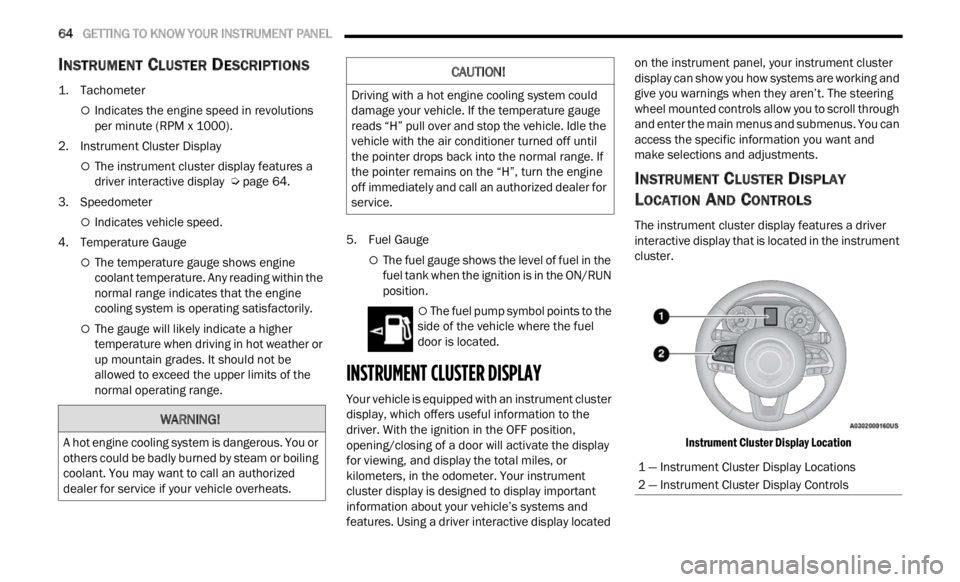
The instrument cluster display features a driver
interactive display that is located in the instrument
cluster.
Instrument Cluster Display Location
WARNING!
A hot engine cooling system is dangerous. You or
others could be badly burned by steam or boiling
coolant. You may want to call an authorized
dealer for service if your vehicle overheats.
CAUTION!
Driving with a hot engine cooling system could
damage your vehicle. If the temperature gauge
reads “H” pull over and stop the vehicle. Idle the
vehicle with the air conditioner turned off until
the pointer drops back into the normal range. If
the pointer remains on the “H”, turn the engine
off immediately and call an authorized dealer for
service.
1 — Instrument Cluster Display Locations
2 — Instrument Cluster Display Controls
Page 68 of 364

66 GETTING TO KNOW YOUR INSTRUMENT PANEL
INSTRUMENT CLUSTER DISPLAY MENU
I
TEMS
NOTE:
The instrument cluster display menu items display
in th e
center of the instrument cluster. Menu items
may vary depending on your vehicle features.
Speedometer
Push and release the up or down arrow
button until the speedometer is displayed in the
i n s
tr
u
ment cluster display. Push and release the
OK button to toggle units (mph or km/h) of the
speedometer.
Vehicle Info
Push and release the up or down arrow
button until “Vehicle Info” is highlighted in the
instr u
ment cluster display. Push and release the
right arrow button and Coolant Temp will be
displayed. Push the right
or left arrow button
to sc
roll through the following information displays:
Tire Pressure — View the information relating to
the Tire Pressure Monitoring System (If
Equipped).
Coolant Temperature — View the engine coolant
temperature.
Trans Temperature — View the trans oil
temperature.
Oil Temperature — View the oil temperature.
Battery Voltage — View the voltage value (state
of charge) of the battery.
Service — View the service status message(s) (If
Equipped).
Driver Assist — If Equipped
Push and release the up or down arrow
button until the Driver Assist menu title displayed
is hi g
hlighted in the instrument cluster display.
LaneSense — If Equipped
The instrument cluster display displays the current
LaneSe n
se status and information. The
information displayed depends on LaneSense
system status and the conditions that need to be
met Ú page 133.
Fuel Economy
This menu item allows you to view the fuel
economy of the vehicle. The following will display:
Range (Miles or km)
Current Consumption (mpg or L/100 km or
km/L)
Average Consumption (mpg or L/100 km or
km/L)
Reset procedure shown at the bottom of the
d ispla
y.
Trip Info
Push and release the up or down arrow
button until the Trip menu title is displayed in the
instr u
ment cluster display. Toggle the left
or
right arrow button to select Trip A or Trip B. The
Trip information will display the following:
Distance – Shows the total distance (mi or km)
traveled for Trip A or Trip B since the last reset.
Average Fuel Economy – Shows the average
fuel economy (MPG or L/100 km or km/L) of
Trip A
or Trip B since the last reset.
Elapsed Time – Shows the total elapsed time of
travel since Trip A or Trip B has been reset.
Hold the OK butt
on to reset feature information.
Stop/Start – If Equipped
Push and release the up or down arrow
button until the Stop/Start menu title is displayed
i n
t h
e
instrument cluster display.
This menu shows messages related to Stop/Start.
Only on
e message can be viewed at a time until the
condition is cleared. When the Stop/Start is
engaged (and the engine is off), the associated
hardware telltale is turned on. Whenever a user
pushes the Stop/Start button on the central stack,
a pop-up message of the Stop/Start status will
appear on the instrument cluster display.