Exit lock JEEP WAGONEER 2023 User Guide
[x] Cancel search | Manufacturer: JEEP, Model Year: 2023, Model line: WAGONEER, Model: JEEP WAGONEER 2023Pages: 396, PDF Size: 15.17 MB
Page 39 of 396
GETTING TO KNOW YOUR VEHICLE37
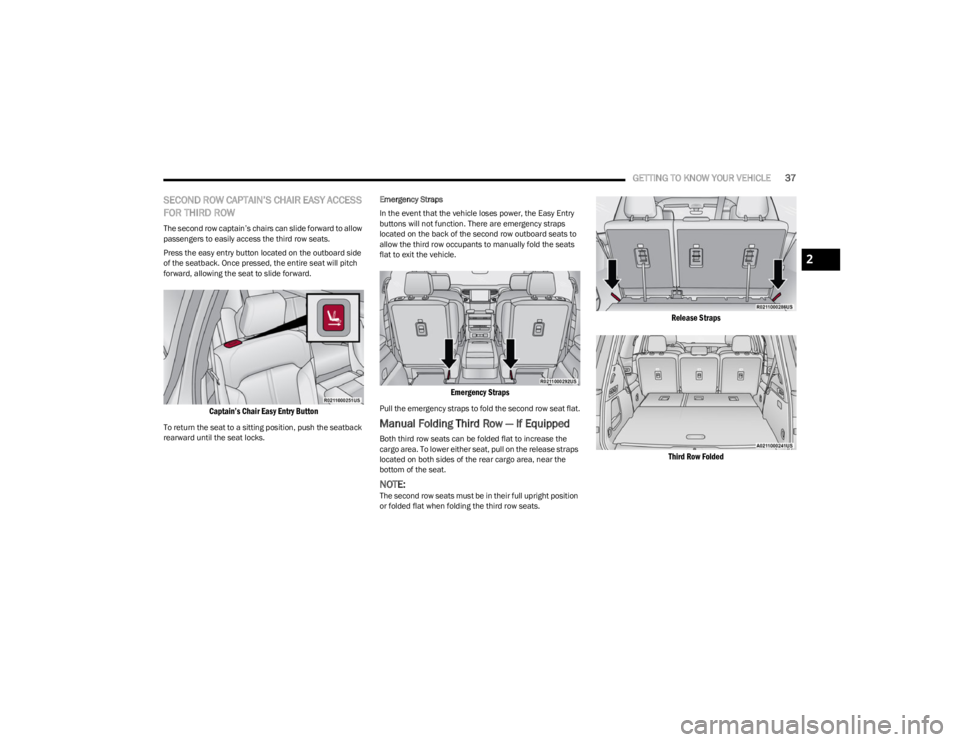
SECOND ROW CAPTAIN’S CHAIR EASY ACCESS
FOR THIRD ROW
The second row captain’s chairs can slide forward to allow
passengers to easily access the third row seats.
Press the easy entry button located on the outboard side
of the seatback. Once pressed, the entire seat will pitch
forward, allowing the seat to slide forward.
Captain’s Chair Easy Entry Button
To return the seat to a sitting position, push the seatback
rearward until the seat locks. Emergency Straps
In the event that the vehicle loses power, the Easy Entry
buttons will not function. There are emergency straps
located on the back of the second row outboard seats to
allow the third row occupants to manually fold the seats
flat to exit the vehicle.
Emergency Straps
Pull the emergency straps to fold the second row seat flat.
Manual Folding Third Row — If Equipped
Both third row seats can be folded flat to increase the
cargo area. To lower either seat, pull on the release straps
located on both sides of the rear cargo area, near the
bottom of the seat.
NOTE:The second row seats must be in their full upright position
or folded flat when folding the third row seats.
Release Straps
Third Row Folded
2
23_WS_OM_EN_USC_t.book Page 37
Page 54 of 396
52GETTING TO KNOW YOUR VEHICLE
POWER MIRRORS
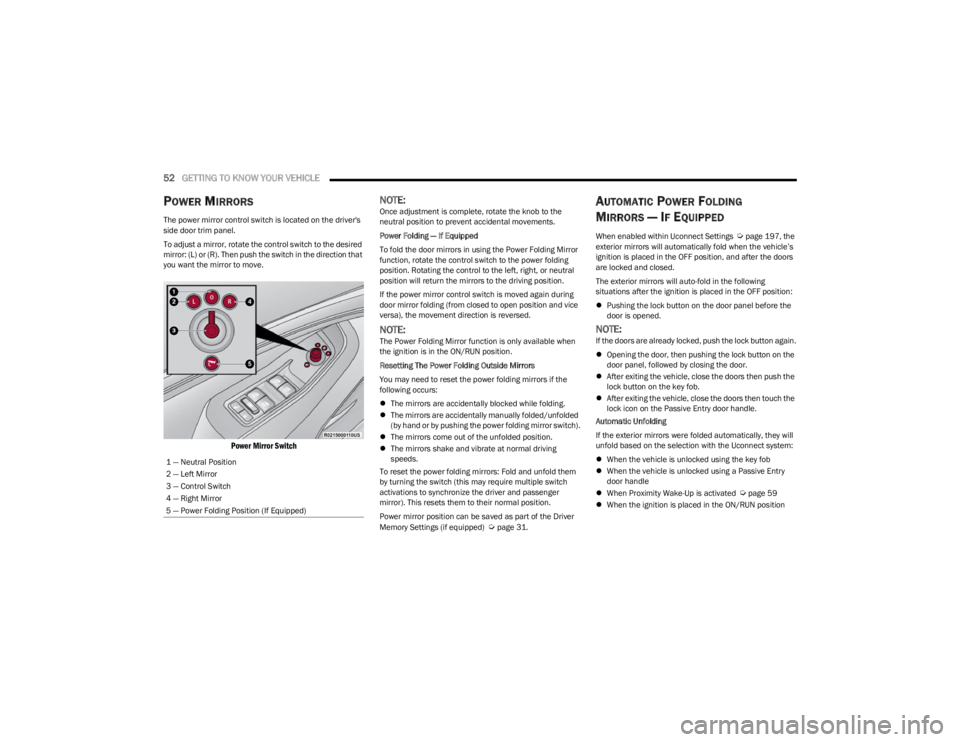
The power mirror control switch is located on the driver's
side door trim panel.
To adjust a mirror, rotate the control switch to the desired
mirror: (L) or (R). Then push the switch in the direction that
you want the mirror to move.
Power Mirror Switch
NOTE:Once adjustment is complete, rotate the knob to the
neutral position to prevent accidental movements.
Power Folding — If Equipped
To fold the door mirrors in using the Power Folding Mirror
function, rotate the control switch to the power folding
position. Rotating the control to the left, right, or neutral
position will return the mirrors to the driving position.
If the power mirror control switch is moved again during
door mirror folding (from closed to open position and vice
versa), the movement direction is reversed.
NOTE:The Power Folding Mirror function is only available when
the ignition is in the ON/RUN position.
Resetting The Power Folding Outside Mirrors
You may need to reset the power folding mirrors if the
following occurs:
The mirrors are accidentally blocked while folding.
The mirrors are accidentally manually folded/unfolded
(by hand or by pushing the power folding mirror switch).
The mirrors come out of the unfolded position.
The mirrors shake and vibrate at normal driving
speeds.
To reset the power folding mirrors: Fold and unfold them
by turning the switch (this may require multiple switch
activations to synchronize the driver and passenger
mirror). This resets them to their normal position.
Power mirror position can be saved as part of the Driver
Memory Settings (if equipped)
Úpage 31.
AUTOMATIC POWER FOLDING
M
IRRORS — IF EQUIPPED
When enabled within Uconnect Settings Úpage 197, the
exterior mirrors will automatically fold when the vehicle’s
ignition is placed in the OFF position, and after the doors
are locked and closed.
The exterior mirrors will auto-fold in the following
situations after the ignition is placed in the OFF position:
Pushing the lock button on the door panel before the
door is opened.
NOTE:If the doors are already locked, push the lock button again.
Opening the door, then pushing the lock button on the
door panel, followed by closing the door.
After exiting the vehicle, close the doors then push the
lock button on the key fob.
After exiting the vehicle, close the doors then touch the
lock icon on the Passive Entry door handle.
Automatic Unfolding
If the exterior mirrors were folded automatically, they will
unfold based on the selection with the Uconnect system:
When the vehicle is unlocked using the key fob
When the vehicle is unlocked using a Passive Entry
door handle
When Proximity Wake-Up is activated
Úpage 59
When the ignition is placed in the ON/RUN position
1 — Neutral Position
2 — Left Mirror
3 — Control Switch
4 — Right Mirror
5 — Power Folding Position (If Equipped)
23_WS_OM_EN_USC_t.book Page 52
Page 61 of 396

GETTING TO KNOW YOUR VEHICLE59
PARKING LIGHTS AND PANEL LIGHTS
To turn on the parking lights and instrument panel lights,
rotate the headlight switch clockwise. To turn off the
parking lights, rotate the headlight switch back to the O
(off) position.
NOTE:Vehicles sold in Canada are equipped with a headlight
switch with an AUTO and ON detent but without an OFF
detent. Headlights will be deactivated when the headlight
switch is placed in the parking lights position. However,
the Daytime Running Lights (DRLs) will be activated along
with the front and rear marker lights. The DRLs may be
deactivated when the parking brake is engaged.
HEADLIGHTS ON AUTOMATICALLY WITH
W
IPERS
If your vehicle is equipped with Automatic Headlights, it
also has this customer-programmable feature. When your
headlights are in the automatic mode and the engine is
running, they will automatically turn on when the wiper
system is on. This feature is programmable through the
Uconnect system
Úpage 197.
NOTE:When your headlights come on during the daytime, the
vehicle will monitor outside brightness and decide if the
instrument panel needs to be dimmed or not
Úpage 60.
HEADLIGHT ILLUMINATION ON
A
PPROACH
When enabled, the headlights, exterior door handle
pocket lights (if equipped), and interior lights will
illuminate when the unlock button on the key fob is
pushed as the operator is approaching the vehicle. This
feature can be turned on/off, and the length of time the
headlights stay on can be programmed for up to
90 seconds within Uconnect Settings
Úpage 197.
Proximity Wake-Up — If Equipped
This feature is enabled/disabled within the Uconnect
system, and is activated when the operator approaches
the driver’s door, passenger’s door, or liftgate with a valid
key fob on their person. Some exterior and interior lights
will illuminate in order to provide an increased sense of
welcome and security as the operator approaches the
vehicle in the dark. “Headlight Illumination On Approach”
must be selected and set to a time value other than zero
within Uconnect Settings for Proximity Wake-Up to
activate.
The doors may be locked or unlocked for this feature to
activate, as long as the ignition is in the OFF position, or
during a Remote Start event. It will not activate if the doors
are locked and the ignition was placed in the ON/RUN
position.
NOTE:Proximity Wake-Up may not activate under the following
conditions:
After numerous consecutive activations, in order to
conserve the vehicle’s battery
After the vehicle’s engine has been off for several days Headlight Animation — If Equipped
When “Headlight Illumination On Approach” is turned on,
and set to a time value above zero, the exterior lights
illuminate in a theatrical manner during approach to the
vehicle. This feature is activated in the following
situations:
Proximity Wake-Up (if equipped) is activated
Remote Start is activated
The unlock button on the key fob is pushed
NOTE:For Headlight Animation to activate with Remote Start or
with the push of the unlock button, “Greeting Lights” must
also be selected within the Uconnect system.
HEADLIGHT DELAY
To aid in your exit, your vehicle is equipped with a
headlight delay that will leave the headlights on for
approximately 90 seconds. This delay is initiated when the
ignition is placed in the OFF position while the headlight
switch is on, and then the headlight switch is cycled off.
Headlight delay can be canceled by either turning the
headlight switch on then off, or by placing the ignition in
the ON position.
NOTE:The headlight delay time is programmable through
Uconnect Settings Úpage 197.
LIGHTS-ON REMINDER
If the headlights or parking lights are left on after the
ignition is placed in the OFF position, a chime will sound
when the driver’s door is opened.
2
23_WS_OM_EN_USC_t.book Page 59
Page 70 of 396
68GETTING TO KNOW YOUR VEHICLE
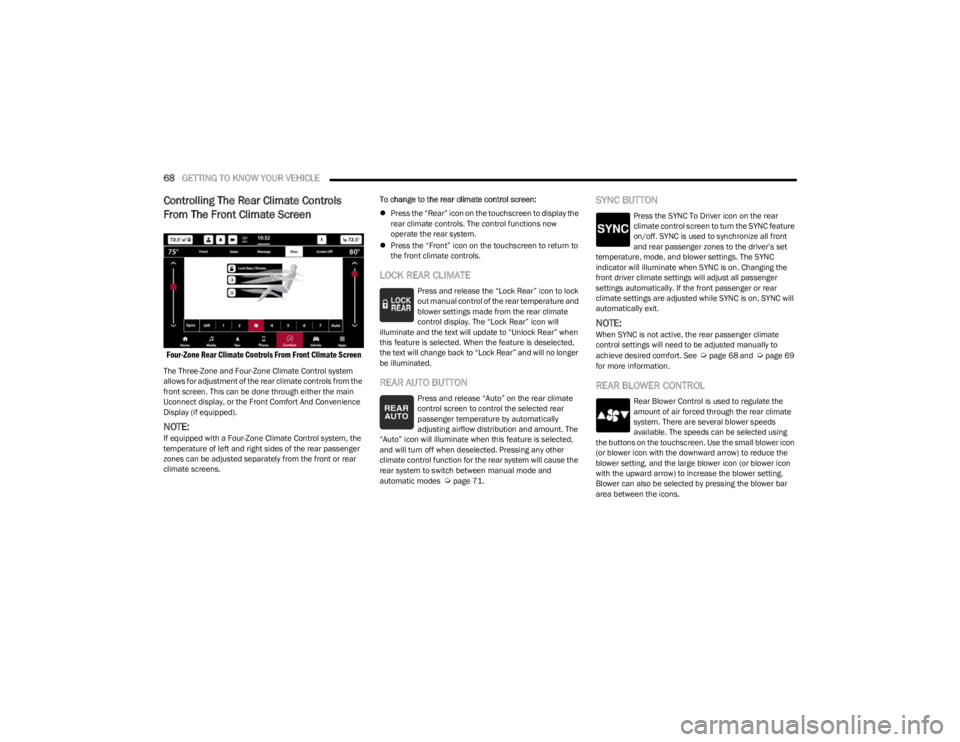
Controlling The Rear Climate Controls
From The Front Climate Screen
Four-Zone Rear Climate Controls From Front Climate Screen
The Three-Zone and Four-Zone Climate Control system
allows for adjustment of the rear climate controls from the
front screen. This can be done through either the main
Uconnect display, or the Front Comfort And Convenience
Display (if equipped).
NOTE:If equipped with a Four-Zone Climate Control system, the
temperature of left and right sides of the rear passenger
zones can be adjusted separately from the front or rear
climate screens. To change to the rear climate control screen:
Press the “Rear” icon on the touchscreen to display the
rear climate controls. The control functions now
operate the rear system.
Press the “Front” icon on the touchscreen to return to
the front climate controls.
LOCK REAR CLIMATE
Press and release the “Lock Rear” icon to lock
out manual control of the rear temperature and
blower settings made from the rear climate
control display. The “Lock Rear” icon will
illuminate and the text will update to “Unlock Rear” when
this feature is selected. When the feature is deselected,
the text will change back to “Lock Rear” and will no longer
be illuminated.
REAR AUTO BUTTON
Press and release “Auto” on the rear climate
control screen to control the selected rear
passenger temperature by automatically
adjusting airflow distribution and amount. The
“Auto” icon will illuminate when this feature is selected,
and will turn off when deselected. Pressing any other
climate control function for the rear system will cause the
rear system to switch between manual mode and
automatic modes
Úpage 71.
SYNC BUTTON
Press the SYNC To Driver icon on the rear
climate control screen to turn the SYNC feature
on/off. SYNC is used to synchronize all front
and rear passenger zones to the driver’s set
temperature, mode, and blower settings. The SYNC
indicator will illuminate when SYNC is on. Changing the
front driver climate settings will adjust all passenger
settings automatically. If the front passenger or rear
climate settings are adjusted while SYNC is on, SYNC will
automatically exit.
NOTE:When SYNC is not active, the rear passenger climate
control settings will need to be adjusted manually to
achieve desired comfort. See
Úpage 68 and Úpage 69
for more information.
REAR BLOWER CONTROL
Rear Blower Control is used to regulate the
amount of air forced through the rear climate
system. There are several blower speeds
available. The speeds can be selected using
the buttons on the touchscreen. Use the small blower icon
(or blower icon with the downward arrow) to reduce the
blower setting, and the large blower icon (or blower icon
with the upward arrow) to increase the blower setting.
Blower can also be selected by pressing the blower bar
area between the icons.
23_WS_OM_EN_USC_t.book Page 68
Page 121 of 396
119
STARTING AND OPERATING
STARTING THE ENGINE
Before starting your vehicle, adjust your seat, adjust the inside
and outside mirrors, fasten your seat belt, and if present,
instruct all other occupants to buckle their seat belts.
AUTOMATIC TRANSMISSION
The gear selector must be in the NEUTRAL (N) or PARK (P)
position before you can start the engine. Apply the brakes
before shifting into any driving gear.
KEYLESS ENTER ‘N GO™ — IGNITION
This feature allows the driver to operate the ignition
switch with the push of a button, as long as the Remote
Start/Keyless Enter ‘n Go™ key fob is in the passenger
compartment.
NORMAL STARTING
To Turn On The Engine Using The ENGINE START/STOP
Button
1. The transmission must be in PARK (P).
2. Press and hold the brake pedal while pushing the ENGINE START/STOP button once.
3. The system takes over and attempts to start the vehicle. If the vehicle fails to start, the starter will
disengage automatically after 10 seconds.
4. If you wish to stop the cranking of the engine prior to the engine starting, push the ENGINE START/STOP
button again.
To Turn Off The Engine Using The ENGINE START/STOP
Button
1. Place the gear selector in PARK, then push and release the ENGINE START/STOP button.
2. The ignition will return to the OFF position.
3. If the gear selector is not in PARK, the ENGINE START/STOP button must be held for two seconds or
three short pushes in a row with the vehicle speed
above 5 mph (8 km/h) before the engine will shut off.
The ignition will remain in the ON/RUN position until
the gear selector is in PARK and the button is pushed
twice to the OFF position.
WARNING!
Before exiting a vehicle, always come to a complete
stop, then shift the automatic transmission into PARK
and apply the parking brake.
Always make sure the keyless ignition node is in the
OFF position, key fob is removed from the vehicle and
vehicle is locked.
Never leave children alone in a vehicle, or with access
to an unlocked vehicle. Leaving children in a vehicle
unattended is dangerous for a number of reasons. A
child or others could be seriously or fatally injured.
Children should be warned not to touch the parking
brake, brake pedal or the gear selector.
Do not leave the key fob in or near the vehicle, or in a
location accessible to children, and do not leave the
ignition of a vehicle equipped with Keyless
Enter ‘n Go™ in the ON/RUN position. A child could
operate power windows, other controls, or move the
vehicle.
Do not leave children or animals inside parked vehi -
cles in hot weather. Interior heat build-up may cause
serious injury or death.
CAUTION!
Damage to the transmission may occur if the following
precautions are not observed:
Do not shift from REVERSE (R), PARK, or NEUTRAL
into any forward gear when the engine is above idle
speed.
Shift into PARK only after the vehicle has come to a
complete stop.
Shift into or out of REVERSE only after the vehicle has
come to a complete stop and the engine is at idle
speed.
Before shifting into any gear, make sure your foot is
firmly on the brake pedal.4
23_WS_OM_EN_USC_t.book Page 119
Page 125 of 396
STARTING AND OPERATING123
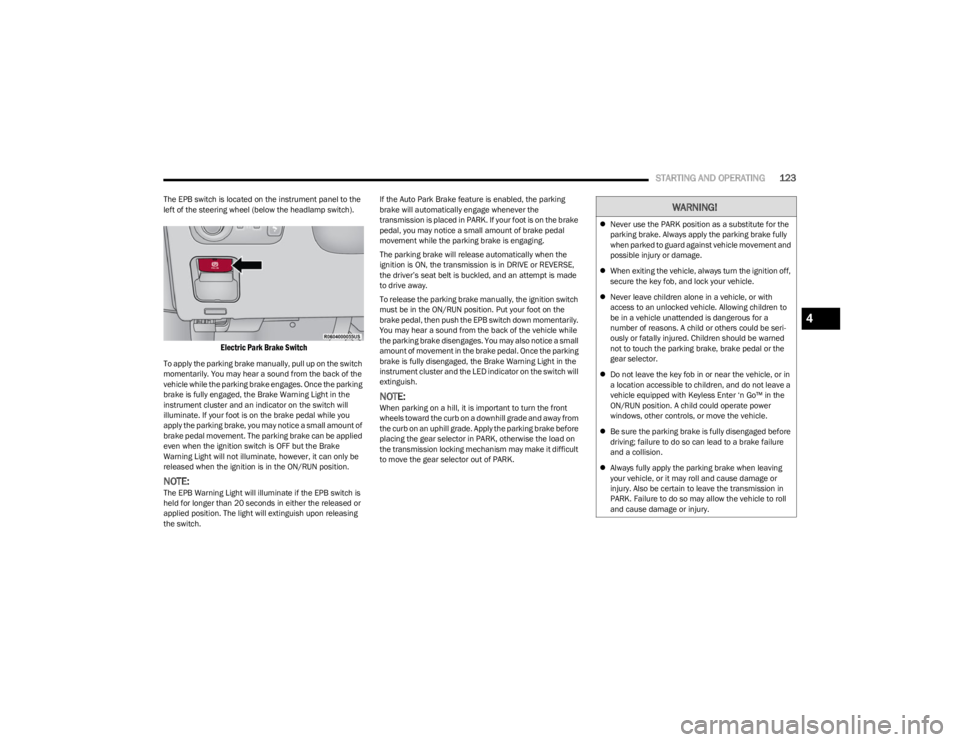
The EPB switch is located on the instrument panel to the
left of the steering wheel (below the headlamp switch).
Electric Park Brake Switch
To apply the parking brake manually, pull up on the switch
momentarily. You may hear a sound from the back of the
vehicle while the parking brake engages. Once the parking
brake is fully engaged, the Brake Warning Light in the
instrument cluster and an indicator on the switch will
illuminate. If your foot is on the brake pedal while you
apply the parking brake, you may notice a small amount of
brake pedal movement. The parking brake can be applied
even when the ignition switch is OFF but the Brake
Warning Light will not illuminate, however, it can only be
released when the ignition is in the ON/RUN position.
NOTE:The EPB Warning Light will illuminate if the EPB switch is
held for longer than 20 seconds in either the released or
applied position. The light will extinguish upon releasing
the switch. If the Auto Park Brake feature is enabled, the parking
brake will automatically engage whenever the
transmission is placed in PARK. If your foot is on the brake
pedal, you may notice a small amount of brake pedal
movement while the parking brake is engaging.
The parking brake will release automatically when the
ignition is ON, the transmission is in DRIVE or REVERSE,
the driver’s seat belt is buckled, and an attempt is made
to drive away.
To release the parking brake manually, the ignition switch
must be in the ON/RUN position. Put your foot on the
brake pedal, then push the EPB switch down momentarily.
You may hear a sound from the back of the vehicle while
the parking brake disengages. You may also notice a small
amount of movement in the brake pedal. Once the parking
brake is fully disengaged, the Brake Warning Light in the
instrument cluster and the LED indicator on the switch will
extinguish.
NOTE:When parking on a hill, it is important to turn the front
wheels toward the curb on a downhill grade and away from
the curb on an uphill grade. Apply the parking brake before
placing the gear selector in PARK, otherwise the load on
the transmission locking mechanism may make it difficult
to move the gear selector out of PARK.
WARNING!
Never use the PARK position as a substitute for the
parking brake. Always apply the parking brake fully
when parked to guard against vehicle movement and
possible injury or damage.
When exiting the vehicle, always turn the ignition off,
secure the key fob, and lock your vehicle.
Never leave children alone in a vehicle, or with
access to an unlocked vehicle. Allowing children to
be in a vehicle unattended is dangerous for a
number of reasons. A child or others could be seri -
ously or fatally injured. Children should be warned
not to touch the parking brake, brake pedal or the
gear selector.
Do not leave the key fob in or near the vehicle, or in
a location accessible to children, and do not leave a
vehicle equipped with Keyless Enter ‘n Go™ in the
ON/RUN position. A child could operate power
windows, other controls, or move the vehicle.
Be sure the parking brake is fully disengaged before
driving; failure to do so can lead to a brake failure
and a collision.
Always fully apply the parking brake when leaving
your vehicle, or it may roll and cause damage or
injury. Also be certain to leave the transmission in
PARK. Failure to do so may allow the vehicle to roll
and cause damage or injury.
4
23_WS_OM_EN_USC_t.book Page 123
Page 128 of 396

126STARTING AND OPERATING
IGNITION PARK INTERLOCK
This vehicle is equipped with an Ignition Park Interlock
which requires the transmission to be in PARK (P) before
the ignition can be turned to the OFF position. This helps
the driver avoid inadvertently leaving the vehicle without
placing the transmission in PARK. This system also locks
the transmission in PARK whenever the ignition is in the
OFF position.
NOTE:The transmission is NOT locked in PARK when the ignition
is in the ON/RUN position (even though the engine will be
off). Ensure that the transmission is in PARK, and the
ignition is OFF (not in ON/RUN position) before exiting the
vehicle.
BRAKE/TRANSMISSION SHIFT
I
NTERLOCK (BTSI) SYSTEM
This vehicle is equipped with a BTSI system that holds the
transmission gear selector in PARK unless the brakes are
applied. To shift the transmission out of PARK, the engine
must be running and the brake pedal must be pressed.
The brake pedal must also be pressed to shift from
NEUTRAL into DRIVE or REVERSE when the vehicle is
stopped or moving at low speeds.
8-SPEED AUTOMATIC TRANSMISSION
The transmission is controlled using a rotary electronic
gear selector located on the center console. The
transmission gear range (PRND) is displayed both above
the gear selector and in the instrument cluster. To select
a gear range, simply rotate the gear selector. You must
press the brake pedal to shift the transmission out of
PARK (or NEUTRAL, when the vehicle is stopped or moving
at low speeds). To shift past multiple gear ranges at once
(such as PARK to DRIVE), simply rotate the gear selector
to the appropriate detent. Select the DRIVE range for
normal driving.
NOTE:In the event of a mismatch between the gear selector
position and the actual transmission gear (for example,
driver selects PARK while driving), the position indicator
will blink continuously until the selector is returned to the
proper position, or the requested shift can be completed.
Unintended movement of a vehicle could injure
those in or near the vehicle. As with all vehicles, you
should never exit a vehicle while the engine is
running. Before exiting a vehicle, always come to a
complete stop, then apply the parking brake, shift
the transmission into PARK, and turn the ignition
OFF. When the ignition is in the OFF position, the
transmission is locked in PARK, securing the vehicle
against unwanted movement.
When exiting the vehicle, always make sure the igni -
tion is in the OFF position, remove the key fob from
the vehicle, and lock the vehicle.
Never leave children alone in a vehicle, or with
access to an unlocked vehicle. Allowing children to
be in a vehicle unattended is dangerous for a
number of reasons. A child or others could be seri -
ously or fatally injured. Children should be warned
not to touch the parking brake, brake pedal or the
transmission gear selector.
Do not leave the key fob in or near the vehicle (or in
a location accessible to children), and do not leave
the ignition in the ON/RUN position. A child could
operate power windows, other controls, or move the
vehicle.
WARNING!CAUTION!
Damage to the transmission may occur if the following
precautions are not observed:
Shift into or out of PARK or REVERSE (R) only after
the vehicle has come to a complete stop.
Do not shift between PARK, REVERSE, NEUTRAL, or
DRIVE (D) when the engine is above idle speed.
Before shifting into any gear, make sure your foot is
firmly pressing the brake pedal.
23_WS_OM_EN_USC_t.book Page 126
Page 129 of 396
STARTING AND OPERATING127
The electronically controlled transmission adapts its shift
schedule based on driver inputs, along with environmental
and road conditions. The transmission electronics are
self-calibrating; therefore, the first few shifts on a new
vehicle may be somewhat abrupt. This is a normal
condition, and precision shifts will develop within a few
hundred miles (kilometers).
Only shift from DRIVE to PARK or REVERSE when the
accelerator pedal is released and the vehicle is stopped.
Be sure to keep your foot on the brake pedal when shifting
between these gears.
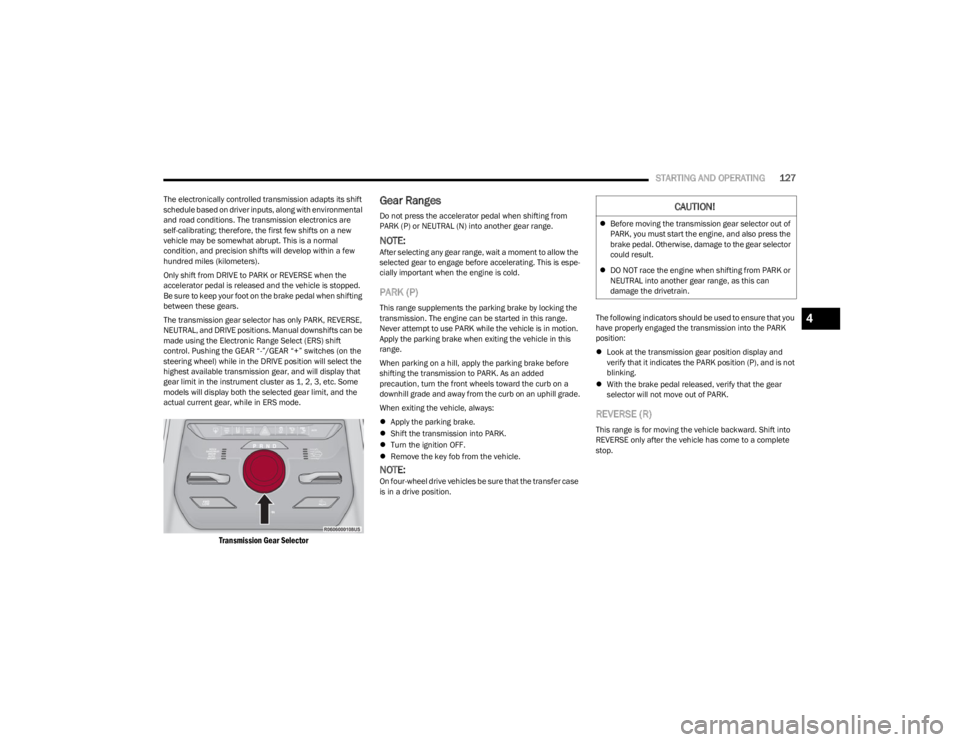
The transmission gear selector has only PARK, REVERSE,
NEUTRAL, and DRIVE positions. Manual downshifts can be
made using the Electronic Range Select (ERS) shift
control. Pushing the GEAR “-”/GEAR “+” switches (on the
steering wheel) while in the DRIVE position will select the
highest available transmission gear, and will display that
gear limit in the instrument cluster as 1, 2, 3, etc. Some
models will display both the selected gear limit, and the
actual current gear, while in ERS mode.
Transmission Gear Selector
Gear Ranges
Do not press the accelerator pedal when shifting from
PARK (P) or NEUTRAL (N) into another gear range.
NOTE:After selecting any gear range, wait a moment to allow the
selected gear to engage before accelerating. This is espe -
cially important when the engine is cold.
PARK (P)
This range supplements the parking brake by locking the
transmission. The engine can be started in this range.
Never attempt to use PARK while the vehicle is in motion.
Apply the parking brake when exiting the vehicle in this
range.
When parking on a hill, apply the parking brake before
shifting the transmission to PARK. As an added
precaution, turn the front wheels toward the curb on a
downhill grade and away from the curb on an uphill grade.
When exiting the vehicle, always:
Apply the parking brake.
Shift the transmission into PARK.
Turn the ignition OFF.
Remove the key fob from the vehicle.
NOTE:On four-wheel drive vehicles be sure that the transfer case
is in a drive position. The following indicators should be used to ensure that you
have properly engaged the transmission into the PARK
position:
Look at the transmission gear position display and
verify that it indicates the PARK position (P), and is not
blinking.
With the brake pedal released, verify that the gear
selector will not move out of PARK.
REVERSE (R)
This range is for moving the vehicle backward. Shift into
REVERSE only after the vehicle has come to a complete
stop.
CAUTION!
Before moving the transmission gear selector out of
PARK, you must start the engine, and also press the
brake pedal. Otherwise, damage to the gear selector
could result.
DO NOT race the engine when shifting from PARK or
NEUTRAL into another gear range, as this can
damage the drivetrain.
4
23_WS_OM_EN_USC_t.book Page 127
Page 172 of 396

170STARTING AND OPERATING
NOTE:
The Active Lane Management system operates with
similar behavior for a right lane departure.
If the turn signal is activated, and the vehicle begins to
depart the lane at the same time the Blind Spot Moni -
toring (BSM) system detects another vehicle in the
BSM zones, the system will provide haptic steering
wheel vibration and/or steering assist torque (if
programmed in Uconnect Settings).
CHANGING ACTIVE LANE MANAGEMENT
S
TATUS
Configurable settings for the Active Lane Management
system are available within the Uconnect system
Úpage 197.
Selectable Warning Types:
Vibration Only
Steering Assist Only
Vibration And Steering Assist
Other configurable settings for this system are for the
intensity of the vibration (high/med/low), steering assist
strength (hi/med/low), and the warning zone sensitivity
(early/medium/late).
NOTE:
The system will not apply vibration and/or steering
assist to the steering wheel whenever a safety system
engages (Anti-Lock Brakes, Traction Control System,
Electronic Stability Control, Forward Collision Warning,
etc.).
The Blind Spot Monitoring system will be forced on
when the ALM system is enabled.
The ALM system will be suppressed when the Active
Driving Assist system (if equipped) is engaged.
PARKVIEW REAR BACK UP CAMERA
Your vehicle is equipped with the ParkView Rear Back Up
Camera that allows you to see an on-screen image of the
rear surroundings of your vehicle whenever the gear
selector is put into REVERSE. The image will be displayed
on the Navigation/Multimedia radio display screen along
with a caution note to “Check Entire Surroundings” across
the top of the screen. After five seconds this note will
disappear. The ParkView camera is located on the rear of
the vehicle above the rear license plate.
When the vehicle is shifted out of REVERSE with camera
delay turned off, the rear camera mode is exited and the
previous screen appears.
Manual Activation Of The Back Up Camera
1. Press the Vehicle button located on the bottom of
the Uconnect display and then select the Controls
menu.
2. Press the Back Up Camera icon to turn the Rear View Camera system on.
NOTE:
The Rear View camera can also be turned on manually
through the Apps menu within the Uconnect system.
The ParkView Rear Back Up Camera has program -
mable modes of operation that may be selected
through the Uconnect system
Úpage 197. When the vehicle is shifted out of REVERSE with camera
delay turned off, the rear camera mode is exited and the
previous screen appears. When the vehicle is shifted out
of REVERSE with camera delay turned on, the camera
image will continue to be displayed for up to 10 seconds
unless the following conditions occur: the vehicle speed
exceeds 8 mph (13 km/h), the vehicle is shifted into
PARK, the vehicle’s ignition is placed in the OFF position,
or the touchscreen X button to disable the display of the
Rear View Camera is pressed.
When enabled, active guidelines are overlaid on the image
to illustrate the width of the vehicle and its projected back
up path based on the steering wheel position. A dashed
center line overlay indicates the center of the vehicle to
assist with parking or aligning to a hitch/receiver.
Different colored zones indicate the distance to the rear of
the vehicle.
The following table shows the approximate distances for
each zone:
Zone Distance To The Rear Of The
Vehicle
Red 0 - 1 ft
(0 - 30 cm)
Yellow 1 ft - 6.5 ft
(30 cm - 2 m)
Green 6.5 ft or greater
(2 m or greater)
23_WS_OM_EN_USC_t.book Page 170
Page 196 of 396
194STARTING AND OPERATING
When To Use 4WD LOW — If Equipped
When off-road driving, shift to 4WD LOW for additional
traction. This range should be limited to extreme
situations such as deep snow, mud, or sand where
additional low speed pulling power is needed. Vehicle
speeds in excess of 25 mph (40 km/h) should be avoided
when in 4WD LOW.
Driving Through Water
Although your vehicle is capable of driving through water,
there are a number of precautions that must be
considered before entering the water.
NOTE:Your vehicle is capable of water fording in up to 20 inches
(51 cm) of water, while crossing small rivers or streams. To
maintain optimal performance of your vehicle's heating
and ventilation system it is recommended to switch the
system into recirculation mode during water fording. Driving through water more than a few inches/
centimeters deep will require extra caution to ensure
safety and prevent damage to your vehicle. If you must
drive through water, try to determine the depth and the
bottom condition (and location of any obstacles) prior to
entering. Proceed with caution and maintain a steady
controlled speed less than 5 mph (8 km/h) in deep water
to minimize wave effects.
Flowing Water
If the water is swift flowing and rising (as in storm run-off),
avoid crossing until the water level recedes and/or the
flow rate is reduced. If you must cross flowing water avoid
depths in excess of 9 inches (23 cm). The flowing water
can erode the streambed, causing your vehicle to sink into
deeper water. Determine exit point(s) that are
downstream of your entry point to allow for drifting.
Standing Water
Avoid driving in standing water deeper than 24 inches
(60 cm), and reduce speed appropriately to minimize
wave effects. Maximum speed is 5 mph (8 km/h).Maintenance
After driving through deep water, inspect your vehicle
fluids and lubricants (engine oil, transmission oil, axle,
transfer case) to ensure the fluids have not been
contaminated. Contaminated fluid (milky, foamy in
appearance) should be flushed/changed as soon as
possible to prevent component damage.
Driving In Snow, Mud And Sand
In heavy snow, when pulling a load, or for additional
control at slower speeds, shift the transmission to a low
gear and shift the transfer case to 4WD LOW if necessary
Úpage 129. Only shift into a lower gear to maintain
forward motion. Over-revving the engine can spin the
wheels and traction will be lost.
Avoid abrupt downshifts on icy or slippery roads, because
engine braking may cause skidding and loss of control.
Hill Climbing
NOTE:Before attempting to climb a hill, determine the conditions
at the crest and/or on the other side.
Before climbing a steep hill, shift the transmission to a
lower gear and shift the transfer case to 4WD LOW. Use
FIRST gear and 4WD LOW for very steep hills.
WARNING!
Do not drive in 4WD LOW on dry pavement; driveline
damage may result. 4WD LOW locks front and rear
drivelines together and does not allow for differential
action between the front to rear driveshafts. Driving in
4WD LOW on pavement will cause driveline binding;
use only on wet or slippery surfaces.
CAUTION!
When driving through water, do not exceed 5 mph
(8 km/h). Always check water depth before entering as
a precaution, and check all fluids afterward. Driving
through water may cause damage that may not be
covered by the New Vehicle Limited Warranty.
23_WS_OM_EN_USC_t.book Page 194