trailer JEEP WAGONEER 2023 User Guide
[x] Cancel search | Manufacturer: JEEP, Model Year: 2023, Model line: WAGONEER, Model: JEEP WAGONEER 2023Pages: 396, PDF Size: 15.17 MB
Page 135 of 396

STARTING AND OPERATING133
Normal Ride Height (NRH) – This is the standard posi -
tion of the suspension and is meant for normal driving.
Off-Road 1 (OR1) (Raises the vehicle approximately
1.2 inches [30 mm]) – This is the primary position for
all off-road driving until OR2 is needed. A smoother and
more comfortable ride will result. Push the toggle
switch forward once from the NRH position while the
vehicle speed is below 38 mph (61 km/h). When in the
OR1 position, if the vehicle speed remains between
40 mph (64 km/h) and 50 mph (80 km/h) for greater than 20 seconds or if the vehicle speed exceeds
50 mph (80 km/h), the vehicle will be automatically
lowered to NRH
Úpage 193. OR1 is unavailable on
4x2 air suspension vehicles.
Off-Road 2 (OR2) (Raises the vehicle approximately
2.0 inches [51 mm]) – This position is intended for
off-roading use only where maximum ground clearance
is required. To enter OR2, push the toggle switch
forward twice from the NRH position or once from the
OR1 position while vehicle speed is below 20 mph
(32 km/h). While in OR2, if the vehicle speed exceeds
25 mph (40 km/h) the vehicle height will be automati -
cally lowered to OR1
Úpage 193. OR2 is unavailable
on 4x2 air suspension vehicles.
Aero Height (Lowers the vehicle approximately
-0.6 inches [-15 mm]) – This position provides
improved aerodynamics by lowering the vehicle. The
vehicle will automatically enter Aero Height when the
vehicle speed remains between 62 mph (100 km/h)
and 66 mph (106 km/h) for greater than 20 seconds
or if the vehicle speed exceeds 66 mph (106 km/h). The vehicle will return to Default Ride Height from Aero
Height if the vehicle speed remains between 30 mph
(48 km/h) and 35 mph (56 km/h) for greater than
20 seconds or if the vehicle speed falls below 30 mph
(48 km/h). The vehicle will enter Aero Height, regard
-
less of vehicle speed if the vehicle is in “SPORT” mode.
Entry/Exit Height (Lowers the vehicle approximately
-1.6 inches [-40 mm]) – This position lowers the
vehicle for easier passenger entry and exit as well as
lowering the rear of the vehicle for easier loading and
unloading of cargo. To enter Entry/Exit Height, push the
toggle switch down twice from NRH while the vehicle
speed is below 6 mph (10 km/h). To exit Entry/Exit
Height, push the UP button once while in Entry/Exit
Height or drive the vehicle over 4 mph (6 km/h).
NOTE:Automatic lowering of the vehicle into Entry/Exit Height
can be enabled through the Uconnect Touchscreen Radio.
If this feature is enabled, the vehicle will only lower if the
gear selector is in PARK, the terrain switch is in AUTO, the
transfer case is in AUTO and the vehicle level is either in
Normal or Aero Height. The vehicle will not automatically
lower if the air suspension level is in OR2 or OR1. When
towing, the automatic Entry/Exit feature may be disabled
through the Uconnect Touchscreen Radio to prevent
vehicle and trailer movement when gear selector is moved
to PARK. The Selec-Terrain system will automatically change the
vehicle to the proper height based on the position of the
Selec-Terrain switch. The height can be changed from the
default Selec-Terrain setting by normal use of the air
suspension buttons
Úpage 131.
The system requires that the engine be running for all
changes. When lowering the vehicle all of the doors,
including the liftgate, must be closed. If a door is opened
at any time while the vehicle is lowering the change will not
be completed until the open door(s) is/are closed.
The Quadra-Lift Air Suspension system uses a lifting and
lowering pattern which keeps the headlights from
incorrectly shining into oncoming traffic. When raising the
vehicle, the rear of the vehicle will move up first and then
the front. When lowering the vehicle, the front will move
down first and then the rear.
After the engine is turned off, it may be noticed that the air
suspension system operates briefly; this is normal. The
system is correcting the position of the vehicle to ensure a
proper appearance.
To assist with changing a spare tire, the Quadra-Lift Air
Suspension system has a feature which allows the
automatic leveling to be disabled
Úpage 197.
4
23_WS_OM_EN_USC_t.book Page 133
Page 136 of 396

134STARTING AND OPERATING
NOTE:Default Ride Height:
Select Aero Height or Normal Ride Height as the default
for all vehicle speeds and operation. This is the
selected height that the suspension will level for speed
changes (e.g. raising from Entry/Exit Height at speed,
lowering from Off Road Height at speed, etc.).
Default ride height can be changed by manually
adjusting the Quadra-Lift switch to Normal Ride Height
or Aero Ride Height and stay in the selected height for
2.5 seconds. It will be stored as the default ride height
and the height will be maintained until a new default
ride height is selected.
If equipped with a Uconnect Touchscreen Radio, all
enabling/disabling of air suspension features must be
done through the radio
Úpage 197.
AIR SUSPENSION MODES
The Air Suspension system has multiple modes to protect
the system in unique situations: Tire/Jack Mode
To assist with changing a spare tire, the air suspension
system has a feature which allows the automatic leveling
to be disabled
Úpage 197. Tire/Jack mode is used for
connecting a trailer with a weight-distributing hitch
Úpage 179.
NOTE:This mode is intended to be enabled with the engine
running.
Auto Entry/Exit Mode
To assist in entering and exiting the vehicle, the air
suspension system has a feature which automatically
lowers the vehicle to Entry/Exit Height
Úpage 197.
NOTE:This mode is intended to be enabled with the engine
running. When towing, the automatic Entry/Exit feature
may be disabled through the Uconnect Touchscreen Radio
to prevent vehicle and trailer movement when the gear
selector is moved to PARK.
Transport Mode
To assist with flatbed towing, the air suspension system
has a feature which will put the vehicle into Entry/Exit
Height and disable the automatic load leveling system
Úpage 197.
NOTE:This mode is intended to be enabled with engine running. Suspension Display Messages Mode
The “Suspension Display Messages” setting allows you to
only display suspension warnings instead of all
suspension messages (i.e., “Normal Height Achieved”)
Úpage 197.
NOTE:This mode is intended to be enabled with the engine
running.
Wheel Alignment Mode
Before performing a wheel alignment this mode must be
enabled which will move the vehicle to Normal Ride Height
and disable the air suspension during the alignment
Úpage 197.
NOTE:This mode is intended to be enabled with the engine
running.
If equipped with a Uconnect Touchscreen Radio, all
enabling/disabling of air suspension features must be
done through the radio
Úpage 197.
INSTRUMENT CLUSTER DISPLAY
M
ESSAGES
When the appropriate conditions exist, a message will
appear in the instrument cluster Úpage 99.
WARNING!
The air suspension system uses a high pressure
volume of air to operate the system. To avoid personal
injury or damage to the system, see an authorized
dealer for service.
23_WS_OM_EN_USC_t.book Page 134
Page 142 of 396
140STARTING AND OPERATING
Adaptive Cruise Control (ACC) Operation
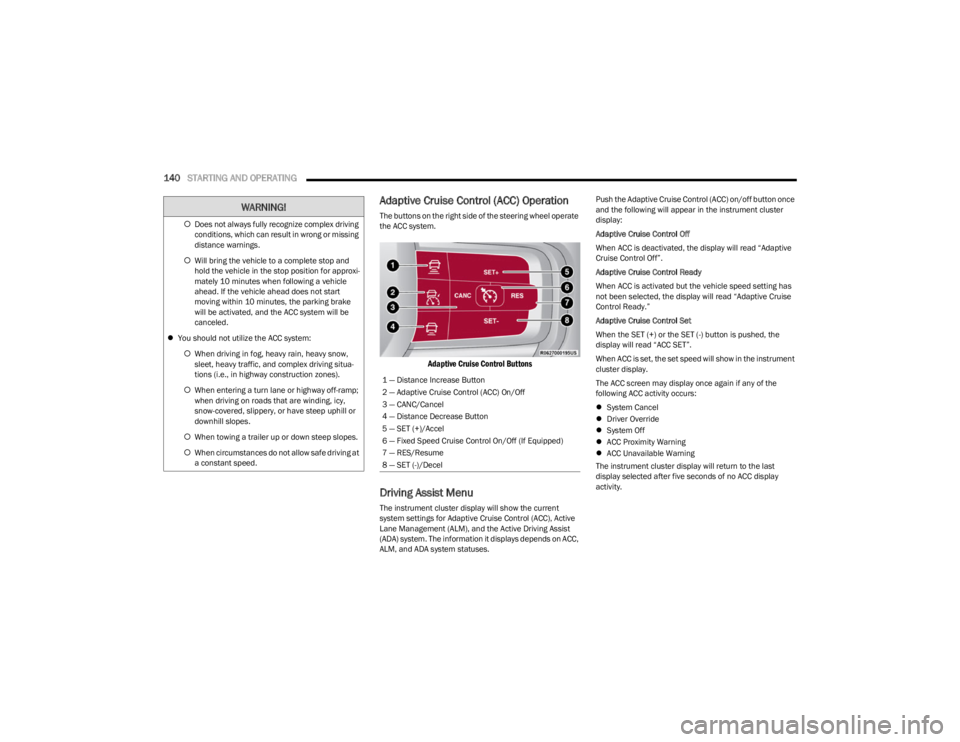
The buttons on the right side of the steering wheel operate
the ACC system.
Adaptive Cruise Control Buttons
Driving Assist Menu
The instrument cluster display will show the current
system settings for Adaptive Cruise Control (ACC), Active
Lane Management (ALM), and the Active Driving Assist
(ADA) system. The information it displays depends on ACC,
ALM, and ADA system statuses. Push the Adaptive Cruise Control (ACC) on/off button once
and the following will appear in the instrument cluster
display:
Adaptive Cruise Control Off
When ACC is deactivated, the display will read “Adaptive
Cruise Control Off”.
Adaptive Cruise Control Ready
When ACC is activated but the vehicle speed setting has
not been selected, the display will read “Adaptive Cruise
Control Ready.”
Adaptive Cruise Control Set
When the SET (+) or the SET (-) button is pushed, the
display will read “ACC SET”.
When ACC is set, the set speed will show in the instrument
cluster display.
The ACC screen may display once again if any of the
following ACC activity occurs:
System Cancel
Driver Override
System Off
ACC Proximity Warning
ACC Unavailable Warning
The instrument cluster display will return to the last
display selected after five seconds of no ACC display
activity.
Does not always fully recognize complex driving
conditions, which can result in wrong or missing
distance warnings.
Will bring the vehicle to a complete stop and
hold the vehicle in the stop position for approxi -
mately 10 minutes when following a vehicle
ahead. If the vehicle ahead does not start
moving within 10 minutes, the parking brake
will be activated, and the ACC system will be
canceled.
You should not utilize the ACC system:
When driving in fog, heavy rain, heavy snow,
sleet, heavy traffic, and complex driving situa-
tions (i.e., in highway construction zones).
When entering a turn lane or highway off-ramp;
when driving on roads that are winding, icy,
snow-covered, slippery, or have steep uphill or
downhill slopes.
When towing a trailer up or down steep slopes.
When circumstances do not allow safe driving at
a constant speed.
WARNING!
1 — Distance Increase Button
2 — Adaptive Cruise Control (ACC) On/Off
3 — CANC/Cancel
4 — Distance Decrease Button
5 — SET (+)/Accel
6 — Fixed Speed Cruise Control On/Off (If Equipped)
7 — RES/Resume
8 — SET (-)/Decel
23_WS_OM_EN_USC_t.book Page 140
Page 144 of 396

142STARTING AND OPERATING
The Electronic Stability Control/Traction Control
System (ESC/TCS) activates
The vehicle parking brake is applied
The Trailer Sway Control (TSC) activates
The driver switches ESC to Full Off mode
The braking temperature exceeds normal range (over -
heated)
The following conditions will only cancel the ACC system:
Driver seat belt is unbuckled at low speeds
Driver door is opened at low speeds
To Turn Off
The system will turn off and erase the set speed in
memory if:
The Adaptive Cruise Control (ACC) on/off button is
pushed
The Fixed Speed Cruise Control (if equipped) on/off
button is pushed
The ignition is placed in the OFF position
4WD Low is engaged
To Resume
If there is a set speed in memory, push the RES (resume)
button and remove your foot from the accelerator pedal.
The instrument cluster display will show the last set
speed.
Resume can be used at any speed above 20 mph
(32 km/h) when only Fixed Speed Cruise Control is
being used.
Resume can be used at any speed above 0 mph (0 km/h)
when ACC is active.
NOTE:
While in ACC mode, when the vehicle comes to a
complete stop longer than two seconds, the driver will
either have to push the RES (resume) button or press
the accelerator pedal to reengage the ACC system.
ACC cannot be resumed if there is a stationary vehicle
in front of your vehicle in close proximity.
To Vary The Speed Setting
To Increase Or Decrease The Set Speed
After setting a speed, you can increase the set speed by
pushing the SET (+) button, or decrease speed by pushing
the SET (-) button.
U.S. Speed (mph)
Pushing the SET (+), or SET (-) button once will result in
a 1 mph speed adjustment. Each subsequent tap of
the button results in an adjustment of 1 mph.
If the button is continually pushed, the set speed will
continue to adjust in 5 mph increments until the button
is released. The new set speed is reflected in the instru -
ment cluster display. Metric Speed (km/h)
Pushing the SET (+), or SET (-) button once will result in
a 1 km/h speed adjustment. Each subsequent tap of
the button results in an adjustment of 1 km/h.
If the button is continually pushed, the set speed will
continue to adjust in 10 km/h increments until the
button is released. The new set speed is reflected in
the instrument cluster display.
NOTE:When you override and push the SET (+) button or SET (-)
button, the new set speed will be the current speed of the
vehicle.
When ACC Is Active
When you use the SET (-) button to decelerate, if the
engine’s braking power does not slow the vehicle suffi -
ciently to reach the set speed, the brake system will
automatically slow the vehicle.
The ACC system decelerates the vehicle to a full stop
when following the vehicle in front. If your vehicle
follows the vehicle in front to a standstill, after two
seconds the driver will either have to push the RES
(resume) button, or apply the accelerator pedal to reen -
gage the ACC to the existing set speed.
The ACC system maintains set speed when driving
uphill and downhill. However, a slight speed change on
moderate hills is normal. In addition, downshifting may
occur while climbing uphill or descending downhill. This
is normal operation and necessary to maintain set
speed. When driving uphill and downhill, the ACC
system will cancel if the braking temperature exceeds
normal range (overheated).
WARNING!
The Resume function should only be used if traffic and
road conditions permit. Resuming a set speed that is
too high or too low for prevailing traffic and road
conditions could cause the vehicle to accelerate or
decelerate too sharply for safe operation. Failure to
follow these warnings can result in a collision and death
or serious personal injury.
23_WS_OM_EN_USC_t.book Page 142
Page 147 of 396
STARTING AND OPERATING145
If weather conditions are not a factor, the driver should
examine the windshield and the camera located on the
back side of the inside rearview mirror. They may require
cleaning or removal of an obstruction.
When the condition that created limited functionality is no
longer present, the system will return to full functionality.
NOTE:If the “ACC Limited Functionality Clean Front Windshield”
message occurs frequently (e.g. more than once on every
trip) without any snow, rain, mud, or other obstruction,
have the windshield and forward facing camera inspected
at an authorized dealer.
SERVICE ACC WARNING
If the system turns off, and the instrument cluster display
reads “ACC Unavailable Service Required” or “Cruise
Unavailable Service Required”, there may be an internal
system fault or a temporary malfunction that limits ACC
functionality. Although the vehicle is still drivable under
normal conditions, ACC will be temporarily unavailable.
If this occurs, try activating ACC again later, following an
ignition cycle. If the problem persists, see an authorized
dealer.
Precautions While Driving With ACC
In certain driving situations, ACC may have detection
issues. In these cases, ACC may brake late or
unexpectedly. The driver needs to stay alert and may need
to intervene. The following are examples of these types of
situations:
TOWING A TRAILER
ACC while towing a trailer is recommended only with an
Integrated Trailer Brake Controller. Aftermarket trailer
brake controllers will not activate the trailer brakes when
ACC is braking.
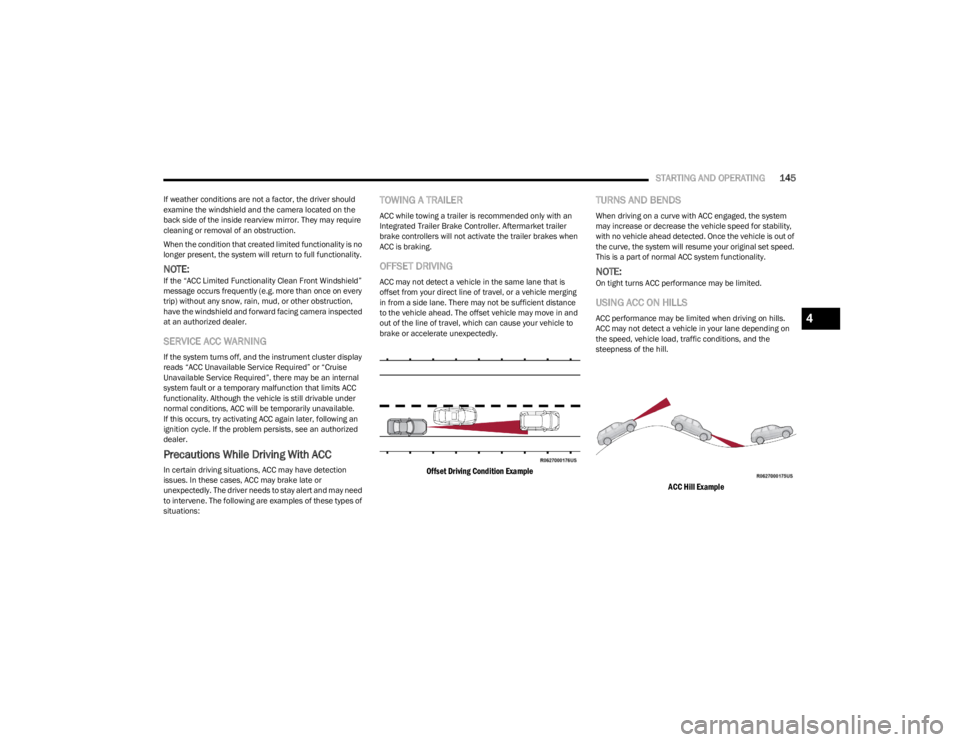
OFFSET DRIVING
ACC may not detect a vehicle in the same lane that is
offset from your direct line of travel, or a vehicle merging
in from a side lane. There may not be sufficient distance
to the vehicle ahead. The offset vehicle may move in and
out of the line of travel, which can cause your vehicle to
brake or accelerate unexpectedly.
Offset Driving Condition Example
TURNS AND BENDS
When driving on a curve with ACC engaged, the system
may increase or decrease the vehicle speed for stability,
with no vehicle ahead detected. Once the vehicle is out of
the curve, the system will resume your original set speed.
This is a part of normal ACC system functionality.
NOTE:On tight turns ACC performance may be limited.
USING ACC ON HILLS
ACC performance may be limited when driving on hills.
ACC may not detect a vehicle in your lane depending on
the speed, vehicle load, traffic conditions, and the
steepness of the hill.
ACC Hill Example
4
23_WS_OM_EN_USC_t.book Page 145
Page 152 of 396
150STARTING AND OPERATING
TURNING ACTIVE DRIVING ASSIST ON
O
R OFF
Active Driving Assist On/Off Button
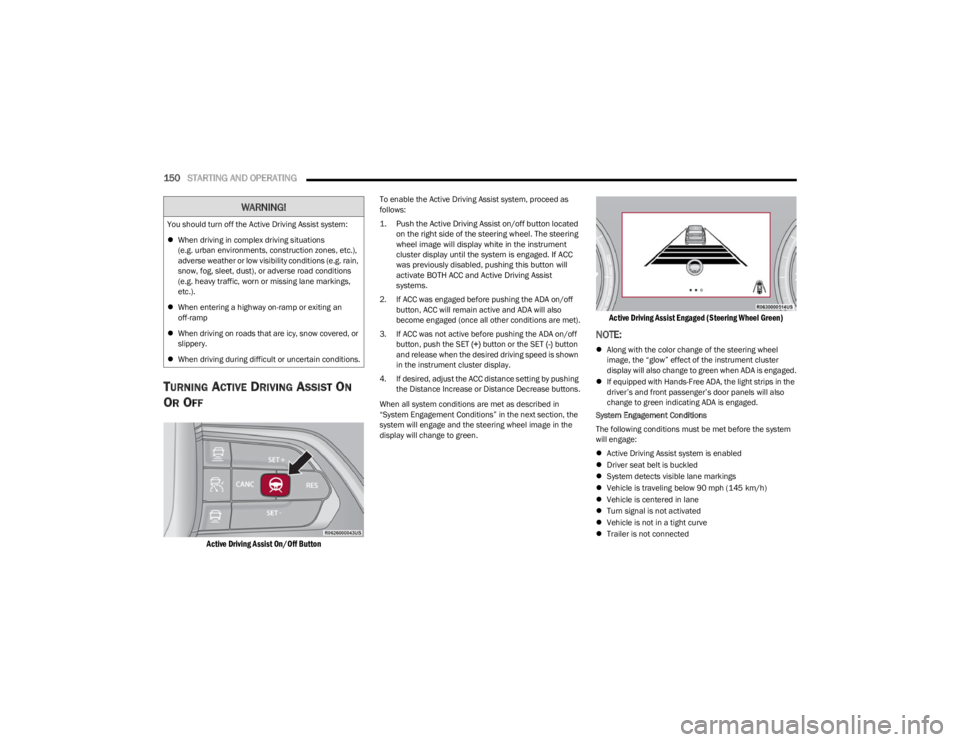
To enable the Active Driving Assist system, proceed as
follows:
1. Push the Active Driving Assist on/off button located
on the right side of the steering wheel. The steering
wheel image will display white in the instrument
cluster display until the system is engaged. If ACC
was previously disabled, pushing this button will
activate BOTH ACC and Active Driving Assist
systems.
2. If ACC was engaged before pushing the ADA on/off button, ACC will remain active and ADA will also
become engaged (once all other conditions are met).
3. If ACC was not active before pushing the ADA on/off button, push the SET (+) button or the SET (-) button
and release when the desired driving speed is shown
in the instrument cluster display.
4. If desired, adjust the ACC distance setting by pushing the Distance Increase or Distance Decrease buttons.
When all system conditions are met as described in
“System Engagement Conditions” in the next section, the
system will engage and the steering wheel image in the
display will change to green.
Active Driving Assist Engaged (Steering Wheel Green)
NOTE:
Along with the color change of the steering wheel
image, the “glow” effect of the instrument cluster
display will also change to green when ADA is engaged.
If equipped with Hands-Free ADA, the light strips in the
driver’s and front passenger’s door panels will also
change to green indicating ADA is engaged.
System Engagement Conditions
The following conditions must be met before the system
will engage:
Active Driving Assist system is enabled
Driver seat belt is buckled
System detects visible lane markings
Vehicle is traveling below 90 mph (145 km/h)
Vehicle is centered in lane
Turn signal is not activated
Vehicle is not in a tight curve
Trailer is not connected
You should turn off the Active Driving Assist system:
When driving in complex driving situations
(e.g. urban environments, construction zones, etc.),
adverse weather or low visibility conditions (e.g. rain,
snow, fog, sleet, dust), or adverse road conditions
(e.g. heavy traffic, worn or missing lane markings,
etc.).
When entering a highway on-ramp or exiting an
off-ramp
When driving on roads that are icy, snow covered, or
slippery.
When driving during difficult or uncertain conditions.
WARNING!
23_WS_OM_EN_USC_t.book Page 150
Page 153 of 396
STARTING AND OPERATING151
Driver has hands on steering wheel and is paying atten -
tion to the road
If equipped with the Hands-Free system, vehicle is
driving on an approved roadway
If equipped with the Hands-Free system, a subscription
is active and the vehicle is receiving a clear cellular
signal
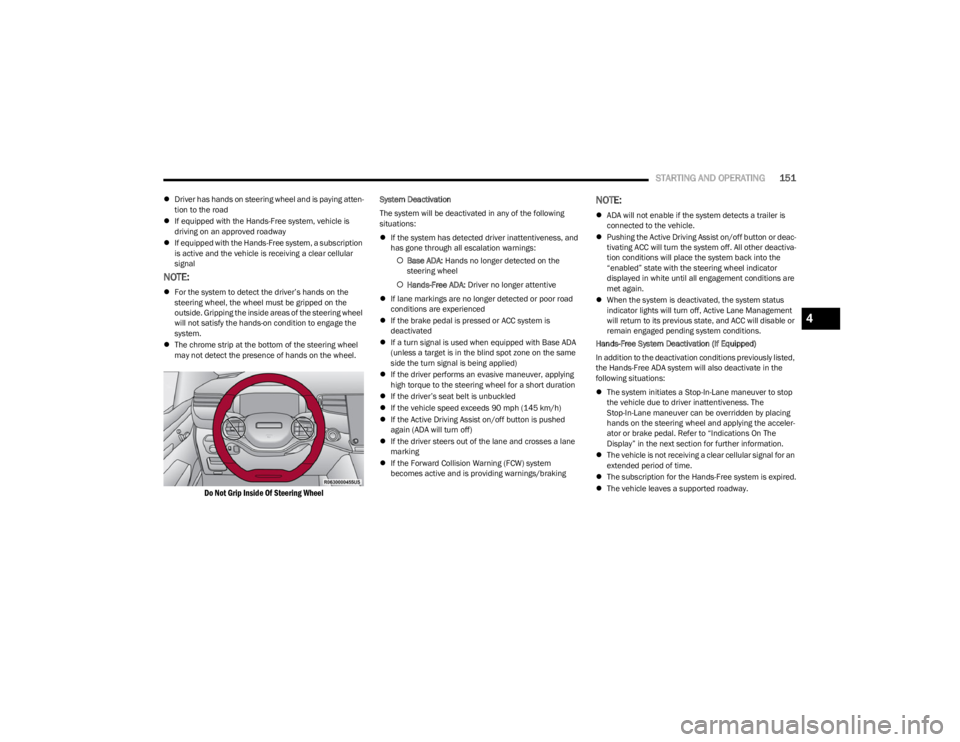
NOTE:
For the system to detect the driver’s hands on the
steering wheel, the wheel must be gripped on the
outside. Gripping the inside areas of the steering wheel
will not satisfy the hands-on condition to engage the
system.
The chrome strip at the bottom of the steering wheel
may not detect the presence of hands on the wheel.
Do Not Grip Inside Of Steering Wheel
System Deactivation
The system will be deactivated in any of the following
situations:
If the system has detected driver inattentiveness, and
has gone through all escalation warnings:
Base ADA: Hands no longer detected on the
steering wheel
Hands-Free ADA: Driver no longer attentive
If lane markings are no longer detected or poor road
conditions are experienced
If the brake pedal is pressed or ACC system is
deactivated
If a turn signal is used when equipped with Base ADA
(unless a target is in the blind spot zone on the same
side the turn signal is being applied)
If the driver performs an evasive maneuver, applying
high torque to the steering wheel for a short duration
If the driver’s seat belt is unbuckled
If the vehicle speed exceeds 90 mph (145 km/h)
If the Active Driving Assist on/off button is pushed
again (ADA will turn off)
If the driver steers out of the lane and crosses a lane
marking
If the Forward Collision Warning (FCW) system
becomes active and is providing warnings/brakingNOTE:
ADA will not enable if the system detects a trailer is
connected to the vehicle.
Pushing the Active Driving Assist on/off button or deac -
tivating ACC will turn the system off. All other deactiva -
tion conditions will place the system back into the
“enabled” state with the steering wheel indicator
displayed in white until all engagement conditions are
met again.
When the system is deactivated, the system status
indicator lights will turn off, Active Lane Management
will return to its previous state, and ACC will disable or
remain engaged pending system conditions.
Hands-Free System Deactivation (If Equipped)
In addition to the deactivation conditions previously listed,
the Hands-Free ADA system will also deactivate in the
following situations:
The system initiates a Stop-In-Lane maneuver to stop
the vehicle due to driver inattentiveness. The
Stop-In-Lane maneuver can be overridden by placing
hands on the steering wheel and applying the acceler -
ator or brake pedal. Refer to “Indications On The
Display” in the next section for further information.
The vehicle is not receiving a clear cellular signal for an
extended period of time.
The subscription for the Hands-Free system is expired.
The vehicle leaves a supported roadway.
4
23_WS_OM_EN_USC_t.book Page 151
Page 160 of 396

158STARTING AND OPERATING
PARKSENSE SYSTEM USAGE
P
RECAUTIONS
NOTE:
Ensure that the front and rear fascias/bumpers are
free of snow, ice, mud, dirt and debris to keep the
ParkSense system operating properly.
Jackhammers, large trucks, and other vibrations could
affect the performance of ParkSense.
When you turn ParkSense off, the instrument cluster
will display “PARKSENSE OFF.” Furthermore, once you
turn ParkSense off, it remains off until you turn it on
again, even if you cycle the ignition.
When you move the gear selector to the REVERSE posi -
tion and ParkSense is turned off, the instrument
cluster will display “PARKSENSE OFF” for as long as the
vehicle is in REVERSE.
ParkSense, when on, will reduce the volume of the
radio when it is sounding a tone.
Clean the ParkSense sensors regularly, taking care not
to scratch or damage them. The sensors must not be
covered with ice, snow, slush, mud, dirt or debris.
Failure to do so can result in the system not working
properly. The ParkSense system might not detect an
obstacle behind or in front of the fascia/bumper, or it
could provide a false indication that an obstacle is
behind or in front of the fascia/bumper.
Use the ParkSense switch to turn the ParkSense
system off if objects such as bicycle carriers, trailer
hitches, etc. are placed within 12 inches (30 cm) of the
rear fascia/bumper. Failure to do so can result in the
system misinterpreting a close object as a sensor
problem, causing the “PARKSENSE UNAVAILABLE
SERVICE REQUIRED” message to be displayed in the
instrument cluster.
ParkSense should be disabled when the liftgate is in
the open position. An opened liftgate could provide a
false indication that an obstacle is behind the vehicle.
SIDE DISTANCE WARNING SYSTEM —
I
F EQUIPPED
The Side Distance Warning system detects the presence
of side obstacles near the vehicle using the parking
sensors located in the front and rear fascia/bumpers.
Side Distance Warning Display
The Side Distance Warning screen will only be displayed if
this feature is enabled within Uconnect Settings
Úpage 197.
The system warns the driver with an acoustic signal and,
when enabled, with visual indications on the instrument
cluster display.
WARNING!
Drivers must be careful when backing up even when
using ParkSense. Always check carefully behind your
vehicle, look behind you, and be sure to check for
pedestrians, animals, other vehicles, obstructions,
and blind spots before backing up. You are respon -
sible for safety and must continue to pay attention to
your surroundings. Failure to do so can result in
serious injury or death.
Before using ParkSense, it is strongly recommended
that the ball mount and hitch ball assembly be
disconnected from the vehicle when the vehicle is
not used for towing. Failure to do so can result in
injury or damage to vehicles or obstacles because
the hitch ball will be much closer to the obstacle than
the rear fascia when the vehicle sounds the contin -
uous tone. Also, the sensors could detect the ball
mount and hitch ball assembly, depending on its size
and shape, giving a false indication that an obstacle
is behind the vehicle.
CAUTION!
ParkSense is only a parking aid and it is unable to
recognize every obstacle, including small obstacles.
Parking curbs might be temporarily detected or not
detected at all. Obstacles located above or below the
sensors will not be detected when they are in close
proximity.
The vehicle must be driven slowly when using Park -
Sense in order to be able to stop in time when an
obstacle is detected. It is recommended that the
driver looks over his/her shoulder when using
ParkSense.
23_WS_OM_EN_USC_t.book Page 158
Page 161 of 396

STARTING AND OPERATING159
When the vehicle is in DRIVE, the Side Distance Warning
volume/chime will match the Front ParkSense volume
and chime type.
When the vehicle is in REVERSE, the Side Distance
Warning volume/chime will match the Rear ParkSense
volume and chime type.
NOTE:Parksense will reduce the volume of the radio if on when
the system is sounding an audible tone. An audible tone
will only sound if a collision is possible.
Activation/Deactivation
The system can operate only after driving a short distance
and if the vehicle speed is between 0 and 7 mph
(0 and 11 km/h). The system can be activated/
deactivated via the Settings menu of the Uconnect
system. If the ParkSense System is deactivated via the
ParkSense hard switch then the Side Distance Warning
system will automatically be deactivated.
Message on the display for Side Distance Warning
feature:
“Wipe Sensors” — This message is displayed in the case of
a failure of the Side Distance Warning system sensors.
Free the bumpers of any obstacles, ensure that the front
and rear fascia/bumper are free of snow, ice, mud, dirt
and debris to keep the ParkSense system operating
properly.
“System Not Available” — This message is displayed if the
Side Distance Warning system is not available. The failed
operation of the system might be due to the insufficient
voltage from the battery or other failures on the electrical
system. Contact an authorized dealer as soon as possible
to have the electrical system checked.
ParkSense Usage Precautions
Some conditions may influence the performance of the
Side Distance Warning system:
NOTE:
Ensure that the front and rear fascia/bumper are free
of snow, ice, mud, dirt and debris to keep the Park -
Sense system operating properly.
Construction equipment, large trucks, and other vibra -
tions could affect the performance of ParkSense.
When you turn ParkSense off, the message to appear
in the instrument cluster display will read “PARKSENSE
OFF.” Furthermore, once you turn ParkSense off, it
remains off until you turn it on again, even if you cycle
the ignition.
ParkSense, when on, will reduce the volume of the
radio when it is sounding a tone.
Clean the ParkSense sensors regularly, taking care not
to scratch or damage them. The sensors must not be
covered with ice, snow, slush, mud, dirt or debris.
Failure to do so can result in the system not working
properly. The ParkSense system might not detect an
obstacle behind or in front of the fascia/bumper, or it
could provide a false indication that an obstacle is
behind or in front of the fascia/bumper.
The presence of a tow hook without a trailer may inter -
fere with the correct operation of the parking sensors.
Before using the ParkSense system, it is recom -
mended to remove the removable tow hook ball
assembly and any attachments from the vehicle when
it is not used for towing operations.
WARNING ALERTS
Distance
(inches/cm) Less than
12 inches
(30 cm)12 – 24 inches
(30 – 60 cm)
Arcs-Left 11th Flashing 12th Flashing
Arcs-Right 11th Flashing 12th Flashing
Audible Alert
Chime ContinuousFast audible
chime as the
objects get close
to the vehicle
Radio Volume
Reduced Yes
Yes
4
23_WS_OM_EN_USC_t.book Page 159
Page 163 of 396

STARTING AND OPERATING161
The system may not work in all conditions (e.g. environ -
mental conditions such as heavy rain, snow, etc., or if
searching for a parking space that has surfaces that
will absorb the ultrasonic sensor waves).
New vehicles from the dealership must have at least
30 miles (48 km) accumulated before the ParkSense
Active Park Assist system is fully calibrated and
performs accurately. This is due to the system’s
dynamic vehicle calibration to improve the perfor -
mance of the feature. The system will also continuously
perform the dynamic vehicle calibration to account for
differences such as over or under inflated tires and
new tires.
ENABLING AND DISABLING THE
P
ARKSENSE ACTIVE PARK ASSIST
S
YSTEM
The ParkSense Active Park Assist system can
be enabled and disabled with the ParkSense
Active Park Assist switch, located on the switch
panel on the forward part of the center console,
in front of the gear selector.
To enable the ParkSense Active Park Assist system, push
the ParkSense Active Park Assist switch once (LED turns
on). Pushing the switch a second time will disable the
system (LED turns off).
The ParkSense Active Park Assist system will turn off
automatically for any of the following conditions:
Parking maneuver is completed
Vehicle speed is greater than 28 mph (45 km/h) when
searching for a parking space during a Fully Automated
maneuver
Vehicle speed is greater than 18 mph (30 km/h) when
searching for a parking space during a Semi-Automatic
maneuver
Vehicle speed is greater than 5 mph (7 km/h) during
Semi-Automatic active steering guidance into the
parking space
Steering wheel is touched during Fully Automated or
Semi-Automatic active steering guidance into the
parking space
The gas pedal or brake pedal is pressed during Fully
Automated active steering guidance into the parking
space
ParkSense Front and Rear Park Assist switch is pushed
Any of the doors are opened during a Fully Automated
maneuver
The driver door is opened during a Semi-Automatic
maneuver
Rear liftgate is opened
A trailer is connected
Vehicle is in 4WD Low
Cruise Control, Adaptive Cruise Control, or Active
Driving Assist systems are engaged
Electronic Stability Control/Anti-Lock Braking System
intervention
The ParkSense Active Park Assist system allows a
maximum number of shifts between DRIVE and REVERSE.
If the maneuver cannot be completed within the maximum
amount of shifts, the system will cancel and the
instrument cluster display will instruct the driver to
complete the maneuver manually. The ParkSense Active Park Assist system will only operate
and search for a parking space when the following
conditions are present:
Gear selector is in DRIVE
Ignition is in the RUN position
ParkSense Active Park Assist switch is activated
All of the doors are closed
Rear liftgate is closed
Vehicle speed is less than 15 mph (25 km/h) during a
Semi-Automatic maneuver
Vehicle speed is less than 25 mph (40 km/h) during a
Fully Automated maneuver
The outer surface and the underside of the front and
rear fascias/bumpers are clean and clear of snow, ice,
mud, dirt or other obstruction
NOTE:
During a Semi-Automatic maneuver, if the vehicle is
driven above approximately 15 mph (25 km/h), the
instrument cluster display will instruct the driver to
slow down. If the vehicle is driven above approximately
18 mph (30 km/h), the system will cancel. The driver
must then reactivate the system by pushing the Park -
Sense Active Park Assist switch.
During a Fully Automated maneuver, if the vehicle is
driven above approximately 25 mph (40 km/h), the
instrument cluster display will instruct the driver to
slow down. If the vehicle is driven above approximately
28 mph (45 km/h), the system will cancel. The driver
must then reactivate the system by pushing the Park -
Sense Active Park Assist switch.
4
23_WS_OM_EN_USC_t.book Page 161